Help with android auto issue

scubauke

Well-Known Member
Joined
Mar 18, 2021
Threads
17
Messages
89
Reaction score
60
Location
Laguna niguel
Vehicles
mach e wanta be
Country flag
I am currently having problems making voice activated calls from Android auto. It used to work fine by just holding the button on the steering wheel an saying call (anyone from my contacts) and it would connect the call. All of a sudden, I now do that and it says, "sure, let me get some more information so I can help you with that. Tap the notification on your device so you can continue." There are no notifications on my phone, Samsung Galaxy s21, or on the car screen. Voice activated calls connect if I say the number, but not the contact name anymore and I do not have all the contact phone numbers memorized. The contacts do show up on the infotainment screen and touching the contact does connect the call. I just want it to work by voice activation while I am driving as it is safer. I called the dealership and they said contact Google which is impossible. I went to my carrier and although they tried to help, even sitting in the car and playing around, but could not make it work. Anyone else have similar issues and and a fix?
Sponsored


 

alexgorod

Well-Known Member
First Name
Alex
Joined
Jul 27, 2021
Threads
21
Messages
1,304
Reaction score
1,400
Location
Michigan
Vehicles
21 Job 2 MME Premium SR AWD (21 CR-V - wife's)
Occupation
DBA
Country flag
Does it work on the phone itself, when it's not connected to the car? Looks like a permission hiccup that prevents Assistant to access your contacts.
 

KDub

Well-Known Member
First Name
Kevin
Joined
Jul 26, 2021
Threads
12
Messages
185
Reaction score
193
Location
Northern California
Vehicles
2021 Mach E CA Route 1
Country flag
I am currently having problems making voice activated calls from Android auto. It used to work fine by just holding the button on the steering wheel an saying call (anyone from my contacts) and it would connect the call. All of a sudden, I now do that and it says, "sure, let me get some more information so I can help you with that. Tap the notification on your device so you can continue." There are no notifications on my phone, Samsung Galaxy s21, or on the car screen. Voice activated calls connect if I say the number, but not the contact name anymore and I do not have all the contact phone numbers memorized. The contacts do show up on the infotainment screen and touching the contact does connect the call. I just want it to work by voice activation while I am driving as it is safer. I called the dealership and they said contact Google which is impossible. I went to my carrier and although they tried to help, even sitting in the car and playing around, but could not make it work. Anyone else have similar issues and and a fix?
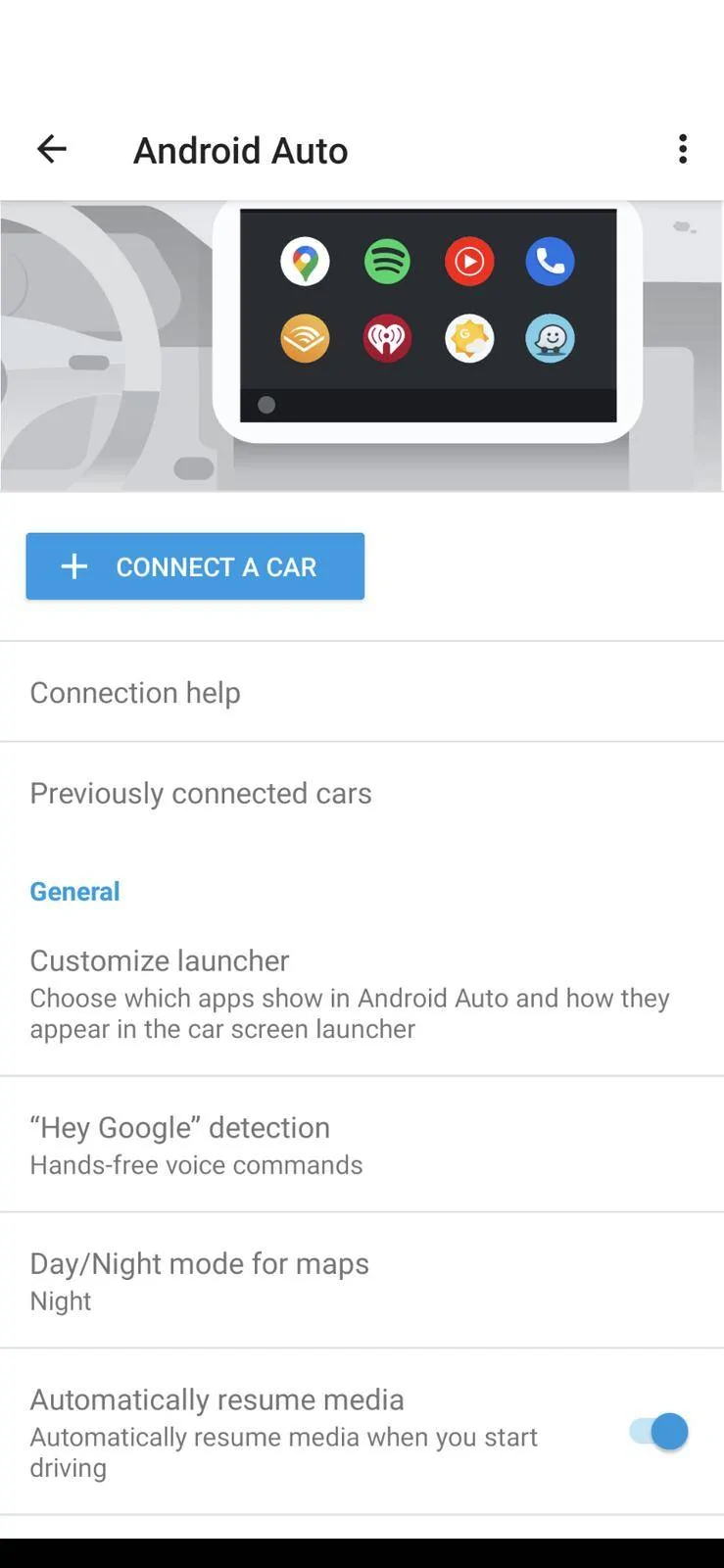
Have you tried activating voice commands in the Android Auto app on your phone? Go into settings and turn on "Hey Google" detection (screenshot) Then when you are in the car, you don't press any buttons but you say,"Hey Google" or "Ok Google" and if it activates Google assistant, say, "Call [name of contact." I never use the voice button on the steering because that activates the Ford voice activation system. Good luck.

Ford Mustang Mach-E Help with android auto issue Screenshot_20210903-170655
 

Creaky

Well-Known Member
Joined
Jul 23, 2021
Threads
5
Messages
123
Reaction score
166
Location
Netherlands
Vehicles
2025 MME RWD SR
Occupation
Anything with a plug on it...
Country flag
Have you tried activating voice commands in the Android Auto app on your phone? Go into settings and turn on "Hey Google" detection (screenshot) Then when you are in the car, you don't press any buttons but you say,"Hey Google" or "Ok Google" and if it activates Google assistant, say, "Call [name of contact." I never use the voice button on the steering because that activates the Ford voice activation system. Good luck.

Screenshot_20210903-170655.webp
FYI
Long pressing the steering wheel voice activation button activates Google assistant/Siri.
Sponsored


Top