How do I start a charging session with a FordPass app

billy_at

Well-Known Member
First Name
Bill
Joined
Jul 15, 2021
Threads
65
Messages
342
Reaction score
466
Location
New Jersey
Vehicles
Mach-E California Route 1
Country flag
I know this is a basic question but I’m new to the mustang Mach-E. When I get to a charging station, how do I use the FordPass app to start a charging session? There are no buttons or anything in the charger detail screen inside the FordPass app. What do I do to use the plug and charge feature?
Sponsored
 

GuliblGuy

Well-Known Member
First Name
Justin
Joined
Apr 8, 2021
Threads
20
Messages
710
Reaction score
1,355
Location
North Tustin, CA
Vehicles
Eruption Green 2025 GT Mach E
Country flag


Watch this video but especially starting at 6:20 he talks about how to turn on plug and charge.
 

hybrid2bev

Well-Known Member
Joined
Dec 4, 2019
Threads
78
Messages
4,641
Reaction score
12,765
Location
USA
Vehicles
2026 Rally
Country flag
When I get to a charging station, how do I use the FordPass app to start a charging session?
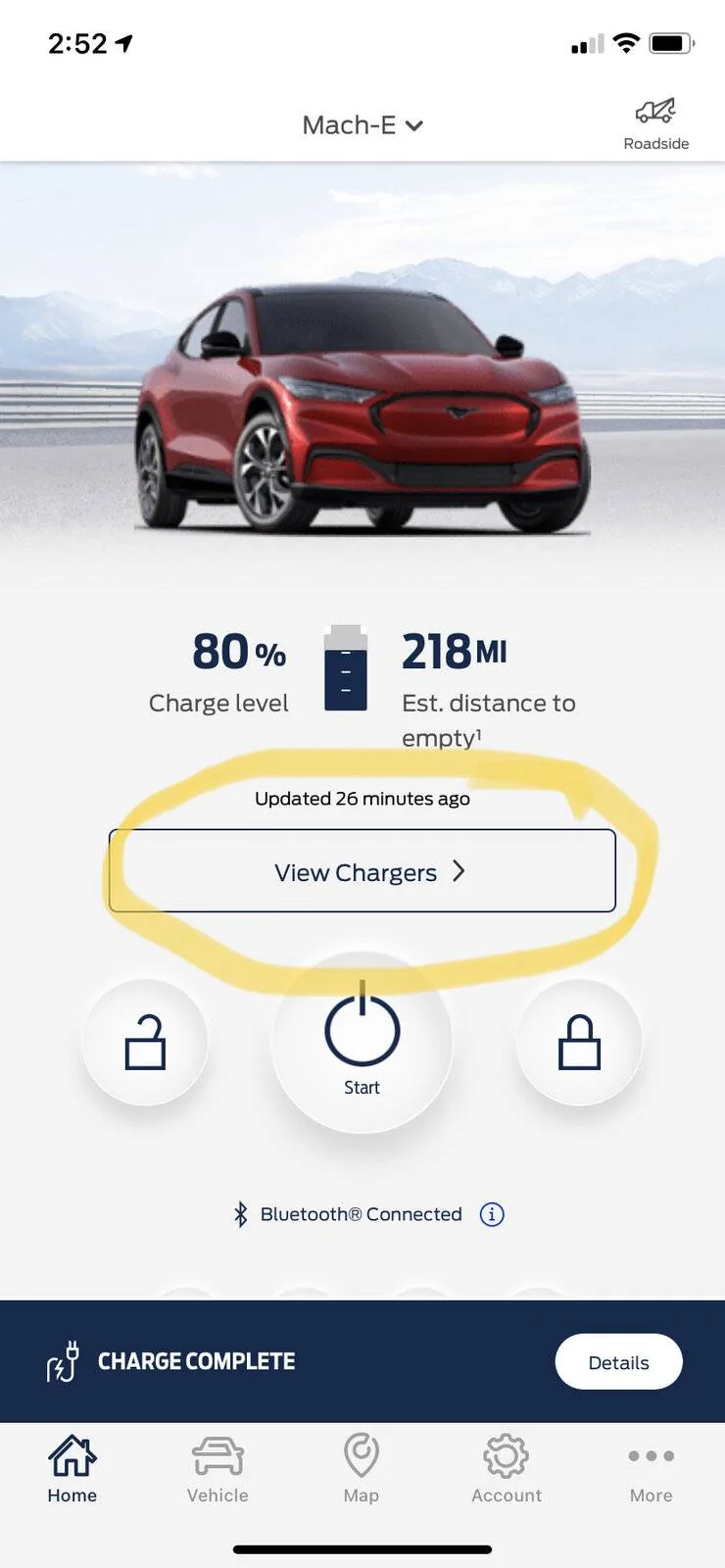
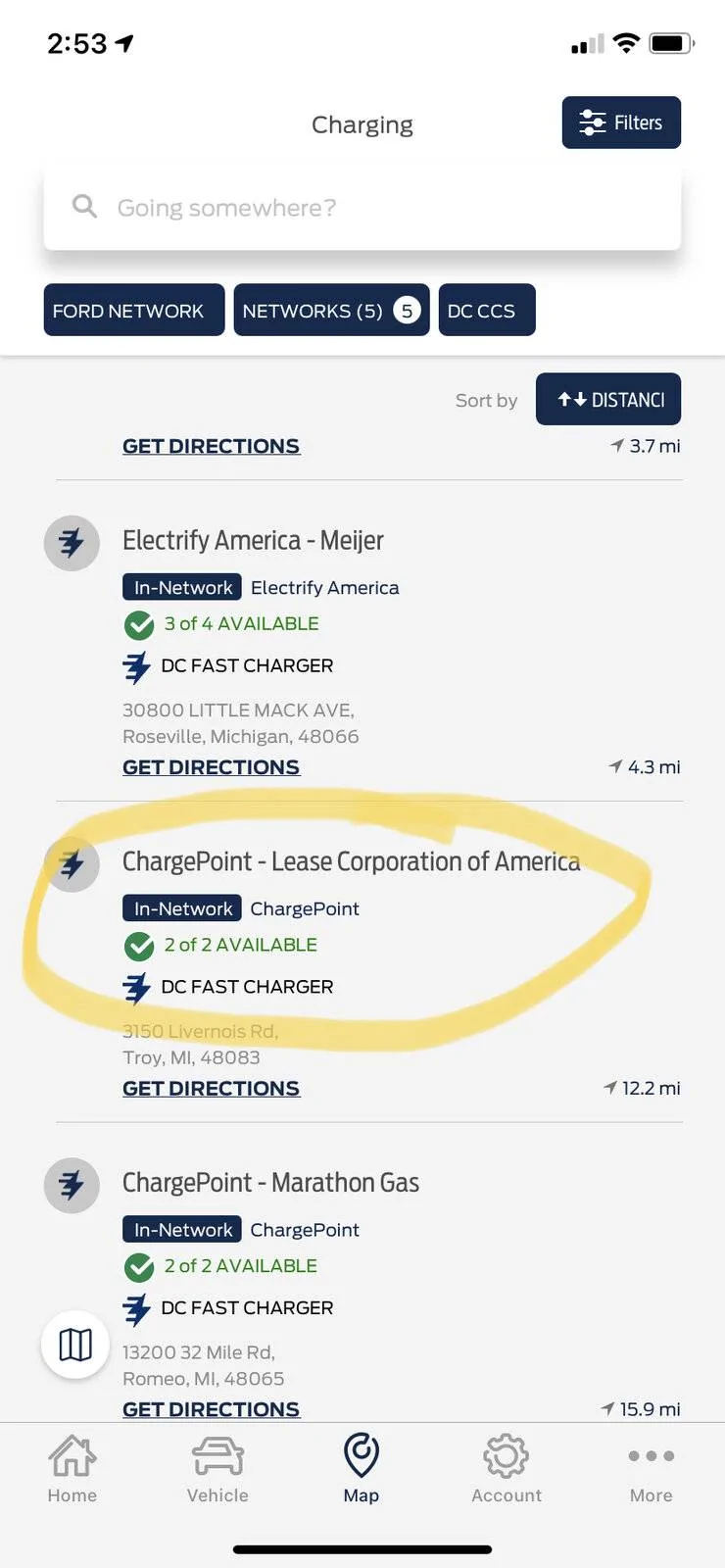
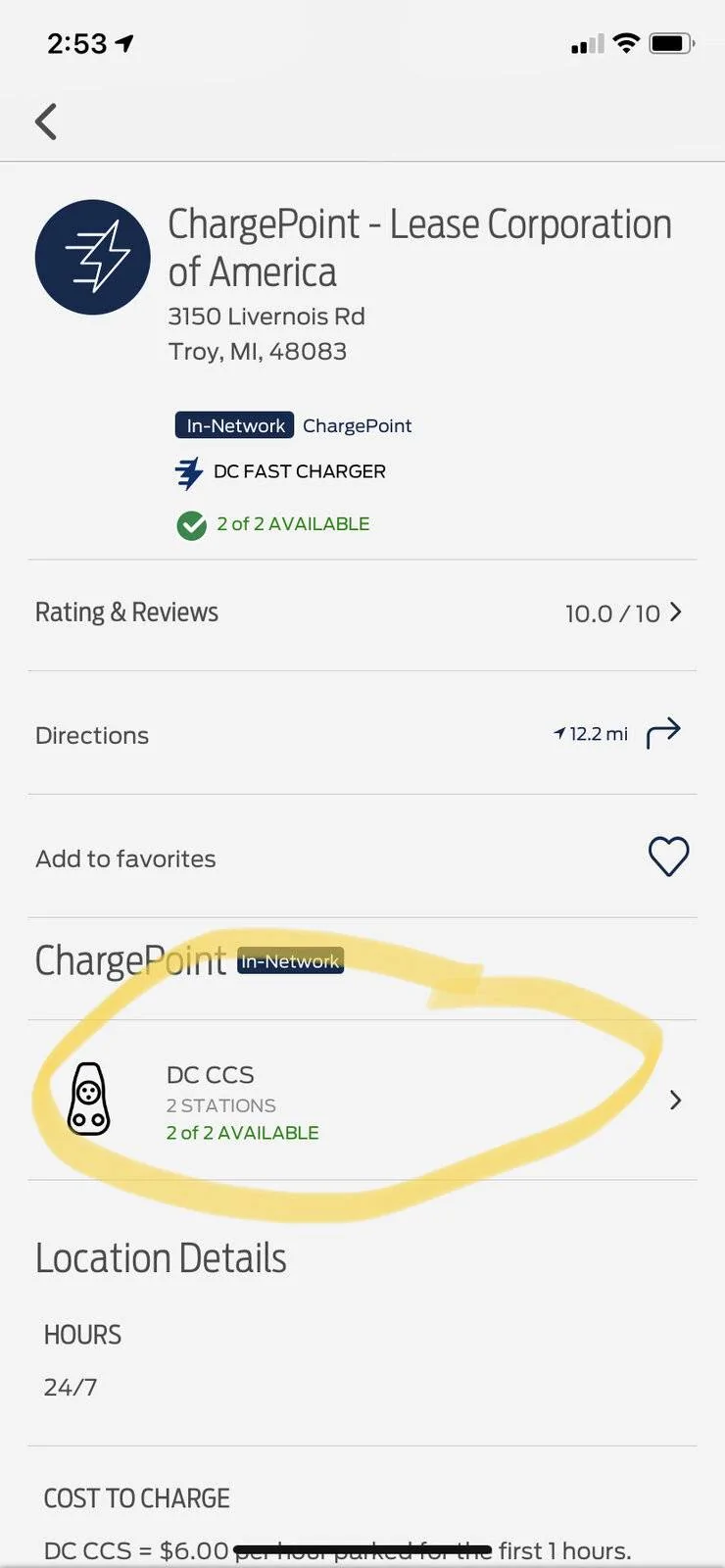
You can start a session manually.

Click on View Chargers from the Home screen
Ford Mustang Mach-E How do I start a charging session with a FordPass app 92C71E33-6AB2-472B-84EB-AEF3BCCA5F38


Click on the location
Ford Mustang Mach-E How do I start a charging session with a FordPass app 250DD0B9-2860-486E-9452-D4A7206C8481


Click on the charger type
Ford Mustang Mach-E How do I start a charging session with a FordPass app 02A43F97-2F86-4FDA-9DE4-A113698DDA2B


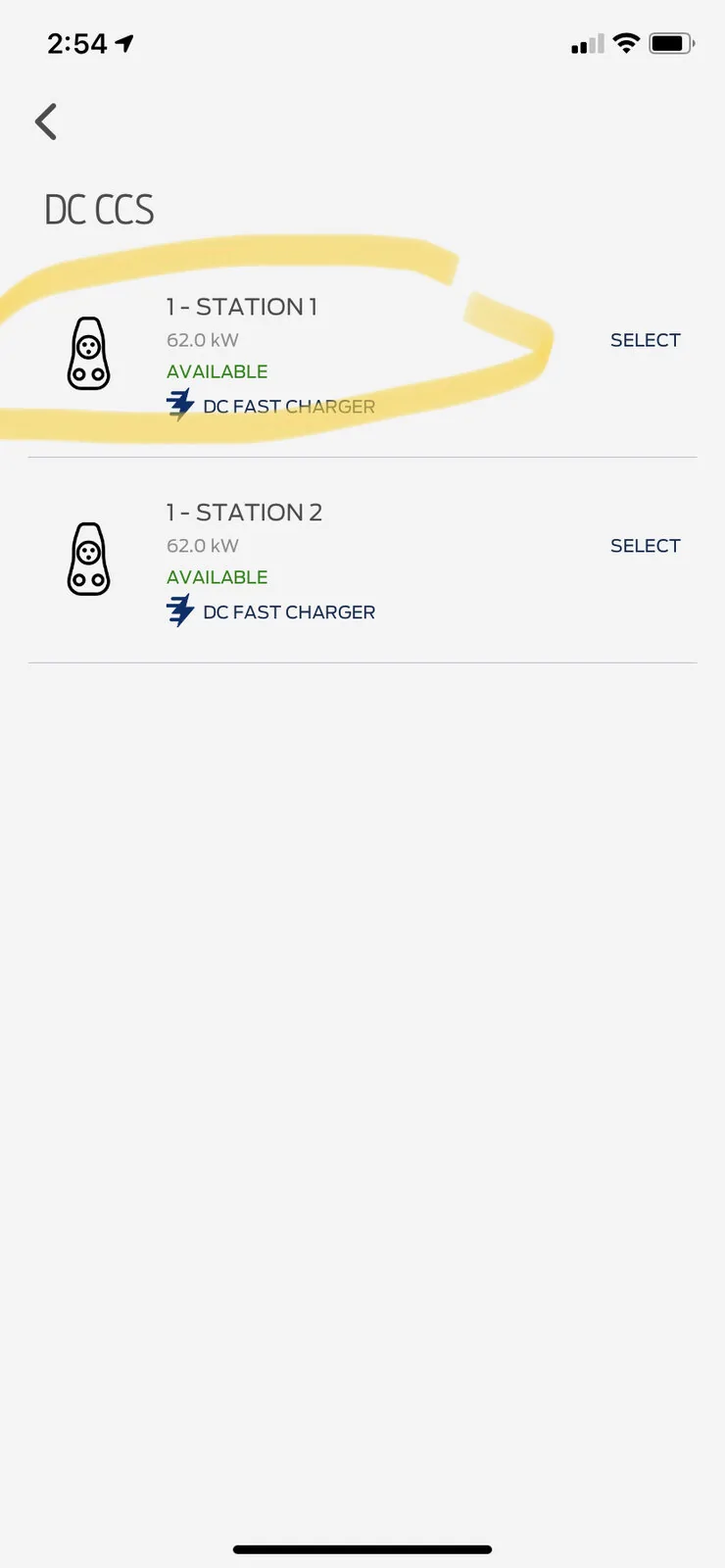
Click on which handle
Ford Mustang Mach-E How do I start a charging session with a FordPass app B6229CFE-BC5F-475A-ABD6-1DFF5869EE87


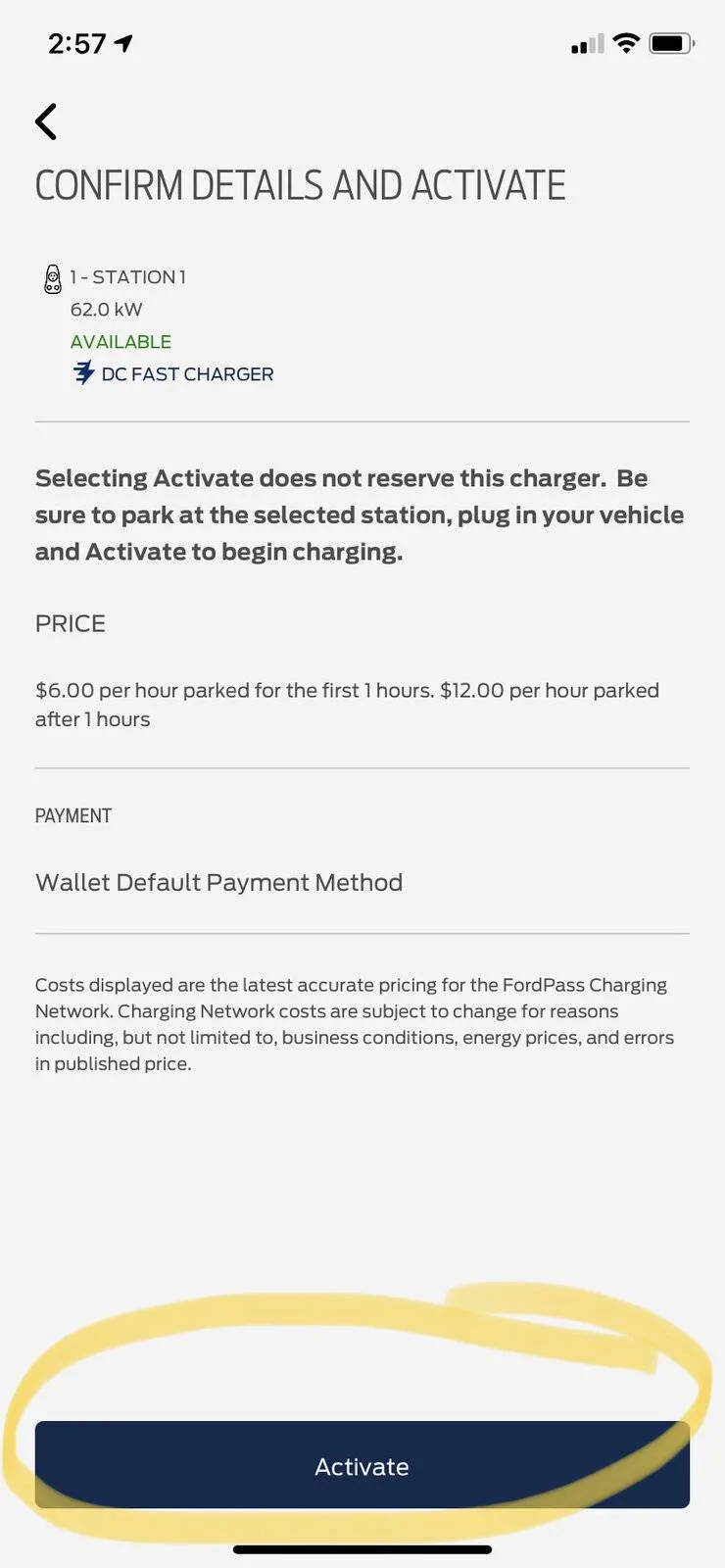
Click Activate
Ford Mustang Mach-E How do I start a charging session with a FordPass app 4BE2F71C-09B8-4174-9BD7-5F052FACB4B2


Then follow the directions on when to plug in.
 
Last edited:
OP
OP
billy_at

billy_at

Well-Known Member
First Name
Bill
Joined
Jul 15, 2021
Threads
65
Messages
342
Reaction score
466
Location
New Jersey
Vehicles
Mach-E California Route 1
Country flag
THANK YOU, @hybrid2bev !

That worked! I was accessing chargers through the Map tab, and those screens only show charger info without letting you select or activate them. Using “View Chargers” did the trick. Thanks so much!


TheVirtualTim

Well-Known Member
First Name
Tim
Joined
Oct 11, 2020
Threads
26
Messages
1,366
Reaction score
2,469
Location
Dearborn, MI
Vehicles
‘21 Mach-E First Edition, ‘23 Mach-E GT Performance
Country flag
Also, set up Plug & Charge.

Visit: owner.ford.com

Sign in (and wait while it looks up what car you own and shows options).

It should show your Mach-E and some tiles below it ... one is labeled "Connected Services". On that tile, click the "Manage Services" link. This opens a new tab in your browser.

On *that* window, you should see the option to setup the "FordPass Charging Network" (it really is best to do this on a computer and not on a phone). You'll go through several setups to set up and enroll a credit card.

When finished, open the FordPass app on your phone.

Pick "Vehicle" (along the bottom"
Pick "Manage EV"
Pick "FordPass Charging Network"
Pick "Plug & Charge"
And you should see a toggle switch to Enable "Plug & Charge"

It's a bunch of steps but once it is set up you can just plug in at stations that support the Plug & Charge technology and it should connect to the car and automatically start charging (and it automatically knows how to bill you for the charging session). You don't need any other payment method.

Plug & Charge mostly only works at Electrify America. Allegedly there are some Greenlots (Shell) stations that support it ... but I have yet to find one.

One other little tip... car does should should be UNLOCKED when initiating Plug & Charge. After the session begins you can lock the car ... just don't lock it BEFORE the session initiates.
 

ChuckA

Well-Known Member
First Name
Chuck
Joined
Jul 3, 2021
Threads
30
Messages
1,615
Reaction score
1,146
Location
North Branford, CT
Vehicles
‘21 MME Premium AWD ER in Infinite Blue
Occupation
Accountant-Retired
Country flag
You can start a session manually.

Click on View Chargers from the Home screen
92C71E33-6AB2-472B-84EB-AEF3BCCA5F38.jpeg


Click on the location
250DD0B9-2860-486E-9452-D4A7206C8481.jpeg


Click on the charger type
02A43F97-2F86-4FDA-9DE4-A113698DDA2B.jpeg


Click on which handle
B6229CFE-BC5F-475A-ABD6-1DFF5869EE87.jpeg


Click Activate
4BE2F71C-09B8-4174-9BD7-5F052FACB4B2.jpeg
T

Then follow the directions on when to plug in.
Thanks for the step by step tutorial. I thought you just plugged in and that was it. In the past I have tried using the Chargepoint app but never the Fordpass app.
Sponsored


Top