Instrument Panel screen setting?

Kangio

Well-Known Member
First Name
Kurt
Joined
Mar 10, 2021
Threads
16
Messages
98
Reaction score
42
Location
Philadelphia
Vehicles
2021 Mach E Premium ER
Country flag
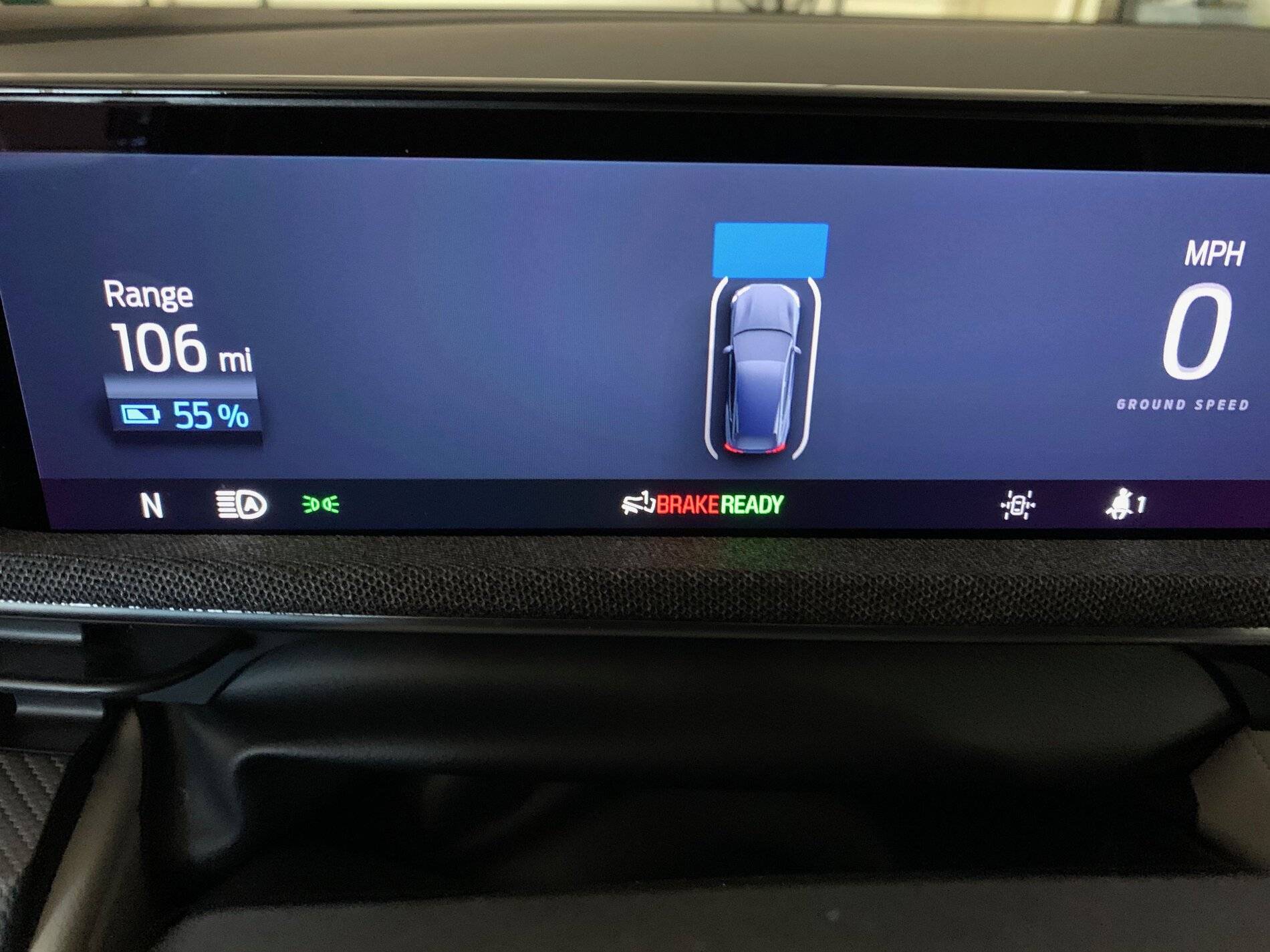
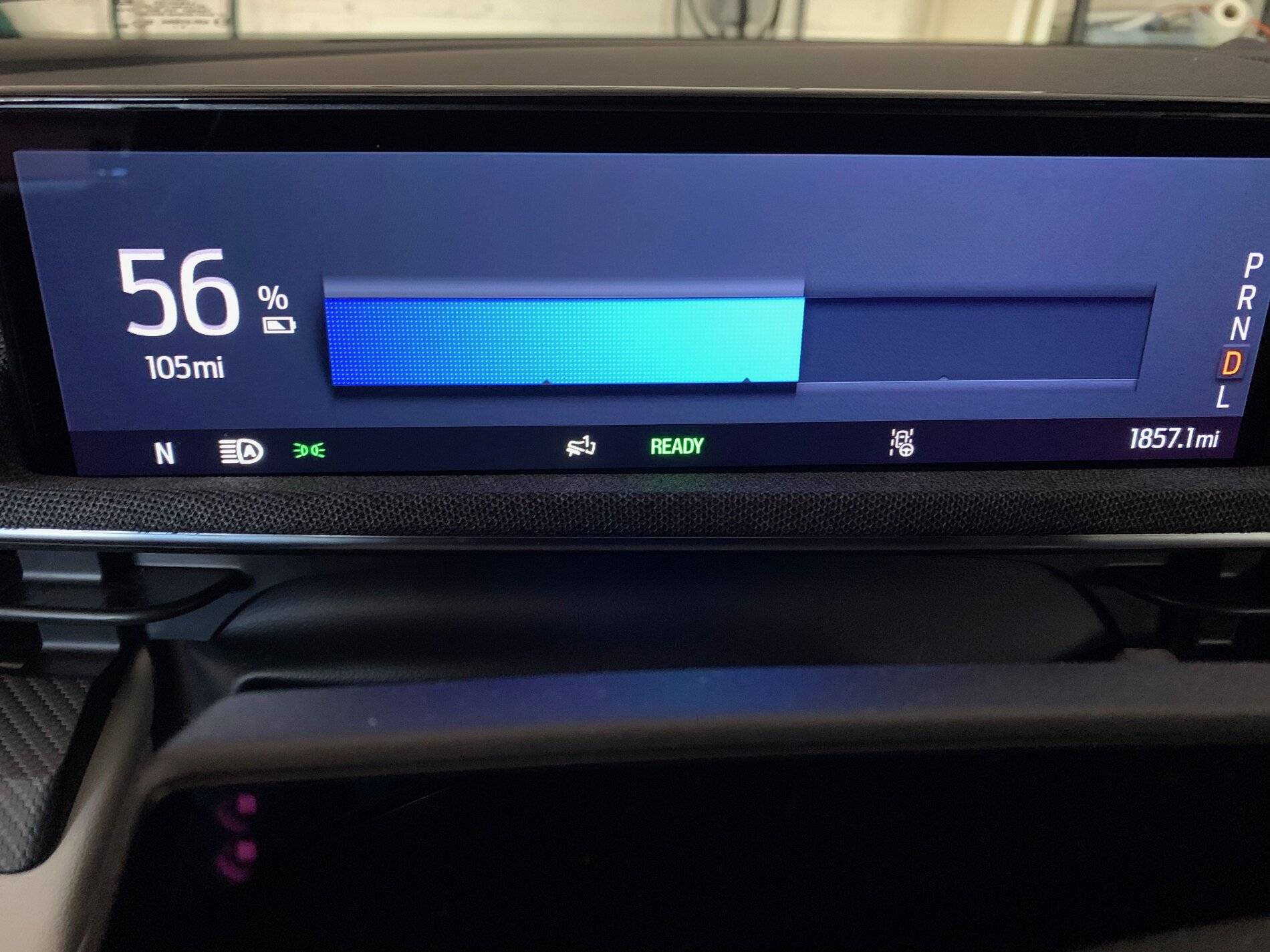
Driving home the other day I noticed the instrument panel screen had changed, now showing a battery charge icon across the screen. Normally my front screen shows a car icon with lane and front of car warning bars. I tried turning lane adjust, adaptive cruise control on/off, but could not find a way to get the other screen to come back. I was not in navigation mode. When I got home, I turned the car on/off, and now back to original screen with car icon.

Is there a setting for this? Couldn't find anything in the "manual".
Ford Mustang Mach-E Instrument Panel screen setting? IMG_0054
Ford Mustang Mach-E Instrument Panel screen setting? IMG_0055
Sponsored


generaltso

Well-Known Member
Joined
Jun 24, 2020
Threads
76
Messages
15,389
Reaction score
28,694
Location
Vermont
Vehicles
2024 Kia EV9 GT-Line
Country flag
Your first picture is in Accessory mode, so the car is not fully started. Put your foot on the brake and hit the start button to fully start the car and see the driving screen. You'll see a similar screen when driving if you're in Engage mode with cruise control and lane keep turned off.

Edit: Okay, maybe not. I just noticed that it says Ready, which I believe means it's fully started. But the battery percentage on top means it's in Accessory mode. Try a reboot of Sync and see if it changes the screen layout back to normal.
 

ten8bike

Well-Known Member
First Name
Bonnie
Joined
Sep 18, 2020
Threads
27
Messages
150
Reaction score
250
Location
Marin County, CA
Vehicles
Ford F150 pickup
Country flag
Driving home the other day I noticed the instrument panel screen had changed, now showing a battery charge icon across the screen. Normally my front screen shows a car icon with lane and front of car warning bars. I tried turning lane adjust, adaptive cruise control on/off, but could not find a way to get the other screen to come back. I was not in navigation mode. When I got home, I turned the car on/off, and now back to original screen with car icon.

Is there a setting for this? Couldn't find anything in the "manual".
IMG_0054.jpeg
IMG_0055.jpeg
That could be the start of the computer going wonky....mine has been in the shop since 3/16.; they say the Image Processing Module should be there by Monday. Was the outside temperature below 50ish? Chilly weather also contributes to the problem.
 
OP
OP
Kangio

Kangio

Well-Known Member
First Name
Kurt
Joined
Mar 10, 2021
Threads
16
Messages
98
Reaction score
42
Location
Philadelphia
Vehicles
2021 Mach E Premium ER
Country flag
That could be the start of the computer going wonky....mine has been in the shop since 3/16.; they say the Image Processing Module should be there by Monday. Was the outside temperature below 50ish? Chilly weather also contributes to the problem.
Temp was mid 40s outside. Noticed the icon for 1pedal driving seemed to come and go. Hoping its not a module but you are probably right. What other issues did you notice?
 
OP
OP
Kangio

Kangio

Well-Known Member
First Name
Kurt
Joined
Mar 10, 2021
Threads
16
Messages
98
Reaction score
42
Location
Philadelphia
Vehicles
2021 Mach E Premium ER
Country flag
Your first picture is in Accessory mode, so the car is not fully started. Put your foot on the brake and hit the start button to fully start the car and see the driving screen. You'll see a similar screen when driving if you're in Engage mode with cruise control and lane keep turned off.

Edit: Okay, maybe not. I just noticed that it says Ready, which I believe means it's fully started. But the battery percentage on top means it's in Accessory mode. Try a reboot of Sync and see if it changes the screen layout back to normal.
I was actually driving the car home, with that screen on the whole time. When I got home, I turned the car off then back on, and it went back to the "normal" screen.


generaltso

Well-Known Member
Joined
Jun 24, 2020
Threads
76
Messages
15,389
Reaction score
28,694
Location
Vermont
Vehicles
2024 Kia EV9 GT-Line
Country flag
I was actually driving the car home, with that screen on the whole time. When I got home, I turned the car off then back on, and it went back to the "normal" screen.
Sounds like a glitch. I don't think you should ever see that Accessory screen while you're driving. If it happens again, it would probably be worth having it checked out.
 

timbop

Well-Known Member
First Name
Tim
Joined
Jan 3, 2020
Threads
65
Messages
6,832
Reaction score
14,036
Location
New Jersey
Vehicles
Solar powered 2021 MME ER RWD (CA RT1)
Occupation
Software Engineer
Country flag
Your first picture is in Accessory mode, so the car is not fully started. Put your foot on the brake and hit the start button to fully start the car and see the driving screen. You'll see a similar screen when driving if you're in Engage mode with cruise control and lane keep turned off.

Edit: Okay, maybe not. I just noticed that it says Ready, which I believe means it's fully started. But the battery percentage on top means it's in Accessory mode. Try a reboot of Sync and see if it changes the screen layout back to normal.
I don't think so; he said this was while driving and of course it is supposed to show your speed while driving.

Agree with the others; that looks like a SNAFU'd screen to me
 

ten8bike

Well-Known Member
First Name
Bonnie
Joined
Sep 18, 2020
Threads
27
Messages
150
Reaction score
250
Location
Marin County, CA
Vehicles
Ford F150 pickup
Country flag
Temp was mid 40s outside. Noticed the icon for 1pedal driving seemed to come and go. Hoping its not a module but you are probably right. What other issues did you notice?
Well....the "blind spot detection with cross traffic", the "pre-collision assist not available", and the "park aid malfunction" all happen. And the icons on the dashboard show those features are not available.
My car has been at the service dept since March 16. They say the part they need was backordered, and will be here Monday, then, with the aid of a Ford engineer, they will fix it, and recalibrate the computer.
The part they say is needed is an "imaging process module".
However, I do have a brand new hybrid Escape to drive around - I've almost put more miles on it than on my Mach E.
 
OP
OP
Kangio

Kangio

Well-Known Member
First Name
Kurt
Joined
Mar 10, 2021
Threads
16
Messages
98
Reaction score
42
Location
Philadelphia
Vehicles
2021 Mach E Premium ER
Country flag
Haven’t had this recur...yet! Will see if it happens again before committing to a long service visit?
 

breeves002

Well-Known Member
First Name
Sam
Joined
Feb 21, 2021
Threads
90
Messages
1,734
Reaction score
3,593
Location
St. Louis, MO
Vehicles
2021 Mach-E GT PE
Country flag
This just sounds like a 1 time bug to me. Just got stuck in the accessory screen. If it keep happening likely a software update will fix it or some module needs to be replaced.

@ten8bike a bad IPMA is a totally different story. Thats the module that controls all of the driver assists and cameras. In previous Fords the IPMA was just the front camera and didn't do anything else. Its a big fancy computer now.
 

Jimrpa

Well-Known Member
First Name
Jim
Joined
Sep 10, 2020
Threads
297
Messages
9,521
Reaction score
12,856
Location
Wayne, PA
Vehicles
2021 Infinite Blue Premium Mustang Mach E ER AWD
Occupation
Retied (formerly tried to herd highly technical, independent cats)
Country flag
Which drive mode are you in?
 
OP
OP
Kangio

Kangio

Well-Known Member
First Name
Kurt
Joined
Mar 10, 2021
Threads
16
Messages
98
Reaction score
42
Location
Philadelphia
Vehicles
2021 Mach E Premium ER
Country flag
I was in Engage. I even tried changing modes while driving, no effect on screen. Fortunately it hasn’t happened again... yet
 

OH2AZ2OH

Well-Known Member
Joined
Jan 11, 2021
Threads
7
Messages
861
Reaction score
989
Location
Dublin, OH
Vehicles
Mach E 4X
Country flag
"Do you have any idea how fast you were going?"
"I was hoping you could tell me!"

Seriously, there is no possible screen configuration/drive mode that should allow you to be driving with no indication of speed. If it happens again, you should definitely report it to your dealer so that it gets logged into Ford's systems.
Sponsored


Top