
Issue - "Unable to connect" when connecting to WiFi (SOLVED)

hitchhiker

Well-Known Member
Joined
Apr 30, 2021
Threads
1
Messages
74
Reaction score
155
Location
Maine, USA
Vehicles
2021 Mach-e 4x, 1965 F-100, 1999 Chevy Silverado
Occupation
Software Engineer
Country flag
I get my MME in about a week and have been reading this thread for ideas. Hoping that the car likes my setup...

I have Unifi equipment as well (USG, CloudKey, Switches and AP's). However, I am using my Windows Server 2019 for DHCP (10.9.8.x). Also have a segregated test network (on 10.0.0.x) that has DHCP handled by (depending on which is active) one of several Server 2016 VMs running under Hyper-V.

I'm hoping my MME will like my 10.9.8.x network. If anyone has worked with something resembling this type of setup I'd love to hear of your horror stories experiences!
Mine is all Unifi, no Windows though. So far the problems don’t seem directly related to the AP, switch or router hardware, but all to DHCP configuration. There may be other issues, but I’m pretty confident that option 119 is a commonality to many of them, if not most or all. See my post above if you have trouble, apart from the fix instructions, the root cause should apply to a Windows DHCP server.

If I remember correctly, Windows as a DHCP client ignores option 119. I think a Windows DHCP server would still send it in a response though, since as @TheSteelRider said, the Mach-e is actually requesting it.
Sponsored

 

SoriceConsulting

Well-Known Member
First Name
Sal
Joined
Oct 10, 2020
Threads
29
Messages
470
Reaction score
469
Location
NJ, USA
Website
sorice.com
Vehicles
2023 GTPE, Rapid Red
Occupation
IT Consultant
Country flag
Mine is all Unifi, no Windows though. So far the problems don’t seem directly related to the AP, switch or router hardware, but all to DHCP configuration. There may be other issues, but I’m pretty confident that option 119 is a commonality to many of them, if not most or all. See my post above if you have trouble, apart from the fix instructions, the root cause should apply to a Windows DHCP server.

If I remember correctly, Windows as a DHCP client ignores option 119. I think a Windows DHCP server would still send it in a response though, since as @TheSteelRider said, the Mach-e is actually requesting it.
Thanks for the insights! I'll report back when I get my MME home and try connecting.
 
OP
OP
TheSteelRider

TheSteelRider

Well-Known Member
Joined
Dec 31, 2019
Threads
57
Messages
1,298
Reaction score
2,311
Location
United States
Vehicles
'21 Premium RWD
Country flag
Now that @Ford Motor Company has supposedly joined this forum and is soliciting feedback, I just sent them this note to make them aware of this problem. Usually these types of accounts are fronted by Marketing folks, and technical issues are usually sent to 1st-level support which would simply respond with "are you sure it is plugged in" / "have you tried rebooting it" type responses which in our case will not help. But nevertheless I figured it was worth a shot, and I am really hoping that whomever gets my message forwards it to the development team. I will keep this thread abreast of any forward movement by Ford to fix the issue.

HI Ford,

I just wanted to raise awareness of an issue with the Mach E. This note will be HIGHLY technical, so please forward to the development team as necessary. Please feel free to reach out to me individually for any follow-up questions.

The Mach E has the ability to connect to WiFi (in order to download OTA updates and the like). On this forum, members are tracking a problem with this feature. It appears that the Mach E will not connect to any network that advertises DHCP option 119, domain-search. In particular, anyone with Ubiquiti UniFi network gear has been unable to connect their Mach E to WiFi.

Below is a network capture (tcpdump) of my own personal Mach E attempting to connect to my network, which I use a UniFi USG as my router / gateway and DHCP server. Notice that the Mach E requests a DHCP address (e.g., DHCP Discover), it is properly given one (e.g., DHCP Offer), and then the Mach E simply retries the request. The Mach E at this point then throws an error to the screen.

(Note: I have redacted all MAC addresses in this dump for privacy reasons).

Bash:
admin@Gateway:~$ sudo tcpdump -vv -i eth1 ether host 78:55:CD:E4:XX:YY
tcpdump: listening on eth1, link-type EN10MB (Ethernet), capture size 262144 bytes

16:15:24.172125 78:55:cd:e4:XX:YY (oui Unknown) > Broadcast Null Supervisory, Receiver not Ready, rcv seq 64, Flags [Poll], length 46
16:16:07.898369 78:55:cd:e4:XX:YY (oui Unknown) > Broadcast Null Unnumbered, xid, Flags [Response], length 46: 01 00
16:16:07.941498 EAPOL key (3) v1, len 117
16:16:07.956410 EAPOL key (3) v1, len 95
16:16:10.273100 IP (tos 0x10, ttl 128, id 0, offset 0, flags [none], proto UDP (17), length 328)
    0.0.0.0.bootpc > 255.255.255.255.bootps: [udp sum ok] BOOTP/DHCP, Request from 78:55:cd:e4:XX:YY (oui Unknown), length 300, xid 0x24c30e0e, secs 2, Flags [none] (0x0000)
          Client-Ethernet-Address 78:55:cd:e4:XX:YY (oui Unknown)
          Vendor-rfc1048 Extensions
            Magic Cookie 0x63825363
            DHCP-Message Option 53, length 1: Discover
            Lease-Time Option 51, length 4: 4294967295
            Hostname Option 12, length 11: "mdm9650-tcu"
            Parameter-Request Option 55, length 11:
              Subnet-Mask, BR, Time-Zone, Domain-Name
              Domain-Name-Server, Hostname, Option 119, Netbios-Name-Server
              Netbios-Scope, Classless-Static-Route, Default-Gateway
            Client-ID Option 61, length 3: hardware-type 116, 63:75
16:16:10.280334 IP (tos 0x10, ttl 128, id 0, offset 0, flags [none], proto UDP (17), length 356)
    setup.ubnt.com.bootps > 10.13.40.20.bootpc: [udp sum ok] BOOTP/DHCP, Reply, length 328, xid 0x24c30e0e, secs 2, Flags [none] (0x0000)
          Your-IP 10.13.40.20
          Client-Ethernet-Address 78:55:cd:e4:XX:YY (oui Unknown)
          Vendor-rfc1048 Extensions
            Magic Cookie 0x63825363
            DHCP-Message Option 53, length 1: Offer
            Server-ID Option 54, length 4: setup.ubnt.com
            Lease-Time Option 51, length 4: 86400
            Subnet-Mask Option 1, length 4: 255.255.0.0
            Domain-Name Option 15, length 22: "REDACTED"
            Domain-Name-Server Option 6, length 8: 10.13.0.253,10.13.0.254
            T119 Option 119, length 24: 225732709,1937007973,1819437412,1701971044,1684960003,1852142592
            Default-Gateway Option 3, length 4: setup.ubnt.com
16:16:13.291451 IP (tos 0x10, ttl 128, id 0, offset 0, flags [none], proto UDP (17), length 328)
    0.0.0.0.bootpc > 255.255.255.255.bootps: [udp sum ok] BOOTP/DHCP, Request from 78:55:cd:e4:XX:YY (oui Unknown), length 300, xid 0x24c30e0e, secs 5, Flags [none] (0x0000)
          Client-Ethernet-Address 78:55:cd:e4:XX:YY (oui Unknown)
          Vendor-rfc1048 Extensions
            Magic Cookie 0x63825363
            DHCP-Message Option 53, length 1: Discover
            Lease-Time Option 51, length 4: 4294967295
            Hostname Option 12, length 11: "mdm9650-tcu"
            Parameter-Request Option 55, length 11:
              Subnet-Mask, BR, Time-Zone, Domain-Name
              Domain-Name-Server, Hostname, Option 119, Netbios-Name-Server
              Netbios-Scope, Classless-Static-Route, Default-Gateway
            Client-ID Option 61, length 3: hardware-type 116, 63:75
16:16:13.292614 IP (tos 0x10, ttl 128, id 0, offset 0, flags [none], proto UDP (17), length 356)
    setup.ubnt.com.bootps > 10.13.40.20.bootpc: [udp sum ok] BOOTP/DHCP, Reply, length 328, xid 0x24c30e0e, secs 5, Flags [none] (0x0000)
          Your-IP 10.13.40.20
          Client-Ethernet-Address 78:55:cd:e4:XX:YY (oui Unknown)
          Vendor-rfc1048 Extensions
            Magic Cookie 0x63825363
            DHCP-Message Option 53, length 1: Offer
            Server-ID Option 54, length 4: setup.ubnt.com
            Lease-Time Option 51, length 4: 86400
            Subnet-Mask Option 1, length 4: 255.255.0.0
            Domain-Name Option 15, length 22: "REDACTED"
            Domain-Name-Server Option 6, length 8: 10.13.0.253,10.13.0.254
            T119 Option 119, length 24: 225732709,1937007973,1819437412,1701971044,1684960003,1852142592
            Default-Gateway Option 3, length 4: setup.ubnt.com

For more in-depth details of this issue, please see the following thread:
https://www.macheforum.com/site/thr...en-connecting-to-wifi-solved.3044/post-172563

If you read the thread, you will note that a group of us who are mostly software engineers or network engineers have been working to try to reverse-engineer and pinpoint the issue. We have already gone through all the simple troubleshooting steps, so I would greatly appreciate it if you could forward this low level technical information directly to someone in Ford who can understand and interpret this data.

Thank you in advance for your consideration for this issue.
 

hitchhiker

Well-Known Member
Joined
Apr 30, 2021
Threads
1
Messages
74
Reaction score
155
Location
Maine, USA
Vehicles
2021 Mach-e 4x, 1965 F-100, 1999 Chevy Silverado
Occupation
Software Engineer
Country flag
Now that @Ford Motor Company has supposedly joined this forum and is soliciting feedback, I just sent them this note to make them aware of this problem. Usually these types of accounts are fronted by Marketing folks, and technical issues are usually sent to 1st-level support which would simply respond with "are you sure it is plugged in" / "have you tried rebooting it" type responses which in our case will not help. But nevertheless I figured it was worth a shot, and I am really hoping that whomever gets my message forwards it to the development team. I will keep this thread abreast of any forward movement by Ford to fix the issue.
Did you ever end up trying my workaround and did it fix the problem for you? If they respond it may be worth pointing them to that specific post as I know it has solved the problem for at least some of us.

And if you’re listening @Ford Motor Company, people like us who troubleshoot problems like this would make ideal candidates for the early access program!
 
OP
OP
TheSteelRider

TheSteelRider

Well-Known Member
Joined
Dec 31, 2019
Threads
57
Messages
1,298
Reaction score
2,311
Location
United States
Vehicles
'21 Premium RWD
Country flag
Did you ever end up trying my workaround and did it fix the problem for you? If they respond it may be worth pointing them to that specific post as I know it has solved the problem for at least some of us.
Yes. I CONFIRM that your work-around works.

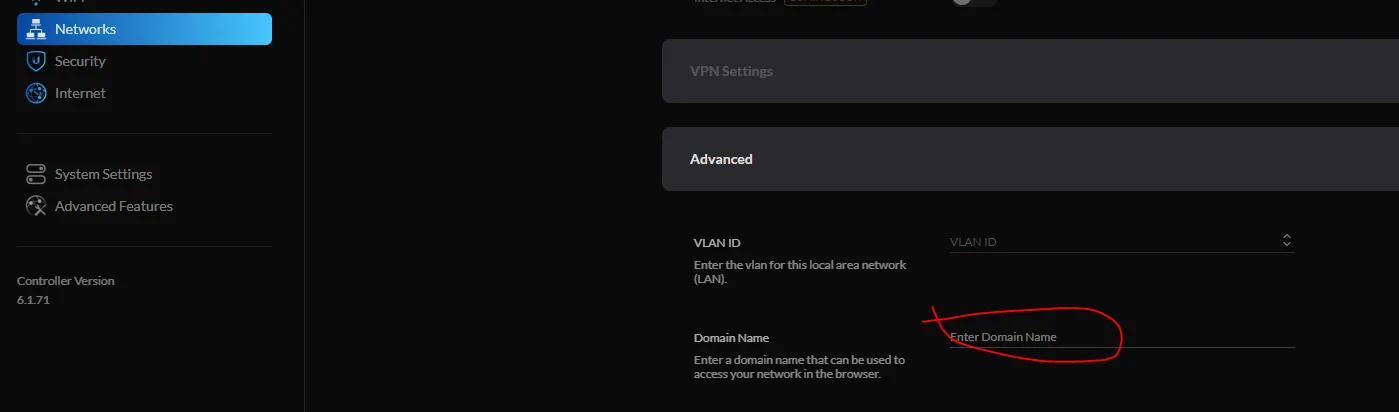
I removed my domain name from the "Domain Name" in my Network configuration in my Unifi Controller and the Mach E connected without issue. This is an unfortunate work-around as it means my signed SSL certificates will not work since I will not have domain name resolution for DHCP-leased devices.

Ford Mustang Mach-E Issue - "Unable to connect" when connecting to WiFi (SOLVED) 1622068478304


hitchhiker

Well-Known Member
Joined
Apr 30, 2021
Threads
1
Messages
74
Reaction score
155
Location
Maine, USA
Vehicles
2021 Mach-e 4x, 1965 F-100, 1999 Chevy Silverado
Occupation
Software Engineer
Country flag
Yes. I CONFIRM that your work-around works.

I removed my domain name from the "Domain Name" in my Network configuration in my Unifi Controller and the Mach E connected without issue. This is an unfortunate work-around as it means my signed SSL certificates will not work since I will not have domain name resolution for DHCP-leased devices.

1622068478304.png
You can still resolve the domain, it just won't be a search suffix. So https://whatever.yourdomain.com/ will still work but https://whatever/ would not. SSL certs would either be for FQDN or a domain wildcard cert anyway so that shouldn't make a difference.
 

kvasiir

New Member
First Name
Carl
Joined
Jul 1, 2021
Threads
0
Messages
1
Reaction score
1
Location
San Jose, California
Vehicles
Mustang Mach-E
Occupation
Engineer
Country flag
Thanks for this thread; confirmed that having a search domain set up in my DHCP config causes the Mach-E to not be able to join WiFi.

These guys should try writing some code that works....

Grump grump grump.
 

dml105

Well-Known Member
Joined
Jul 26, 2020
Threads
27
Messages
949
Reaction score
1,421
Location
Arlington, VA
Vehicles
Shadowfax, the Star White Tricoated Metallic Pony
Country flag
Thanks for this thread; confirmed that having a search domain set up in my DHCP config causes the Mach-E to not be able to join WiFi.

These guys should try writing some code that works....

Grump grump grump.
These guys being… Qualcomm?
 

cmtaylor963

Well-Known Member
First Name
Charles
Joined
Jun 19, 2020
Threads
4
Messages
239
Reaction score
346
Location
Springfield, MO
Vehicles
Mach E 1st Ed
Occupation
Engineer
Country flag
Yup, it looks like any presence of option 119 in the response will cause it to fail, regardless of value. This DHCP option just controls the DNS search path on clients. If you tried to hit "www" and your search path is "home.com", it would try to resolve "www.home.com". With no search path, you'd just always have to use the full "www.home.com". Normally, DHCP option 15 is used to specify a single domain name. Option 119 is used to be able to specify multiple domains in this path. The problem here is these implementations always set option 119 even for a single domain.

My home network is nerdy and abnormal so I wanted to keep my domain suffix path via option 15. Unless you are running things like internal web servers, most home networks should be OK without this. Things like printers, NAS servers etc typically rely on other mDNS (or WINS) based resolution.

TL;DR - If it doesn't seem to be causing you any problems, you should be fine just leaving this field empty for now.
That worked for me too. I have been running a separate network just for my car for the last 5 months.
 

explorerford18

New Member
First Name
Tom
Joined
Aug 19, 2021
Threads
0
Messages
1
Reaction score
1
Location
Here
Vehicles
2018 ford explorer
Country flag
I have the same issue. Nothing above has solved it. I would think that if an iPhone can connect to a network, my car should be able to connect to my network. If every device that has ever tried to connect to my network, has without issue. Then the problem is the car...
 

Finkerton

Well-Known Member
Joined
Mar 11, 2021
Threads
11
Messages
153
Reaction score
88
Location
Boston, MA
Vehicles
MME FE
Country flag
I haven't touched my unifi settings since removing the DNS option, which like others on this thread made it work previously.

However today it's unable to connect again.

Anyone else also seeing failures these days when it used to work (after removing that option)?
 

Elmn8r

Active Member
First Name
Logan
Joined
Aug 4, 2021
Threads
2
Messages
29
Reaction score
20
Location
South Carolina
Vehicles
2021 Ford Mustang GTPE Star White
Country flag
@Ford Motor Company - any chance we can get this fixed? We've already identified the problem. Please see above. :cool:
Just got my GTPE yesterday and had this exact same issue connecting to my Unifi USG network. Removed the Domain name and it connected no problem. Thanks for the troubleshooting and resolution ident.

Cheers
 

Sin_Chase

Well-Known Member
Joined
Aug 6, 2021
Threads
10
Messages
75
Reaction score
58
Location
UK
Vehicles
Mach-E AWD ER
Still a couple days before I bring my Mach-e home for good, but I've got it here for an overnight test drive, and went deep down the rabbit hole on this.

I'm also using a Ubiquiti USG and could not get it to connect to any of my networks. My primary network DHCP is served by my Synology NAS, and IoT/guest/etc DHCP is served by the USG. I ran into this issue with both.

At least in my case, the problem is DHCP option 119, domain-search. This is only needed when you want your DHCP server to send multiple domains as a DNS search path.

Clearing the domain name setting on either platform allows the Mach-e to connect for me. For Unifi, edit the network you're connecting to, scroll down to Domain Name, and clear any value in the box. On Synology, go to DHCP settings, edit the appropriate interface, and clear the domain name there.

If you never use short hostnames and always use FQDNs when connecting to resources in your local network, you should be fine to just leave it that way. Doing this will also cause the DHCP server not to send the domain-name option, so you'll have no search suffix at all.

I wanted to be a bit more selective. Under the hood on the Unifi side, a perl script generates a dhcpd.conf for ISC dhcpd. There's no way to make it omit the domain-search option. While I was digging, I noticed that the Unifi also supports dnsmasq as a DHCP server, and the config generator for this one doesn't include the offending option. You can switch to dnsmasq using a custom config.gateway.json. This goes on your Unifi controller, check the linked article to find out where. In my case it was /usr/lib/unifi/data/sites/default/config.gateway.json. Either create the file with the following content, or add this to your existing config:

JSON:
{
  "service": {
    "dhcp-server": {
      "use-dnsmasq": "enable"
    }
  }
}
Then run a force provision on your USG, and when it's done try connecting your Mach-e.

There may be a way to selectively disable the domain-search option on the Synology, I poked around a bit but ultimately didn't bother as it's getting late and I didn't need this functionality. I do know that you can create extra dnsmasq config in /etc/dhcpd/dhcpd-vendor.conf and it will be added to the end of the generated config (I use this technique to add options needed to netboot Raspberry Pis).

Hopefully this fixes the problem for some of you, or at least sets you on the right path!

Thanks for this.

On an all Unifi network and was tearing my hair out with the Mach-Es inability to connect to the WiFi. I have a multitude of clients and have never experienced anything like this.

I wonder what network stack implementation Ford have used in the Mach-E to cause such an issue.
 

hitchhiker

Well-Known Member
Joined
Apr 30, 2021
Threads
1
Messages
74
Reaction score
155
Location
Maine, USA
Vehicles
2021 Mach-e 4x, 1965 F-100, 1999 Chevy Silverado
Occupation
Software Engineer
Country flag
Thanks for this.

On an all Unifi network and was tearing my hair out with the Mach-Es inability to connect to the WiFi. I have a multitude of clients and have never experienced anything like this.

I wonder what network stack implementation Ford have used in the Mach-E to cause such an issue.
I'm actually pretty surprised at how many others are using Unifi networks at home. I guess I shouldn't be, a high tech car self-selects for nerdy customers. :cool:

Sync is built on the venerable QNX OS. I was able to find a doc that indicates the QNX DHCP client only supports options 1-61. It's bizarre that it would simply refuse a lease from a server offering options outside that range, rather than simply ignore it. Anyone got an old Blackberry around? I wonder if it would behave the same way.

Ford is transitioning to Android Automotive (which is different than Android Auto) for Sync in the future, which should hopefully alleviate problems like this, in favor of all new problems. Progress!
Sponsored


Top