
Newly Designed FordPass 5.0 App®: What to Know
- Thread starter Ford Motor Company
- Start date
- Watchers 38
dhcruz
Member
- First Name
- Dan
- Joined
- Apr 27, 2023
- Threads
- 5
- Messages
- 22
- Reaction score
- 18
- Location
- 1220 Running Springs CT
- Vehicles
- 2023 Ford Mach e Select
- Occupation
- Retired

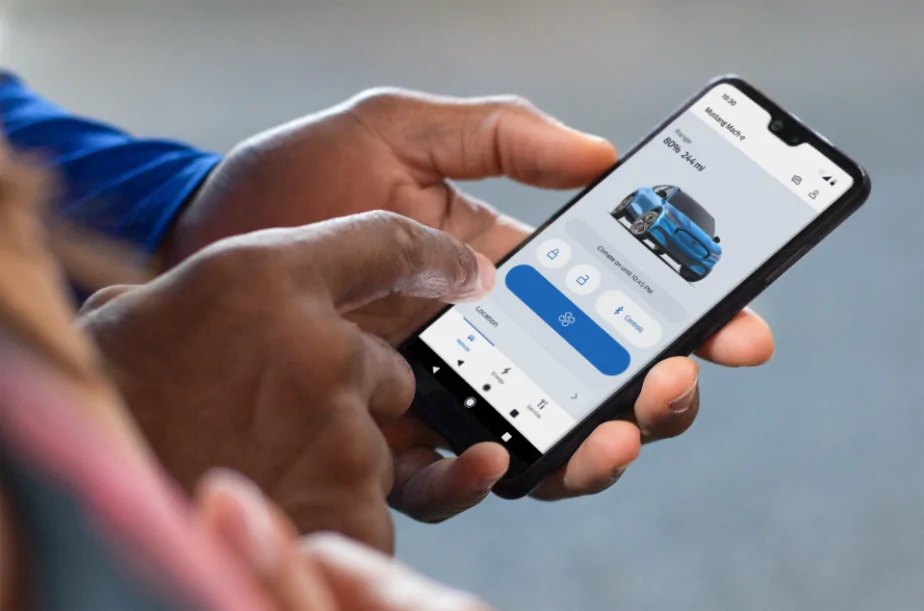
Hi Mustang Mach-E owners! If you recently updated your FordPass® app, you may have noticed it looks a little different. We are pleased to share that we have rolled out a newly designed app that is easy to use and efficient, to help you better manage your vehicle remotely. Here is what is new:
We are also continuing to improve the in-app experience with this latest version. If you notice a feature you previously used before is no longer there, don’t worry. The feature can still be accessed via your in-vehicle touchscreen.
- Simplified Experience: We have reduced the number of steps it takes to access functions and made it easier to find them. As an EV owner, you can enjoy a simplified slider for target charge. Also, instead of having to press and hold to turn the vehicle ‘on’, it is now a simple tap.
- Apple Watch Integration: If you have an Apple Watch, in addition to lock/unlock and remote start/stop, you will also be able to use the following features from your wrist:
- View battery level and range
- View charging status, including: Charging speed, next departure time based on when desired charge is reached, current preferred charging window
- View vehicle location
- Activate horn and lights remotely
We love to hear from our owners so let us know what you think and if you have any questions about FordPass!
EDIT (5/28/24):
Many of you had additional questions, so we wanted to provide some supplemental information about the newly designed FordPass app. Some of your exact features may vary depending on your vehicle model.
Please note: FordPass® App, compatible with select smartphone platforms, is available via a download. Message and data rates may apply.
- All about service: To reach the service dashboard, click the tool icon on the bottom right of your screen. You will find a vehicle health status list that includes the odometer reading and tire pressure. If you’d like to add your vehicle service history, this can be done via Ford.com.
- Trip Planning: While there’s no trip planning feature in FordPass right now, you can still use your in-vehicle touchscreen to access this feature. We’re exploring a simpler, more reliable version of this feature for FordPass.
- Google Maps: To turn your Google Maps consent on or off, go to your Account settings, then Legal & Privacy, then Privacy.
- Beep Beep: To reach the horn and lights feature, go to the location section right on the front screen.
- Lock from anywhere: To tell if the vehicle is locked or unlocked, just click on your desired lock/ unlock state. The vehicle will then confirm “locked” or “unlocked” with a green check.
- Tailgate party: Depending on your vehicle’s capability, Phone As A Key™ Bluetooth controls for the windows, trunk/frunk, and tailgate are found in the "Bluetooth Controls" menu right alongside all your other primary controls.
- Add a friend: If your Ford vehicle is already connected in FordPass, you can find and manage any new vehicle user access requests by selecting your vehicle in the app, then selecting Vehicle Details. From there, you can approve or deny any new user access requests.

dhcruz
Member
- First Name
- Dan
- Joined
- Apr 27, 2023
- Threads
- 5
- Messages
- 22
- Reaction score
- 18
- Location
- 1220 Running Springs CT
- Vehicles
- 2023 Ford Mach e Select
- Occupation
- Retired
Anyone know how I can see the current mileage on the new version of FordPass? It used to be visible on the old version of FordPass.
Space_Pony
Well-Known Member
- Joined
- Jun 7, 2023
- Threads
- 4
- Messages
- 1,699
- Reaction score
- 1,436
- Location
- Indiana
- Vehicles
- 2023 Premium Mach-E awdX
It's not that hard to find. Check the reply to your other post if your not motivated enough to look for it.Anyone know how I can see the current mileage on the new version of FordPass? It used to be visible on the old version of FordPass.
DeusEx
Well-Known Member
On my android version, Fordpass 5.02, it's under Service -> Vehicle Health.Anyone know how I can see the current mileage on the new version of FordPass? It used to be visible on the old version of FordPass.
jdeve
Well-Known Member
- First Name
- John
- Joined
- Dec 26, 2023
- Threads
- 1
- Messages
- 159
- Reaction score
- 70
- Location
- Kentucky
- Vehicles
- 2023 MME GT performance edition rapid red metallic
- Occupation
- retired back to work IT guy
Ford pass says my 'Vehicle is on' but it isn't. Anyone else having this probelm? thanks

macchiaz-o
Well-Known Member
- First Name
- Jonathan
- Joined
- Nov 25, 2019
- Threads
- 171
- Messages
- 8,576
- Reaction score
- 15,986
- Vehicles
- MY21 J1 Premium RWD SR
Yeah every apple icar owner I've met has been thrilled with the app.Maybe Ford should hire the defunct Apple icar team to improve the software.
GoneGump
Member
- Joined
- Mar 29, 2024
- Threads
- 1
- Messages
- 10
- Reaction score
- 3
- Location
- West Alabama
- Vehicles
- 2023 Mach E GTPEs (Star White and Vapor Blue)
We have two 2023 Mach E's (both GTPE Job 1). One is reporting location, charge status, car on/off, mileage etc. on the app just fine, but the other one hasn't shared anything in over 3 weeks. The non-responsive car will lock and unlock via FordPass even with Bluetooth turned off on the phone, so I think the car's modem is working. The non-responsive car has the "Enhanced Stability ECG-24.2.4.9" as the current update. The responsive car is running 6.3.0. I have FordPass 5.2.0 on a Samsung S23.
I have all security and privacy settings set to allow sharing. I have reset both the center screen and the dashboard with no improvement. I was in a multi-story parking garage when the connectivity stopped as that's the last location listed. I only park there twice a year.
Any ideas on further troubleshooting?
I have all security and privacy settings set to allow sharing. I have reset both the center screen and the dashboard with no improvement. I was in a multi-story parking garage when the connectivity stopped as that's the last location listed. I only park there twice a year.
Any ideas on further troubleshooting?
chemical
New Member
- First Name
- Camron
- Joined
- Jul 13, 2024
- Threads
- 0
- Messages
- 2
- Reaction score
- 0
- Location
- St. Charles, MO
- Vehicles
- 2023 MME GT
- Occupation
- Electrical Engineer
I came to see if I could find any help on this exact topic. Mine is a 2023 GT experiencing the same issues. However, mine started back on June 19th. I had it at a body shop to fix a scratch (someone keyed all the cars next to the fence at the dealership) and it stopped working. I have the same ECG-24.2.4.9 update as the last update installed. My car still reports that it is at the body shop in the ford pass app. I have no charging data in the app since the 19th and cannot turn on climate. Can lock/unlock doors with the buttons, but not windows.We have two 2023 Mach E's (both GTPE Job 1). One is reporting location, charge status, car on/off, mileage etc. on the app just fine, but the other one hasn't shared anything in over 3 weeks. The non-responsive car will lock and unlock via FordPass even with Bluetooth turned off on the phone, so I think the car's modem is working. The non-responsive car has the "Enhanced Stability ECG-24.2.4.9" as the current update. The responsive car is running 6.3.0. I have FordPass 5.2.0 on a Samsung S23.
I have all security and privacy settings set to allow sharing. I have reset both the center screen and the dashboard with no improvement. I was in a multi-story parking garage when the connectivity stopped as that's the last location listed. I only park there twice a year.
Any ideas on further troubleshooting?
Calling Ford Pass support, they had me turn off all connectivity features and drive around a bit, then then turn connectivity back on. This didn't work. Finally support asked their manager and they said it's a "known issue" and to keep my car connected to WIFI at home for an update sometime. I don't like this answer obviously. I'm going to call them again to see if I can get someone else, or I'll take it to the dealer to see if there's something they can do.
GoneGump
Member
- Joined
- Mar 29, 2024
- Threads
- 1
- Messages
- 10
- Reaction score
- 3
- Location
- West Alabama
- Vehicles
- 2023 Mach E GTPEs (Star White and Vapor Blue)
Thanks so much for sharing that. Your added details match mine. My car lost connection on June 24. Please keep us posted. I'll do the same.I came to see if I could find any help on this exact topic. Mine is a 2023 GT experiencing the same issues. However, mine started back on June 19th. I had it at a body shop to fix a scratch (someone keyed all the cars next to the fence at the dealership) and it stopped working. I have the same ECG-24.2.4.9 update as the last update installed. My car still reports that it is at the body shop in the ford pass app. I have no charging data in the app since the 19th and cannot turn on climate. Can lock/unlock doors with the buttons, but not windows.
Calling Ford Pass support, they had me turn off all connectivity features and drive around a bit, then then turn connectivity back on. This didn't work. Finally support asked their manager and they said it's a "known issue" and to keep my car connected to WIFI at home for an update sometime. I don't like this answer obviously. I'm going to call them again to see if I can get someone else, or I'll take it to the dealer to see if there's something they can do.

JamesStew71
Well-Known Member
- First Name
- James
- Joined
- Oct 13, 2021
- Threads
- 3
- Messages
- 321
- Reaction score
- 112
- Location
- Jordan Ford
- Vehicles
- mustang mach e
- Occupation
- auto tech
I call Bullshit on location, sometimes 2/3 hours after it parks do we know where it is ?Hi Mustang Mach-E owners! If you recently updated your FordPass® app, you may have noticed it looks a little different. We are pleased to share that we have rolled out a newly designed app that is easy to use and efficient, to help you better manage your vehicle remotely. Here is what is new:
We are also continuing to improve the in-app experience with this latest version. If you notice a feature you previously used before is no longer there, don’t worry. The feature can still be accessed via your in-vehicle touchscreen.
- Simplified Experience: We have reduced the number of steps it takes to access functions and made it easier to find them. As an EV owner, you can enjoy a simplified slider for target charge. Also, instead of having to press and hold to turn the vehicle ‘on’, it is now a simple tap.
- Apple Watch Integration: If you have an Apple Watch, in addition to lock/unlock and remote start/stop, you will also be able to use the following features from your wrist:
- View battery level and range
- View charging status, including: Charging speed, next departure time based on when desired charge is reached, current preferred charging window
- View vehicle location
- Activate horn and lights remotely
We love to hear from our owners so let us know what you think and if you have any questions about FordPass!
EDIT (5/28/24):
Many of you had additional questions, so we wanted to provide some supplemental information about the newly designed FordPass app. Some of your exact features may vary depending on your vehicle model.
Please note: FordPass® App, compatible with select smartphone platforms, is available via a download. Message and data rates may apply.
- All about service: To reach the service dashboard, click the tool icon on the bottom right of your screen. You will find a vehicle health status list that includes the odometer reading and tire pressure. If you’d like to add your vehicle service history, this can be done via Ford.com.
- Trip Planning: While there’s no trip planning feature in FordPass right now, you can still use your in-vehicle touchscreen to access this feature. We’re exploring a simpler, more reliable version of this feature for FordPass.
- Google Maps: To turn your Google Maps consent on or off, go to your Account settings, then Legal & Privacy, then Privacy.
- Beep Beep: To reach the horn and lights feature, go to the location section right on the front screen.
- Lock from anywhere: To tell if the vehicle is locked or unlocked, just click on your desired lock/ unlock state. The vehicle will then confirm “locked” or “unlocked” with a green check.
- Tailgate party: Depending on your vehicle’s capability, Phone As A Key™ Bluetooth controls for the windows, trunk/frunk, and tailgate are found in the "Bluetooth Controls" menu right alongside all your other primary controls.
- Add a friend: If your Ford vehicle is already connected in FordPass, you can find and manage any new vehicle user access requests by selecting your vehicle in the app, then selecting Vehicle Details. From there, you can approve or deny any new user access requests.
 ???
???
JamesStew71
Well-Known Member
- First Name
- James
- Joined
- Oct 13, 2021
- Threads
- 3
- Messages
- 321
- Reaction score
- 112
- Location
- Jordan Ford
- Vehicles
- mustang mach e
- Occupation
- auto tech
Well if I am i the Fu……. Car then I would not need to locate it “Right” Dumbass!!Kind of defeats the point, but ok.
The app looks nice but the number of times I've opened it and it's just blank/it never refreshes is too high. Would also appreciate the status of the PAAK connection to be on the main screen instead of under the Bluetooth menu. Or even swap the text of "Controls" to be that status. That's the number one thing I'd be looking at the app for.
sukhoi_584th
Well-Known Member
- Joined
- Sep 29, 2021
- Threads
- 15
- Messages
- 318
- Reaction score
- 302
- Location
- United States
- Vehicles
- 2022 MME CR1 AWD
I don't understand why they took the timestamp away. It's fairly useless now.I call Bullshit on location, sometimes 2/3 hours after it parks do we know where it is ?
Tomm
Well-Known Member
- First Name
- Tom
- Joined
- Apr 20, 2024
- Threads
- 5
- Messages
- 248
- Reaction score
- 221
- Location
- Davis Ca
- Vehicles
- 2023 Premium
- Occupation
- Surgeon
My connectivity comes and goes. Sometimes there is a significant lag. If I am at work, I can’t turn on the climate system before I get to the car. In other parking lots or in Costco or other stores it sometimes connects and sometimes doesn’t.
DorothyMacaw
Member
- First Name
- Theresa
- Joined
- Jun 22, 2021
- Threads
- 1
- Messages
- 6
- Reaction score
- 4
- Location
- Seattle Washington
- Vehicles
- 2018 murano
- Occupation
- retired
Hi (Especially Ford rep)
I am not able to change my charge level or charge times via the app. FordPass 5.2.0.
Everything below the Fan icon is light blue. When I press the option I want, the image changes like it is trying to open the process and goes back to the menu.
I am using an iPhone with iOS 18.3 Beta (If you are going to tell me that betas are buggy don't waste your time. I know)
I have tried closing the app and restarting it.
I have tried closing the app and shutting down the phone.
I have tried removing and reinstalling the app.
None of those things fixed the problem. The only thing reinstalling it did, was make me reprogram my PAAK.
Any helpful suggestions would be appreciated, especially from Ford.
Thanks for your time
I am not able to change my charge level or charge times via the app. FordPass 5.2.0.
Everything below the Fan icon is light blue. When I press the option I want, the image changes like it is trying to open the process and goes back to the menu.
I am using an iPhone with iOS 18.3 Beta (If you are going to tell me that betas are buggy don't waste your time. I know)
I have tried closing the app and restarting it.
I have tried closing the app and shutting down the phone.
I have tried removing and reinstalling the app.
None of those things fixed the problem. The only thing reinstalling it did, was make me reprogram my PAAK.
Any helpful suggestions would be appreciated, especially from Ford.
Thanks for your time
Sponsored
Similar threads


- Replies
- 11
- Views
- 2,908


- Replies
- 27
- Views
- 12,340
