Solved! Google Maps location Permission issue

Astraea

Well-Known Member
Joined
Mar 20, 2021
Threads
17
Messages
362
Reaction score
547
Location
NY
Vehicles
MMe Premium AWD ER
Country flag
So I got the my new S22Ultra all set up, PaaK is working great and Android Auto connects immediately when turning the car on. One little snag though... For some reason my google maps isn't working, at all. The screen just shows me Google Maps needs location permission and to check the notification on my phone. I don't get any notifications on my phone and when I check permissions, Google already has location permission for my phone. I never had issues with my old phone and I'm not sure what else to check. Anyone have any ideas?
Sponsored


 

RickMachE

Well-Known Member
Joined
Jul 1, 2021
Threads
267
Messages
17,898
Reaction score
27,851
Location
SE MI
Vehicles
2022 Mach-E Premium 4X, 2022 Lightning Lariat ER
Country flag
The first step is to get Google Maps working on your phone without connecting to the car. Open it up, and try to use it. Any permissions needed should come up with a prompt to allow them.

Then, once it's working (i.e. you can navigate a route to a destination), try again.
 

benk016

Well-Known Member
First Name
Ben
Joined
Nov 12, 2020
Threads
38
Messages
3,265
Reaction score
5,093
Location
Tulsa, Oklahoma
Vehicles
2021 Mustang Mach-E GT
Country flag
If you can't get it, go into your app settings on the phone and wipe all data on google maps. That will reset the app completely and reset permissions to prompt you on first launch again.
 
OP
OP
Astraea

Astraea

Well-Known Member
Joined
Mar 20, 2021
Threads
17
Messages
362
Reaction score
547
Location
NY
Vehicles
MMe Premium AWD ER
Country flag
The first step is to get Google Maps working on your phone without connecting to the car. Open it up, and try to use it. Any permissions needed should come up with a prompt to allow them.

Then, once it's working (i.e. you can navigate a route to a destination), try again.
I've tried that, but let me go in and remove the permission and retry to see if I can get the prompt to come up.
 

RickMachE

Well-Known Member
Joined
Jul 1, 2021
Threads
267
Messages
17,898
Reaction score
27,851
Location
SE MI
Vehicles
2022 Mach-E Premium 4X, 2022 Lightning Lariat ER
Country flag
If you cannot get it working on your phone, delete it, reinstall, and try again. Only move to Android Auto once it's working, by itself, on your phone.


OP
OP
Astraea

Astraea

Well-Known Member
Joined
Mar 20, 2021
Threads
17
Messages
362
Reaction score
547
Location
NY
Vehicles
MMe Premium AWD ER
Country flag
If you cannot get it working on your phone, delete it, reinstall, and try again. Only move to Android Auto once it's working, by itself, on your phone.
This is the solution that ended up working.
 

Chuck

Well-Known Member
First Name
Chuck
Joined
May 13, 2021
Threads
96
Messages
1,258
Reaction score
1,775
Location
SoCal
Vehicles
Mustang Mach E 2021
Country flag
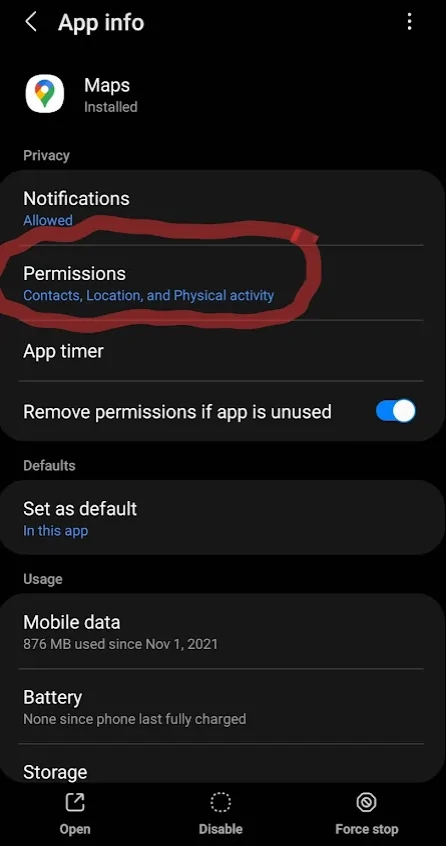
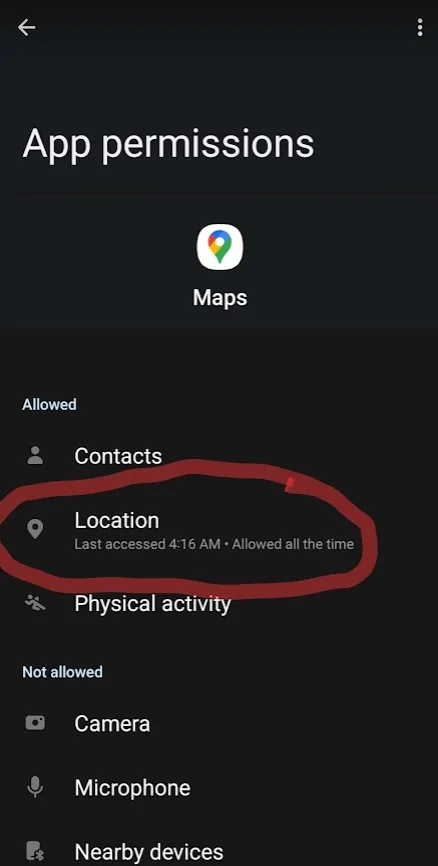
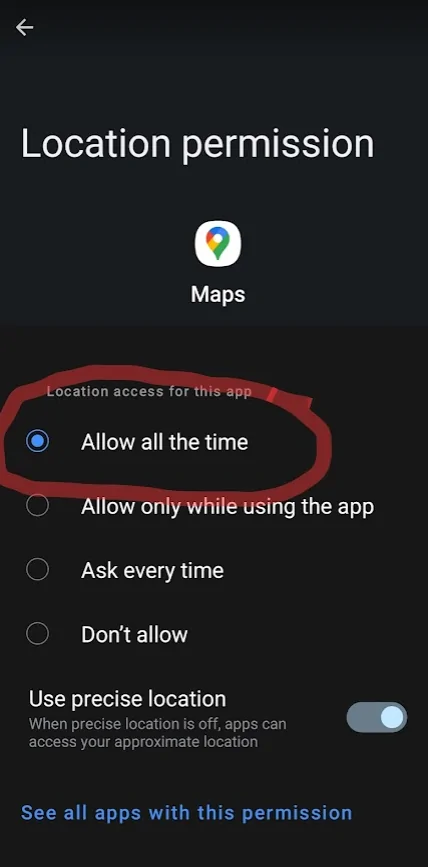
It's not clear from the discussion if you did this or not, but here is what I see when I select "Maps" from the Apps screen in the settings:

Ford Mustang Mach-E Solved! Google Maps location Permission issue 1646148806088


Ford Mustang Mach-E Solved! Google Maps location Permission issue 1646148840459


Ford Mustang Mach-E Solved! Google Maps location Permission issue 1646148872567
 
OP
OP
Astraea

Astraea

Well-Known Member
Joined
Mar 20, 2021
Threads
17
Messages
362
Reaction score
547
Location
NY
Vehicles
MMe Premium AWD ER
Country flag
It's not clear from the discussion if you did this or not, but here is what I see when I select "Maps" from the Apps screen in the settings:

1646148806088.png


1646148840459.png


1646148872567.png
Yeah I looked into the permissions I had for Google Maps in my settings, it showed it had location permissions but wouldn't work. I ended up uninstalling Google Maps and reinstalling then went back into the app then it prompted me to give permission for location and it worked.
 

Chuck

Well-Known Member
First Name
Chuck
Joined
May 13, 2021
Threads
96
Messages
1,258
Reaction score
1,775
Location
SoCal
Vehicles
Mustang Mach E 2021
Country flag
Yeah I looked into the permissions I had for Google Maps in my settings, it showed it had location permissions but wouldn't work. I ended up uninstalling Google Maps and reinstalling then went back into the app then it prompted me to give permission for location and it worked.
I had a calculus professor in college that often said, "There are so many ways to solve the problem you can't help but get the right answer." Turns out he was talking about life, not just calculus.
 

jdanniel

New Member
First Name
Jack
Joined
Jun 5, 2022
Threads
0
Messages
2
Reaction score
0
Location
New Jersey
Vehicles
Hyundai Elantra
Hello, everyone. I bought a new phone just yesterday. A Motorola Moto G Power. My 2021 Hyundai Elantra's Wireless Android Auto system is doing exactly the same thing. But someone said to uninstall Google Maps on my phone. That isn't possible...there isn't an Uninstall option. It's hard wired into the phone.

My previous phone synched up with Wireless Android Auto flawlessly. I still have it, so I might be able to continue using it for the GPS until I find a fix for my new phone's problem.

Is there anything I can try that hasn't been mentioned here yet? Is there anything I can do, other than uninstall Google Maps?

I tried installing Waze, and couldn't get that to work, either.

Well....let me rephrase that. I can get into the Waze GPS screen, but if I try to use the microphone to announce my destination, it says there was an error.

So, right now, I can't use my new Moto G Power as a GPS on my car. The previous phone (Samsung A11) I never had a problem with.
Thank you!
 

krazieboy

Well-Known Member
Joined
Jun 4, 2021
Threads
7
Messages
355
Reaction score
211
Location
US
Vehicles
Mustang
Country flag
Under Data, "allow background data usage"
 

jdanniel

New Member
First Name
Jack
Joined
Jun 5, 2022
Threads
0
Messages
2
Reaction score
0
Location
New Jersey
Vehicles
Hyundai Elantra
Good news. I got it working. I did two things:

1) I uninstalled Updates via Google Play Store, then reinstalled Updates.

At first, I thought that would solve the problem.
It didn't. And boy, was I...um....upset.

Then, it hit me. WHAM! I overlooked something. Something so simple, I'm mad at myself for not thinking of this sooner.

I didn't have Mobile Data enabled on the phone.

I enabled that, and voila...Google Maps worked on my dashboard, Waze worked, the whole shebang.
Sponsored


Top