Today’s the DAY getting my BlueCruise!

VegStang

Well-Known Member
First Name
Leo
Joined
Jan 30, 2020
Threads
5
Messages
1,268
Reaction score
1,367
Location
Silicon Valley
Vehicles
Volvo C40 Recharge, 2023 MME
Occupation
Artist, animal rights activist
Country flag
Since I am now past the 1 year anniversary with the car I'm becoming more squeaky, and will be until all the issues I have been dealing with as an early adopter are corrected (as much as possible.)
Sponsored


 

mpshizzle

Well-Known Member
Joined
Mar 22, 2021
Threads
65
Messages
1,274
Reaction score
1,605
Location
Utah
Vehicles
Mustang Mach E 4X
Country flag
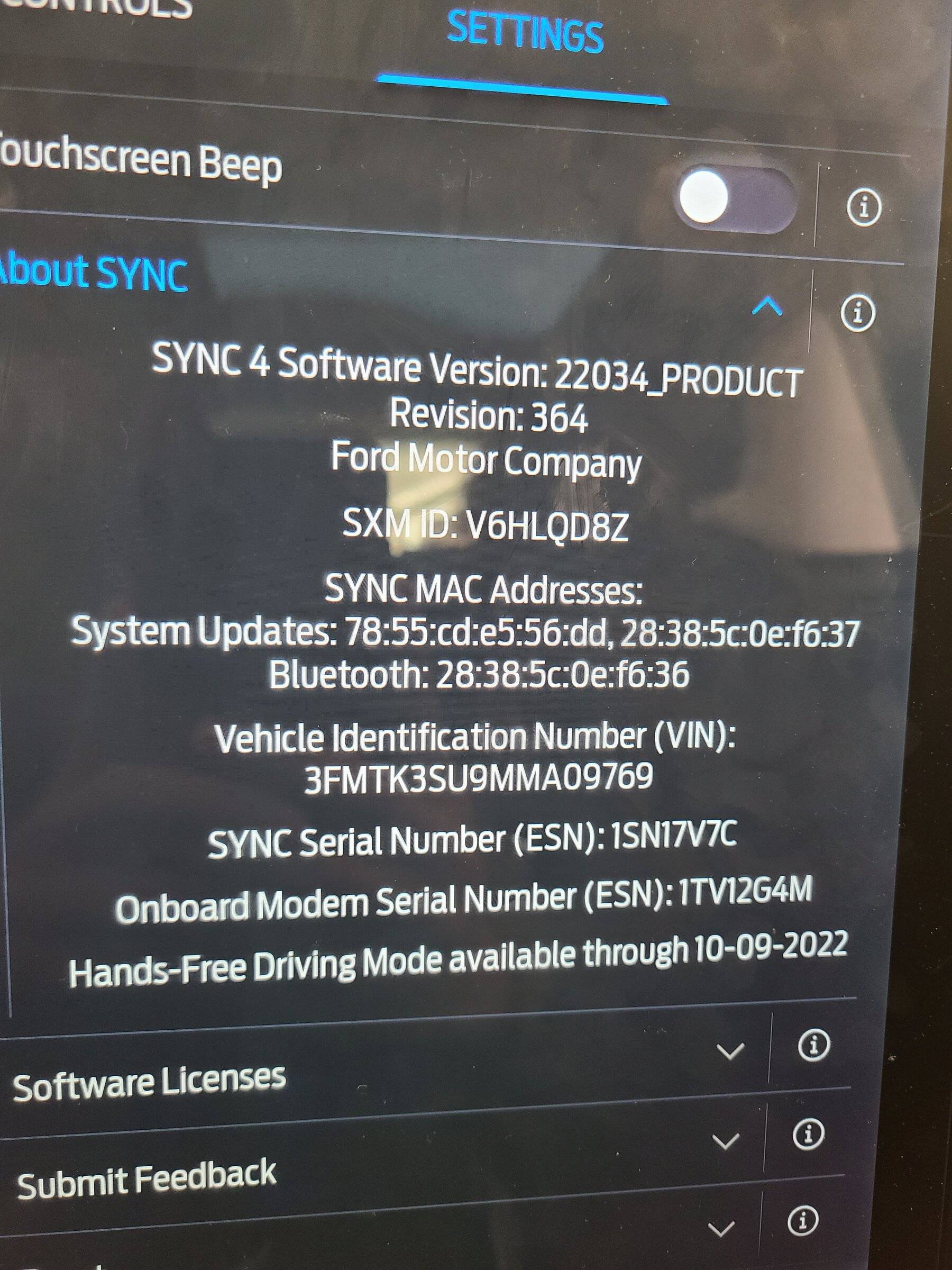
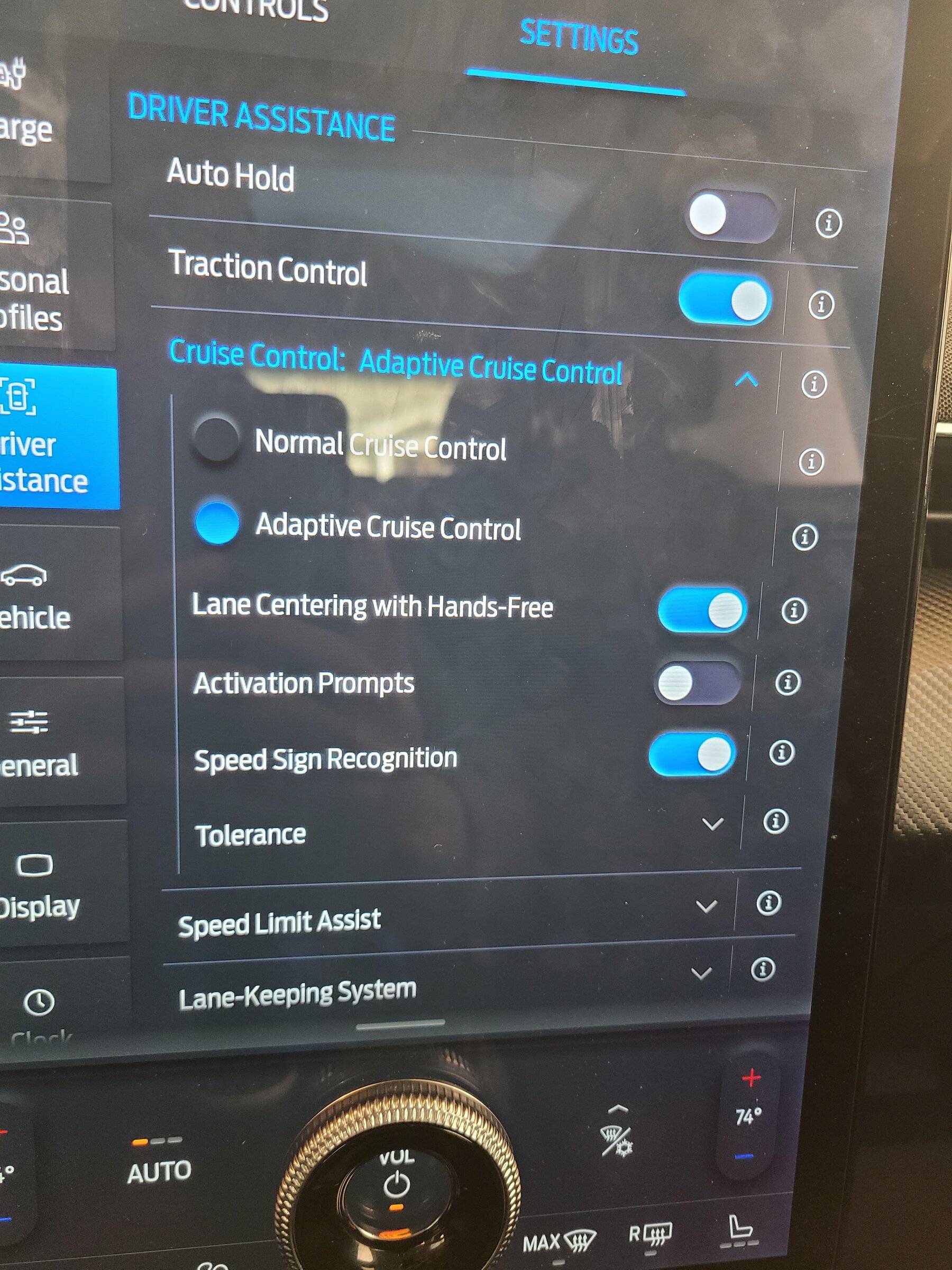
So I'm in a fun situation with mine. I've been keeping up to date with FDRS (I'm not in EAP). A couple of days ago some new updates for my car showed up.

Installed them and my car is all in on blue cruise:
Ford Mustang Mach-E Today’s the DAY getting my BlueCruise! 20220330_130206

Ford Mustang Mach-E Today’s the DAY getting my BlueCruise! 20220330_130222


So I happily jumped on the freeway to try it out and.....

?. Somebody at Ford hasn't pushed the button even though the car clearly has the software
 

Blue highway

Well-Known Member
First Name
Steve
Joined
Oct 15, 2021
Threads
5
Messages
2,693
Reaction score
4,237
Location
Oregon
Vehicles
Mach E Premium SR RWD
Country flag
So I'm in a fun situation with mine. I've been keeping up to date with FDRS (I'm not in EAP). A couple of days ago some new updates for my car showed up.

Installed them and my car is all in on blue cruise:
20220330_130206.jpg

20220330_130222.jpg


So I happily jumped on the freeway to try it out and.....

?. Somebody at Ford hasn't pushed the button even though the car clearly has the software
It's encouraging that the module updates are now available (at least for your spec) through FDRS.

The DIY path is looking much more attractive.

Please share when/if you can get the mothership in Dearborn to push the magic button.
 
OP
OP
Jimrpa

Jimrpa

Well-Known Member
First Name
Jim
Joined
Sep 10, 2020
Threads
297
Messages
9,514
Reaction score
12,845
Location
Wayne, PA
Vehicles
2021 Infinite Blue Premium Mustang Mach E ER AWD
Occupation
Retied (formerly tried to herd highly technical, independent cats)
Country flag
The Arizona, the Missouri, and the Bowfin. All worth seeing when there.
I was extremely honored to be able to attend a private event on board the Arizona the one time I was in HI. Definitely an incredible experience.


mpshizzle

Well-Known Member
Joined
Mar 22, 2021
Threads
65
Messages
1,274
Reaction score
1,605
Location
Utah
Vehicles
Mustang Mach E 4X
Country flag
It's encouraging that the module updates are now available (at least for your spec) through FDRS.

The DIY path is looking much more attractive.

Please share when/if you can get the mothership in Dearborn to push the magic button.
Certainly will! I just called customer service to see what they'd say. When I told her blue cruise wasn't showing in connected services she just got really confused and was like "well the only thing I can find in my help documents is that you'll get a notice. Okay bye!"

Not super helpful but not entirely unexpected either ?‍♂. So I guess it's a waiting game now
 

smaster553

Member
Joined
Mar 30, 2022
Threads
0
Messages
17
Reaction score
7
Location
New Jersey
Vehicles
Mach E 2021 CA Route 1 Space White
Country flag
Yes, I received said email and got an updated to 2.4.2 about ten days ago. Not a thing since. This is like watching water boil. I've been driving (and loving) this car for 13 1/2 months now with 13K miles and have been very patient. 3rd quarter, 4th quarter (last year), now first quarter ending with us sitting here in anticipation. Sad.
"Watch water boil" - how would you feel, if like me, who is stuck on the dreaded v1.7.1. Ford cannot get their act straight. Finally printed TSB 22-2117, wrote a long things to do list, and dropped car off at the dealership. Hoping they fix it.
 

mpshizzle

Well-Known Member
Joined
Mar 22, 2021
Threads
65
Messages
1,274
Reaction score
1,605
Location
Utah
Vehicles
Mustang Mach E 4X
Country flag
"Watch water boil" - how would you feel, if like me, who is stuck on the dreaded v1.7.1. Ford cannot get their act straight. Finally printed TSB 22-2117, wrote a long things to do list, and dropped car off at the dealership. Hoping they fix it.
Did the fix not work?
 

Regularmache

Well-Known Member
First Name
Stephen
Joined
Nov 16, 2019
Threads
16
Messages
1,020
Reaction score
1,371
Location
US
Vehicles
18 F150 Platinum, 18 Mustang GT PP2, 14 QX80
Occupation
Purchasing
Country flag
I've decided I'll just wait until my 22 GTPE comes in May. My FE premium will hopefully they the update before the next owner buys it. The dealer has a buyer already for our FE.
 

Dolfanrich13

Member
First Name
Rich
Joined
Jan 30, 2022
Threads
0
Messages
14
Reaction score
2
Location
Alabama
Vehicles
Wrangler 4xe
Country flag
So, seriously, I may be getting BlueCruise today. I gave up waiting on OTA and the car is at the dealership today for the update. We'll see. Not sure how much time they'll need to get from 2.4.2 up to 2.5.3 (or whatever it's being called now).
just got my car from dealership how can I verify the new update

no bluecruise options under driver assistance. Disappointing
 

SnBGC

Well-Known Member
First Name
Greg
Joined
Apr 20, 2020
Threads
46
Messages
5,962
Reaction score
9,778
Location
Phoenix
Vehicles
2021 Mach-E FE, 2021 Wrangler 4xe High Altitude
Occupation
Manager
Country flag
I've decided I'll just wait until my 22 GTPE comes in May. My FE premium will hopefully they the update before the next owner buys it. The dealer has a buyer already for our FE.
These cars remain popular still. Was approached on two separate occasions this week by random strangers asking if my car was for sale. ???? Strange.
 

Illinibird

Well-Known Member
First Name
Mike
Joined
Oct 13, 2020
Threads
40
Messages
1,563
Reaction score
1,451
Location
Frankfort Illinois
Vehicles
2015 Acura MDX Adv; 2016 Titanium Fusion Hybrid
Occupation
retired Endodontist (root canal specialist) and Clinical Assistant Professor
Country flag
EARLY ACCESS PROGRAM NOTIFICATION
SOFTWARE UPDATES FIX + BLUECRUISE™ 
Hi,

As you may be aware, we have encountered an issue that’s preventing us from updating your vehicle remotely. We value your participation in the Ford Early Access Program and we want to restore this capability for you as soon as possible. Unfortunately, we need you to go to the Dealer to resolve it. Now for the good news — starting tomorrow, while restoring software update capabilities, your dealer can also add BlueCruise— our hands-free driving technology — which will be available.

Please call your Dealer and mention this reference number for your software update service: TSB 22-2117. This service requires 1-2 hours in most cases, plus additional time for the BlueCruise update. Your Dealer can confirm the BlueCriuse update is available and how long the update will take.

Once you’ve had your vehicle’s update capability reinstated, be sure to set a schedule so future software updates can progress as quickly as possible. As a reminder, scheduling is only for updates that require your vehicle to be off – most updates will happen seamlessly in the background.

Ensure Automatic Updates are set to On
1. Select Settings on your vehicle's SYNC® screen
2. Select System Updates
3. Toggle Automatic Updates to ON

Set a schedule for convenient day(s) and time
We recommend setting your schedule for as many days as possible, at a time you will not need to enter or use your vehicle. You'll always be notified via FordPass™ and on your SYNC screen prior to each update. You’ll then have an opportunity to reschedule if needed.
1. Select Settings on your vehicle’s SYNC screen
2. Select System Updates
3. Select Schedule Updates
a. If no schedule has been set, select the days of the week and time that you typically don’t need access to your vehicle.
b. Your set schedule will be recurring, so every time an update that requires your ignition to be off becomes available, it will be installed at your selected day(s) and time unless changed.
c. If a schedule has already been set, you can come back at any time to change it
4. Select Save

When an update is ready for install, you can also choose to Update Now ahead of your scheduled time. You can do this when prompted on your in-vehicle screen. From your SYNC screen, simply select one of these icons when it appears
Ford Mustang Mach-E Today’s the DAY getting my BlueCruise! 1648756057302
,
Ford Mustang Mach-E Today’s the DAY getting my BlueCruise! 1648756057356
or
Ford Mustang Mach-E Today’s the DAY getting my BlueCruise! 1648756057438
then proceed to Update Now. Or select Settings > System Updates > Update Details > Update Now. Please ensure you have enough time to complete the update, as you will not be able to use your vehicle during this time. Check your FordPass App for the latest information about how long each update will take (typically 15 to 45 minutes).

Thank you! We love having you as part of our Ford Early Access Community. You’re truly making a difference. However, if you no longer wish to participate, you can leave the program by visiting earlyaccess.ford.com/account
Ford Motor Company
Customer Relationship Center
P‌.O‌. Bo‌x 62‌48
Dear‌born‌, M‌I 481‌26​
 

Gullwingdmc

Well-Known Member
First Name
Chip
Joined
May 15, 2021
Threads
85
Messages
2,943
Reaction score
4,110
Location
Boston, MA
Vehicles
2022 Mustang Mach E GT AWD ER - Grabber Blue
Country flag
EARLY ACCESS PROGRAM NOTIFICATION
SOFTWARE UPDATES FIX + BLUECRUISE™ 
Hi,

As you may be aware, we have encountered an issue that’s preventing us from updating your vehicle remotely. We value your participation in the Ford Early Access Program and we want to restore this capability for you as soon as possible. Unfortunately, we need you to go to the Dealer to resolve it. Now for the good news — starting tomorrow, while restoring software update capabilities, your dealer can also add BlueCruise— our hands-free driving technology — which will be available.

Please call your Dealer and mention this reference number for your software update service: TSB 22-2117. This service requires 1-2 hours in most cases, plus additional time for the BlueCruise update. Your Dealer can confirm the BlueCriuse update is available and how long the update will take.

Once you’ve had your vehicle’s update capability reinstated, be sure to set a schedule so future software updates can progress as quickly as possible. As a reminder, scheduling is only for updates that require your vehicle to be off – most updates will happen seamlessly in the background.

Ensure Automatic Updates are set to On
1. Select Settings on your vehicle's SYNC® screen
2. Select System Updates
3. Toggle Automatic Updates to ON

Set a schedule for convenient day(s) and time
We recommend setting your schedule for as many days as possible, at a time you will not need to enter or use your vehicle. You'll always be notified via FordPass™ and on your SYNC screen prior to each update. You’ll then have an opportunity to reschedule if needed.
1. Select Settings on your vehicle’s SYNC screen
2. Select System Updates
3. Select Schedule Updates
a. If no schedule has been set, select the days of the week and time that you typically don’t need access to your vehicle.
b. Your set schedule will be recurring, so every time an update that requires your ignition to be off becomes available, it will be installed at your selected day(s) and time unless changed.
c. If a schedule has already been set, you can come back at any time to change it
4. Select Save

When an update is ready for install, you can also choose to Update Now ahead of your scheduled time. You can do this when prompted on your in-vehicle screen. From your SYNC screen, simply select one of these icons when it appears
image001.jpg
,
image002.jpg
or
image003.jpg
then proceed to Update Now. Or select Settings > System Updates > Update Details > Update Now. Please ensure you have enough time to complete the update, as you will not be able to use your vehicle during this time. Check your FordPass App for the latest information about how long each update will take (typically 15 to 45 minutes).

Thank you! We love having you as part of our Ford Early Access Community. You’re truly making a difference. However, if you no longer wish to participate, you can leave the program by visiting earlyaccess.ford.com/account
Ford Motor Company
Customer Relationship Center
P‌.O‌. Bo‌x 62‌48
Dear‌born‌, M‌I 481‌26​
What issues did you have?
Sponsored


Top