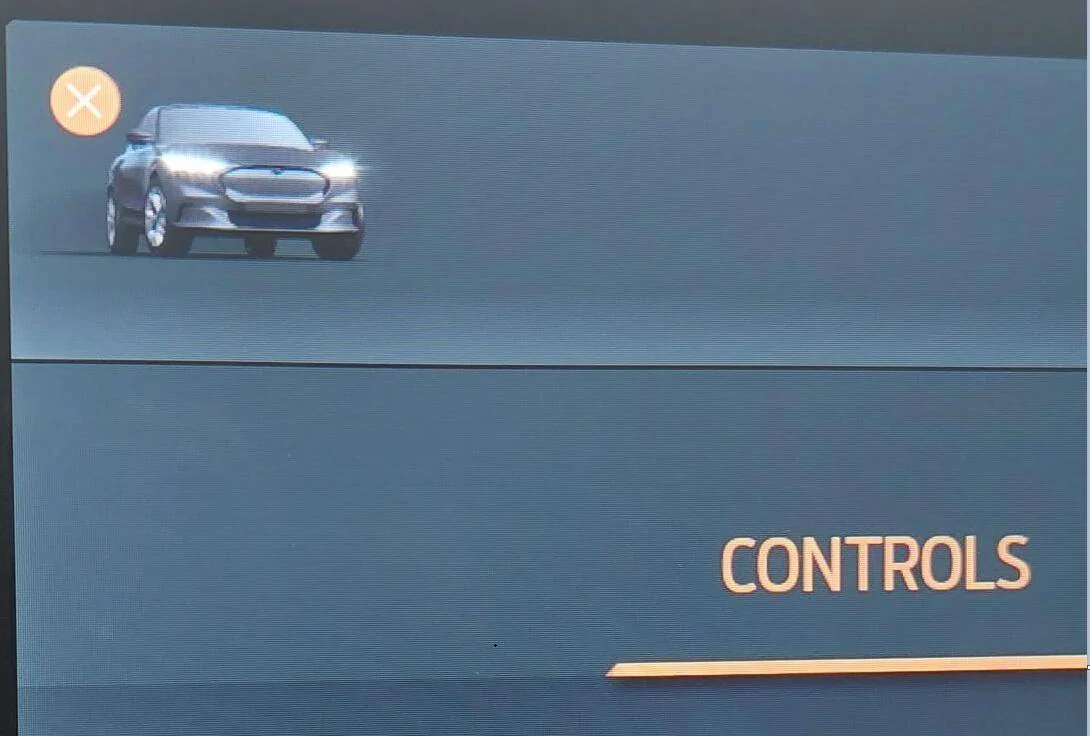
What does X icon mean on Touch Screen?

SoriceConsulting

Well-Known Member
First Name
Sal
Joined
Oct 10, 2020
Threads
29
Messages
469
Reaction score
469
Location
NJ, USA
Website
sorice.com
Vehicles
2023 GTPE, Rapid Red
Occupation
IT Consultant
Country flag
Not sure if it matters, but 2 things that may have caused this...

1. I had my Dealer do the TSB 21-2310 (and they 'Reprogrammed APIM to latest level as per TSB'), as I was having some Android issues.
2. I just received the Ford notification about the Pano Roof / Windshield recall.

That out of the way...

Now my car has a big X on the car icon on the Touchscreen:

Ford Mustang Mach-E What does X icon mean on Touch Screen? Mach-E X on Icon


It comes and goes (think it goes away when I'm in Settings, but not sure - I'd have to take better notes... :^)

Has anyone seen this? I'm thinking it may have to do with the recalls but not sure.
Sponsored

 

JohnnyForensic

Well-Known Member
First Name
John
Joined
Apr 14, 2021
Threads
44
Messages
1,208
Reaction score
2,191
Location
VA, US
Vehicles
'21 Infinite Blue MME 4X Premium
Occupation
Digital Forensics
Country flag
It means you can hit that button to close that screen. The functionality hasn’t changed, but I guess some people didn’t know how to get out of it after hitting the car icon, so they tried to make it more clear. This change came with the latest Sync update.
Yeah, I only figured out recently that I could tap the car to both open AND close the settings menu. I normally ended-up going back through the app drawer by tapping my icon in the center (because I, too, am self-centered). The (X) is there now to tell people like me, "Hey, this closes the settings screen once you've opened it."

On the other hand, it means you should also have the Notes/Calculator/Tic-Tac-Toe app and Apple Maps directions in your instrument cluster!
 

SashaLondon

Well-Known Member
First Name
Sasha
Joined
Sep 11, 2020
Threads
32
Messages
1,393
Reaction score
1,500
Location
London
Vehicles
MME AWD SR
Country flag
I think it’s a terrible design. Why is it so close to the car.


OP
OP
SoriceConsulting

SoriceConsulting

Well-Known Member
First Name
Sal
Joined
Oct 10, 2020
Threads
29
Messages
469
Reaction score
469
Location
NJ, USA
Website
sorice.com
Vehicles
2023 GTPE, Rapid Red
Occupation
IT Consultant
Country flag
Yeah, I only figured out recently that I could tap the car to both open AND close the settings menu. I normally ended-up going back through the app drawer by tapping my icon in the center (because I, too, am self-centered). The (X) is there now to tell people like me, "Hey, this closes the settings screen once you've opened it."

On the other hand, it means you should also have the Notes/Calculator/Tic-Tac-Toe app and Apple Maps directions in your instrument cluster!
I saw the 'Notes' app but don't remember seeing the others. Will check today. I'm also still on PowerUp 1.4 - though after the dealer installed updates thought I'd be at 1.7.1. Will check to see if anything updated today on that front as well.. Don't think I like the X icon - I always intuitively hit the car icon to toggle back and forth. To me, the X makes it look like something is wrong.
 

jimwheel

Member
First Name
jim
Joined
Dec 8, 2021
Threads
0
Messages
11
Reaction score
8
Location
Fuquay Varina
Vehicles
2021 Mach-E
Country flag
I saw the 'Notes' app but don't remember seeing the others. Will check today. I'm also still on PowerUp 1.4 - though after the dealer installed updates thought I'd be at 1.7.1. Will check to see if anything updated today on that front as well.. Don't think I like the X icon - I always intuitively hit the car icon to toggle back and forth. To me, the X makes it look like something is wrong.

i just saw the 'x' on the app drawer icon after the dealer had to update mme software and also thought something was wrong in the drawer. Not an intuitive way of showing the functionality.
Sponsored


Top