Ford Motor Company

Well-Known Member
Official Ford Account
First Name
Brian
Joined
May 10, 2021
Threads
68
Messages
3,456
Reaction score
6,530
Location
Michigan
Vehicles
Mustang Mach-E
Occupation
Real Human & Community Manager
Country flag
Ford Mustang Mach-E Software Update 6.14 Rolling Out to Mustang Mach-E 43241


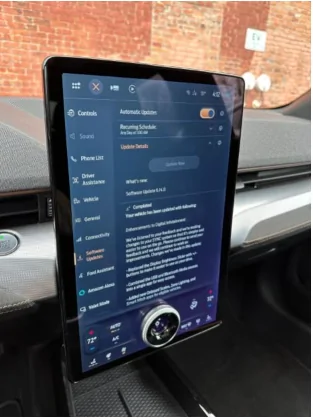
Hi owners! We’re happy to announce that Software Update 6.14 is rolling out to Mustang Mach-Es. What you share with us in these owner forums and through In-Vehicle Voice Feedback are direct inputs to some of these changes, and we appreciate your continued passion for building an electric future alongside us. The update brings the following:
  • Replaced the Display Brightness Slider with +/- buttons to make it easier to use on your drive.
  • Combined the USB and Bluetooth media sources into a single app for easy access.
  • Moved the Sketch app into the “Entertainment” page so it’s easier to find.
  • Updated the icons on the top bar to make them easier to see.
  • Added a phone battery icon on the phone app screens.
  • The Public Charging application, previously known as Charge Assist, can be located in your application drawer, where other apps live.
  • You can now start and pay for charging on the BlueOval™ Charge Network without requiring a smartphone. Filter by charge speed and network while staying informed about real-time information about new chargers, such as availability and those under repair.
  • A new map view has been added, allowing you to visibly search for nearby chargers and quickly see what’s available.
  • Frunk Release – For MY21 and MY21.5 that have had the BCM update (which opens the frunk electronically), this update adds the button to their SYNC screen.

Software updates are designed to help make your vehicle better over time. We want to make sure you are getting the latest and greatest new features and improvements like this delivered to your vehicle.
As a friendly reminder make sure you:
  1. Have Automatic Software Updates turned ON – this keeps updates coming as they roll out.
  1. Set a Recurring Schedule – software updates may happen seamlessly in the background while you are driving, while others may require you to park and exit your vehicle so set the schedule for a time when you know you won’t need to drive the vehicle, like overnight.

Below is a quick step-by-step and here is a video of how to do this and some things to know about software updates on your vehicle.

How-To Guide:
Turn ON Automatic Software Updates
  • Go to “Settings” on your vehicle’s SYNC screen
  • Choose “Software Updates”
  • Toggle “Automatic Updates” to ON
Set a Recurring Schedule
  • Go to “Settings” on your vehicle’s SYNC screen
  • Choose “Software Updates”
  • Press “Schedule Updates” or “Recurring Update Schedule”

Things to Know:
  • Don’t skip your Automatic Software Updates – this impacts all future updates.
  • If an update requires you to be parked, you will receive a reminder in your vehicle (24 hours prior) and in your FordPass App. You can reschedule up to 2 mins before the update begins.
  • Software updates are not deployed to all vehicles at the same time and are done on a rolling basis – for example, your neighbor might get an update before you do.
  • While not required, we recommend connecting to WiFi for an improved update experience. If Wi-Fi is not available, your update will be delivered using the built-in cellular connection with your vehicle modem.

So, turn ON your Automatic Software Updates, set your schedule and let the updates roll in!
Sponsored

 

CarGuy11

Well-Known Member
Joined
Dec 11, 2022
Threads
49
Messages
1,035
Reaction score
493
Location
Pittsburgh
Vehicles
2022 MachE4X Prem, 2020 GRSupra, 2016 Corvette Z51, 2024 Emira
Country flag
Can we get a split screen or bar to show song & title playing? Its a huge screen but doesn't have that function & the instrument cluster have audio either. Thanks!
 

Mirak

Banned
Banned
Joined
Oct 8, 2020
Threads
111
Messages
3,754
Reaction score
6,166
Location
Kansas
Vehicles
"Sonic" 2021 MME Grabber Blue First Edition
Country flag
Hi owners! We’re happy to announce that Software Update 6.14 is rolling out to Mustang Mach-Es. What you share with us in these owner forums and through In-Vehicle Voice Feedback are direct inputs to some of these changes, and we appreciate your continued passion for building an electric future alongside us. The update brings the following:
  • Replaced the Display Brightness Slider with +/- buttons to make it easier to use on your drive.
  • Combined the USB and Bluetooth media sources into a single app for easy access.
  • Moved the Sketch app into the “Entertainment” page so it’s easier to find.
  • Updated the icons on the top bar to make them easier to see.
  • Added a phone battery icon on the phone app screens.
  • The Public Charging application, previously known as Charge Assist, can be located in your application drawer, where other apps live.
  • You can now start and pay for charging on the BlueOval™ Charge Network without requiring a smartphone. Filter by charge speed and network while staying informed about real-time information about new chargers, such as availability and those under repair.
  • A new map view has been added, allowing you to visibly search for nearby chargers and quickly see what’s available.
  • Frunk Release – For MY21 and MY21.5 that have had the BCM update (which opens the frunk electronically), this update adds the button to their SYNC screen.
You moved the Sketch app to make it easier to find… but trunk access is still buried under settings?

Opening the trunk is not a setting. It is a common function. So common that cars almost always come with a physical button, usually near the driver’s left knee. The Mach E replaced that with a max defrost button, even though that already exists on the SYNC Home Screen.

So if keeping score, that’s TWO ways to activate max defrost with a single tap - ZERO ways to pop the trunk with a single tap.

Instead, I have to first tap into settings, and then hunt for the little trunk button. This is ANNOYING when I’m picking up / dropping off kids and they want me to pop the trunk. It takes more time and thought than it should.

PLEASE PIN TRUNK ACCESS TO THE TOP RIBBON OF HOME SCREEN, @Ford Motor Company.
 

generaltso

Well-Known Member
Joined
Jun 24, 2020
Threads
76
Messages
15,389
Reaction score
28,694
Location
Vermont
Vehicles
2024 Kia EV9 GT-Line
Country flag
Can we get a split screen or bar to show song & title playing? Its a huge screen but doesn't have that function & the instrument cluster have audio either. Thanks!
Or maybe just include that useful info in the tiles at the bottom. It could be called the "retro" update.


4sallypat

Well-Known Member
First Name
Pat
Joined
Mar 30, 2022
Threads
103
Messages
2,806
Reaction score
2,463
Location
Southern California
Website
www.kudo-ume-farms.com
Vehicles
'23 MME delivered May '23 + '22 Lightning July '22
Occupation
Network Tech
Country flag
Does this mean we can now see Tesla Superchargers on our Ford Navigation map while we drive ?

That was my pet peeve while on the move. Charge Assist / Public Charging only works to show Tesla SC while parked.
  • "A new map view has been added, allowing you to visibly search for nearby chargers and quickly see what’s available."
 

Mach-Lee

Well-Known Member
First Name
Lee
Joined
Jul 16, 2021
Threads
262
Messages
11,348
Reaction score
24,969
Location
Wisconsin
Vehicles
2022 Mach-E Premium AWD
Occupation
Sci/Eng
Country flag
Does this mean we can now see Tesla Superchargers on our Ford Navigation map while we drive ?

That was my pet peeve while on the move. Charge Assist / Public Charging only works to show Tesla SC while parked.
  • "A new map view has been added, allowing you to visibly search for nearby chargers and quickly see what’s available."
Nope.
 

FrankieD

Well-Known Member
First Name
Frankie
Joined
Feb 5, 2023
Threads
30
Messages
145
Reaction score
71
Location
Atlanta, GA
Vehicles
2023 Mach-E GTPE
Country flag
@Ford Motor Company - I would still like to see the more charging info, on either screen, without having to turn the car on. Specifically the charge speed - I don’t want to have to open the app or look at the screen on the charger to find this info. Tesla charges don’t have screens so it’s even more reason to have that info show in the car


Top