HRT_Florida913

Active Member
First Name
Reinhard
Joined
Feb 5, 2021
Threads
2
Messages
39
Reaction score
45
Location
Fort Myers, Florida
Vehicles
Infinite Blue Metallic MME, PR ER AWD, Mar 30, 21
Occupation
Retired
Country flag
Do you have your car yet? I'll be at the Ft. Myers Brewery with mine on Wednesday afternoon.
That's cool, I live maybe a mile west of it. If you PM me your approximate time I come by and see you and your awesome car. :)
Sponsored


capt_jak_harkness

Well-Known Member
Joined
Jan 29, 2021
Threads
6
Messages
136
Reaction score
271
Location
IL
Vehicles
Mustang Mach E Premium
Country flag
I found the unlock all our driver door option in the remote-open but where in the myriad menus did you find that option for PaaK/fob?
I'm only aware of the option in Settings>Vehicle>Locks>Remote Unlock

It's not mentioned or obvious that this has anything to do with PaaK, but I was just wondering if somewhere in the code Fob/PaaK is also impacted by this selection.

(I still can't get the ambient light selection to stick in my profile settings, so who knows where gremlins in the code exist.)

Sorry if I led you astray or caused you wasted time digging!
 
OP
OP
ChasingCoral

ChasingCoral

Well-Known Member
First Name
Mark
Joined
Feb 3, 2020
Threads
502
Messages
14,318
Reaction score
28,680
Location
Maryland
Vehicles
2021 GB E4X FE, 2022 F-150 Lightning Lariat ER
Occupation
Retired oceanographer
Country flag
I'm only aware of the option in Settings>Vehicle>Locks>Remote Unlock

It's not mentioned or obvious that this has anything to do with PaaK, but I was just wondering if somewhere in the code Fob/PaaK is also impacted by this selection.

(I still can't get the ambient light selection to stick in my profile settings, so who knows where gremlins in the code exist.)

Sorry if I led you astray or caused you wasted time digging!
No worries. I’m problem-solving PaaK too.
 

Nav

Well-Known Member
Joined
Sep 28, 2020
Threads
6
Messages
307
Reaction score
322
Location
Fairfax, VA
Vehicles
'21 MME Premium SR AWD
Country flag
I still can't get the ambient light selection to stick in my profile settings
On the Drive Modes screen, do you have the Auto Ambient Light Selection toggled to On? If so, turn Off. Sorry if you already tried this or are aware. I just had the realization the other day of why my light selection wasn't sticking. Every time you change drive modes, it auto selects the ambient light color if this setting is left on.
 

methorian

Well-Known Member
Joined
Nov 18, 2019
Threads
18
Messages
1,558
Reaction score
2,437
Location
Roanoke, VA
Vehicles
2021 Mach-E First Edition, 2025 Kia EV6 GT-Line
Occupation
IT Admin
Country flag
On the Drive Modes screen, do you have the Auto Ambient Light Selection toggled to On? If so, turn Off. Sorry if you already tried this or are aware. I just had the realization the other day of why my light selection wasn't sticking. Every time you change drive modes, it auto selects the ambient light color if this setting is left on.
The Auto Ambient Light selection is one of those settings that likes to revert back to On 90% of the time for me. Found that if I change profiles via the numbered buttons on the drivers door, and then back to mine, it generally pulls it correctly though.
 
  • Wow
Reactions: Nav


OP
OP
ChasingCoral

ChasingCoral

Well-Known Member
First Name
Mark
Joined
Feb 3, 2020
Threads
502
Messages
14,318
Reaction score
28,680
Location
Maryland
Vehicles
2021 GB E4X FE, 2022 F-150 Lightning Lariat ER
Occupation
Retired oceanographer
Country flag
The Auto Ambient Light selection is one of those settings that likes to revert back to On 90% of the time for me. Found that if I change profiles via the numbered buttons on the drivers door, and then back to mine, it generally pulls it correctly though.
Are you making all your selections then pressing and holding your number on the memory pad on the door? That’s what locks them in.
 

eltonlin

Well-Known Member
Joined
Oct 4, 2020
Threads
8
Messages
1,184
Reaction score
1,503
Location
NorCal
Vehicles
FE Gray
Country flag
Are you making all your selections then pressing and holding your number on the memory pad on the door? That’s what locks them in.
I thought I read in the manual that changing settings are supposed to save automatically, and the memory pad on the door was strictly for seat settings?
 

agoldman

Well-Known Member
Joined
Jan 23, 2020
Threads
54
Messages
3,007
Reaction score
2,482
Location
Charleston, SC
Vehicles
2024 Mach E GT vapor blue- perf pack-alloy wheels
Country flag
The only way I can get settings other than seat to stick is to not use profiles. Then even the ambient and audio settings stick.
 

Juan-Marco

Well-Known Member
First Name
Juan-Marco
Joined
Feb 11, 2021
Threads
0
Messages
81
Reaction score
100
Location
British Columbia
Vehicles
Audi S5
Country flag
Also posted in a new thread about Paak requiring cell service:
https://www.macheforum.com/site/threads/paak-seems-to-require-cellular-service.4231/

Lots of folks on the Forum are indicating that PaaK isn’t ready for prime time. While many folks have indicated they were giving up on it. I’ve gone all-in on Paak and normally leave my fob at home. For this trip to Florida I brought the fob but carried it in the glove compartment wrapped in two faraday bags so Marlin wouldn’t “see” it. Once we got here to Marco I left it in the condo in a suitcase. That means when the 5 March Everglades incidents cropped up, I had no fob to fall back on. It’s now back in the glove box due to the Everglades Incidents below.

General issues:
Sometimes Marlin sees the phone, sometimes he doesn’t. My iPhone 12Pro may be working better for recognition to unlock than my wife’s iPhone 7. However, that may just be because I'm driving most of the time. Unlocking the driver’s door is the most reliable, lift gate second, passenger door the least. In fact, I'm starting to wonder if PaaK is working on the passenger door at all. Often we’ll have to wake up the phone and start or activate the app to get it to work. Sometimes we have to press unlock on the app. Sometimes we have to resort to the key pad to open the car. The phone really needs to be sitting on the charging pad to start the car. Starting almost never works with the phone in a back pocket. Walk-away lock has become unreliable, too. It often works great — probably most of the time. Sometimes it doesn’t. That’s not reliable for locking a vehicle in a city.

The Everglades Incidents:
PaaK failed miserably and consistently when there was no cell coverage. Many parts of the Everglades have absolutely no cell signal. This is true of many big National Parks. First, PaaK wouldn’t work at all at the Shark Valley Visitor Center. It would neither open the doors, nor start the car, even if the phone was connected to the USB. The app would not start on the phone since it couldn’t connect to the mothership (won't get past the first Ford splash screen). We had to use the door and start backup codes. Once in Miami for the charge at the Miami International Mall PaaK was working fine. Then we entered the Park through the main entrance. Once a short distance past the Visitor Center, we had no cell signal again. The rest of the day in Everglades National Park, PaaK would not open doors or start the car. Every hike, every boardwalk, etc., we had to use the door and start codes. If I left Marlin on and got out to the pictures, the security system would require a key to put the car into drive. Since the PaaK wasn’t working, that meant waiting for a minute for the passcode prompt to appear and then entering the start code again -- every, single time.

If you're going to be out of cell phone coverage, I recommend you have your fob with you as a backup.
I just want to thank you Mark for the pioneer work you did.I'm sorry it had to be you that blazed the trail, but I honestly belief your experience benefits all of us waiting.
The problems with your car that were brought to Ford's attention, I know is what prompted the delay on my car.
If I received my car without the need to deal with issues after waiting this long, I thank you for your sacrifice.
I'm glad that everything has worked out for you finally and I'm confident the lesser remaining technical issues will be resolved OTA soon.
 
OP
OP
ChasingCoral

ChasingCoral

Well-Known Member
First Name
Mark
Joined
Feb 3, 2020
Threads
502
Messages
14,318
Reaction score
28,680
Location
Maryland
Vehicles
2021 GB E4X FE, 2022 F-150 Lightning Lariat ER
Occupation
Retired oceanographer
Country flag
I just want to thank you Mark for the pioneer work you did.I'm sorry it had to be you that blazed the trail, but I honestly belief your experience benefits all of us waiting.
The problems with your car that were brought to Ford's attention, I know is what prompted the delay on my car.
If I received my car without the need to deal with issues after waiting this long, I thank you for your sacrifice.
I'm glad that everything has worked out for you finally and I'm confident the lesser remaining technical issues will be resolved OTA soon.
Glad to have helped!
 

portlandg

Well-Known Member
First Name
grahame
Joined
Mar 17, 2020
Threads
7
Messages
2,931
Reaction score
3,668
Location
Dorset UK
Vehicles
Black RWD ER and loving it
Occupation
Cabinet maker
Country flag
I just want to thank you Mark for the pioneer work you did.I'm sorry it had to be you that blazed the trail, but I honestly belief your experience benefits all of us waiting.
The problems with your car that were brought to Ford's attention, I know is what prompted the delay on my car.
If I received my car without the need to deal with issues after waiting this long, I thank you for your sacrifice.
I'm glad that everything has worked out for you finally and I'm confident the lesser remaining technical issues will be resolved OTA soon.
Quite agree. Well said. Mine is having a little cruise up the East Coast and then hopefully will be making its way across the pond. By the time it gets to me I am hoping that Ford will have a fix for all the problems that you guys have had and I am sure that all of us over this side would like to thank those you who have had your cars delivered and had issues with them for being the "testers". I hope you have all had fixes applied and are now enjoying yours cars full potential.
 

dbsb3233

Well-Known Member
First Name
TimCO
Joined
Dec 30, 2019
Threads
56
Messages
10,100
Reaction score
11,965
Location
Colorado, USA
Vehicles
2021 Mustang Mach-E FE, 2025 Porche Macan Electric
Occupation
Retired
Country flag
I thought I read in the manual that changing settings are supposed to save automatically, and the memory pad on the door was strictly for seat settings?
Settings are supposed to save how you last left them within each profile. But the 1-2-3 door buttons do more than just save the seat/mirror settings. When you link a door button# to a personal profile, pressing a button to change between #'s implements that whole profile.

So for instance, let's say you're saved as door code #1, and it's linked to your personal profile. If some settings didn't implement as they should at startup (a common problem), press #2 or #3 to switch to that, then press #1 to switch back. That forces the whole profile to be implemented again (seats, mirrors, and all the saved settings for #1). In other words, it does what's supposed to happen at startup (but sometimes fails to fully do).
 

dbsb3233

Well-Known Member
First Name
TimCO
Joined
Dec 30, 2019
Threads
56
Messages
10,100
Reaction score
11,965
Location
Colorado, USA
Vehicles
2021 Mustang Mach-E FE, 2025 Porche Macan Electric
Occupation
Retired
Country flag
The only way I can get settings other than seat to stick is to not use profiles. Then even the ambient and audio settings stick.
Yep, turning Personal Profiles OFF seems to eliminate most of the spotty startup problems. For you it seemed to be some settings not saving to the profile, for me it was those saved settings not fully implementing on startup (thus why manually switching door codes to another # and back forced them to implement).

But either way, turning off Personal Profiles completely seems to sidestep that whole problem.
 
OP
OP
ChasingCoral

ChasingCoral

Well-Known Member
First Name
Mark
Joined
Feb 3, 2020
Threads
502
Messages
14,318
Reaction score
28,680
Location
Maryland
Vehicles
2021 GB E4X FE, 2022 F-150 Lightning Lariat ER
Occupation
Retired oceanographer
Country flag
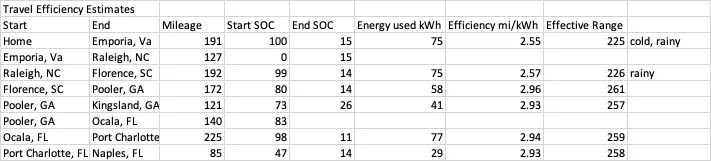
I've analyzed my mileage on the trip so far and looked at pricing.

Hint #1: If you have a choice, use your free 250kWh of charging at EA stations that charge by the kWh rather than those that charge by the minute. EA stations in by-the-minute states are about half the price per kWh of the ones in by-the-kWh states. At least this was the case in NC, SC, and GA.

No surprise here: range is better in milder temperatures and dry conditions than cold or rainy conditions:

Ford Mustang Mach-E My Travels With Marlin (GB FE) 1615433644997

Travel was almost all interstate, 95% Intelligent Cruise at 70-80 mph
 
OP
OP
ChasingCoral

ChasingCoral

Well-Known Member
First Name
Mark
Joined
Feb 3, 2020
Threads
502
Messages
14,318
Reaction score
28,680
Location
Maryland
Vehicles
2021 GB E4X FE, 2022 F-150 Lightning Lariat ER
Occupation
Retired oceanographer
Country flag
Charging Sessions, good and bad:

After picking Marlin up the evening of 26 February I reprogrammed profiles, PAAK, Plug & Charge, etc. that were lost in the reset during Marlin’s PDU transplant (a minor inconvenience to get him healthy again!). I have the confirmation message in the FordPass app that I turned on Plug & Charge.

27 February: Shakedown drive and attempted P&C in Columbia, MD. No luck with P&C, successfully charged using the EA app to initiate charging sessions.

Days 1 & 2 of drive: Failed P&C at EA stations in Emporia, VA (Signet? 350kW) on 28 Feb., Florence, SC (Signet? 350kW) and Puller, GA (ABB 350kW) on 1 March. Succeeded in initiating charging using EA app all three times. Realized P&C was no longer turned on in FordPass app. When I tried to turn it on using my phone, app just spun. On my wife’s phone it gave an error about unable to complete action. Was emailing with Cole Buccafurri regarding P&C instructions he sent me and I mentioned these issues to him as well. Charged fine on a ChargePoint station in Kingsland, GA using RFID charging card (125kW-shared unit, only person using either station but never exceeded 70kW).

Emporia, VA EA charging videos:


Florence, SC EA charging video:


Puller, GA EA charging video:


Kingsland, GA ChargePoint charging video:


Day 3 of drive, 2 March: Cole reported the team got our P&C settings overnight (go Team!) and I confirmed it on both my phone and my wife’s. Successful P&C in Port Charlotte, FL (ABB 350kW) and Naples, FL (ABB 350kW #2). Arrived at destination (Marco Island, FL).

Port Charlotte, FL EA charging video (successful P&C):


Naples, FL EA charging video (successful P&C):


5 March: Headed to the Everglades. On the way across the state on Tamiami Trail, I checked out the charging stations at National Park Service facilities.
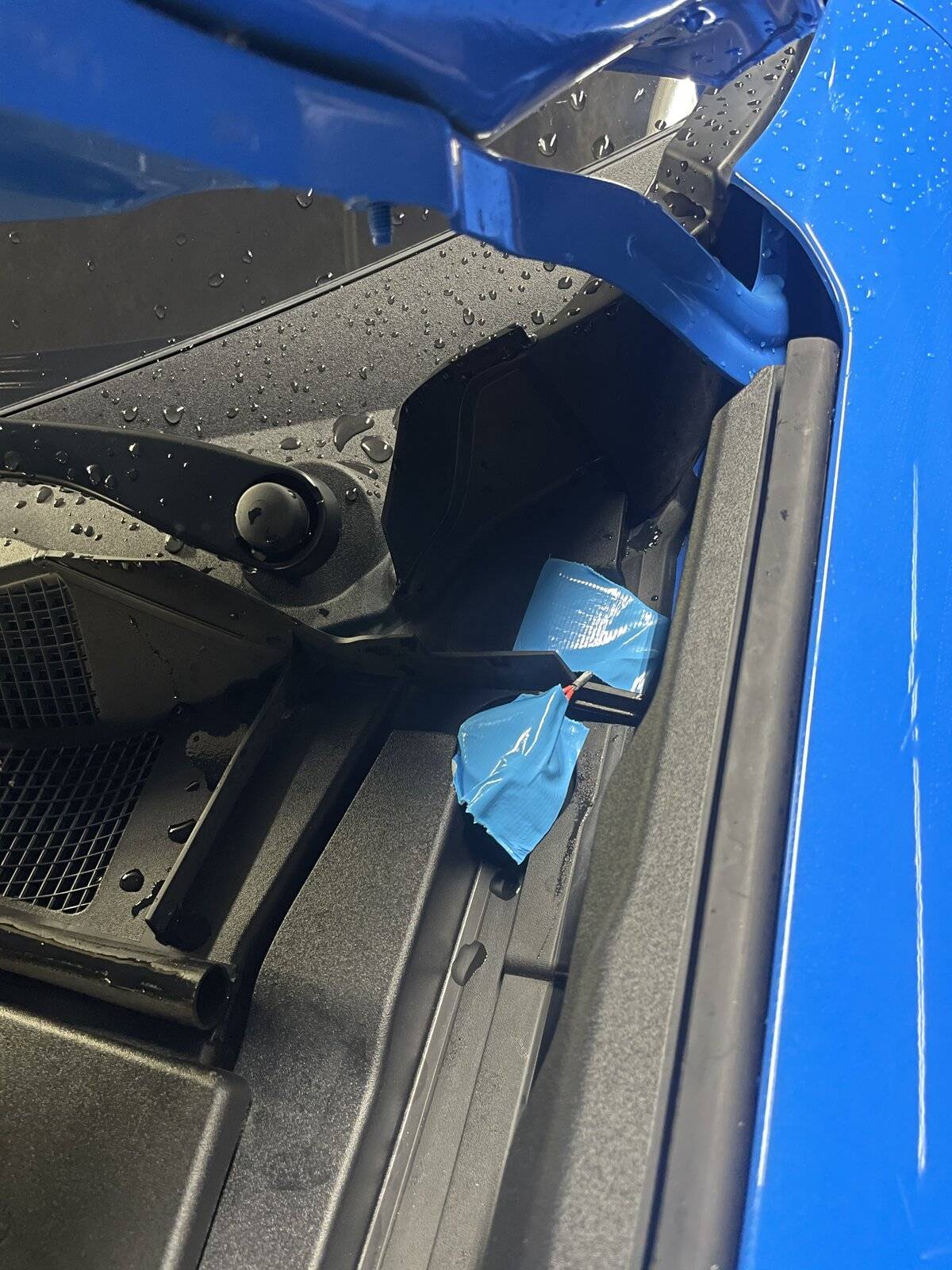
Charging issue #1: The Shark Valley Visitor center had a pair of SemaConnect L2 chargers (fee, $2/hr). We decided to test them while we talked to the rangers there about reserving a tour. SemaConnect failed to authorize the session. After failing, it also failed to release the lock. I was unaware these units would engage a the lock in the Mach E charger despite only being J-1772 plugs. We couldn’t get the SemaConnect units to initiate the release of the lock. We also couldn’t try to release it from the center screen as PAAK failure prevented us from accessing the center screen (see PAAK issues below). Because there was no cell signal, we couldn’t try forcing it from within the SemaConnect app, nor could we call SemaConnect for customer service. We ended up removing the Rear and Left Luggage Compartment (Beauty) Covers in the Frunk to access the manual release cable. Like the jumper cable connection points, this seems to be another item that should not require so much panel removal to access. The manual release worked to free us from the charger.
Shark Valley, FL non-charging video:


I recommend everyone buy a roll of Duck Tape to match your Mach E (Electric Blue is almost a perfect for Marlin) and keep the ripcord available:
8BE49A72-1867-46FA-9E8D-E3D88547A1DA.jpeg


Charging issue #2: Miami International Mall EA station (Signet 150kW). Tried two different stations, P&C failed on both (unable to initiate charging session). I then couldn’t get the EA app to initiate a charging session. Called EA, they reset the Signet charger. P&C failed again but was able to initiate the session using the EA app. Came back to the same station that night and charged using EA app (didn’t even try P&C).

Miami International Mall EA charging video:


6 March: Multiple failures at the same EA charger in Naples, FL used for successful P&C on 2 March (350kW #2). First attempt, P&C initiated charging, then abruptly ended after ~12 kWH of charging. Second attempt, P&C initiated charging, then abruptly ended after ~3 kWH of charging. Could not re-initiate P&C. Tried using the EA app and could not initiate charging. Moved to another 350kW charger, could not initiate P&C or from EA app. Interesting observation: sometimes the LED charging indicators on the Mach E were glowing orange even before I connected the charger. Called WA, they reset the charger (#3) and P&C worked but the charger hung at a 32kW charging rate. She reset charger #2, I moved back to there and P&C worked, reaching about 115kW — a bit slow but battery over 50% SOC by then. Since this charging session started at near 50% SOC, there was no 150kW peak and it stayed at around 100kW to the 80% wall.

Sorry, it was raining. No videos.
10 March:
Two more charging sessions at the same EA station (charger #02) in Naples mentioned twice above. Good news: P&C worked fine to start sessions both times. Bad news: you need to baby sit these things.

1. On the way up to Fort Myers I stopped in for a zap & dash as I wasn't sure I'd have quite enough to get back after meeting folks at the Fort Myers Brewing Company. P&C initiated fine, went inside Walmart, checked the app and it said it would be almost 2 hours to 80%. Went back out to the charger and found it had leveled off at 30kW. I ended the session, plugged it in again. It worked well, running right up to 110kW. Not spectacular but it would do.

2. On the way back to Marco I stopped in for a full 80% charge. P&C worked fine and ran right up to 150kW. After a few kWh the session abruptly ended. Again, I unplugged and reconnected. New session went right up to 150kW and followed the standard charging curve to 80% when I ended the session.
Sponsored


Top