OTA 1.7.1 Stuck, anyone else have issue updating?

Ajax

Well-Known Member
First Name
Ajax
Joined
Mar 26, 2021
Threads
7
Messages
94
Reaction score
110
Location
Minnesota
Vehicles
Infinite Blue 4x Extended
Country flag
Sorry, something you said just struck me...."They completed the TSB but couldn't get the blue cruise update to go through.."

So you're saying that when you check your Sync "About" screen it says you are at Sync version 364 but your BC doesn't work?

And you are as of today unable to schedule multiple weekday software updates?

Those two things don't reconcile.

I'm betting you're about 15 hours of labor away from getting fully BC functional, and now that there was another HVAC, GWM, TCU, and APIM update this past week that's another 2.5 hours (the USB updates are not hard but require the car to shut completely down between updates so the A/B software switch can take place, and that takes like 15 minutes each time waiting for the car to go to sleep).

As far as what the service advisor or tech briefed you when you picked the car up....I would treat that with a ludicrous level of suspicion.

As of this past week's update I am now at Sync version 421 and showing no further updates available. I offer that as a reference for those who may not know what the current version is as of this date..

Mike
Yeah, I'm still at Sync revision 252 and unable as of today to schedule multiple weekday updates. I'm going to call around to other dealerships since the one I had my car at for 3 weeks obviously didn't know what they were doing. I also had an update scheduled for last night, and of course nothing happened.

I'm fairly certain the first dealership did little, if anything, but at least I can toggle updates on. Will make a few calls today to see if there are more knowledgable dealers in the area.
Sponsored


 

louibluey

Well-Known Member
First Name
Joe
Joined
Dec 21, 2020
Threads
60
Messages
888
Reaction score
1,127
Location
NY
Vehicles
FE "Louibluey" GB
Occupation
retired
Country flag
Not sure what charger/power supply you used, but I do know that a 20 amp should be able to keep up depending on the starting state of the 12V battery. I have a 20 amp charger/power supply. I made sure the battery was at a good state of charge before beginning and then put the charger in power supply mode. The lowest I saw the voltage dip to during all of the updates was about 12.3V. This was when all the pumps and fans started running during one of the updates. All the other updates it stayed steady in the 13.2-13.4V range.


This is what, I believe, the real reason is after talking with the tech at my dealer when I was trying to get them to do this before I gave up and ordered the equipment and did it myself. I got the distinct impression that they just started updating some modules and gave up after a few hours.

They did the GWM 1st and it failed (probably removed the USB too soon)
They did the GWM again and it worked.
They reset the APIM twice (Sync module) should have been done very last
Opened and closed the IPMA, CCM, PSCM, and CMR modules tools without updating
Then they updated the CCM and quits for the day (Friday afternoon).

Then on Monday morning, they called me to say the vehicle was updated and BC was working.

Obviously it wasn't working and they hadn't followed the steps. I took it back one more time a week later and they didn't even work on it. They just had the tech come out and tell me they had done everything and it was a problem that Ford corporate had. They even told me that BC hadn't been released on the East coast yet and it was only working in California...

So I got mad and ordered everything and the next weekend did all the updates following the "original" 21G01 instructions in about 4 hours and had BC up and running...
Several of us have recorded 36A during some updates, 20A is not enough. I think some have got by with 30A, at somewhat lower risk. Many of us use the PL6100 60A charger with 100A power supply capacity. It is pricey, although occiassionally goes on sale for under $400. Slight overkill, but a really nice unit. Only last August, it feels like years ago now!
 

Illinibird

Well-Known Member
First Name
Mike
Joined
Oct 13, 2020
Threads
40
Messages
1,563
Reaction score
1,451
Location
Frankfort Illinois
Vehicles
2015 Acura MDX Adv; 2016 Titanium Fusion Hybrid
Occupation
retired Endodontist (root canal specialist) and Clinical Assistant Professor
Country flag
Hopefully I just received good news. Charity from the Ford Early Access Team just called me and a Ford Field Engineer will be at Currie Motors of Frankfort Thursday when my car goes in. He is going to work with the Tech/Mechanic to install all the Startup updates I am missing and then install Blue Cruise. She said it is a long process and to expect them to take 8 to 13 hours to complete the work so I will need to leave the car overnight. I feel excited once again and hope this will end the problem I have been having and that my car will download future OTA Startup updates after they complete the work. It has been really a breath of fresh air to be able to actually talk to and communicate with somebody from Ford about this problem which has been going on since September 2021.
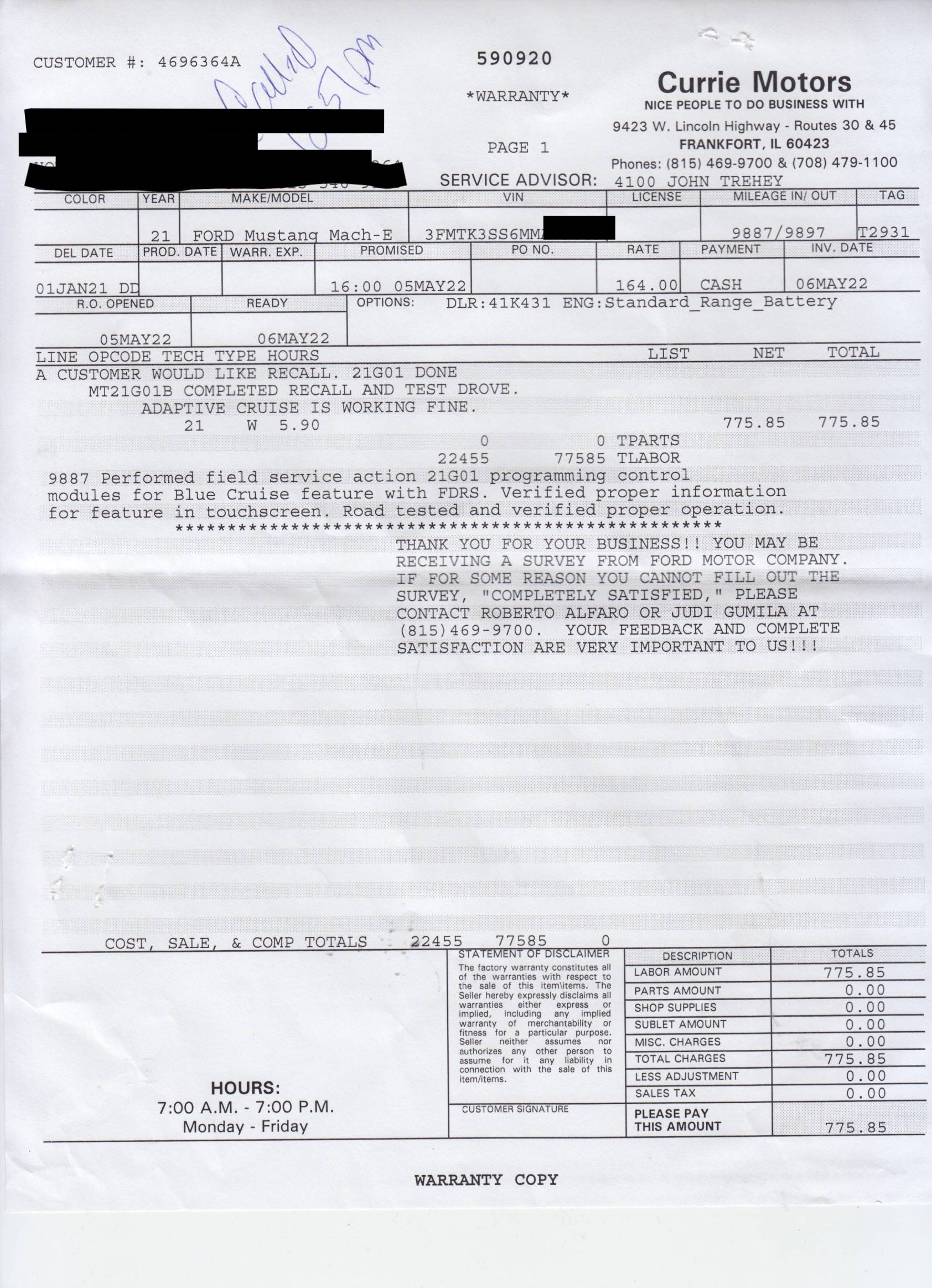
I just picked my car up tonight after 1.5 days at the dealer performing 21G01. From all I can tell with the brief time I've had the car home is that the Optional Product Improvement Program 21G01 was successful. I have not had time to take it out to a portion of highway that has been scanned for Blue Cruise but the mechanic says he took the car out and it worked. I have taken two screenshots of the center display and a scan of the invoice. Can somebody tell me if the Sync version (and programs installed) indicates a higher Startup update and that Blue Cruise was installed? When I check the Software Update it just says my car is up-to-date. I think this worked but I need feedback on the Sync Version and programs added. The Startup update number is not listed. They are billing Ford $775.85 for the work that was done. The mechanic worked both days with the Ford Field Engineer.

Ford Mustang Mach-E OTA 1.7.1 Stuck, anyone else have issue updating? 21G01.JPG
Ford Mustang Mach-E OTA 1.7.1 Stuck, anyone else have issue updating? 21G01 (2).JPG
Ford Mustang Mach-E OTA 1.7.1 Stuck, anyone else have issue updating? 21G01 invoic
 

mikeinet

Well-Known Member
First Name
Mike
Joined
Oct 5, 2021
Threads
43
Messages
554
Reaction score
438
Location
New York
Vehicles
Standard AWD Tech/Comfort
Occupation
Cyber Security, First Responder
Country flag
Yep you look good on the surface….
 

Illinibird

Well-Known Member
First Name
Mike
Joined
Oct 13, 2020
Threads
40
Messages
1,563
Reaction score
1,451
Location
Frankfort Illinois
Vehicles
2015 Acura MDX Adv; 2016 Titanium Fusion Hybrid
Occupation
retired Endodontist (root canal specialist) and Clinical Assistant Professor
Country flag
Yep you look good on the surface….
Thanks, I thought so too but wasn't 100% sure. I'll have to take it out to try Blue Cruise. How do you turn on Blue Cruise? With the Adaptive Cruise Control? I've never used either so far.


mikeinet

Well-Known Member
First Name
Mike
Joined
Oct 5, 2021
Threads
43
Messages
554
Reaction score
438
Location
New York
Vehicles
Standard AWD Tech/Comfort
Occupation
Cyber Security, First Responder
Country flag
Thanks, I thought so too but wasn't 100% sure. I'll have to take it out to try Blue Cruise. How do you turn on Blue Cruise? With the Adaptive Cruise Control? I've never used either so far.
yep look under adaptive cruise control. Should say “hands free” under one of the options…. Then just turn on the cruise control like you normally would. You’ll get a warning about bluecruise that you have to OK every time (kinda annoying). You’ll see the hands free come up on the left and may see a screen change too
 

AllenXS

Well-Known Member
First Name
Allen
Joined
Jan 11, 2021
Threads
13
Messages
1,339
Reaction score
1,706
Location
Richmond, BC, Canada
Vehicles
Premium Blue ER AWD
Country flag
Two weeks ago the car went in due to electrical issues. Told them it was hvbjb. Instead they worked on ecb.
After two weeks now they’re installing the hvbjb. Another week at this rate!
And ford support send meaningless emails like we’ll look to see what program we have to get a loaner car. Then never follow up.
Can’t wait to get it back!
 

Illinibird

Well-Known Member
First Name
Mike
Joined
Oct 13, 2020
Threads
40
Messages
1,563
Reaction score
1,451
Location
Frankfort Illinois
Vehicles
2015 Acura MDX Adv; 2016 Titanium Fusion Hybrid
Occupation
retired Endodontist (root canal specialist) and Clinical Assistant Professor
Country flag
yep look under adaptive cruise control. Should say “hands free” under one of the options…. Then just turn on the cruise control like you normally would. You’ll get a warning about bluecruise that you have to OK every time (kinda annoying). You’ll see the hands free come up on the left and may see a screen change too
I went to the Adaptive Cruise Control section and there was a button to tell you that BC was on so I clicked it. Is that the button you are referring to? Also, no Startup Update version is listed in the Software Updates only "Your Car is Up to Date." How do I tell what Startup Version I have if my dealer did the Optional Update Program 21G01? (I've heard the Startup version won't be displayed if the dealer updated the system with FDRS and the car was not updated via OTA.)
 

Logal727

Well-Known Member
First Name
C
Joined
Aug 23, 2021
Threads
101
Messages
7,351
Reaction score
11,347
Location
Florida
Vehicles
‘21 Carbonized Gray Mustang Mach-E Premium AWD Ext
Country flag
I stopped by my dealer yesterday to ask about the status of OTA and BlueCruise updates. I wanted to know if they had done any yet. The advisor asked their Mach-E tech to come out and talk to me.

He said he has done 8 Mach-E's and over a dozen F-150's. He admitted the 1st one was not pleasant, but now it is pretty straightforward. I asked if I should just to the 22-2117 update and let the rest go OTA. He advised against it and was aware that 22-2117 had been updated to 22-2150. He also told me that 21G01 has just been sent an update 21G01-S1. They pulled up my VIN and also said there was a new CSP 22B08 listed for my car that is a fix if 22-2150 does not update the APIM or TCU modules correctly. He said he would do that one first, then 22-2150 and then 21G01.

He said it was not that hard, just that it takes a lot of time. But he did say that Ford has authorized to pay actual time and not just an allotted time for these. So Ford must have gotten the word from the techs about how long these take. He told me it would most likely be 2.5 days.

I have to say I feel a lot better about having these all done at the dealership now. Appointment is for Tuesday at 8:00 AM. And I get a loaner.

More to follow next week!

Jim
Which dealer in FL?
 

Rocky29670

Well-Known Member
Joined
Jun 10, 2020
Threads
26
Messages
416
Reaction score
478
Location
Clemson, SC
Vehicles
2009 Toyota Camry Hybrid (Sold), 2013 Ford Fusion (borrowing until MME gets here), Mustang Mach E Premium ER AWD
Country flag
Premium AWD EX, built Jan, delivered April 10th. Stuck on 1.7.1 in Nov. Took to dealer on Thurs morning. So far TSB has failed twice. Hopefully something will work on Monday. Will have them contact Ford. I'm guessing I will need a module replacement since others have been successful.

Update, 4/18 After third try the update was successful without any new modules. So I now have at least 1.7.1. They did not do the Blue Cruise updates because they said they only wanted to do one at a time to make sure all was ok. I agreed. I will wait a while to see if updates start. If they don't start in a week or two I will go back in for the Blue cruise update.
I'm hoping they get mine fixed soon it will be 3 weeks in the shop on Tuesday. They've tried and failed several times to update but are blaming faulty USB cables. I even went so far as to buy 2 from Amazon that were on the TSB list but no luck. The cables are on backorder from Ford, but mysteriously showed up yesterday and the other one will come on Monday after I called Ford customer care to open up a ticket. I'm hoping it works or they replace the APIM.
 

mikeinet

Well-Known Member
First Name
Mike
Joined
Oct 5, 2021
Threads
43
Messages
554
Reaction score
438
Location
New York
Vehicles
Standard AWD Tech/Comfort
Occupation
Cyber Security, First Responder
Country flag
I went to the Adaptive Cruise Control section and there was a button to tell you that BC was on so I clicked it. Is that the button you are referring to? Also, no Startup Update version is listed in the Software Updates only "Your Car is Up to Date." How do I tell what Startup Version I have if my dealer did the Optional Update Program 21G01? (I've heard the Startup version won't be displayed if the dealer updated the system with FDRS and the car was not updated via OTA.)
regarding updates… manual Frds updates and ota updates are unrelated and don’t correlate to each other (probably should ford…)

go into general > about sync and you should see 4.0.22095 revision 421

regarding BC- yeah, under adaptive control you should see hands free. When you activate adaptive on the steering wheel, you should get a prompt there too that you have to OK with the steering wheel (may not be immediate)
 

Jim_I

Well-Known Member
First Name
Jim
Joined
Feb 6, 2020
Threads
3
Messages
279
Reaction score
393
Location
FL
Vehicles
2021 Mach-E Premium X-R Batt RWD Carbonized Gray
Country flag
Which dealer in FL?
===============================================

Wayne Akers Ford - Lake Worth, FL

Will let everyone know how it goes. I drop off the car on May 10th.

Jim
 

Illinibird

Well-Known Member
First Name
Mike
Joined
Oct 13, 2020
Threads
40
Messages
1,563
Reaction score
1,451
Location
Frankfort Illinois
Vehicles
2015 Acura MDX Adv; 2016 Titanium Fusion Hybrid
Occupation
retired Endodontist (root canal specialist) and Clinical Assistant Professor
Country flag
regarding updates… manual Frds updates and ota updates are unrelated and don’t correlate to each other (probably should ford…)

go into general > about sync and you should see 4.0.22095 revision 421

regarding BC- yeah, under adaptive control you should see hands free. When you activate adaptive on the steering wheel, you should get a prompt there too that you have to OK with the steering wheel (may not be immediate)
Was on the Interstate today and Blue Cruise worked fine. I have to say I didn’t trust it and turned it off after a little bit.
 

RSH

Well-Known Member
First Name
RSH
Joined
Jun 18, 2021
Threads
2
Messages
282
Reaction score
253
Location
Virginia
Vehicles
2021 MME Rapid Red Premium ER
Country flag
(cross-posting this to the various 1.7.1-stuck threads)

Just wanted to post an update here for those in the Boston/New England area that Sentry Ford in Medford was able to get me in and out in 2.5 business days (Thu, Fri, half of Mon) and apply 21P22, 22B08, and 21G01. This is on a Job1, non-EA Select AWD w/ comfort-tech package that had been stuck on the 1.7.1 update since December. Build date early/mid July 2021. Am now on Sync 22095_PRODUCT Rev 421 which I believe is Power Up 2.8.3.

I had purchased all the adapters for the TSB and printed it out, but they were left unopened. I believe I was the 2nd Mach-E that their master tech had done these updates to.

So if it's close (enough) to you, give Sentry Ford in Medford, MA a try!

Also big thanks to @generaltso for getting me some FDRS details over the week so I could see specific progress on the work.
Thanks for posting this. Gives me hope. Stuck since November.
 

Rocky29670

Well-Known Member
Joined
Jun 10, 2020
Threads
26
Messages
416
Reaction score
478
Location
Clemson, SC
Vehicles
2009 Toyota Camry Hybrid (Sold), 2013 Ford Fusion (borrowing until MME gets here), Mustang Mach E Premium ER AWD
Country flag
Anyone who can run VINs to see what has or has not been updated or still needs to be updated on my car mind doing that for me?
Sponsored


Top