Elucidus

New Member
Joined
Mar 22, 2022
Threads
0
Messages
1
Reaction score
1
Location
Santa Clara, CA
Vehicles
No Mach E yet :(
So it seems like it just gives you an idea of where you need to charge when you first head out. I hope that they are working on functionality where it will allow Apple Maps to update real time with current consumption usage and update any stops that might be needed. I guess the Ford Nav is supposed to do this, but from what I've read it does not do it very well.
I can verify that you do get updates if your charge situation changes enough to warrant a changing stop - in either direction. IE, if you hypermile or leadfoot, you can have stops removed or added as appropriate.

Apple claims as such on their website as well:https://support.apple.com/guide/iphone/set-up-electric-vehicle-routing-iphc5e3a4b4b/ios

By analyzing elevation changes along the route and other factors, Maps identifies appropriate charging stations along the way. If you drive until your charge gets too low, you’re offered a route to the nearest compatible charging station.
When it happens, you get one of those messages like when there's a traffic jam ahead, but it talks about the new/removed stop instead.
Sponsored


Todd44

Well-Known Member
First Name
Todd
Joined
Mar 18, 2022
Threads
3
Messages
103
Reaction score
64
Location
Dade City, FL
Vehicles
Leaf, MME Select, Red, RWD ordered 3/17/22
Occupation
Software Developer Manager
Country flag
Still not sure this is enough to get me to switch from Google Maps though. Apple needs to show real-time alternative route choices like Google to start to win me over. It’s invaluable to see options on the screen without having to do anything other than drive.
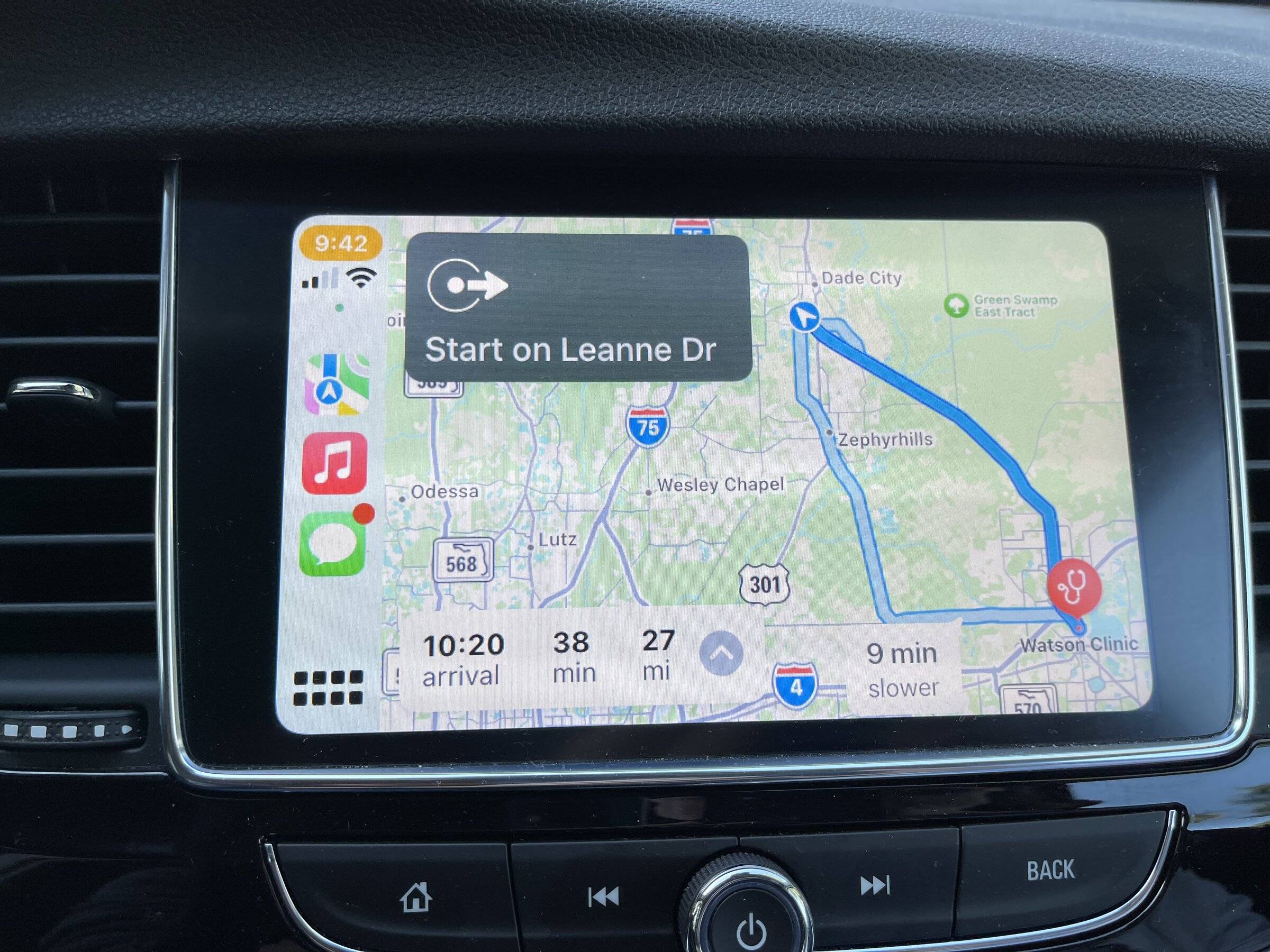
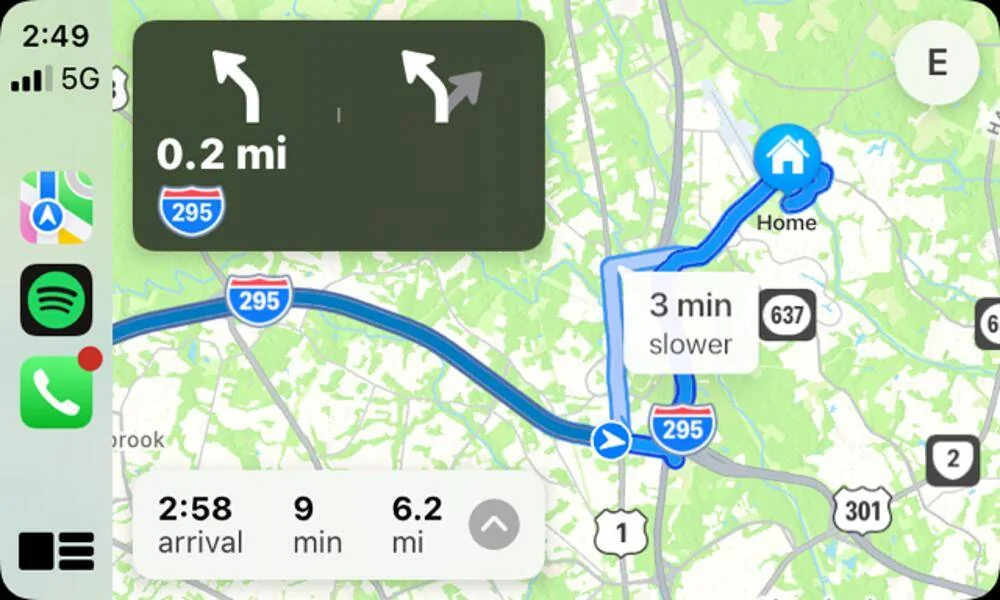
Is this what you are referring to as “real time alternatives”)? By tapping the route icon, upper right, not shown in the image, once at the beginning, it shows you live, real time, alternative routes while you drive, letting you know the over/under timing (3 min longer , or 2 minutes faster)? As you pass alternates they disappear and new alternatives (if they exist) appearing.
Ford Mustang Mach-E EV Routing For Apple Maps Now Available Via Carplay & SYNC in Mach-E C0136716-D2CD-41E4-970C-802AAFCAF726
 

rodhx

Well-Known Member
First Name
Rod
Joined
Mar 24, 2021
Threads
9
Messages
298
Reaction score
381
Location
Alabama
Vehicles
Rivian R1T, Lexus IS300 autox/track car.
Country flag
Is this what you are referring to as “real time alternatives”)? By tapping the route icon, upper right, not shown in the image, once at the beginning, it shows you live, real time, alternative routes while you drive, letting you know the over/under timing (3 min longer , or 2 minutes faster)? As you pass alternates they disappear and new alternatives (if they exist) appearing.
C0136716-D2CD-41E4-970C-802AAFCAF726.jpeg
No. Google Maps continuously shows alternatives in real-time navigation as you approach intersections, etc. That allows you to evaluate alternatives hands-free as you drive, no tapping required. I have never seen Apple do that, and I tried it as recently as this morning.
 

Todd44

Well-Known Member
First Name
Todd
Joined
Mar 18, 2022
Threads
3
Messages
103
Reaction score
64
Location
Dade City, FL
Vehicles
Leaf, MME Select, Red, RWD ordered 3/17/22
Occupation
Software Developer Manager
Country flag
No. Google Maps continuously shows alternatives in real-time navigation as you approach intersections, etc. That allows you to evaluate alternatives hands-free as you drive, no tapping required. I have never seen Apple do that, and I tried it as recently as this morning.
That’s what this does, in real time has all routes available based upon location And time cost for each. No tapping, except once at the very beginning of the route (I just did this yesterday taking my mom to the doctor, continuous updates of several alternative routes). If you just use it in standard mode, then you get real-time updates as well, but only if there is a time savings, Siri will say, “save y minutes by taking x”, I have never tried to confirm this with voice, so not sure if that is possible, I just tap screen.. So Google is telling you (on the screen only, I hope), turn right here its 3 min longer, turn left there it’s 5 minutes longer, etc, in the standard, course up, navigation mode? That’s what you are looking for?


Mike G

Well-Known Member
First Name
Mike
Joined
Mar 27, 2022
Threads
25
Messages
6,458
Reaction score
5,298
Location
N. AL, USA
Vehicles
'23(J1) Mach-E GT-PE, '22 F-150 Lightning, '24 Bronco HLE 2Dr
Country flag
?

Hey, my Sync Software version is "--" since November 2021 because your update PowerUp 1.7.1 screwed up my car.

When do you plan on releasing the fix that was promised last month to us and keeps behind pushed?
Make an appointment with your dealers service department and reference the attached TSB.

Mike
 

Attachments

gnaark

Well-Known Member
Joined
Mar 4, 2021
Threads
30
Messages
278
Reaction score
436
Location
DC Metro
Vehicles
First Edition Rapid Red
Country flag
Make an appointment with your dealers service department and reference the attached TSB.

Mike
yeah, I know that, at the time that fix didn't exist though and even if it's out since a week my dealer is being difficult saying they don't have the hardware and that my car "doesn't qualify"
 

rodhx

Well-Known Member
First Name
Rod
Joined
Mar 24, 2021
Threads
9
Messages
298
Reaction score
381
Location
Alabama
Vehicles
Rivian R1T, Lexus IS300 autox/track car.
Country flag
That’s what this does, in real time has all routes available based upon location And time cost for each. No tapping, except once at the very beginning of the route (I just did this yesterday taking my mom to the doctor, continuous updates of several alternative routes). If you just use it in standard mode, then you get real-time updates as well, but only if there is a time savings, Siri will say, “save y minutes by taking x”, I have never tried to confirm this with voice, so not sure if that is possible, I just tap screen.. So Google is telling you (on the screen only, I hope), turn right here its 3 min longer, turn left there it’s 5 minutes longer, etc, in the standard, course up, navigation mode? That’s what you are looking for?
Yes, the bolded part is what I'm looking for. I am talking about how it behaves in normal driving 3D mode once you start navigating, not an overview map like you showed. Google shows "gray" alternatives as you approach intersections that say things like "3 minutes longer" or "similar ETA". I find these very useful in day-to-day driving for picking routes I might prefer (knowledge of local traffic, etc) even if a program doesn't think it's best. Apple Maps has never presented that info to me. It has consistently shown only the route I'm on. Yes, it may suggest a theoretical time-saving route but they all do that and that isn't what I'm talking about.

It's just a preference thing. I like the way Google let's me evaluate a potential "less than optimal" route by providing heads-up ETA impacts of choosing to go off the "blue" route to a "gray" alternative. Apple seems to be like most nav programs where it keeps you blind to anything it doesn't think is better.

BTW, one reason I like the Google display is as I approach intersections I can discover, without having to do anything at all, that perceived "longer but more fun" routes actually the same ETA or a minor impact. There are many days when I'll gladly spend "1 minute longer" on a country two lane versus a shorter congested highway sitting at traffic lights, especially knowing that deserted two lane means I'll easily make up the "1 minute longer". ;)
 

Todd44

Well-Known Member
First Name
Todd
Joined
Mar 18, 2022
Threads
3
Messages
103
Reaction score
64
Location
Dade City, FL
Vehicles
Leaf, MME Select, Red, RWD ordered 3/17/22
Occupation
Software Developer Manager
Country flag
Yes, the bolded part is what I'm looking for. I am talking about how it behaves in normal driving 3D mode once you start navigating, not an overview map like you showed. Google shows "gray" alternatives as you approach intersections that say things like "3 minutes longer" or "similar ETA". I find these very useful in day-to-day driving for picking routes I might prefer (knowledge of local traffic, etc) even if a program doesn't think it's best. Apple Maps has never presented that info to me. It has consistently shown only the route I'm on. Yes, it may suggest a theoretical time-saving route but they all do that and that isn't what I'm talking about.

It's just a preference thing. I like the way Google let's me evaluate a potential "less than optimal" route by providing heads-up ETA impacts of choosing to go off the "blue" route to a "gray" alternative. Apple seems to be like most nav programs where it keeps you blind to anything it doesn't think is better.

BTW, one reason I like the Google display is as I approach intersections I can discover, without having to do anything at all, that perceived "longer but more fun" routes actually the same ETA or a minor impact. There are many days when I'll gladly spend "1 minute longer" on a country two lane versus a shorter congested highway sitting at traffic lights, especially knowing that deserted two lane means I'll easily make up the "1 minute longer". ;)
True, regularly take the 45 minute scenic drive home at 45mph, than the quicker one at 75mph. I would also appreciate the distance differential, as well as time. I definitely see the benefit of course up+recommendations. On regular trips, I know where I am going and don’t need the course up display, so I just leave the overview on to see if other alternatives are “worth” it, but driving an EV with limited range, Nissan Leaf, the distance is also important. Although, probably not for most drivers.
 

Av8tor

Well-Known Member
First Name
Kevin
Joined
Aug 6, 2021
Threads
30
Messages
708
Reaction score
921
Location
Richmond, VA
Vehicles
Fusion Hybrid, MME GTPE
Occupation
Systems Engineer IOT
Country flag
True, regularly take the 45 minute scenic drive home at 45mph, than the quicker one at 75mph. I would also appreciate the distance differential, as well as time. I definitely see the benefit of course up+recommendations. On regular trips, I know where I am going and don’t need the course up display, so I just leave the overview on to see if other alternatives are “worth” it, but driving an EV with limited range, Nissan Leaf, the distance is also important. Although, probably not for most drivers.
Well you learn something every day. @Todd44, nice find. I didn't know, and if you leave it on the summery, it shows the alternative routes in real-time. I was wondering how you could visualize what the recommend re-route was, or didn't want to take the suggestion but then wanted too after the prompt was gone, and this would do that.

I do like how google maps provides these cues in the drive view.


Ford Mustang Mach-E EV Routing For Apple Maps Now Available Via Carplay & SYNC in Mach-E 1648667871386
 

Cuddlecool

Well-Known Member
First Name
Greg
Joined
Aug 4, 2021
Threads
3
Messages
135
Reaction score
182
Location
Texas
Vehicles
2021 Mustang Mach-E Premium 4X
Occupation
Professional education
Country flag
How do I turn off EV routing in Apple Maps? I agree it’s a convenient feature, but sometimes I want to use Maps to give me a drive-time ETA without any charging stops. For example, let’s say on Friday evening I’m getting ready for a 200-mile trip that I’ll leave for on Saturday morning. My MME has a 20% charge. I want to know when I’ll get to my destination based on my departure time. But Maps will now automatically add in a charging stop based on the car’s current charge level, along with the time it estimates I’ll need to “fill up.” But I know I’ll be charging the car overnight to 90% and won’t need to stop on the way. I want to turn off EV routing so I can better plan my trip. Sure Maps will reset the ETA once I turn the car on and set out on my trip, but that’s too late to help me decide what time I need to leave. Help!
 

ponydsp

Well-Known Member
Joined
Oct 2, 2021
Threads
12
Messages
311
Reaction score
547
Location
Virginia
Vehicles
'22 MME Premium 4ER, Taycan CT, 650s, F8 on order
Country flag
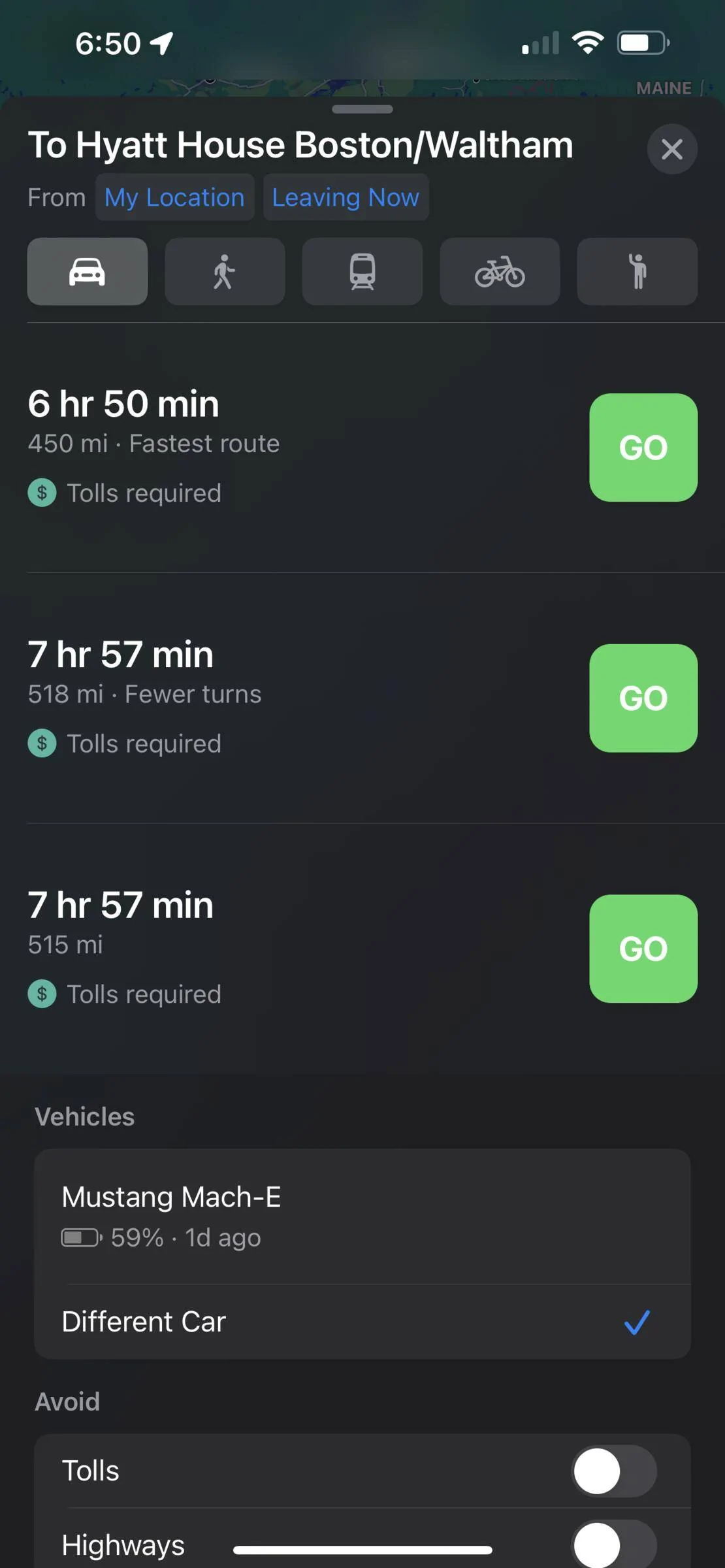
Try swiping up after you enter destination. Under vehicles, click on different car

Ford Mustang Mach-E EV Routing For Apple Maps Now Available Via Carplay & SYNC in Mach-E A32BB0C5-6465-4E69-B0A7-BBCE14B5E52E
 

Cuddlecool

Well-Known Member
First Name
Greg
Joined
Aug 4, 2021
Threads
3
Messages
135
Reaction score
182
Location
Texas
Vehicles
2021 Mustang Mach-E Premium 4X
Occupation
Professional education
Country flag
Try swiping up after you enter destination. Under vehicles, click on different car

A32BB0C5-6465-4E69-B0A7-BBCE14B5E52E.png
Thanks! Good suggestion. I suppose that would at least give me me a generic ETA. Still, there may be other driving situations when I’d rather turn it off, like when I have a particular charging station in mind, but Maps is routing me to the one it has in mind. I’m sure there’s a workaround for that too, but hey, just give us a switch to turn it off!
 

tobin1920

Well-Known Member
First Name
Anthony
Joined
May 15, 2022
Threads
1
Messages
91
Reaction score
108
Location
PA
Vehicles
2022 Mach-E Premium AWD ER
Country flag
I can’t for the life of me seem to get EV Routing working in Apple Maps in my 2022 MY that came with BC pre-installed. I’m on Sync 21297 rev 253, and I am not sure which Power Up version I’m on since I’ve never had an OTA pushed to me yet. I would have sworn that when I got my car back in April, Apple Maps showed me the splash screen about EV Routing.

When I tap Search in Maps, it shows Charging Stations in the options. However if I pick a destination thousands of miles away, none of the EV Routing options appear. I’ve un-paired/re-paired my phone and removed the MME from CarPlay settings, but no dice. I’m on iOS 15.5.

I’ve searched the forums and skimmed through posts in this thread and couldn’t find anything - sorry if other similar questions are staring me in the face. Otherwise, any tips would be most appreciated! I’d love to have this working so it’s good to go when I need it.
 

ktn

Well-Known Member
Joined
Apr 20, 2022
Threads
17
Messages
293
Reaction score
359
Location
USA
Vehicles
Current: F150 Lightning SOLD: 2022 Mach-E Premium ER AWD
Country flag
I can’t for the life of me seem to get EV Routing working in Apple Maps in my 2022 MY that came with BC pre-installed. I’m on Sync 21297 rev 253, and I am not sure which Power Up version I’m on since I’ve never had an OTA pushed to me yet. I would have sworn that when I got my car back in April, Apple Maps showed me the splash screen about EV Routing.

When I tap Search in Maps, it shows Charging Stations in the options. However if I pick a destination thousands of miles away, none of the EV Routing options appear. I’ve un-paired/re-paired my phone and removed the MME from CarPlay settings, but no dice. I’m on iOS 15.5.

I’ve searched the forums and skimmed through posts in this thread and couldn’t find anything - sorry if other similar questions are staring me in the face. Otherwise, any tips would be most appreciated! I’d love to have this working so it’s good to go when I need it.
Did you add your car in the Maps app? Tap on your profile pic → Vehicles
Sponsored


Top