mdpmdp

Well-Known Member
Joined
Oct 2, 2021
Threads
1
Messages
521
Reaction score
525
Location
Arizona
Vehicles
'22 Premium RWD SR Grabber Blue
Country flag
The 15 minute poll is just to Ford servers to get the latest data on the car. So whatever the car last reported to the servers is obtained. This has no impact on the battery as it's not coming from the car, nor requesting a refresh from the car. The service in HA to refresh the data actually sends a query to the car to request a full refresh.

I have testing an automation querying the service every 5 minutes and I'm able to drain the battery in less than 12 hours to the point where the HVB has to top it off and I get the battery drain notification.
Ah ok, that makes sense. So does the car itself self-refresh every 15 minutes while plugged in? Because I noticed that it seems to accurately track my charging stats every 15 minutes. From what I understand, while on battery it gets more complicated with data reporting (only on lock/unlock or whatever), and that's when you could call the refresh service manually to force it to report (after the 5 minute roundtrip response)?

I'm gonna play around with the sensors and see if I can get some automations/notifications going through Node-RED, but one I have a question on is the fordpass_tracker entity. I see in your automations that you have it tracked to "home" or "is_not_home", are those the only 2 states? I assume it's pulling from the FordPass GPS coordinates and comparing to the home-designated coordinates in HA if so?
Sponsored

 
OP
OP
DevSecOps

DevSecOps

Well-Known Member
First Name
Todd
Joined
Sep 22, 2021
Threads
69
Messages
4,764
Reaction score
11,624
Location
Sacramento, CA
Vehicles
'21 Audi SQ5 / '23 Rivian R1T / '23 M3P
Occupation
CISO
Country flag
So does the car itself self-refresh every 15 minutes while plugged in?
No, it should be reporting every 5 minutes while charging. Otherwise it reports back on events like door locks, remote start, start, stop, etc. You can force it to refresh using an automation as much as you want. The roundtrip is about 5 minutes but if you refreshed every 2, for example you would have refreshed data 5 minutes from each 2 minute refresh.

"home" or "is_not_home", are those the only 2 states?
That's based on HA. You can create as many locations as you want. HA determines if the car is within the geo-fence for the location.
 

mdpmdp

Well-Known Member
Joined
Oct 2, 2021
Threads
1
Messages
521
Reaction score
525
Location
Arizona
Vehicles
'22 Premium RWD SR Grabber Blue
Country flag
No it should be reporting ever 5 minutes while charging.
If I'm understanding correctly, the integration refreshes from the cloud every 15 minutes, so I wouldn't see the intermediate refreshes in HA, only in the FP app?
 
OP
OP
DevSecOps

DevSecOps

Well-Known Member
First Name
Todd
Joined
Sep 22, 2021
Threads
69
Messages
4,764
Reaction score
11,624
Location
Sacramento, CA
Vehicles
'21 Audi SQ5 / '23 Rivian R1T / '23 M3P
Occupation
CISO
Country flag
If I'm understanding correctly, the integration refreshes from the cloud every 15 minutes, so I wouldn't see the intermediate refreshes in HA, only in the FP app?
I think the HA integration subscribes to events so it should refresh as soon as FP does and therefore just queries Ford every 15 if there's been no changes.
 
OP
OP
DevSecOps

DevSecOps

Well-Known Member
First Name
Todd
Joined
Sep 22, 2021
Threads
69
Messages
4,764
Reaction score
11,624
Location
Sacramento, CA
Vehicles
'21 Audi SQ5 / '23 Rivian R1T / '23 M3P
Occupation
CISO
Country flag
For anyone following some of my automations - I've added an additional condition (by revision of the original) to many of the rules to ensure the vehicle is off. For example, door lock notifications won't trigger if the vehicle is on.


mdpmdp

Well-Known Member
Joined
Oct 2, 2021
Threads
1
Messages
521
Reaction score
525
Location
Arizona
Vehicles
'22 Premium RWD SR Grabber Blue
Country flag
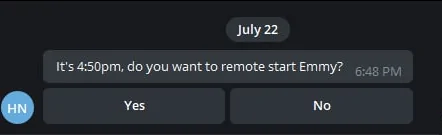
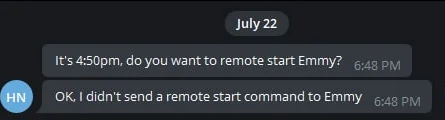
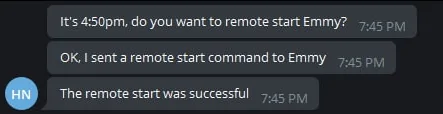
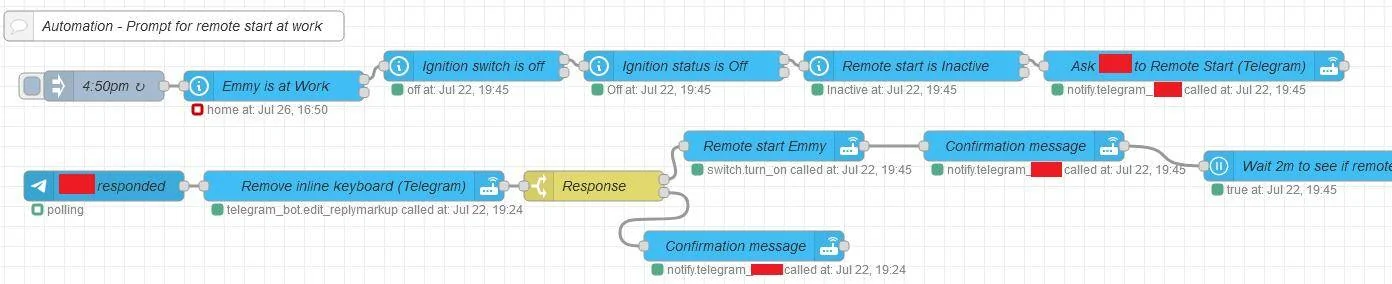
After poking around a bit, I did get something set up in Node-RED which triggers at 4:50pm if my car is in the "Work" zone. Nice automation so I don't have to pay attention to the time to remote start (much needed in AZ with temps reaching 110+ by the time I leave the office). It sends me an actionable message via Telegram to ask if I want to remote start the car with an inline keyboard and then polls for the status and notifies me if it was successful or unsuccessful. I won't post the flow since it's just a bit of a pain to scrape the identifying info out, but I've tested it manually with an Inject node and it seems to work - I'll know for sure next Thursday when I'm in the office. Happy to share additional info if anybody is interested.

I was toying with the idea of setting something up for auto-unlock on approach using GPS, but not sure how I'd get it to not interfere with PaaK walk-away lock yet.

Here's a snippet of the general routing of the flow:

Ford Mustang Mach-E Home Assistant Automations - Show them off!!! 1658953635030


Here's what it looks like in Telegram:

Ford Mustang Mach-E Home Assistant Automations - Show them off!!! 1658953670784


If you respond No:

Ford Mustang Mach-E Home Assistant Automations - Show them off!!! 1658953688827


If you respond Yes (with polling confirmation):

Ford Mustang Mach-E Home Assistant Automations - Show them off!!! 1658953730351
 
OP
OP
DevSecOps

DevSecOps

Well-Known Member
First Name
Todd
Joined
Sep 22, 2021
Threads
69
Messages
4,764
Reaction score
11,624
Location
Sacramento, CA
Vehicles
'21 Audi SQ5 / '23 Rivian R1T / '23 M3P
Occupation
CISO
Country flag
After poking around a bit, I did get something set up in Node-RED which triggers at 4:50pm if my car is in the "Work" zone. Nice automation so I don't have to pay attention to the time to remote start (much needed in AZ with temps reaching 110+ by the time I leave the office). It sends me an actionable message via Telegram to ask if I want to remote start the car with an inline keyboard and then polls for the status and notifies me if it was successful or unsuccessful. I won't post the flow since it's just a bit of a pain to scrape the identifying info out, but I've tested it manually with an Inject node and it seems to work - I'll know for sure next Thursday when I'm in the office. Happy to share additional info if anybody is interested.

I was toying with the idea of setting something up for auto-unlock on approach using GPS, but not sure how I'd get it to not interfere with PaaK walk-away lock yet.

Here's a snippet of the general routing of the flow:

1658953635030.png


Here's what it looks like in Telegram:

1658953670784.png


If you respond No:

1658953688827.png


If you respond Yes (with polling confirmation):

1658953730351.png
Out of curiosity, why not just use departure times?
 

mdpmdp

Well-Known Member
Joined
Oct 2, 2021
Threads
1
Messages
521
Reaction score
525
Location
Arizona
Vehicles
'22 Premium RWD SR Grabber Blue
Country flag
Out of curiosity, why not just use departure times?
I have a dynamic schedule for on-site - I'm there once every 2 weeks, sometimes an extra day or two depending on any physical needs. This way it just checks to see if the car is at work, and if so then ping me - otherwise no action needed (the bottom branch of "Emmy is at Work")
 
OP
OP
DevSecOps

DevSecOps

Well-Known Member
First Name
Todd
Joined
Sep 22, 2021
Threads
69
Messages
4,764
Reaction score
11,624
Location
Sacramento, CA
Vehicles
'21 Audi SQ5 / '23 Rivian R1T / '23 M3P
Occupation
CISO
Country flag
I have a dynamic schedule for on-site - I'm there once every 2 weeks, sometimes an extra day or two depending on any physical needs. This way it just checks to see if the car is at work, and if so then ping me - otherwise no action needed (the bottom branch of "Emmy is at Work")
Gotcha, the some days at work, some days not makes it all make sense.
 

CommittotheIndian

Well-Known Member
First Name
Travis
Joined
Jun 28, 2022
Threads
7
Messages
110
Reaction score
28
Location
Indiana
Vehicles
2022 Ford Mach-E Select eAWD Star White
Occupation
Indiana Supreme Court - IT
Country flag
Nothing to crazy. I don't really care for the simple FordPass notification telling me that my vehicle is fully charged when at home (haven't looked at turning that off).

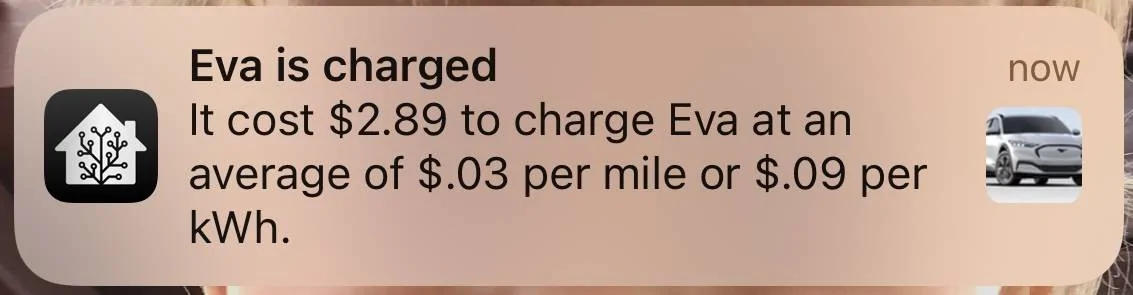
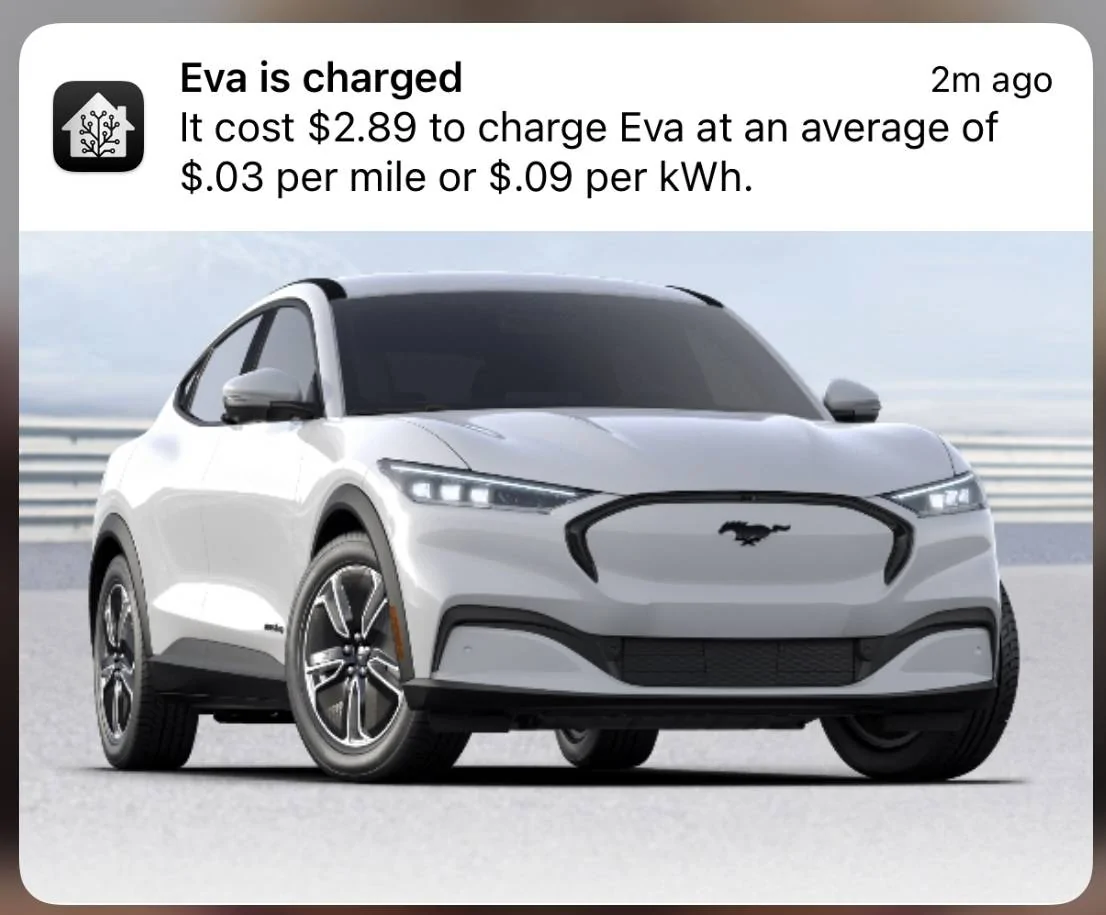
With this automation, I get a notification when my charger shows fully charged for 2 mins (just started testing the 2 mins since spikes have been pushing the notification more than once lately). The notification shows the cost to charge my MME, the cost per mile and the cost per kWh. Cost per mile and cost per kWh should not change much but good to catch issues if they do. And just a fun little addition, I threw a picture of my MME into the notification.

Note: I do have another set of sensor code that ignores "unavailable" being sent in the notification but I haven't run into in the field since the charging data resets after you unplug in the morning.

Config Template Sensor:

YAML:
#Eva Average
template:
  - sensor:
      - name: Eva Cost Per Mile
        unit_of_measurement: '$'
        state: >
          {{ ((states('sensor.cph50_charge_cost')|float) / (states('sensor.cph50_miles_added')|float))|round(2) }}
YAML:
#Eva Average
  - name: Eva Cost per kWh
    unit_of_measurement: '$'
    state: >
      {{ ((states('sensor.cph50_charge_cost') | float) / (states('sensor.cph50_energy_output') | float)) | round(2) }}

Automation:

YAML:
alias: Eva Charge Cost
description: ''
trigger:
  - platform: state
    entity_id:
      - sensor.cph50_charger_state
    to: Fully Charged
    for:
      hours: 0
      minutes: 2
      seconds: 0
condition: []
action:
  - service: notify.family_ios_devices
    data:
      data:
        image: /media/local/Evabig.jpg
      message: >
        It cost ${{states('sensor.cph50_charge_cost')}} to charge Eva at an
        average of ${{states('sensor.eva_cost_per_mile')}} per mile or
        ${{states('sensor.eva_cost_per_kwh')}} per kWh.
      title: Eva is charged
mode: single
Ford Mustang Mach-E Home Assistant Automations - Show them off!!! IMG_6854


Ford Mustang Mach-E Home Assistant Automations - Show them off!!! IMG_6855
 
Last edited:

CommittotheIndian

Well-Known Member
First Name
Travis
Joined
Jun 28, 2022
Threads
7
Messages
110
Reaction score
28
Location
Indiana
Vehicles
2022 Ford Mach-E Select eAWD Star White
Occupation
Indiana Supreme Court - IT
Country flag
@DevSecOps I implemented the Rain automation but I'm getting warnings from Open Weather Map that I'm exceeding the 100 API a day. I do have Thunderstorm and Drizzle as well. Curious if you've seen that or adjusted the automation around it.
 
OP
OP
DevSecOps

DevSecOps

Well-Known Member
First Name
Todd
Joined
Sep 22, 2021
Threads
69
Messages
4,764
Reaction score
11,624
Location
Sacramento, CA
Vehicles
'21 Audi SQ5 / '23 Rivian R1T / '23 M3P
Occupation
CISO
Country flag
@DevSecOps I implemented the Rain automation but I'm getting warnings from Open Weather Map that I'm exceeding the 100 API a day. I do have Thunderstorm and Drizzle as well. Curious if you've seen that or adjusted the automation around it.
What is your scan interval set at? Change it to 900, which is 15 minutes.

I didn't think the free API was limited to just 100 a day. I'll look into that.
 

CommittotheIndian

Well-Known Member
First Name
Travis
Joined
Jun 28, 2022
Threads
7
Messages
110
Reaction score
28
Location
Indiana
Vehicles
2022 Ford Mach-E Select eAWD Star White
Occupation
Indiana Supreme Court - IT
Country flag
What is your scan interval set at? Change it to 900, which is 15 minutes.

I didn't think the free API was limited to just 100 a day. I'll look into that.

I had copied your code, so it was 600/10mins.

There are multiple API options. I'm set on the current weather and forecast (Free plan). Maybe you have a different API. And correction I thought the email said 100 this morning. It does say 1000. I must be using it somewhere else in HA, but can't remember where.
 
OP
OP
DevSecOps

DevSecOps

Well-Known Member
First Name
Todd
Joined
Sep 22, 2021
Threads
69
Messages
4,764
Reaction score
11,624
Location
Sacramento, CA
Vehicles
'21 Audi SQ5 / '23 Rivian R1T / '23 M3P
Occupation
CISO
Country flag
I had copied your code, so it was 600/10mins.

There are multiple API options. I'm set on the current weather and forecast (Free plan). Maybe you have a different API. And correction I thought the email said 100 this morning. It does say 1000. I must be using it somewhere else in HA, but can't remember where.
Yeah I was sure that it was more than 100. So if you're hitting more than 1k something is wrong.
 

ShaggySS

Well-Known Member
First Name
Scott
Joined
Jul 21, 2022
Threads
7
Messages
484
Reaction score
534
Location
Roseville, CA
Vehicles
2022 Mach-E Premium RWD
Occupation
IT Nerd
Country flag
Seems like I have automated everything at home that can be automated. Never thought of googling Mach-E for automations. Thanks for the invite down the rabbit hole.
Sponsored


Top