MachEnthusiast

Well-Known Member
Joined
Oct 22, 2021
Threads
14
Messages
306
Reaction score
145
Location
Seattle, WA
Vehicles
2021 Mustang Mach E GT
Occupation
Software PM
Country flag
Love Love Love the new UI. The Camera always there is the way it should be and having a “CarPlay” button only when you are in other screens (other than home or settings that you can cancel), also fixes one of my other big complaints with the old UI.
I'm not sure I get the usage/value of the camera button being there. Like maybe this is stupid question but when is the front camera more useful than looking in front of you?

That said, I do think FP or the car should keep track of all the OTAs received so we can easily see what has been applied over time. But nope. Maybe it will become available in November of 2022, at the same time the headlight switch bug is fixed.
Yeah the best way is never delete the "You're Rolling with the Latest" emails from Ford in your FP app. Then you can reference when each update was installed since those have dates.
Sponsored


mkhuffman

Well-Known Member
First Name
Mike
Joined
Nov 19, 2020
Threads
29
Messages
6,878
Reaction score
9,513
Location
Virginia
Vehicles
2025 Rivian R1T Tri-Max, Jeep GC-L, VW Jetta
Country flag
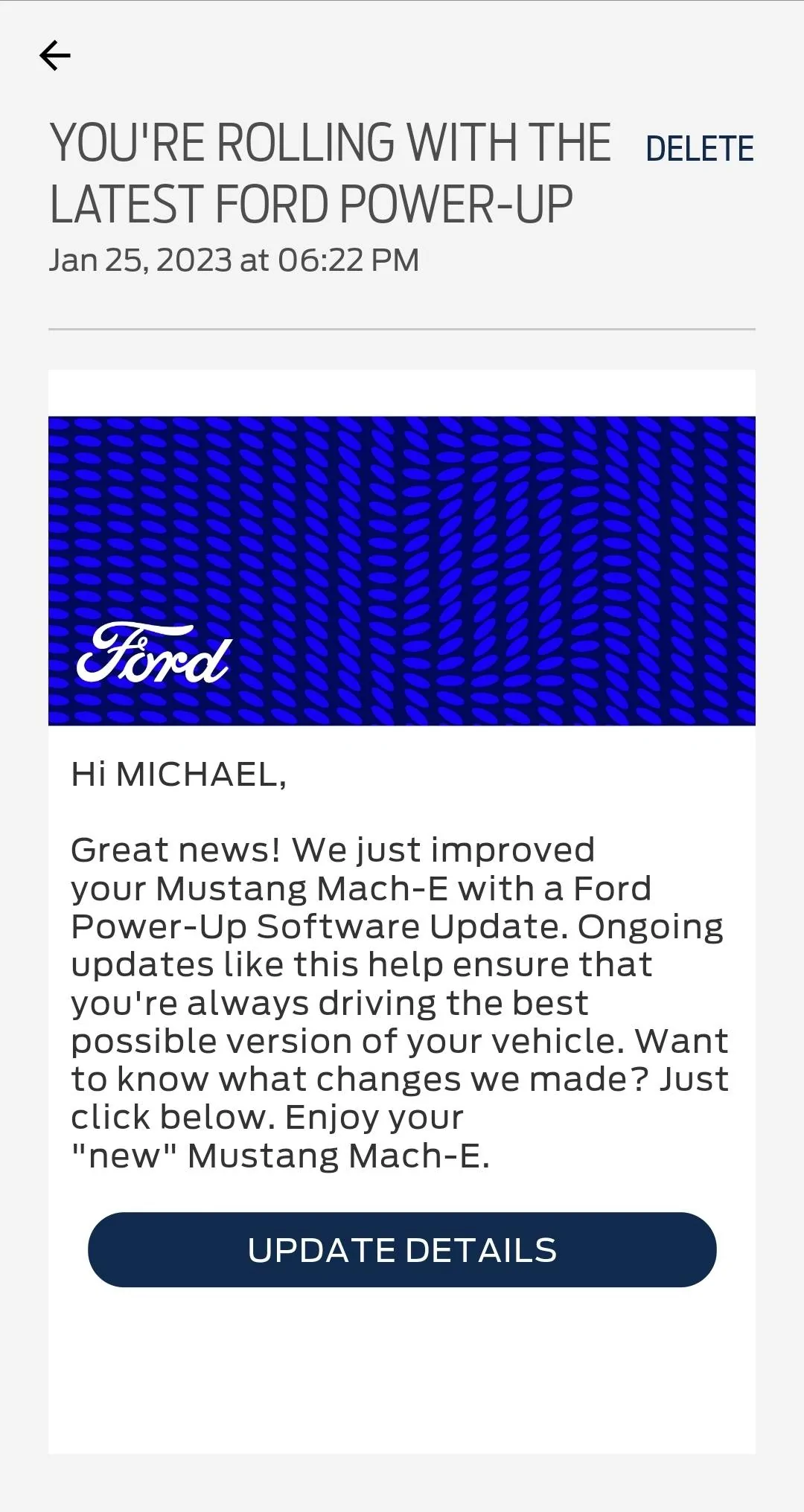
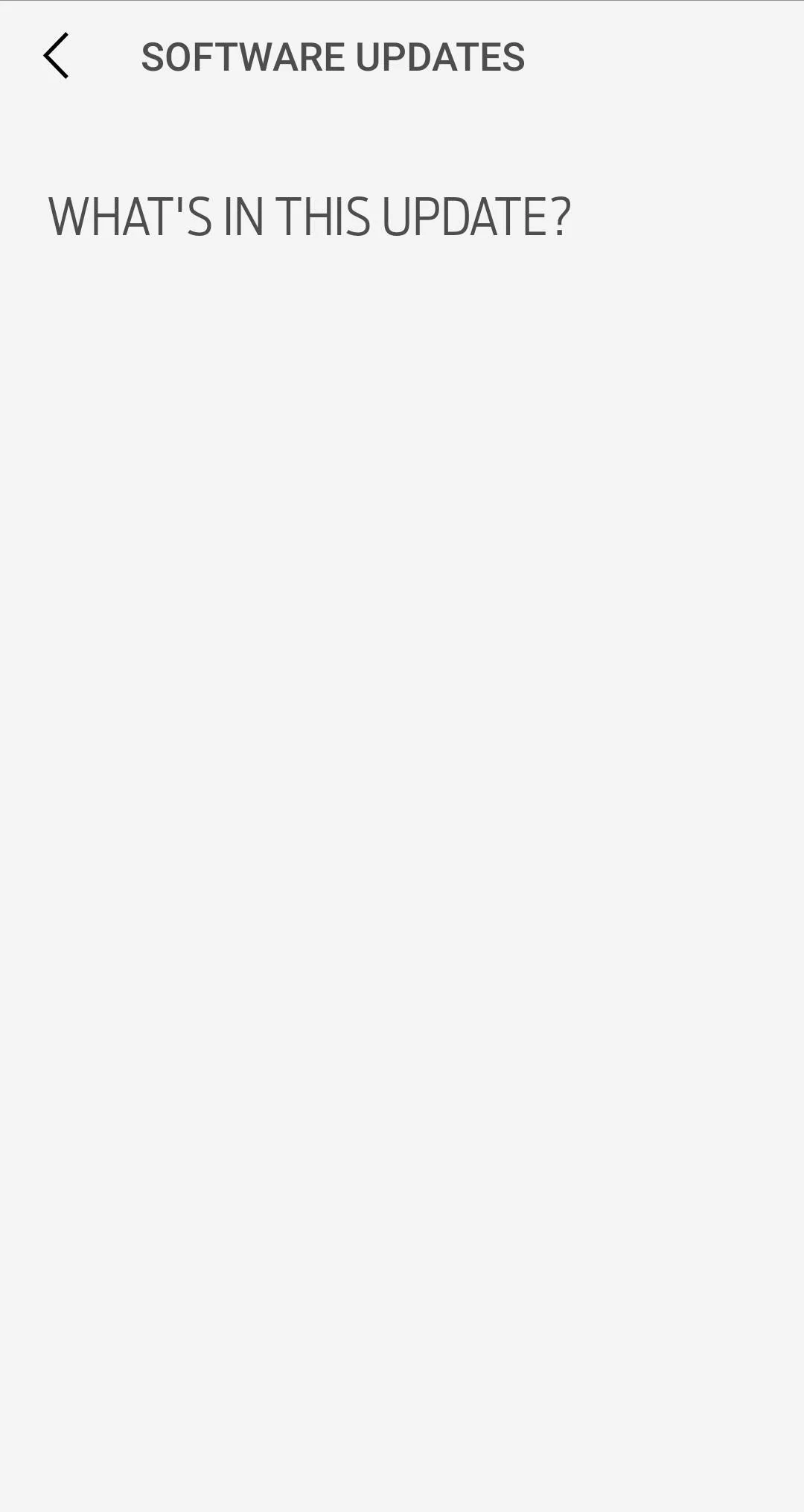
Yeah the best way is never delete the "You're Rolling with the Latest" emails from Ford in your FP app. Then you can reference when each update was installed since those have dates.
You mean this?

Ford Mustang Mach-E If you want your Mach-E to get OTA updates - the SOC of the 12V (LVB) must be at least 80-85% Screenshot_20230205-084350_FordPass

Ford Mustang Mach-E If you want your Mach-E to get OTA updates - the SOC of the 12V (LVB) must be at least 80-85% Screenshot_20230205-084359_FordPass


Yeah, that doesn't work either. You have to manually keep track.
 
OP
OP
Larry Paul

Larry Paul

Well-Known Member
First Name
Larry
Joined
Aug 27, 2021
Threads
24
Messages
929
Reaction score
1,051
Location
Southern California
Vehicles
MME-GTPE, Sunbeam Tiger w1970 Boss302, 2002Rav4EV
Country flag
I'm not sure I get the usage/value of the camera button being there. Like maybe this is stupid question but when is the front camera more useful than looking in front of you?

The 360 camera and front view cameras shows things you can’t see through mirrors or windows. It is NOT for use when driving over a couple MPH.

It is used because you can‘t see immediately in front and below the car at low speed. Eg: It is very useful when parking in a spot and want to see where the curb is or just to confirm how centered the car is with the 360 camera while driving forward, not just in reverse.

I should not have to click multiple icons/ menu items to activate it. I know many people asked for this, and many competing vehicles have it. Kudos to Ford for listening to customers and enhancing the vehicle with new features and functions.


I do hope that just like the CarPlay icon (and I presume Android Auto) that only appears when you are using a function that you cannot click the cancel ”x”, to get back to CarPlay, that Ford will do the same thing with the trunk & frunk buttons that only appear when the car is in park with a future OTA update. Those two functions should be a one click action and there is still unused real estate on the top of the screen.
 
OP
OP
Larry Paul

Larry Paul

Well-Known Member
First Name
Larry
Joined
Aug 27, 2021
Threads
24
Messages
929
Reaction score
1,051
Location
Southern California
Vehicles
MME-GTPE, Sunbeam Tiger w1970 Boss302, 2002Rav4EV
Country flag
The 360 camera and front view cameras shows things you can’t see through mirrors or windows. It is NOT for use when driving over a couple MPH.

It is used because you can‘t see immediately in front and below the car at low speed. Eg: It is very useful when parking in a spot and want to see where the curb is or just to confirm how centered the car is with the 360 camera while driving forward, not just in reverse.

I should not have to click multiple icons/ menu items to activate it. I know many people asked for this, and many competing vehicles have it. Kudos to Ford for listening to customers and enhancing the vehicle with new features and functions.


I do hope that just like the CarPlay icon (and I presume Android Auto) that only appears when you are using a function that you cannot click the cancel ”x”, to get back to CarPlay, that Ford will do the same thing with the trunk & frunk buttons that only appear when the car is in park with a future OTA update. Those two functions should be a one click action and there is still unused real estate on the top of the screen.
I just updated a post on a thread from last year that I think would be ideal to continue the UI upgrade.

https://www.macheforum.com/site/threads/2023-mach-e-feature-wishlist.17738/#post-431589
 

MachDoc

Well-Known Member
Joined
Apr 4, 2021
Threads
3
Messages
61
Reaction score
103
Location
New Jersey
Vehicles
2021 Premium Grey, 2023 GT Vapor Blue
Country flag
I would not be surprised if the SOC of the 12V battery were the problem here. I drive very short distances most days. I just measured my 12V battery voltage at 12.18. That would correlate with a SOC of less than 60%. I'm going to connect it to a trickle charger overnight to see what happens.


mkhuffman

Well-Known Member
First Name
Mike
Joined
Nov 19, 2020
Threads
29
Messages
6,878
Reaction score
9,513
Location
Virginia
Vehicles
2025 Rivian R1T Tri-Max, Jeep GC-L, VW Jetta
Country flag
I would not be surprised if the SOC of the 12V battery were the problem here. I drive very short distances most days. I just measured my 12V battery voltage at 12.18. That would correlate with a SOC of less than 60%. I'm going to connect it to a trickle charger overnight to see what happens.
The LVB SoC will not prevent a OTA delivery to your car, but may prevent it from getting installed. If nothing been delivered, charging your LVB won't make any difference.
 

MachEnthusiast

Well-Known Member
Joined
Oct 22, 2021
Threads
14
Messages
306
Reaction score
145
Location
Seattle, WA
Vehicles
2021 Mustang Mach E GT
Occupation
Software PM
Country flag
You mean this?

Screenshot_20230205-084350_FordPass.jpg

Screenshot_20230205-084359_FordPass.jpg


Yeah, that doesn't work either. You have to manually keep track.
Well my emails aren't blank like that. It's happened once to me in the many OTA updates I've received. I'm guessing that whatever update they pushed was one of the rare ones where there's no info. I think 4.1.3 was doing this for some people as I recall. Since that's the most recent update for MOST folks, my best guess is that's what version you're on.
 

MachEnthusiast

Well-Known Member
Joined
Oct 22, 2021
Threads
14
Messages
306
Reaction score
145
Location
Seattle, WA
Vehicles
2021 Mustang Mach E GT
Occupation
Software PM
Country flag
I do hope that just like the CarPlay icon (and I presume Android Auto) that only appears when you are using a function that you cannot click the cancel ”x”, to get back to CarPlay, that Ford will do the same thing with the trunk & frunk buttons that only appear when the car is in park with a future OTA update. Those two functions should be a one click action and there is still unused real estate on the top of the screen.
I had a hard time following that first sentence but it sounded interesting. Can you ELI5?
 
OP
OP
Larry Paul

Larry Paul

Well-Known Member
First Name
Larry
Joined
Aug 27, 2021
Threads
24
Messages
929
Reaction score
1,051
Location
Southern California
Vehicles
MME-GTPE, Sunbeam Tiger w1970 Boss302, 2002Rav4EV
Country flag
Since a picture is "worth a thousand words" I updated my post from June 2022 with new data today that may help.

https://www.macheforum.com/site/threads/2023-mach-e-feature-wishlist.17738/page-3#post-596714

See the post #31 (top of the 3rd page) and my original post for reference.

In addition to that graphic, the bottom line is:

There are always 3 buttons in the upper corner of the screen starting with 4.1.2. (if you have a car with a 360 camera at least. I am not sure what is there on a car without a 360 camera system)

Home, Settings and Camera

When you are using CarPlay (and I presume Android Auto): When you click home, the screen changes to the home screen (with the apps and entertainment). When the majority of the screen is showing the home layout, the home button becomes a button with an "x" in it. When you click the "x" the screen instantly returns to Car Play.

Same thing with Settings and camera. If you click the "x" the screen returns to CarPlay.

However, when you are using something that is more than 1 menu button down (like trip energy economy or the owners manual), there is a new 4th icon that appears-a CarPlay icon button. This enables the driver to go back to CarPlay. Once you are back in CarPlay-the top of the screen goes back to just 3 icons.
 
Last edited:

mkhuffman

Well-Known Member
First Name
Mike
Joined
Nov 19, 2020
Threads
29
Messages
6,878
Reaction score
9,513
Location
Virginia
Vehicles
2025 Rivian R1T Tri-Max, Jeep GC-L, VW Jetta
Country flag
Well my emails aren't blank like that. It's happened once to me in the many OTA updates I've received. I'm guessing that whatever update they pushed was one of the rare ones where there's no info. I think 4.1.3 was doing this for some people as I recall. Since that's the most recent update for MOST folks, my best guess is that's what version you're on.
Are you referring to emails, or the FordPass messages? I don't get an email when an update is applied, but I do get a FordPass message.

Right after I receive the update I can see the update details, but after a few days, maybe a week or two, the details disappear. For all my updates, not just the last one.

The last update I received was 3.6.1. I have not received 3.6.2, 4.1.1, 4.1.2 or 4.1.3 yet.

Have you gone back and looked at all your old FordPass messages and confirmed they still show the update details? Go back a few weeks and check those.
 

Kangio

Well-Known Member
First Name
Kurt
Joined
Mar 10, 2021
Threads
16
Messages
98
Reaction score
42
Location
Philadelphia
Vehicles
2021 Mach E Premium ER
Country flag
Having been stuck at 3.5.4.2 since Oct, I decided, what the hell, I’ll try the suggested ”tricks” from this thread. But after several attempts of leaving my car “turned on” with FOB in the center tray, every time it quickly seems to time out and automatically turn off. I cannot just “leave the car running” for 2 hrs to ensure charged 12v. Anyone else notice this? My current commutes are only about 15min drives, not 2 hrs.

Also, I have turned my headlight setting to “off” (which I doubt matters for OTA), but as soon as I turn the car back on, it keeps defaulting to “auto” setting.
 
OP
OP
Larry Paul

Larry Paul

Well-Known Member
First Name
Larry
Joined
Aug 27, 2021
Threads
24
Messages
929
Reaction score
1,051
Location
Southern California
Vehicles
MME-GTPE, Sunbeam Tiger w1970 Boss302, 2002Rav4EV
Country flag
Have you called the OTA number on the first post of the thread? Give them the VIN.

If you have called, I think there is an issue with your car's modem or service.
 

Kangio

Well-Known Member
First Name
Kurt
Joined
Mar 10, 2021
Threads
16
Messages
98
Reaction score
42
Location
Philadelphia
Vehicles
2021 Mach E Premium ER
Country flag
Have you called the OTA number on the first post of the thread? Give them the VIN.

If you have called, I think there is an issue with your car's modem or service.
I assume you are responding to my “stuck status”, not the issue of car turning off?

I called the number last week, and they confirmed a failed attempt at 3.6 OTA in November, and said I should see dealership service. But my car was just in the week before and they claimed to do all the appropriate updates. Ben from the forum ran the VIN through FDRS, and also noted the same status but suggested FORD is still working on delivering an OTA fix.
 

azerik

Well-Known Member
First Name
Erik
Joined
Jan 8, 2023
Threads
79
Messages
4,545
Reaction score
4,558
Location
Chandler/Flagstaff, AZ
Vehicles
'21 Spacey Prem4x, '21 RX450H, 13 Focus EV
Occupation
DevSecNetOps, General PITA
Country flag
I'm not sure I get the usage/value of the camera button being there. Like maybe this is stupid question but when is the front camera more useful than looking in front of you?
My garage. In my RX450H it has lines in front that line up magically with the baseboard of my garage. If the line is at or above the baseboard it's pulled in far enough to not get modified by the garage door hinges. This is the single best parking helper my wife has. With my MME, when I get to put it inside I need to be fairly close to the cabinets in front of me. I have no way of seeing where the front end actually is. (Yes I'm sure with time and practice it'll be easier, but grown accustomed to the front cam on the Lexus flipping on by it's self in a parking situation) The 360 Cam I havn't used all that much because it's too many clicks in and honestly kind of dumb. Theres 15 inches of screen, no real reason I need to click again to zoom in to kinda see the curb a little better and slightly more pixelated.
 

azerik

Well-Known Member
First Name
Erik
Joined
Jan 8, 2023
Threads
79
Messages
4,545
Reaction score
4,558
Location
Chandler/Flagstaff, AZ
Vehicles
'21 Spacey Prem4x, '21 RX450H, 13 Focus EV
Occupation
DevSecNetOps, General PITA
Country flag
Having been stuck at 3.5.4.2 since Oct, I decided, what the hell, I’ll try the suggested ”tricks” from this thread. But after several attempts of leaving my car “turned on” with FOB in the center tray, every time it quickly seems to time out and automatically turn off. I cannot just “leave the car running” for 2 hrs to ensure charged 12v. Anyone else notice this? My current commutes are only about 15min drives, not 2 hrs.

Also, I have turned my headlight setting to “off” (which I doubt matters for OTA), but as soon as I turn the car back on, it keeps defaulting to “auto” setting.
I was in exactly the same issues. It finally sent me an update. I gave up on the song and dance of trying and it just happened. But my drive is closer to 30 min once or twice a day.
Sponsored


Top