

bshaw
Well-Known Member
- Joined
- May 18, 2020
- Threads
- 14
- Messages
- 1,562
- Reaction score
- 2,181
- Location
- Boston, MA
- Vehicles
- 2021 Mustang Mach E 4X (Job 1)

CarScanner works pretty reliably on iOS. I'm looking for a good dashboard config because the one I created on my own is terrible.
Please post a template if you have a good one.
Please post a template if you have a good one.
bshaw
Well-Known Member
- Joined
- May 18, 2020
- Threads
- 14
- Messages
- 1,562
- Reaction score
- 2,181
- Location
- Boston, MA
- Vehicles
- 2021 Mustang Mach E 4X (Job 1)
There is a lot of things that are nice to monitor that are not exposed by any of the car interfaces.What's the best things to monitor?
For me, the #1 best thing to see is HV Battery temperature. If your big battery is too cold or too hot, then your range will be affected, and your ability to DCFC will be throttled to slower speeds.
#2 is maybe 12V battery SOC. I don't have a problem with my car maintaining the 12V, but lots of other people have, and the car becomes unusable once your 12V drops too low.

dtbaker61
Well-Known Member
- First Name
- Dan
- Joined
- May 11, 2020
- Threads
- 126
- Messages
- 4,823
- Reaction score
- 4,526
- Location
- santa fe,nm
- Website
- www.envirokarma.org
- Vehicles
- MME (delivered 2/26/21), DIY eMiata BEV
- Occupation
- Solar Sales/install
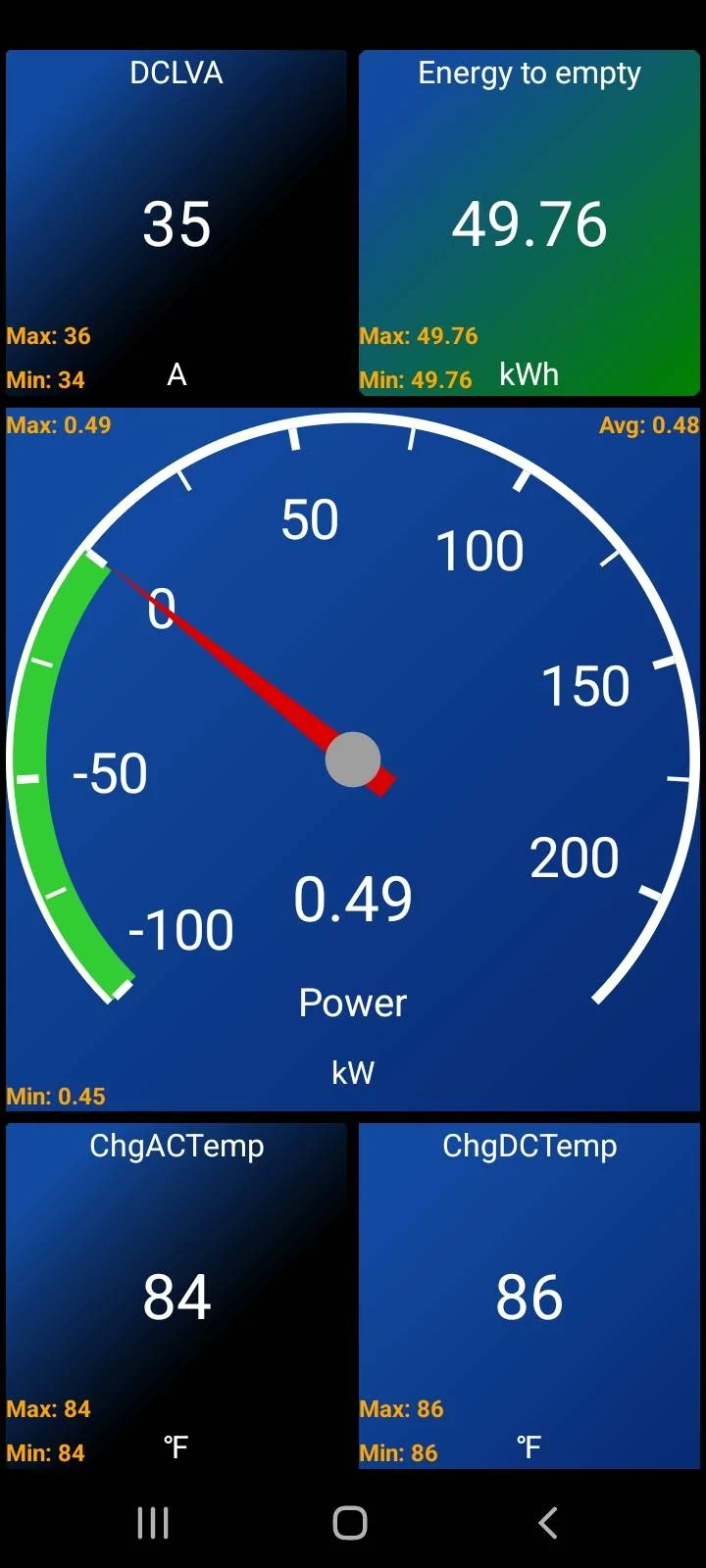
I like CarScanner, and have settled on display of 5 guages. It's pretty easy to pick the layout, and then select the data you want to see in each section, and select HOW you want to see it. This is my favorite so far:

Murse-In-Airy
Well-Known Member
- First Name
- Rod
- Joined
- Mar 5, 2021
- Threads
- 82
- Messages
- 3,679
- Reaction score
- 8,297
- Location
- Chaumont, NY
- Vehicles
- Mach-E ER AWD
- Occupation
- Nurse
Looks nice. But I have to ask what is being monitored? Os chgAC and chgDC temp both battery temp? And what is DCLVA? DC Battery amps?I like CarScanner, and have settled on display of 5 guages. It's pretty easy to pick the layout, and then select the data you want to see in each section, and select HOW you want to see it. This is my favorite so far:
Tbird
Well-Known Member
- First Name
- Denny
- Joined
- Sep 24, 2021
- Threads
- 9
- Messages
- 299
- Reaction score
- 313
- Location
- New Hampshire
- Vehicles
- Mach E4x 2021 job 1, 2024 Kia EV6 GT-Line Trim
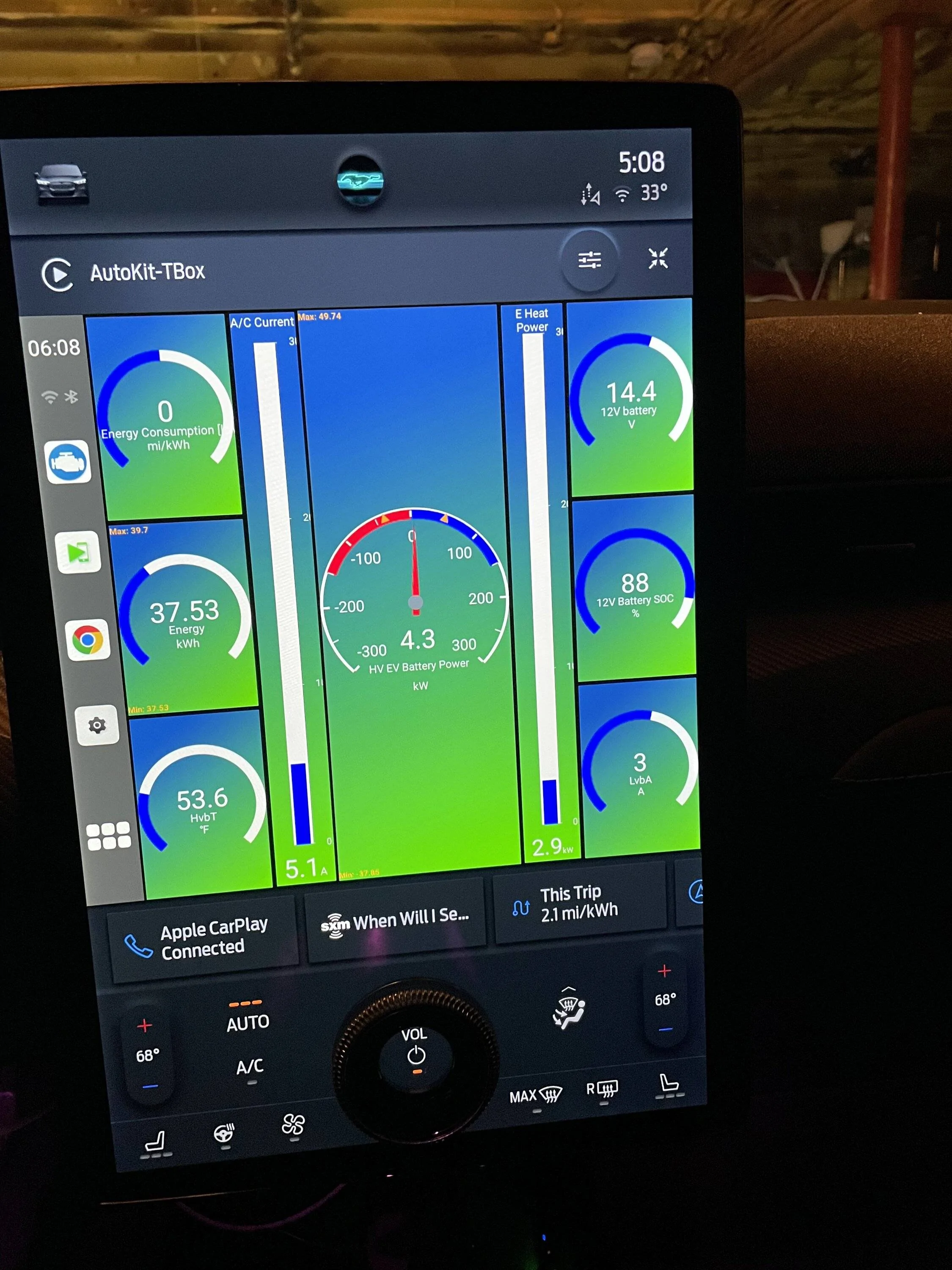
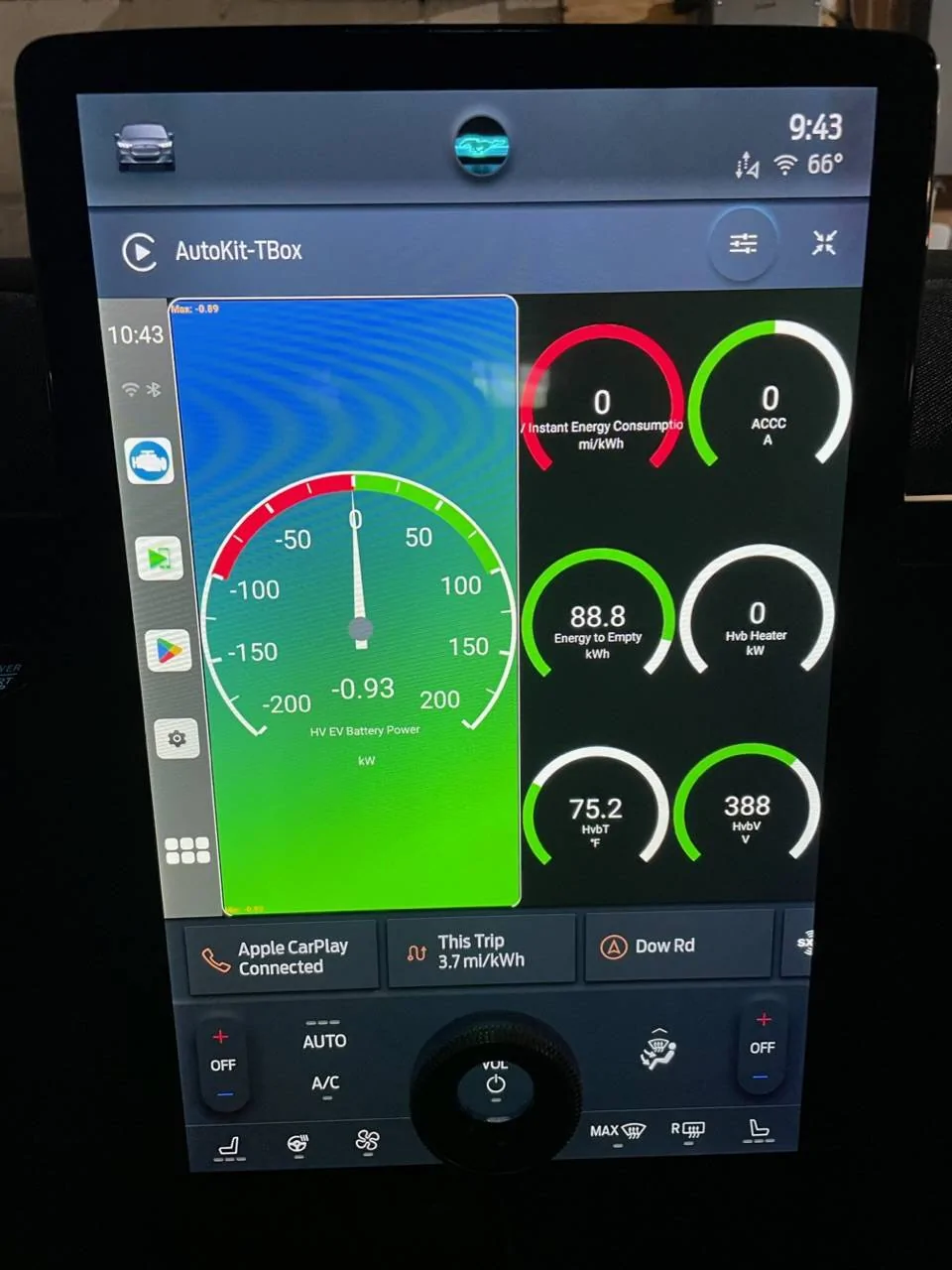
Here is what I use


dtbaker61
Well-Known Member
- First Name
- Dan
- Joined
- May 11, 2020
- Threads
- 126
- Messages
- 4,823
- Reaction score
- 4,526
- Location
- santa fe,nm
- Website
- www.envirokarma.org
- Vehicles
- MME (delivered 2/26/21), DIY eMiata BEV
- Occupation
- Solar Sales/install
those are the closest temp sensors to the HV battery. I believe they are just outside the HV battery case, one on the AC charger connector, and the other on the DC-DC connector. They both seem to go up and down together pretty much either from charging, or extended heavy loads/regen will drive the temps up a bit.Looks nice. But I have to ask what is being monitored? Os chgAC and chgDC temp both battery temp?
12v system amps coming out of the dc-dc converter. I like to see this for reference when eHeat, A/C, come on.... AND the times I export 12v power thru my little inverter when I am running external loads; I want to be sure that the TOTAL 12v load stays well under 160amps. Background load with nothing special on bounces around 12-20amps.And what is DCLVA? DC Battery amps?
dtbaker61
Well-Known Member
- First Name
- Dan
- Joined
- May 11, 2020
- Threads
- 126
- Messages
- 4,823
- Reaction score
- 4,526
- Location
- santa fe,nm
- Website
- www.envirokarma.org
- Vehicles
- MME (delivered 2/26/21), DIY eMiata BEV
- Occupation
- Solar Sales/install
that's pretty nice! I have an Android Phone, but decided to leave the CarScanner display on the phone so I could have navigation up on the bigscreen at the same time. I have not ever configured or used AndroidAuto since there is no other App I would cast to the screen.....Here is what I use
Murse-In-Airy
Well-Known Member
- First Name
- Rod
- Joined
- Mar 5, 2021
- Threads
- 82
- Messages
- 3,679
- Reaction score
- 8,297
- Location
- Chaumont, NY
- Vehicles
- Mach-E ER AWD
- Occupation
- Nurse
Thanks for the explanation Dan. I’m going to try and put something together for myself and there are SO MANY options and abbreviations to try and decode.
dtbaker61
Well-Known Member
- First Name
- Dan
- Joined
- May 11, 2020
- Threads
- 126
- Messages
- 4,823
- Reaction score
- 4,526
- Location
- santa fe,nm
- Website
- www.envirokarma.org
- Vehicles
- MME (delivered 2/26/21), DIY eMiata BEV
- Occupation
- Solar Sales/install
Thanks for the explanation Dan. I’m going to try and put something together for myself and there are SO MANY options and abbreviations to try and decode.
yup, lots of choices and sensors to choose from..... I wanted to keep the data to a minimum, and watch only the ones I have a specific reason for watching. The real-time kW output/regen is the most useful/instructive, so I wanted to make that large and in a dial format I would catch out of the corner of my eye.
The nice thing is the content of each little frame is easy to change.... you can even have a number of different 'dashboards' watching different sensors depending what you are doing.
Tbird
Well-Known Member
- First Name
- Denny
- Joined
- Sep 24, 2021
- Threads
- 9
- Messages
- 299
- Reaction score
- 313
- Location
- New Hampshire
- Vehicles
- Mach E4x 2021 job 1, 2024 Kia EV6 GT-Line Trim
I am using an Autokit T box which is a seperate android multimedia box which runs car scanner as an app simulating car play which connects to the sync screen. That leaves my phone available for other things and I easily switch between the ford nav screen and the car play app(but not both at the same time).that's pretty nice! I have an Android Phone, but decided to leave the CarScanner display on the phone so I could have navigation up on the bigscreen at the same time. I have not ever configured or used AndroidAuto since there is no other App I would cast to the screen.....
hawkeye3point1
Well-Known Member
- Joined
- Nov 13, 2021
- Threads
- 0
- Messages
- 480
- Reaction score
- 460
- Location
- NH
- Vehicles
- Space White ER RWD, Born on 12 Aug. '21
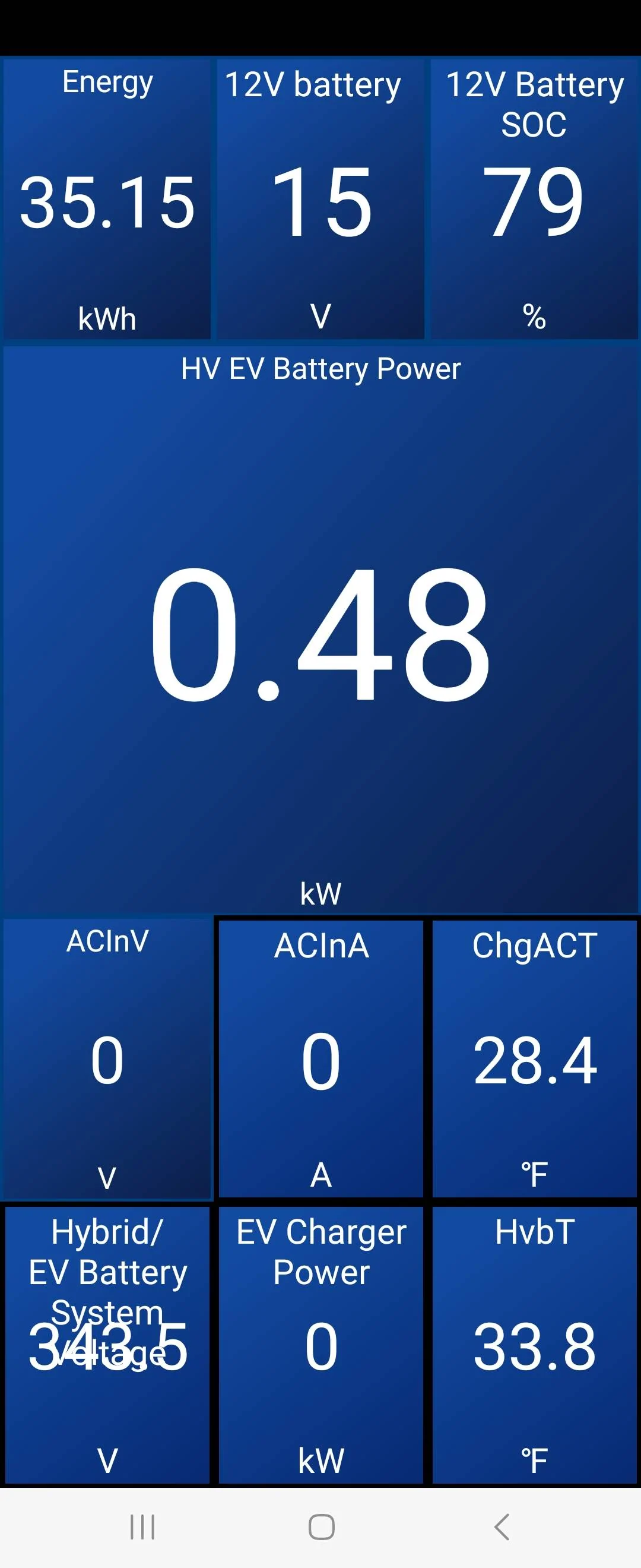
Here is my Home screen.

JimmyMachE
Well-Known Member
I think the pre-loaded screens in the Mach-E profile are decent (circa 15 pages).CarScanner works pretty reliably on iOS. I'm looking for a good dashboard config because the one I created on my own is terrible.
Please post a template if you have a good one.
I found them by resetting the Dashboard:
Settings / Dashboard - reset Dashboard to default


