Has Anyone Figured out how to Select an Alternate Route in Navigation?

Chrisbriding

Well-Known Member
First Name
Chris
Joined
Mar 1, 2023
Threads
4
Messages
119
Reaction score
116
Location
Los Angeles, CA
Vehicles
2023 Mach-E Premium AWD
Country flag
We spent over an hour or so trying to help a visiting relative (2 Mach-Es in the driveway!) plan their way home after visiting us in LA. We wanted to route him around downtown (think, 710 N to 210W to 5N) and could see it as an option on the map but could not figure out how to select it.

I've read the other threads but I think those were written regarding earlier versions of Sync.

Owner's manual was no help and even YouTube failed me ?

Thanks!
Sponsored

 

RickMachE

Well-Known Member
Joined
Jul 1, 2021
Threads
267
Messages
17,939
Reaction score
27,947
Location
SE MI
Vehicles
2022 Mach-E Premium 4X, 2022 Lightning Lariat ER
Country flag
The smoothest solution is to use ABRP, and set additional waypoints. Then, share it to then, they can then open it in GoogleMaps.
 

SWO

Well-Known Member
Joined
Aug 28, 2021
Threads
21
Messages
2,223
Reaction score
2,803
Location
MD, USA
Vehicles
2022 Mach E GT, 2021 Escape PHEV, 2019 F-150
Country flag
I like the ford navigation but this is something I really wish it had. My work around is to use google/waze and then use it to add waypoints to force the Ford navigation to follow.
 

SpaceEVDriver

Well-Known Member
Joined
Aug 26, 2021
Threads
71
Messages
2,651
Reaction score
4,774
Location
Arizona
Vehicles
2022 CA Route 1 AWD, ER; 2023 Lightning Lariat ER
Occupation
Planetary Science
Country flag
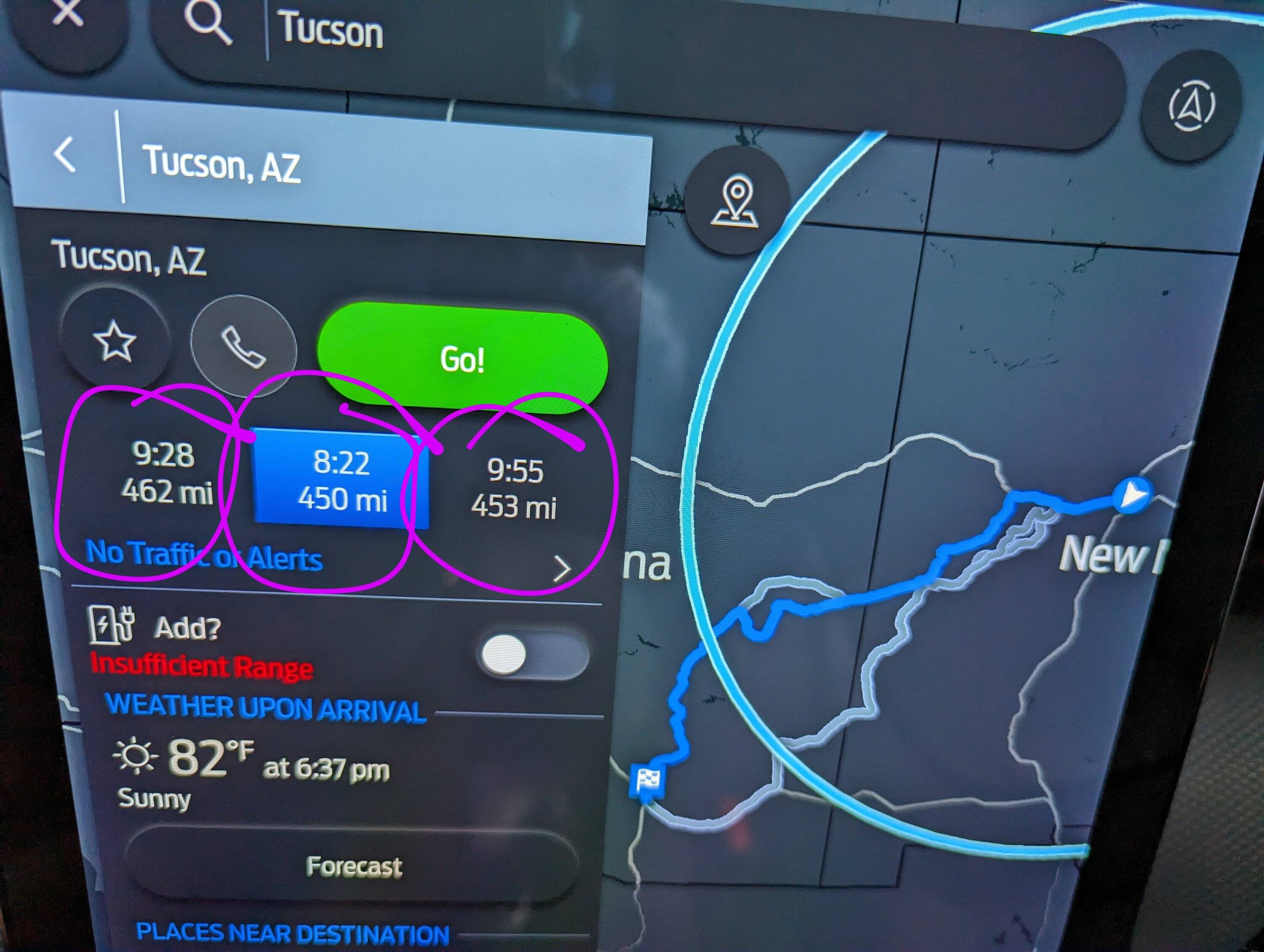
When my Ford navigation sees possible alternate routes, there are choices just under the big, green GO! button.

Ford Mustang Mach-E Has Anyone Figured out how to Select an Alternate Route in Navigation? PXL_20230506_160940193~2


eastern refugee

Well-Known Member
First Name
Rich
Joined
Dec 11, 2019
Threads
13
Messages
1,080
Reaction score
1,325
Location
california
Vehicles
2021 Mach E First Edition Grabber Blue.....GOT IT!
Occupation
insurance agent
Country flag
Ford navigation is awesome honest. I drive from Bakersfield to LA. I go to the same place and yet ford directs me at least 6 different ways due to traffic/accidents etc. I upgraded SIRUS to include navigation. It does an awesome job changing on the fly. I have compared it to WAZE at the exact same time. 90% of the time they are exactly the same. The other 10% WAZE is like 10 minutes faster because it either throws you off a cliff or directs you through gang areas.
 

RickMachE

Well-Known Member
Joined
Jul 1, 2021
Threads
267
Messages
17,939
Reaction score
27,947
Location
SE MI
Vehicles
2022 Mach-E Premium 4X, 2022 Lightning Lariat ER
Country flag
When my Ford navigation sees possible alternate routes, there are choices just under the big, green GO! button.
That's when it SEES possible alternate routes, not when you want to FORCE one. Forcing a route, in any mapping software, can be a challenge.
 

SpaceEVDriver

Well-Known Member
Joined
Aug 26, 2021
Threads
71
Messages
2,651
Reaction score
4,774
Location
Arizona
Vehicles
2022 CA Route 1 AWD, ER; 2023 Lightning Lariat ER
Occupation
Planetary Science
Country flag
That's when it SEES possible alternate routes, not when you want to FORCE one. Forcing a route, in any mapping software, can be a challenge.
Absolutely true. The OP stated,

We wanted to route him around downtown (think, 710 N to 210W to 5N) and could see it as an option on the map but could not figure out how to select it.
So my interpretation was that the Ford Nav saw that route option but the OP couldn't figure out how to select it in the mapping software. Thus the screen-cap I posted.

It won't matter which mapping software you choose, if the route you want isn't one it's discovered, you'll have to do something special like add a destination close to the route you want.
 
OP
OP

Chrisbriding

Well-Known Member
First Name
Chris
Joined
Mar 1, 2023
Threads
4
Messages
119
Reaction score
116
Location
Los Angeles, CA
Vehicles
2023 Mach-E Premium AWD
Country flag
Absolutely true. The OP stated,


So my interpretation was that the Ford Nav saw that route option but the OP couldn't figure out how to select it in the mapping software. Thus the screen-cap I posted.

It won't matter which mapping software you choose, if the route you want isn't one it's discovered, you'll have to do something special like add a destination close to the route you want.
Actually, it's a little of both. I really wanted to force the route to be 605N to 210W and was trying to drag it over the way that you can in some other apps. The Ford Navigation showed a 710 N to 210 W route as an option and I was so fixated on trying to drag the route that it didn't occur to me to just select it. The screen shot was a big light bulb!!
Sponsored


Top