peterlhansen

Well-Known Member
First Name
Peter
Joined
Dec 2, 2021
Threads
3
Messages
82
Reaction score
75
Location
Punta Gorda, FL
Vehicles
2022 Mach-E Red Premium AWD ER "Reddy"
Occupation
Retired Engineer
Country flag
Does Apple Maps EV integration still not show "remaining miles" on a trip? I use Apple Maps all the time (my preferred app for routing) but I had to turn off the EV integration. I like seeing the miles remaining in a trip.
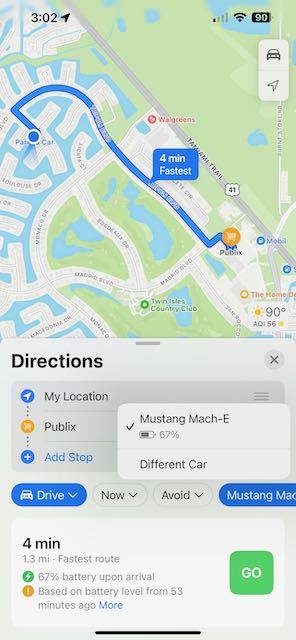
In order to see the remaining miles (instead of arrival SOC), before starting the drive, you need to press the blue "Mustang Mach-E" button on the iPhone, then select "Different Car" from the popup menu as you can see in the attached screenshot. Unfortunately, there is no way to do this from the CarPlay screen on the big display. I hope that Apple adds a means to switch between SOC and miles-to-go on the main display.
Ford Mustang Mach-E iOS 17 adds real-time charging availability info IMG_4197
Sponsored


ElectrikPony

Well-Known Member
First Name
RANDY
Joined
Jan 23, 2022
Threads
26
Messages
336
Reaction score
239
Location
California
Vehicles
None yet
Country flag
In order to see the remaining miles (instead of arrival SOC), before starting the drive, you need to press the blue "Mustang Mach-E" button on the iPhone, then select "Different Car" from the popup menu as you can see in the attached screenshot. Unfortunately, there is no way to do this from the CarPlay screen on the big display. I hope that Apple adds a means to switch between SOC and miles-to-go on the main display.
IMG_4197.jpeg
I’m on iOS17 beta as well, and I never see the “mustang mach-e” as a blue button. I only get a “now” and “avoid” buttons.

How do I get those ? It’s connected via CarPlay.
 

peterlhansen

Well-Known Member
First Name
Peter
Joined
Dec 2, 2021
Threads
3
Messages
82
Reaction score
75
Location
Punta Gorda, FL
Vehicles
2022 Mach-E Red Premium AWD ER "Reddy"
Occupation
Retired Engineer
Country flag
I’m on iOS17 beta as well, and I never see the “mustang mach-e” as a blue button. I only get a “now” and “avoid” buttons.

How do I get those ? It’s connected via CarPlay.
Sorry, my response was for iOS 16. From some of the posts of iOS 17, it appears that there have been basic changes. I guess it’s time to get adventurous and try 17.
 

nathan624

Active Member
First Name
Nathan
Joined
Aug 18, 2021
Threads
3
Messages
39
Reaction score
45
Location
San Diego, CA
Vehicles
2022 Mach-E Premium AWD
Occupation
Marketing
Country flag
Really wish they fixed the CarPlay scaling on larger screens like ours. Things are still super small on the multiapp home page thing. Drives me nuts!
I wish we could two-finger scale like we can do on our phones. I'm not sure if that's a limitation of the screen or not.
 

Sagacant

Active Member
Joined
Jun 14, 2022
Threads
2
Messages
31
Reaction score
40
Location
NY
Vehicles
2023 Ford Mustang Mach-E California Route 1
Country flag
That's fantastic and Apple has been so smart to get into this area as quickly as possible. We used Apple Maps on our first long road trip in the MME a couple months ago and it was great to use a map system we already know and see our projected charge at arrival as we went. The integration is already great, will be nice to see it go even further.

Only issue I had with it was on the drive home, it absolutely wanted us to stop to charge like 10 miles from home because I guess it thought we would run out, or maybe fall under 10% when we were that close to home? I had to cancel and redo the route once we got closer to home before it finally realized that wasn't needed. Hopefully they improve the ability to skip a recommended stop or set your "comfort level" for state of charge at arrival. We got home with about 17% battery remaining, the extra charging stop was totally not needed.
I had that same issue recently. I actually was routing myself to a Tesla Supercharger (with a magic dock) and it kept directing me to stop at a different charger along the way. I’m guessing apple doesn’t yet recognize Tesla magic dock stations as compatible with the MME? But either way, it would be nice to just cancel the suggestion to stop at a charger. I ended up having to use the in-car navigation to get to the Tesla charging station


JoBe

Member
First Name
Johan
Joined
Jun 7, 2023
Threads
0
Messages
11
Reaction score
5
Location
EU
Vehicles
Mach-E AWD LR
Occupation
Engineer
Country flag
I wonder when, if ever, non apple apps will have access to live soc from the car.
I use ABRP to plan trips, ChargeFinder for live status of available chargers and apple maps and google for turn-by-turn nav.
Maybe one day one app will be enough…
 
Last edited:
OP
OP
Gullwingdmc

Gullwingdmc

Well-Known Member
First Name
Chip
Joined
May 15, 2021
Threads
85
Messages
2,945
Reaction score
4,113
Location
Boston, MA
Vehicles
2022 Mustang Mach E GT AWD ER - Grabber Blue
Country flag
I wish we could two-finger scale like we can do on our phones. I'm not sure if that's a limitation of the screen or not.
The screen supports it, but I don’t think the CarPlay connection does.
 

cbcasas

Well-Known Member
First Name
Christopher
Joined
Jun 8, 2022
Threads
10
Messages
321
Reaction score
157
Location
Southern California
Vehicles
2024 Premium
Country flag
How’s PAAK working so far on the beta?
1 week update: PAAK seems better than before. But unsure if that’s because of iOS or some recent Power-Up (4.2.6). Haven’t had an instance where I’m standing outside my car waiting to unlock because it hasn’t connected to my phone.
 
OP
OP
Gullwingdmc

Gullwingdmc

Well-Known Member
First Name
Chip
Joined
May 15, 2021
Threads
85
Messages
2,945
Reaction score
4,113
Location
Boston, MA
Vehicles
2022 Mustang Mach E GT AWD ER - Grabber Blue
Country flag
1 week update: PAAK seems better than before. But unsure if that’s because of iOS or some recent Power-Up (4.2.6). Haven’t had an instance where I’m standing outside my car waiting to unlock because it hasn’t connected to my phone.
That’s great news!!
Sponsored


Top