SyNRG

Well-Known Member
First Name
John
Joined
Dec 5, 2019
Threads
6
Messages
394
Reaction score
495
Location
Brea, CA
Vehicles
2019 Explorer Sport & 2021 MME Select (SR) RWD
Occupation
Healthcare Data Analysis
Country flag
Overall, I like the new v5.0 but sadden to see Trip History hasn't made its return yet.
I'm on Android (Samsung Galaxy S24+) and only issues thus far:
  1. Location button worked once and hasn't since. Have tried clearing cache, reboot, and also uninstalled and reinstalled the app still no dice.
  2. Public Charging button map I'm guessing is tied to #1, thus same, click on it and nothing happens.
Sponsored
 

Space_Pony

Well-Known Member
Joined
Jun 7, 2023
Threads
4
Messages
1,710
Reaction score
1,442
Location
Indiana
Vehicles
2023 Premium Mach-E awdX
Country flag
Overall, I like the new v5.0 but sadden to see Trip History hasn't made its return yet.
I'm on Android (Samsung Galaxy S24+) and only issues thus far:
  1. Location button worked once and hasn't since. Have tried clearing cache, reboot, and also uninstalled and reinstalled the app still no dice.
  2. Public Charging button map I'm guessing is tied to #1, thus same, click on it and nothing happens.
Join the club. S23+ here. Apparently the guy that was supposed to test the app on Android 14 called in sick that day.
 
  • Haha
Reactions: RLW

gordonf238

Well-Known Member
First Name
Gordon
Joined
Aug 26, 2021
Threads
39
Messages
217
Reaction score
264
Location
NYC
Vehicles
Mach-E AWD, Ext. range
Country flag
click on: Service > Vehicle Health
Ah thank you.
Works with my Mach-E

for my Expedition it just says “Temporarily Unavailable”.
I’m sure they’ll fix that in time.
 

Taz

Member
First Name
Jørn
Joined
Aug 17, 2023
Threads
1
Messages
18
Reaction score
4
Location
Norway
Vehicles
Ford Mustang Mach E 2021 FE
Occupation
IT-Consultant
Country flag
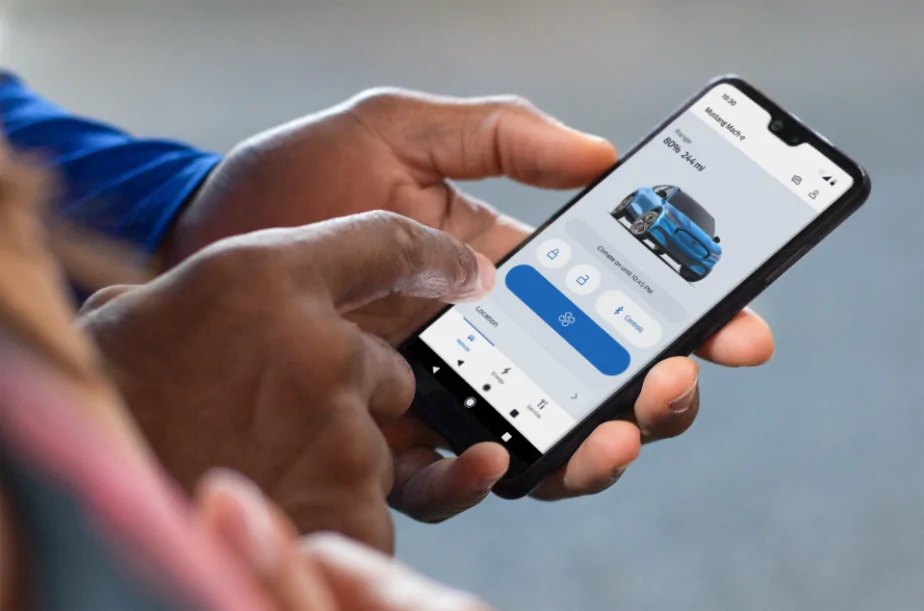
Hi Mustang Mach-E owners! If you recently updated your FordPass® app, you may have noticed it looks a little different. We are pleased to share that we have rolled out a newly designed app that is easy to use and efficient, to help you better manage your vehicle remotely. Here is what is new:
  • Simplified Experience: We have reduced the number of steps it takes to access functions and made it easier to find them. As an EV owner, you can enjoy a simplified slider for target charge. Also, instead of having to press and hold to turn the vehicle ‘on’, it is now a simple tap.
  • Apple Watch Integration: If you have an Apple Watch, in addition to lock/unlock and remote start/stop, you will also be able to use the following features from your wrist:
    • View battery level and range
    • View charging status, including: Charging speed, next departure time based on when desired charge is reached, current preferred charging window
    • View vehicle location
    • Activate horn and lights remotely
We are also continuing to improve the in-app experience with this latest version. If you notice a feature you previously used before is no longer there, don’t worry. The feature can still be accessed via your in-vehicle touchscreen.

We love to hear from our owners so let us know what you think and if you have any questions about FordPass!

Please note: FordPass® App, compatible with select smartphone platforms, is available via a download. Message and data rates may apply. 

524242.png
Any chance it will be realesed in Norway anytime soon? :D
 

me-stang

Well-Known Member
First Name
Jim
Joined
Jul 11, 2021
Threads
2
Messages
45
Reaction score
25
Location
New Jersey
Vehicles
2021 Mach-e Select, 2013 Explorer, 2013 Edge
Occupation
Software engineer
Country flag
I can't open the map. The location and public charging buttons do nothing, almost always. I've gotten the location button to work a handful of times.

I am on a Samsung s23 ultra. Cleared the app data. Uninstalled. Restarted phone. Given it location permissions explicitly.

Nothing is helping.

As it's officially released I don't have the option to go back anymore.

How do I report a bug?

Has anyone found a workaround?
Same problem with a Pixel 6 - Location rarely responds, same with Public Charging for me...all the others work fine.


WPJoe

Well-Known Member
Joined
Jan 27, 2021
Threads
31
Messages
106
Reaction score
31
Location
NY
Vehicles
Acura RDX
Country flag
"Simplified Experience: We have reduced the number of steps it takes to access functions and made it easier to find them."

How did moving the open frunk button from the main screen to a sub menu of the app make things easier to access?!? ?
 

eban0106

New Member
First Name
Brad
Joined
Dec 31, 2023
Threads
0
Messages
1
Reaction score
1
Location
Vancouver, BC
Vehicles
Mach-E 2021
Country flag
I wonder why this version pushed and enforced while it is clearly a bogus version and has some important features that were previously available now is missing. Some that makes me frustrated:

- Location does not show the last time of update (e.g. last update 15 minutes ago)
- No way to ask for refresh of the location (previously we could just swipe-down to get the latest updated location of the car)

At least make both versions available so that we can use the old one until you fix this. So many issues take a few months to fix.
 

milepost1

Well-Known Member
First Name
harold
Joined
Feb 18, 2021
Threads
16
Messages
493
Reaction score
404
Location
bonney lake
Vehicles
Carbonizied gray - FE
Occupation
retired
Country flag
It's the fan icon. Starts HVAC.


Yeah, I'm seeing a lot of people having trouble wrapping their head around the fact that "Remote Start" on an EV really just means the HVAC turns on, that's it. So switching to the fan icon makes more sense than a start button. It should have always been that way, but it was another ICE carryover.
I am fine with a fan symbol, i can wrap my head around not actually starting car. But looking at UI I would assume "start" button would start car (climate control) and not "start charging to 100%". I would not have used one word "start" to mean "start charging to 100%" and fan symbol to mean "start" car.
 

Parasmoney

Well-Known Member
First Name
Paras
Joined
Sep 27, 2021
Threads
4
Messages
106
Reaction score
96
Location
Philadelphia
Vehicles
Mazda 3
Occupation
IT
Country flag
"Simplified Experience: We have reduced the number of steps it takes to access functions and made it easier to find them."

How did moving the open frunk button from the main screen to a sub menu of the app make things easier to access?!? ?
So the buttons are now one click instead of press and hold. It's actually better having them on a different screen (at least for me) so you don't accidentally "butt" unlock your car or open the frunk or the windows with a single clik.
 

MrPeanut

Well-Known Member
First Name
Bob
Joined
Dec 11, 2021
Threads
1
Messages
63
Reaction score
21
Location
Wake Forest, NC
Vehicles
2022 MME Premium ER
Occupation
Retired
Country flag
I can't setup the PAAK. When I try to do it, I get an Error Code 11 and it tells me to reset the phone as a key data, only it doesn't respond to the button or give you any instruction on how to do it otherwise! Thanks, FOMOCO for another crack job of programming.
 

leeman

Well-Known Member
Joined
Jun 6, 2021
Threads
73
Messages
716
Reaction score
239
Location
Outer space
Vehicles
2021 Mach E GT
Occupation
Engineer
Country flag
Hi Mustang Mach-E owners! If you recently updated your FordPass® app, you may have noticed it looks a little different. We are pleased to share that we have rolled out a newly designed app that is easy to use and efficient, to help you better manage your vehicle remotely. Here is what is new:
  • Simplified Experience: We have reduced the number of steps it takes to access functions and made it easier to find them. As an EV owner, you can enjoy a simplified slider for target charge. Also, instead of having to press and hold to turn the vehicle ‘on’, it is now a simple tap.
  • Apple Watch Integration: If you have an Apple Watch, in addition to lock/unlock and remote start/stop, you will also be able to use the following features from your wrist:
    • View battery level and range
    • View charging status, including: Charging speed, next departure time based on when desired charge is reached, current preferred charging window
    • View vehicle location
    • Activate horn and lights remotely
We are also continuing to improve the in-app experience with this latest version. If you notice a feature you previously used before is no longer there, don’t worry. The feature can still be accessed via your in-vehicle touchscreen.

We love to hear from our owners so let us know what you think and if you have any questions about FordPass!

Please note: FordPass® App, compatible with select smartphone platforms, is available via a download. Message and data rates may apply. 

524242.png
Wher is the Plug and charge info screen ???? it is just a on off . How do you add a credit card in order to charge publicly where is the thing where you set up charging for electrify America Tesla all that stuff is disappeared why would you release an app that is incomplete.
 

Homestead

Well-Known Member
Joined
Oct 15, 2023
Threads
7
Messages
332
Reaction score
187
Location
Oregun
Vehicles
23 Mach-E, F-350
Occupation
Retired Engineer
Country flag
I tried the start button today. It did start charging to 100% but I then went to the energy screen and tried to adjust it to 80% but after a few moments it reverted back to 100%. So I had to keep an eye on it to force it to stop when I got to 80%.
 

Kkbrit

Member
First Name
Karen
Joined
Aug 27, 2022
Threads
4
Messages
23
Reaction score
5
Location
Santa Rosa
Vehicles
Mach E
Occupation
Manager
Country flag
I can’t get my Apple Watch to work with FordPass . It is asking me to set a passcode to access it. Anyone know how to get around this?
 

ponyjoule

New Member
First Name
Abe
Joined
Jan 8, 2023
Threads
0
Messages
3
Reaction score
0
Location
Pleasanton, CA
Vehicles
Porsche Cayman, Lexus ES 300, Mustang Mach-e GT PE
Country flag
Hi Mustang Mach-E owners! If you recently updated your FordPass® app, you may have noticed it looks a little different. We are pleased to share that we have rolled out a newly designed app that is easy to use and efficient, to help you better manage your vehicle remotely. Here is what is new:
  • Simplified Experience: We have reduced the number of steps it takes to access functions and made it easier to find them. As an EV owner, you can enjoy a simplified slider for target charge. Also, instead of having to press and hold to turn the vehicle ‘on’, it is now a simple tap.
  • Apple Watch Integration: If you have an Apple Watch, in addition to lock/unlock and remote start/stop, you will also be able to use the following features from your wrist:
    • View battery level and range
    • View charging status, including: Charging speed, next departure time based on when desired charge is reached, current preferred charging window
    • View vehicle location
    • Activate horn and lights remotely
We are also continuing to improve the in-app experience with this latest version. If you notice a feature you previously used before is no longer there, don’t worry. The feature can still be accessed via your in-vehicle touchscreen.

We love to hear from our owners so let us know what you think and if you have any questions about FordPass!

Please note: FordPass® App, compatible with select smartphone platforms, is available via a download. Message and data rates may apply. 

524242.png
Sponsored


Top