Emporia Charger

TEP

Active Member
First Name
Tom
Joined
Oct 10, 2022
Threads
8
Messages
40
Reaction score
8
Location
St George , Utah
Vehicles
2022 dark matter ext battery
Occupation
Retired
Country flag
I just ordered the Emporia charger and will arrive today. However, I learned that WiFi needs to be 2.4ghz in order to utilize the app to change settings. I have a 40amp breaker and can only use 32amps for charging. Emporia can only be changed to 32 via the app. Currently using Ford 32 amp charger. I can change the breaker to 50 amps. I utilize 5G WiFi. Not interested in fooling with WiFi. Called Emporia and they made some suggestions but they are workarounds. They were helpful and called back same day. Good sign!
If I make a breaker change and charge my car, can I use the Ford app to monitor the charging without using the Emporia app???? I am confused as to direction to go in and disappointed Emporia only had a 2.4 ghz connection. No expert, but 5g seems to be current standard.
I wasn’t counting on the electrition expense to change the breaker. However, this may be the best way to utilize the charger.
if any of this makes sense and someone had similar quandary I would appreciate the suggestion. If I don’t make sense apologize in advance.
Thanks from sun baked Utah.
Tom
Sponsored


 

jefftuck

Well-Known Member
First Name
Jeff
Joined
May 18, 2024
Threads
8
Messages
100
Reaction score
79
Location
US
Vehicles
2023 Mach-e GT
Country flag
Can you set up a hotspot with your phone to create a temporary 5G network, then use a second phone to reconfigure the Emporia? I know you don’t want to fiddle with WiFi, but do this once and you’re done.

For me, the Emporia app is optional. It tells me if the system is charging and lets me look at graphs for history and download reports. The Ford app to the car ALSO tells me if it is charging and how fast. The Ford app is the only place where it tells me how far it will charge, when it will be done, and if it is waiting to start because of a schedule.

So, I think you only need the Emporia app once, to set it up. You can monitor charging, including that it is saying down below
 

markboris

Well-Known Member
First Name
Mark
Joined
Nov 13, 2019
Threads
44
Messages
5,753
Reaction score
16,450
Location
Sonora, CA
Vehicles
Currently: '20 Shelby GT500 FPB '24 Mach-E GTP GGM
Occupation
Retired
Country flag
I just ordered the Emporia charger and will arrive today. However, I learned that WiFi needs to be 2.4ghz in order to utilize the app to change settings. I have a 40amp breaker and can only use 32amps for charging. Emporia can only be changed to 32 via the app. Currently using Ford 32 amp charger. I can change the breaker to 50 amps. I utilize 5G WiFi. Not interested in fooling with WiFi. Called Emporia and they made some suggestions but they are workarounds. They were helpful and called back same day. Good sign!
If I make a breaker change and charge my car, can I use the Ford app to monitor the charging without using the Emporia app???? I am confused as to direction to go in and disappointed Emporia only had a 2.4 ghz connection. No expert, but 5g seems to be current standard.
I wasn’t counting on the electrition expense to change the breaker. However, this may be the best way to utilize the charger.
if any of this makes sense and someone had similar quandary I would appreciate the suggestion. If I don’t make sense apologize in advance.
Thanks from sun baked Utah.
Tom
You can monitor the charging with the Ford app but you can do a lot more with the Emporia app and it will give you a monthly report plus you can set it up to just charge on excess solar or a timed schedule or only during off peak hours after you enter your utility rate plan plus a lot more.

When you say 5 GHz wifi is the current standard, I don't think so. Sure it is much faster and you would want to use it for streaming movies, gaming, etc., but it also has a much shorter range and that is why most household devices use 2.4 GHz wifi. My Tesla Powerwall batteries, SolarEdge inverter, Emporia EV chargers, Honeywell thermostats, Schlage door locks, Belkin, Enbrighten and Wemo smart plugs and switches, B-Hyve irrigation controller, NaviLink water heater, Chamberlain garage door opener, SimplySafe house alarm, Furbo pet camera, Levolor blinds, Aquarium heater and light, Sonos speakers in each room, BullFrog hot tub, Mr. Cool split HVAC, etc, etc, ALL run exclusively on 2.4 GHz wifi. None of them can run on 5 GHz. The only household device I have that operates on both is my Ring doorbell. Most likely because its easier to stream HD video on 5 GHz.
 
Last edited:
OP
OP

TEP

Active Member
First Name
Tom
Joined
Oct 10, 2022
Threads
8
Messages
40
Reaction score
8
Location
St George , Utah
Vehicles
2022 dark matter ext battery
Occupation
Retired
Country flag
What Wi-Fi router do you have? Many support both 5Ghz and 2.4Ghz and automatically adjust based on the device connecting or the distance.
Thanks. So far all good info. Emporia also mentioned on the phone the router may auto adjust or creating a hotspot. Thanks always to the forum.


bbhaag

Well-Known Member
Joined
Jul 29, 2022
Threads
15
Messages
479
Reaction score
878
Location
Illinois
Vehicles
Maverick XLT, Mustang Mach-E GT Performance
Country flag
It is clearly spelled out that the Emporia charger only works on the 2.4ghz band. This should not have come as a surprise to the OP.
 

Jgg181

Well-Known Member
First Name
JG
Joined
May 3, 2024
Threads
9
Messages
177
Reaction score
201
Location
Davenport, Florida
Vehicles
2023 Mustang Mach E Premium Extended Range
Occupation
Retired
Country flag
I just ordered the Emporia charger and will arrive today. However, I learned that WiFi needs to be 2.4ghz in order to utilize the app to change settings. I have a 40amp breaker and can only use 32amps for charging. Emporia can only be changed to 32 via the app. Currently using Ford 32 amp charger. I can change the breaker to 50 amps. I utilize 5G WiFi. Not interested in fooling with WiFi. Called Emporia and they made some suggestions but they are workarounds. They were helpful and called back same day. Good sign!
If I make a breaker change and charge my car, can I use the Ford app to monitor the charging without using the Emporia app???? I am confused as to direction to go in and disappointed Emporia only had a 2.4 ghz connection. No expert, but 5g seems to be current standard.
I wasn’t counting on the electrition expense to change the breaker. However, this may be the best way to utilize the charger.
if any of this makes sense and someone had similar quandary I would appreciate the suggestion. If I don’t make sense apologize in advance.
Thanks from sun baked Utah.
Tom
Just purchased and setup my Emporia Level 2. Loving it!

Yes, the charger requires 2.4ghz, your phone ‘hotspot‘ will have that as a Wifi option when you connect to the charger, no worries.

Yes, going to a 50 amp breaker, (‘non-hardwire’) Nema 14-50R 240v setup, you should then be able to charge at a consistent 40 amps.

Good Luck and enjoy.
 
OP
OP

TEP

Active Member
First Name
Tom
Joined
Oct 10, 2022
Threads
8
Messages
40
Reaction score
8
Location
St George , Utah
Vehicles
2022 dark matter ext battery
Occupation
Retired
Country flag
It is clearly spelled out that the Emporia charger only works on the 2.4ghz band. This should not have come as a surprise to the OP.
.
Just purchased and setup my Emporia Level 2. Loving it!

Yes, the charger requires 2.4ghz, your phone ‘hotspot‘ will have that as a Wifi option when you connect to the charger, no worries.

Yes, going to a 50 amp breaker, (‘non-hardwire’) Nema 14-50R 240v setup, you should then be able to charge at a consistent 40 amps.

Good Luck and enjoy.
I believe this fix is the answer. Seems the best way to solve the issue. Thanks
 
OP
OP

TEP

Active Member
First Name
Tom
Joined
Oct 10, 2022
Threads
8
Messages
40
Reaction score
8
Location
St George , Utah
Vehicles
2022 dark matter ext battery
Occupation
Retired
Country flag
It is clearly spelled out that the Emporia charger only works on the 2.4ghz band. This should not have come as a surprise to the OP.
Well. I clearly missed that part or I would not have asked the forum for suggestions.
 

Jeff-NoVA

Well-Known Member
First Name
Jeff
Joined
Oct 21, 2023
Threads
19
Messages
696
Reaction score
1,123
Location
Northern VA
Vehicles
2022 Mustang Mach-E Premium
Country flag
I have never heard of somebody's home WiFi being 5GHz only, short of a total tech head with some weird use case. Somebody who is not "interested in fooling with WiFi" is definitely not running 5GHz only at home, unless by total accident.
 

bbhaag

Well-Known Member
Joined
Jul 29, 2022
Threads
15
Messages
479
Reaction score
878
Location
Illinois
Vehicles
Maverick XLT, Mustang Mach-E GT Performance
Country flag
Well. I clearly missed that part or I would not have asked the forum for suggestions.
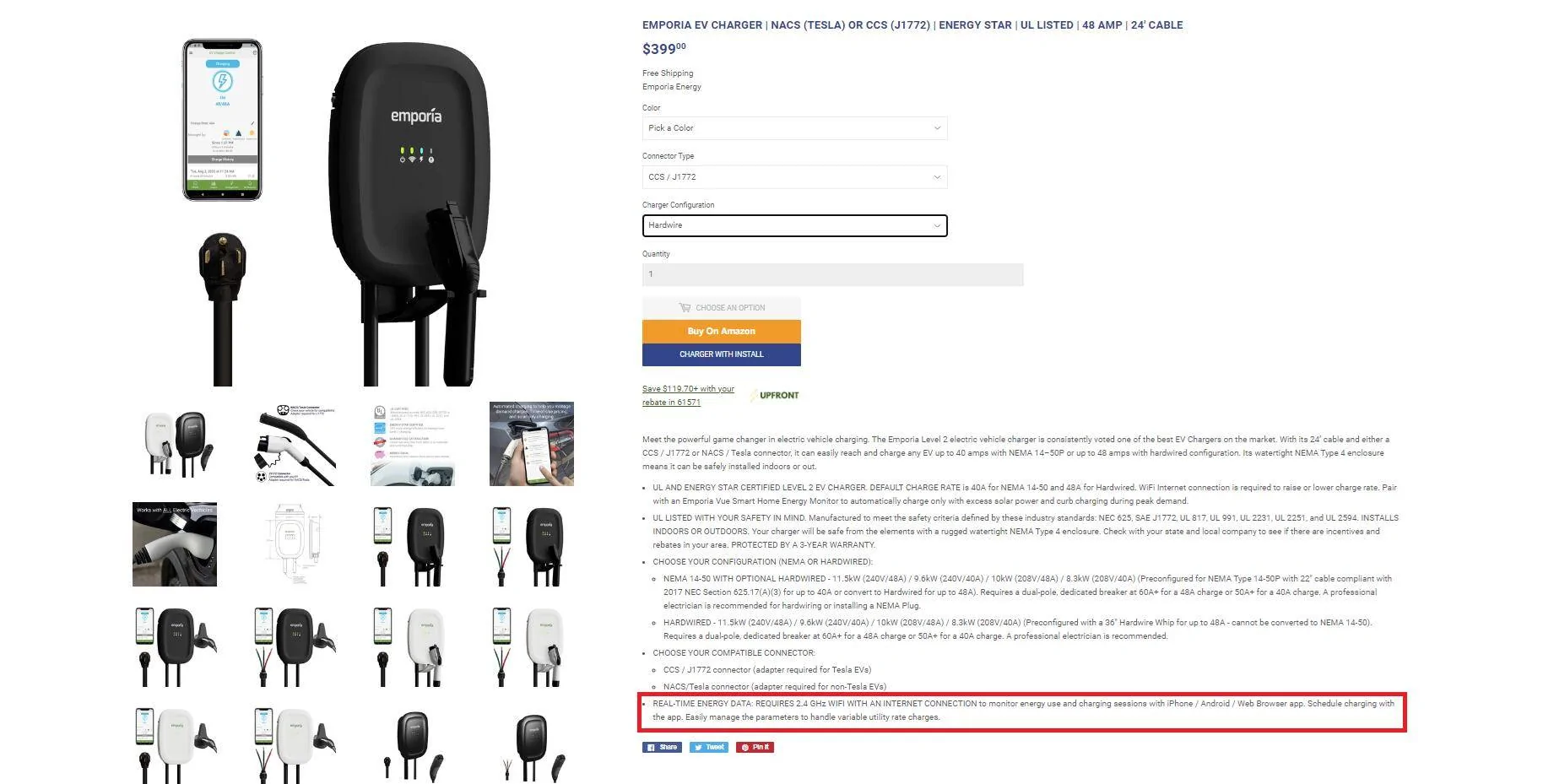
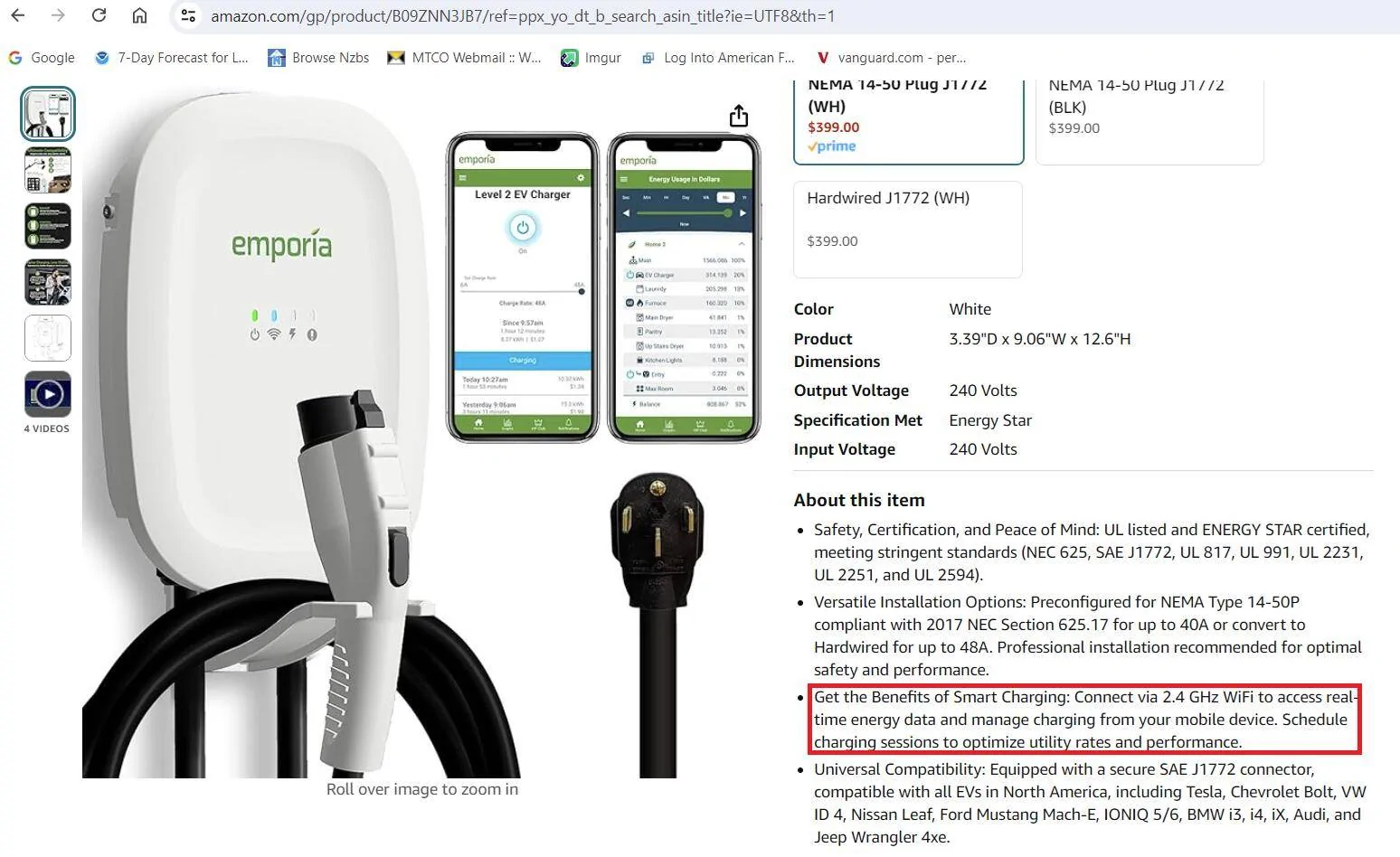
It was very apparent in the listings. Whether you purchased it from Emporia directly or off Amazon.

Ford Mustang Mach-E Emporia Charger emporia 2.4


Ford Mustang Mach-E Emporia Charger emporia 2.4 amazon
 
OP
OP

TEP

Active Member
First Name
Tom
Joined
Oct 10, 2022
Threads
8
Messages
40
Reaction score
8
Location
St George , Utah
Vehicles
2022 dark matter ext battery
Occupation
Retired
Country flag
It was very apparent in the listings. Whether you purchased it from Emporia directly or off Amazon.

emporia 2.4.png


emporia 2.4 amazon.png
Ok you are correct. Cured me of posting. All have a nice evening.
 

bbhaag

Well-Known Member
Joined
Jul 29, 2022
Threads
15
Messages
479
Reaction score
878
Location
Illinois
Vehicles
Maverick XLT, Mustang Mach-E GT Performance
Country flag
Ok you are correct. Cured me of posting. All have a nice evening.
Don't take it personally. We all mess up. Chances are really good that your router has a 2.4ghz band but now you have to do some extra legwork to configure it.
 

Andy OS WA

Active Member
First Name
Andrew
Joined
Apr 27, 2024
Threads
1
Messages
44
Reaction score
29
Location
Ocean Shores WA
Vehicles
'23 Mach-E; '20 Ranger
Occupation
Retired
Country flag
Some routers, like Eero, have a control that allows for a 2.4 Ghz device to connect. I have a new Mach-E, but will go with the Grizzl-E Classic specifically because it does not have wifi. I can't see the need for one more "smart" device.
Sponsored


Top