Tips for trip to mountains. Hopefully with CarPlay

burritoman

Well-Known Member
First Name
Dave
Joined
Apr 3, 2024
Threads
7
Messages
107
Reaction score
102
Location
Michigan
Vehicles
2023 Mach-E Premium, Ford Edge
Country flag
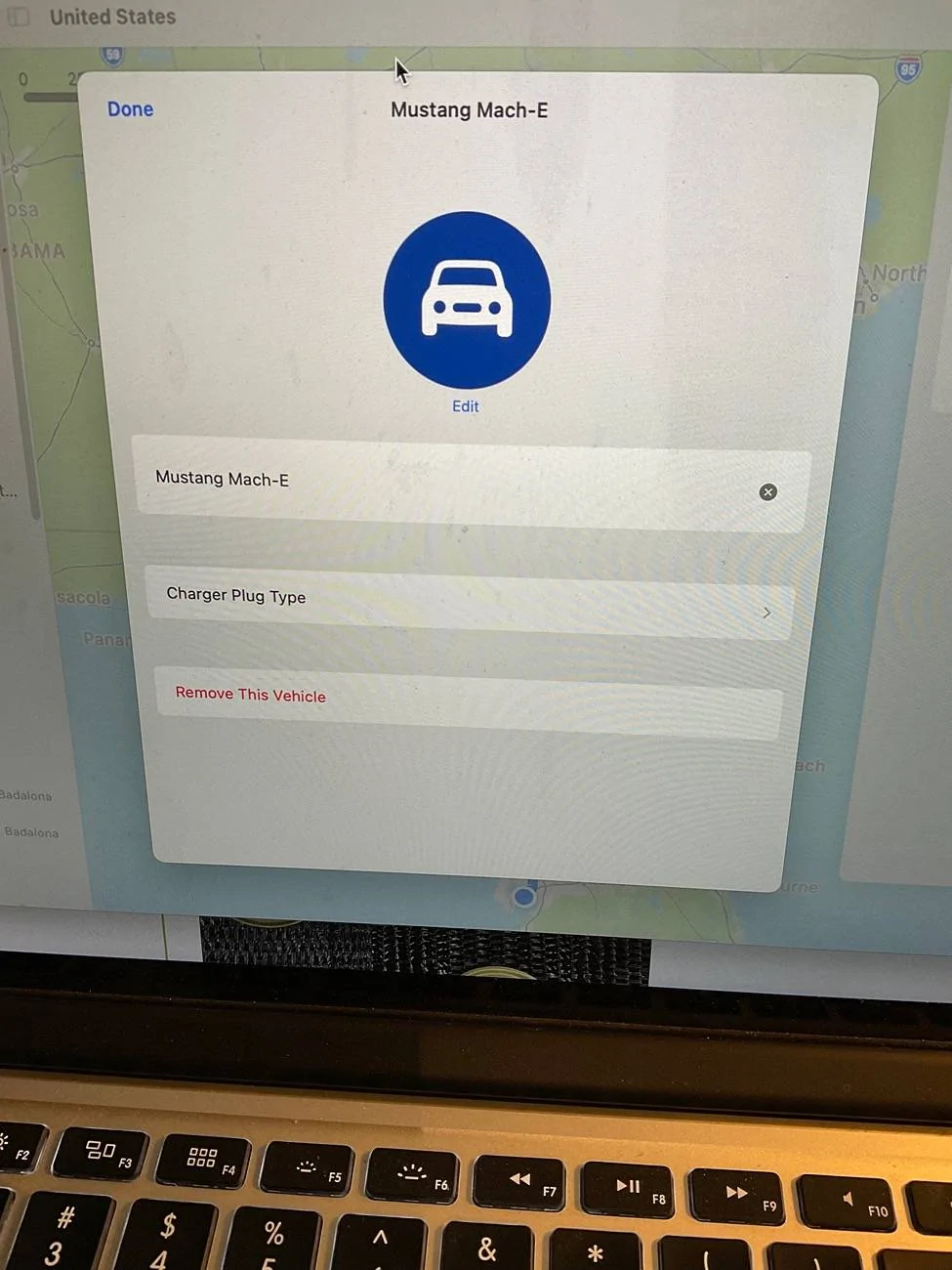
Yeah, I did that on my laptop but didn’t get the network selection menu. I only get pick the Mustang or different car and avoid tolls and highways.
I'm on macOS Sequoia, in the upper right corner click on the profile icon. Then on the vehicles line, select your vehicle. On the next page click on your vehicle again. You should see all the networks on this page.

Edit: The downside of adding Tesla SCs is I don't think it makes a distinction between SCs open to other EVs and Tesla-only SCs.
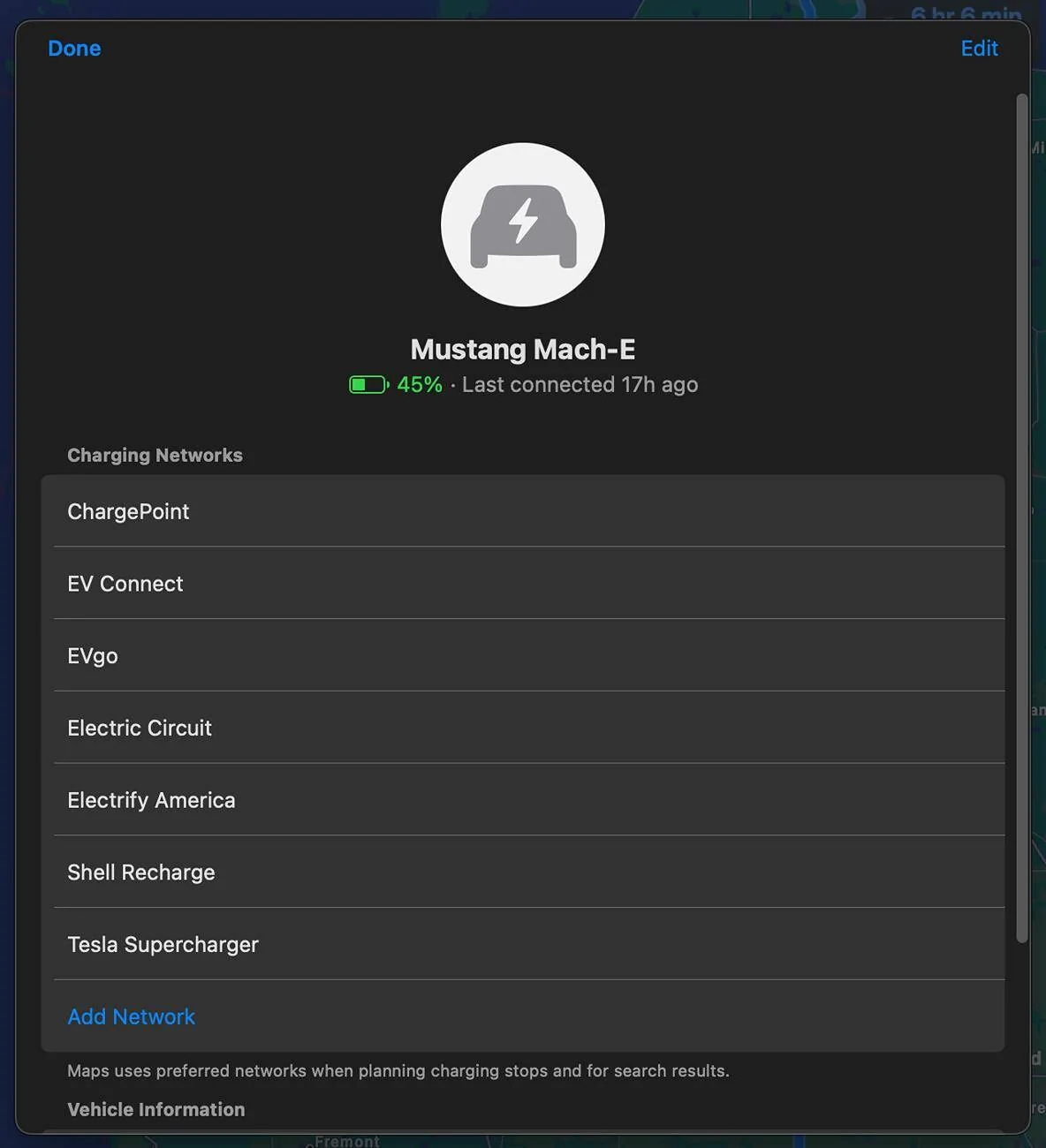
Ford Mustang Mach-E Tips for trip to mountains. Hopefully with CarPlay Screenshot 2024-09-05 at 1.08.28 PM
Sponsored

 
Last edited:
OP
OP

BatteriesIncluded

Well-Known Member
Joined
Aug 18, 2024
Threads
8
Messages
61
Reaction score
43
Location
Sunny San José, California
Vehicles
2024 MME Premium ER AWD
Country flag
And carry a L2 Tesla Destination charger adapter (it’s different from the L3 adapter) as there might be some of those at or nearby your destination.
Is this for non-Tesla network stations? I thought we could only use v3 or v4 stations (I believe old style stations are L2).

Also I just got the A2Z Typhoon Pro in time for this trip so I plan on using Tesla SC fast charging to avoid the whole broken charger tango.
 

Tampamike

Well-Known Member
First Name
Mike
Joined
Feb 19, 2021
Threads
25
Messages
2,075
Reaction score
2,808
Location
Tampa, FL
Vehicles
‘24 Mach E Premium RWD
Country flag
I'm on macOS Sequoia, in the upper right corner click on the profile icon. Then on the vehicles line, select your vehicle. On the next page click on your vehicle again. You should see all the networks on this page.

Edit: The downside of adding Tesla SCs is I don't think it makes a distinction between SCs open to other EVs and Tesla-only SCs.
Screenshot 2024-09-05 at 1.08.28 PM.png
I have Monterey 12.7.6. This is what I see:
Ford Mustang Mach-E Tips for trip to mountains. Hopefully with CarPlay IMG_0101
 
OP
OP

BatteriesIncluded

Well-Known Member
Joined
Aug 18, 2024
Threads
8
Messages
61
Reaction score
43
Location
Sunny San José, California
Vehicles
2024 MME Premium ER AWD
Country flag
If you know your charging points save them in Ford Navi. I use Google maps all the time and switch to Ford Navi 30 minutes before charging point.
So you stop Google maps and switch the Ford Navi? (Not both at once.)

And this method won't work when Ford Navi expires? So no preconditioning unless you pay?
 

Tampamike

Well-Known Member
First Name
Mike
Joined
Feb 19, 2021
Threads
25
Messages
2,075
Reaction score
2,808
Location
Tampa, FL
Vehicles
‘24 Mach E Premium RWD
Country flag
Is this for non-Tesla network stations? I thought we could only use v3 or v4 stations (I believe old style stations are L2).

Also I just got the A2Z Typhoon Pro in time for this trip so I plan on using Tesla SC fast charging to avoid the whole broken charger tango.
No, it’s for the Level 2 Tesla “Destination” chargers that you would find at hotels, B&B’s or restaurant parking lots. Don’t confuse level 2 with Tesla version 2.


OP
OP

BatteriesIncluded

Well-Known Member
Joined
Aug 18, 2024
Threads
8
Messages
61
Reaction score
43
Location
Sunny San José, California
Vehicles
2024 MME Premium ER AWD
Country flag
No, it’s for the Level 2 Tesla “Destination” chargers that you would find at hotels, B&B’s or restaurant parking lots. Don’t confuse level 2 with Tesla version 2.
Ah, I see the Destination Charger is a wall mount charger like what a homeowner would install -- not a Tesla network charger.

In PlugShare, I filtered for Tesla Destination Charger and found a few at a restaurant somewhat nearby but out of the way and really doesn't help my charging situation. Maybe getting an adapter would be somewhat cheap insurance against getting stuck -- more emergency charging options. For example a Tesla homeowner takes pity on a stuck Mach-E.
 

markboris

Well-Known Member
First Name
Mark
Joined
Nov 13, 2019
Threads
43
Messages
5,747
Reaction score
16,424
Location
Sonora, CA
Vehicles
Currently: '20 Shelby GT500 FPB '24 Mach-E GTP GGM
Occupation
Retired
Country flag
I'm on macOS Sequoia, in the upper right corner click on the profile icon. Then on the vehicles line, select your vehicle. On the next page click on your vehicle again. You should see all the networks on this page.

Edit: The downside of adding Tesla SCs is I don't think it makes a distinction between SCs open to other EVs and Tesla-only SCs.
Screenshot 2024-09-05 at 1.08.28 PM.png
Good catch Dave. Not sure why I didn't see that but thanks for posting this.
 

rreddy3

Well-Known Member
First Name
Richard
Joined
Mar 25, 2024
Threads
5
Messages
988
Reaction score
1,060
Location
Virginia
Vehicles
2023 Mach e Premium AWD X
Country flag
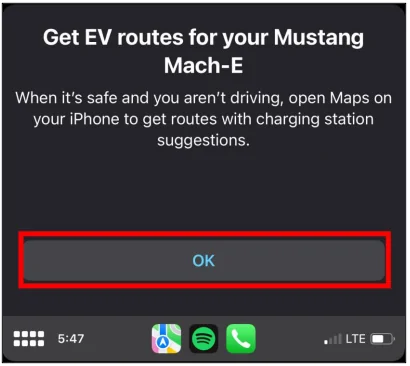
Is the apple maps EV routing feature via carplay something that has to be added via an OTA? It seems to be unavailable on my car. I have a 15pro on 17.6.1 and an ipad on the same iOS. Maps on neither give me the ev routing. The phone is linked on carplay. I read instructions on ford.com for the apple maps EV routing feature. I’m not getting this pop up ford.com references. Evidently it’s not available for my car which takes me back to the OTA question.


  1. Press OK on the pop-up message.
    Ford Mustang Mach-E Tips for trip to mountains. Hopefully with CarPlay 3a3a50ac-0374-4ae9-b60d-8134179567b2

    Note: If this feature is unavailable for your vehicle, the pop-up screen will not display.”
 

markboris

Well-Known Member
First Name
Mark
Joined
Nov 13, 2019
Threads
43
Messages
5,747
Reaction score
16,424
Location
Sonora, CA
Vehicles
Currently: '20 Shelby GT500 FPB '24 Mach-E GTP GGM
Occupation
Retired
Country flag
Hey Richard (rreddy3), you need to add your car to Maps.

1. Go in your car, turn it on, open up CarPlay and open Maps.
2. On your phone, open Maps and to the right of the search bar is your personal Icon. Click on that icon and scroll down to Vehicles and choose your Mach-E.

I don't remember the thread but I have detailed instructions with photos somewhere here on this forum. That should get you going though.
 

Tampamike

Well-Known Member
First Name
Mike
Joined
Feb 19, 2021
Threads
25
Messages
2,075
Reaction score
2,808
Location
Tampa, FL
Vehicles
‘24 Mach E Premium RWD
Country flag
Ah, I see the Destination Charger is a wall mount charger like what a homeowner would install -- not a Tesla network charger.

In PlugShare, I filtered for Tesla Destination Charger and found a few at a restaurant somewhat nearby but out of the way and really doesn't help my charging situation. Maybe getting an adapter would be somewhat cheap insurance against getting stuck -- more emergency charging options. For example a Tesla homeowner takes pity on a stuck Mach-E.
The biggest use-case for the Destnation adapter is at hotels/B&B’s. Sometimes there’s one or two of each type J1772 and Tesla or sometimes just the Tesla. Apparently Tesla got a bunch of them installed around the country years ago. So, if you have the adapter, you can still charge up full overnight if there’s only Tesla destinations or if the J1772’s are already taken and there’s a Tesla open.
 

rreddy3

Well-Known Member
First Name
Richard
Joined
Mar 25, 2024
Threads
5
Messages
988
Reaction score
1,060
Location
Virginia
Vehicles
2023 Mach e Premium AWD X
Country flag
Hey Richard (rreddy3), you need to add your car to Maps.

1. Go in your car, turn it on, open up CarPlay and open Maps.
2. On your phone, open Maps and to the right of the search bar is your personal Icon. Click on that icon and scroll down to Vehicles and choose your Mach-E.

I don't remember the thread but I have detailed instructions with photos somewhere here on this forum. That should get you going though.
thanks Mark. I’ll look for the thread. When I go to the personal icon, the Vehicles choice is MIA. I need to organize a search party. I’ll let you know if I succeed.
 

markboris

Well-Known Member
First Name
Mark
Joined
Nov 13, 2019
Threads
43
Messages
5,747
Reaction score
16,424
Location
Sonora, CA
Vehicles
Currently: '20 Shelby GT500 FPB '24 Mach-E GTP GGM
Occupation
Retired
Country flag
thanks Mark. I’ll look for the thread. When I go to the personal icon, the Vehicles choice is MIA. I need to organize a search party. I’ll let you know if I succeed.
Richard, here is one of them however this is when I was on iOS 17 Beta but should still be similar to yours. I'm on iOS 18 Beta right now. If you don't get Vehicles in the drop down list, maybe start a destination then try it again? Maybe someone else will know why it does not show up for you. I have not had any issues when setting up others.

https://www.macheforum.com/site/thr...rging-station-availability.28492/#post-678199
 

rreddy3

Well-Known Member
First Name
Richard
Joined
Mar 25, 2024
Threads
5
Messages
988
Reaction score
1,060
Location
Virginia
Vehicles
2023 Mach e Premium AWD X
Country flag
Richard, here is one of them however this is when I was on iOS 17 Beta but should still be similar to yours. I'm on iOS 18 Beta right now. If you don't get Vehicles in the drop down list, maybe start a destination then try it again? Maybe someone else will know why it does not show up for you. I have not had any issues when setting up others.

https://www.macheforum.com/site/thr...rging-station-availability.28492/#post-678199

Thanks Mark. Vehicles simply isn't showing up on the drop-down list under the personal icon. I've got a session going on the phone with an Apple tech person trying to sort out whether the issue is on the phone end, or if not, then on the car end. Currently my support guy is checking more references since we've run a bunch of traps and not had luck in displaying the Vehicles option.
stay tuned ... film at 11 :)
Sponsored


Top