Mach-Lee
Well-Known Member
- First Name
- Lee
- Joined
- Jul 16, 2021
- Threads
- 262
- Messages
- 11,366
- Reaction score
- 25,031
- Location
- Wisconsin
- Vehicles
- 2022 Mach-E Premium AWD
- Occupation
- Sci/Eng

- Thread starter
- #1
Beosonic is sort of graphic equalizer that allows you to adjust the tonal quality of the sound to your liking. It's much better than the standard 3-band EQ (bass, mid, treble) that Ford gives by default and allows you to dial in the tonality with greater precision. It debuted on 2024 Mach-E's, but is present in the current SYNC software and can be enabled by simply changing a few as-built values.
Requirements:
B&O sound system
Recent APIM version (6.2.1 or later)
Latest DSP software (14C589-AD)
FORScan license
OBD adapter
I'm not going to explain the whole process of using FORScan, if you haven't used it before read Livnitup's FORScan tutorial here. Remember you can mess things up if you do something wrong, so make a note or save the original config before editing.
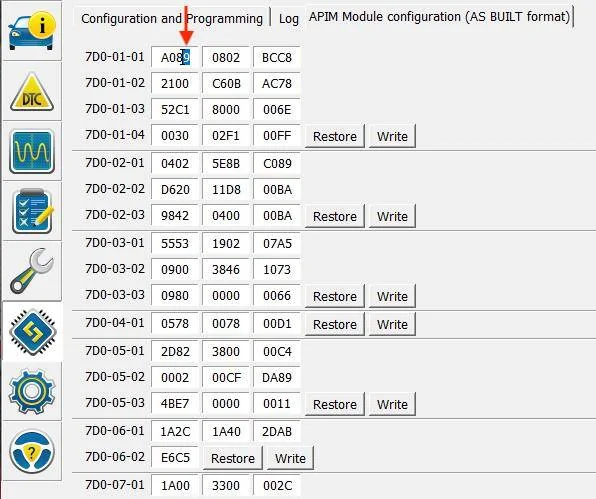
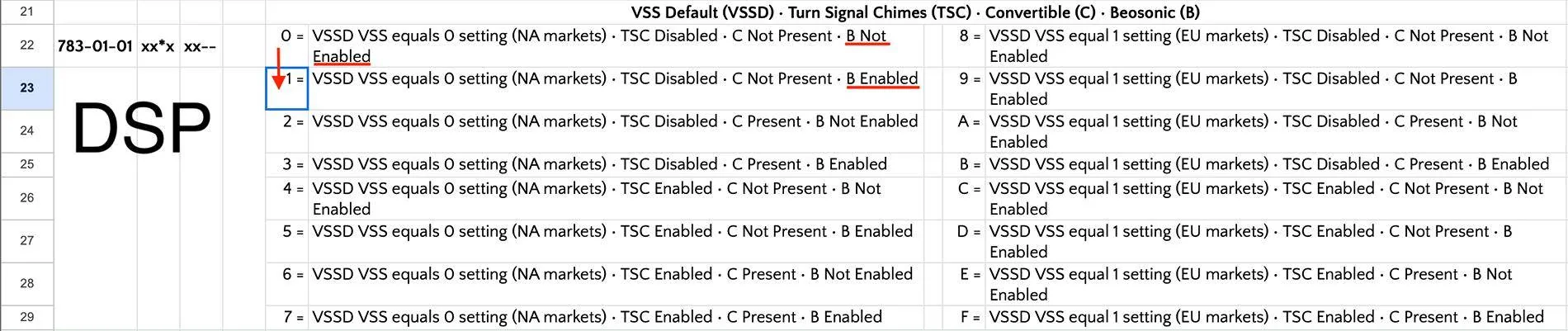
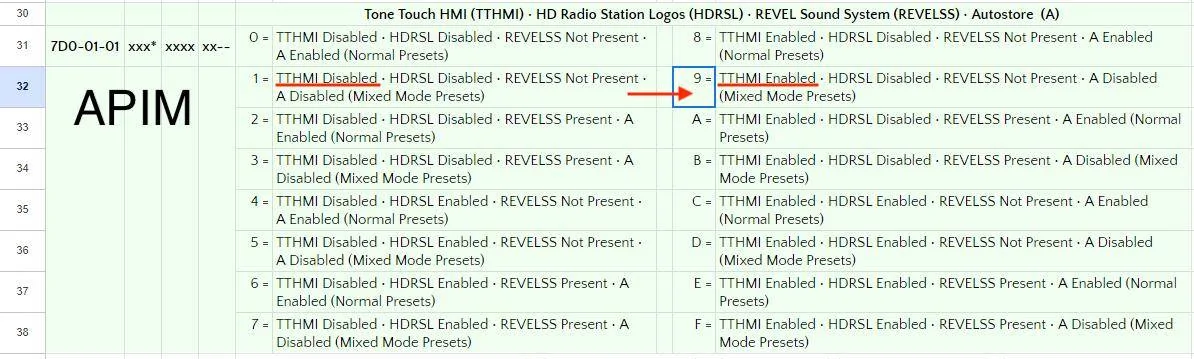
Here are the required as-built hex changes for Mach-E's:
You can edit the number, double check you did it correctly, then click the write button. If it doesn't work, turn the car off, open the door, wait 5 minutes and try again. Then proceed to a SYNC reboot if necessary.


If you are successful, the Beosonic option will show up in the sound settings:

Drag the white dot and release it to change the sound. If the bright and warm positions don't sound any different, your DSP software is too old to support Beosonic, update it with FDRS. Double tap the dot to enable/disable surround sound mode (there will be double rings around the white dot when enabled).
Bright = increased treble, sounds hot
Warm = decreased treble, sounds muddy
Energetic = increased bass, sounds punchy
Relaxed = decreased midrange?, sounds hollow
My personal favorite is the yellow/orange position shown in the above photo. I prefer stereo mode instead of surround mode (surround puts too much emphasis on the center speaker). Enabling this has increased the clarity and punchiness of the sound significantly, I like it a lot better now. For audiophiles you'll notice a slight increase in distortion when Beosonic in use, but it won't be that noticeable while driving with all the road noise. Fixing the tonality is the greatest benefit.
NOTE: I’ve noticed that making these changes causes the ACM to lose its configuration for some reason. Afterwards, you should check for codes, and reconfigure the ACM if the “initial configuration incomplete” code is present.
Requirements:
B&O sound system
Recent APIM version (6.2.1 or later)
Latest DSP software (14C589-AD)
FORScan license
OBD adapter
I'm not going to explain the whole process of using FORScan, if you haven't used it before read Livnitup's FORScan tutorial here. Remember you can mess things up if you do something wrong, so make a note or save the original config before editing.
Here are the required as-built hex changes for Mach-E's:
Code:
DSP 783-01-01 xx1x xx

APIM 7D0-01-01 xxx9 xxxx xx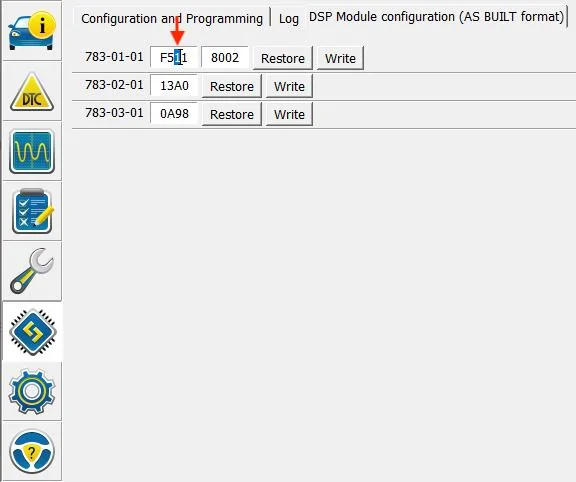
If you are successful, the Beosonic option will show up in the sound settings:
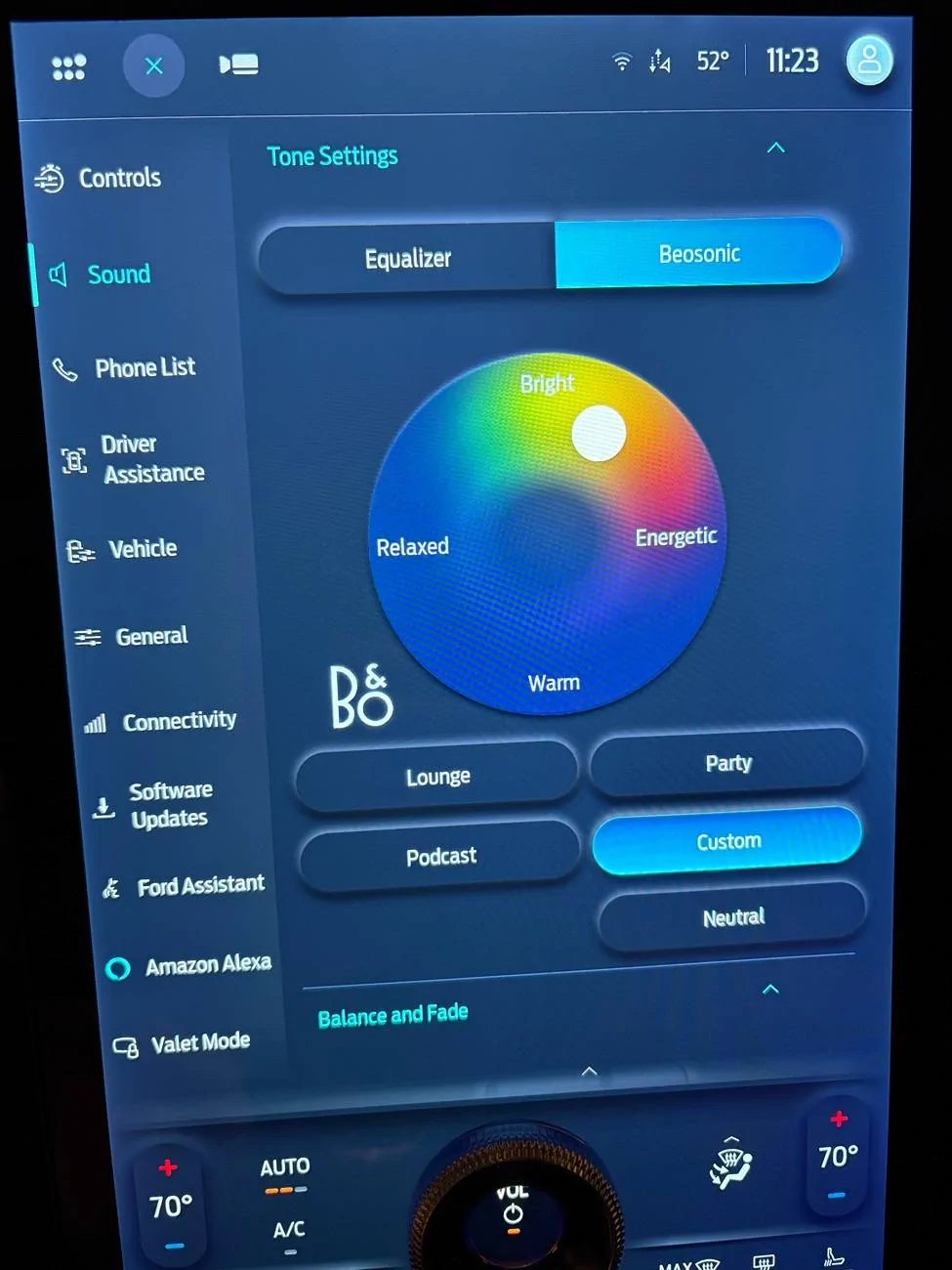
Drag the white dot and release it to change the sound. If the bright and warm positions don't sound any different, your DSP software is too old to support Beosonic, update it with FDRS. Double tap the dot to enable/disable surround sound mode (there will be double rings around the white dot when enabled).
Bright = increased treble, sounds hot
Warm = decreased treble, sounds muddy
Energetic = increased bass, sounds punchy
Relaxed = decreased midrange?, sounds hollow
My personal favorite is the yellow/orange position shown in the above photo. I prefer stereo mode instead of surround mode (surround puts too much emphasis on the center speaker). Enabling this has increased the clarity and punchiness of the sound significantly, I like it a lot better now. For audiophiles you'll notice a slight increase in distortion when Beosonic in use, but it won't be that noticeable while driving with all the road noise. Fixing the tonality is the greatest benefit.
NOTE: I’ve noticed that making these changes causes the ACM to lose its configuration for some reason. Afterwards, you should check for codes, and reconfigure the ACM if the “initial configuration incomplete” code is present.
Sponsored
Last edited: