

ack154
Well-Known Member
Hard to say - especially or 2021s. Plenty of people here chiming in though: https://www.macheforum.com/site/thr...1-0-bluecruise-public-charging-updates.39030/I wonder when that's coming? My last OTA was in March.
Sponsored
Hard to say - especially or 2021s. Plenty of people here chiming in though: https://www.macheforum.com/site/thr...1-0-bluecruise-public-charging-updates.39030/I wonder when that's coming? My last OTA was in March.

Any official reason why this isn't coming to the IOS version of Google Maps or Apple Maps? (For PreConditioning)Hi Mustang Mach-E Owners!
Earlier this year, we shared that Google Maps EV Routing for Android Auto users would soon roll out to F-150 Lightning and Mustang Mach-E vehicles. As some of you have already experienced in your vehicles, we’re excited to officially share that it’s here and continues to roll out!
This feature is rolling out now to the Mustang Mach-E via an over-the-air software update, enabled through 10.1.0, letting Mach-E drivers who love using Google Maps through Android Auto enjoy more enhanced routing capabilities right from their Ford electric SUV. Simply connect your smart phone to your vehicle, activate Android Auto, then use Google Maps for navigation – and you’re ready to go! Just be sure you have the latest version of Google Maps installed on your smartphone.
Thanks to this update, Google Maps will be able to share routing information like:
On top of that, we’re also delivering a few extra surprises with this update. Enroute pre-conditioning will be available when navigating to DC fast-chargers, and drivers will also be able to see available chargers and compatible Tesla Supercharger locations along their routes.
- Battery on-arrival estimate for all route stops
- Recommended charging stops
- Minimum recommended charge
- List of nearby amenities at charging stops
We can’t wait for you to experience this feature in your Mustang Mach-E! We love to hear from our owners, so let us know what you think and share your experiences with us on social.
Yah I realized this after the fact; and that it makes way more sense this has to happen at the vehicle level. No update notification yet though.It's not necessarily due to a specific Google Maps update on your phone. You'll need to have received 10.1.0 on your car to see these functions.

Address your questions to Apple. Ford isn’t the one holding up the show for this feature under iOS.Any official reason why this isn't coming to the IOS version of Google Maps or Apple Maps? (For PreConditioning)
Is it an Apple thing to require parity between mapping apps? Is it coming and this just came out faster? Does Apple Maps not support Preconditioning for EV chargers? Does Google not want Android and IOS to have feature parity for their maps?
Help us help you by letting us know what the limitation is so we can go give Apple/Google that feedback.

Do we know this for sure, or are we speculating? Many APIs goes both ways, hence an argument can be made that Ford is the one that has to figure out how to transfer / mirror the car play navigation into the NAV.Address your questions to Apple. Ford isn’t the one holding up the show for this feature under iOS.
Apple CarPlay already has it enabled with Apple Maps if you’re interested in having battery percentage upon arrival ? I think you’re asking about Google Maps, but thought I’d let you know anywaysApple CarPlay soon ???
It’s known for certain. Both Apple and Google have had the ability for quite some time.Do we know this for sure, or are we speculating? Many APIs goes both ways, hence an argument can be made that Ford is the one that has to figure out how to transfer / mirror the car play navigation into the NAV.
It does NOT appear to yet work with Google Maps on Apple Car Play, though. Anti-competitive practices, since it's been two years?If you are talking about EV routing on iOS, it‘s been available via Apple Maps since 2022 as long as you have one of the following SYNC versions (or newer):
You also need at least iOS 15.4.
- 21281_PRODUCT.244
- 22028_PRODUCT.358
- 22034_PRODUCT.364
 . I'm OK with this because with this update I retain control of the audio portion of the drive more often now.
I have a 2021, and turned off OTA long ago because I do not trust the stability/quality control of the @Ford Motor Company release process, and I have zero interest in BlueCruise. AA with routing info in googlemaps is the first enhancement that interests me enough to ask:
1. Is there a way to initiate a "batch service pack update" to skip all the releases between where I am today, and this 10.1.0 ?
2. Can I get this update if I have let my connected services subscription lapse?
Was able to find it after some searching and figured I would put it here for others since it's sort of buried.Has anyone here had the "NACS adapter" toggle setting in google maps disappear for them? I had it when I first got the Sync update that enabled the EV features in Android Auto google maps but now I don't have that toggle option anymore for some reason.

That explains.Was able to find it after some searching and figured I would put it here for others since it's sort of buried.
Click on search in Google Maps on Android Auto, NOT on your phone. Go to categories on the left, then charging stations. In the top left of that menu will be an icon of 3 sliders, select that. In that menu select the option below the text "compatible plugs." There will be a toggle for NACS adapter, which will enable navigating to compatible superchargers along navigation routes. If you don't have this option toggled, if you try to manually navigate to a supercharger it will warn you that your car is not compatible.
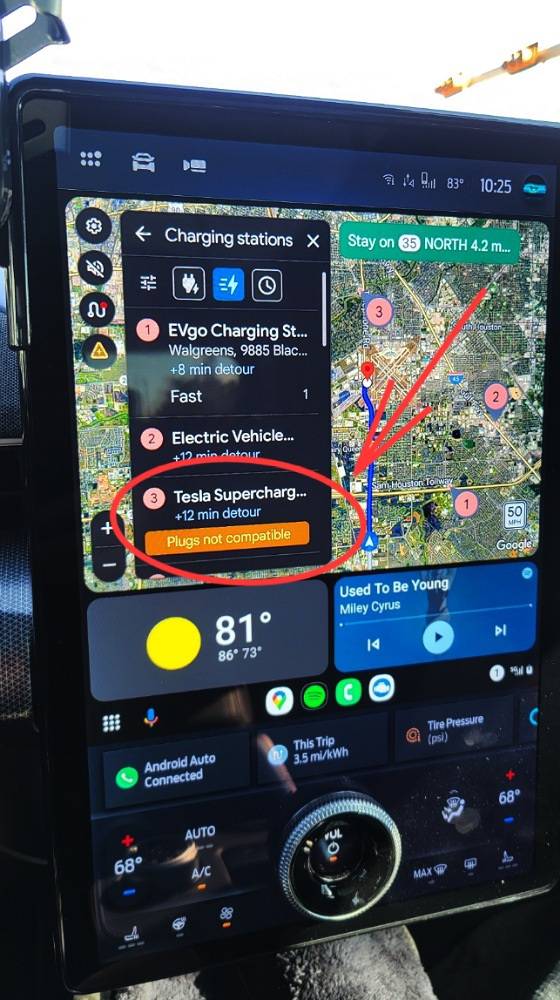
Yup, if you just select the slider icon below the back arrow you'll find the compatible plugs menu where you can enable the adapter setting!That explains.
Because I have actually charged at the location referred to in the Pic. (A2Z adapter)


