Streaming audio thru CarPlay - how to display the current song

Erik in MA

New Member
First Name
Erik
Joined
Nov 28, 2024
Threads
2
Messages
4
Reaction score
5
Location
Boston, MA
Vehicles
2024 Mach E Premium
I'm 3 months and 2500 miles into my 2024 Mach E. Love the car.

I normally stream audio via my iPhone / CarPlay.

I can "see" the current track with the streaming app open, but if I have Waze (for example) on the big screen, the current track is only visible if I bring the streaming app back "to the front."

On the other hand, if I'm listening to the radio or XM, the current track is displayed via one of the small tiles on the main screen. No matter what I have displayed.

Is there anyway to have the track that's playing via CarPlay visible at all times?

thanks!
Sponsored

 

markboris

Well-Known Member
First Name
Mark
Joined
Nov 13, 2019
Threads
43
Messages
5,744
Reaction score
16,394
Location
Sonora, CA
Vehicles
Currently: '20 Shelby GT500 FPB '24 Mach-E GTP GGM
Occupation
Retired
Country flag
I'm 3 months and 2500 miles into my 2024 Mach E. Love the car.

I normally stream audio via my iPhone / CarPlay.

I can "see" the current track with the streaming app open, but if I have Waze (for example) on the big screen, the current track is only visible if I bring the streaming app back "to the front."

On the other hand, if I'm listening to the radio or XM, the current track is displayed via one of the small tiles on the main screen. No matter what I have displayed.

Is there anyway to have the track that's playing via CarPlay visible at all times?

thanks!
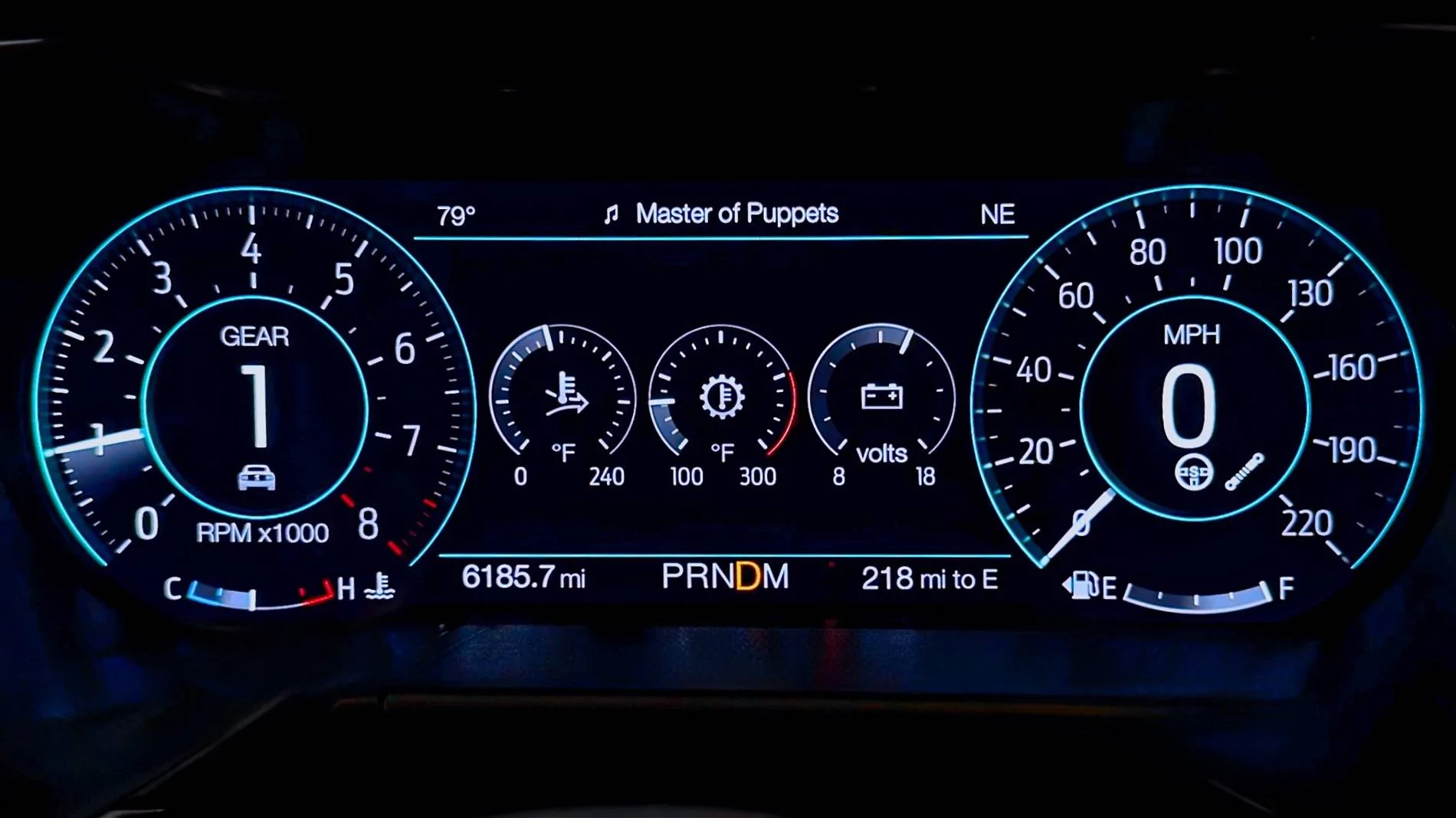
Wouldn't it be nice to have the current track playing shown in the drivers display in front of you?

While using CarPlay with Apple Music in my '20 ICE Mustang that is how Ford has it set up. If you have the drivers display is in "Normal" mode, as in the photo below, the audio track is always shown. When the drivers display is in "Sport" mode, the audio track is only shown for a few seconds when it starts playing. When the drivers display is in "Track" mode, the audio track is never shown.

I agree with you and Ford should be doing the same for our Mach-E's but unfortunately they don't. ?

Ford Mustang Mach-E Streaming audio thru CarPlay - how to display the current song IMG_5993 (1)30 (2)
 
Last edited:

JoeyD

Well-Known Member
First Name
Joe
Joined
Mar 3, 2023
Threads
0
Messages
114
Reaction score
177
Location
Surprise, AZ
Vehicles
2018 Tacoma, 2024 MME GT
Occupation
School Bus Driver
Country flag
Wouldn't it be nice to have the current track playing shown in the drivers display in front of you?

While using CarPlay with Apple Music in my '20 ICE Mustang that is how Ford has it set up. If you have the drivers display is in "Normal" mode, as in the photo below, the audio track is always shown. When the drivers display is in "Sport" mode, the audio track is only shown for a few seconds when it starts playing. When the drivers display is in "Track" mode, the audio track is never shown.

I agree with you and Ford should be doing the same for our Mach-E's but unfortunately they don't. ?

IMG_5993 (1)30 (2).webp
YES, this ^^^^. I would also like the audio track shown in the drivers dash display all the time too.
 

AliRafiee

Well-Known Member
First Name
Ali
Joined
Jan 20, 2023
Threads
103
Messages
3,267
Reaction score
4,192
Location
Seattle WA
Vehicles
2022 Mach E GT - Grabber Blue
Occupation
Software Eng.
Country flag
We should have the audio and navigation info on the IPC at all times. A little mini map when not actively navigating would be a nice touch.
Sponsored


Top