redgrandam

Well-Known Member
First Name
Jay
Joined
Feb 23, 2024
Threads
15
Messages
230
Reaction score
241
Location
Southwestern Ontario, Canada
Vehicles
2023 Mach E Select
Country flag
I have found a reading for ‘HVB Thermal Op Mode’.
It has so far shown ‘off’ and ‘heat’ for when it’s actively heating the battery. It also shows an ‘EQ’ status as well. Does anyone know what EQ means?

For context, I’ll be driving along and it will be in EQ. If I put in a fast charger don’t starts heating the battery it goes to ‘heating’ as one would expect. But then after 15 mins if I cancel the trip it goes to ‘off’ not back to EQ. Which leaves me wondering what EQ means?
Sponsored

 

SoriceConsulting

Well-Known Member
First Name
Sal
Joined
Oct 10, 2020
Threads
29
Messages
470
Reaction score
469
Location
NJ, USA
Website
sorice.com
Vehicles
2023 GTPE, Rapid Red
Occupation
IT Consultant
Country flag
Total newbie regarding this stuff. Just bought the OBDLink MX+ reader, Model MX201:
OBDlink MX+ on Amazon

Anyone else have this model? Any tips on using it with CarScanner?

Thanks!!!
 

mkhuffman

Well-Known Member
First Name
Mike
Joined
Nov 19, 2020
Threads
29
Messages
6,880
Reaction score
9,518
Location
Virginia
Vehicles
2025 Rivian R1T Tri-Max, Jeep GC-L, VW Jetta
Country flag
Total newbie regarding this stuff. Just bought the OBDLink MX+ reader, Model MX201:
OBDlink MX+ on Amazon

Anyone else have this model? Any tips on using it with CarScanner?

Thanks!!!
I use this one as well, and it is highly recommended because you can physically control Bluetooth pairing. Most cheaper models start up in pairing mode, allowing a bad actor to potentially connect to your MME.

It is also much faster than the BLE+ scanners that are available in the market. I think a BLE+ OBDII scanner is needed to connect to ABRP. That is a hassle, but I have a Veepak one that works fine for that use case. I don't leave it plugged in though.

Just install CarScanner and connect to the MX+. Make sure you select the Mach-e which installs the default dashboards, since that will save you a lot of time setting things up.
 

SoriceConsulting

Well-Known Member
First Name
Sal
Joined
Oct 10, 2020
Threads
29
Messages
470
Reaction score
469
Location
NJ, USA
Website
sorice.com
Vehicles
2023 GTPE, Rapid Red
Occupation
IT Consultant
Country flag
I use this one as well, and it is highly recommended because you can physically control Bluetooth pairing. Most cheaper models start up in pairing mode, allowing a bad actor to potentially connect to your MME.

It is also much faster than the BLE+ scanners that are available in the market. I think a BLE+ OBDII scanner is needed to connect to ABRP. That is a hassle, but I have a Veepak one that works fine for that use case. I don't leave it plugged in though.

Just install CarScanner and connect to the MX+. Make sure you select the Mach-e which installs the default dashboards, since that will save you a lot of time setting things up.
Thanks @mkhuffman ! I've got it set up, but just not sure if it is OK / wise to leave is always plugged in (even though it has an "automatic sleep" setting to minimize LBV drain).

Also, the available "monitors / readings" are a bit bewildering to me. I'm just looking for basic info (LVB SOC, HVB SOC, tire pressure, etc.) Not sure what worthwhile info the other sensors would tell me - recommendation welcome.

I'm just an everyday driver - not interested in 1/4 mile type stuff, etc. - just want to be sure the internal systems are OK.

So much to learn....
 

mkhuffman

Well-Known Member
First Name
Mike
Joined
Nov 19, 2020
Threads
29
Messages
6,880
Reaction score
9,518
Location
Virginia
Vehicles
2025 Rivian R1T Tri-Max, Jeep GC-L, VW Jetta
Country flag
Thanks @mkhuffman ! I've got it set up, but just not sure if it is OK / wise to leave is always plugged in (even though it has an "automatic sleep" setting to minimize LBV drain).

Also, the available "monitors / readings" are a bit bewildering to me. I'm just looking for basic info (LVB SOC, HVB SOC, tire pressure, etc.) Not sure what worthwhile info the other sensors would tell me - recommendation welcome.

I'm just an everyday driver - not interested in 1/4 mile type stuff, etc. - just want to be sure the internal systems are OK.

So much to learn....
I leave mine plugged in all the time. I only remove it if I want to put in a different OBDII scanner, like the Veepak one. Leaving it plugged in is totally safe, especially because you have the MX+ that does not automatically Bluetooth pair.


OP
OP
dtbaker61

dtbaker61

Well-Known Member
First Name
Dan
Joined
May 11, 2020
Threads
126
Messages
4,823
Reaction score
4,526
Location
santa fe,nm
Website
www.envirokarma.org
Vehicles
MME (delivered 2/26/21), DIY eMiata BEV
Occupation
Solar Sales/install
Country flag
I leave mine plugged in all the time. I only remove it if I want to put in a different OBDII scanner, like the Veepak one. Leaving it plugged in is totally safe, especially because you have the MX+ that does not automatically Bluetooth pair.
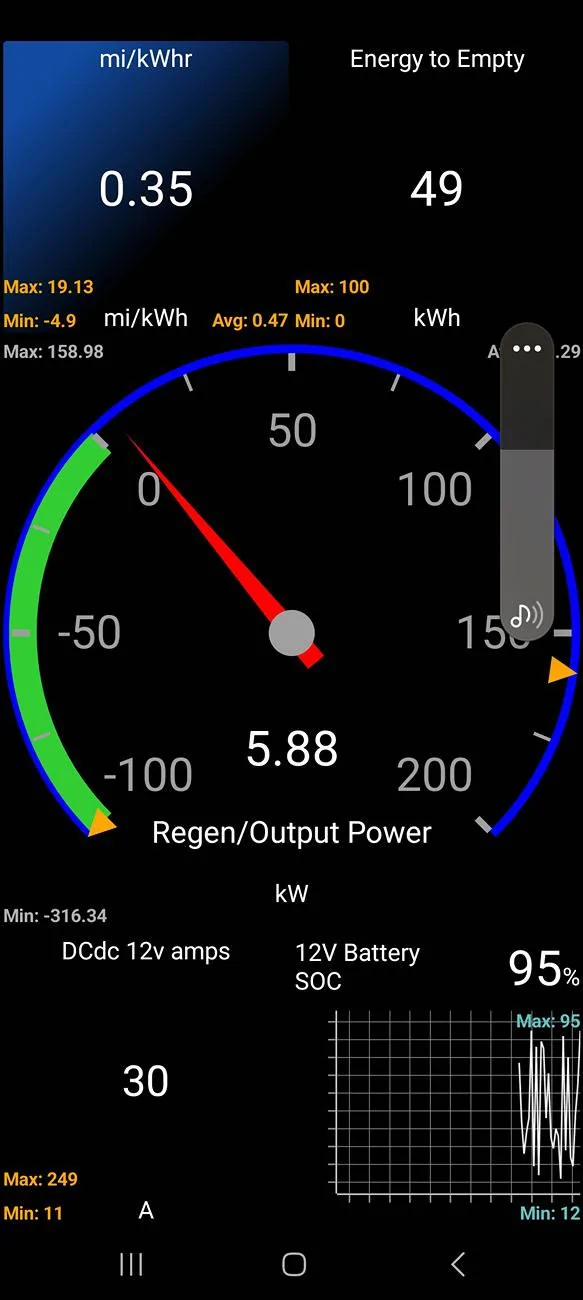
I leave mine plugged n most of the time, but only fire up the CarScanner app occasionally when I want to check something, or on a long trip for accurate idea of remaining kWhr and power in/out realtime.
 

IgorKl

Well-Known Member
Joined
Mar 22, 2022
Threads
41
Messages
769
Reaction score
749
Location
Pacifica, ca
Vehicles
'22 MME CaliRoute 1 AWD and '25 MME Premium RWD Ext
Country flag
It would be nice to find ODB dongle that would support both CarScanner and ABRP
 

fleeps

Well-Known Member
First Name
Ray
Joined
Jun 19, 2023
Threads
6
Messages
66
Reaction score
93
Location
Maryland, USA
Vehicles
Mach-E Premium, AWD, Extended Battery, Rapid Red
Country flag
I always run CarScanner. I want to see power output and regen. In the winter, I want to see interior cabin temperature and battery temperature. I also display torque not because I'm interested in the numbers but because I'm curious when the car decides to run both motors.

I also display steering wheel angle, which I need to park in my garage. For reasons that I can ascribe only to pure malice, my house (which has a small single-car garage) has a driveway that curves as it approaches the garage. This means I must turn the steering wheel at just the right angle to enter the garage smoothly, and more difficult, exit the garage smoothly.

I also have different screens to use when charging and camping.
 
OP
OP
dtbaker61

dtbaker61

Well-Known Member
First Name
Dan
Joined
May 11, 2020
Threads
126
Messages
4,823
Reaction score
4,526
Location
santa fe,nm
Website
www.envirokarma.org
Vehicles
MME (delivered 2/26/21), DIY eMiata BEV
Occupation
Solar Sales/install
Country flag
my fav dashboard setup now has power output/regen I can glance at.... very helpful on snow/ice in combination w 1-p to maintain traction.
Ford Mustang Mach-E HowTo: use OBD-II and CarScanner to see Power Output/Regen/Charging and other data dashboard-240516
 

mkhuffman

Well-Known Member
First Name
Mike
Joined
Nov 19, 2020
Threads
29
Messages
6,880
Reaction score
9,518
Location
Virginia
Vehicles
2025 Rivian R1T Tri-Max, Jeep GC-L, VW Jetta
Country flag
It would be nice to find ODB dongle that would support both CarScanner and ABRP
The Veepak one I have will support both, but since it is BLE+, the data connection to CarScanner sucks. It is very slow. I don't recommend using a BLE+ OBDII with CarScanner.

I wonder why ABRP requires a BLE+ scanner? Weird.
 

jmgreen

Well-Known Member
First Name
Joerg
Joined
Apr 27, 2023
Threads
1
Messages
120
Reaction score
61
Location
Germany
Vehicles
Mach-E 2022 RWD-ER
Country flag
I use the Vgate vLinker MC+ that also supports both CarScanner and ABRP.
I cannot complain about the connection/data speed. But as this is my only OBD adapter, I am lacking experience with others.
It claims to support a low-power mode (3 mA), but I never leave it attached as it seems to drain my LV battery.
 

rickmcd47

Member
Joined
Dec 28, 2024
Threads
0
Messages
6
Reaction score
1
Location
Grand Canypn, AZ
Vehicles
Mach-e Rally
Mine shows through CarPlay in a different format than on the screen.
Ford Mustang Mach-E HowTo: use OBD-II and CarScanner to see Power Output/Regen/Charging and other data image


CarScanner is NOT supported directly by CarPlay or AndroidAuto unfortunately. There are a couple members that have added third party stuff to display unsupported apps, but it requires some extra equipment costing several hundred dollars..... not worth it to me, but it would be nice to display on the big screen.

Maybe we can encourage @Ford Motor Company to work a deal out with the CarScanner development team and pre-install a version of CarScanner in the base software selectable to display on center screen. .... and tied into the ODB2 data without even requiring a device.... THAT would be super cool to have a customizable data display for any/all sensor data
Sponsored


Top