Dustus

Well-Known Member
First Name
Dustin
Joined
Dec 29, 2021
Threads
12
Messages
311
Reaction score
435
Location
Boise Idaho
Vehicles
2022 Mach E GT
Country flag
that does not sound like fun. what phone is this with? one of the main problems with Android Auto is the fragmentation of Android versions and phone models from different manfuacturers guarantees incompatibility.
I'm using a Galaxy S21+, all updates installed. Its odd because if I'm in the car and connected my home button works just fine but as soon as I get out and turn off the car my phone home button turns into that AA message unless I go into apps and disable AA or reboot the phone.
Sponsored


scoopman

Well-Known Member
Joined
Jan 30, 2021
Threads
60
Messages
2,771
Reaction score
5,816
Location
Bay Area
Vehicles
2023 KIA EV6 GT, 20214 Hyundai Ioniq 5 Ltd AWD
Occupation
former electric pony jockey, flatbed towing expert
Country flag
I'm using a Galaxy S21+, all updates installed. Its odd because if I'm in the car and connected my home button works just fine but as soon as I get out and turn off the car my phone home button turns into that AA message unless I go into apps and disable AA or reboot the phone.
This is a good stumper. Are you running Android 12 on your Samsung S21+?

Do you still see an Android Auto separate app that you can run?
 

scoopman

Well-Known Member
Joined
Jan 30, 2021
Threads
60
Messages
2,771
Reaction score
5,816
Location
Bay Area
Vehicles
2023 KIA EV6 GT, 20214 Hyundai Ioniq 5 Ltd AWD
Occupation
former electric pony jockey, flatbed towing expert
Country flag

Dustus

Well-Known Member
First Name
Dustin
Joined
Dec 29, 2021
Threads
12
Messages
311
Reaction score
435
Location
Boise Idaho
Vehicles
2022 Mach E GT
Country flag
his is a good stumper. Are you running Android 12 on your Samsung S21+?

Do you still see an Android Auto separate app that you can run?

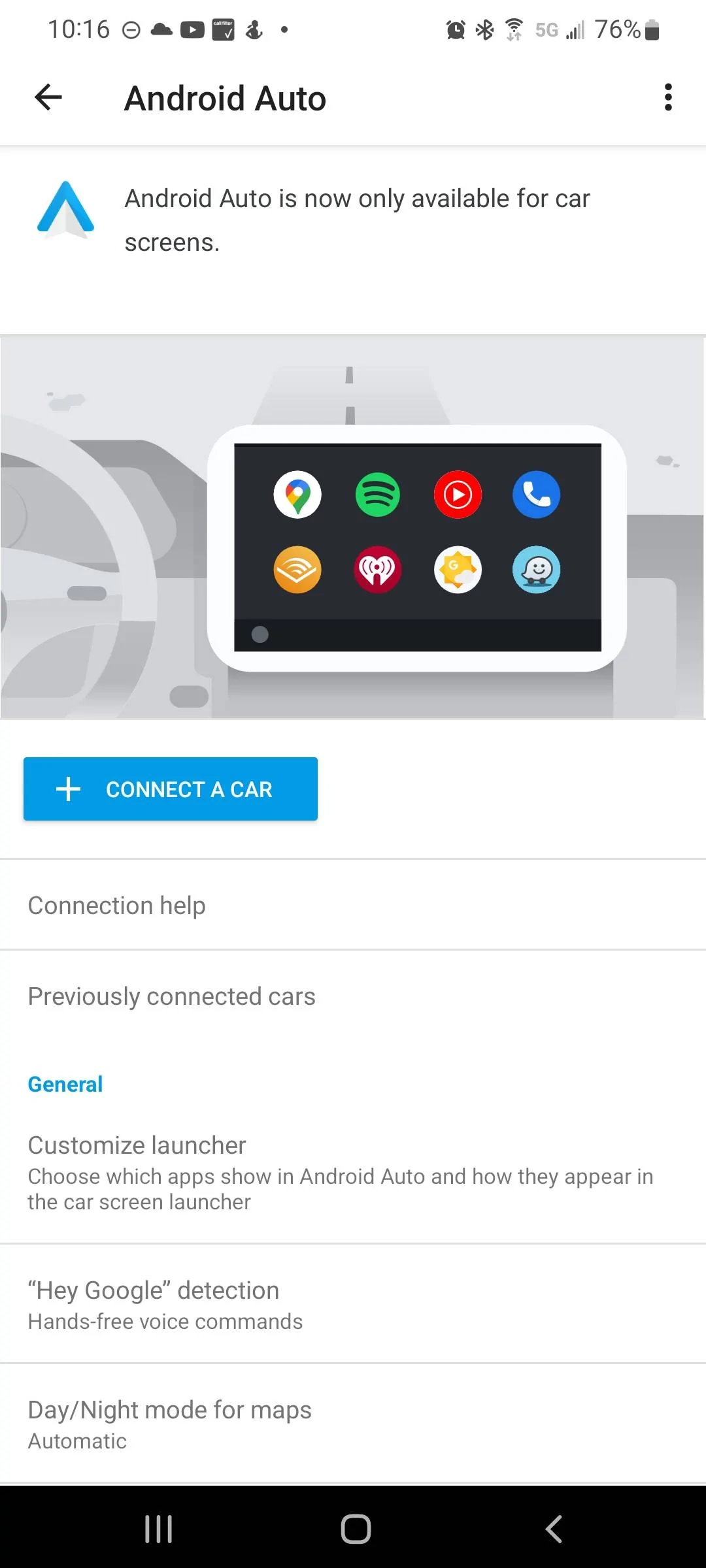
Running Android 12 on my S21 Ultra (Sorry I said plus earlier, that was my last phone). I don't see a separate AA app that I can run. I do see it listed in my apps but all I can do is uninstall updates. I just tried removing the phone from the car, uninstalled the AA updates, then went back to the car and reconnected it. When I fired up the AA on the car it talked to the phone which immediately wanted to update the app. I walked through the setup and everything looks great. Phone responded nomally while sitting in the car. As soon as I turned the car off though my phone home button brings up a full page message:
Ford Mustang Mach-E AndroidAuto Update Shows It's Scalable / Full-Screen Capable 1652501846125


I have to hit the back button on my phone several times to close it out and get back to my actual home screen. Can't find any solid info online about it so I guess I'm special.
 

scoopman

Well-Known Member
Joined
Jan 30, 2021
Threads
60
Messages
2,771
Reaction score
5,816
Location
Bay Area
Vehicles
2023 KIA EV6 GT, 20214 Hyundai Ioniq 5 Ltd AWD
Occupation
former electric pony jockey, flatbed towing expert
Country flag
Running Android 12 on my S21 Ultra (Sorry I said plus earlier, that was my last phone). I don't see a separate AA app that I can run. I do see it listed in my apps but all I can do is uninstall updates. I just tried removing the phone from the car, uninstalled the AA updates, then went back to the car and reconnected it. When I fired up the AA on the car it talked to the phone which immediately wanted to update the app. I walked through the setup and everything looks great. Phone responded nomally while sitting in the car. As soon as I turned the car off though my phone home button brings up a full page message:
1652501846125.jpeg


I have to hit the back button on my phone several times to close it out and get back to my actual home screen. Can't find any solid info online about it so I guess I'm special.
That sucks! Definitely a bug. Somehow, the loss of connection to your car is leaving the phone thinking you're trying to launch the Android Auto for phone screens (which Google has killed in favor of a new Google Maps Driving Mode). If you run the phone app these days, you will get this message, and somehow it's being shown to you when it definitely should not be.

I've not had this problem with the Pixel 6. The engineers at Google generally only carry around and test with those phones reguarly....

Do you have another car with Android Auto to see if it does the same thing there? Is it doing the same thing with wired connection, not just wireless AA?

I would post this in the Android Auto support forum, it looks like this is something they should fix.


scoopman

Well-Known Member
Joined
Jan 30, 2021
Threads
60
Messages
2,771
Reaction score
5,816
Location
Bay Area
Vehicles
2023 KIA EV6 GT, 20214 Hyundai Ioniq 5 Ltd AWD
Occupation
former electric pony jockey, flatbed towing expert
Country flag
Running Android 12 on my S21 Ultra (Sorry I said plus earlier, that was my last phone). I don't see a separate AA app that I can run. I do see it listed in my apps but all I can do is uninstall updates. I just tried removing the phone from the car, uninstalled the AA updates, then went back to the car and reconnected it. When I fired up the AA on the car it talked to the phone which immediately wanted to update the app. I walked through the setup and everything looks great. Phone responded nomally while sitting in the car. As soon as I turned the car off though my phone home button brings up a full page message:
1652501846125.jpeg


I have to hit the back button on my phone several times to close it out and get back to my actual home screen. Can't find any solid info online about it so I guess I'm special.
After re-reading your repro steps, I think your phone is trying to go into car mode itself, which is super-messed up.

Go look here:

and


I think you should start by disabling in Google Maps > Settings > Navigation > Google Assistant settings ----- these two ones:

"When connected to car's Bluetooth" set to "Do nothing"

and

"When driving is detected" set to "Do nothing"

If that doesn't work, follow the steps in the links above to get Google Play Services to stop putting your phone in DND mode perhaps -- I would also scour your Settings for some Samsung-specific crap that is detecting and keeping your phone in car mode.

It's the car mode setting + AA that is causing AA to show that message with no way to escape.

Another alternative here if you are somewhat hacky / technical is to look into using Tasker to run a macro to force the phone out of what's called "car home" mode when you disconnect from your car.

Or you can do what I did and just use CarPlay. It doesn't force users to hack around like this to just have your phone work in a basic way.
 

Eraser

Well-Known Member
Joined
Jun 23, 2020
Threads
14
Messages
386
Reaction score
537
Location
California
Vehicles
2021 Mach-E Premium RWD | SR
Country flag
What you're asking is completely controlled by Google and the Android Auto app that's updated through the Play Store. Having other nav apps be the default instead of forcing you to use Google Maps every time you start up isn't technically challenging to do.

I'm not sure how high a priority this is on Google's list of things to do, however.

Apple has remembered the last nav app used between CarPlay sessions for years now, BTW.
I've been using the AA Beta for quite a while. At some point there was an option in the settings that let you set the default app type when AA started. I believe the options were something like last used Navigation app or last used audio app. When I switched it to last used audio app it would auto start using Youtube Music or Pocket Casts based on what I had used last. It was a great feature, but it was short lived as it was removed at some point months ago and now just defaults to Google Maps.

I attempted to downgrade the AA app to some prior beta versions but haven't had any luck finding the version that had the feature. My hope it the feature was removed due to some issue and will return at some point in the future.
 

scoopman

Well-Known Member
Joined
Jan 30, 2021
Threads
60
Messages
2,771
Reaction score
5,816
Location
Bay Area
Vehicles
2023 KIA EV6 GT, 20214 Hyundai Ioniq 5 Ltd AWD
Occupation
former electric pony jockey, flatbed towing expert
Country flag
I've been using the AA Beta for quite a while. At some point there was an option in the settings that let you set the default app type when AA started. I believe the options were something like last used Navigation app or last used audio app. When I switched it to last used audio app it would auto start using Youtube Music or Pocket Casts based on what I had used last. It was a great feature, but it was short lived as it was removed at some point months ago and now just defaults to Google Maps.

I attempted to downgrade the AA app to some prior beta versions but haven't had any luck finding the version that had the feature. My hope it the feature was removed due to some issue and will return at some point in the future.
With their new UI refresh, it'll probably work exactly like carplay and allow you to start the last playing media on their dashboard combo screen. They're just copying it shamelessly.

Unclear if it will show you anything other than Maps though when you start and that dashboard shows up. I tend to doubt that.
 

mkhuffman

Well-Known Member
First Name
Mike
Joined
Nov 19, 2020
Threads
29
Messages
6,875
Reaction score
9,507
Location
Virginia
Vehicles
2025 Rivian R1T Tri-Max, Jeep GC-L, VW Jetta
Country flag
I'm going to have a video on this next week-ish.

But TLDR --- what AAWireless does is plug into your car via USB-A or USB-C, and to your car, it looks like an Android phone that talks Android Auto protocol.

But this isn't an Android phone, it's a slick purpose-built little Linux-running device that talks AA to your car, but then talks Android Auto wireless to your phone.

So if your car can do Android Auto wired or wireless already, why would you want this?
  • Android Auto is HORRIBLE in its reliability starting up. This is a known issue but for a number of reasons, AA lags CarPlay considerably in its startup time and reliability with most phones and cars. AAWireless solves some of these issues by being extremely configurable and rapidly fixing bugs that improve startup time and reliability (cars take FOREVER to push out fixes to the car side of the connection, the source of many bugs)
  • Some cars don't have Android Auto wireless, and this adds the capability to many of those cars (such as the Ioniq 5 and EV6)
  • AAWireless has a companion app on your phone that lets you update the device firmware and completely configure and customize lots of stuff about the gadget. Some of the configs address car startup reliability and compatibility with a wide array of phones, and as I showed above, you can have AAWireless report a "denser" DPI to your phone to have more information on the screen and force the phone into the current AA widescreen layout
  • There are other interesting tweaks, including eliminating some of the safety nannies of Android Auto such as not being able to tap more than 6 times in a row before completing a task.
Full disclosure -- I was the founding Product Manager of Android Auto (I'm not at Google anymore, so all opinions are my own), so happy to try and answer any questions about this stuff.
I gave up on wireless AA because it was killing my phone's battery, and the charge pad could not keep up with it. It was overheating, shutting off charging, and just sucked. Also, I really like being able to report a speed trap or accident, but cannot do that via AA. So I just use Google Maps on my phone and sometimes the Ford navigation at the same time.

So my questions are: could this device work better with my phone and solve the battery killing issue? And does it allow me to report speed traps via the MME's display?
 

scoopman

Well-Known Member
Joined
Jan 30, 2021
Threads
60
Messages
2,771
Reaction score
5,816
Location
Bay Area
Vehicles
2023 KIA EV6 GT, 20214 Hyundai Ioniq 5 Ltd AWD
Occupation
former electric pony jockey, flatbed towing expert
Country flag
I gave up on wireless AA because it was killing my phone's battery, and the charge pad could not keep up with it. It was overheating, shutting off charging, and just sucked. Also, I really like being able to report a speed trap or accident, but cannot do that via AA. So I just use Google Maps on my phone and sometimes the Ford navigation at the same time.

So my questions are: could this device work better with my phone and solve the battery killing issue? And does it allow me to report speed traps via the MME's display?
Nope.

You could use wired AA which wouldn't have the charging issues probably.

You can report issues using Waze... but then you have to use Waze.
 

Jimrpa

Well-Known Member
First Name
Jim
Joined
Sep 10, 2020
Threads
297
Messages
9,525
Reaction score
12,859
Location
Wayne, PA
Vehicles
2021 Infinite Blue Premium Mustang Mach E ER AWD
Occupation
Retied (formerly tried to herd highly technical, independent cats)
Country flag
Android dominates and currently has 70% smart phone market share globally... so, the answer is... a lot of us.
Ok, android was a “trigger” for some folks and therefore a poor example. Do a string substitution “blocks” for “android” and I think everyone will be good.
On a side note, I don’t think “global market share” is an important factor for a US market car. Fun fact, it appears iOS has a bit over 50% of the US market share. https://gs.statcounter.com/os-market-share/mobile/united-states-of-america
 

Silver Surfer

Well-Known Member
Joined
Dec 6, 2021
Threads
3
Messages
129
Reaction score
67
Location
Washington DC
Vehicles
Mach E
Country flag
With their new UI refresh, it'll probably work exactly like carplay and allow you to start the last playing media on their dashboard combo screen. They're just copying it shamelessly.

Unclear if it will show you anything other than Maps though when you start and that dashboard shows up. I tend to doubt that.
Damn dude get off your apple high all tech companies copy eachother.
 

timbop

Well-Known Member
First Name
Tim
Joined
Jan 3, 2020
Threads
65
Messages
6,832
Reaction score
14,036
Location
New Jersey
Vehicles
Solar powered 2021 MME ER RWD (CA RT1)
Occupation
Software Engineer
Country flag
I really like being able to report a speed trap or accident, but cannot do that via AA. So I just use Google Maps on my phone and sometimes the Ford navigation at the same time.
As @scoopman said, you can absolutely use waze over either wired or wireless AA. It works just fine, and I have reported road hazards and "other things" through the sync screen with no issues. I use wireless AA for shorter trips, but longer drives I do plug in my phone for the same reasons you do: using GPS and AA overheats the phone and the wireless charging pad shuts off.

I also use AA for podcasts and a few other things, although MLB rewrote their app and now it isn't supported through the sync screen anymore - which is a real bummer.
 

scoopman

Well-Known Member
Joined
Jan 30, 2021
Threads
60
Messages
2,771
Reaction score
5,816
Location
Bay Area
Vehicles
2023 KIA EV6 GT, 20214 Hyundai Ioniq 5 Ltd AWD
Occupation
former electric pony jockey, flatbed towing expert
Country flag
Ok, android was a “trigger” for some folks and therefore a poor example. Do a string substitution “blocks” for “android” and I think everyone will be good.
On a side note, I don’t think “global market share” is an important factor for a US market car. Fun fact, it appears iOS has a bit over 50% of the US market share. https://gs.statcounter.com/os-market-share/mobile/united-states-of-america
I will just say that far more people use iOS and CarPlay in the United States, and in premium vehicles.
 

scoopman

Well-Known Member
Joined
Jan 30, 2021
Threads
60
Messages
2,771
Reaction score
5,816
Location
Bay Area
Vehicles
2023 KIA EV6 GT, 20214 Hyundai Ioniq 5 Ltd AWD
Occupation
former electric pony jockey, flatbed towing expert
Country flag
As @scoopman said, you can absolutely use waze over either wired or wireless AA. It works just fine, and I have reported road hazards and "other things" through the sync screen with no issues. I use wireless AA for shorter trips, but longer drives I do plug in my phone for the same reasons you do: using GPS and AA overheats the phone and the wireless charging pad shuts off.

I also use AA for podcasts and a few other things, although MLB rewrote their app and now it isn't supported through the sync screen anymore - which is a real bummer.
MLB doesn't work through Android Auto anymore? That's a shame, they were one of the launch partners way back when.
Sponsored


Top