Beosonic

rugedraw

Well-Known Member
First Name
Javier
Joined
Nov 13, 2023
Threads
0
Messages
2,634
Reaction score
2,390
Location
Miami, FL
Vehicles
2021 Ford F150 Platinum FX4 EB/2023 Bronco Sport Badlands/1991 Mustang 5.0 coupe
Occupation
Auto Sales
Country flag
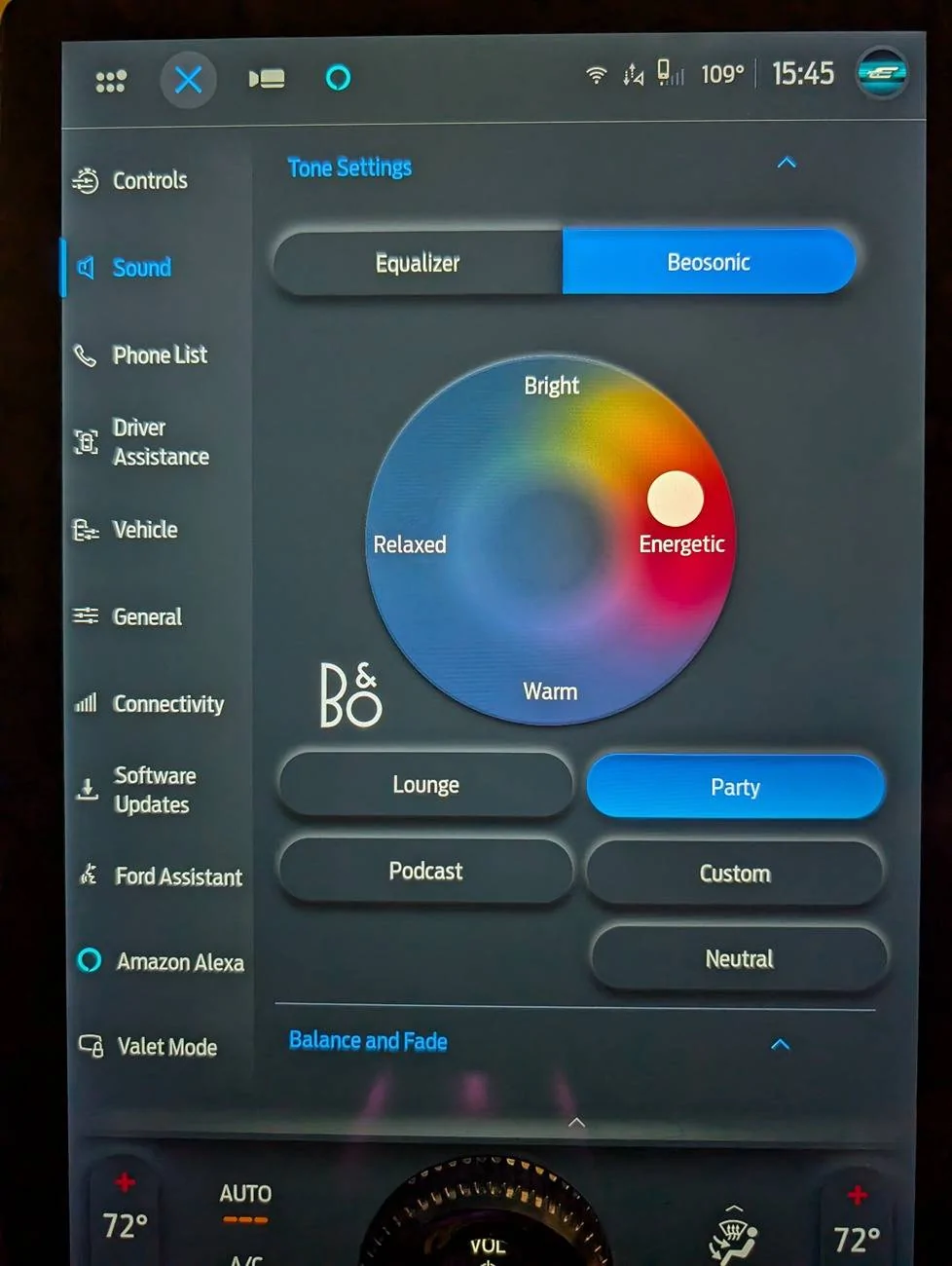
Which says "A double-tap on the white marker activates surround sound mode."

Sure enough, a double-tap added extra circles around the marker and flipped to "Surround"
You beat me to it. One of the guys on the ICE forums that made this change discovered that the double-tap works for that.
Sponsored


AtomicInternet

Well-Known Member
Joined
Jul 31, 2023
Threads
29
Messages
865
Reaction score
1,442
Location
SC
Vehicles
Focus RS, Mach E Premium
Country flag

carbonizedbrett

Well-Known Member
First Name
Brett
Joined
Oct 22, 2020
Threads
2
Messages
200
Reaction score
161
Location
Montgomery Township, NJ
Vehicles
'24 GV60P, '21 Mach E 4X, '17 Outback, '10 Jetta
Occupation
Scientist
Country flag
I don't have my Mach E anymore but when I tested multi-channel flac files, only the front left and front right channels played.

Has anybody tested with any discrete surround files after this update?
 

AtomicInternet

Well-Known Member
Joined
Jul 31, 2023
Threads
29
Messages
865
Reaction score
1,442
Location
SC
Vehicles
Focus RS, Mach E Premium
Country flag


carbonizedbrett

Well-Known Member
First Name
Brett
Joined
Oct 22, 2020
Threads
2
Messages
200
Reaction score
161
Location
Montgomery Township, NJ
Vehicles
'24 GV60P, '21 Mach E 4X, '17 Outback, '10 Jetta
Occupation
Scientist
Country flag
Found a whole mess of test audio files I'll try out with surround Beosonic active.
https://drive.google.com/drive/folders/1JxmeedtAtgmoafXv9rroiDOS2vEX7N4b
That's exactly where I sourced the test files I used!

Don't expect the mp4 or atmos files to play.

I'd start with the FLAC 5.1.flac and the LPCM 7.1.wav.

Those should be recognized and play without errors. If you hear more than two channels, that will be a significant change!

If the update means the Mach E can play rips of DVD-Audio, SACD, and Blu-ray PureAudio discs, that would be something!
 

AtomicInternet

Well-Known Member
Joined
Jul 31, 2023
Threads
29
Messages
865
Reaction score
1,442
Location
SC
Vehicles
Focus RS, Mach E Premium
Country flag
That's exactly where I sourced the test files I used!

Don't expect the mp4 or atmos files to play.

I'd start with the FLAC 5.1.flac and the LPCM 7.1.wav.

Those should be recognized and play without errors. If you hear more than two channels, that will be a significant change!

If the update means the Mach E can play rips of DVD-Audio, SACD, and Blu-ray PureAudio discs, that would be something!
I switched between Beosonic and Equalizer for all of the FLAC xxx.flac files, including "Stereo" and "Surround" modes for each.

They played ONLY the front left / front right as you experienced.

The only file that gave me left/center/front/surround channels was the Dolby Surround 4.0 LCRSur.flac file: Dolby Surround 4.0 LCRSur

It didn't even recognize the rest of the files. Looks like no change on codec support.
 

carbonizedbrett

Well-Known Member
First Name
Brett
Joined
Oct 22, 2020
Threads
2
Messages
200
Reaction score
161
Location
Montgomery Township, NJ
Vehicles
'24 GV60P, '21 Mach E 4X, '17 Outback, '10 Jetta
Occupation
Scientist
Country flag
I switched between Beosonic and Equalizer for all of the FLAC xxx.flac files, including "Stereo" and "Surround" modes for each.

They played ONLY the front left / front right as you experienced.

The only file that gave me left/center/front/surround channels was the Dolby Surround 4.0 LCRSur.flac file: Dolby Surround 4.0 LCRSur

It didn't even recognize the rest of the files. Looks like no change on codec support.
It seemed really strange to me that the 4.0 flac file wasn't limited to just Front Left and Front Right. Then it occurred to met that it was Dolby 4.0, which suggested it might be old-school Dolby Pro-Logic that used some analog encoding wizardry to steer 2-channel (stereo) audio to F/C/R and a common Rear Surround channel, hence 4.0.

I downloaded the file and opened it in Audacity and sure enough, it's a 2-channel file. So the stereo-to-surround processing the B&O does is playing nicely with that file. Fascinating!
 

carbonizedbrett

Well-Known Member
First Name
Brett
Joined
Oct 22, 2020
Threads
2
Messages
200
Reaction score
161
Location
Montgomery Township, NJ
Vehicles
'24 GV60P, '21 Mach E 4X, '17 Outback, '10 Jetta
Occupation
Scientist
Country flag
In other codec news, I did discover the Mach E will play stereo DSD encoded audio from .dsf files.

I used sample files - actual music, this time! - from here: https://www.oppodigital.com/hra/dsd-by-davidelias.aspx

If I recall correctly, it would recognize a multichannel dsf file but display an error when trying to play it.

My GV60 B&O will not recognize .dsf files but it does play multichannel flacs, Dolby AC3 in m4a or mka files, and other 5.1 and 7.1 DTS and Dolby formats (not Atmos, though) in mka audio files and mp4 video files. It does not do well with the tags in mka files, which is annoying.

I hadn't discovered the mka container until after I turned in my Mach E but I think the primary advantage is that it can store the original DTS encoding which is quite a bit less data than a FLAC conversion of it.
 

Mark Hassa

Well-Known Member
First Name
Mark
Joined
Jun 15, 2022
Threads
12
Messages
498
Reaction score
300
Location
New Westminster, BC
Vehicles
2024 Grabber Blue GT
Occupation
Government Food Inspector
Country flag
Oh yeah, skipped that part lol. It's working now, and I can hear a difference.

Only downside is I can't switch to "Surround" for Sound Mode now (lower down in sound settings). It keeps flipping back to "Stereo"

EDIT: I can pick "Surround" if I flip to "Equalizer" instead of "Beosonic" so nothing lost with this change.

1727207241946-zf.jpg


PXL_20240924_194537839.jpg
Tried installing this on my 2021 Job 2 Premium with B&O and couldn't get it to work at all. Forscan reported issues with modules not communicating so I had to revert back to factory settings.
 

rugedraw

Well-Known Member
First Name
Javier
Joined
Nov 13, 2023
Threads
0
Messages
2,634
Reaction score
2,390
Location
Miami, FL
Vehicles
2021 Ford F150 Platinum FX4 EB/2023 Bronco Sport Badlands/1991 Mustang 5.0 coupe
Occupation
Auto Sales
Country flag
Tried installing this on my 2021 Job 2 Premium with B&O and couldn't get it to work at all. Forscan reported issues with modules not communicating so I had to revert back to factory settings.
Can't get it to work on 21-23 F150's with either the 8 speaker or 18 speaker B&O systems. It worked on a 2024 F150. Trying to see if it works for the Lightning guys or not. Another 2023 Mach E owner got it working last night who was talking to me via PM.


Maybe a difference in hardware between the model years here?
 

Mark Hassa

Well-Known Member
First Name
Mark
Joined
Jun 15, 2022
Threads
12
Messages
498
Reaction score
300
Location
New Westminster, BC
Vehicles
2024 Grabber Blue GT
Occupation
Government Food Inspector
Country flag
Do you have the link to the guy who got it working on a 2024 F-150? I can try it on mine and see if I get it to work.
Can't get it to work on 21-23 F150's with either the 8 speaker or 18 speaker B&O systems. It worked on a 2024 F150. Trying to see if it works for the Lightning guys or not. Another 2023 Mach E owner got it working last night who was talking to me via PM.


Maybe a difference in hardware between the model years here?
 

rugedraw

Well-Known Member
First Name
Javier
Joined
Nov 13, 2023
Threads
0
Messages
2,634
Reaction score
2,390
Location
Miami, FL
Vehicles
2021 Ford F150 Platinum FX4 EB/2023 Bronco Sport Badlands/1991 Mustang 5.0 coupe
Occupation
Auto Sales
Country flag

AtomicInternet

Well-Known Member
Joined
Jul 31, 2023
Threads
29
Messages
865
Reaction score
1,442
Location
SC
Vehicles
Focus RS, Mach E Premium
Country flag
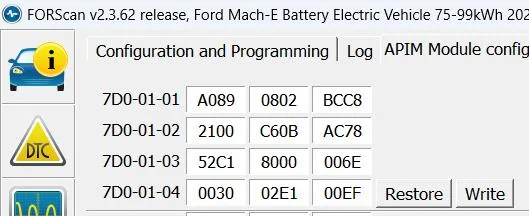
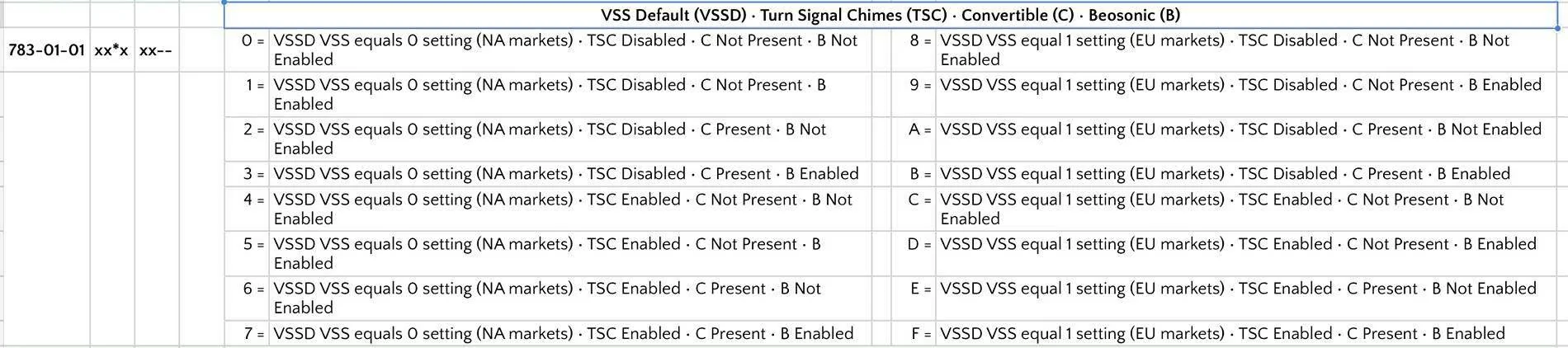
Just FYI, you're supposed to increment whatever value is in that position to enable it. The F-150 forums have a great spreadsheet for their vehicles.

Just increment the value in the indicated position by the number. The numbers after those are just CRC and don't matter (FORscan sorts it out).

For DSP, increment by 1.
For APIM, increment by 8.

I'd say all our vehicles SHOULD end up with the same numbers since we have the same configurations

Changes applied to:
DSP 783-01-01 xx1x xx
APIM 7D0-01-01 xxx8 xxxx xx

Ford Mustang Mach-E Beosonic 1727373786025-p5
 

rugedraw

Well-Known Member
First Name
Javier
Joined
Nov 13, 2023
Threads
0
Messages
2,634
Reaction score
2,390
Location
Miami, FL
Vehicles
2021 Ford F150 Platinum FX4 EB/2023 Bronco Sport Badlands/1991 Mustang 5.0 coupe
Occupation
Auto Sales
Country flag
Just FYI, you're supposed to increment whatever value is in that position to enable it. The F-150 forums have a great spreadsheet for their vehicles.

Just increment the value in the indicated position by the number. The numbers after those are just CRC and don't matter (FORscan sorts it out).

For DSP, increment by 1.
For APIM, increment by 8.

I'd say all our vehicles SHOULD end up with the same numbers since we have the same configurations

Changes applied to:
DSP 783-01-01 xx1x xx
APIM 7D0-01-01 xxx8 xxxx xx
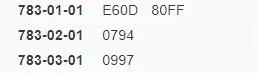
Yea, I getcha, but an 8 in the APIM didn't work for me or several others that tried with both B&O systems. I though at first it may only work on the 6 channel DSP and not the 10 channel we have with the 18 speaker system, but same results in both cases.

This is what I show here:

Ford Mustang Mach-E Beosonic 1727374525200-jy


Another member tried changing -02-01 Xxxx to a few different values to see if changing vehicle types helped any, but that didn't help, either. Turning noise canceling on/off also didn't help. We're still tinkering with it. I plan on messing with it on Sunday when I have some time to try and figure it out.
Sponsored


Top