CarPlay EV Routing Is Not Visible

OP
OP

sgerstacker

Member
First Name
Stephen
Joined
Nov 14, 2023
Threads
2
Messages
22
Reaction score
5
Location
Ohio
Vehicles
‘21 Mach-E Premium AWD Ext
Country flag
I just tried this for the first time and followed these instructions:

Set up EV routing through CarPlay
For a compatible electric vehicle (EV) that doesn’t require an app from its manufacturer, use CarPlay to set up EV routing in the Maps app.​
Note: Refer to the owner’s guide for your vehicle for compatibility information.​
  1. Connect iPhone to CarPlay.
  2. Open the Maps app
    2d0b2b0e721e8078455f9b089e5d81b2.png
    on your iPhone, get driving directions, tap Connect (above the list of routes), then follow the onscreen instructions.

It worked fine the first try on both my Mach E and my Lightning.

Before that, I tried it when not connected to the vehicles and got nothing. However, now that I connected to both vehicles it shows me both vehicles as options when I am not connected to CarPlay. I think this is the critical step, being connected to the vehicle using CarPlay when you add the vehicles.
Yep, it’s all been tried. For this one, the Connect button is not there. Going in to the profile, the Vehicles option isn’t there.

This is with the car on, parked, connected to CarPlay.
Sponsored
 
OP
OP

sgerstacker

Member
First Name
Stephen
Joined
Nov 14, 2023
Threads
2
Messages
22
Reaction score
5
Location
Ohio
Vehicles
‘21 Mach-E Premium AWD Ext
Country flag
Additional notes: since Ford added that chat option to their site, I attempted to use that. I typed up the whole story, pasted it to the chat, and the person immediately sent me to the SYNC / OTA phone line.

I called them and they started going through all of the steps that have been outlined throughout this thread. The tech ultimately told me I had to go to a dealer.

I’ll be going down that route next week. The original dealer I worked with is over an hour away, but I live next to one as well, so we’ll see if another dealer can get the right info from Ford.
 

jtmyrand

Active Member
First Name
Gerald
Joined
Apr 26, 2021
Threads
1
Messages
41
Reaction score
37
Location
Grosse Ile, MI
Vehicles
2023 Mustang Mach-E GTPE, 2023 F-250 Super Duty
Occupation
IT Consultant
Country flag
I wish you good luck. Let us know how it turns out.
 

ChasingCoral

Well-Known Member
First Name
Mark
Joined
Feb 3, 2020
Threads
502
Messages
14,306
Reaction score
28,653
Location
Maryland
Vehicles
2021 GB E4X FE, 2022 F-150 Lightning Lariat ER
Occupation
Retired oceanographer
Country flag
Additional notes: since Ford added that chat option to their site, I attempted to use that. I typed up the whole story, pasted it to the chat, and the person immediately sent me to the SYNC / OTA phone line.

I called them and they started going through all of the steps that have been outlined throughout this thread. The tech ultimately told me I had to go to a dealer.

I’ll be going down that route next week. The original dealer I worked with is over an hour away, but I live next to one as well, so we’ll see if another dealer can get the right info from Ford.
One more question? Which iPhone & OS are you using. wife tried setting up her phone last night and didn’t see the option to add the Mach E. She’s running an iPhone 7.
 
OP
OP

sgerstacker

Member
First Name
Stephen
Joined
Nov 14, 2023
Threads
2
Messages
22
Reaction score
5
Location
Ohio
Vehicles
‘21 Mach-E Premium AWD Ext
Country flag
One more question? Which iPhone & OS are you using. wife tried setting up her phone last night and didn’t see the option to add the Mach E. She’s running an iPhone 7.
iPhone 15 Pro Max. iOS 17.2.1.


brennan

New Member
Joined
Aug 24, 2023
Threads
1
Messages
4
Reaction score
0
Location
California
Vehicles
2021 MME Premium AWD ER
Country flag
iPhone 15 Pro Max. iOS 17.2.1.
Did you ever find a fix for this issue? I have the exact same problem.

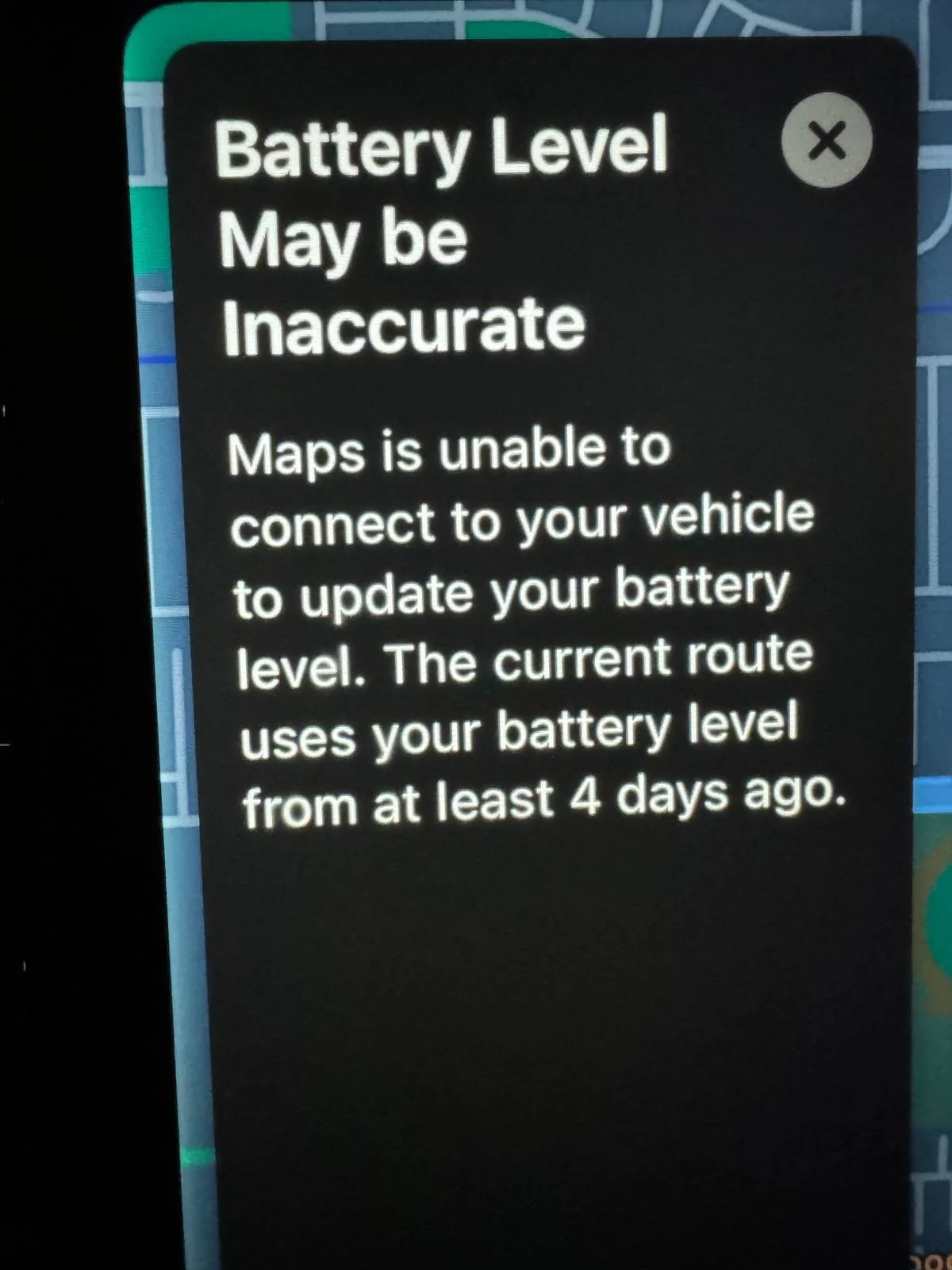
I removed my MachE from Apple Maps because there was a bug where Apple Maps was getting old battery data from a few days prior (it gave me this notification in the image below).

Ford Mustang Mach-E CarPlay EV Routing Is Not Visible IMG_1503


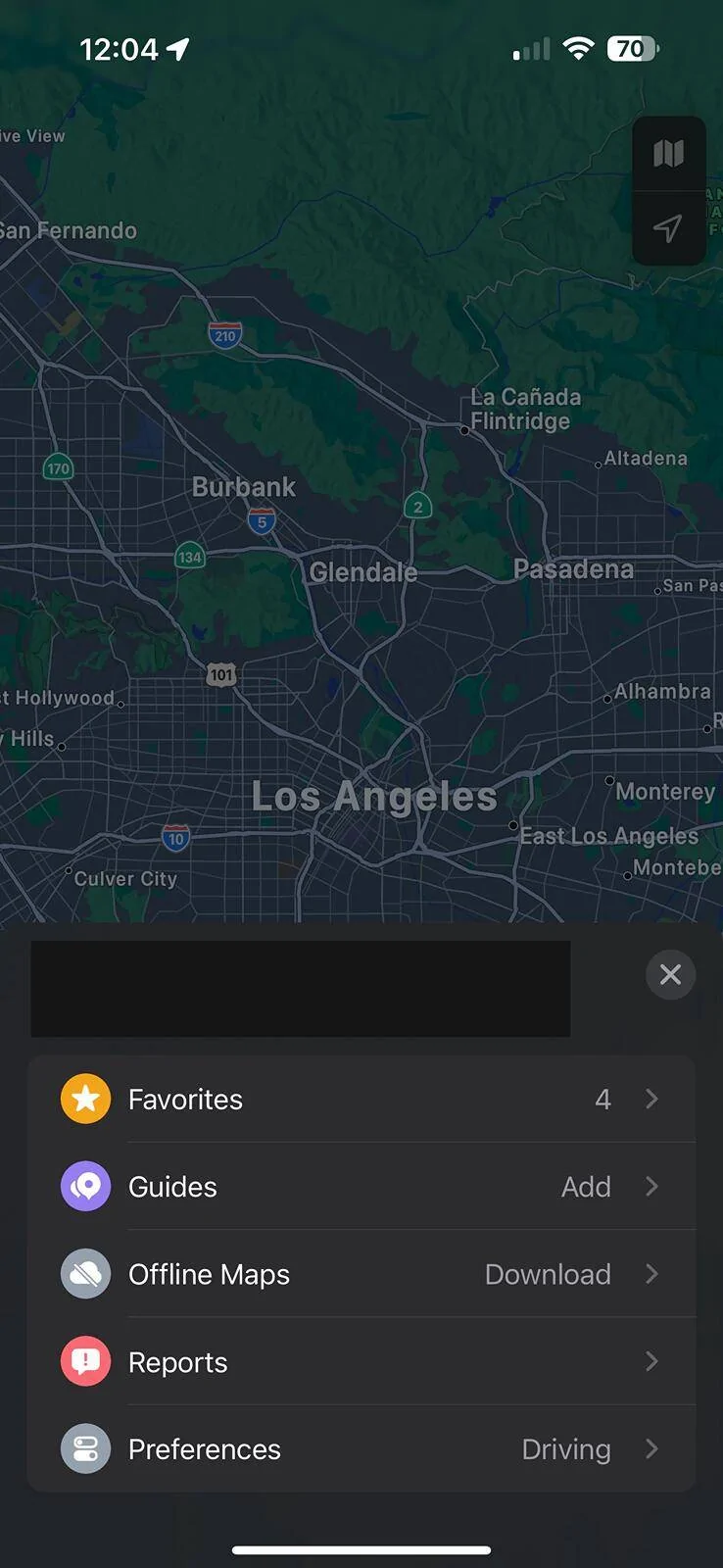
Now when trying to re-add the car to Maps, the “Vehicles” menu item is missing (see screenshot).

Ford Mustang Mach-E CarPlay EV Routing Is Not Visible IMG_1510


I have followed the steps from Apple’s guide and done all resets (re-did PaaK, CarPlay, Bluetooth, reboot SYNC). Nothing works to get that “Vehicles” menu item back in maps.

Ford also has a guide which seems to indicate that Maps on CarPlay should prompt you to enable EV routing, but that has not been the case for me.

Running iPhone 15 Pro Max iOS 17.4. Not sure what SYNC version.
 
OP
OP

sgerstacker

Member
First Name
Stephen
Joined
Nov 14, 2023
Threads
2
Messages
22
Reaction score
5
Location
Ohio
Vehicles
‘21 Mach-E Premium AWD Ext
Country flag
Did you ever find a fix for this issue? I have the exact same problem.

I removed my MachE from Apple Maps because there was a bug where Apple Maps was getting old battery data from a few days prior (it gave me this notification in the image below).

IMG_1503.jpeg


Now when trying to re-add the car to Maps, the “Vehicles” menu item is missing (see screenshot).

IMG_1510.png


I have followed the steps from Apple’s guide and done all resets (re-did PaaK, CarPlay, Bluetooth, reboot SYNC). Nothing works to get that “Vehicles” menu item back in maps.

Ford also has a guide which seems to indicate that Maps on CarPlay should prompt you to enable EV routing, but that has not been the case for me.

Running iPhone 15 Pro Max iOS 17.4. Not sure what SYNC version.
Did you ever find a fix for this issue? I have the exact same problem.

I removed my MachE from Apple Maps because there was a bug where Apple Maps was getting old battery data from a few days prior (it gave me this notification in the image below).

IMG_1503.jpeg


Now when trying to re-add the car to Maps, the “Vehicles” menu item is missing (see screenshot).

IMG_1510.png


I have followed the steps from Apple’s guide and done all resets (re-did PaaK, CarPlay, Bluetooth, reboot SYNC). Nothing works to get that “Vehicles” menu item back in maps.

Ford also has a guide which seems to indicate that Maps on CarPlay should prompt you to enable EV routing, but that has not been the case for me.

Running iPhone 15 Pro Max iOS 17.4. Not sure what SYNC version.
Unfortunately, no. I keep hoping at some point all of the other updates for the car come through and those might help, but I doubt it.

I spoke with a tech online somewhere and he said maybe do a master reset, but I haven’t had the time / courage to do that yet.
 

ahern149

Well-Known Member
First Name
Alberto
Joined
Sep 11, 2022
Threads
0
Messages
54
Reaction score
10
Location
91101
Vehicles
2021 Mustange Mach-E Select Awd
Country flag
On your iPhone hold the Apple Maps app until the option to uninstall pops up. Uninstall it and then reinstall by searching in App Store. Also make sure to remove your iPhone from your Mach-E. Then try reconnecting like it’s a brand new phone. This happened to me
 
OP
OP

sgerstacker

Member
First Name
Stephen
Joined
Nov 14, 2023
Threads
2
Messages
22
Reaction score
5
Location
Ohio
Vehicles
‘21 Mach-E Premium AWD Ext
Country flag
On your iPhone hold the Apple Maps app until the option to uninstall pops up. Uninstall it and then reinstall by searching in App Store. Also make sure to remove your iPhone from your Mach-E. Then try reconnecting like it’s a brand new phone. This happened to me
I never thought to uninstall Apple Maps. I just tried it and unfortunately, it didn’t change anything.

Unpaired everything, uninstalled Maps, rebooted everything, paired everything, and still no EV routing feature in Maps.
 

ahern149

Well-Known Member
First Name
Alberto
Joined
Sep 11, 2022
Threads
0
Messages
54
Reaction score
10
Location
91101
Vehicles
2021 Mustange Mach-E Select Awd
Country flag
I never thought to uninstall Apple Maps. I just tried it and unfortunately, it didn’t change anything.

Unpaired everything, uninstalled Maps, rebooted everything, paired everything, and still no EV routing feature in Maps.
When you connected your phone again did you open CarPlay Apple Maps or did you try opening Apple Maps directly on your phone while it’s connected to CarPlay?
I tried it with another iPhone right now and did the opening through the iPhone when the EV-routing prompt came up.
 
OP
OP

sgerstacker

Member
First Name
Stephen
Joined
Nov 14, 2023
Threads
2
Messages
22
Reaction score
5
Location
Ohio
Vehicles
‘21 Mach-E Premium AWD Ext
Country flag
When you connected your phone again did you open CarPlay Apple Maps or did you try opening Apple Maps directly on your phone while it’s connected to CarPlay?
I tried it with another iPhone right now and did the opening through the iPhone when the EV-routing prompt came up.
I did it through the phone. No prompt.

I’ve seen my phone work on another MME 2021 no problem.

My wife’s phone also does not prompt on my MME.
 

OH2AZ2OH

Well-Known Member
Joined
Jan 11, 2021
Threads
7
Messages
861
Reaction score
989
Location
Dublin, OH
Vehicles
Mach E 4X
Country flag
Last edited:

brennan

New Member
Joined
Aug 24, 2023
Threads
1
Messages
4
Reaction score
0
Location
California
Vehicles
2021 MME Premium AWD ER
Country flag
I did it through the phone. No prompt.

I’ve seen my phone work on another MME 2021 no problem.

My wife’s phone also does not prompt on my MME.
I tried disconnecting everything, uninstalling maps, and rebooting. Tried launching from both iPhone and MachE. Neither worked to prompt EV routing.
 

joelers11

Member
First Name
Joel
Joined
Jul 26, 2024
Threads
2
Messages
8
Reaction score
4
Location
Vancouver BC
Vehicles
Mustang Mach E Premium AWD, Job 1 '23
Country flag
Did you ever find a fix for this issue? I have the exact same problem.

I removed my MachE from Apple Maps because there was a bug where Apple Maps was getting old battery data from a few days prior (it gave me this notification in the image below).

IMG_1503.webp


Now when trying to re-add the car to Maps, the “Vehicles” menu item is missing (see screenshot).

IMG_1510.webp


I have followed the steps from Apple’s guide and done all resets (re-did PaaK, CarPlay, Bluetooth, reboot SYNC). Nothing works to get that “Vehicles” menu item back in maps.

Ford also has a guide which seems to indicate that Maps on CarPlay should prompt you to enable EV routing, but that has not been the case for me.

Running iPhone 15 Pro Max iOS 17.4. Not sure what SYNC version.
I removed my Mach E last night from Apple Maps hoping to re set it up, but now I have the same issue as OP and you :/

did anyone figure this out yet? I find it strange that once a vehicle is removed you can’t seem to re-add it (despite deleting maps, disconnecting Bluetooth, removing phone in car) seems like once a car is removed you can’t re establish it in Apple Maps, I don’t understand how…

There’s several forum posts (people with Porches etc) on Apple forums as well with the same problem
 

joelers11

Member
First Name
Joel
Joined
Jul 26, 2024
Threads
2
Messages
8
Reaction score
4
Location
Vancouver BC
Vehicles
Mustang Mach E Premium AWD, Job 1 '23
Country flag
After an IOS update this finally worked

I think there is a piece of data being stored in Apple Maps / iCloud that prevents the EV connection prompt from coming up maybe the IOS version number helped fix that
Sponsored


Top