CarPlay question

NovaMustang

Active Member
First Name
Adam
Joined
Oct 19, 2021
Threads
7
Messages
39
Reaction score
41
Location
NoVa
Vehicles
MachE
Country flag
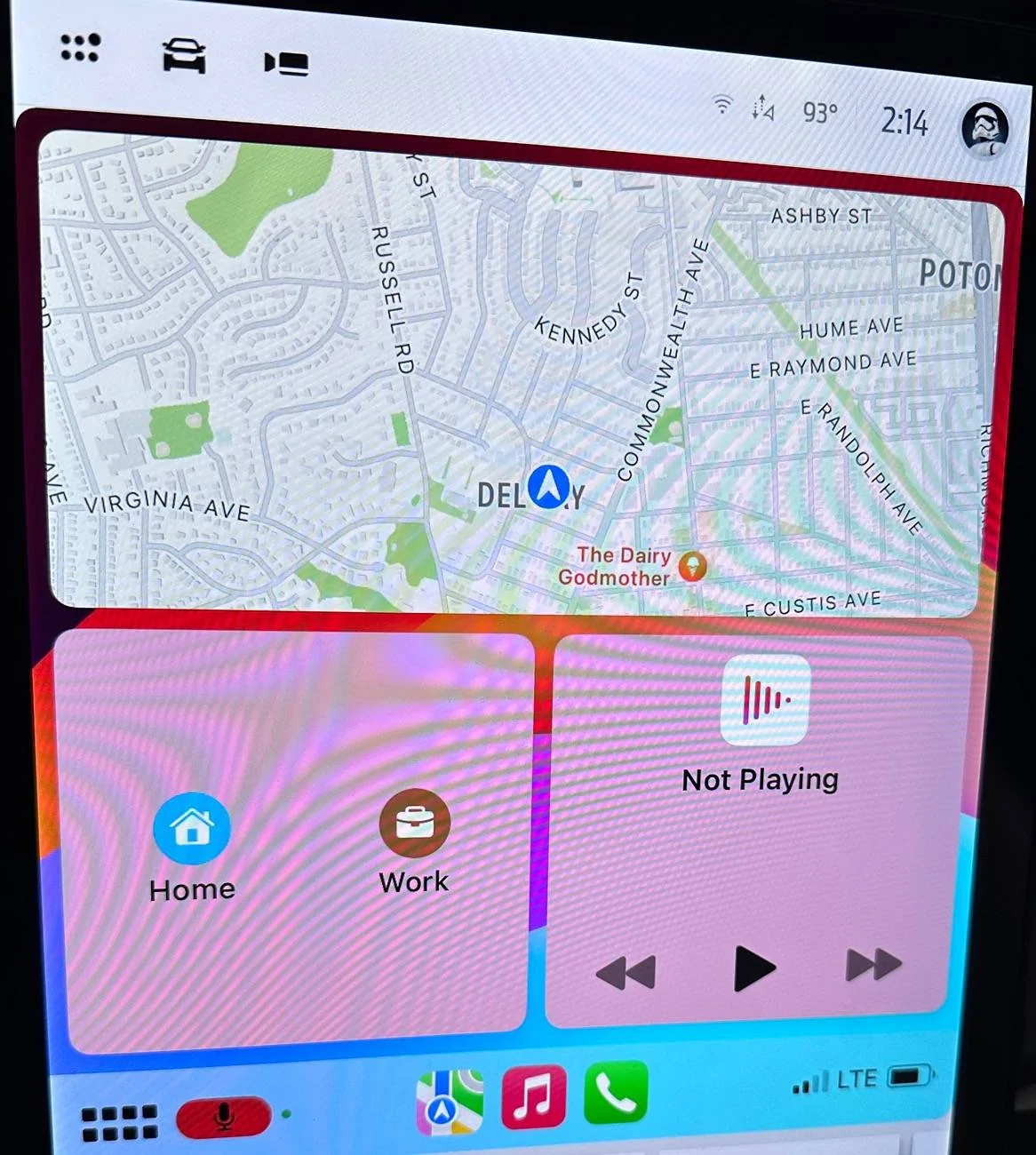
When I use CarPlay, the default view shows the map up top. Below that is a left hand tile with quick hit buttons to navigate home or to my office. Below the map and to the right is whatever music or podcast is playing. I don’t like this, but it is what it is and it’s been that way forever.

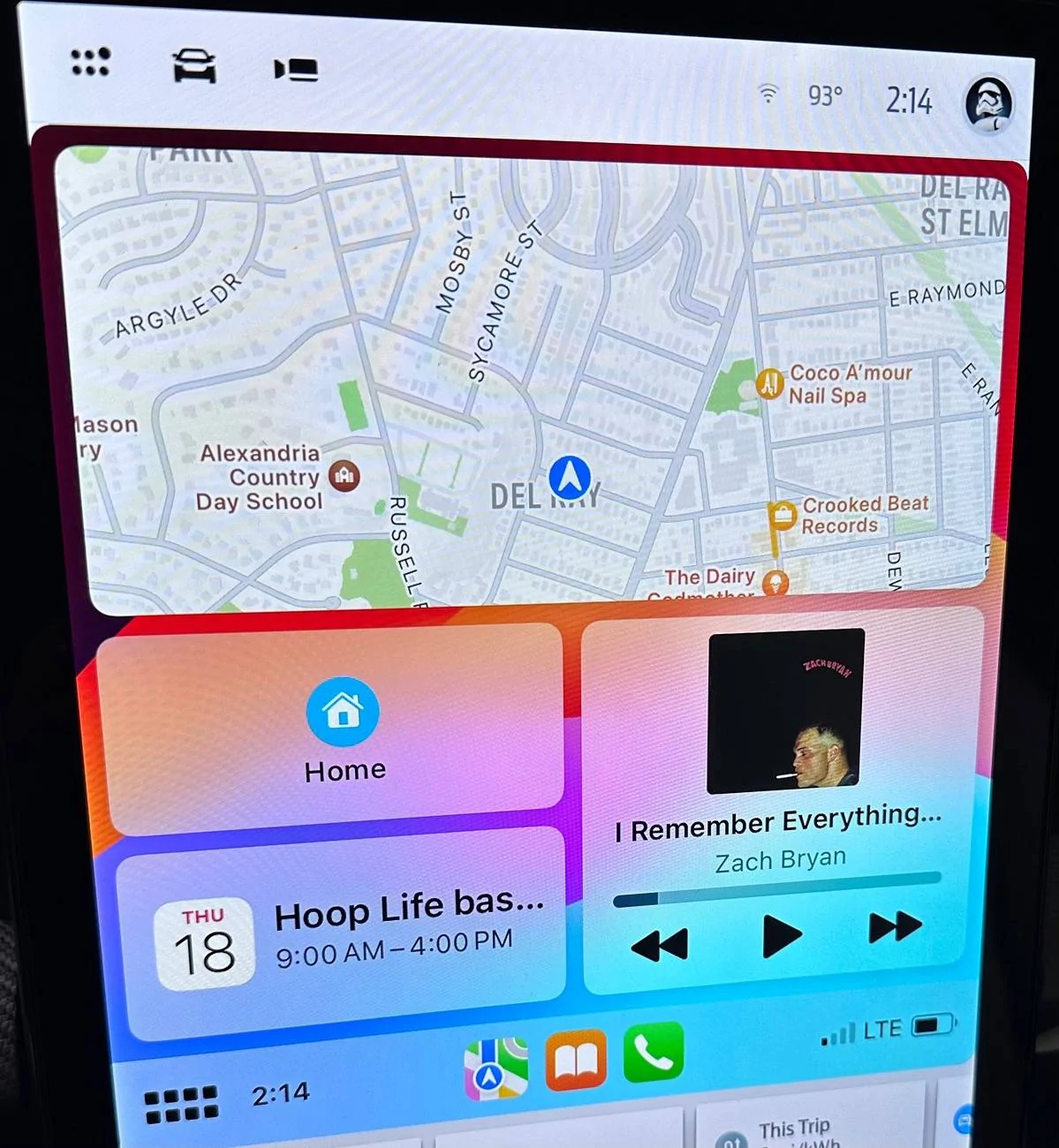
Recently, I noticed that CarPlay is slightly different when my wife’s phone is connected. Hers is the same, except for the left hand side, under the map. There, she has the quick hit buttons to navigate home, like me, but she also has whenever is next on her iOS calendar.

Anyone have any idea how I can make my CarPlay work like hers? We’re both using the same Mach E and the same iOS. I don’t get it.
Sponsored


 

njb

Well-Known Member
First Name
Nancy
Joined
Aug 31, 2022
Threads
1
Messages
309
Reaction score
255
Location
Illinois
Vehicles
Rapid Red 2023 GT
Country flag
My calendar only shows up if I have something that day on my calendar. It does not show days in advance.

I haven't played around with it but if you go into the car play settings on your iphone you can change the order of the apps. Perhaps you just need to make your calendar app higher in the hierarchy.
 

AliRafiee

Well-Known Member
First Name
Ali
Joined
Jan 20, 2023
Threads
103
Messages
3,267
Reaction score
4,191
Location
Seattle WA
Vehicles
2022 Mach E GT - Grabber Blue
Occupation
Software Eng.
Country flag
She has Siri suggestions enabled in her settings.
 

tbrumleve

Well-Known Member
First Name
Tom
Joined
Jan 1, 2023
Threads
2
Messages
744
Reaction score
987
Location
Oregon, USA
Vehicles
2023 Mach-E Premium eAWD Standard Range
Country flag
The only CarPlay options are to add / delete / rearrange the apps available. The layout of the main split screen cannot be changed. Calendar entries will show if one is coming up soon.
 
  • Like
Reactions: njb

Ravensfan1996

Well-Known Member
First Name
Rick
Joined
Nov 16, 2020
Threads
10
Messages
623
Reaction score
456
Location
Maryland/Pennsylvania New Freedom, Pa
Vehicles
2021 Mustang Mach E
Country flag
In that view its whatever apps were last used. If you change to podcast, the podcast will be there, if they change to calendar, calendar will show there. Etc. You can’t choose which one goes there, You can also get full screen mode by clicking the squares in the bottom left.


OP
OP

NovaMustang

Active Member
First Name
Adam
Joined
Oct 19, 2021
Threads
7
Messages
39
Reaction score
41
Location
NoVa
Vehicles
MachE
Country flag
I appreciate the responses, but don’t think any of them hit the mark.

I have Siri suggestions enabled.

And I’m aware of how the icons in the CarPlay try change, based upon which are being used or were recently used. But that’s not related to what I’m asking about.

In the bottom left hand quadrant of CarPlay, I see just the buttons to navigate home and to work. My wife sees that and whatever’s next on her calendar. I never see that, even if I have something coming up on my calendar.

Mystery not solved.
 

Art

Well-Known Member
First Name
Art
Joined
Aug 7, 2021
Threads
5
Messages
283
Reaction score
162
Location
244SnowyGv932nFordC
Vehicles
Mustang Mach E
Occupation
Retiref
Country flag
When I use CarPlay, the default view shows the map up top. Below that is a left hand tile with quick hit buttons to navigate home or to my office. Below the map and to the right is whatever music or podcast is playing. I don’t like this, but it is what it is and it’s been that way forever.

Recently, I noticed that CarPlay is slightly different when my wife’s phone is connected. Hers is the same, except for the left hand side, under the map. There, she has the quick hit buttons to navigate home, like me, but she also has whenever is next on her iOS calendar.

Anyone have any idea how I can make my CarPlay work like hers? We’re both using the same Mach E and the same iOS. I don’t get it.
I have an older Apple Iphone and I could actually bluetooth it to my 2021 MME.
Now I have to use the USB connection for carplay. My wife gets into the car and immediately connects to bluetooth with her newer phone.
The problem seems to be Apple and Ford have updates and either one can jolt your setup. We have to live with it because these two large companies are not about to partner on updates.
 

Kamuelaflyer

Well-Known Member
First Name
Bill
Joined
Feb 18, 2020
Threads
11
Messages
11,333
Reaction score
22,907
Location
Hawaii
Vehicles
2021 Premium Infinite Blue. ER AWD. 2020 Raptor, 2021 Ranger.
Country flag
A picture is worth a thousand words.
 

Rob-Mach-E

Well-Known Member
First Name
Rob
Joined
Aug 29, 2023
Threads
8
Messages
90
Reaction score
73
Location
Central Pennsylvania
Website
robzone.net
Vehicles
2023 GTPE. Space White Nite Pony
Country flag
I appreciate the responses, but don’t think any of them hit the mark.

I have Siri suggestions enabled.

And I’m aware of how the icons in the CarPlay try change, based upon which are being used or were recently used. But that’s not related to what I’m asking about.

In the bottom left hand quadrant of CarPlay, I see just the buttons to navigate home and to work. My wife sees that and whatever’s next on her calendar. I never see that, even if I have something coming up on my calendar.

Mystery not solved.
Maybe put in a soon calendar event with a location associated with it
 

avdonr

Well-Known Member
First Name
Avdon
Joined
Dec 5, 2022
Threads
1
Messages
247
Reaction score
300
Location
Canada
Vehicles
2021 Mustang Mach-E GT PE
Occupation
Software Engineer
Country flag
CarPlay automatically arranges the widgets view based on your personal apps/schedule/etc. If you have upcoming calendar appointments, then it will show that, if you are close to home with smart devices, it might suggest opening the garage door or turning on the lights - things like that. Generally, if nothing else, it will show you quick actions from your current nav app.
 

azerik

Well-Known Member
First Name
Erik
Joined
Jan 8, 2023
Threads
79
Messages
4,545
Reaction score
4,557
Location
Chandler/Flagstaff, AZ
Vehicles
'21 Spacey Prem4x, '21 RX450H, 13 Focus EV
Occupation
DevSecNetOps, General PITA
Country flag
And if you're using the nav in that view it randomly will make you think you missed something and/or something jumped off the page, because that bottom left block that is your calendar at this moment will become the turn by turn then disappear block. Drove me nuts as I had to just stop using that view if getting directions.
 
OP
OP

NovaMustang

Active Member
First Name
Adam
Joined
Oct 19, 2021
Threads
7
Messages
39
Reaction score
41
Location
NoVa
Vehicles
MachE
Country flag
CarPlay automatically arranges the widgets view based on your personal apps/schedule/etc. If you have upcoming calendar appointments, then it will show that, if you are close to home with smart devices, it might suggest opening the garage door or turning on the lights - things like that. Generally, if nothing else, it will show you quick actions from your current nav app.
That’s true, but it doesn’t explain the difference here. Like I said, we share an iOS calendar. So, if CarPlay show an event on her screen, it should show the same event when I’m connected. But it doesn’t, as you can see in these photos, which were taken a minute apart from the same location, as we both had all the exact same events in our shared calendar.
 

avdonr

Well-Known Member
First Name
Avdon
Joined
Dec 5, 2022
Threads
1
Messages
247
Reaction score
300
Location
Canada
Vehicles
2021 Mustang Mach-E GT PE
Occupation
Software Engineer
Country flag
That’s true, but it doesn’t explain the difference here. Like I said, we share an iOS calendar. So, if CarPlay show an event on her screen, it should show the same event when I’m connected. But it doesn’t, as you can see in these photos, which were taken a minute apart from the same location, as we both had all the exact same events in our shared calendar.
Might just be a case of the background intelligent suggestions deciding not to surface the same information at the same time. I personally view the whole Siri suggestions feature as a black box, can never really tell what information its pulling or learning from to surface suggestions.

Only other thing I could think of is that it’s only displaying for the person that actually created the event in the calendar. Did you create the event or did your wife? Maybe both of you can try to create a new event and see how it behaves.
 

Kamuelaflyer

Well-Known Member
First Name
Bill
Joined
Feb 18, 2020
Threads
11
Messages
11,333
Reaction score
22,907
Location
Hawaii
Vehicles
2021 Premium Infinite Blue. ER AWD. 2020 Raptor, 2021 Ranger.
Country flag
Same car. Same iOS. Same shared calendar in iOS with the same events. Different CarPlay results.

IMG_4432.jpeg


IMG_4431.jpeg
The top picture is what I see most of the time unless there’s and active event on my calendar. Could it be dependent upon who actually enters the event initially?
Sponsored


Top