Does Navigation Map show traffic conditions?

OP
OP
MYOUTH

MYOUTH

Well-Known Member
First Name
Steven
Joined
Mar 18, 2021
Threads
20
Messages
71
Reaction score
61
Location
St Louis
Vehicles
Lincoln MKX, Proud Owner of a Premium SR RWD
Occupation
Retired
Country flag
Does the navigation system need to be actively routing you somewhere. When I brought up the traffic alert it showe’d me a list of roads
Sponsored

 

zvez

Banned
Banned
First Name
chris
Joined
Dec 31, 2020
Threads
13
Messages
2,441
Reaction score
2,344
Location
ga
Vehicles
2023 GT PE Carbonized Grey with Nite Pony package
Occupation
retired
Country flag
How long do we get traffic conditions? Is this something we'll have to pay a subscription fee for later on?
 

agoldman

Well-Known Member
Joined
Jan 23, 2020
Threads
54
Messages
3,006
Reaction score
2,482
Location
Charleston, SC
Vehicles
2024 Mach E GT vapor blue- perf pack-alloy wheels
Country flag
mine often doesn't show until the next startup. In general, the maps and nav features are horrible compared to smart phone options on the display. Dramatic difference.
 

agoldman

Well-Known Member
Joined
Jan 23, 2020
Threads
54
Messages
3,006
Reaction score
2,482
Location
Charleston, SC
Vehicles
2024 Mach E GT vapor blue- perf pack-alloy wheels
Country flag
I have had nothing but problems with this nav system. The traffic often doesn't come on at all. I hate that the map always starts zoomed in fully. There needs to be a default optrion for how it opens. When you zoom out the controls on the left side of the screen to center the map, or the 3D/N buttons etc loose function very often.

The iphone google and waze maps don't pinch to zoom or move around in wireless carplay, so quite useless in reality.


njb

Well-Known Member
First Name
Nancy
Joined
Aug 31, 2022
Threads
1
Messages
309
Reaction score
255
Location
Illinois
Vehicles
Rapid Red 2023 GT
Country flag
Old thread I know, but I have similar questions.

I know that there is a traffic overlay if I put in route guidance and that the traffic icon in the bottom right corner of the screen will bring up local traffic issues, but is there a way to just have a map with traffic overlay and no guidance? Like google maps does. I make a lot of short trips that would be silly to use navigation guidance on but I'd like to see if an intersection up ahead has an issue and maybe I would prefer to avoid it.
 

MacherAWD

Well-Known Member
First Name
Erik
Joined
Mar 29, 2022
Threads
14
Messages
1,823
Reaction score
2,704
Location
North Shore MA
Vehicles
2021 AWD Select C&T, 2020 Bolt Premier
Occupation
Healthcare Software
Country flag
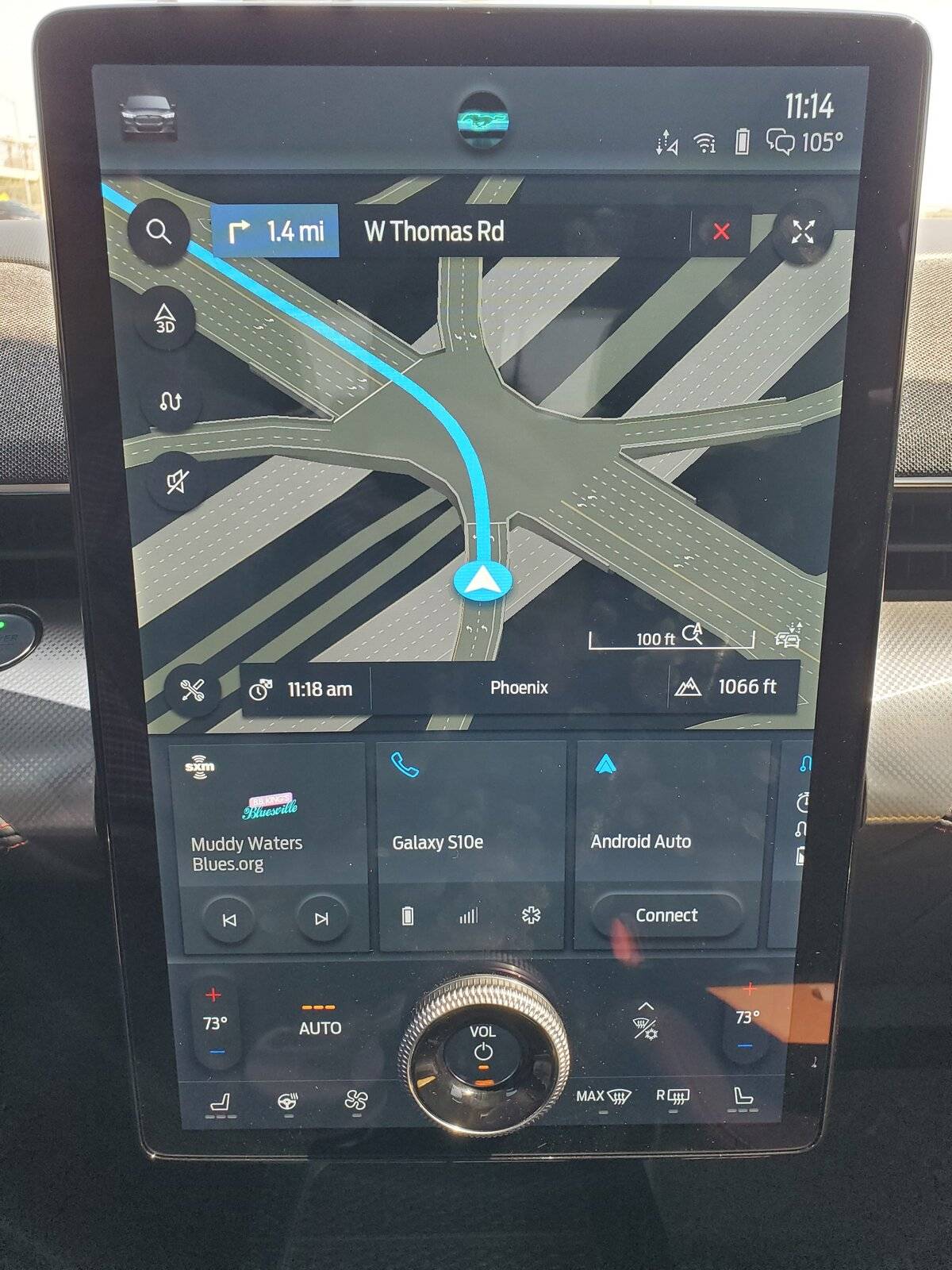
The native nav works very well for me. Going from memory....I think red is traffic jamb, yellow is heavy traffic, I think purple is construction or maybe an accident? Blue is the route if you have a destination programmed and white is a turn I think.....? There might be more colors that I can't remember....

Seems pretty nice to me. I suppose Green would be okay too. It might make it more clear when you see yellow on the opposite highway direction while your route is clear.....like the last photo attached. ?
20210913_111429.jpg


20210907_115723.jpg


20210907_085147.jpg
I saw the 3-D map display last weekend for the first time, had the navigation on in boston. Had the car since March and never saw, I always head north which the 3-D maps doesnt do anything.
 

Logal727

Well-Known Member
First Name
C
Joined
Aug 23, 2021
Threads
101
Messages
7,351
Reaction score
11,347
Location
Florida
Vehicles
‘21 Carbonized Gray Mustang Mach-E Premium AWD Ext
Country flag
Old thread I know, but I have similar questions.

I know that there is a traffic overlay if I put in route guidance and that the traffic icon in the bottom right corner of the screen will bring up local traffic issues, but is there a way to just have a map with traffic overlay and no guidance? Like google maps does. I make a lot of short trips that would be silly to use navigation guidance on but I'd like to see if an intersection up ahead has an issue and maybe I would prefer to avoid it.
You can zoom in and out and scroll around and see the traffic conditions without putting a route in
Sponsored

 
  • Like
Reactions: njb


Top