Wyostang

Active Member
First Name
Jeff
Joined
Aug 4, 2020
Threads
3
Messages
34
Reaction score
46
Location
Wyoming
Vehicles
2023 Mach E GTPE
Country flag
I picked up my First Edition ER AWD MME last Wednesday. I'm having the same issue as you. Yesterday, the Connected Built-In Navigation option started showing up, but I'm not seeing my FordPass Charging Network.

To top it off, I'm scheduled to have an electrician here on Tuesday to give me a quote to get the 220V power ran to the garage and installing the Home Charging System. So right now I'm trying to charge it running off the mobile charging system they provided on 120V. I'm literally charging at a rate of 2 miles per hour. Would love to hear if others had this problem and if there's a way to speed that up until I can get the 220V charging system installed.
Identical situation for me. Just started seeing the connected navigation yesterday as well but no charging network. I went one week using 120v. Had electrician here on Wednesday and my ChargePoint station showed up the day before, so no more 2 mile per hour charge. I can easily charge (to 90%) overnight now, so I would recommend getting the 220v ASAP.
Sponsored


whyteshadow

Member
First Name
E.G.
Joined
Feb 8, 2021
Threads
1
Messages
8
Reaction score
5
Location
California
Vehicles
2021 Mustang Mach-E Premium
Country flag
Still seeing "No Connected Services Available" and it's been nearly two weeks. Probably doesn't matter anyway. Given the reviews I've seen on Electrify America and other charging services, their reliability isn't good enough yet to guarantee a relatively painless road trip.

On the bright side, I am enjoying my Mach-E Premium. It's surprisingly quick off the line.

While I do miss the wildness of my 2016 Mustang GT in sport and track mode, I don't miss the cost of replacing those rear tires ?.
 

Jako607

Well-Known Member
Joined
Jan 26, 2021
Threads
14
Messages
186
Reaction score
354
Location
92104
Vehicles
2019 Bolt
Country flag
I set up my Ford account today and tried to follow these instructions and also get NO CONNECTED SERVICES AVAILABLE message on my Ford.com account when I click on Connected Services. Happens in both Chrome and Edge browsers, although Ford's site does seem to respond better to Edge
 
Last edited:

DBC

Well-Known Member
First Name
Don
Joined
Oct 1, 2020
Threads
8
Messages
1,224
Reaction score
1,430
Location
San Diego
Vehicles
Volt ELR
Country flag
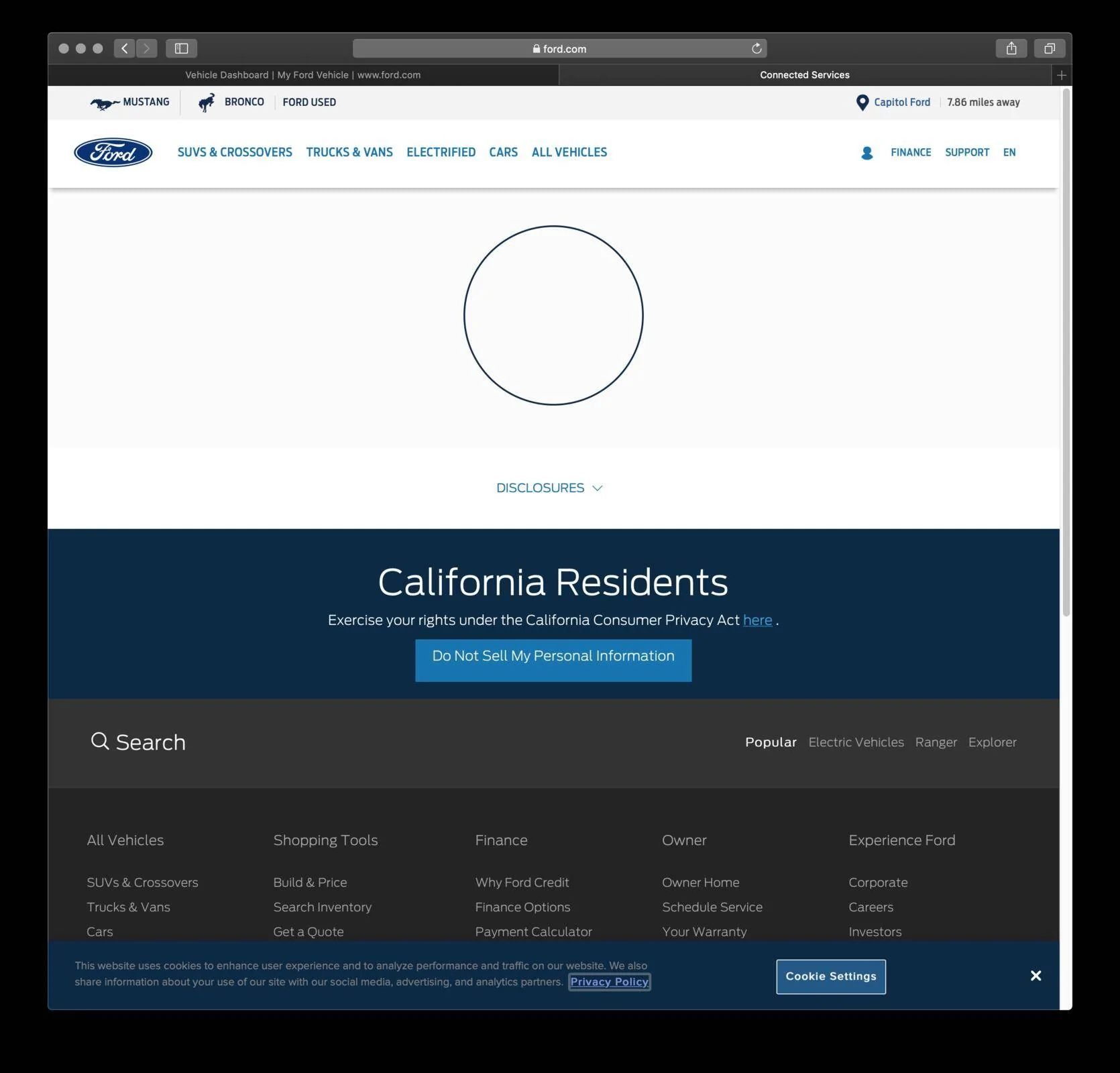
I can see the Connected Services icon but when I click on it I just get a constant spinning circle on the next screen. I thought it might be Safari but couldn't even log onto my account using Chrome -- just got an error page.

This is not a big deal since I have no plans for going on a trip, and of course I could just use a credit card. Much more frustrated that I can't get HomeLink to work! Having to have a garage opener in the MME is an inconvenience. LOL
 

back_at_it_19

Well-Known Member
Joined
Jul 9, 2020
Threads
11
Messages
673
Reaction score
628
Location
Seattle area
Vehicles
'21 Job 1 GB FE and '22 Red Prem4x
Country flag
I can see the Connected Services icon but when I click on it I just get a constant spinning circle on the next screen. I thought it might be Safari but couldn't even log onto my account using Chrome -- just got an error page.

This is not a big deal since I have no plans for going on a trip, and of course I could just use a credit card. Much more frustrated that I can't get HomeLink to work! Having to have a garage opener in the MME is an inconvenience. LOL
Fwiw I’ve had better success with Ford sites when on chrome, allow all pop ups, and turn off all ad blockers. If you’re not already doing that. (I haven’t connected to the MME yet bc I don’t have one yet but on the way.)


Jako607

Well-Known Member
Joined
Jan 26, 2021
Threads
14
Messages
186
Reaction score
354
Location
92104
Vehicles
2019 Bolt
Country flag
I got it to work today! On my Android phone's Chrome browser. Plug and Charge activated successfully
 

GregM

Well-Known Member
First Name
Greg
Joined
Mar 11, 2020
Threads
5
Messages
195
Reaction score
197
Location
Virginia
Vehicles
Audi A3, Tahoe, Mustang Mach E Premium (on order)
Occupation
Communications/Marketing
Country flag
Every time I try to do this, the Ford website tells me they cannot connect to my Wallet- then, I go into Wallet to insure my card is set as the default - then it times out and says they are having trouble connecting to my Wallet...this is frustrating.
 

RyZt

Well-Known Member
Joined
Nov 17, 2019
Threads
24
Messages
746
Reaction score
880
Location
San Jose
Vehicles
Mach E4X
Country flag
I have two cards in my account.
  • For one of the card, it would ask me for "Security Code". Once I put it in and click "Verify", it turns into a spinning circle, that spins forever.
  • For the other card, it doesn't ask me for "Security Code". And it works.
I have successfully enabled Plug & Charge following the instructions in the original post. But the process doesn't seem polished at all. Also, the Ford website overall seems extremely slow.
 

MrRossKeys

Well-Known Member
Joined
Nov 28, 2020
Threads
11
Messages
276
Reaction score
668
Location
San Jose, CA
Vehicles
Mustang Mach E First Edition
Country flag
For the last 3 days this is what I see after clicking "Activate Now" followed by "Connected Services."

I've tried Chrome and Safari. I give up.


Ford Mustang Mach-E How to Enable Plug & Charge in 7 Steps Screen Shot 2021-02-17 at 1.22.40 AM
 

GregM

Well-Known Member
First Name
Greg
Joined
Mar 11, 2020
Threads
5
Messages
195
Reaction score
197
Location
Virginia
Vehicles
Audi A3, Tahoe, Mustang Mach E Premium (on order)
Occupation
Communications/Marketing
Country flag
Every time I try to do this, the Ford website tells me they cannot connect to my Wallet- then, I go into Wallet to insure my card is set as the default - then it times out and says they are having trouble connecting to my Wallet...this is frustrating.
For the record, I resolved my issue by deleting my card and reentering it. Then everything works - I have used Chrome and Edge - both work.
 

whyteshadow

Member
First Name
E.G.
Joined
Feb 8, 2021
Threads
1
Messages
8
Reaction score
5
Location
California
Vehicles
2021 Mustang Mach-E Premium
Country flag
This is not a big deal since I have no plans for going on a trip, and of course I could just use a credit card. Much more frustrated that I can't get HomeLink to work! Having to have a garage opener in the MME is an inconvenience. LOL
Hi Don,

Homelink isn't a connected service, so it should work.

If you have a modern garage door opener, then it's almost a two person job. Or if you're fast enough you can race to your car after pressing the "learn" button on the opener.
 

ChasingCoral

Well-Known Member
First Name
Mark
Joined
Feb 3, 2020
Threads
502
Messages
14,306
Reaction score
28,653
Location
Maryland
Vehicles
2021 GB E4X FE, 2022 F-150 Lightning Lariat ER
Occupation
Retired oceanographer
Country flag
For the last 3 days this is what I see after clicking "Activate Now" followed by "Connected Services."

I've tried Chrome and Safari. I give up.


Screen Shot 2021-02-17 at 1.22.40 AM.png
Try clearing your cache and adding Ford.com to your allowed popups. That worked for me.
 

DBC

Well-Known Member
First Name
Don
Joined
Oct 1, 2020
Threads
8
Messages
1,224
Reaction score
1,430
Location
San Diego
Vehicles
Volt ELR
Country flag
Hi Don,

Homelink isn't a connected service, so it should work.

If you have a modern garage door opener, then it's almost a two person job. Or if you're fast enough you can race to your car after pressing the "learn" button on the opener.
Thanks for your words of encouragement!

Not sure how "modern" my garage door opener is! LOL Should be OK. I've used HomeLink with it before.

I tried using both the transmitter and the base station to program the MME HomeLink. (I cleared the buttons between attempts). Neither worked on multiple efforts. The transmitter just needs one person. For the base station I tried it as a one person job -- yes going quickly to the MME -- and as a two person job. I also tried parking the MME in the driveway and in the garage. No luck.

I think BTW that these attempts triggered a (false) Propulsion Fault, the "Service Vehicle Soon" message, and the red ring of anger on the charge port lights. From other posts that might have resulted from RF interference with the charge port. Also might be something different. When messing with HomeLink I also plugged and unplugged the EVSE a couple of times and tried connecting to the home network.

Would actually like to get this up and running. It's a pain taking a garage opener.
 

DBC

Well-Known Member
First Name
Don
Joined
Oct 1, 2020
Threads
8
Messages
1,224
Reaction score
1,430
Location
San Diego
Vehicles
Volt ELR
Country flag
Try clearing your cache and adding Ford.com to your allowed popups. That worked for me.
Thanks. I have the same issue. My guess is popups.

UPDATE: Unfortunately didn't work. Of all the issues this one is not high on my list.
 
Last edited:

ChasingCoral

Well-Known Member
First Name
Mark
Joined
Feb 3, 2020
Threads
502
Messages
14,306
Reaction score
28,653
Location
Maryland
Vehicles
2021 GB E4X FE, 2022 F-150 Lightning Lariat ER
Occupation
Retired oceanographer
Country flag
Thanks. I have the same issue. My guess is popups.

UPDATE: Unfortunately didn't work. Of all the issues this one is not high on my list.
Call Ford customer service. They did the trouble shooting for me and found the cache/popup issue. Use the number on that page for connected services.
Sponsored


Top