How to find charger while driving!

Jimrpa

Well-Known Member
First Name
Jim
Joined
Sep 10, 2020
Threads
297
Messages
9,525
Reaction score
12,861
Location
Wayne, PA
Vehicles
2021 Infinite Blue Premium Mustang Mach E ER AWD
Occupation
Retied (formerly tried to herd highly technical, independent cats)
Country flag
So we took the car for the first summer trip.
At the start it showed 180 miles range which was enough to go our destination and come back home (with 30 miles to spare)

So spent the day at lake Winnipesaukee and started driving back home.
Whatever you call it brain freeze, distraction but I took the wrong exit to get on the highway.
Went north instead of south.
So first exit and GPS (Google map via CarPlay) is telling me to turn around.
Since I believe I am going in the right direction , the GPS must be wrong.
I also ignored the 'N' on the instrument cluster!

Finally wife noticed 'Welcome to White Mountains'.
WHAT?
Turn around next exit, by now 25 miles was wasted (from original entry to highway).
So driving back and display shows 1 mile to spare for home address.
Here's my question...
How do you find a DC Fast charger WITHOUT stopping?
I find PlugShare interface hard (you have to plan a trip, I just want it to find one around me).
I did have wife enter home address in plugshare and it did not find any EA chargers (I know for a fact there is one in Manchester, NH which would have been a 5 minute detoure)
I tried FordPass but it says you can't use that feature while driving.


I had my son search for EA charger in google map and found one.
As we got closer to exit I checked home address and now it was showing 7 miles to spare.
Drove directly home and reached with 5% and 10 miles to spare.

But really if I was all by myself can I find a charger without stopping?
They come up on the Nav screen.
Sponsored


SnBGC

Well-Known Member
First Name
Greg
Joined
Apr 20, 2020
Threads
46
Messages
5,962
Reaction score
9,778
Location
Phoenix
Vehicles
2021 Mach-E FE, 2021 Wrangler 4xe High Altitude
Occupation
Manager
Country flag
I need to play more with built in Nav...
If I could do voice command it would be great.
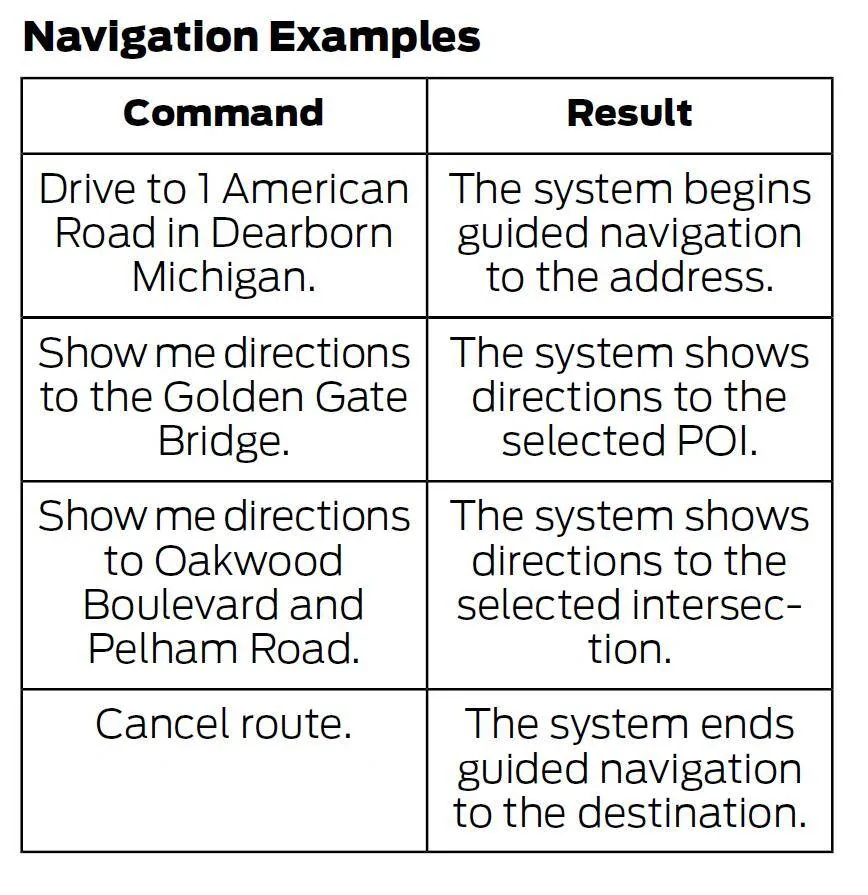
The native nav responds to voice commands. You
So we took the car for the first summer trip.
At the start it showed 180 miles range which was enough to go our destination and come back home (with 30 miles to spare)

So spent the day at lake Winnipesaukee and started driving back home.
Whatever you call it brain freeze, distraction but I took the wrong exit to get on the highway.
Went north instead of south.
So first exit and GPS (Google map via CarPlay) is telling me to turn around.
Since I believe I am going in the right direction , the GPS must be wrong.
I also ignored the 'N' on the instrument cluster!

Finally wife noticed 'Welcome to White Mountains'.
WHAT?
Turn around next exit, by now 25 miles was wasted (from original entry to highway).
So driving back and display shows 1 mile to spare for home address.
Here's my question...
How do you find a DC Fast charger WITHOUT stopping?
I find PlugShare interface hard (you have to plan a trip, I just want it to find one around me).
I did have wife enter home address in plugshare and it did not find any EA chargers (I know for a fact there is one in Manchester, NH which would have been a 5 minute detoure)
I tried FordPass but it says you can't use that feature while driving.


I had my son search for EA charger in google map and found one.
As we got closer to exit I checked home address and now it was showing 7 miles to spare.
Drove directly home and reached with 5% and 10 miles to spare.

But really if I was all by myself can I find a charger without stopping?
Press the button on the steering wheel thst looks like a person talking. Then say "Navigate to nearest charging station". Then select from the list.

It is helpful if you set filters prior to using this feature because it shows all charging by default.
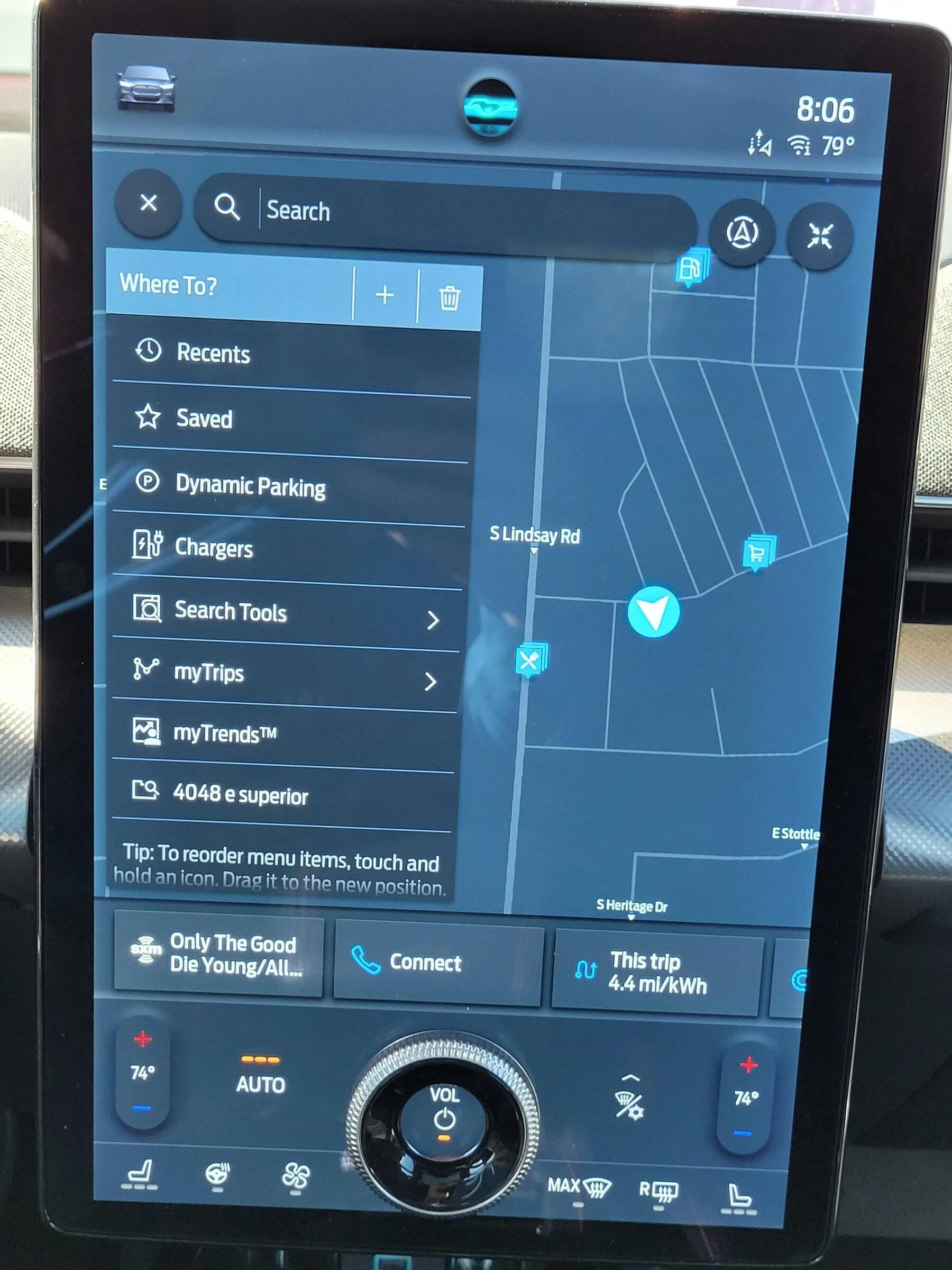
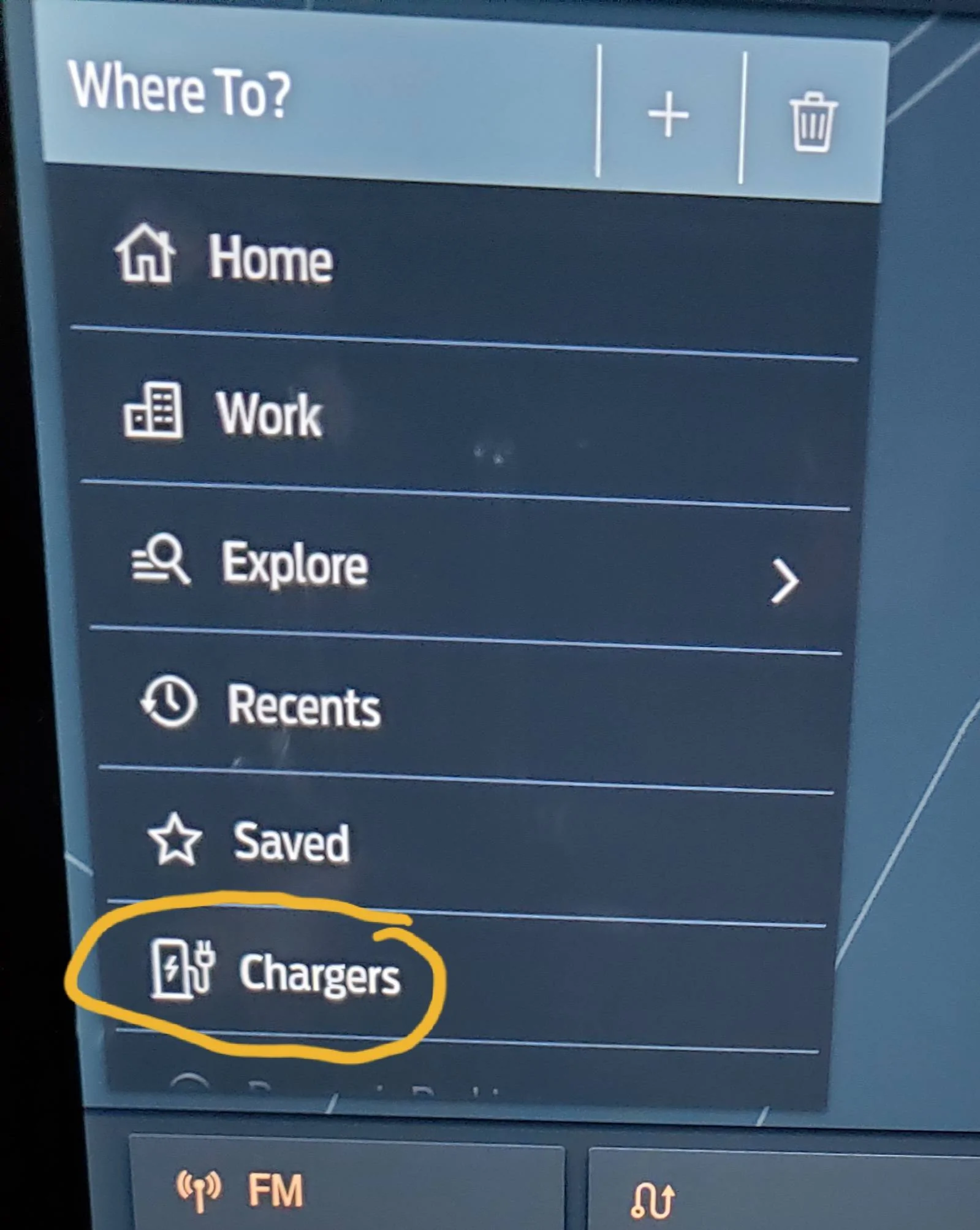
Touch "Where To?" In the nav.
Scroll down to find "Chargers"
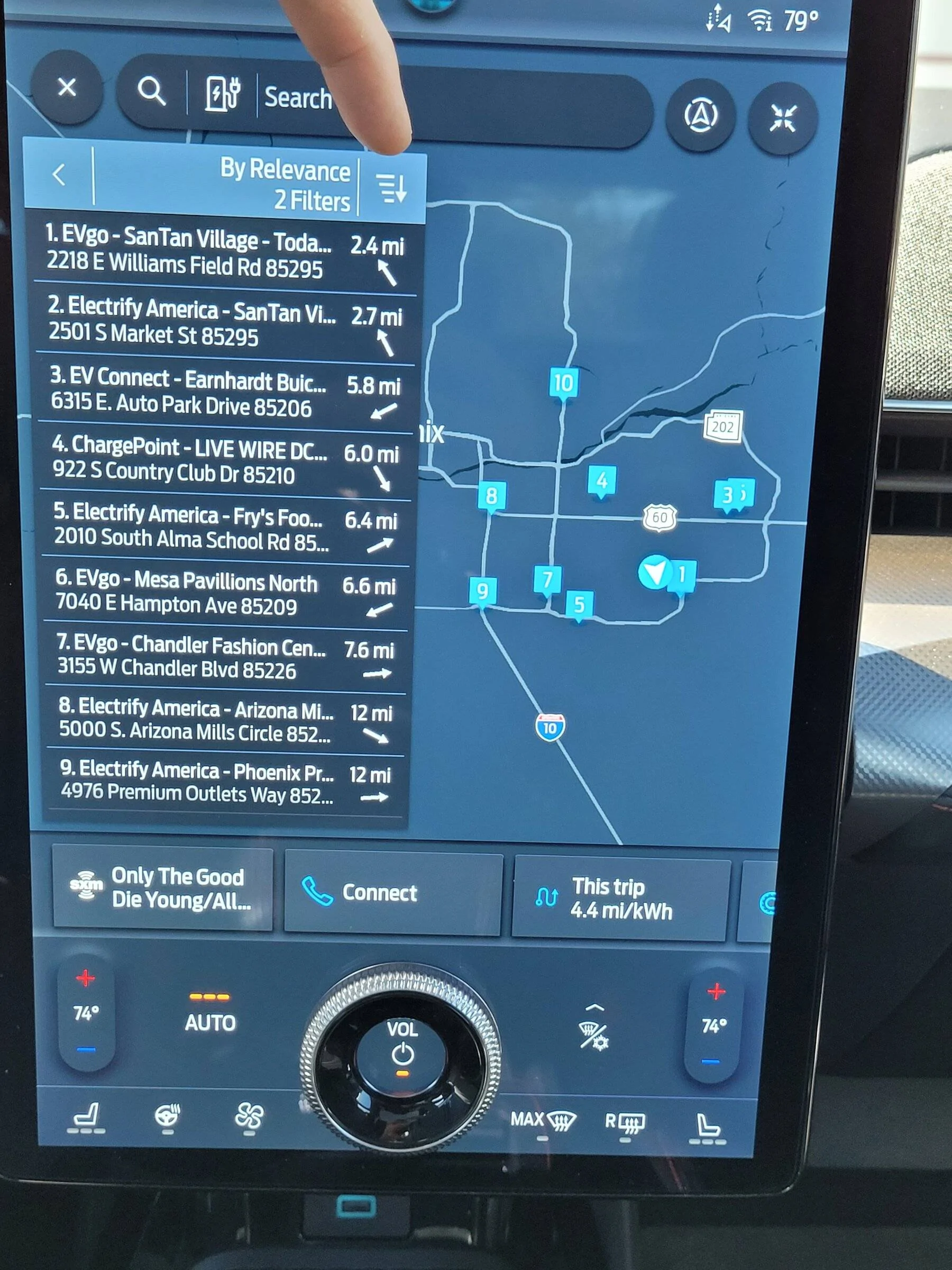
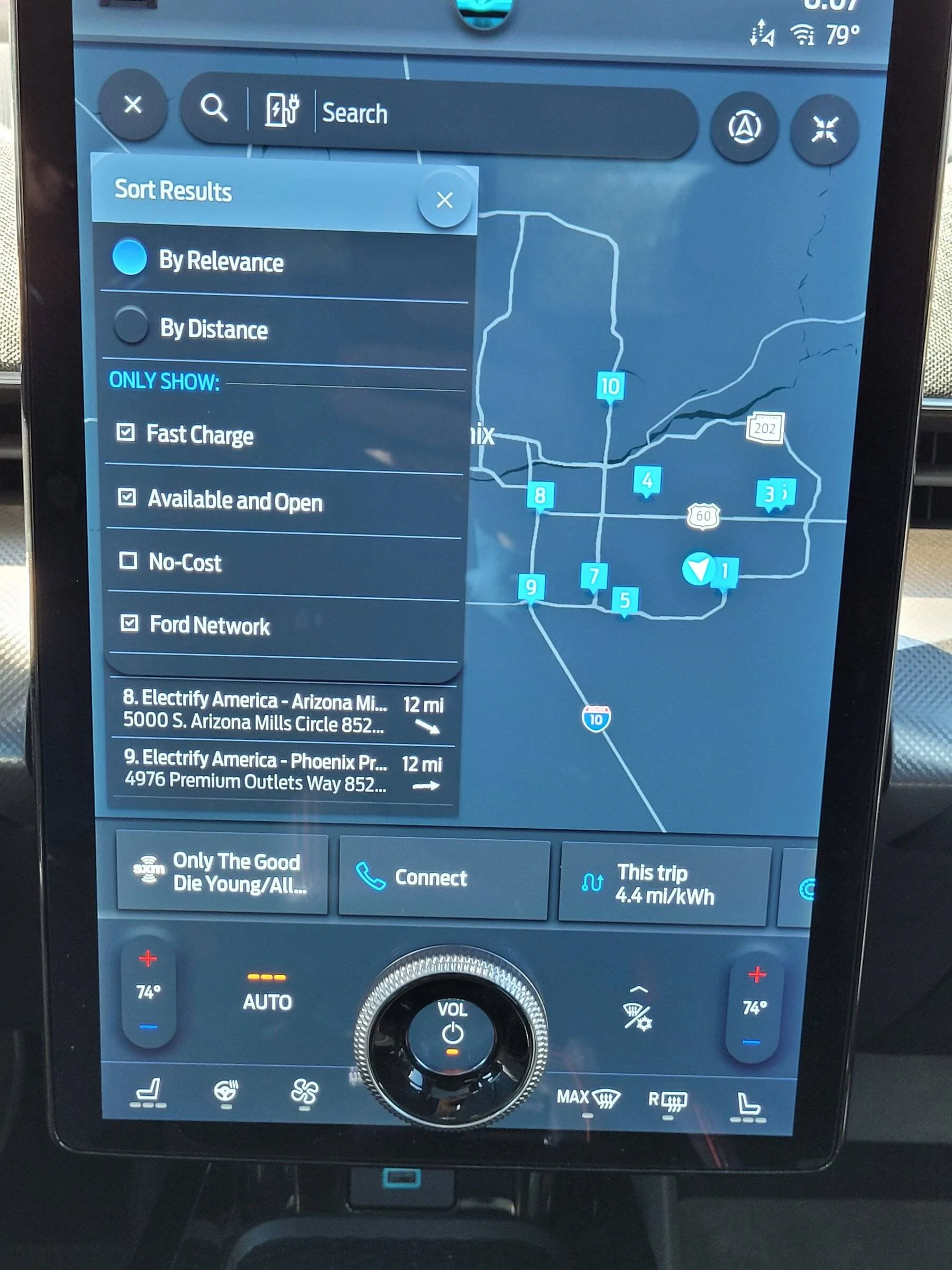
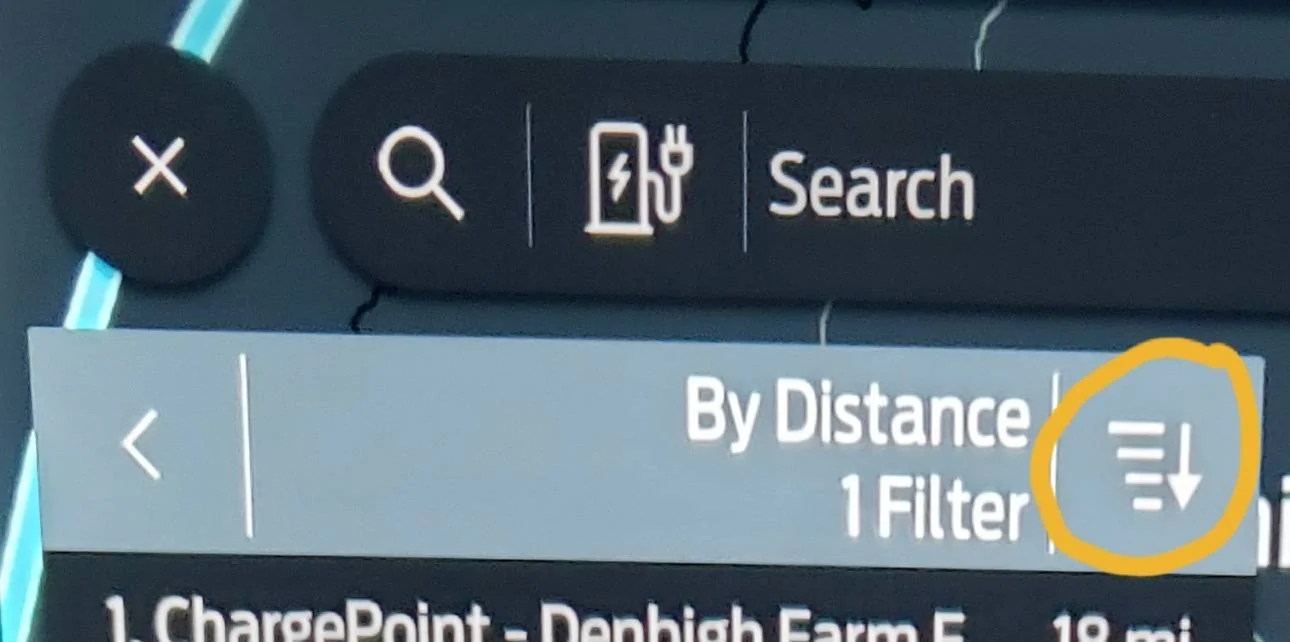
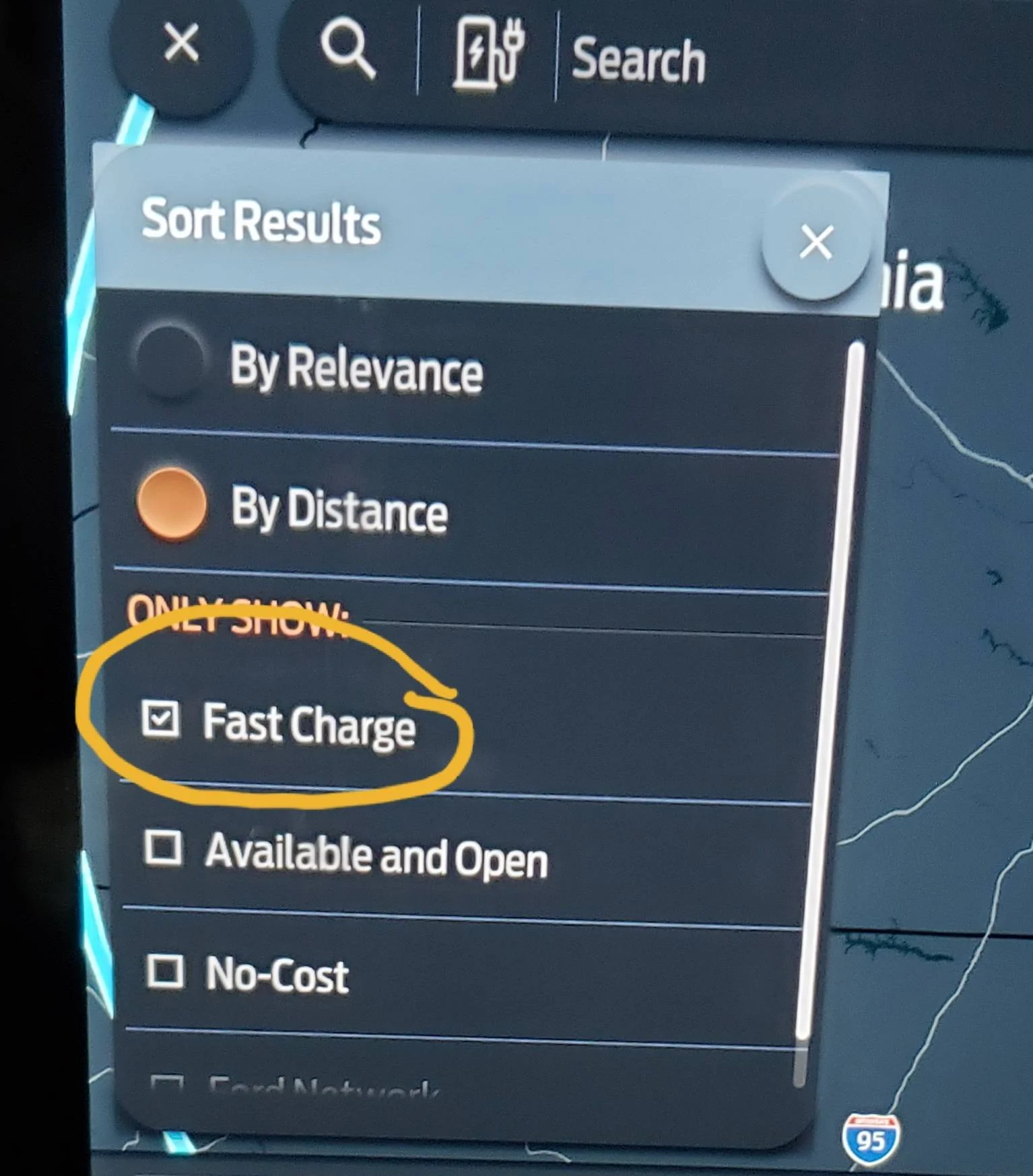
Touch the filter icon and then select Fast Chargers. This will filter out other options like L2 or outlets.

Ford Mustang Mach-E How to find charger while driving! 20220515_080705


Ford Mustang Mach-E How to find charger while driving! 20220515_080723


Ford Mustang Mach-E How to find charger while driving! 20220515_080736
 
OP
OP
rzanzerkia

rzanzerkia

Well-Known Member
First Name
Robert
Joined
Dec 4, 2021
Threads
22
Messages
174
Reaction score
165
Location
New Hampshire
Vehicles
2013 Acura TL, 2016 MB GLE350, 2021 Mach-e Premium
Country flag
I think Tampamike and others pointed out excellent steps.

If there's clearly a safe place to pull off to the side of the highway/turnpike that's definitely the best move, BUT it may be quite rare when that shows up at a time you really need it.

ALSO remember any time you need a boost of range, maybe an extra ten miles, just drive slower. It has a very positive impact on range. If you drop to 65mph on the highway, like just sit behind a slower big rig in the right lane going that speed, you'll slowly pick up better range as you go.

I predict that you were perhaps specifically curious about the best way to find fast DCFC chargers while driving on the highway or turnpike without needing to stop, or performing too many steps on a smartphone, particularly with nobody else in the car to help you.

When that is the goal, like Tampamike said, I think the Voice Commands is likely the very best way. If you click the SPEAK button on the right side of the steering wheel you'll hear the Ford Assistant voice ask to help, and then you can say "Drive to Home" or "Drive to Nashua" and that built-in Navigation should pop up and take over the Center Screen and start planning stuff. If it notices your battery may need recharging before the destination it will include Chargers on the way. Ford works with Electrify America so EA chargers should definitely be displayed. Test this out next time you are driving around town and just pick a place far away, like Washington DC.

The newer versions of CarPlay (via updates for Mach-E) will also have the new Apple Maps with charger info included too. In the future when your car eventually gets this update to CarPlay (and perhaps no longer has the subscription for Ford Nav) then you could similarly press and HOLD the SPEAK button, and then SIRI will ask what you need and you can say "Drive to Home" etc. Google Maps will get this too soon I'm sure.

If you use A Better Route Planner on your phone/computer, it too has a CarPlay app that is a little slow/jerky sometimes, but might be helpful in a pinch if you have a paid account and it already knows all your info from times you've used it in preparation for a roadtrip.

SLOW CHARGING: Having an adapter for a Tesla Destination charger (a slow level 2 charger, found at hotels/shopping) is a great idea by the way. TeslaTap MINI 60amp is what I'd recommend. It's a very sturdy small adapter that fits in a cup holder and thus is easy to keep in the car somewhere. Tesla's destination chargers are pretty plentiful and often charge a bit faster than your average level 2 non-Tesla J1772 public charger. When they are added as an option to your PlugShare map of chargers available often the map gets much improved. Adapters to Tesla FAST SuperChargers in the USA do NOT yet exist and in the future will likely come only from Tesla. Elon recently said he will in the future open SuperChargers up for non-Teslas, so eventually that might happen.
Thank you, very informative.
That's what I was looking for.
I played with the Ford Nav and I can see it using it when not doing carplay.
 

SnBGC

Well-Known Member
First Name
Greg
Joined
Apr 20, 2020
Threads
46
Messages
5,962
Reaction score
9,778
Location
Phoenix
Vehicles
2021 Mach-E FE, 2021 Wrangler 4xe High Altitude
Occupation
Manager
Country flag
Thank you, very informative.
That's what I was looking for.
I played with the Ford Nav and I can see it using it when not doing carplay.
IMO, the Ford nav is excellent. It even functions while CarPlay is connected so you aren't stuck using the CarPlay nav if you don't feel like it.
 

Mach-Lee

Well-Known Member
First Name
Lee
Joined
Jul 16, 2021
Threads
262
Messages
11,349
Reaction score
24,973
Location
Wisconsin
Vehicles
2022 Mach-E Premium AWD
Occupation
Sci/Eng
Country flag
Voice button on steering wheel > Say "Find a charger"

Better way is to open Nav:

Tap [Where to?] > Chargers

Or use the tools button in the lower left of the map > Up ahead > Chargers

@SnBGC you may want to update your SYNC so you have kW filters for the chargers (3 levels).


mkhuffman

Well-Known Member
First Name
Mike
Joined
Nov 19, 2020
Threads
29
Messages
6,875
Reaction score
9,507
Location
Virginia
Vehicles
2025 Rivian R1T Tri-Max, Jeep GC-L, VW Jetta
Country flag
I had a similar situation. I missed the exit for my charging stop and didn't want to turn around. So I cancelled the route and then started a new route. I have it set up to ask me if I want to automatically add chargers and I selected "yes". It picked a new DCFC that was on my way and didn't require me to turn around.

I did all that while sailing down the highway at 75 mph, using the Ford navigation system. I agree with others that it works really well, and it could have to picked a charger for you. But if the Nav says you will arrive with a charge above zero, I would trust it. It has been very accurate for me.
 

SnBGC

Well-Known Member
First Name
Greg
Joined
Apr 20, 2020
Threads
46
Messages
5,962
Reaction score
9,778
Location
Phoenix
Vehicles
2021 Mach-E FE, 2021 Wrangler 4xe High Altitude
Occupation
Manager
Country flag
Voice button on steering wheel > Say "Find a charger"

Better way is to open Nav:

Tap [Where to?] > Chargers

Or use the tools button in the lower left of the map > Up ahead > Chargers

@SnBGC you may want to update your SYNC so you have kW filters for the chargers (3 levels).
How do I update Sync?
 

shutterbug

Well-Known Member
First Name
Joseph
Joined
Nov 5, 2020
Threads
13
Messages
1,323
Reaction score
1,810
Location
AZ
Vehicles
MME GB FE—Dead. F150L Lariat SR. 2024 MME Rally
Country flag
I need to play more with built in Nav...
If I could do voice command it would be great.
Sorry, confused. Why can't you you use voice commands with built-in navigation?
 

RickMachE

Well-Known Member
Joined
Jul 1, 2021
Threads
267
Messages
17,918
Reaction score
27,899
Location
SE MI
Vehicles
2022 Mach-E Premium 4X, 2022 Lightning Lariat ER
Country flag

shutterbug

Well-Known Member
First Name
Joseph
Joined
Nov 5, 2020
Threads
13
Messages
1,323
Reaction score
1,810
Location
AZ
Vehicles
MME GB FE—Dead. F150L Lariat SR. 2024 MME Rally
Country flag
Because you didn't read the manual.
So your manual says you can't use voice commands with built-in navigation? I must have a different manual.
Ford Mustang Mach-E How to find charger while driving! 1652676472804
 

RickMachE

Well-Known Member
Joined
Jul 1, 2021
Threads
267
Messages
17,918
Reaction score
27,899
Location
SE MI
Vehicles
2022 Mach-E Premium 4X, 2022 Lightning Lariat ER
Country flag
So your manual says you can't use voice commands with built-in navigation? I must have a different manual.
Manual does. Apparently my sarcasm didn't work.

OP was told that it uses voice in #10, but then wished it did. Reqding the manual, as well as thread responses, is helpful to using any vehicle, especially one that is run by software.

Some people buy a $60,000+ car, and don't read the manual. Yet if they bought a bread maker, or even a coffee maker, they wowould. I have never understood that.
 
OP
OP
rzanzerkia

rzanzerkia

Well-Known Member
First Name
Robert
Joined
Dec 4, 2021
Threads
22
Messages
174
Reaction score
165
Location
New Hampshire
Vehicles
2013 Acura TL, 2016 MB GLE350, 2021 Mach-e Premium
Country flag
Sorry, confused. Why can't you you use voice commands with built-in navigation?
I was just stating that if built in navigation worked with voice command it would be great to pull up chargers while driving.
Looks like it does...

Wife drives this car so I don't spend much time in it...
 

em5quare

Well-Known Member
Joined
Oct 28, 2021
Threads
11
Messages
73
Reaction score
39
Location
NY
Vehicles
Mach E RWD Premium ER
Country flag
Voice button on steering wheel > Say "Find a charger"

Better way is to open Nav:

Tap [Where to?] > Chargers

Or use the tools button in the lower left of the map > Up ahead > Chargers

@SnBGC you may want to update your SYNC so you have kW filters for the chargers (3 levels).
Where are the kW filters? My Sync is allegedly up to date, I have a 2021 December build.
 

jhalkias

Well-Known Member
First Name
John
Joined
Mar 3, 2020
Threads
123
Messages
2,491
Reaction score
5,039
Location
Ohio
Vehicles
'21 RR ME FE, '22 Corsair GT, '22 Lightning Lariat
Occupation
Benefit Fund Administrator
Country flag
First, you need to reexamine why you are using GoogleMaps instead of the Ford navigation. Before you make your list of reasons, note that all of them fail because chargers aren't included.

Ford's navigation will add in a charger to get you home. So when you went in the wrong direction, nav would have told you and then eventually offered to add in chargers.

You should also consider reading, or rereading the manual. And reading the numerous travel threads here - https://www.macheforum.com/site/forums/trip-reports-journals-logs.68/

I have never planned a route in Plugshare. I use it to check charger location reviews. Use ABRP (A Better Route Planner).

I recommend you stop using tools not equipped for EVs. Run Ford's nav, run ABRP on a phone, and double check route with GoogleMaps.
THIS. Could not have said it any better.
 

mkhuffman

Well-Known Member
First Name
Mike
Joined
Nov 19, 2020
Threads
29
Messages
6,875
Reaction score
9,507
Location
Virginia
Vehicles
2025 Rivian R1T Tri-Max, Jeep GC-L, VW Jetta
Country flag
Where are the kW filters? My Sync is allegedly up to date, I have a 2021 December build.
It is not intuitive at all. It is under Search:

Ford Mustang Mach-E How to find charger while driving! 20220516_150840


Ford Mustang Mach-E How to find charger while driving! 20220516_150950


Ford Mustang Mach-E How to find charger while driving! 20220516_150915
Sponsored


Top