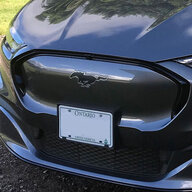
Initial experiences from a new Mach-E owner

ChasingCoral

Well-Known Member
First Name
Mark
Joined
Feb 3, 2020
Threads
502
Messages
14,306
Reaction score
28,655
Location
Maryland
Vehicles
2021 GB E4X FE, 2022 F-150 Lightning Lariat ER
Occupation
Retired oceanographer
Country flag
Hello friends, I started out this evening very excited as I went to go pick up my brand new Mach-E. Unfortunately my high spirits were not to last.

Don't get me wrong. I still have high hopes that I will love the car, but I'm sad to report that my experiences this evening did not go well. Where to start?

Problem #1 - Navigation

I should start out by saying that I took my car for a test drive when it arrived at my dealership last week. During the test drive I noticed that the navigation was not working. It did not show anything on the map at all. When I finished my test drive, I reported this to my dealer. He stated that it was probably because they had not activated the modem yet.

When I picked up the car, I quickly discovered that the navigation is still not working. I have to say that I'm quite disappointed that the dealer did not ensure that the navigation was working before delivering the car to me after I reported that it was not working last week.

After browsing through the navigation menus, I observed the following oddities:

- The list of installed maps is empty
- The Satellite Status screen says "GPS is Off" (even though it lists a latitude and longitude for my location??)
- The System Information screen has nothing listed under Navigation Version

It appears as though none of the navigation software/data got installed at the factory.

Problem #2 - Wi-Fi

As soon as I got home, I tried connecting to my home Wi-Fi network. I was unable to connect. I spent a significant amount of time trying to get this to work. Nothing I did made any difference. I have two Wi-Fi Access Points in my house. I tried connecting to both of them. No luck with either one.

When I type in the wrong password, it tells me that the password is wrong. When I type in the correct password, it just says that it was "Unable to connect". This tells me two things. 1 - It is definitely communicating with the access point. 2 - I'm not typing in the wrong password.

I was able to connect the Mach-E to the Wi-Fi access point on my phone when I set the phone up as a Wi-Fi hotspot, so I know that the car is able to connect to a Wi-Fi network. Just not the network in my house. We have countless Wi-Fi devices in the house, and they are all connected just fine, so I know my home Wi-Fi is working properly. I have no idea why the car won't connect to it, but for some reason it just won't.

Problem #3 - Android Auto

When I connected my Google Pixel 3 to the car, the phone immediately recognized that the car had Android Auto, and told me to finish setting it up on the car. When I open Android Auto on the car, the car says to go to the phone list, select a phone, then select Connect Android Auto. I did that, but there was no "Connect Android Auto" to be found. Lots of options for setting up my phone, but nothing related to Android Auto at all.

The Android Auto app in the car also suggested connecting the phone to the car with a USB cable. My wife has a Nissan Murano with Android Auto that only works through a USB cable. I've used it on my wife's car many times. In her car it works perfectly. I tried plugging my phone into the Mach-E with a USB cable. As soon as I plugged in the cable, my phone immediately crashed and restarted the operating system. I tried it numerous times with different cables (to test both ports in the car). Same thing every time. As soon as I plug in the phone, the phone crashes.

I realize that in this case it is the phone that is crashing, but like I said, I've used it in my wife's car with no issues. Clearly the Mach-E is doing something that the phone REALLY doesn't like.

Problem #4 - Charging

I wanted to charge the car up to 90% overnight. There does not seem to be a way to set a global charging limit. You can only set limits for specific charge locations. This is not really an issue, but when I tried to edit the current location to make it my home location, and to set the charge times, the screen to edit the location showed a wait indicator (the three animated dots), and just sat there. I kept trying to hit Next, but nothing happened. I tried waiting a while, but the wait indicator never went away. I have no idea what it was trying to do, but it would not let me set the limit for my charging session because I could not edit my location.

Luckily after checking the user guide, I discovered that you can edit the location though the Ford Pass App, so I did that instead. That at least worked, and it was able to successfully upload the settings to the car, so the car will now stop charging at 90%.

On a slightly unrelated note, while I was standing beside the car, plugging in the charger, I noticed that the car was making some strange noises. As though it was trying to do something. I didn't have my key with me, and I wasn't touching the car at all. I had not plugged in the charger yet. After all the bad experiences that I had this evening, these noises did not give me a warm fuzzy feeling. I sure hope those noises are normal.

Looks like I've got some support calls to make tomorrow. Hopefully tomorrow will be a better day.
Your dealer really blew it here. You had expressed concern about the Nav problem last week and they failed to make sure it was working before you picked it up. That's all on them.
Sponsored


highland58

Well-Known Member
First Name
Dave
Joined
Jan 6, 2020
Threads
22
Messages
1,490
Reaction score
1,800
Location
Seattle area - south King county
Vehicles
2025 Mach-E Rally, 2023 Bolt EUV, 2018 F150 XLT
Occupation
IT Solutions Architect
Country flag
Thanks for the reply. I actually heard the noises before plugging in the charger. I tried to be clear about that during my description, but I guess I should not have mentioned charging at all because a few people misunderstood and thought that I was describing noises that occur while charging.

Once I did plug in the charger, there were much louder noises that started, vents opening and closing, and a loud hum from under the car, but a quick search online confirmed that the hum is totally normal.
Could the noises from before the charger connect be due to the car "seeing" your key fob and responding by unlocking the door, etc? Did it happen as soon as you walked close to the car?
 

ChasingCoral

Well-Known Member
First Name
Mark
Joined
Feb 3, 2020
Threads
502
Messages
14,306
Reaction score
28,655
Location
Maryland
Vehicles
2021 GB E4X FE, 2022 F-150 Lightning Lariat ER
Occupation
Retired oceanographer
Country flag
Could the noises from before the charger connect be due to the car "seeing" your key fob and responding by unlocking the door, etc? Did it happen as soon as you walked close to the car?
My first guess is this was part of the battery management system doing its job to keep the battery conditioned.
 

noflipping

Well-Known Member
First Name
MJ
Joined
Jun 26, 2020
Threads
9
Messages
184
Reaction score
271
Location
Burbs of Detroit
Vehicles
Mach e Premium 4X, Focus Electric
Country flag
Sorry to hear of the issues! They will get resolved. But what a hassle! Also, hoping this isn't a stupid question, but why would you want/need to connect the car to your home's WiFi network? It has its own network connection already through the modem, right? I thought the wifi connections were for you/your passengers when traveling?
 

SnBGC

Well-Known Member
First Name
Greg
Joined
Apr 20, 2020
Threads
46
Messages
5,962
Reaction score
9,778
Location
Phoenix
Vehicles
2021 Mach-E FE, 2021 Wrangler 4xe High Altitude
Occupation
Manager
Country flag
Sorry to hear of the issues! They will get resolved. But what a hassle! Also, hoping this isn't a stupid question, but why would you want/need to connect the car to your home's WiFi network? It has its own network connection already through the modem, right? I thought the wifi connections were for you/your passengers when traveling?
Connecting to you home wifi will be a much better method of communicating with the vehicle. Faster access from your mobile or web app and it can download updates from your wifi instead of using the cellular modem onboard.


back_at_it_19

Well-Known Member
Joined
Jul 9, 2020
Threads
11
Messages
673
Reaction score
628
Location
Seattle area
Vehicles
'21 Job 1 GB FE and '22 Red Prem4x
Country flag
Hello friends, I started out this evening very excited as I went to go pick up my brand new Mach-E. Unfortunately my high spirits were not to last.

Don't get me wrong. I still have high hopes that I will love the car, but I'm sad to report that my experiences this evening did not go well. Where to start?

Problem #1 - Navigation

I should start out by saying that I took my car for a test drive when it arrived at my dealership last week. During the test drive I noticed that the navigation was not working. It did not show anything on the map at all. When I finished my test drive, I reported this to my dealer. He stated that it was probably because they had not activated the modem yet.

When I picked up the car, I quickly discovered that the navigation is still not working. I have to say that I'm quite disappointed that the dealer did not ensure that the navigation was working before delivering the car to me after I reported that it was not working last week.

After browsing through the navigation menus, I observed the following oddities:

- The list of installed maps is empty
- The Satellite Status screen says "GPS is Off" (even though it lists a latitude and longitude for my location??)
- The System Information screen has nothing listed under Navigation Version

It appears as though none of the navigation software/data got installed at the factory.

Problem #2 - Wi-Fi

As soon as I got home, I tried connecting to my home Wi-Fi network. I was unable to connect. I spent a significant amount of time trying to get this to work. Nothing I did made any difference. I have two Wi-Fi Access Points in my house. I tried connecting to both of them. No luck with either one.

When I type in the wrong password, it tells me that the password is wrong. When I type in the correct password, it just says that it was "Unable to connect". This tells me two things. 1 - It is definitely communicating with the access point. 2 - I'm not typing in the wrong password.

I was able to connect the Mach-E to the Wi-Fi access point on my phone when I set the phone up as a Wi-Fi hotspot, so I know that the car is able to connect to a Wi-Fi network. Just not the network in my house. We have countless Wi-Fi devices in the house, and they are all connected just fine, so I know my home Wi-Fi is working properly. I have no idea why the car won't connect to it, but for some reason it just won't.

Problem #3 - Android Auto

When I connected my Google Pixel 3 to the car, the phone immediately recognized that the car had Android Auto, and told me to finish setting it up on the car. When I open Android Auto on the car, the car says to go to the phone list, select a phone, then select Connect Android Auto. I did that, but there was no "Connect Android Auto" to be found. Lots of options for setting up my phone, but nothing related to Android Auto at all.

The Android Auto app in the car also suggested connecting the phone to the car with a USB cable. My wife has a Nissan Murano with Android Auto that only works through a USB cable. I've used it on my wife's car many times. In her car it works perfectly. I tried plugging my phone into the Mach-E with a USB cable. As soon as I plugged in the cable, my phone immediately crashed and restarted the operating system. I tried it numerous times with different cables (to test both ports in the car). Same thing every time. As soon as I plug in the phone, the phone crashes.

I realize that in this case it is the phone that is crashing, but like I said, I've used it in my wife's car with no issues. Clearly the Mach-E is doing something that the phone REALLY doesn't like.

Problem #4 - Charging

I wanted to charge the car up to 90% overnight. There does not seem to be a way to set a global charging limit. You can only set limits for specific charge locations. This is not really an issue, but when I tried to edit the current location to make it my home location, and to set the charge times, the screen to edit the location showed a wait indicator (the three animated dots), and just sat there. I kept trying to hit Next, but nothing happened. I tried waiting a while, but the wait indicator never went away. I have no idea what it was trying to do, but it would not let me set the limit for my charging session because I could not edit my location.

Luckily after checking the user guide, I discovered that you can edit the location though the Ford Pass App, so I did that instead. That at least worked, and it was able to successfully upload the settings to the car, so the car will now stop charging at 90%.

On a slightly unrelated note, while I was standing beside the car, plugging in the charger, I noticed that the car was making some strange noises. As though it was trying to do something. I didn't have my key with me, and I wasn't touching the car at all. I had not plugged in the charger yet. After all the bad experiences that I had this evening, these noises did not give me a warm fuzzy feeling. I sure hope those noises are normal.

Looks like I've got some support calls to make tomorrow. Hopefully tomorrow will be a better day.
Anxiously awaiting updates on dealer fix. Hearing this, I would very likely refuse delivery or return the car if the nav/WiFi/modems are not working. Memories of my modem/Sync issues with an old Escape...
 

SnBGC

Well-Known Member
First Name
Greg
Joined
Apr 20, 2020
Threads
46
Messages
5,962
Reaction score
9,778
Location
Phoenix
Vehicles
2021 Mach-E FE, 2021 Wrangler 4xe High Altitude
Occupation
Manager
Country flag
Wow Mark. That is awesome. Thank you so much.
I just noticed that you are in Canada. Make sure you mention that if/when they contact you with help.

Was your speedometer set to km/hr or mi/hr when you took delivery? Which is appropriate for your region?
 

DBC

Well-Known Member
First Name
Don
Joined
Oct 1, 2020
Threads
8
Messages
1,224
Reaction score
1,430
Location
San Diego
Vehicles
Volt ELR
Country flag
If I had to take a wild guess.......and this is just a guess......
The tech that was performing the pre-delivery checklist got curious and browsed the back end menus and accidentally turned off the GPS and some other modules. It sounds like a simple matter of a master reset to me but again......I am just guessing. :)
That's a really good guess. Might have come up not because they wandered off the reservation but because they missed a stop in a QC check -- maybe part of the Stop Ship. People aren't "programmed" to be 100% accurate.

In any event, given these are all communication issues it does seem possible they are all related. Approaching them as separate issues may just confuse things.
 
  • Like
Reactions: UW2

ChasingCoral

Well-Known Member
First Name
Mark
Joined
Feb 3, 2020
Threads
502
Messages
14,306
Reaction score
28,655
Location
Maryland
Vehicles
2021 GB E4X FE, 2022 F-150 Lightning Lariat ER
Occupation
Retired oceanographer
Country flag
Anxiously awaiting updates on dealer fix. Hearing this, I would very likely refuse delivery or return the car if the nav/WiFi/modems are not working. Memories of my modem/Sync issues with an old Escape...
Yes, I think upon finding the Nav not working I'd give the dealer the stink eye and remind them you mentioned it a week prior.
 

SnBGC

Well-Known Member
First Name
Greg
Joined
Apr 20, 2020
Threads
46
Messages
5,962
Reaction score
9,778
Location
Phoenix
Vehicles
2021 Mach-E FE, 2021 Wrangler 4xe High Altitude
Occupation
Manager
Country flag
Hello friends, I started out this evening very excited as I went to go pick up my brand new Mach-E. Unfortunately my high spirits were not to last.

Don't get me wrong. I still have high hopes that I will love the car, but I'm sad to report that my experiences this evening did not go well. Where to start?

Problem #1 - Navigation

I should start out by saying that I took my car for a test drive when it arrived at my dealership last week. During the test drive I noticed that the navigation was not working. It did not show anything on the map at all. When I finished my test drive, I reported this to my dealer. He stated that it was probably because they had not activated the modem yet.

When I picked up the car, I quickly discovered that the navigation is still not working. I have to say that I'm quite disappointed that the dealer did not ensure that the navigation was working before delivering the car to me after I reported that it was not working last week.

After browsing through the navigation menus, I observed the following oddities:

- The list of installed maps is empty
- The Satellite Status screen says "GPS is Off" (even though it lists a latitude and longitude for my location??)
- The System Information screen has nothing listed under Navigation Version

It appears as though none of the navigation software/data got installed at the factory.

Problem #2 - Wi-Fi

As soon as I got home, I tried connecting to my home Wi-Fi network. I was unable to connect. I spent a significant amount of time trying to get this to work. Nothing I did made any difference. I have two Wi-Fi Access Points in my house. I tried connecting to both of them. No luck with either one.

When I type in the wrong password, it tells me that the password is wrong. When I type in the correct password, it just says that it was "Unable to connect". This tells me two things. 1 - It is definitely communicating with the access point. 2 - I'm not typing in the wrong password.

I was able to connect the Mach-E to the Wi-Fi access point on my phone when I set the phone up as a Wi-Fi hotspot, so I know that the car is able to connect to a Wi-Fi network. Just not the network in my house. We have countless Wi-Fi devices in the house, and they are all connected just fine, so I know my home Wi-Fi is working properly. I have no idea why the car won't connect to it, but for some reason it just won't.

Problem #3 - Android Auto

When I connected my Google Pixel 3 to the car, the phone immediately recognized that the car had Android Auto, and told me to finish setting it up on the car. When I open Android Auto on the car, the car says to go to the phone list, select a phone, then select Connect Android Auto. I did that, but there was no "Connect Android Auto" to be found. Lots of options for setting up my phone, but nothing related to Android Auto at all.

The Android Auto app in the car also suggested connecting the phone to the car with a USB cable. My wife has a Nissan Murano with Android Auto that only works through a USB cable. I've used it on my wife's car many times. In her car it works perfectly. I tried plugging my phone into the Mach-E with a USB cable. As soon as I plugged in the cable, my phone immediately crashed and restarted the operating system. I tried it numerous times with different cables (to test both ports in the car). Same thing every time. As soon as I plug in the phone, the phone crashes.

I realize that in this case it is the phone that is crashing, but like I said, I've used it in my wife's car with no issues. Clearly the Mach-E is doing something that the phone REALLY doesn't like.

Problem #4 - Charging

I wanted to charge the car up to 90% overnight. There does not seem to be a way to set a global charging limit. You can only set limits for specific charge locations. This is not really an issue, but when I tried to edit the current location to make it my home location, and to set the charge times, the screen to edit the location showed a wait indicator (the three animated dots), and just sat there. I kept trying to hit Next, but nothing happened. I tried waiting a while, but the wait indicator never went away. I have no idea what it was trying to do, but it would not let me set the limit for my charging session because I could not edit my location.

Luckily after checking the user guide, I discovered that you can edit the location though the Ford Pass App, so I did that instead. That at least worked, and it was able to successfully upload the settings to the car, so the car will now stop charging at 90%.

On a slightly unrelated note, while I was standing beside the car, plugging in the charger, I noticed that the car was making some strange noises. As though it was trying to do something. I didn't have my key with me, and I wasn't touching the car at all. I had not plugged in the charger yet. After all the bad experiences that I had this evening, these noises did not give me a warm fuzzy feeling. I sure hope those noises are normal.

Looks like I've got some support calls to make tomorrow. Hopefully tomorrow will be a better day.
Apologies to bombard you with a bunch of suggestions.....just trying to help in case your dealer is isn't sure where to start.

If it were me.....I would take the car back to the dealer asap and make them connect their diagnostic scan tool and scan for codes. Also make them run the module active check to verify all modules are reporting correctly.

Then specifically as if they have performed the SSM 49491 during the pre-delivery checklist
Effective Jan 26 2021
2021 Mustang Mach-E - Reset The Driver History Settings Prior To Delivering A New Vehicle To The Customer


I suspect that since your vehicle arrived last week.....they didn't see this message (since it just came out on Tuesday).

Reset the car and I think everything else will start to function normally. Worth a try at least. ?
 

SnBGC

Well-Known Member
First Name
Greg
Joined
Apr 20, 2020
Threads
46
Messages
5,962
Reaction score
9,778
Location
Phoenix
Vehicles
2021 Mach-E FE, 2021 Wrangler 4xe High Altitude
Occupation
Manager
Country flag
Okay.....
I found the procedure. Looks like it's something you can do yourself and certainly not the total system reset that I am thinking you need. :(
SSM 49491 is just a Driver History Reset. The notice says this is to make sure the estimated range and charge levels readings are accurate. So, this may not help you with your issue.

For those that are curious.....here is the procedure.

Go to Home Screen, tap the vehicle icon on the top left corner, tap Settings>Vehicle>EV Driving History Reset
 

krafty81

Well-Known Member
First Name
Terry
Joined
Jun 23, 2020
Threads
59
Messages
1,053
Reaction score
835
Location
San Diego
Vehicles
2021 MME AWD EX Premium, 2023 Lexus RX350h
Country flag
Anxiously awaiting updates on dealer fix. Hearing this, I would very likely refuse delivery or return the car if the nav/WiFi/modems are not working. Memories of my modem/Sync issues with an old Escape...
I am twitching as I remember all the issues my 2013 Escape had/has!
 

Shayne

Well-Known Member
Joined
Aug 9, 2020
Threads
18
Messages
3,824
Reaction score
2,738
Location
Northern Ontario Canada
Vehicles
2021 MME4x Prem
Occupation
Retired
Country flag
Connecting to you home wifi will be a much better method of communicating with the vehicle. Faster access from your mobile or web app and it can download updates from your wifi instead of using the cellular modem onboard.
No data and Wi-Fi is required. Was wondering how a GPS you mentioned is involved in the wi-fi connection problem he noted having?

With software problems it always boils down to the same thing. Even if you are with them for 20 years and contacted them twice. Q: Is your SMTP down? Ans: No sir it is something you are doing wrong ;). Of course it is just my stupidity and thank you for your help. 2 hours later their SMPT is back up after 2 days; made me phone for their help.
Sponsored


Top