
ack154
Well-Known Member
- Thread starter
- #1
So I finally had a long enough trip yesterday where I had to stop and charge on the way home. It was just a day trip of about 150 miles each way. Charged to 100% overnight and left early in the morning.
When we finally left late in the afternoon there was about 40% left. I hit Home in the built-in maps in the car to see where it wanted me to charge and it chose a charger about 50-60 miles away but estimated I'd only have 8% left when I got there. Given the road being all freeway, a bit hilly, and pretty much nothing else in between, I didn't want want to take the chance and wanted to charge sooner than that (it might have been fine, but again, my first longer trip, so why risk it?).
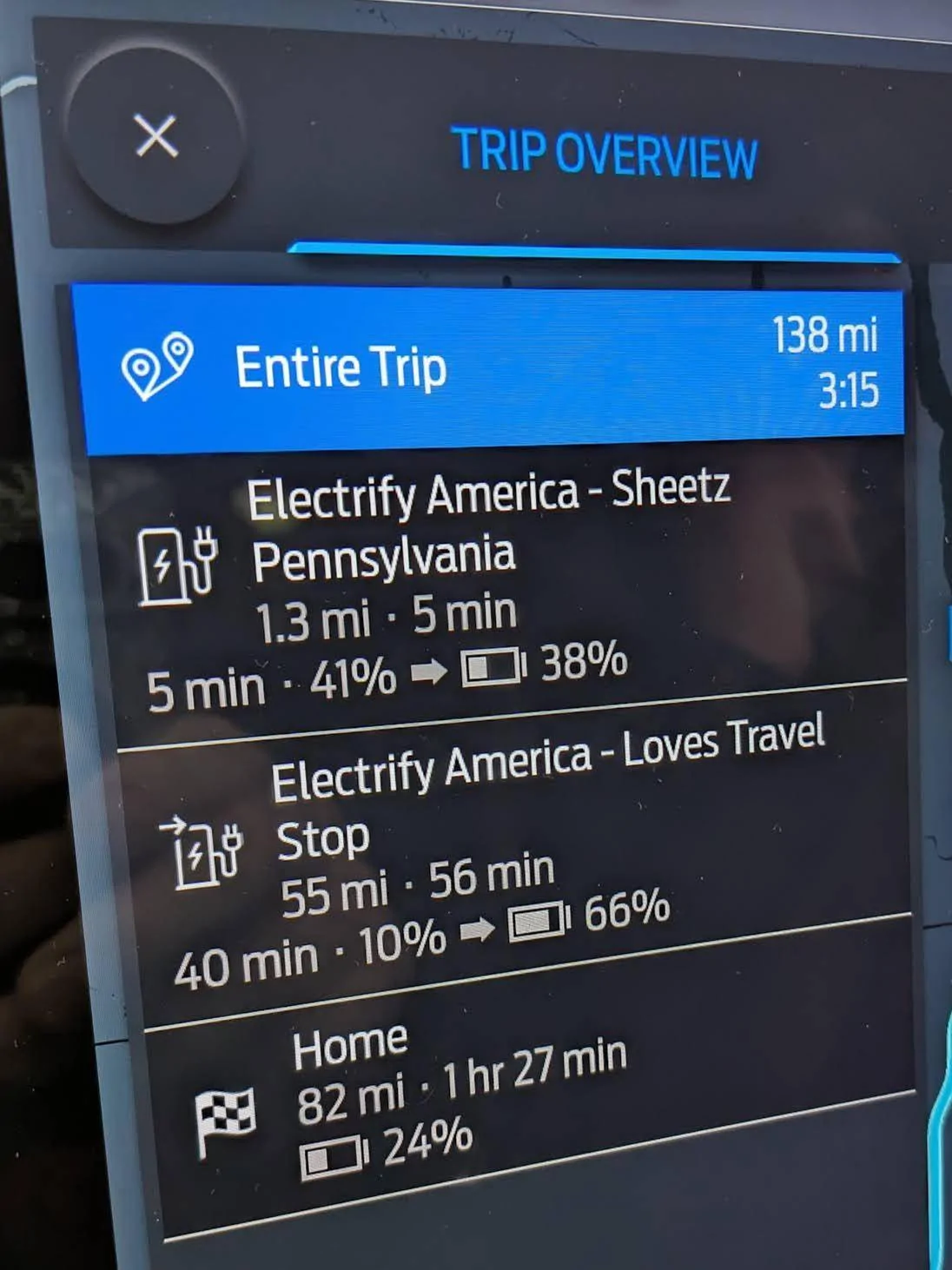
So I tapped on the charger it selected to find a different option and found one right in the city I was leaving from (I had already looked these options up last week before I left and knew which ones would be ideal). I selected that closer charger and tapped on the big green Replace button. But it didn't "replace" it. It added it to my trip along with the other charge stop.
That's not even really the strange part. The strange part was that it only wanted me to stop there to charge for 5 minutes and then continue on to the original charger it had selected for me (now estimated to arrive with 10% instead of 8%). Obviously this was stupid.... but rather than screw around with it, I just left it as-is, went to the closer charger, and charged up to just a hair over 80% while we inhaled some MTOs at Sheetz. When we actually left, the other charging stop had disappeared from the route, but still super strange.
I need to play around with the maps/charging options a bit more to get more familiar with them but I am SURE that the button said "replace" when I selected the other charger. It just didn't do that.

When we finally left late in the afternoon there was about 40% left. I hit Home in the built-in maps in the car to see where it wanted me to charge and it chose a charger about 50-60 miles away but estimated I'd only have 8% left when I got there. Given the road being all freeway, a bit hilly, and pretty much nothing else in between, I didn't want want to take the chance and wanted to charge sooner than that (it might have been fine, but again, my first longer trip, so why risk it?).
So I tapped on the charger it selected to find a different option and found one right in the city I was leaving from (I had already looked these options up last week before I left and knew which ones would be ideal). I selected that closer charger and tapped on the big green Replace button. But it didn't "replace" it. It added it to my trip along with the other charge stop.
That's not even really the strange part. The strange part was that it only wanted me to stop there to charge for 5 minutes and then continue on to the original charger it had selected for me (now estimated to arrive with 10% instead of 8%). Obviously this was stupid.... but rather than screw around with it, I just left it as-is, went to the closer charger, and charged up to just a hair over 80% while we inhaled some MTOs at Sheetz. When we actually left, the other charging stop had disappeared from the route, but still super strange.
I need to play around with the maps/charging options a bit more to get more familiar with them but I am SURE that the button said "replace" when I selected the other charger. It just didn't do that.
Sponsored