Swapping TWRAPS charging puck with Apple MagSafe puck

burritoman

Well-Known Member
First Name
Dave
Joined
Apr 3, 2024
Threads
7
Messages
107
Reaction score
102
Location
Michigan
Vehicles
2023 Mach-E Premium, Ford Edge
Country flag
The built-in wireless charging pad in the Mach-E is just plain awful, and it somehow turns my iPhone 12 Pro into a molten brick while barely charging it all. My solution to that was to upgrade it to a TWRAPS MagSafe wireless charger. It turned out to be only marginally better. The iPhone would no longer get super hot but the charging speed was still very slow. I'd go on a road trip with the phone at 68% and after an hour it's still at 68%. That's not good. Turns out that 3rd party Qi chargers are only able to use 7.5W of charging while Apple branded MagSafe can charge up to 15W. So I decided to swap the TWRAPS MagSafe puck with an Apple MagSafe puck, using the TWRAPS enclosure.

As expected there was a big difference in charging speed after making the change:
My iPhone 12 Pro with wireless CarPlay active, music and navigation on, 20 mins of charging - it went from 66 to 74%.
I also tested my wife's iPhone 14 Pro with no CarPlay, 20 mins of charging - it went from 62 to 78%.

The iPhone felt about same warmth as with the TWRAPS after charging. (It doesn't make sense to me, seems like it should have been hotter since it's actually charging much faster)

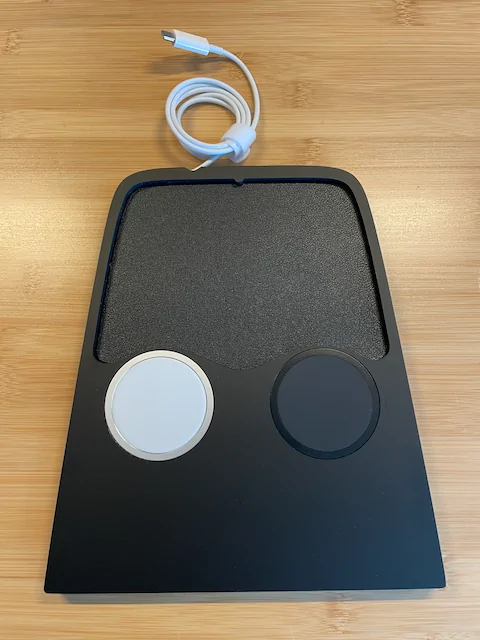
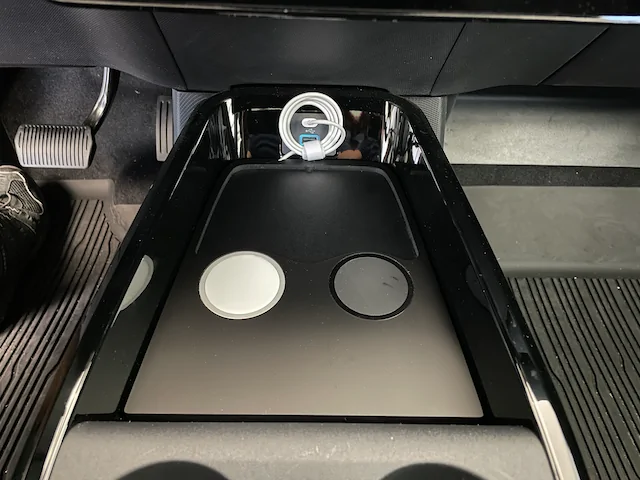
Initially my goal was to replace both pucks with two Apple MagSafe chargers but I wasn't sure if the USB-A port (with a USB-C adapter) could handle the MagSafe charger power requirements. Turned out it couldn't handle it. So I decided to cut the wire off one of the original pucks and insert it as a placeholder.

Ford Mustang Mach-E Swapping TWRAPS charging puck with Apple MagSafe puck IMG_8804


If you're having the same issue with slow charging and want to swap it, I can give you some tips on how to do it.
Sponsored


Mach-Lee

Well-Known Member
First Name
Lee
Joined
Jul 16, 2021
Threads
262
Messages
11,344
Reaction score
24,963
Location
Wisconsin
Vehicles
2022 Mach-E Premium AWD
Occupation
Sci/Eng
Country flag
FYI the USB-C port in the Mach-E can only provide 7.5W 15W of power maximum. If you saw an improvement in speed with the genuine MagSafe, it was because the charger that comes with the TWRAPS is low quality or defective (which some others have reported).

The wireless charger and plugging your phone in directly should be about the same speed.
 
Last edited:
OP
OP
burritoman

burritoman

Well-Known Member
First Name
Dave
Joined
Apr 3, 2024
Threads
7
Messages
107
Reaction score
102
Location
Michigan
Vehicles
2023 Mach-E Premium, Ford Edge
Country flag
I've seen others complain about charging speed with TWRAPS, so I don't think it's defective.
 

MBCook

Well-Known Member
Joined
Mar 20, 2022
Threads
23
Messages
392
Reaction score
622
Location
USA
Vehicles
2021 Mach E AWD ER, Infinite Metallic Blue
Country flag
MagSafe also uses magnets to ensure ideal alignment for maximum possible efficiency. Misalignment kills efficiency and really boosts heat.

Qi 2 chargers will do the same thing. I don’t think they’re out yet but honestly I’m not sure, I haven’t checked.

Great mod.
 
OP
OP
burritoman

burritoman

Well-Known Member
First Name
Dave
Joined
Apr 3, 2024
Threads
7
Messages
107
Reaction score
102
Location
Michigan
Vehicles
2023 Mach-E Premium, Ford Edge
Country flag
FYI the USB-C port in the Mach-E can only provide 7.5W of power maximum. If you saw an improvement in speed with the genuine MagSafe, it was because the charger that comes with the TWRAPS is low quality or defective (which some others have reported).

The wireless charger and plugging your phone in directly should be about the same speed.
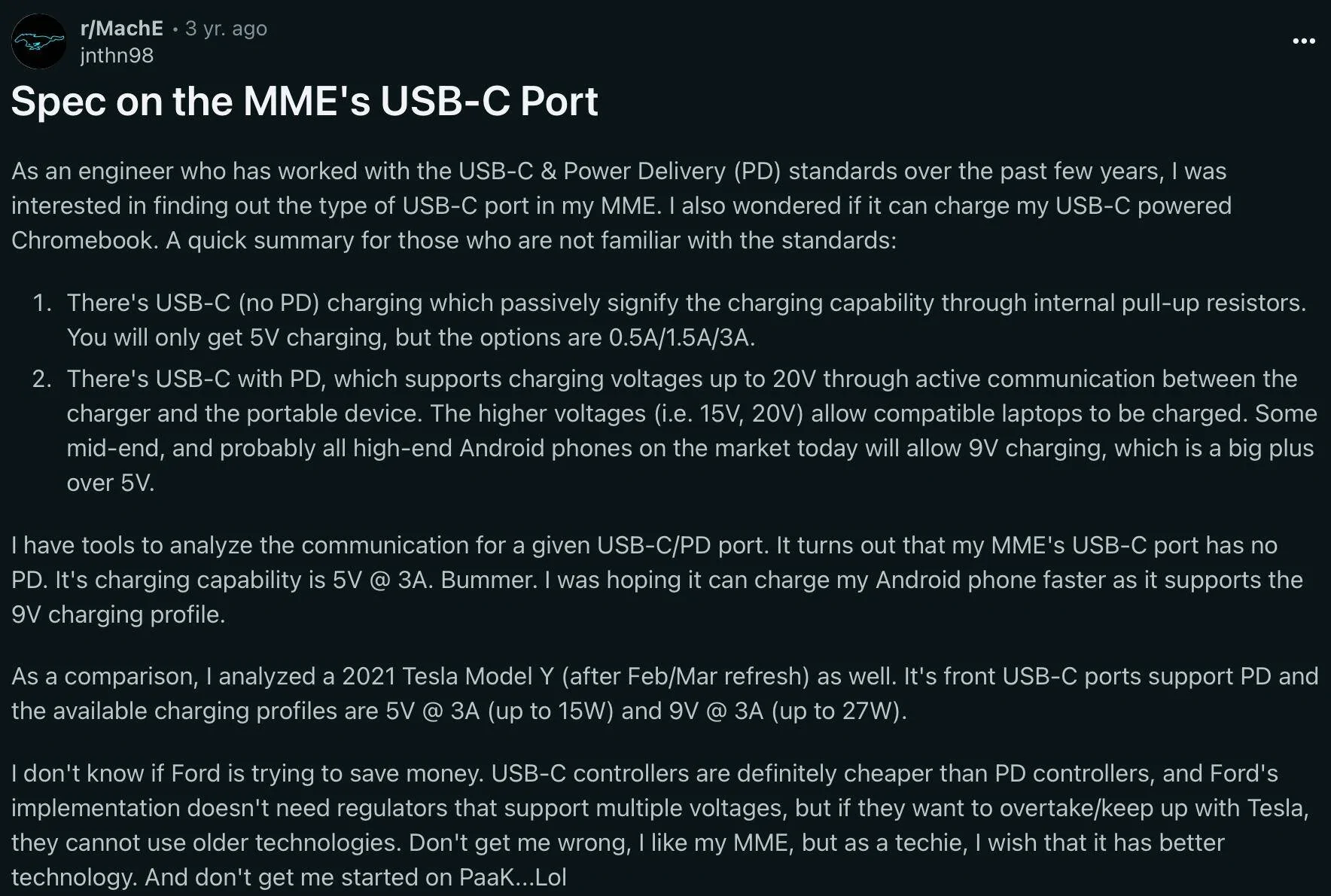
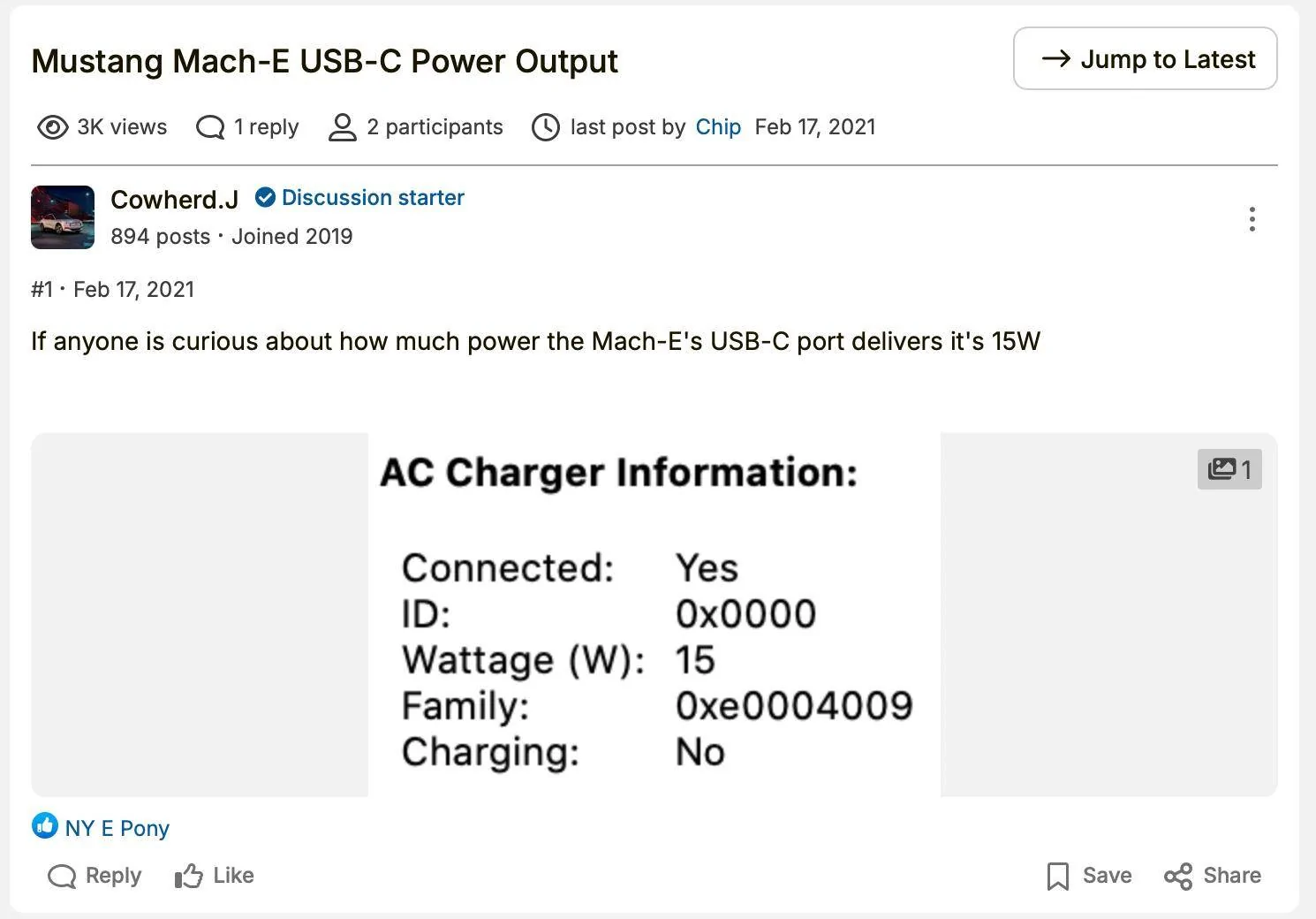
Are you sure it's not 15W? Some searching reveals 5V @ 3A for 15W delivery.
Ford Mustang Mach-E Swapping TWRAPS charging puck with Apple MagSafe puck Screenshot 2024-09-02 at 4.50.37 PM

Ford Mustang Mach-E Swapping TWRAPS charging puck with Apple MagSafe puck Screenshot 2024-09-02 at 4.50.52 PM
 
Last edited:


Mach-Lee

Well-Known Member
First Name
Lee
Joined
Jul 16, 2021
Threads
262
Messages
11,344
Reaction score
24,963
Location
Wisconsin
Vehicles
2022 Mach-E Premium AWD
Occupation
Sci/Eng
Country flag
Are you sure it's not 15W? Some searching reveals 5V @ 3A for 15W delivery.
Screenshot 2024-09-02 at 4.50.37 PM.webp

Screenshot 2024-09-02 at 4.50.52 PM.webp
Alright, after additional testing I can officially declare that port as “weird”. Seems like 15W only works with Apple devices. Everything else drops down to 7.5W (DCP profile). There seems to be some kind of odd auto detect process that will change which power profiles are being advertised (I have a tester that checks what power profiles a USB port supports). My guess is this is why some chargers may have comparability problems with it and provide less output.
 

Deleted member 22199

Guest
The built-in wireless charging pad in the Mach-E is just plain awful, and it somehow turns my iPhone 12 Pro into a molten brick while barely charging it all. My solution to that was to upgrade it to a TWRAPS MagSafe wireless charger. It turned out to be only marginally better. The iPhone would no longer get super hot but the charging speed was still very slow. I'd go on a road trip with the phone at 68% and after an hour it's still at 68%. That's not good. Turns out that 3rd party Qi chargers are only able to use 7.5W of charging while Apple branded MagSafe can charge up to 15W. So I decided to swap the TWRAPS MagSafe puck with an Apple MagSafe puck, using the TWRAPS enclosure.

As expected there was a big difference in charging speed after making the change:
My iPhone 12 Pro with wireless CarPlay active, music and navigation on, 20 mins of charging - it went from 66 to 74%.
I also tested my wife's iPhone 14 Pro with no CarPlay, 20 mins of charging - it went from 62 to 78%.

The iPhone felt about same warmth as with the TWRAPS after charging. (It doesn't make sense to me, seems like it should have been hotter since it's actually charging much faster)

Initially my goal was to replace both pucks with two Apple MagSafe chargers but I wasn't sure if the USB-A port (with a USB-C adapter) could handle the MagSafe charger power requirements. Turned out it couldn't handle it. So I decided to cut the wire off one of the original pucks and insert it as a placeholder.
IMG_8804.png


If you're having the same issue with slow charging and want to swap it, I can give you some tips on how to do it.
I’d love your tips. The TWRAPS is slightly better than the Ford one, but as you found, only marginally. I’d love to improve it.
 

twraps

Well-Known Member
Diamond Sponsor
First Name
ILIYA
Joined
Oct 28, 2022
Threads
7
Messages
135
Reaction score
157
Location
Concord, California
Website
twraps.com
Vehicles
Mach-E
Country flag
Hey guys

Iliya from TWRAPS here.
@Mach-Lee - our charger is not low quality. It supports 20W if both pucks are engaged simultaneously or 15W per puck if only one is being used. If you don't believe me I can send you some images/videos of me testing it on an outlet that would give that much power, with a Galaxy S23 and it works. On an iPhone though you will only be getting max 10W even though it's supposed to be limited to 7.5W I am getting 10W in testing.
For the record, with OEM Apple pucks I am getting 12.5-13W, not 15W... I've never seen 15W on a wireless charger so far, and we're already working on a Qi2 charger and even with it I get about 12W, still not 15W.

@Crackling Static - if your idea is to replace our puck with Apple OEM puck that will work but only for one puck. That's why we've developed this charging controller that regulates handshake /the process during which the phone, the car and our charger communicate to come to an agreement which charging protocol to use/ and power distribution on 2 pucks connected to the same port (the charging controller is inside the aluminum case that says TWRAPS). If that's not an issue for you (losing one puck) you can of course do this though, all you need is an Apple puck and a M2 Torx. You can also theoretically hook another puck to the USB-A port in the Mach-E but USB-A has a 5W limit, so while you will get about 25% gain in charging power on one puck you will lose 50+% on the other.

So I just wanted to add this for context - there is a limit on how much you can draw from the Mach-E, there is a limit on how much your iPhone would let be drawn with a non-Apple puck and of course there is a limit to how much our pucks and charging controller can handle as well, but our limit is the biggest of the 3 ?

PS One easy test you can do is this - hook up our charger on a home power adapter that's at least 20W USB-C and see how fast it will charge ??
 
OP
OP
burritoman

burritoman

Well-Known Member
First Name
Dave
Joined
Apr 3, 2024
Threads
7
Messages
107
Reaction score
102
Location
Michigan
Vehicles
2023 Mach-E Premium, Ford Edge
Country flag
I’d love your tips. The TWRAPS is slightly better than the Ford one, but as you found, only marginally. I’d love to improve it.
You'll need the following:
- T6 torx screwdriver
- Heavy duty double-sided tape
- Alcohol wipe
- Velcro cable tie

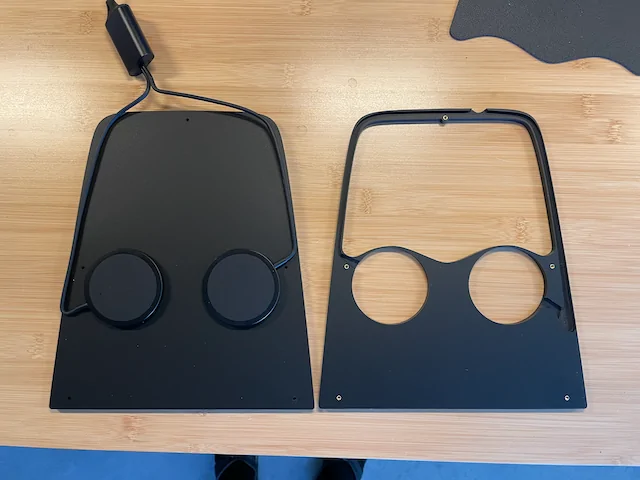
1. Remove the two halves of the unit by unscrewing the 5 torx screws from the back. Lay the top half upside down on a table next to the bottom side.
Ford Mustang Mach-E Swapping TWRAPS charging puck with Apple MagSafe puck IMG_8795


2. Remove the pucks by sliding a flathead screwdriver underneath and gently prying upward. The two sided tape will come loose. (Edit: you don't have to remove both pucks if you want to keep one as a placeholder, just leave it in place and snip the cable off.)

3. Insert the Apple puck into the top side of the unit and route the cable into the channel. Be sure to put the puck into the correct side you want it in. Clean the back side of the puck and the bottom half of the unit with an alcohol wipe to ensure good adherence.

4. I snipped the cable from one of the TWRAPS pucks and put it into the other side as a placeholder since I wasn't planning on using it for anything. (You can probably reuse the sticky tape here but I removed the old tape by firmly rolling it off with my thumb, it comes off cleanly that way, and then put new sticky tape on it.)

5. Affix the bottom part of the unit carefully to the top making sure it's aligned and press down firmly so the pucks adhere to the bottom half, and then screw it back together.

Done!
Ford Mustang Mach-E Swapping TWRAPS charging puck with Apple MagSafe puck IMG_8801
 
Last edited:

Deleted member 22199

Guest
Wow. That is awesome. Thank you, so much. Very clear instructions.

I will do this today. :)
 

ack154

Well-Known Member
Joined
Jan 24, 2024
Threads
37
Messages
851
Reaction score
1,446
Location
NY
Vehicles
2023 Mach-E GT PE
You'll need the following:
- T6 torx screwdriver
- Heavy duty double-sided tape
- Alcohol wipe
- Velcro cable tie

1. Remove the two halves of the unit by unscrewing the 5 torx screws from the back. Lay the top half upside down on a table next to the bottom side.
IMG_8795.png


2. Remove the pucks by sliding a flathead screwdriver underneath and gently prying upward. The two sided tape will come loose. (Edit: you don't have to remove both pucks if you want to keep one as a placeholder, just leave it in place and snip the cable off.)

3. Insert the Apple puck into the top side of the unit and route the cable into the channel. Be sure to put the puck into the correct side you want it in. Clean the back side of the puck and the bottom half of the unit with an alcohol wipe to ensure good adherence.

4. I snipped the cable from one of the TWRAPS pucks and put it into the other side as a placeholder since I wasn't planning on using it for anything. (You can probably reuse the sticky tape here but I removed the old tape by firmly rolling it off with my thumb, it comes off cleanly that way, and then put new sticky tape on it.)

5. Affix the bottom part of the unit carefully to the top making sure it's aligned and press down firmly so the pucks adhere to the bottom half, and then screw it back together.

Done!
IMG_8801.png
This seems a little odd to me - if you're going to use an Apple charger anyway, and cut the cord on the other TWRAPS charger - why even have it? Just doubleside tape the Apple charger into the existing tray or something? Surely that's simpler?
 
OP
OP
burritoman

burritoman

Well-Known Member
First Name
Dave
Joined
Apr 3, 2024
Threads
7
Messages
107
Reaction score
102
Location
Michigan
Vehicles
2023 Mach-E Premium, Ford Edge
Country flag
This seems a little odd to me - if you're going to use an Apple charger anyway, and cut the cord on the other TWRAPS charger - why even have it? Just doubleside tape the Apple charger into the existing tray or something? Surely that's simpler?
I'd already bought the TWRAPS solution, it just didn't work as expected. If you're asking why not just get rid of the TWRAPS altogether and sticky tape the Apple MagSafe charger into the built-in tray, I suppose that would work but it wouldn't look as clean. I'd already sunk money into the TWRAPS. I just want it to work like it's supposed to.
 

corradoborg

Well-Known Member
First Name
Mike
Joined
Jun 9, 2023
Threads
1
Messages
314
Reaction score
552
Location
Aptos, CA
Vehicles
2025 Mach-E GT
Country flag
Weird. I had no idea people were unsatisfied with the Twraps chargers. I had previously only heard and experienced good things.
My unmodified Twraps charger definitely charges my iPhone 14 Pro substantially. I work from home and don’t always drive in a given day. On days when I don’t drive at all, my phone is often below 20% when I go to bed and put it on its charger for the night.
When I do drive - even if just for 15-20 minutes - my phone will have spent that time on the Twraps charger. I always use wireless CarPlay, which is a big power drain. Yet on these days, my phone is often around 40% or more when I go to bed - substantially more if I’ve taken a longer drive.
Not scientific measurements, by far. But when my phone has spent even just a few minutes on the Twraps pad, it comes out of the car with more charge than it went in with.
 

corradoborg

Well-Known Member
First Name
Mike
Joined
Jun 9, 2023
Threads
1
Messages
314
Reaction score
552
Location
Aptos, CA
Vehicles
2025 Mach-E GT
Country flag
MagSafe also uses magnets to ensure ideal alignment for maximum possible efficiency. Misalignment kills efficiency and really boosts heat.

Qi 2 chargers will do the same thing. I don’t think they’re out yet but honestly I’m not sure, I haven’t checked.

Great mod.
The pucks in the Twraps charger are “MagSafe compatible,” meaning they are also magnetic. In addition to aligning the phone correctly for charging, this also ensures they don’t move around in the console tray.
 

AllenXS

Well-Known Member
First Name
Allen
Joined
Jan 11, 2021
Threads
13
Messages
1,339
Reaction score
1,706
Location
Richmond, BC, Canada
Vehicles
Premium Blue ER AWD
Country flag
On first use mine didn’t charge much. On second and every subsequent use it has been more than adequate with wireless charging and great that the phone stays in place.
Sponsored


Top