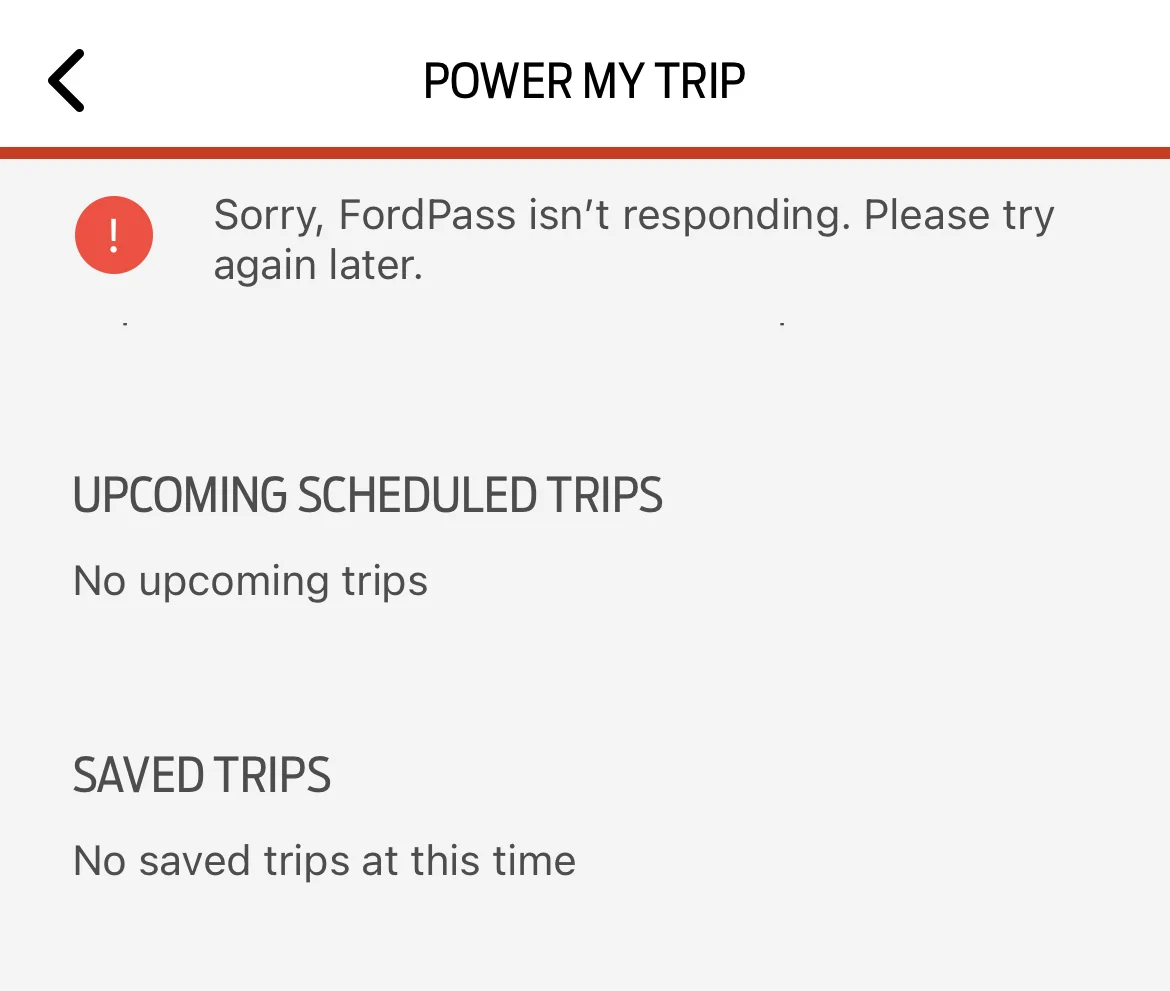
Trip Plan Limit Reached

Machs E

New Member
First Name
Stephanie
Joined
Jul 12, 2021
Threads
1
Messages
1
Reaction score
0
Location
Delaware
Vehicles
2021 Mustang Mach E
Country flag
How do I delete a trip from the Trip Planner option in FordPass? I click the Map icon, and select the Trip Planner option but when I click Create New Trip Plan I get a Trip Plan Limit Reached message. I've tried everything, and searched but can't get rid of them from my Saved Trips.
Sponsored
 

TRP

Well-Known Member
First Name
Tim
Joined
Jun 23, 2021
Threads
77
Messages
1,264
Reaction score
1,456
Location
37841
Vehicles
Mach E P4x, Ford F150
Country flag
In the car, go to the nav screen and click through to find your trips. Select one and then you have the option to delete it. I don't see a way to do it from the app tho
 

JoeDimwit

Well-Known Member
First Name
Joe
Joined
Mar 1, 2021
Threads
77
Messages
1,831
Reaction score
3,451
Location
Waterford
Vehicles
Grabber Blue First Edition
Occupation
Electrician
Country flag
In the car, go to the nav screen and click through to find your trips. Select one and then you have the option to delete it. I don't see a way to do it from the app tho
If this is the only way to delete a saved trip, let’s just call it another failure for the FordPass team. If you can create it in the app, you should be able to manage it from the app.
 

TRP

Well-Known Member
First Name
Tim
Joined
Jun 23, 2021
Threads
77
Messages
1,264
Reaction score
1,456
Location
37841
Vehicles
Mach E P4x, Ford F150
Country flag
I hate Ford Pass and PAAK, but I deleted trips last night in Ford Pass on my phone.

1) Open Ford Pass, click Map then trip planner
2) Swipe left on the trips you want to delete, should show red delete
3) click delete

This..........I just found that I could do this too
 
  • Like
Reactions: TTF


GoGoGadgetMachE

Well-Known Member
First Name
Michael
Joined
Jan 23, 2020
Threads
153
Messages
5,612
Reaction score
12,669
Location
Ohio
Vehicles
2021 Mach-E 1st Ed., 2022 Lightning Platinum
Occupation
Professional forum cheerleader and fanboy
Country flag
I hate Ford Pass and PAAK, but I deleted trips last night in Ford Pass on my phone.

1) Open Ford Pass, click Map then trip planner
2) Swipe left on the trips you want to delete, should show red delete
3) click delete
this was not obvious to me at all. I tried "tap and hold" and that didn't do it obviously.

I suppose given how much I have fought the awful iOS swipe nonsense with my gf's devices, I should have thought to try that.
 

Mach_Enrique

Well-Known Member
First Name
Chris
Joined
Feb 4, 2020
Threads
7
Messages
94
Reaction score
348
Location
Denver
Vehicles
RIP -2021 MachE GT; 2023 Lighting; WRX STI; BMW i5
Occupation
Finance
Country flag
Adding this here rather than starting a new thread. A few weeks ago when I actually wanted to plan a long trip, I got a "Sorry, FordPass isn't responding. Please try again later" whenever I select "trip planner" from the FordPass (FP) App. It will still let me plan a trip, but when I try to save it to the car I get "Trip Limit for VIN Exceeded" (screen shots below).

I only had 4 trips in memory in the vehicle and deleted them all from the car as noted above in a post. Did not help.

I just planned the recent trip from in the vehicle as it was a minor inconvenience not to be able to do it in the app and push to the car. FP has updated at least once since this started an no change to errors. I was having an issue with notifications not working also (even when turned on in iOS) so I deleted and reinstalled FP app. That fixed my notification problems but not the trip planner errors. Anyone else experience this issue with the trip planner (this was the only thread I could find remotely similar)?


Ford Mustang Mach-E Trip Plan Limit Reached 1649013905891

Ford Mustang Mach-E Trip Plan Limit Reached 1649013931593
 

tannerk89

Well-Known Member
First Name
Tanner
Joined
Oct 31, 2021
Threads
17
Messages
691
Reaction score
1,056
Location
Roanoke, VA
Vehicles
Mach-E P4X
Occupation
Project Manager
Country flag
I haven’t been able to use FordPass trip planner feature, I get crashes etc whenever I tried in the past. But I also don’t like using the built in Navigation. I’ve found A Better Route Planner is way better at planning a trip and just plug the stop point addresses into Waze, my preferred navigation app. Mainly because I want the traffic, police, and hazard alerts. If you haven’t checked out ABRP yet, it’s worth looking into.
 

Mach_Enrique

Well-Known Member
First Name
Chris
Joined
Feb 4, 2020
Threads
7
Messages
94
Reaction score
348
Location
Denver
Vehicles
RIP -2021 MachE GT; 2023 Lighting; WRX STI; BMW i5
Occupation
Finance
Country flag
I haven’t been able to use FordPass trip planner feature, I get crashes etc whenever I tried in the past. But I also don’t like using the built in Navigation. I’ve found A Better Route Planner is way better at planning a trip and just plug the stop point addresses into Waze, my preferred navigation app. Mainly because I want the traffic, police, and hazard alerts. If you haven’t checked out ABRP yet, it’s worth looking into.
Thanks. I use ABRP to validate/check what the Sync Nav. says, but prefer the in car nav for the long trips and charger planning as it knows the SoC and also has good traffic conditions. I keep Waze via Car Play up on the center screen while driving though, with no destinations, so I get the hazard and po po alerts while still getting the nav guidance on drivers console from the Sync 4 routing.

Having so many options via Car Play lets us all do what we like for our use cases, which is a big up vote for the MachE over other EV's without Car Play (or AA).
Sponsored


Top