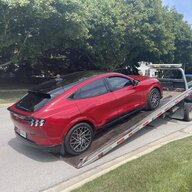

FordPass - somebody should get fired

mkhuffman

Well-Known Member
First Name
Mike
Joined
Nov 19, 2020
Threads
29
Messages
6,880
Reaction score
9,520
Location
Virginia
Vehicles
2025 Rivian R1T Tri-Max, Jeep GC-L, VW Jetta
Country flag
I give up posting after this... I would sound like a broken record if I continue. So much bad information based on pure assumptions.

Facts - FP has a frunk button that works for some of us. FP isn't just plug and play like it should be. If you don't change permissions you'll get battery drain, bad locations, crappy PaaK and the list goes on. 1.7.1 is just a sync update, it doesn't do anything else, update other modules or enable other features.

Unfortunately technology has it's limits with the non technically inclined. Just like I'm terrible performing brain surgery...

If you struggle with tech, carry a FOB.

If you really want help search for PaaK and myself as the author or DM me. I'm always here to help.

Should FordPass be better ... Yes yes yes yes, no argument. Remember FP is only 1/2 of the equation. If your modules are outdated then the issue is the car and Ford's poor OTAs.
Don't give up.

I may need module updates because all my PaaK issues returned today in a big way. I could not open the door and used the door code. I sat in the car for 5 minutes trying to get the car to see my phone key. Even placing it on the magic charging pad didn't work. I unlocked, locked and started the car using FordPass and still no key detected. Reluctantly I unwrapped my Fob so I could go to the gym.

It did work when I got finished at the gym but just after I started the car I got the "no key detected" message. I arrived home without a key detected. After I went inside I went back to the garage with my phone and could not open the door. Complete and total PaaK failure.

I can't rely on it at all. I wish it could work reliably because it is really nice not to carry the Fob, but no. It is not possible.
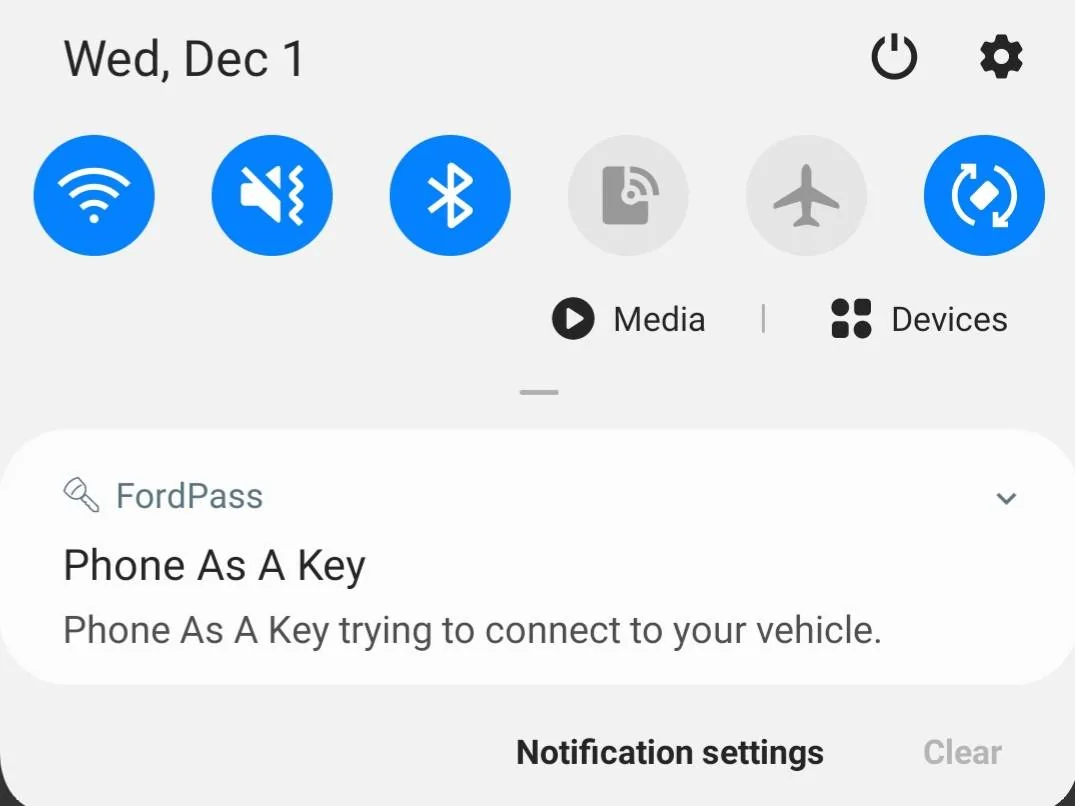
Ford Mustang Mach-E FordPass - somebody should get fired 20211201_203824


Edit: I rebooted my phone and PaaK worked to open the door. Maybe that solved the problem this time. I will try it again tomorrow.
Sponsored

 
Last edited:
HuntingPudel

Well-Known Member
First Name
Steve
Joined
Mar 23, 2021
Threads
89
Messages
12,975
Reaction score
17,451
Location
Bay Area, CA
Vehicles
2024 MME GT with Performance Upgrade, 1979 Fire-Am, 1972 K/5 Blazer
Occupation
Engineering
Country flag
Well, I'm gonna bite the bullet tomorrow and leave my key in my filing cabinet. I'm going to rely on my phone to get in the car, start it, and lock it. Paws crossed... ??
 

PaulP

Well-Known Member
First Name
Paul
Joined
Jun 22, 2021
Threads
2
Messages
62
Reaction score
82
Location
La Malbaie, QC
Vehicles
2022 Mach-E Premium AWD ER - Grabber Blue
Country flag
Me too!!! FOB in pocket works for me and FOB in purse works for my Wife!! :)
That's my problem right here. They only gave me one fob with the car because there's PaaK. But PaaK drains 50% of my phone's battery and has been anything but reliable. Ford should own up to their mistake and give a second fob free of charge.
 

mkhuffman

Well-Known Member
First Name
Mike
Joined
Nov 19, 2020
Threads
29
Messages
6,880
Reaction score
9,520
Location
Virginia
Vehicles
2025 Rivian R1T Tri-Max, Jeep GC-L, VW Jetta
Country flag
That's my problem right here. They only gave me one fob with the car because there's PaaK. But PaaK drains 50% of my phone's battery and has been anything but reliable. Ford should own up to their mistake and give a second fob free of charge.
FordPass 3.35.2 has solved my battery draining problem I think. No drainage since the update. Check your app version.
 

Newboj

Active Member
First Name
Jeff
Joined
Aug 26, 2021
Threads
4
Messages
41
Reaction score
40
Location
Salt Lake City
Vehicles
Mustang Mach E
Country flag
I have to respectfully disagree with all the complaining. I have had my Mach E for 3 days now and while setting up PAAK was a little frustrating, I finally got it to work. The key was to get away from my house wifi and to a location with good cell service. Other than that it has been flawless. PAAK works perfectly, the remote start and trunk and drunk opening are great. I like being able to see my charge levels and when summer rolls around being able to open the windows will be amazing. Is it perfect, no, but let’s be reasonable.


jeffMachE

Well-Known Member
First Name
Jeff
Joined
Oct 27, 2020
Threads
16
Messages
361
Reaction score
440
Location
Colorado
Vehicles
F-350, '21 Prem 4EX, '24 Lyriq
Country flag
It was in the thread warning about updating to 3.35.0
do you mind replying with the forums that solved the battery drain on Android? I disabled PAAK b/c of that but it was working great for me.
 

RockwallRick

Well-Known Member
Joined
Apr 15, 2021
Threads
12
Messages
1,652
Reaction score
1,564
Location
Lake Wales, Florida
Vehicles
22 Ford Maverick FX4
Country flag
That's my problem right here. They only gave me one fob with the car because there's PaaK. But PaaK drains 50% of my phone's battery and has been anything but reliable. Ford should own up to their mistake and give a second fob free of charge.
Yes, they should do that and some of us have been able to get the 2nd one free of charge! I just told them that it wasn’t working for my Wife so she ended up with the original Fob and I have one for myself. Her PAAK got wiped out during a Fordpass upgrade and we haven’t tried it again since then!
 

RSH

Well-Known Member
First Name
RSH
Joined
Jun 18, 2021
Threads
2
Messages
283
Reaction score
253
Location
Virginia
Vehicles
2021 MME Rapid Red Premium ER
Country flag
Don't give up.

I may need module updates because all my PaaK issues returned today in a big way. I could not open the door and used the door code. I sat in the car for 5 minutes trying to get the car to see my phone key. Even placing it on the magic charging pad didn't work. I unlocked, locked and started the car using FordPass and still no key detected. Reluctantly I unwrapped my Fob so I could go to the gym.

It did work when I got finished at the gym but just after I started the car I got the "no key detected" message. I arrived home without a key detected. After I went inside I went back to the garage with my phone and could not open the door. Complete and total PaaK failure.

I can't rely on it at all. I wish it could work reliably because it is really nice not to carry the Fob, but no. It is not possible.

20211201_203824.webp


Edit: I rebooted my phone and PaaK worked to open the door. Maybe that solved the problem this time. I will try it again tomorrow.
FP and PAAK work better when I reboot my phone at least once each week. I believe you're supposed to do that anyway. It not only makes FP work better - most of my apps work better if I routinely (weekly) reboot the phone.
 

dsuyang

Active Member
First Name
Suyang
Joined
Nov 23, 2021
Threads
0
Messages
31
Reaction score
141
Location
Novi, MI
Vehicles
Mach-E
Occupation
Software Engineer
Country flag
do you mind replying with the forums that solved the battery drain on Android? I disabled PAAK b/c of that but it was working great for me.
According to many other users on this forum, please long press the app icon -> App info -> Permissions -> Locations -> Allow all the time
 

dsuyang

Active Member
First Name
Suyang
Joined
Nov 23, 2021
Threads
0
Messages
31
Reaction score
141
Location
Novi, MI
Vehicles
Mach-E
Occupation
Software Engineer
Country flag
I do not have any of those functions either. My Fordpass app says I need to set up pakk even though my phone is listed in the paak key settings on the app and is listed in the car. I can open and drive the car about 75% of the time even though the app says I need to set up phone paak. It's F'ing ridiculous
I was speaking with Eric, same confusion about why the key showed up in the key list, but Paak isn't working. @PaaK_Android I think our UI/UX gets more jobs to do

So Paak first downloads the key from the server/cloud, then the key will appear in the list. That doesn't mean the key can control the car, though, because the vehicle doesn't trust the key.

To make the car trust the key, the Paak setup process tries to pair with the Bluetooth in the vehicle and `deliver the key`.

A few things you could try before visiting the dealership:
1. Like Eric said, clean up all the keys by doing a Paak reset: Mache HMI -> General -> Reset -> Paak Reset. (NOT master reset)
After this step, if you go to the key list in FP, you should see all of the keys being wiped out.
2. Go through Paak setup process. (Make sure both key fob and phone are in the cabin during the setup process, and turn on the vehicle)
3. I am not sure if you use iOS/Android. If iOS setup process doesn't work for you, try Android if you have one.

Let me know if you have any success. I have never seen any Android phone couldn't set up with my Mache (I have 3 Android phones Samsung/Pixel/Moto and my wife has One Plus).
 

Kamuelaflyer

Well-Known Member
First Name
Bill
Joined
Feb 18, 2020
Threads
11
Messages
11,468
Reaction score
23,231
Location
Hawaii
Vehicles
2021 Premium Infinite Blue. ER AWD. 2020 Raptor, 2021 Ranger.
Country flag
I'm struggling with FordPass. Same as everybody else - PaaK setup on iOS is a goat rodeo. It thinks I'm in Detroit when trying to set departure times. The thing crashes like the Hindenburg, and it times out so often that I think this is the secret name for it - Timeout! And, I have stable gig internet.

Does anybody know a feedback channel that we can use? This POS is Charlie Sheen levels of unstable.
Everyone else isn't struggling with it, though some are.

I'm also on iOS and have no crashing problems, no issues with the time zones, and almost nothing else. The sole issue I have is to saving a schedule for SecuriAlert and frankly, I'm not thrilled with that feature anyway.
 

dsuyang

Active Member
First Name
Suyang
Joined
Nov 23, 2021
Threads
0
Messages
31
Reaction score
141
Location
Novi, MI
Vehicles
Mach-E
Occupation
Software Engineer
Country flag
Don't give up.

I may need module updates because all my PaaK issues returned today in a big way. I could not open the door and used the door code. I sat in the car for 5 minutes trying to get the car to see my phone key. Even placing it on the magic charging pad didn't work. I unlocked, locked and started the car using FordPass and still no key detected. Reluctantly I unwrapped my Fob so I could go to the gym.

It did work when I got finished at the gym but just after I started the car I got the "no key detected" message. I arrived home without a key detected. After I went inside I went back to the garage with my phone and could not open the door. Complete and total PaaK failure.

I can't rely on it at all. I wish it could work reliably because it is really nice not to carry the Fob, but no. It is not possible.

20211201_203824.jpg


Edit: I rebooted my phone and PaaK worked to open the door. Maybe that solved the problem this time. I will try it again tomorrow.
Tough one, very disappointing !!!

A few things you can try in the future before rebooting the phone:
1. Turn on or off the Bluetooth
2. If Step 1 is no good, then click the foreground notification banner where it says Phone as a Key trying to connect to your vehicle -> click `cancel`. Sometimes you might have to click twice to kill the banner. After that, force kill the FP app and restart the app
3. If Step 2 is still no good, then reboot the phone...
 

PaaK_Android

Well-Known Member
First Name
Gage
Joined
Nov 29, 2021
Threads
0
Messages
50
Reaction score
102
Location
North America
Vehicles
Mach-e, Lincoln Aviator
Occupation
Lead PaaK Android Developer
Country flag
I was speaking with Eric, same confusion about why the key showed up in the key list, but Paak isn't working. @PaaK_Android I think our UI/UX gets more jobs to do

So Paak first downloads the key from the server/cloud, then the key will appear in the list. That doesn't mean the key can control the car, though, because the vehicle doesn't trust the key.

To make the car trust the key, the Paak setup process tries to pair with the Bluetooth in the vehicle and `deliver the key`.

A few things you could try before visiting the dealership:
1. Like Eric said, clean up all the keys by doing a Paak reset: Mache HMI -> General -> Reset -> Paak Reset. (NOT master reset)
After this step, if you go to the key list in FP, you should see all of the keys being wiped out.
2. Go through Paak setup process. (Make sure both key fob and phone are in the cabin during the setup process, and turn on the vehicle)
3. I am not sure if you use iOS/Android. If iOS setup process doesn't work for you, try Android if you have one.

Let me know if you have any success. I have never seen any Android phone couldn't set up with my Mache (I have 3 Android phones Samsung/Pixel/Moto and my wife has One Plus).
We are working on reworking the key list screen to be more user friendly.
Sponsored


Top