Arjan

Well-Known Member
First Name
Arjan
Joined
Feb 14, 2020
Threads
6
Messages
360
Reaction score
241
Location
NL
Vehicles
Ford Mustang Mach-E GT Performance
Country flag
Run a self test in FDRS and select for all modules. Then when it finishes hit clear and retest. Hopefully then you’re all green. You shouldn’t need to reset sync for DTCs.
Yeah already did that, but one does not clear..
It got added after i received the Deep Sleep OTA, so it is likely a bug somewhere.
But clearing all DTC's does not help i am afraid.
Car runs fine without any issues.

O well i managed to get a appointment at the dealer next monday, ill see if they will clear it. The mechanic told me that was a reset, but i am assuming this is not a reset in Sync, but at a deaper level
Sponsored

 

Neil4Real

Well-Known Member
Joined
Jul 8, 2021
Threads
17
Messages
3,385
Reaction score
3,073
Location
Southern California
Vehicles
Mach-E GT Performance Edition - Shadow Black
Country flag
Yeah already did that, but one does not clear..
It got added after i received the Deep Sleep OTA, so it is likely a bug somewhere.
But clearing all DTC's does not help i am afraid.
Car runs fine without any issues.

O well i managed to get a appointment at the dealer next monday, ill see if they will clear it. The mechanic told me that was a reset, but i am assuming this is not a reset in Sync, but at a deaper level
What is the DTC? Some users have permanent DTCs like yours that doesn’t clear but have no issues from it so there is nothing to worry about.
 

connoisseurr

Well-Known Member
First Name
Connor
Joined
Sep 29, 2021
Threads
35
Messages
1,394
Reaction score
1,624
Location
Northern VA
Vehicles
22 Rivian R1T, 23 Tesla MYP
Occupation
IT Engineering
Country flag
How do i do that in Sync, can you explain more ?
This is only Sync4 related, not DTC related is my guess ?
Master reset is within Sync - this wipes out EVERYTHING. I believe it's located under Settings > General.
 

Arjan

Well-Known Member
First Name
Arjan
Joined
Feb 14, 2020
Threads
6
Messages
360
Reaction score
241
Location
NL
Vehicles
Ford Mustang Mach-E GT Performance
Country flag
What is the DTC? Some users have permanent DTCs like yours that doesn’t clear but have no issues from it so there is nothing to worry about.
I am sorry i do not have access right now to fdrs (license thing)
But i you would like to see the clearing history in fdrs just check my vin ( WF0TK4SX6MME02905 )

Ford Mustang Mach-E The Complete DIY Guide to Updating Your Mach-E with FDRS 20220628_141955.JPG


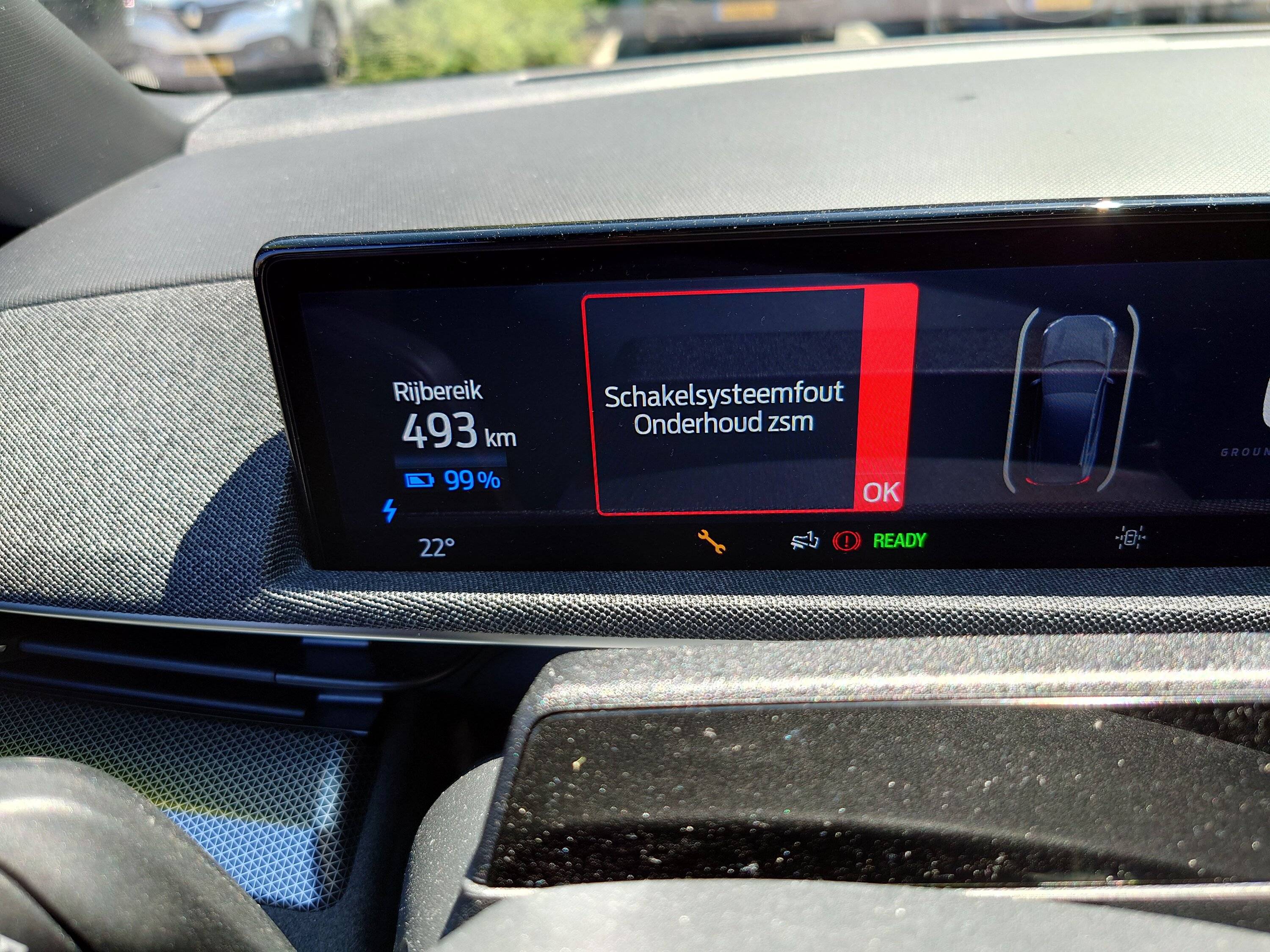
The error is translated like "Switch System Failure". So my guess is the gear turn-button ? Below it says maintenance needed


connoisseurr

Well-Known Member
First Name
Connor
Joined
Sep 29, 2021
Threads
35
Messages
1,394
Reaction score
1,624
Location
Northern VA
Vehicles
22 Rivian R1T, 23 Tesla MYP
Occupation
IT Engineering
Country flag
Not my error i am afraid...
Well you asked about a master reset in FDRS and I advised the only master reset exists in Sync.

Do you have FDRS? Can you see if you have any Sync updates (APIM) or updates to the Gateway Module? If not, post in the other FDRS thread asking for a printout of available updates.
 

Arjan

Well-Known Member
First Name
Arjan
Joined
Feb 14, 2020
Threads
6
Messages
360
Reaction score
241
Location
NL
Vehicles
Ford Mustang Mach-E GT Performance
Country flag
Well you asked about a master reset in FDRS and I advised the only master reset exists in Sync.

Do you have FDRS? Can you see if you have any Sync updates (APIM) or updates to the Gateway Module? If not, post in the other FDRS thread asking for a printout of available updates.
See post 694, i try to explain there what kind of error i get. I know that you can see the entire logging in FDRS, but i only had a 2 hour license. So i cannot enter it anymore.

Yesterday i flashed all remaining updates, except the GWM because that one kept erroring out. I think this is the reason for other modules to error.

I tried several times to clear the remaining errors but this one keeps coming back.

So this i why i think it needs a system reset, or some way to reach the GWM again.
The OTA was succesfull by the way that caused this specific error.
 

connoisseurr

Well-Known Member
First Name
Connor
Joined
Sep 29, 2021
Threads
35
Messages
1,394
Reaction score
1,624
Location
Northern VA
Vehicles
22 Rivian R1T, 23 Tesla MYP
Occupation
IT Engineering
Country flag
See post 694, i try to explain there what kind of error i get. I know that you can see the entire logging in FDRS, but i only had a 2 hour license. So i cannot enter it anymore.

Yesterday i flashed all remaining updates, except the GWM because that one kept erroring out. I think this is the reason for other modules to error.

I tried several times to clear the remaining errors but this one keeps coming back.

So this i why i think it needs a system reset, or some way to reach the GWM again.
The OTA was succesfull by the way that caused this specific error.
I see. There might be something in the guided procedures for the GWM to take the update. I believe @DevSecOps was hit with a stubborn gateway module as well. Maybe he can share his experience to get that module updated?
 

DevSecOps

Well-Known Member
First Name
Todd
Joined
Sep 22, 2021
Threads
69
Messages
4,764
Reaction score
11,624
Location
Sacramento, CA
Vehicles
'21 Audi SQ5 / '23 Rivian R1T / '23 M3P
Occupation
CISO
Country flag
I see. There might be something in the guided procedures for the GWM to take the update. I believe @DevSecOps was hit with a stubborn gateway module as well. Maybe he can share his experience to get that module updated?
I had to flash the GWM twice. @Arjan post is too vague to get any real idea of what's going on.
 

walla2

Well-Known Member
First Name
David
Joined
May 1, 2021
Threads
7
Messages
149
Reaction score
273
Location
Walla Walla, WA
Vehicles
21 MME Prem ER AWD, 2017 Toyota Highlander
Occupation
Clergy
Country flag
You are in a thread with a lot of geeks who enjoy this stuff but it is very much outside the norm of the average Mach-E owner and we're discussing stuff that is utterly irrelevant to normal use and enjoyment of the car.
This, thread, basically:

Ford Mustang Mach-E The Complete DIY Guide to Updating Your Mach-E with FDRS simpsons-nerd
 

Arjan

Well-Known Member
First Name
Arjan
Joined
Feb 14, 2020
Threads
6
Messages
360
Reaction score
241
Location
NL
Vehicles
Ford Mustang Mach-E GT Performance
Country flag
I had to flash the GWM twice. @Arjan post is too vague to get any real idea of what's going on.
Let me try to explain in chronological order

1. The car was charging (for 5 minutes) and got interrupted for an OTA update (the deep sleep OTA, i have a GT model)
2. After reconnecting the charger to the car i noticed that there was an additional issue like in post 694. This also pops up on fordpass with reduced power/ malfunction on 4wd.
3. I bought a FDRS license to check if i could clear the error myself, but this did not clear my dashboard error.
4. I noticed there were updates recently released and went ahead to flash them
5. When i reached the GWM module i got a communication error in FDRS and flashing was unsuccessful
6. I tried to flash several times, but no luck
7. i tried several times to clear all errors and rerun the tests. But i never got a full green screen.
8. i called my dealer today and had a conversation with the mechanic that does the flashes and he told me that maybe a systemwide reset would resolve this. I guess well see on monday.

There is absolutely nothing wrong with the car imho, no problems with 4wd , no reduced system power. No issues whatsoever, only this annoying beep when i change from P to D and back.
 

DevSecOps

Well-Known Member
First Name
Todd
Joined
Sep 22, 2021
Threads
69
Messages
4,764
Reaction score
11,624
Location
Sacramento, CA
Vehicles
'21 Audi SQ5 / '23 Rivian R1T / '23 M3P
Occupation
CISO
Country flag
Let me try to explain in chronological order

1. The car was charging (for 5 minutes) and got interrupted for an OTA update (the deep sleep OTA, i have a GT model)
2. After reconnecting the charger to the car i noticed that there was an additional issue like in post 694. This also pops up on fordpass with reduced power/ malfunction on 4wd.
3. I bought a FDRS license to check if i could clear the error myself, but this did not clear my dashboard error.
4. I noticed there were updates recently released and went ahead to flash them
5. When i reached the GWM module i got a communication error in FDRS and flashing was unsuccessful
6. I tried to flash several times, but no luck
7. i tried several times to clear all errors and rerun the tests. But i never got a full green screen.
8. i called my dealer today and had a conversation with the mechanic that does the flashes and he told me that maybe a systemwide reset would resolve this. I guess well see on monday.

There is absolutely nothing wrong with the car ihmo, no problems with 4wd , no reduced system power. No issues whatsoever, only this annoying beep when i change from P to D and back.
Ok so since this is the thread for updating the vehicle let's start there.

What adapter do you have for performing the updates?
The GWM update is done with a USB drive, did you get that far?
Do you have pictures of where the GWM failed?
 

Arjan

Well-Known Member
First Name
Arjan
Joined
Feb 14, 2020
Threads
6
Messages
360
Reaction score
241
Location
NL
Vehicles
Ford Mustang Mach-E GT Performance
Country flag
Ok so since this is the thread for updating the vehicle let's start there.

What adapter do you have for performing the updates?
The GWM update is done with a USB drive, did you get that far?
Do you have pictures of where the GWM failed?
I use the Mongoose cable to flash all updates, sofar no issues at all on that method.
When starting the GWM update i was not asked for the USB drive.
I already got a error (communication) before that.

Something that i just reminded, i used an license for an hour. Maybe the license was expired ?
 

DevSecOps

Well-Known Member
First Name
Todd
Joined
Sep 22, 2021
Threads
69
Messages
4,764
Reaction score
11,624
Location
Sacramento, CA
Vehicles
'21 Audi SQ5 / '23 Rivian R1T / '23 M3P
Occupation
CISO
Country flag
Something that i just reminded, i used an license for an hour. Maybe the license was expired ?
Very well could be that it expired. I haven't seen a communications error unless there's a loss a network to FDRS. Normally that can be resolved by clicking on the little comms button down in the lower right corner. But if the license expired it may not let you reconnect.
 

Arjan

Well-Known Member
First Name
Arjan
Joined
Feb 14, 2020
Threads
6
Messages
360
Reaction score
241
Location
NL
Vehicles
Ford Mustang Mach-E GT Performance
Country flag
Very well could be that it expired. I haven't seen a communications error unless there's a loss a network to FDRS. Normally that can be resolved by clicking on the little comms button down in the lower right corner. But if the license expired it may not let you reconnect.
I downloaded all update modules in the beginning, but i just thought that when you start every flash module FDRS checks stuff, so it could very well be the license.

After that i still did the test and clear procedure, but i guess as long you keep FDRS open it just works. Ill try again with a new fresh license tonight !
Sponsored


Top