Post here if you have an active FDRS account and are willing to look up info for others

terry_mach_e

Well-Known Member
Joined
Jul 22, 2021
Threads
8
Messages
63
Reaction score
30
Location
MI
Vehicles
2021 Mustang Mach-E4X | Rapid Red
Country flag
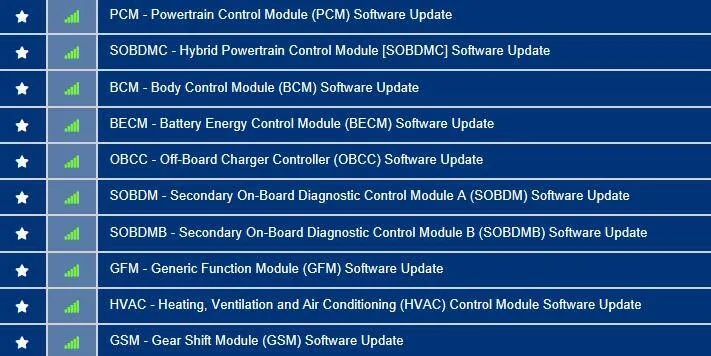
27 May '21 build date, Job 1 car.

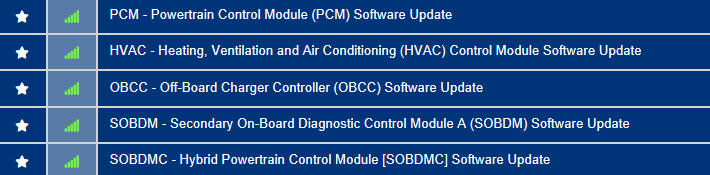
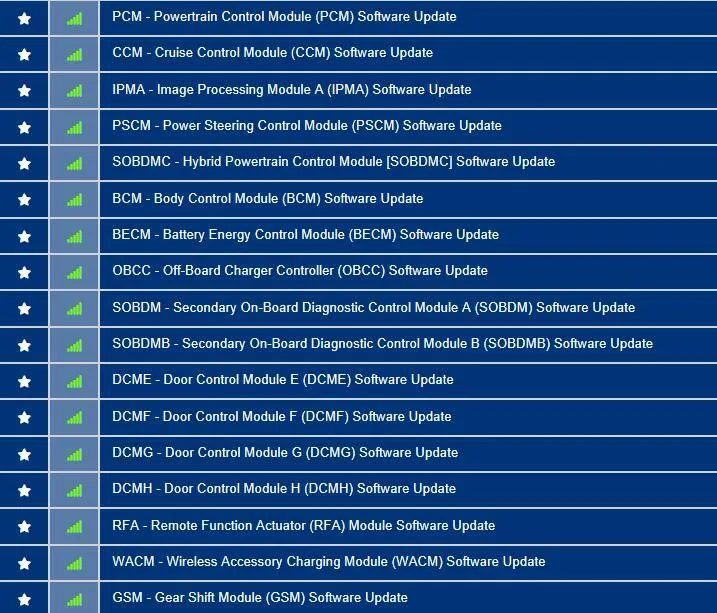
Here's the list of available updates:
3FMTK3SU5MMA28013-5-Apr-23.webp
Hello Mike. I just had my MME returned after the dealer workup. If possible, can you re-check the available updates in FDRS for my VIN (3FMTK3SU5MMA28013)? Thank you!
Sponsored


SMI

Member
First Name
Steffen
Joined
Apr 12, 2023
Threads
0
Messages
13
Reaction score
8
Location
Germany
Vehicles
MME RWD ER 2022
Country flag
Hello Mike, can you also query the MME in Europe?

WF0TK1E70NMA21594

Thanks
 

Mike G

Well-Known Member
First Name
Mike
Joined
Mar 27, 2022
Threads
25
Messages
6,462
Reaction score
5,306
Location
N. AL, USA
Vehicles
'23(J1) Mach-E GT-PE, '22 F-150 Lightning, '24 Bronco HLE 2Dr
Country flag
Hello, my car has been stuck at the dealership for over a week now and they won't tell me the issue. I was hoping someone could lookup the VIN and tell me what's going on! Any information would be awesome. I just got this car a few months ago so my knowledge is pretty limited!

VIN: 3FMTK1SS0MMA02647

Thanks in advance,
Brandon
Well it looks like they started working on the IPMA on the 7th. They attempted a PMI to reload the software and that didn't work (said it failed).

Then on the 10th they did a PMI on the Instrument Cluster (IPC) which looks like worked, and then another PMI attempt on the IPMA which didn't work.

And then yesterday and today, no programming. They are likely calling the mothership for support, or at least I hope that's wht they're doing. But your problem seems to be the Image Processing Module (A) [IPMA] (...there is only an "A" image processor on this car as far as I'm aware).

Here's a list of the other updates they haven't done yet, (and I don't know that they intend to)
Ford Mustang Mach-E Post here if you have an active FDRS account and are willing to look up info for others 3FMTK1SS0MMA02647-12-Apr-23
:
 

Mike G

Well-Known Member
First Name
Mike
Joined
Mar 27, 2022
Threads
25
Messages
6,462
Reaction score
5,306
Location
N. AL, USA
Vehicles
'23(J1) Mach-E GT-PE, '22 F-150 Lightning, '24 Bronco HLE 2Dr
Country flag
Hello Mike. I just had my MME returned after the dealer workup. If possible, can you re-check the available updates in FDRS for my VIN (3FMTK3SU5MMA28013)? Thank you!
I can...all they did was update the HVAC. I think the TCU was probably an OTA.

Ford Mustang Mach-E Post here if you have an active FDRS account and are willing to look up info for others 3FMTK3SU5MMA28013-12-Apr-23
 

Mike G

Well-Known Member
First Name
Mike
Joined
Mar 27, 2022
Threads
25
Messages
6,462
Reaction score
5,306
Location
N. AL, USA
Vehicles
'23(J1) Mach-E GT-PE, '22 F-150 Lightning, '24 Bronco HLE 2Dr
Country flag
Hello Mike, can you also query the MME in Europe?

WF0TK1E70NMA21594

Thanks
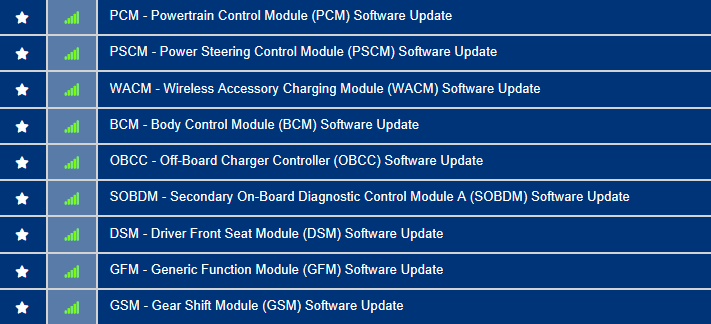
11 Apr '22 build date.

Here's the list of available updates:
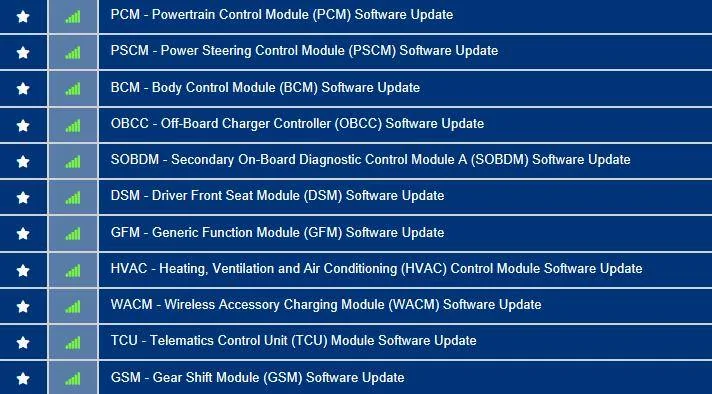
Ford Mustang Mach-E Post here if you have an active FDRS account and are willing to look up info for others WF0TK1E70NMA21594-12-Apr-23


Mopey

Well-Known Member
First Name
John
Joined
Nov 20, 2019
Threads
19
Messages
613
Reaction score
1,504
Location
Alaska
Vehicles
21 MME GTPE, 22 Lightning Lariat
Country flag
Trying to decide whether to buy another 2 day FDRS license; can someone check 3FMTK3SU8MMA07057 ?
 

oldhero51

Member
Joined
Jan 13, 2023
Threads
1
Messages
8
Reaction score
1
Location
Northern Virginia
Vehicles
2021 Mach-E
Country flag
Could someone please check on my updates? I’m stuck on 2.7.1. My last update was May ‘22. It’s seems I’m pretty far behind, but Ford customer service and the dealer says to keep waiting for updates.
VIN: 3FMTK1SS7MMA10681
‘21 Mach-E
 

indie

Active Member
Joined
Apr 12, 2023
Threads
2
Messages
36
Reaction score
37
Location
Arkansas, US
Vehicles
2022 Ford Mustang Mach E Select RWD
Country flag
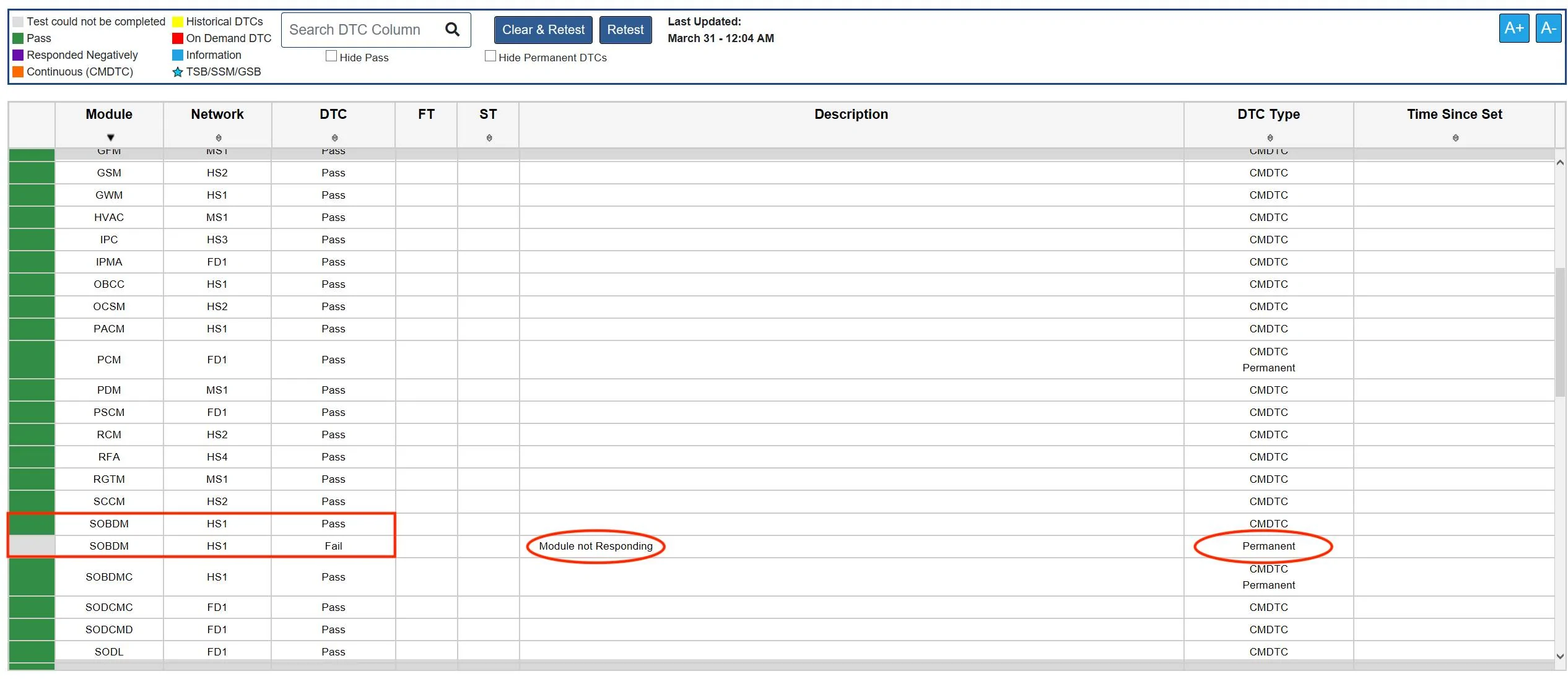
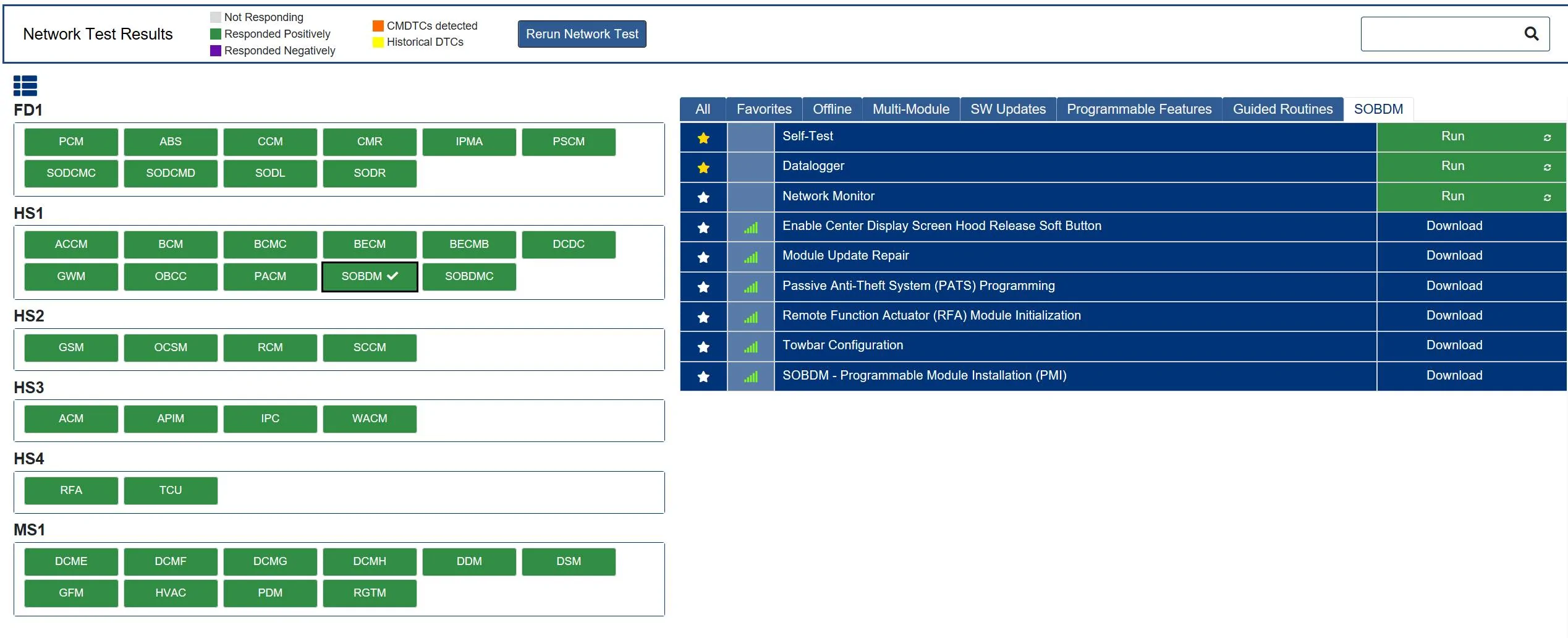
Apologies if this is slightly off topic, but I had a quick question for some of you others that have been using FDRS and know a little more about it. I recently purchased a Mach E, but was not receiving new updates so I did research here on the forum (thanks a bunch to all of you that contribute) and figured out how to use FDRS, purchased the Mongoose cable, power supply, and I was able to do all of my software updates and get the current UI experience to control climate settings with the volume control knob, etc. I noticed however though when I would do the self-test feature to clear the error codes out after the updates to get every module back to green status if I uncheck the Hide Permanent DTCs button at the top it will show (2) results for the SOBDM module. First result shows Pass like the others and is in green and the second one below it is grey and shows Fail with the description of Module not responding. Is that something I should be concerned about, or is it just a glitch perhaps in FDRS? The rest of the modules all appear only once and show green across the board with Hide Permanent DTCS checked or unchecked. If I go to the other menu screen where it has all of the modules laid out along the left side with the blue options on the right everything shows green there as well. I was just wondering if this was normal behavior or if its something I need to have my dealer check?

Ford Mustang Mach-E Post here if you have an active FDRS account and are willing to look up info for others Error A
Ford Mustang Mach-E Post here if you have an active FDRS account and are willing to look up info for others Error B
 

Mach-Lee

Well-Known Member
First Name
Lee
Joined
Jul 16, 2021
Threads
262
Messages
11,442
Reaction score
25,248
Location
Wisconsin
Vehicles
2022 Mach-E Premium AWD
Occupation
Sci/Eng
Country flag
Apologies if this is slightly off topic, but I had a quick question for some of you others that have been using FDRS and know a little more about it. I recently purchased a Mach E, but was not receiving new updates so I did research here on the forum (thanks a bunch to all of you that contribute) and figured out how to use FDRS, purchased the Mongoose cable, power supply, and I was able to do all of my software updates and get the current UI experience to control climate settings with the volume control knob, etc. I noticed however though when I would do the self-test feature to clear the error codes out after the updates to get every module back to green status if I uncheck the Hide Permanent DTCs button at the top it will show (2) results for the SOBDM module. First result shows Pass like the others and is in green and the second one below it is grey and shows Fail with the description of Module not responding. Is that something I should be concerned about, or is it just a glitch perhaps in FDRS? The rest of the modules all appear only once and show green across the board with Hide Permanent DTCS checked or unchecked. If I go to the other menu screen where it has all of the modules laid out along the left side with the blue options on the right everything shows green there as well. I was just wondering if this was normal behavior or if its something I need to have my dealer check?

Error A.webp
Error B.webp
Yeah that looks like a FDRS glitch, each module should only show up once. Try uninstalling FDRS, rebooting, and reinstalling the latest version (35.5.5). When going through the process, make sure you check the box to clear the cache.
 

indie

Active Member
Joined
Apr 12, 2023
Threads
2
Messages
36
Reaction score
37
Location
Arkansas, US
Vehicles
2022 Ford Mustang Mach E Select RWD
Country flag
Yeah that looks like a FDRS glitch, each module should only show up once. Try uninstalling FDRS, rebooting, and reinstalling the latest version (35.5.5). When going through the process, make sure you check the box to clear the cache.
I will try that. Appreciate the insight and assist.
 

Mike G

Well-Known Member
First Name
Mike
Joined
Mar 27, 2022
Threads
25
Messages
6,462
Reaction score
5,306
Location
N. AL, USA
Vehicles
'23(J1) Mach-E GT-PE, '22 F-150 Lightning, '24 Bronco HLE 2Dr
Country flag
Could someone please check on my updates? I’m stuck on 2.7.1. My last update was May ‘22. It’s seems I’m pretty far behind, but Ford customer service and the dealer says to keep waiting for updates.
VIN: 3FMTK1SS7MMA10681
‘21 Mach-E
14 Jan '21 build date, Job 1 car.

Here's the list of available updates:
Ford Mustang Mach-E Post here if you have an active FDRS account and are willing to look up info for others 3FMTK1SS7MMA10681-13-Apr-23


None of these are going to come as OTAs.
 

Mike G

Well-Known Member
First Name
Mike
Joined
Mar 27, 2022
Threads
25
Messages
6,462
Reaction score
5,306
Location
N. AL, USA
Vehicles
'23(J1) Mach-E GT-PE, '22 F-150 Lightning, '24 Bronco HLE 2Dr
Country flag
Apologies if this is slightly off topic, but I had a quick question for some of you others that have been using FDRS and know a little more about it. I recently purchased a Mach E, but was not receiving new updates so I did research here on the forum (thanks a bunch to all of you that contribute) and figured out how to use FDRS, purchased the Mongoose cable, power supply, and I was able to do all of my software updates and get the current UI experience to control climate settings with the volume control knob, etc. I noticed however though when I would do the self-test feature to clear the error codes out after the updates to get every module back to green status if I uncheck the Hide Permanent DTCs button at the top it will show (2) results for the SOBDM module. First result shows Pass like the others and is in green and the second one below it is grey and shows Fail with the description of Module not responding. Is that something I should be concerned about, or is it just a glitch perhaps in FDRS? The rest of the modules all appear only once and show green across the board with Hide Permanent DTCS checked or unchecked. If I go to the other menu screen where it has all of the modules laid out along the left side with the blue options on the right everything shows green there as well. I was just wondering if this was normal behavior or if its something I need to have my dealer check?

Error A.jpg
Error B.jpg
I have that same error. I think it's an occasional comms problem.


Top