LeanneL

Well-Known Member
First Name
Leanne
Joined
Jun 5, 2022
Threads
6
Messages
382
Reaction score
322
Location
Surrey, BC Canada
Vehicles
2023 GTP
Occupation
Nurse
Country flag
And just like that, the last 3 pages (1 days posts) talked me out of doing it. ✨
Despite the issues I had, I am patiently waiting for more updates to queue up to install :)
Sponsored


Mike G

Well-Known Member
First Name
Mike
Joined
Mar 27, 2022
Threads
25
Messages
6,455
Reaction score
5,297
Location
N. AL, USA
Vehicles
'23(J1) Mach-E GT-PE, '22 F-150 Lightning, '24 Bronco HLE 2Dr
Country flag
I like to consider myself an FDRS veteran. I jumped onboard when the Gen14 F150 infamous thread started January 22, 2022.
I've done more than 75 updates across my 2 different trucks. I've confronted every common issue that FDRS updating has presented.

Having said all that, the new 2023.5 GTPE has me stumped!
I fetched it home 3 weeks ago today. I had a buddy who was licensed up run the VIN and sure enough it had 17 updates in the queue. ??

Same laptop and Mongoose and FDRS version I use on the truck. But of the 17, there were 3 or 4 that would fail almost immediately after clicking "Run". Within 4 or 5 seconds of beginning to download the update.

I thought it odd, but moved on to the next update and as stated, all but a few behaved normally. Successfully.

Fast forward to today and I decided to give it another try. The car has received successful OTA updates since I brought it home. 4 of them in about 6 days? It's like a flood with this thing. Lol
Anyways, sure enough the previous troublesome updates were still in FDRS, along with a few new ones.

mackE03222024updates.webp


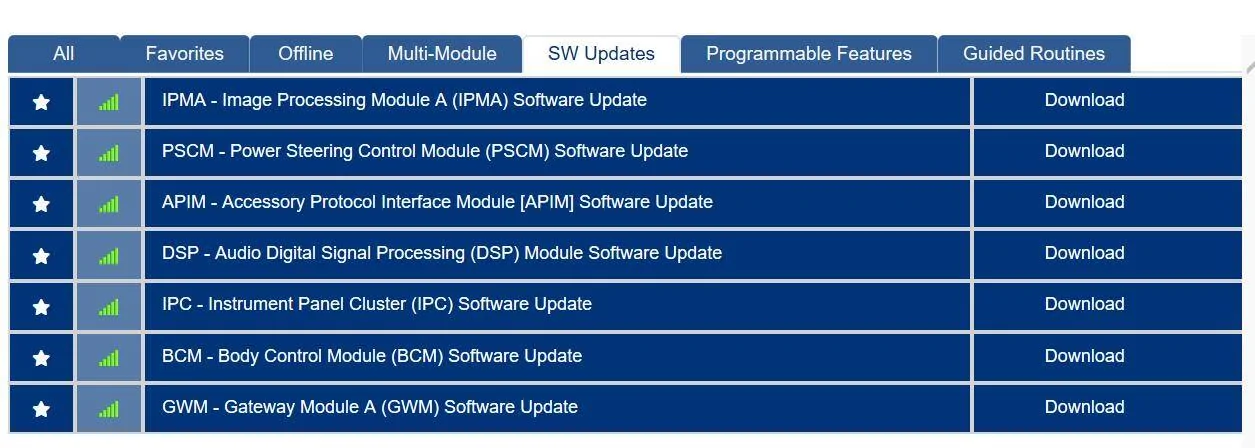
The GWM, BCM, DSP, and I think PSCM are the leftovers.
And while my habit in the past has always been to do a GWM first, if there's one available, it's a perfect example of the issue I am facing.
I click download.
I then click Run
The procedure begins normally with the "downloading files"
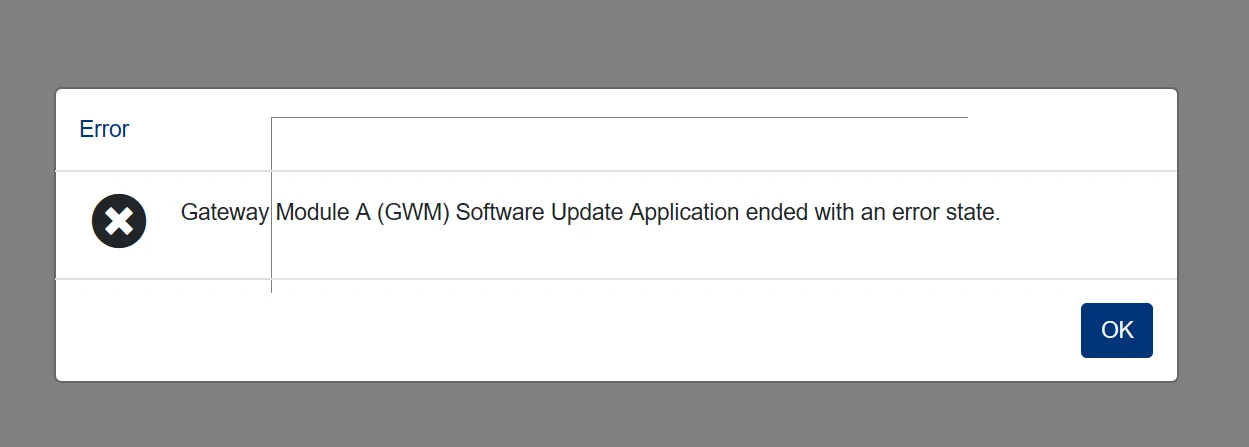
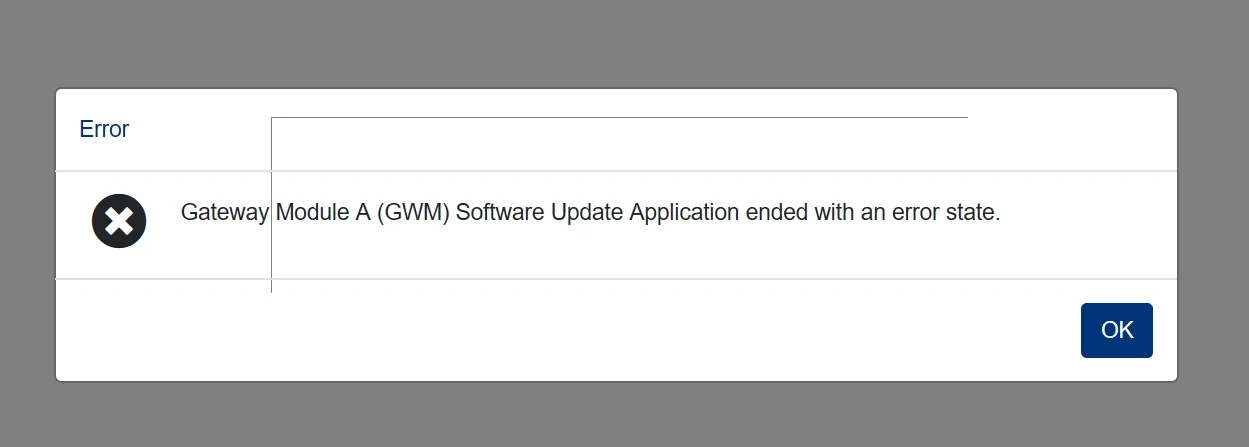
But about 4 or 5 seconds into the download the following error pops up

GWMerror.webp


Same exact issue with any/all available updates.

I've tried 3 versions of FDRS
I've uninstalled/reinstalled
Upgraded
Rebooted.....

I have a 55 Amp power supply
FDRS shows voltage 14.2 (perhaps too high? The Clore 20 Amp couldn't keep that up, that's for sure)

Whatever the issue is, keep in mind I was able to do about 12 updates a couple of weeks ago. So I don't see any obvious logic for these updates that error out almost immediately.

Sorry for the long post, but wanted to answer all the typical questions that are asked when someone is new to FDRS.
So here's the deal.

You do your best to pick the GWM, APIM, and TCU updates first like you know from experience...and then you decide to knock out some standalones that won't affect anything else like the HVAC, OBCC, or ACM and then suddenly (and without warning) the next thing you pick blows up...

Could be the BCM or GFM, or maybe you decided to run the PCM to knock out all those powertrain items (since they quite often are dependency blockers for other updates you can't see in your list yet).

When this happens (error or some completely nonsense, that can't be right, WTF! type error message is thrown by FDRS you need to go back and clear the CMDTCs that you don't even know are there (because the module status tiles are showing all green, when they're actually not really).

Happens to me all the time. I'll do some update and then I'll move on without noticing that during the final part of the update script that particular routine did not run the "Clearing DTCs" at the end ....and there you are.

When I then go back to view and clear the CMDTCs I find that over half the module list is in an error state (orange), and I then have to clear and retest to get back to a green board before the next update.

So try that and see what happens. I've already mentioned this to somebody and requested they get the FDRS crowd to ensure they script all these updates with a "Clear DTCs" command at the end...but it likely won't be the last time I get surprised by this happening.

Just one more thing to look out for really.....
 

benk016

Well-Known Member
First Name
Ben
Joined
Nov 12, 2020
Threads
39
Messages
3,270
Reaction score
5,112
Location
Tulsa, Oklahoma
Vehicles
2021 Mustang Mach-E GT
Country flag
So here's the deal.

You do your best to pick the GWM, APIM, and TCU updates first like you know from experience...and then you decide to knock out some standalones that won't affect anything else like the HVAC, OBCC, or ACM and then suddenly (and without warning) the next thing you pick blows up...

Could be the BCM or GFM, or maybe you decided to run the PCM to knock out all those powertrain items (since they quite often are dependency blockers for other updates you can't see in your list yet).

When this happens (error or some completely nonsense, that can't be right, WTF! type error message is thrown by FDRS you need to go back and clear the CMDTCs that you don't even know are there (because the module status tiles are showing all green, when they're actually not really).

Happens to me all the time. I'll do some update and then I'll move on without noticing that during the final part of the update script that particular routine did not run the "Clearing DTCs" at the end ....and there you are.

When I then go back to view and clear the CMDTCs I find that over half the module list is in an error state (orange), and I then have to clear and retest to get back to a green board before the next update.

So try that and see what happens. I've already mentioned this to somebody and requested they get the FDRS crowd to ensure they script all these updates with a "Clear DTCs" command at the end...but it likely won't be the last time I get surprised by this happening.

Just one more thing to look out for really.....
One downside to the update clearing all DTCs, is if you are running with the SVS power limitations for the HVBJB issue, it clears that too and takes away the power limit.
 

Snakebitten

Well-Known Member
Joined
Mar 1, 2024
Threads
0
Messages
2,263
Reaction score
3,779
Location
Coastal Texas
Vehicles
2023.5 Mach-E
Country flag
C:\ProgramData\Ford Motor Company\FDRS\fdrs\data\vehicle_software

Delete everything in there. This is all the actual software files it downloads for the module flashing.

Nuclear option would be to delete everything in C:\ProgramData\Ford Motor Company\ which will wipe all FDRS cache files.
The full path on this machine is C:\ProgramData\Ford Motor Company\FDRS\fdrs\data\vehicle_software\strategy\downloads

(version 39.6.4)

Which was empty. However I nuked the whole path as well as every other variation of clearing cache, so to speak.

When I start any update, I can see the first file being written to the folder, but as described, within 5 seconds the error pops up and the file is gone.

I've tried everything, including creating a new pc profile with local admin rights and reinstalling everything. Reclaim license, login, and rescan. All green. No DTCs. It's crazy.
I've done countless upgrades with this laptop and dongle. Usually the only fuss is with the recent Ford migration to SSO, I will log into Ford.com with a browser before attempting to login with FDRS. Seems to help with the FDRS login temperament. :)

Thanks for the suggestions though.
And you too Mike G
Appreciate it
 

spicy_taco

Well-Known Member
First Name
Jack
Joined
Sep 23, 2022
Threads
41
Messages
582
Reaction score
414
Location
Bay Area, CA
Vehicles
2023 Mach-E Premium AWD
Country flag
This is the weekend I'm going to attempt that IPMA update on my car. I've delayed it for fear of bricking it. I'll be sweating bullets until it is done, but at least reading some post even an interrupted update could be rescued using the PMI process.


737flyer

Well-Known Member
First Name
Richard
Joined
Jul 12, 2021
Threads
2
Messages
872
Reaction score
373
Location
Redington Beach, Fl
Vehicles
2025 Mache Premium, 2024 BMW IX50
Occupation
Retired Airline Pilot
Country flag
This is the weekend I'm going to attempt that IPMA update on my car. I've delayed it for fear of bricking it. I'll be sweating bullets until it is done, but at least reading some post even an interrupted update could be rescued using the PMI process.
I did mine last weekend. Just make sure you have a good charger and strong internet connection. It look me 2 hours 45 minutes. I started with the PSCM and when that finished it automatically rolled into to the IPMA. Nice and smooth update.
Good luck.
 

kennelh

Well-Known Member
First Name
Louise and Ken
Joined
Nov 28, 2019
Threads
13
Messages
1,188
Reaction score
1,378
Location
Northern California
Vehicles
J1 '21 Premium Ex RWD (Rapid Red)
Country flag
This is the weekend I'm going to attempt that IPMA update on my car. I've delayed it for fear of bricking it. I'll be sweating bullets until it is done, but at least reading some post even an interrupted update could be rescued using the PMI process.
I did the IPMA a month ago. It took a little under three hours and other than having to clear DTCs there was no drama. So good luck ?
 

Snakebitten

Well-Known Member
Joined
Mar 1, 2024
Threads
0
Messages
2,263
Reaction score
3,779
Location
Coastal Texas
Vehicles
2023.5 Mach-E
Country flag
Pretty much eliminated the laptop/FDRS software from the failure equation.
Pulled the previous machine I was using for FDRS in 2022 and tried the last 2 releases of FDRS and experienced exactly the same failures on the same modules. Literally identical.

Recap:
Purchased the car March 1st
FDRS scan on March 3rd:

Ford Mustang Mach-E The Complete DIY Guide to Updating Your Mach-E with FDRS 1000022342


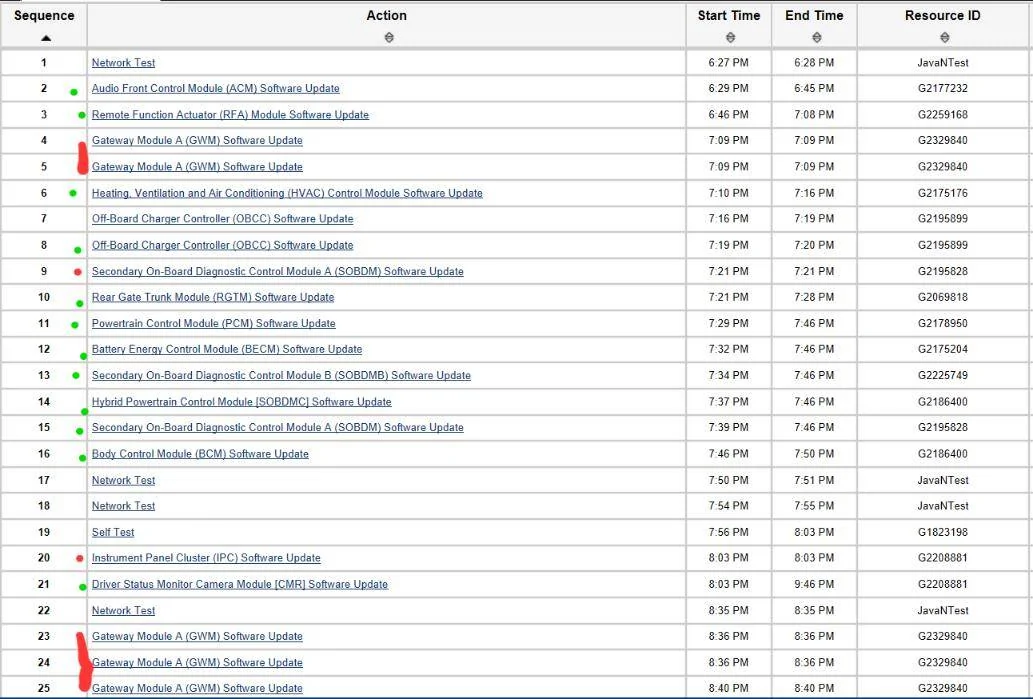
FDRS service history with successful updates with Green Dot.
Failure in red

Ford Mustang Mach-E The Complete DIY Guide to Updating Your Mach-E with FDRS march4


That was 12 successful updates
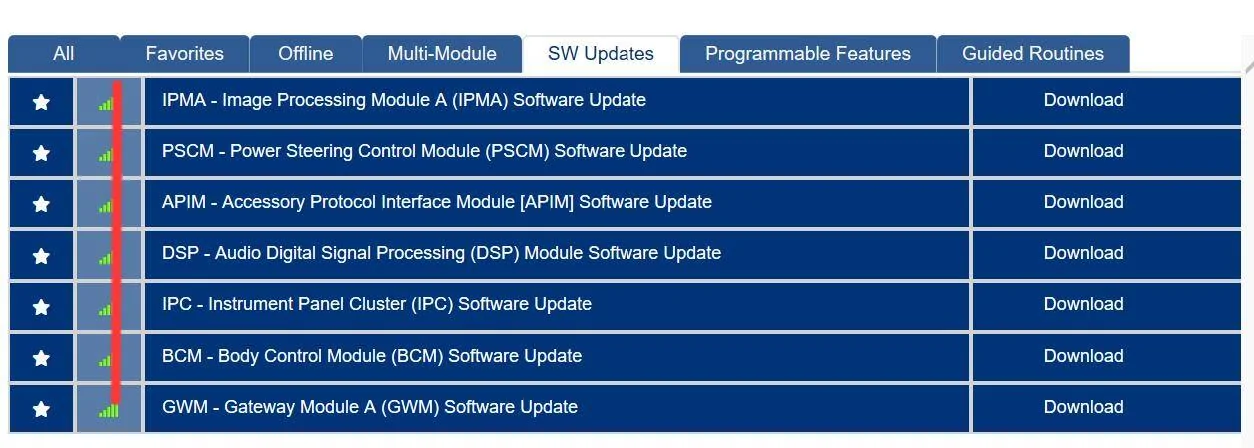
5 modules fail :

Ford Mustang Mach-E The Complete DIY Guide to Updating Your Mach-E with FDRS FDRSfailures (1)


I then received the following OTA's quickly in succession:

24-PU-0102-SVD-FX (is this a GWM?)
24-PU-1103-NAT-VCE
6.3.0
23-PU-1113-UNX-DC

Note: is it possible that any of these OTA updates are some of those failed updates?

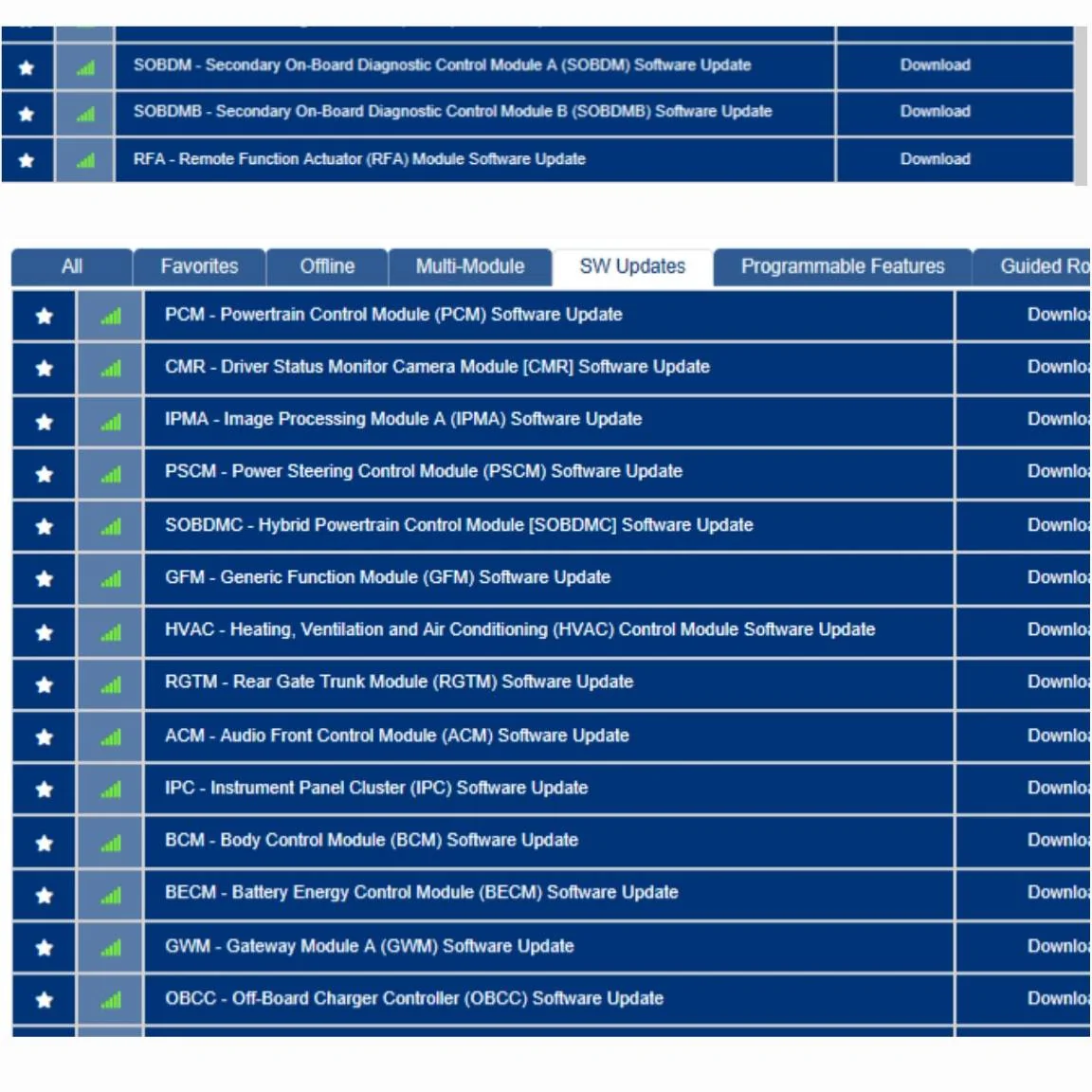
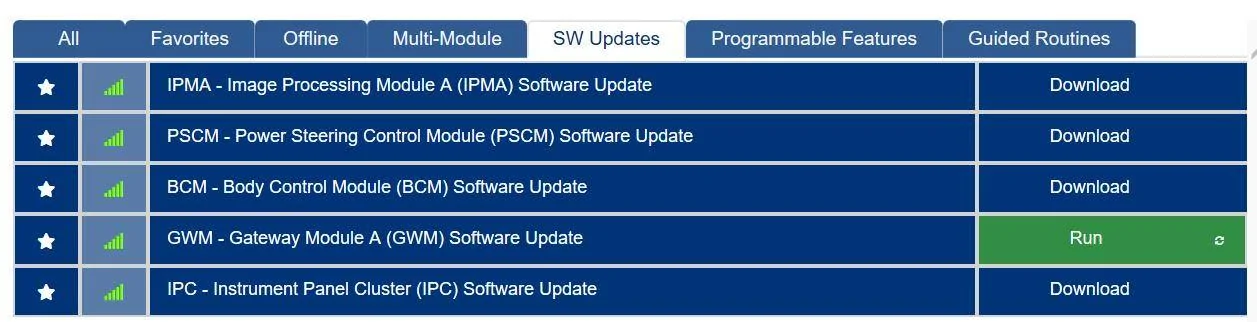
So a couple of weeks have passed since my FDRS session and I licensed up today and there's a couple more updates added to the previous 5 that failed

Ford Mustang Mach-E The Complete DIY Guide to Updating Your Mach-E with FDRS mackE03222024updates


And as stated in the previous posts, they all fail in exactly the same fashion. They launch properly and immediately start to download the first file. And the download folder for the files briefly show the name of the file being downloaded. But about 5 seconds into the download, the error pops up relative to the module being updated

Ford Mustang Mach-E The Complete DIY Guide to Updating Your Mach-E with FDRS GWMerror


I'm convinced that this is something specific to the car.
The same laptop/software/mongoose has successfully updated the 2022 F150 Powerboost many times. As well as updating 12 of the 19 updates for the car.

I'm fairly tenacious. There's a solution for this, but my logic is in a bit of a twist. ?
 

737flyer

Well-Known Member
First Name
Richard
Joined
Jul 12, 2021
Threads
2
Messages
872
Reaction score
373
Location
Redington Beach, Fl
Vehicles
2025 Mache Premium, 2024 BMW IX50
Occupation
Retired Airline Pilot
Country flag
Pretty much eliminated the laptop/FDRS software from the failure equation.
Pulled the previous machine I was using for FDRS in 2022 and tried the last 2 releases of FDRS and experienced exactly the same failures on the same modules. Literally identical.

Recap:
Purchased the car March 1st
FDRS scan on March 3rd:

1000022342.webp


FDRS service history with successful updates with Green Dot.
Failure in red

march4.webp


That was 12 successful updates
5 modules fail :

FDRSfailures (1).webp


I then received the following OTA's quickly in succession:

24-PU-0102-SVD-FX (is this a GWM?)
24-PU-1103-NAT-VCE
6.3.0
23-PU-1113-UNX-DC

Note: is it possible that any of these OTA updates are some of those failed updates?

So a couple of weeks have passed since my FDRS session and I licensed up today and there's a couple more updates added to the previous 5 that failed

mackE03222024updates.webp


And as stated in the previous posts, they all fail in exactly the same fashion. They launch properly and immediately start to download the first file. And the download folder for the files briefly show the name of the file being downloaded. But about 5 seconds into the download, the error pops up relative to the module being updated

GWMerror.webp


I'm convinced that this is something specific to the car.
The same laptop/software/mongoose has successfully updated the 2022 F150 Powerboost many times. As well as updating 12 of the 19 updates for the car.

I'm fairly tenacious. There's a solution for this, but my logic is in a bit of a twist. ?
Maybe try using an internet cable instead of WiFi. Also reboot your router.
 

kdonnel

Well-Known Member
Joined
Oct 31, 2021
Threads
35
Messages
1,147
Reaction score
1,665
Location
Metro Atlanta
Vehicles
2022 CA Route 1, 2020 Bolt EV
Country flag
They launch properly and immediately start to download the first file. And the download folder for the files briefly show the name of the file being downloaded. But about 5 seconds into the download, the error pops up relative to the module being updated
Do you have any sort of ad blocker installed either on the laptop or on your network that might be interfering with downloads?
 

Mike G

Well-Known Member
First Name
Mike
Joined
Mar 27, 2022
Threads
25
Messages
6,455
Reaction score
5,297
Location
N. AL, USA
Vehicles
'23(J1) Mach-E GT-PE, '22 F-150 Lightning, '24 Bronco HLE 2Dr
Country flag
The full path on this machine is C:\ProgramData\Ford Motor Company\FDRS\fdrs\data\vehicle_software\strategy\downloads

(version 39.6.4)

Which was empty. However I nuked the whole path as well as every other variation of clearing cache, so to speak.

When I start any update, I can see the first file being written to the folder, but as described, within 5 seconds the error pops up and the file is gone.

I've tried everything, including creating a new pc profile with local admin rights and reinstalling everything. Reclaim license, login, and rescan. All green. No DTCs. It's crazy.
I've done countless upgrades with this laptop and dongle. Usually the only fuss is with the recent Ford migration to SSO, I will log into Ford.com with a browser before attempting to login with FDRS. Seems to help with the FDRS login temperament. :)

Thanks for the suggestions though.
And you too Mike G
Appreciate it
Yeah the SSO thing really threw me for a while. Lots of login drama. I then started using MS Edge instead of Firefox on the machine, and most of that has now stopped. I still use Firefox for most browsing but I was actively blocking MS Edge before...but since I stopped that I haven't had issues. I know from the Helm notes that they still want you to use Explorer 11, but obviously that's not gonna work, so I think MS Edge is running in some sort of compatibility mode to mimic that.
 

Jeff-NoVA

Well-Known Member
First Name
Jeff
Joined
Oct 21, 2023
Threads
19
Messages
696
Reaction score
1,123
Location
Northern VA
Vehicles
2022 Mustang Mach-E Premium
Country flag
When I first used FDRS I recall having major login issues using my 6 year-old Windows 10 laptop. Luckily my Windows machine is not my daily computer so I did a full wipe and started with a clean OS. Really made a big difference, no more FDRS issues and boot time went from several minutes for everything to stop loading to 30 seconds or less. Chrome has worked fine - Edge and Chrome are both Chromium-based, so results should be similar.
 

Snakebitten

Well-Known Member
Joined
Mar 1, 2024
Threads
0
Messages
2,263
Reaction score
3,779
Location
Coastal Texas
Vehicles
2023.5 Mach-E
Country flag
Thanks fellas for the suggestions.
I do use DNS filtering on the router, but it's not been an issue with FDRS in the past. And as noted, FDRS had no issue downloading the files for 12 of the module updates.
It's just those pesky 5 updates, and now 7, that refuse to go through.

I'm curious exactly what is going on in FDRS while the files are being downloaded, in regards to the Mongoose cable and communications with the car?

Obviously the file download doesn't involve the OBD interface, but is there a background conversation taking place with the modules during the file download? Or could you actually Unplug the mongoose and the files would still download uninterrupted?

Just trying to eliminate as much as I can from the equation.

And really curious about the successful OTA for the GWM that the car received between the 2 different days I used FDRS...... Why would the same GWM be available in FDRS before and after receiving a GWM OTA update?
That just doesn't sound right.

I'm curious if the cloud manifest for the car doesn't match up with the actual car's local versioning. Out of Sync, so to speak.
 

kdonnel

Well-Known Member
Joined
Oct 31, 2021
Threads
35
Messages
1,147
Reaction score
1,665
Location
Metro Atlanta
Vehicles
2022 CA Route 1, 2020 Bolt EV
Country flag
Have you pulled the negative battery terminal? Force a total reboot of the vehicle modules.
 

Robob

Well-Known Member
First Name
Rob
Joined
May 29, 2023
Threads
3
Messages
241
Reaction score
164
Location
Vermont
Vehicles
23’ GT Cyber Orange
Occupation
Auto Parts, Paint & Tech
Country flag
on my win 11 laptop I only had edge installed and had login issues at first because of the new built in vpn security settings they had In edge, After disabling that it was all fine.

@Snakebitten Have you updated The mongoose drivers and or firmware as it also could be a VCI communication issue.
Sponsored


Top