shark

Well-Known Member
First Name
David
Joined
Jul 18, 2021
Threads
22
Messages
326
Reaction score
515
Location
Texas
Vehicles
Mach E GT
Country flag
Is there any official word from Ford as to when/if 2021 GT's will be getting newer PowerUp versions? My car has been stuck on 6.6 since last year. I did receive a couple minor FX updates like the charging update, but that's it.
Sponsored


 

markboris

Well-Known Member
First Name
Mark
Joined
Nov 13, 2019
Threads
43
Messages
5,749
Reaction score
16,429
Location
Sonora, CA
Vehicles
Currently: '20 Shelby GT500 FPB '24 Mach-E GTP GGM
Occupation
Retired
Country flag
Interesting. But there’s not an equivalent hard button for rear defrost.
When you activate the MAX Defrost, it also turns on the rear window defrost.
 

MME72BB

Active Member
First Name
Shane
Joined
Feb 29, 2024
Threads
1
Messages
39
Reaction score
23
Location
Toronto Canada
Vehicles
Mustang Mach E AWD EXT
Country flag
Any idea when Canada will get the YouTube App?
 

SigSauer

Well-Known Member
First Name
Mark David
Joined
Aug 22, 2021
Threads
4
Messages
326
Reaction score
286
Location
Columbus, Ohio
Vehicles
2022 Preiumn in DMG, AWD, ER and 1928 Model A Ford
Occupation
Retired Sales Representative
Country flag
43241.PNG


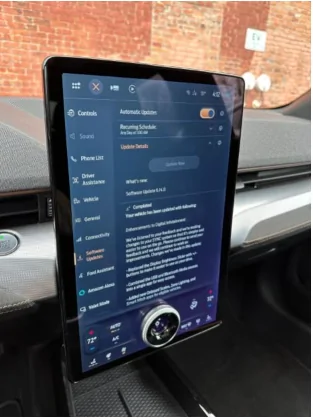
Hi owners! We’re happy to announce that Software Update 6.14 is rolling out to Mustang Mach-Es. What you share with us in these owner forums and through In-Vehicle Voice Feedback are direct inputs to some of these changes, and we appreciate your continued passion for building an electric future alongside us. The update brings the following:
  • Replaced the Display Brightness Slider with +/- buttons to make it easier to use on your drive.
  • Combined the USB and Bluetooth media sources into a single app for easy access.
  • Moved the Sketch app into the “Entertainment” page so it’s easier to find.
  • Updated the icons on the top bar to make them easier to see.
  • Added a phone battery icon on the phone app screens.
  • The Public Charging application, previously known as Charge Assist, can be located in your application drawer, where other apps live.
  • You can now start and pay for charging on the BlueOval™ Charge Network without requiring a smartphone. Filter by charge speed and network while staying informed about real-time information about new chargers, such as availability and those under repair.
  • A new map view has been added, allowing you to visibly search for nearby chargers and quickly see what’s available.
  • Frunk Release – For MY21 and MY21.5 that have had the BCM update (which opens the frunk electronically), this update adds the button to their SYNC screen.

Software updates are designed to help make your vehicle better over time. We want to make sure you are getting the latest and greatest new features and improvements like this delivered to your vehicle.
As a friendly reminder make sure you:
  1. Have Automatic Software Updates turned ON – this keeps updates coming as they roll out.
  2. Set a Recurring Schedule – software updates may happen seamlessly in the background while you are driving, while others may require you to park and exit your vehicle so set the schedule for a time when you know you won’t need to drive the vehicle, like overnight.

Below is a quick step-by-step and here is a video of how to do this and some things to know about software updates on your vehicle.

How-To Guide:
Turn ON Automatic Software Updates
  • Go to “Settings” on your vehicle’s SYNC screen
  • Choose “Software Updates”
  • Toggle “Automatic Updates” to ON
Set a Recurring Schedule
  • Go to “Settings” on your vehicle’s SYNC screen
  • Choose “Software Updates”
  • Press “Schedule Updates” or “Recurring Update Schedule”

Things to Know:
  • Don’t skip your Automatic Software Updates – this impacts all future updates.
  • If an update requires you to be parked, you will receive a reminder in your vehicle (24 hours prior) and in your FordPass App. You can reschedule up to 2 mins before the update begins.
  • Software updates are not deployed to all vehicles at the same time and are done on a rolling basis – for example, your neighbor might get an update before you do.
  • While not required, we recommend connecting to WiFi for an improved update experience. If Wi-Fi is not available, your update will be delivered using the built-in cellular connection with your vehicle modem.

So, turn ON your Automatic Software Updates, set your schedule and let the updates roll in!
Great updates, still waiting on the Blue Cruise update.
 

Kamuelaflyer

Well-Known Member
First Name
Bill
Joined
Feb 18, 2020
Threads
11
Messages
11,365
Reaction score
22,955
Location
Hawaii
Vehicles
2021 Premium Infinite Blue. ER AWD. 2020 Raptor, 2021 Ranger.
Country flag
Is there any official word from Ford as to when/if 2021 GT's will be getting newer PowerUp versions? My car has been stuck on 6.6 since last year. I did receive a couple minor FX updates like the charging update, but that's it.
Those priority updates you received incorporated many of the 6.x series of updates that caused issues. After the battery management update the next one should probably be 6.14. I’m in early access and haven’t received 6.14 yet either. The updated will come your way.


Snakebitten

Well-Known Member
Joined
Mar 1, 2024
Threads
0
Messages
2,263
Reaction score
3,779
Location
Coastal Texas
Vehicles
2023.5 Mach-E
Country flag
Not sure what you mean by this, the Gateway module and everything is updated in FDRS but nothing for APIM been released to 23’s yet.
And I have been checking multiple vehicles in the other thread for FDRS but have only seen it pop up on one persons 2022 car so far
I recently got an APIM update pop up in FDRS for a 2023.5

I don't know if it's the one you are referring to though. It updated Sync to 23297/1058

Am I waiting on one to get it further along than that?
 

Fixbear

Well-Known Member
First Name
Frank
Joined
Jun 15, 2022
Threads
5
Messages
642
Reaction score
276
Location
ADK. foothills, NY
Vehicles
2001 SelectMachE4 SR , Mini SE
Occupation
retired, Construction Mechanic, Refrigeration tech, Ford, GMC, Chevy tech,
Country flag
Actually, methinks you have just been lucky for 2 years and are now experiencing other's normal daily experience :)

I mean, compared to other systems, I'm pleasantly surprised how well it works, but it's had gremlins from day 1 and LOVES to give me a random wipe or two here and there "Just because"
Remember it's controlled by what the camera ahead of the rear-view mirror sees. Mist, bird dung, bugs all effect it. Especially oil coating and wash wetting agents. I had pine sap interfere with mine once.
 

Jerrytball

Well-Known Member
First Name
Jerry
Joined
Feb 21, 2024
Threads
30
Messages
2,152
Reaction score
1,136
Location
Gulfport MS
Vehicles
2026 bmw i4 M50
Occupation
Retired
Country flag
I asked this on a different thread, but where can you look on the car or either on your telephone to find out what version you’ve got I don’t believe I see six point anything.
 

Zinmaster

Member
Joined
Jan 18, 2021
Threads
0
Messages
9
Reaction score
9
Location
California
Vehicles
Mach E
Country flag
43241.PNG


Hi owners! We’re happy to announce that Software Update 6.14 is rolling out to Mustang Mach-Es. What you share with us in these owner forums and through In-Vehicle Voice Feedback are direct inputs to some of these changes, and we appreciate your continued passion for building an electric future alongside us. The update brings the following:
  • Replaced the Display Brightness Slider with +/- buttons to make it easier to use on your drive.
  • Combined the USB and Bluetooth media sources into a single app for easy access.
  • Moved the Sketch app into the “Entertainment” page so it’s easier to find.
  • Updated the icons on the top bar to make them easier to see.
  • Added a phone battery icon on the phone app screens.
  • The Public Charging application, previously known as Charge Assist, can be located in your application drawer, where other apps live.
  • You can now start and pay for charging on the BlueOval™ Charge Network without requiring a smartphone. Filter by charge speed and network while staying informed about real-time information about new chargers, such as availability and those under repair.
  • A new map view has been added, allowing you to visibly search for nearby chargers and quickly see what’s available.
  • Frunk Release – For MY21 and MY21.5 that have had the BCM update (which opens the frunk electronically), this update adds the button to their SYNC screen.

Software updates are designed to help make your vehicle better over time. We want to make sure you are getting the latest and greatest new features and improvements like this delivered to your vehicle.
As a friendly reminder make sure you:
  1. Have Automatic Software Updates turned ON – this keeps updates coming as they roll out.
  2. Set a Recurring Schedule – software updates may happen seamlessly in the background while you are driving, while others may require you to park and exit your vehicle so set the schedule for a time when you know you won’t need to drive the vehicle, like overnight.

Below is a quick step-by-step and here is a video of how to do this and some things to know about software updates on your vehicle.

How-To Guide:
Turn ON Automatic Software Updates
  • Go to “Settings” on your vehicle’s SYNC screen
  • Choose “Software Updates”
  • Toggle “Automatic Updates” to ON
Set a Recurring Schedule
  • Go to “Settings” on your vehicle’s SYNC screen
  • Choose “Software Updates”
  • Press “Schedule Updates” or “Recurring Update Schedule”

Things to Know:
  • Don’t skip your Automatic Software Updates – this impacts all future updates.
  • If an update requires you to be parked, you will receive a reminder in your vehicle (24 hours prior) and in your FordPass App. You can reschedule up to 2 mins before the update begins.
  • Software updates are not deployed to all vehicles at the same time and are done on a rolling basis – for example, your neighbor might get an update before you do.
  • While not required, we recommend connecting to WiFi for an improved update experience. If Wi-Fi is not available, your update will be delivered using the built-in cellular connection with your vehicle modem.

So, turn ON your Automatic Software Updates, set your schedule and let the updates roll in!
@Ford Motor Company On the next update, please give us the option to lower the volume of the back up sound so we don't disrupt our neighbors at night.
 

Robob

Well-Known Member
First Name
Rob
Joined
May 29, 2023
Threads
3
Messages
241
Reaction score
164
Location
Vermont
Vehicles
23’ GT Cyber Orange
Occupation
Auto Parts, Paint & Tech
Country flag
1058 is what I’m on as well. The 6.14 is 1122 I believe.
A gateway update did come thru FDRS today so hopefully the APIM (Sync) update soon
 

GrayWolf

Well-Known Member
First Name
Brent
Joined
Oct 4, 2021
Threads
0
Messages
241
Reaction score
180
Location
Atlanta, GA area
Vehicles
2021 Mach-E GT (Star White Metallic)
Country flag
Those priority updates you received incorporated many of the 6.x series of updates that caused issues. After the battery management update the next one should probably be 6.14. I’m in early access and haven’t received 6.14 yet either. The updated will come your way.
I see that you and I are on the same update schedule, again. :)
 

shark

Well-Known Member
First Name
David
Joined
Jul 18, 2021
Threads
22
Messages
326
Reaction score
515
Location
Texas
Vehicles
Mach E GT
Country flag
Those priority updates you received incorporated many of the 6.x series of updates that caused issues. After the battery management update the next one should probably be 6.14. I’m in early access and haven’t received 6.14 yet either. The updated will come your way.
I hope you are right. Looks like I received 24-PU0121-FTDI-FX this past Saturday, which mentions BMS update.
Sponsored


Top