Quranp

Well-Known Member
First Name
Quran
Joined
May 2, 2024
Threads
2
Messages
45
Reaction score
6
Location
Atlanta
Vehicles
Mustang Mach E, Tesla Model S
Occupation
Wireless engineer
Country flag
I bricked the CCM module in my Powerboost with the Nano. As did several others.
But fortunately recovered it with a Mongoose.

It also would corrupt some of the field labels it uploaded to the cloud after a scan of the vehicle. But that too would be corrected eventually as the vehicle communicated with the servers later.

I was disappointed that the $100 adapter couldn't be completely trusted. But the Mongoose has been very nice to work with.
Ok, enough said grabbing the Goose now.. I'v read how others have done recoveries with Forscan or using the cache in FDRS. Is it possible to do a backup of my mofules prior to update attempt?
Sponsored


bshaw

Well-Known Member
Joined
May 18, 2020
Threads
14
Messages
1,562
Reaction score
2,181
Location
Boston, MA
Vehicles
2021 Mustang Mach E 4X (Job 1)
Country flag
Ok, enough said grabbing the Goose now.. I'v read how others have done recoveries with Forscan or using the cache in FDRS. Is it possible to do a backup of my mofules prior to update attempt?
FDRS is not the same as Forscan where you should backup your modules before updating. Generally speaking, if FDRS offers you an update you should take it. There are exceptions with a problematic update, but they are rare and tend to be posted about here. If FDRS fails on a particular module, most modules have an ability to re-program on a recovery attempt so you shouldn't ever be stuck like what some people call "bricked".
 

Quranp

Well-Known Member
First Name
Quran
Joined
May 2, 2024
Threads
2
Messages
45
Reaction score
6
Location
Atlanta
Vehicles
Mustang Mach E, Tesla Model S
Occupation
Wireless engineer
Country flag
Ok thank you bshaw, My MME was down for quite somentime between transferring from Ford in MI to Ford in Ga as well as a stint in a body shop. So I expect a long list of updates needed. Also I noted my infotainment interaction is quite different from those on youtube.
 

rrobe53

Well-Known Member
Joined
Apr 14, 2024
Threads
1
Messages
58
Reaction score
51
Location
Virginia
Vehicles
2023 Mach-E GTPE
Country flag
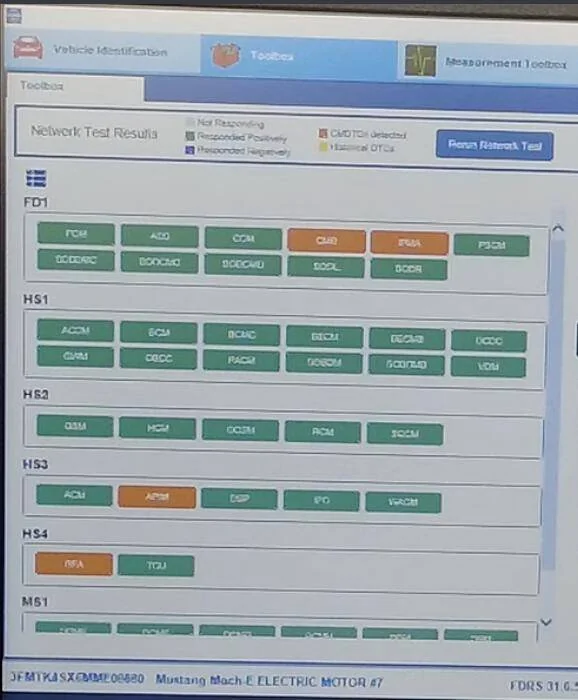
Ford Mustang Mach-E The Complete DIY Guide to Updating Your Mach-E with FDRS 1714800299729-s6


I've got a 2023 GTPE and doing my first go at all this. The video in the first post says not to update some modules? I updated my GWM but how do I know which ones I should and shouldn't update?

Ford Mustang Mach-E The Complete DIY Guide to Updating Your Mach-E with FDRS 1714800387368-uv


Also I grabbed this screencap from the video, but he didn't really seem to touch on the boxes on the left side. Do I just ignore that some of these are other colors?
 

Mike G

Well-Known Member
First Name
Mike
Joined
Mar 27, 2022
Threads
25
Messages
6,458
Reaction score
5,298
Location
N. AL, USA
Vehicles
'23(J1) Mach-E GT-PE, '22 F-150 Lightning, '24 Bronco HLE 2Dr
Country flag
1714800299729-s6.webp


I've got a 2023 GTPE and doing my first go at all this. The video in the first post says not to update some modules? I updated my GWM but how do I know which ones I should and shouldn't update?

1714800387368-uv.webp


Also I grabbed this screencap from the video, but he didn't really seem to touch on the boxes on the left side. Do I just ignore that some of these are other colors?
When starting FDRS the vehicle should initially be "Key On, Engine Off".

Before starting any programming you need to clear and retest to get rid of the orange (or red) module indicators.

Don't try to update something while it's in an error state.

From the Vehicle Identification Tab look for the blue button that says "View CMDTCS" and press that.

Scroll through the list when that refreshes and review the orange (you hope never to see red) module tiles and you can expand the hyperlink text to view the details.

When you've finished the light reading then select the "Clear and retest" button and hopefully all those modules will be reset to a green status. Then head over to the toolbox tab and select SW Updates.

Before you get into any of that let me advise that after you've updated something, you may run into a situation where FDRS throws an error when you try to update whatever your next module selection was. And when you look over to the left side panel all the module tiles are still showing "green". If that happens, go back to the Vehicle Identification tab and once again run the "Clear and retest' button to make sure that the module you're trying to update didn't enter an error state due to the interruption of communication that happens routinely during FDRS programming of some module. FDRS will leave the module tiles in the last state they were in before you started to program a module....if due to comms interruption a module is now in error...you won't know it because the module tile status isn't updated when you're returned to the available software list. So you need to go back and clear and retest as a precaution to make sure you're starting with a green board before launching a new update.

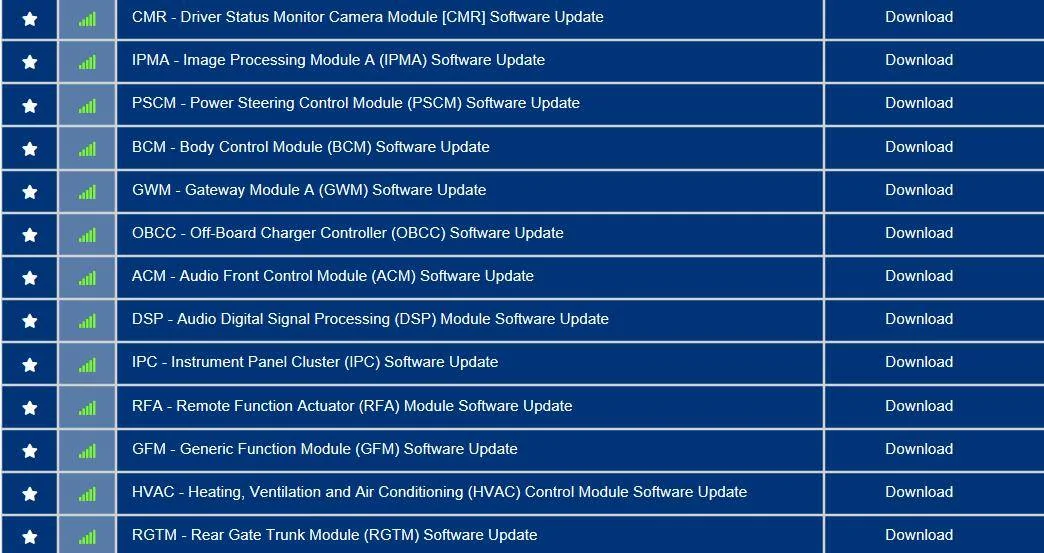
Then, to get your feet wet you can knock down some 'standalone' modules that don't impact other modules functions.....like say the RFA...or the OBCC, or the RGTM, or the HVAC. Then the BCM and GFM.

Do the cruise control related items in this sequence, IPC, SCCM, CMR, IPMA/PSCM (those two are coordinated to update together).

One final note.....after updating a module (or a set of them if they're coordinated) when you are returned to the available software list you may notice that a new update has appeared...it's because something else you just updated has unlocked a dependency and enabled something new to be applied. If at any time a GWM, APIM, TCU, or IPC appears after doing some other update....apply those next, whichever one it was. Those four need to be done when they appear to further unlock future updates.
 
Last edited:


MrLoganRoss

Well-Known Member
First Name
Chris
Joined
Dec 11, 2023
Threads
47
Messages
506
Reaction score
452
Location
Seattle
Vehicles
Mach E
Country flag
Hi. Is anyone getting “cannot reach FDRS servers” when trying to log into the latest version of FDRS? Network diagnostics shows Pass for everything.

Thanks.
 

Snakebitten

Well-Known Member
Joined
Mar 1, 2024
Threads
0
Messages
2,263
Reaction score
3,779
Location
Coastal Texas
Vehicles
2023.5 Mach-E
Country flag
Saturdays aren't usually the problem though.

Have you tried :

Close everything.
Open Edge (browser) and login to your Ford.com account.

Then open FDRS and login (non-dealership) using the same credentials you used for the successful browser login.

The latest version(s) of FDRS use SSO and can be laggy.
Also note that if you accidentally tried the dealership or the ETIS login for FDRS and failed, you need to close everything and start all over.
 

Mike G

Well-Known Member
First Name
Mike
Joined
Mar 27, 2022
Threads
25
Messages
6,458
Reaction score
5,298
Location
N. AL, USA
Vehicles
'23(J1) Mach-E GT-PE, '22 F-150 Lightning, '24 Bronco HLE 2Dr
Country flag
Updated powertrain modules are now in FDRS...GVMS has been lifted.

Remain calm, and try not to alarm others as you gather your laptop, mongoose, powersupply, and beverage in preparation.

Ford Mustang Mach-E The Complete DIY Guide to Updating Your Mach-E with FDRS stopwatch
 

avdonr

Well-Known Member
First Name
Avdon
Joined
Dec 5, 2022
Threads
1
Messages
249
Reaction score
300
Location
Canada
Vehicles
2021 Mustang Mach-E GT PE
Occupation
Software Engineer
Country flag
Updated powertrain modules are now in FDRS...GVMS has been lifted.

Remain calm, and try not to alarm others as you gather your laptop, mongoose, powersupply, and beverage in preparation.

stopwatch.gif
I'm waiting for others to install it before I take the plunge, need to verify it really is fixed :ROFLMAO:
 

Mike G

Well-Known Member
First Name
Mike
Joined
Mar 27, 2022
Threads
25
Messages
6,458
Reaction score
5,298
Location
N. AL, USA
Vehicles
'23(J1) Mach-E GT-PE, '22 F-150 Lightning, '24 Bronco HLE 2Dr
Country flag
One thing I've noticed...PTS shows an ABS update for me...but FDRS doesn't.

I'll find out what happens in a few minutes.
 

Mike G

Well-Known Member
First Name
Mike
Joined
Mar 27, 2022
Threads
25
Messages
6,458
Reaction score
5,298
Location
N. AL, USA
Vehicles
'23(J1) Mach-E GT-PE, '22 F-150 Lightning, '24 Bronco HLE 2Dr
Country flag
One thing I've noticed...PTS shows an ABS update for me...but FDRS doesn't.

I'll find out what happens in a few minutes.
All done and it took 10 minutes.

PCM, BECM and SOBDMC.

There was no ABS....and it's now disappeared from PTS as well.


Go forth and Mongoose.
 

Mach-Lee

Well-Known Member
First Name
Lee
Joined
Jul 16, 2021
Threads
262
Messages
11,382
Reaction score
25,070
Location
Wisconsin
Vehicles
2022 Mach-E Premium AWD
Occupation
Sci/Eng
Country flag
Updated powertrain modules are now in FDRS...GVMS has been lifted.

Remain calm, and try not to alarm others as you gather your laptop, mongoose, powersupply, and beverage in preparation.

stopwatch.gif
The hold on the FSAs is still showing in PTS.

Has there been a new version of powertrain released? Arguably a bit premature in case they are still working on finalizing the config in FDRS.
Sponsored


Top