3 questions

Almondtree

Well-Known Member
First Name
Phyllis
Joined
Nov 6, 2022
Threads
44
Messages
199
Reaction score
76
Location
USA
Vehicles
Mach E
Country flag
1. We are going to Las Vegas in a couple of weeks. We live in Palm Desert. I went to the route planner and it routed me through Needles, CA through Arizona. I don't want to go that way. We always go through Barstow, CA. How can I ask it to give me alternate routes?
2. How do I program I program a route in either the car GPS or Apple GPS (preferred method) to show me to where the charging stations are along the way?
3. How do I check the 12v battery? Do I need to take it to the dealer? I want to make sure it's ok before we take this trip. This is the first long trip we are taking since we've had the car - 2-1/2 years.
Sponsored

 

HuntingPudel

Well-Known Member
First Name
Steve
Joined
Mar 23, 2021
Threads
88
Messages
12,947
Reaction score
17,394
Location
Bay Area, CA
Vehicles
2024 MME GT with Performance Upgrade, 1979 Fire-Am, 1972 K/5 Blazer
Occupation
Engineering
Country flag
First, get A Better Route Planner (ABRP) and PlugShare and use them to plan your charging route. I have only gone on a few trips but I used ABRP and PlugShare and then plugged each charger into my car's GPS as a destination. ??
 

Vgkfan

Well-Known Member
First Name
Keith
Joined
Jul 7, 2022
Threads
4
Messages
400
Reaction score
272
Location
Nevada
Vehicles
2022 mme premium ER AWD 2016 Kia, 2003 Honda
Country flag
You can see 12v % if you go to your account online and click on (your name) account.


Tampamike

Well-Known Member
First Name
Mike
Joined
Feb 19, 2021
Threads
25
Messages
2,076
Reaction score
2,814
Location
Tampa, FL
Vehicles
‘24 Mach E Premium RWD
Country flag
1) When you enter a destination in the car’s onboard nav, it usually will offer you more than one choice of routes. Select the one you want (hopefully one of those goes through Barstow). If Barstow is not an option, just select a rout and touch go. Then find Barstow on the map and add it as a waypoint.

2) The car will automatically add chargers as needed. You may or may not like what it picks - you’ll have to do some homework on PlugShare. If you desire a charger different than the nav-selected one, you can easily replace it if your desired charger is near that one. With the route active, tap on the direction bar at the top of the map. Tap on the undesired charge location. Tap “replace.” You’ll get a list of nearby chargers. Tap on the lightning bolt with three bars at the top of the list which will filter to only high speed chargers. Pick the one you want then tap “replace” and then “go.”
 

Thunderbuck

Well-Known Member
First Name
Brett
Joined
Feb 7, 2020
Threads
9
Messages
447
Reaction score
665
Location
Whitehorse, Yukon
Vehicles
2023 Mustang Mach-E Premium
Occupation
IT Tech
Country flag
Apple Maps DOES provide charging information. You have to go into the settings and tell it what car you have, and then you can search for routes there and it will tell you what chargers are available on your route.
 

MBCook

Well-Known Member
Joined
Mar 20, 2022
Threads
23
Messages
394
Reaction score
626
Location
USA
Vehicles
2021 Mach E AWD ER, Infinite Metallic Blue
Country flag
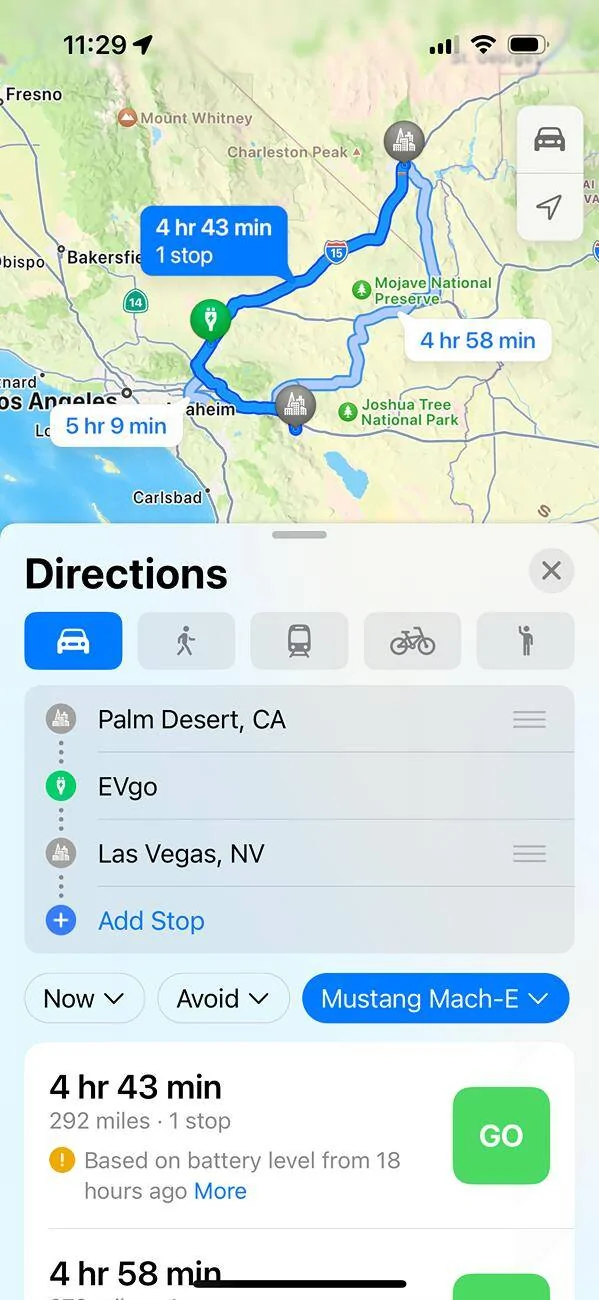
Thunderbuck is right. Here’s what Apple Map shows me when I enter your cities:

Ford Mustang Mach-E 3 questions IMG_4351


That EVgo stop was added automatically, and the fact it’s necessary was also based on my last known charge level (when I was last using CarPlay).

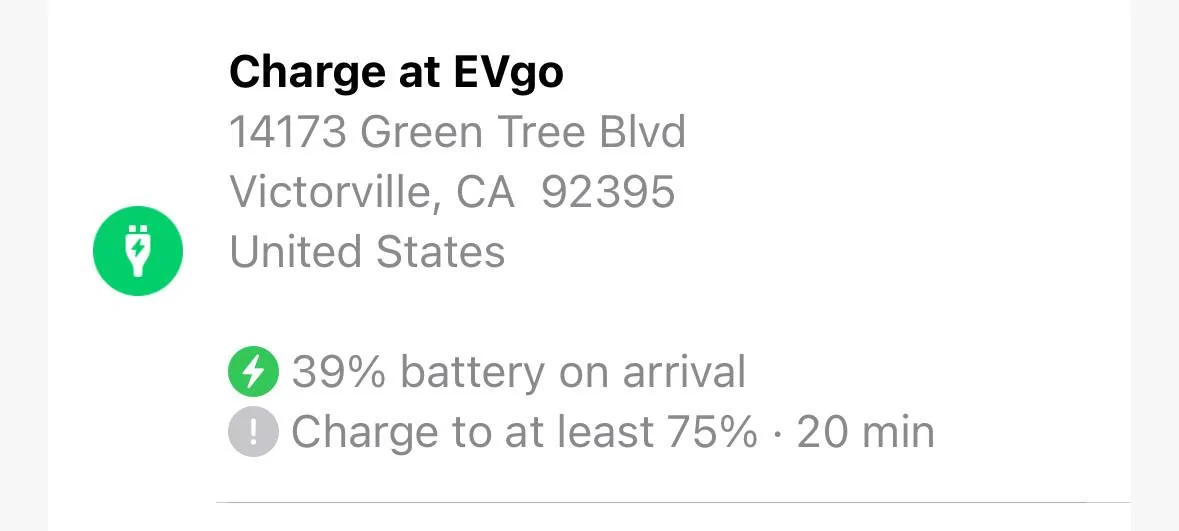
If I look at the route details, it even shows more info!

Ford Mustang Mach-E 3 questions IMG_4352
 

Sikkun

Well-Known Member
Joined
May 9, 2024
Threads
3
Messages
1,777
Reaction score
3,396
Location
USA
Vehicles
2023 Mach E
Country flag
Apple Maps seems to be about 20% off on their estimates for me sadly. Convinced it doesn’t know I have the extended range battery.
 

Thunderbuck

Well-Known Member
First Name
Brett
Joined
Feb 7, 2020
Threads
9
Messages
447
Reaction score
665
Location
Whitehorse, Yukon
Vehicles
2023 Mustang Mach-E Premium
Occupation
IT Tech
Country flag
Apple Maps seems to be about 20% off on their estimates for me sadly. Convinced it doesn’t know I have the extended range battery.
I doubt that's the issue. Apple Maps IS able to read your current state of charge, but there can be a lag.

Besides, I'd much rather Maps makes its estimates too conservatively.
 

67 Stang Convertible

Well-Known Member
First Name
Rich
Joined
Jan 27, 2021
Threads
51
Messages
1,694
Reaction score
2,455
Location
Georgia, USA
Vehicles
1967 Mustang, 2013 Kia Optima, 2018 Kia Sportage
Occupation
Physician
Country flag
BTW, ABRP now let's you toggle a button (digitally of course) if you have a Tesla Adapter. So it now shows NACS and CCS chargers along your route. Just discovered this am, was planning a trip.
Why can't Ford do this on the native navigation???
 

Sikkun

Well-Known Member
Joined
May 9, 2024
Threads
3
Messages
1,777
Reaction score
3,396
Location
USA
Vehicles
2023 Mach E
Country flag
I doubt that's the issue. Apple Maps IS able to read your current state of charge, but there can be a lag.

Besides, I'd much rather Maps makes its estimates too conservatively.
I’m fine with conservative…but telling me I can’t make it home when I show up with a 27% charge is not very usable IMO.

Yes it adjust while your driving, but from a planning app…it’ll tell you things are impossible.
 

MBCook

Well-Known Member
Joined
Mar 20, 2022
Threads
23
Messages
394
Reaction score
626
Location
USA
Vehicles
2021 Mach E AWD ER, Infinite Metallic Blue
Country flag
I really like Apple Maps in general. For something like this with one stop I’d probably just use it.

For something much longer I’d consult with ABRP and maybe others for my route, then stick it into Apple Maps marking out the charging stops myself if needed.

That way I still get the interface and turn by turn directions on the little screen.
 

electric-in-the-desert

Well-Known Member
Joined
May 18, 2023
Threads
1
Messages
217
Reaction score
385
Location
Phoenix
Vehicles
23 GT
Occupation
Computer Engineer
Country flag
I’m fine with conservative…but telling me I can’t make it home when I show up with a 27% charge is not very usable IMO.

Yes it adjust while your driving, but from a planning app…it’ll tell you things are impossible.
Plus it’s a pain (if not impossible) to switch chargers. I love Apple Maps day to day, but it’s not great for EV roadtripping
 

dtbaker61

Well-Known Member
First Name
Dan
Joined
May 11, 2020
Threads
126
Messages
4,822
Reaction score
4,525
Location
santa fe,nm
Website
www.envirokarma.org
Vehicles
MME (delivered 2/26/21), DIY eMiata BEV
Occupation
Solar Sales/install
Country flag
3. How do I check the 12v battery? Do I need to take it to the dealer? I want to make sure it's ok before we take this trip. This is the first long trip we are taking since we've had the car - 2-1/2 years.
12v battery health (remaining capacity) is hard to measure until you start seeing any kind of warnings.

Fortunately, roads trips with hours of driving and hours of re-charging are great for the 12v. So, try not to worry about the 12v.... ;) one thing you *could* do to avoid surprises is turn OFF your auto-update setting while you are travelling so nothing mysteriously changes while you are on the road.
Sponsored


Top