Can anyone help? Ford? TCU is broken and no one knows what to do...

phil2kx

Active Member
First Name
Philipp
Joined
Nov 12, 2021
Threads
3
Messages
40
Reaction score
26
Location
Germany
Vehicles
Ford Mustang Mach E SR RWD
Country flag
@Ford Motor Company

Hello,

today, I'm writing here in the American forum because no one else can help me anymore. I'm based in Germany with a "German" Mach-E. I'm holding out a bit of hope that maybe @Ford Motor Company is reading this, or someone else can do something. So, let me provide my case number with Ford right away. Maybe someone can access it: CAS-48782864-C7L1B3.

Here's the short version of the story. My Mach-E is from July 2021, Job 1. I bought the vehicle new at that time. I've been driving Ford vehicles here in Germany, Europe, for many years. Since August of last year, I noticed that my vehicle was no longer receiving updates. However, everything was still functioning at that point. I didn’t want to hassle my dealer, so I ignored it for a while. That was a mistake (because the vehicle is now out of the two-year warranty and I would have to cover the costs myself - over EUR 1.600... However, I could possibly file a goodwill claim with Ford - but at this point, that's almost a side issue... :( ).

Eventually, at the beginning of 2024, I reached out to Ford and contacted them via email. I dealt with some very nice people, and engineers also checked the log files and my vehicle remotely. They then tried to restart the update process or push the pending updates. This apparently led to an error, causing the system to crash, which drained the 12-volt battery. I suspect that this might have affected more modules or other components because, as a result, my TCU basically failed.

After months of back and forth (partly because my dealer here in Germany had no idea about the issue and apparently doesn’t really understand electric vehicles), it took until just about a week and a half ago for the vehicle to finally get an appointment at the dealer. The dealer told me that they had already installed three new TCUs, and two of those modules apparently failed shortly after installation. The third module seems to be working in general, but according to them, they can’t get the latest software onto the module, which means the vehicle still has no connectivity. Because of this, the FordPass app doesn’t work, and neither does connected navigation, etc.

I’m still in close contact with Ford in Europe. However, they’re just telling the dealer to install yet another new TCU because a fault code (with something like 3000?!) suggests the current TCU module is defective again. But honestly, no one seems to know what's really going on. The vehicle has now been sitting in the shop for a week and a half. The dealer says he doesn’t want to install another TCU because he’s already installed two, and the technical hotline from Ford insists on it.
EDIT: Is TSB 22-2404 a solution? Does it apply to "german" vehicles / is there a way for my dealer to get it in German? (31) TSB 22-2404 - Revised TSB for Stuck USB Updates | MachEforum - Ford Mustang Mach-E News, Owners, Discussions, Community

So now I’m stuck, and no one knows what to do. Can anyone, maybe if Ford Motor Company is reading this from the USA, get in touch using my case number? Can anyone do something? I desperately need help. I’m really at my wit's end.

I've been driving Ford vehicles my entire life, including a Mondeo (European Fusion), a Mustang V6, a Mustang V8, a Ford Focus, a Ford Fiesta.... I've been a loyal and dedicated Ford driver my entire life, but what's happening with this three-year-old Mach-E right now is unbelievable. :(
Sponsored

 
Last edited:

Mike G

Well-Known Member
First Name
Mike
Joined
Mar 27, 2022
Threads
25
Messages
6,458
Reaction score
5,298
Location
N. AL, USA
Vehicles
'23(J1) Mach-E GT-PE, '22 F-150 Lightning, '24 Bronco HLE 2Dr
Country flag
Your car's TCU is working fine.

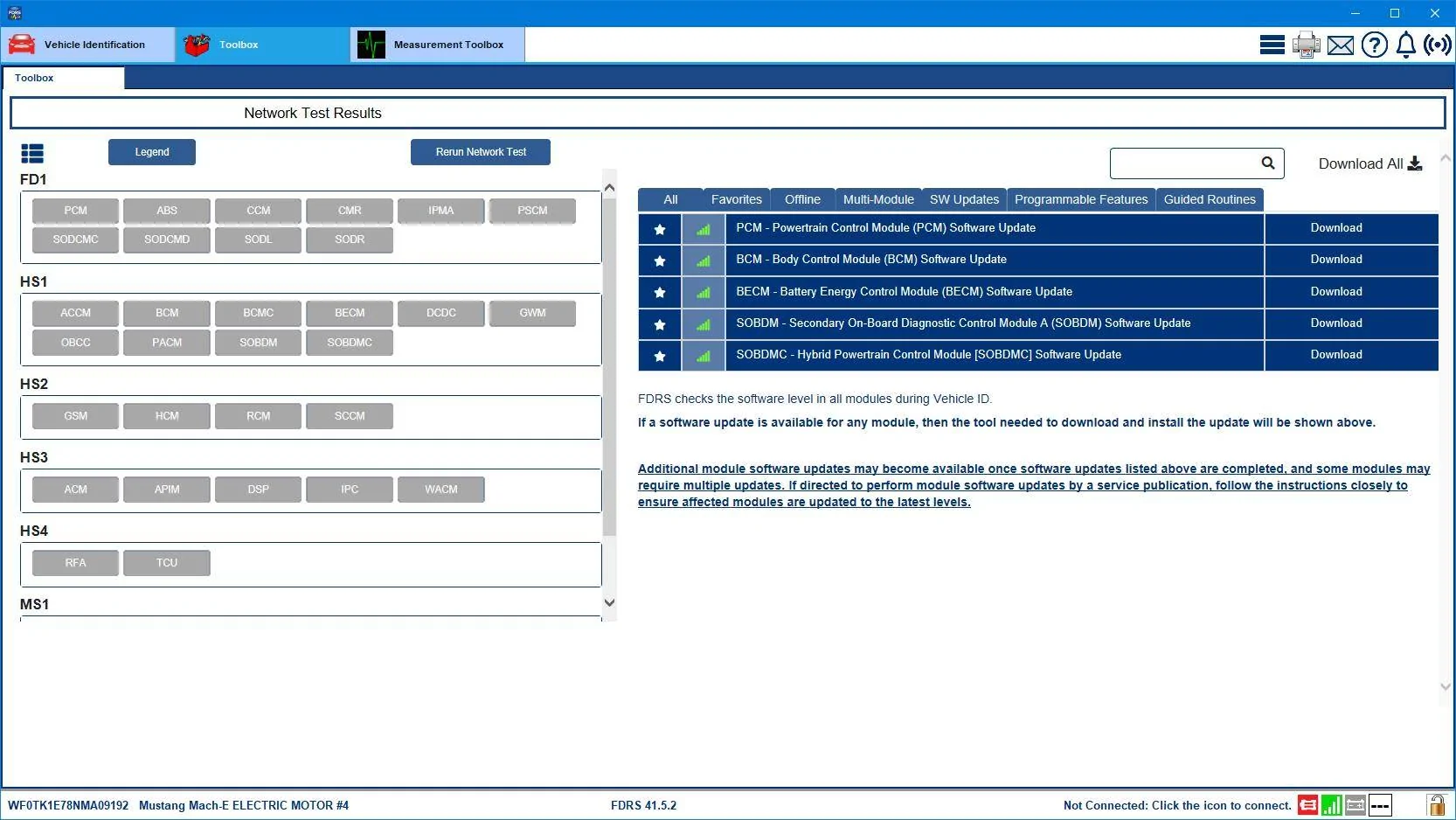
The only available updates you show in FDRS are for the body controller and a subset of the powertrain modules:
Ford Mustang Mach-E Can anyone help? Ford? TCU is broken and no one knows what to do... WF0TK1E78NMA09192-23-Aug-24Updates


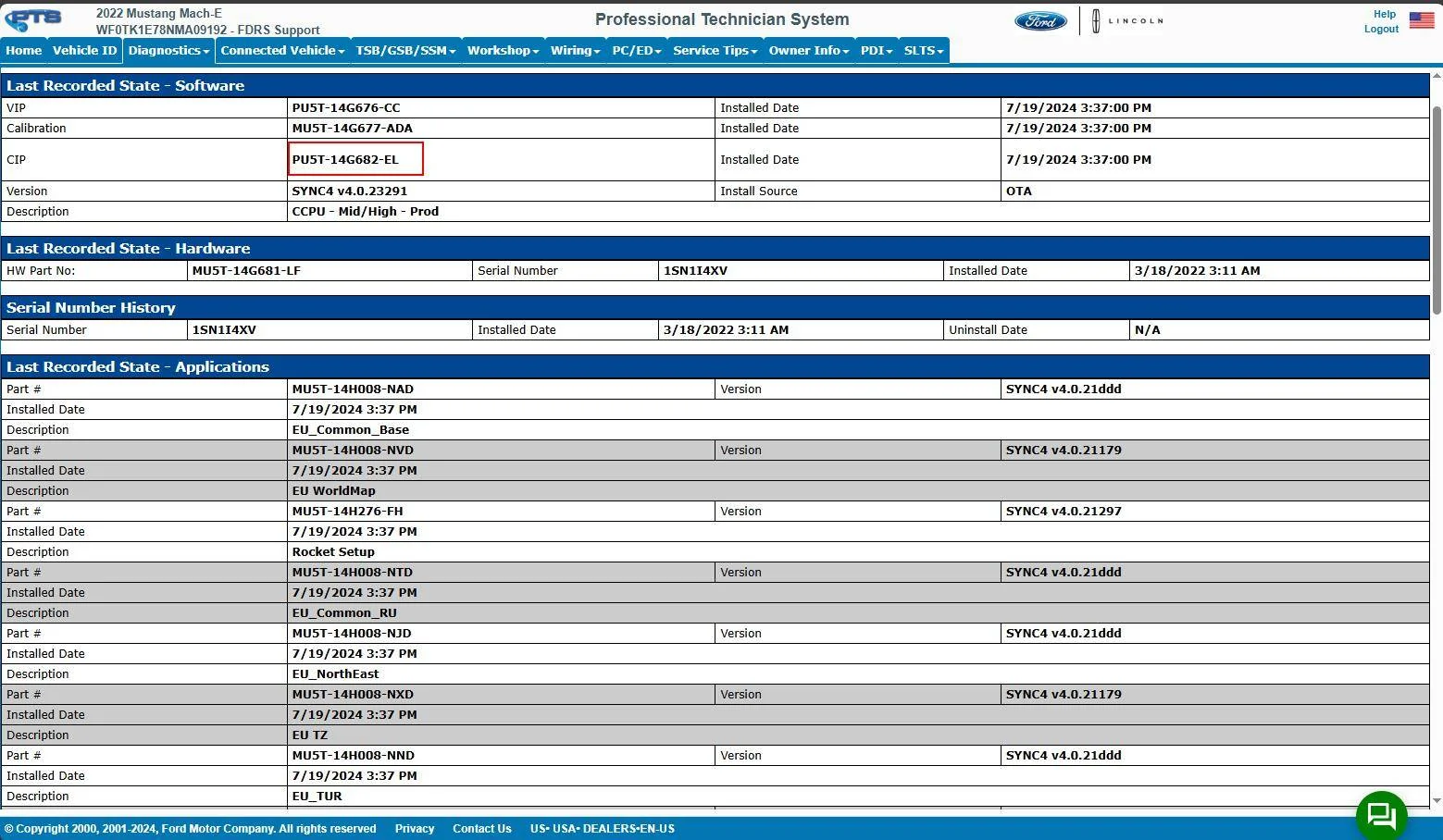
Your Sync version is -EL and that was installed in July. That's only two revisions behind the North American cars (-EM and then -DA as the new Sync 1122).
Ford Mustang Mach-E Can anyone help? Ford? TCU is broken and no one knows what to do... WF0TK1E78NMA09192-23-Aug-24Sync


You aren't that far behind at all.
 
Last edited:

Snakebitten

Well-Known Member
Joined
Mar 1, 2024
Threads
0
Messages
2,263
Reaction score
3,779
Location
Coastal Texas
Vehicles
2023.5 Mach-E
Country flag
Amazing.

Why would any tech or engineer believe seriously in multiple faulty TCUs?

It's so intellectually lazy
 
OP
OP
phil2kx

phil2kx

Active Member
First Name
Philipp
Joined
Nov 12, 2021
Threads
3
Messages
40
Reaction score
26
Location
Germany
Vehicles
Ford Mustang Mach E SR RWD
Country flag
View attachment 131637

This is your Vehicle Health report from PTS.

Your car's TCU is working fine, or we wouldn't be looking at this page of DTCs.

The only available updates you show in FDRS are for the body controller and a subset of the powertrain modules:
WF0TK1E78NMA09192-23-Aug-24Updates.png


Your Sync version is -EL and that was installed in July. That's only two revisions behind the North American cars (-EM and then -DA as the new Sync 1122).
WF0TK1E78NMA09192-23-Aug-24Sync.png


You aren't that far behind at all.

Oh man. For a second, I had hope. But the screenshots show a different VIN. That's not my vehicle. My VIN is: WF0TK1EM6MMA30790. The data in the screenshot is also for a 2022 Mach-E, but mine is a 2021 model. Could you take another look?
 

Mike G

Well-Known Member
First Name
Mike
Joined
Mar 27, 2022
Threads
25
Messages
6,458
Reaction score
5,298
Location
N. AL, USA
Vehicles
'23(J1) Mach-E GT-PE, '22 F-150 Lightning, '24 Bronco HLE 2Dr
Country flag
Oh man. For a second, I had hope. But the screenshots show a different VIN. That's not my vehicle. My VIN is: WF0TK1EM6MMA30790. The data in the screenshot is also for a 2022 Mach-E, but mine is a 2021 model. Could you take another look?
I can certainly. First thing tomorrow.


jmgreen

Well-Known Member
First Name
Joerg
Joined
Apr 27, 2023
Threads
1
Messages
117
Reaction score
61
Location
Germany
Vehicles
Mach-E 2022 RWD-ER
Country flag
Oh man. For a second, I had hope. But the screenshots show a different VIN. That's not my vehicle. My VIN is: WF0TK1EM6MMA30790. The data in the screenshot is also for a 2022 Mach-E, but mine is a 2021 model. Could you take another look?
Yes, indeed. @Mike G, this VIN is mine. :giggle: Thanks a lot for the read-out!! :)
Philipp used this VIN within the FDRS discussion as a reference for another German model. And now I know how good your VIN database is. :)
 

Mike G

Well-Known Member
First Name
Mike
Joined
Mar 27, 2022
Threads
25
Messages
6,458
Reaction score
5,298
Location
N. AL, USA
Vehicles
'23(J1) Mach-E GT-PE, '22 F-150 Lightning, '24 Bronco HLE 2Dr
Country flag
I can certainly. First thing tomorrow.
@phil2kx
So now to the correct VIN:

PTS landing page says this TCU is "Not Authorized", which accounts for everything. No communication is going to happen if that's the case. It could be a bad TCU (again?) but that seems pretty unlikely, but possible. Since this "Not Authorized" also happens when a car is purchased used and the dealership doesn't go into Sync and do a "Master Reset" to clear out the previous owner's settings, that would be the first thing to try.

Obviously, after doing a Sync Master Reset, you would need to setup FP and PAAK again.

After doing the Master Reset in Sync, a clue that your TCU is now talking to the cloud is this icon on the top row of your Sync screen:
Ford Mustang Mach-E Can anyone help? Ford? TCU is broken and no one knows what to do... Connected_Vehicl

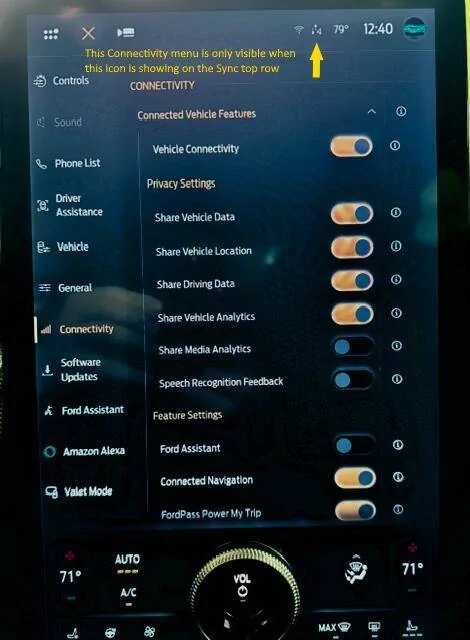
When you do see this icon it is the only time that Sync will let you access the Connectivity Settings to check and make sure you don't have your privacy settings completely locked down. You want your settings to look like this for everything to work:
Ford Mustang Mach-E Can anyone help? Ford? TCU is broken and no one knows what to do... Connectivity


However, if you've done the Sync Master Reset, setup FordPass again, and there's still no connectivity, then it's likely you'll have to go back to the service tech.

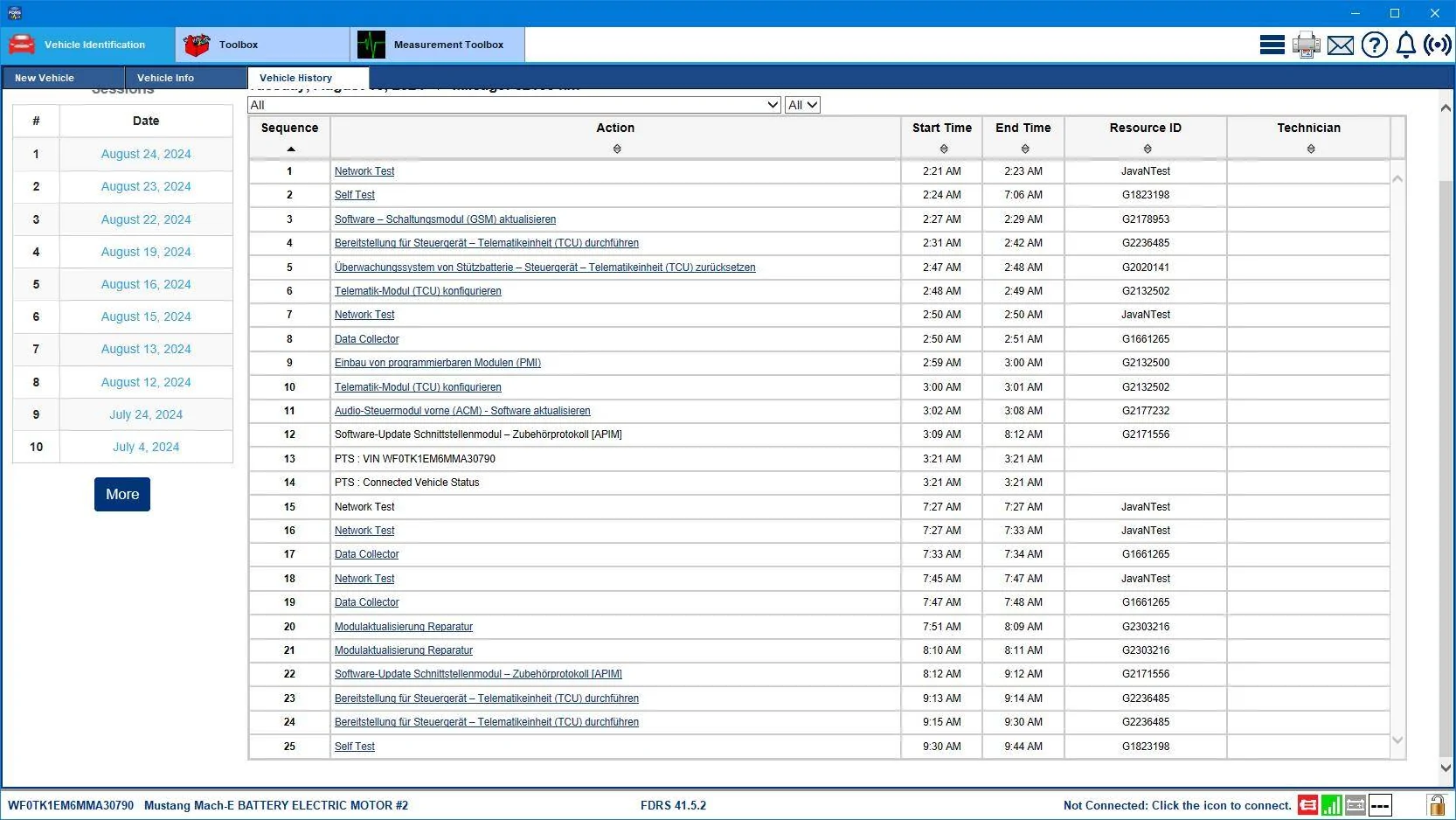
Here's a recent FDRS work session showing the tech trying to do a PMI to sort out your TCU. Notice the times. None of those times are long enough for the process to work. A TCU software update (or a PMI for that matter) is USB based. So the software is downloaded to a USB drive and that drive is inserted into the USB port in the console and the car is turned on and allowed to update the module with the USB drive contents. It can take 1-2 minutes for the USB drive to be recognized and then the car is turned off and left to sit for 10 minutes so that the A/B switch takes place, and then the car is restarted to complete the update acknowledgement and software QC check by FDRS.
Ford Mustang Mach-E Can anyone help? Ford? TCU is broken and no one knows what to do... WF0TK1EM6MMA30790-24-Aug-24Work

My German is very rusty at this point, but that's why we have the internet:
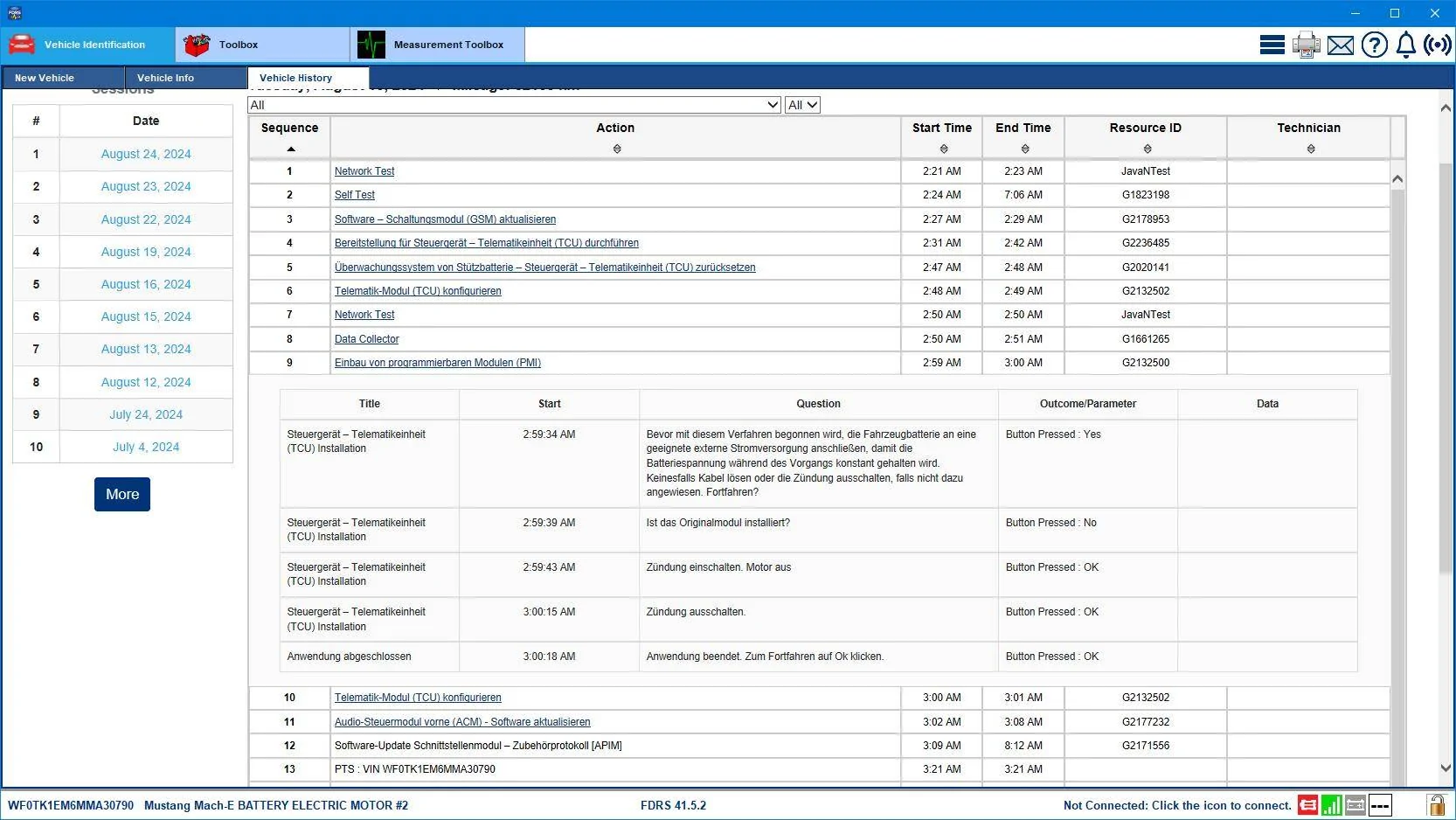
There were several attempts to configure the TCU and 'sort of' an attempt to do a PMI (reinstallation of the existing module with fresh software). The reason I say 'sort of' is that doing a PMI to refresh the software on any module would take more than 44 seconds to accomplish (Early morning times shown are due to the timezone differences between where I live and where the car was serviced). (Oh, and the appearance that the APIM was updated in this work session is just that, an appearance, because the APIM did not in fact get updated during this session).

So check this out:
Ford Mustang Mach-E Can anyone help? Ford? TCU is broken and no one knows what to do... WF0TK1EM6MMA30790-24-Aug-24Work2

44 seconds to do a PMI? I don't think so.
Tech then proceeded to do a configuration of the TCU and eventually (line 24) got that to work.

I think after doing a Sync Master Reset and setting up FP and PAAK (PAAK is actually optional really) if you don't see the Connectivity icon on the top row of your Sync screen you should tell your service advisor that you want the car looked at again because the previous work done while the car was still under warranty was not completed satisfactorily. Meaning this was a faulty repair, so there's no reason you should be required to pay anything if the previous work was not done correctly under warranty. And also, tell them you want a Field Service Engineer involved in the repair effort the next time.

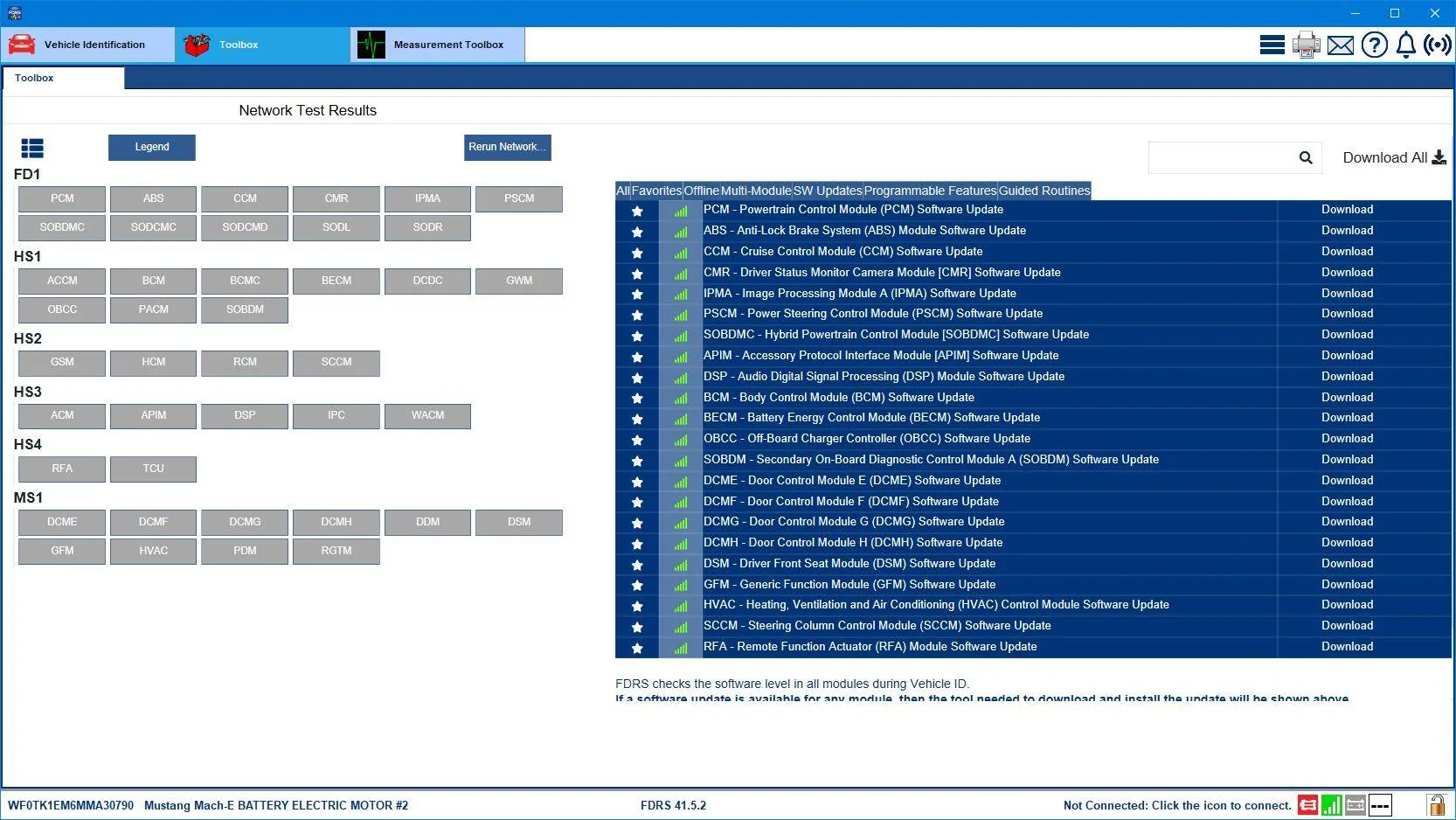
Here's the list of available software showing in FDRS for your VIN:
Ford Mustang Mach-E Can anyone help? Ford? TCU is broken and no one knows what to do... WF0TK1EM6MMA30790-24-Aug-24


Your OTA Dashboard shows that the cloud has tried to send your car an APIM update three times unsuccessfully.
 
Last edited:
OP
OP
phil2kx

phil2kx

Active Member
First Name
Philipp
Joined
Nov 12, 2021
Threads
3
Messages
40
Reaction score
26
Location
Germany
Vehicles
Ford Mustang Mach E SR RWD
Country flag
Oh my God. I can’t believe how much effort you put into this. I’m so grateful! I’ll pass the information on to Ford Germany and my dealer! A HUGE THANK YOU for now! I don’t think I would have gotten anywhere without your help!
?


EDIT: Do you have any idea what it could be if the dealer claims they can’t communicate with any of the cars modules? Is there any evidence in your FDRS data to support this claim?!

I’m still completely amazed that someone thousands of miles away is helping me with this. It’s so incredible. God bless you.
 
Last edited:

B177y

Well-Known Member
First Name
Bill
Joined
Sep 17, 2023
Threads
16
Messages
422
Reaction score
638
Location
Olympic Peninsula, WA
Vehicles
'23 J2 MME Premium, '24 Lightning Pro ER, '20 Bolt
Country flag
Oh my God. I can’t believe how much effort you put into this. I’m so grateful! I’ll pass the information on to Ford Germany and my dealer! A HUGE THANK YOU for now! I don’t think I would have gotten anywhere without your help!
?
I agree. This forum is full of MME rockstars!!
 
OP
OP
phil2kx

phil2kx

Active Member
First Name
Philipp
Joined
Nov 12, 2021
Threads
3
Messages
40
Reaction score
26
Location
Germany
Vehicles
Ford Mustang Mach E SR RWD
Country flag
@phil2kx
So now to the correct VIN:

PTS landing page says this TCU is "Not Authorized", which accounts for everything. No communication is going to happen if that's the case. It could be a bad TCU (again?) but that seems pretty unlikely, but possible. Since this "Not Authorized" also happens when a car is purchased used and the dealership doesn't go into Sync and do a "Master Reset" to clear out the previous owner's settings, that would be the first thing to try.

View attachment 131664

Obviously, after doing a Sync Master Reset, you would need to setup FP and PAAK again.

After doing the Master Reset in Sync, a clue that your TCU is now talking to the cloud is this icon on the top row of your Sync screen:
Connected_Vehicle.png

When you do see this icon it is the only time that Sync will let you access the Connectivity Settings to check and make sure you don't have your privacy settings completely locked down. You want your settings to look like this for everything to work:
Connectivity.png


However, if you've done the Sync Master Reset, setup FordPass again, and there's still no connectivity, then it's likely you'll have to go back to the service tech.

Here's a recent FDRS work session showing the tech trying to do a PMI to sort out your TCU. Notice the times. None of those times are long enough for the process to work. A TCU software update (or a PMI for that matter) is USB based. So the software is downloaded to a USB drive and that drive is inserted into the USB port in the console and the car is turned on and allowed to update the module with the USB drive contents. It can take 1-2 minutes for the USB drive to be recognized and then the car is turned off and left to sit for 10 minutes so that the A/B switch takes place, and then the car is restarted to complete the update acknowledgement and software QC check by FDRS.
WF0TK1EM6MMA30790-24-Aug-24Work.png

My German is very rusty at this point, but that's why we have the internet:
There were several attempts to configure the TCU and 'sort of' an attempt to do a PMI (reinstallation of the existing module with fresh software). The reason I say 'sort of' is that doing a PMI to refresh the software on any module would take more than 44 seconds to accomplish (Early morning times shown are due to the timezone differences between where I live and where the car was serviced). (Oh, and the appearance that the APIM was updated in this work session is just that, an appearance, because the APIM did not in fact get updated during this session).

So check this out:
WF0TK1EM6MMA30790-24-Aug-24Work2.png

44 seconds to do a PMI? I don't think so.
Tech then proceeded to do a configuration of the TCU and eventually (line 24) got that to work.

I think after doing a Sync Master Reset and setting up FP and PAAK (PAAK is actually optional really) if you don't see the Connectivity icon on the top row of your Sync screen you should tell your service advisor that you want the car looked at again because the previous work done while the car was still under warranty was not completed satisfactorily. Meaning this was a faulty repair, so there's no reason you should be required to pay anything if the previous work was not done correctly under warranty. And also, tell them you want a Field Service Engineer involved in the repair effort the next time.

Here's the list of available software showing in FDRS for your VIN:
WF0TK1EM6MMA30790-24-Aug-24.png


And here's your OTA Dashboard showing that the cloud has tried to send your car an APIM update three times unsuccessfully.
View attachment 131673

Still no response from Ford or the dealer up to now. Would you be so kind and maybe check again if they've done any more work on the car? ??
Thank you so much.
 

Mike G

Well-Known Member
First Name
Mike
Joined
Mar 27, 2022
Threads
25
Messages
6,458
Reaction score
5,298
Location
N. AL, USA
Vehicles
'23(J1) Mach-E GT-PE, '22 F-150 Lightning, '24 Bronco HLE 2Dr
Country flag
Still no response from Ford or the dealer up to now. Would you be so kind and maybe check again if they've done any more work on the car? ??
Thank you so much.
We are exactly where we were last week. No change.
 
OP
OP
phil2kx

phil2kx

Active Member
First Name
Philipp
Joined
Nov 12, 2021
Threads
3
Messages
40
Reaction score
26
Location
Germany
Vehicles
Ford Mustang Mach E SR RWD
Country flag
We are exactly where we were last week. No change.
Thank you, Sir!


Unbelievable, all of it. I passed along the info you gave me, and it has reached Ford Germany, and they’re looking into it… got that info a few minutes ago.

But according to Ford Germany, the first step is to install a new TCU again because it is possible that a wrong TCU was installed twice. The dealer needs to double-check the serial number and order a new one specifically for the Mach E. Can you believe that?! I called my dealer a few minutes ago and he is on it now, and they say they’ll have the new TCU by tomorrow and will give me an update.

Does that sound plausible? Could it be that a TCU for a different Ford model was installed?
 

zvez

Banned
Banned
First Name
chris
Joined
Dec 31, 2020
Threads
13
Messages
2,441
Reaction score
2,344
Location
ga
Vehicles
2023 GT PE Carbonized Grey with Nite Pony package
Occupation
retired
Country flag
@phil2kx
So now to the correct VIN:

PTS landing page says this TCU is "Not Authorized", which accounts for everything. No communication is going to happen if that's the case. It could be a bad TCU (again?) but that seems pretty unlikely, but possible. Since this "Not Authorized" also happens when a car is purchased used and the dealership doesn't go into Sync and do a "Master Reset" to clear out the previous owner's settings, that would be the first thing to try.

View attachment 131664

Obviously, after doing a Sync Master Reset, you would need to setup FP and PAAK again.

After doing the Master Reset in Sync, a clue that your TCU is now talking to the cloud is this icon on the top row of your Sync screen:
Connected_Vehicle.png

When you do see this icon it is the only time that Sync will let you access the Connectivity Settings to check and make sure you don't have your privacy settings completely locked down. You want your settings to look like this for everything to work:


However, if you've done the Sync Master Reset, setup FordPass again, and there's still no connectivity, then it's likely you'll have to go back to the service tech.

Here's a recent FDRS work session showing the tech trying to do a PMI to sort out your TCU. Notice the times. None of those times are long enough for the process to work. A TCU software update (or a PMI for that matter) is USB based. So the software is downloaded to a USB drive and that drive is inserted into the USB port in the console and the car is turned on and allowed to update the module with the USB drive contents. It can take 1-2 minutes for the USB drive to be recognized and then the car is turned off and left to sit for 10 minutes so that the A/B switch takes place, and then the car is restarted to complete the update acknowledgement and software QC check by FDRS.

My German is very rusty at this point, but that's why we have the internet:
There were several attempts to configure the TCU and 'sort of' an attempt to do a PMI (reinstallation of the existing module with fresh software). The reason I say 'sort of' is that doing a PMI to refresh the software on any module would take more than 44 seconds to accomplish (Early morning times shown are due to the timezone differences between where I live and where the car was serviced). (Oh, and the appearance that the APIM was updated in this work session is just that, an appearance, because the APIM did not in fact get updated during this session).

So check this out:

44 seconds to do a PMI? I don't think so.
Tech then proceeded to do a configuration of the TCU and eventually (line 24) got that to work.

I think after doing a Sync Master Reset and setting up FP and PAAK (PAAK is actually optional really) if you don't see the Connectivity icon on the top row of your Sync screen you should tell your service advisor that you want the car looked at again because the previous work done while the car was still under warranty was not completed satisfactorily. Meaning this was a faulty repair, so there's no reason you should be required to pay anything if the previous work was not done correctly under warranty. And also, tell them you want a Field Service Engineer involved in the repair effort the next time.

Here's the list of available software showing in FDRS for your VIN:


And here's your OTA Dashboard showing that the cloud has tried to send your car an APIM update three times unsuccessfully.
An amazingly informative post. It's troubling that apparently ford doesn't have trained field service guys in germany to help service techs out?
 

zvez

Banned
Banned
First Name
chris
Joined
Dec 31, 2020
Threads
13
Messages
2,441
Reaction score
2,344
Location
ga
Vehicles
2023 GT PE Carbonized Grey with Nite Pony package
Occupation
retired
Country flag
Oh my God. I can’t believe how much effort you put into this. I’m so grateful! I’ll pass the information on to Ford Germany and my dealer! A HUGE THANK YOU for now! I don’t think I would have gotten anywhere without your help!
?


EDIT: Do you have any idea what it could be if the dealer claims they can’t communicate with any of the cars modules? Is there any evidence in your FDRS data to support this claim?!

I’m still completely amazed that someone thousands of miles away is helping me with this. It’s so incredible. God bless you.
It's how MikeG, Mach Lee and several others on this board roll! Great tech depth on this forum.
Sponsored


Top