Deleted member 26087

Guest
Hi Mustang Mach-E owners,

We’re excited to announce that compatible Tesla Superchargers are coming to Connected Navigation! This feature will be available from the factory for the 2025 Mustang Mach-E.

Here’s how it will work:

Adapter Needed

To charge at Tesla Superchargers, you’ll need a Fast Charging Adapter.
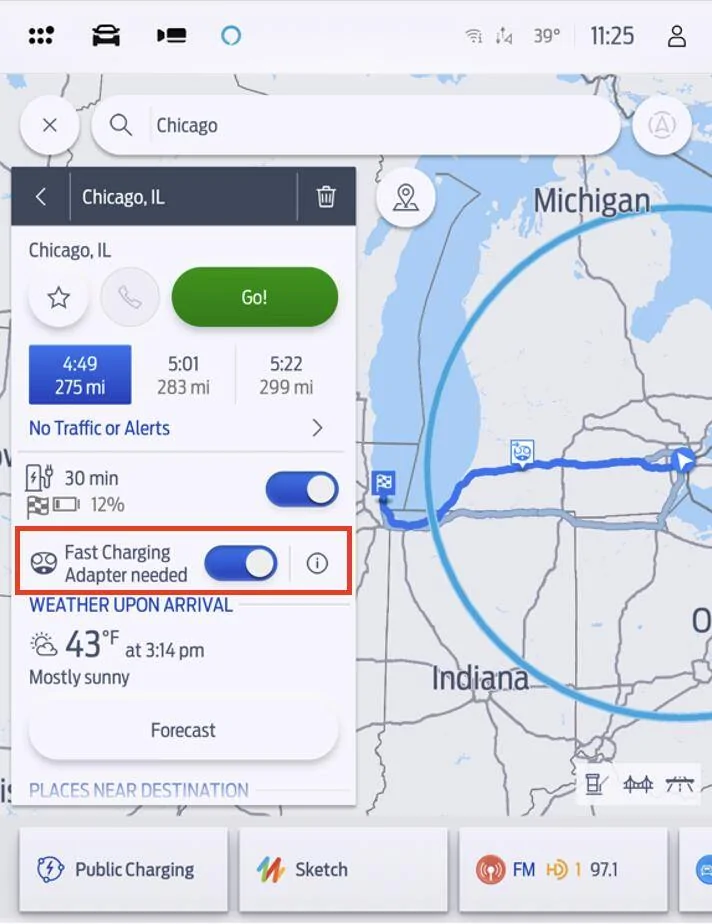
Now when you start a route in Connected Navigation, you will see a new toggle: Fast Charging Adapter needed.

01 - Toggle.jpg


If you don’t have an adapter, or don’t have it with you, turning this toggle off will remove stations that require an adapter from route plans and the charger search view. To restore Tesla Superchargers to route plans and charger searches, toggle it back on.

To learn more about charging with adapters, please visit ford.com/fastchargingadapter

To purchase a Fast Charging Adapter when available, please visit go.ford/fordadapter

Routing With Tesla Superchargers


When starting a route to a destination, Connected Navigation will automatically calculate if charging is required. If the Fast Charging Adapter needed toggle is enabled, Connected Navigation will choose from all DC Fast Chargers, including compatible Tesla Superchargers and other fast chargers which require an adapter.

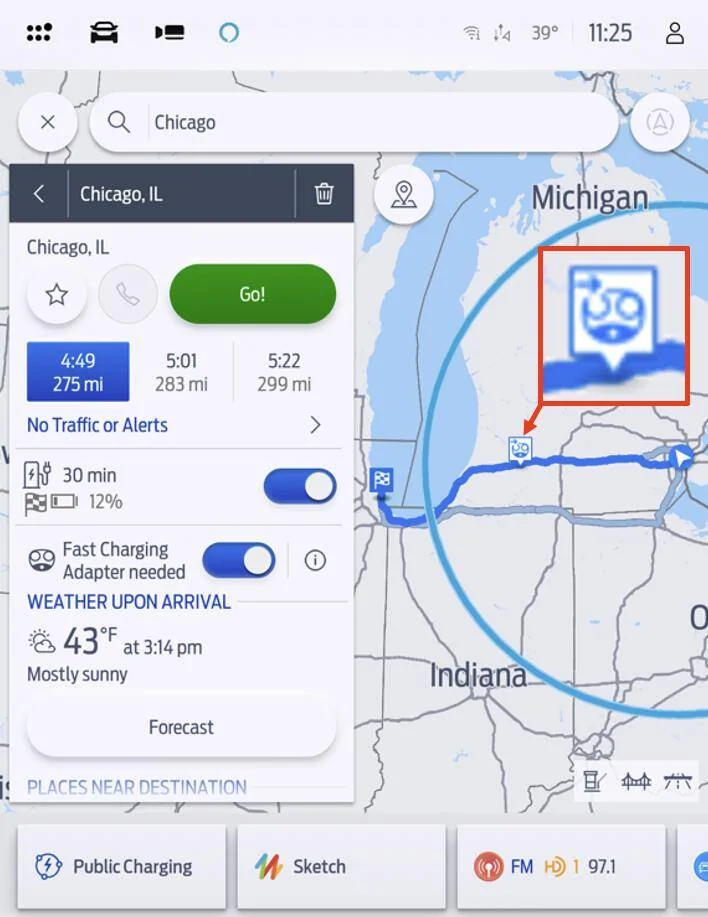
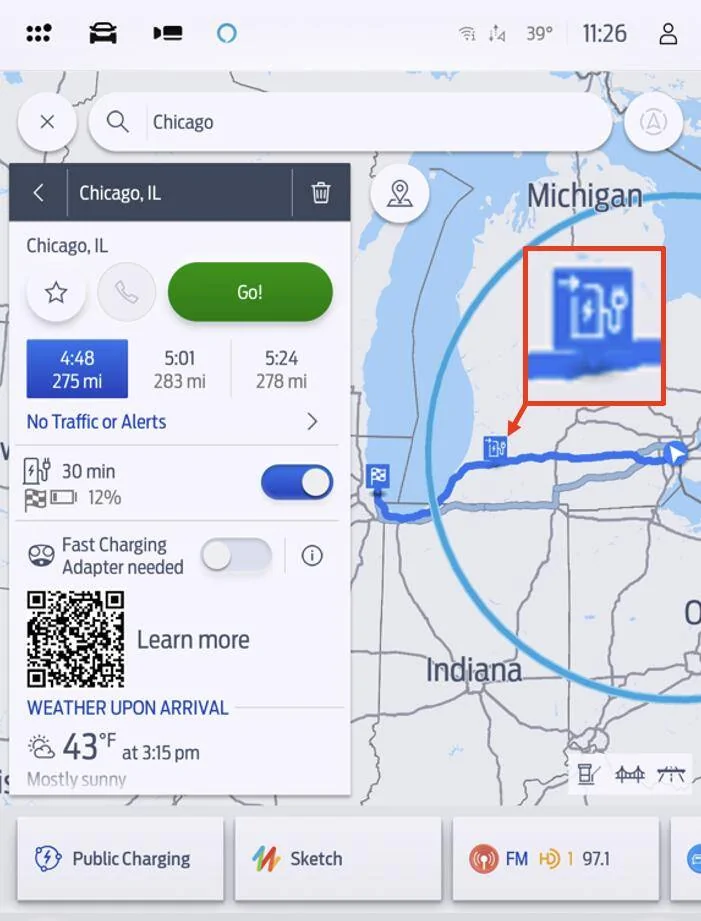
When a station is added to your route plan, charge stops will have a unique icon to indicate which stops require an adapter:

Stations which require an adapter will be noted with an image of the NACS plug:

02 - NACS POI Highlight.jpg


Stations which do not require an adapter will be noted with a blue charging station:

03 - CCS or J1772 POI Highlight.jpg


Finding Superchargers Manually

To locate chargers manually, tap Where to? and then tap Chargers.

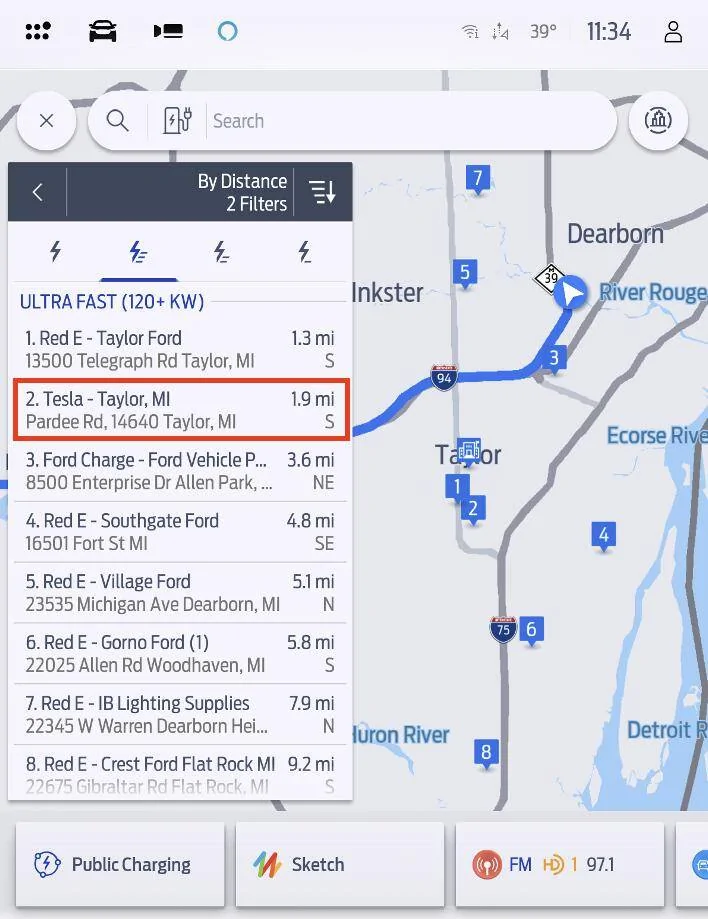
Compatible Tesla Superchargers are all Ultra Fast (120+ kW), so to find them easier, tap the Ultra Fast filter. They will appear in the list display:

04 - Tesla In List.jpg


If Tesla Superchargers don’t appear, make sure the Fast Charging Adapter needed toggle is on by searching for a destination and confirming the status of the toggle.

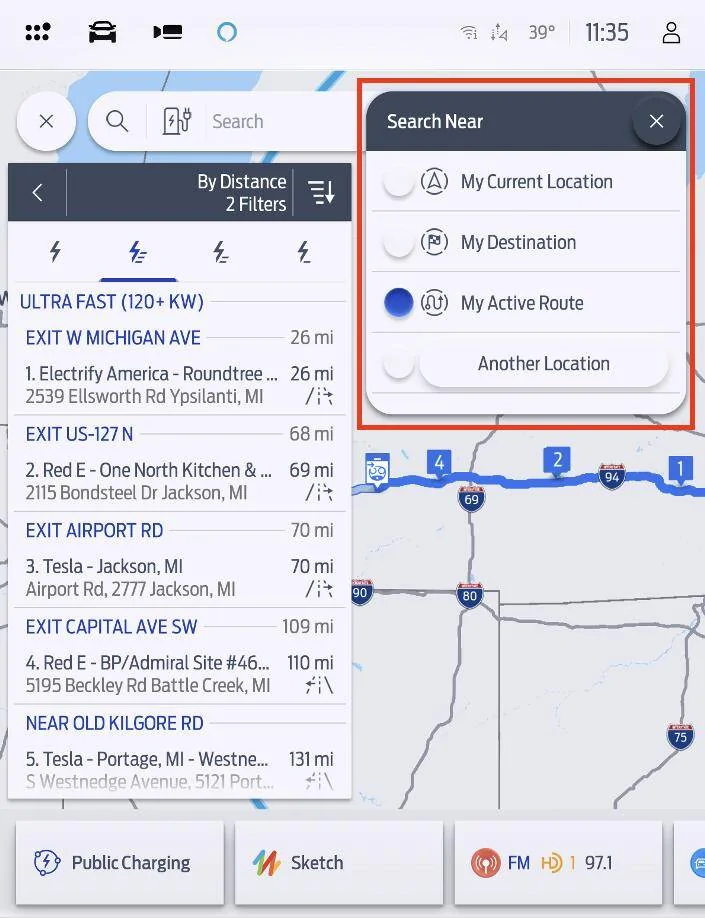
Note that you can also use Connected Navigation to find chargers in another location, or only ahead of you along your active route. To change where you’re looking at chargers, tap the Search Near menu at the top of the screen and choose from the available options:

05 - Search Near.jpg

  • My Current Location – Find the chargers closest to your location, in any direction
  • My Destination – Find chargers near the destination of your active route
  • My Active Route – Find chargers that are ahead of you along your active route
  • Another Location – Search for chargers anywhere.
Incompatible Chargers

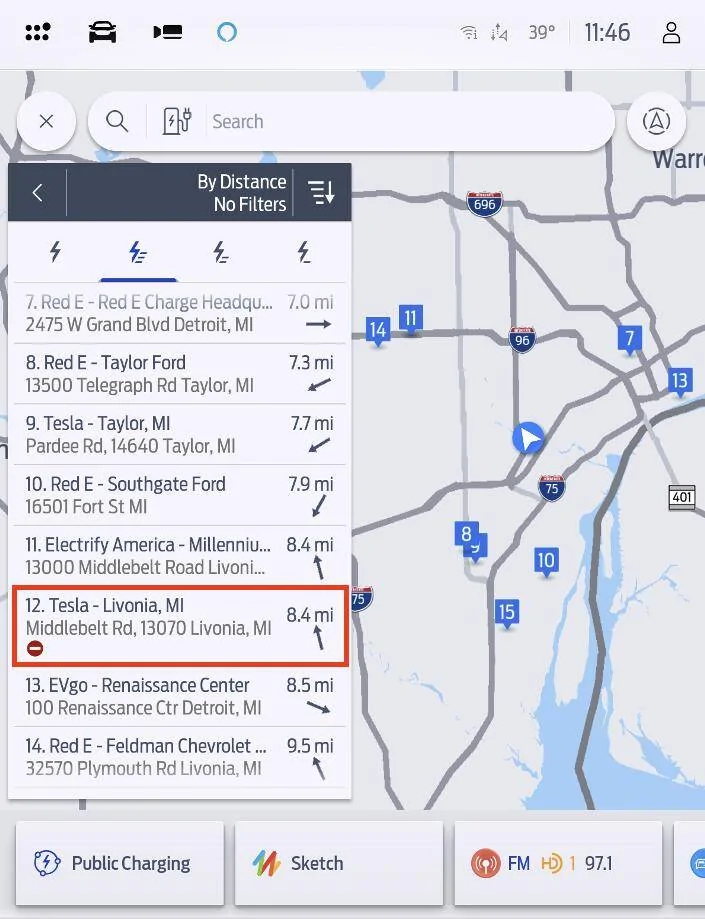
Not all Tesla Superchargers are open to non-Tesla vehicles. When you enter a destination Connected Navigation will only include stations that are open to Ford vehicles in your route plan. However, to provide a complete listing of all charging stations, stations that are incompatible are listed when manually viewing chargers unless the Available and Open filter is selected. These stations will appear accompanied by a ⛔ symbol.

06 - Incompatible Tesla In List.jpg


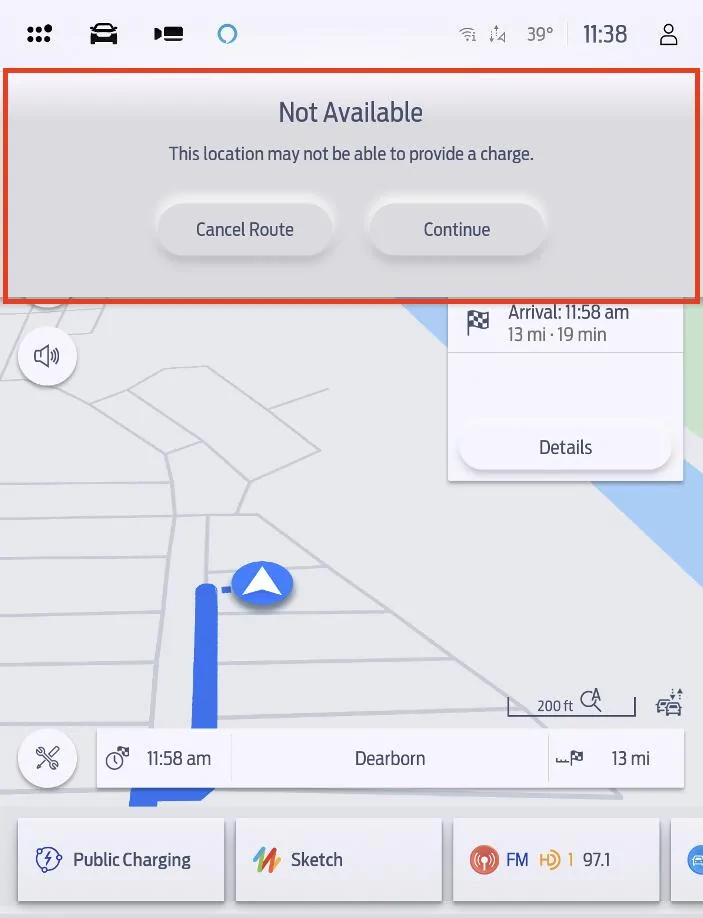
If you manually select these chargers, you may see a warning message appear notifying you that you have selected an incompatible station. If you aren’t expecting to see this message, select Cancel Route and choose another charger.

07 - Not Available.jpg


Frequently Asked Questions:

Do I need to use Connected Navigation? Can I use Apple CarPlay or Android Auto to find Tesla Superchargers?

Connected Navigation is one option to find Tesla Superchargers. Android users can also use Google Maps EV Routing for Android Auto to find Superchargers. For Apple CarPlay users, Apple Maps will soon add Tesla Supercharger support.

Does Connected Navigation precondition my battery for fast charging?
Yes, Connected Navigation will precondition your vehicle’s battery when heading to a known fast charger. For more on preconditioning visit go.ford/evroadtrip

How do I pay for charging at Tesla Superchargers?
Compatible Tesla Superchargers are part of the BlueOval Charge Network feature Plug & Charge, so simply plugging in your vehicle is all it takes – your BlueOval Charge Network account will be automatically used for payment. And like all networks within the BlueOval Charge Network, you can also use the FordPass® app to pay for charging.

Is there a cost to use Connected Navigation?
Connected Navigation is a connected service with a complimentary 3-year trial included for electric vehicles.
  • For 2025 MY Mustang Mach-E, Connected Navigation will be available via the paid Connectivity Package after the expiration of the 3-year trial.
  • For prior model year Mustang Mach-E, Connected Navigation/Connected Built-In Navigation (as equipped) is available as a standalone paid subscription after the expiration of the 3-year trial
Thank you and happy charging!

Robert and Brian
BS - OUT OF STOCK!
Sponsored


Tbird

Well-Known Member
First Name
Denny
Joined
Sep 24, 2021
Threads
9
Messages
295
Reaction score
309
Location
New Hampshire
Vehicles
Mach E4x 2021 job 1, 2024 Kia EV6 GT-Line Trim
Country flag
Hi,

Human Brian here, not AI ;)

The information we have shared is to serve as a master how-to for reference for 2025MY owners - providing proactive information that is helpful. We will announce more about software updates when they become available.

Thanks for all the engagement on this topic and stay tuned for more updates!

-Human Brian (not AI) from Ford
Brian Human:

I currently have a paid active subscription for the connected navigation services but do not have this update for Tesla charging locations. I will not be renewing my subscription without assurances that the update will come either before my renewal fee is due or with the renewal of the connected navigation services. I am tired of the "stayed tuned and soon" messages.

I would think there are others who would agree with this position.
 
Last edited:

emersonsdad

Well-Known Member
First Name
Pablo
Joined
Dec 17, 2021
Threads
9
Messages
285
Reaction score
274
Location
Cali
Vehicles
22 MME CA R1
Country flag
Thank you human Brian, looking forward to this OTA the most. I really love connected navigation,
and don't want to use Apple Maps or Google Maps for my long trips that require charging.

(Although Apple Maps is super handy for short trips, e.g. "hey siri, directions to my friend Sarah's house")
You call Sarah a friend but don’t know how to get to her house? ??‍♂


Jimrpa

Well-Known Member
First Name
Jim
Joined
Sep 10, 2020
Threads
297
Messages
9,514
Reaction score
12,847
Location
Wayne, PA
Vehicles
2021 Infinite Blue Premium Mustang Mach E ER AWD
Occupation
Retied (formerly tried to herd highly technical, independent cats)
Country flag
What is the point of this navigator? It is the worst I have ever tried in my life. It is useless. Cars that are less expensive have better navigators than those in the Mach E. Invest more in the software of this vehicle because the truth is it is embarrassing.
Clearly, you’ve never driven a Hyundai Ionic 5 ?
 

DYohn

Well-Known Member
First Name
David
Joined
Jul 3, 2021
Threads
34
Messages
1,519
Reaction score
2,572
Location
Valley of the Sun
Vehicles
2021 Mach E Premium Ex
Country flag
This is great for 2025 owners. But I don't plan to purchase a 2025 to get this required functionality. When will it "trickle down" to previous MY vehicles?
 

Jimrpa

Well-Known Member
First Name
Jim
Joined
Sep 10, 2020
Threads
297
Messages
9,514
Reaction score
12,847
Location
Wayne, PA
Vehicles
2021 Infinite Blue Premium Mustang Mach E ER AWD
Occupation
Retied (formerly tried to herd highly technical, independent cats)
Country flag
Hehe. According to Out of Spec, the new CCN software is much better.
A 1985 paper Rand McNally map would be better than their pathetic excuse for a nav system (and, according to a buddy of mine who had one two weeks ago, hyundai haven’t markedly improved since I last used one).
 

silverelan

Well-Known Member
Joined
Nov 25, 2019
Threads
131
Messages
3,685
Reaction score
5,390
Location
Seattle
Vehicles
2021 Mustang Mach-E GT, 2019 Bolt EV
Country flag
Hi Mustang Mach-E owners,

We’re excited to announce that compatible Tesla Superchargers are coming to Connected Navigation! This feature will be available from the factory for the 2025 Mustang Mach-E.

Here’s how it will work:

Adapter Needed

To charge at Tesla Superchargers, you’ll need a Fast Charging Adapter.
Now when you start a route in Connected Navigation, you will see a new toggle: Fast Charging Adapter needed.

01 - Toggle.jpg


If you don’t have an adapter, or don’t have it with you, turning this toggle off will remove stations that require an adapter from route plans and the charger search view. To restore Tesla Superchargers to route plans and charger searches, toggle it back on.

To learn more about charging with adapters, please visit ford.com/fastchargingadapter

To purchase a Fast Charging Adapter when available, please visit go.ford/fordadapter

Routing With Tesla Superchargers


When starting a route to a destination, Connected Navigation will automatically calculate if charging is required. If the Fast Charging Adapter needed toggle is enabled, Connected Navigation will choose from all DC Fast Chargers, including compatible Tesla Superchargers and other fast chargers which require an adapter.

When a station is added to your route plan, charge stops will have a unique icon to indicate which stops require an adapter:

Stations which require an adapter will be noted with an image of the NACS plug:

02 - NACS POI Highlight.jpg


Stations which do not require an adapter will be noted with a blue charging station:

03 - CCS or J1772 POI Highlight.jpg


Finding Superchargers Manually

To locate chargers manually, tap Where to? and then tap Chargers.

Compatible Tesla Superchargers are all Ultra Fast (120+ kW), so to find them easier, tap the Ultra Fast filter. They will appear in the list display:

04 - Tesla In List.jpg


If Tesla Superchargers don’t appear, make sure the Fast Charging Adapter needed toggle is on by searching for a destination and confirming the status of the toggle.

Note that you can also use Connected Navigation to find chargers in another location, or only ahead of you along your active route. To change where you’re looking at chargers, tap the Search Near menu at the top of the screen and choose from the available options:

05 - Search Near.jpg

  • My Current Location – Find the chargers closest to your location, in any direction
  • My Destination – Find chargers near the destination of your active route
  • My Active Route – Find chargers that are ahead of you along your active route
  • Another Location – Search for chargers anywhere.
Incompatible Chargers

Not all Tesla Superchargers are open to non-Tesla vehicles. When you enter a destination Connected Navigation will only include stations that are open to Ford vehicles in your route plan. However, to provide a complete listing of all charging stations, stations that are incompatible are listed when manually viewing chargers unless the Available and Open filter is selected. These stations will appear accompanied by a ⛔ symbol.

06 - Incompatible Tesla In List.jpg


If you manually select these chargers, you may see a warning message appear notifying you that you have selected an incompatible station. If you aren’t expecting to see this message, select Cancel Route and choose another charger.

07 - Not Available.jpg


Frequently Asked Questions:

Do I need to use Connected Navigation? Can I use Apple CarPlay or Android Auto to find Tesla Superchargers?

Connected Navigation is one option to find Tesla Superchargers. Android users can also use Google Maps EV Routing for Android Auto to find Superchargers. For Apple CarPlay users, Apple Maps will soon add Tesla Supercharger support.

Does Connected Navigation precondition my battery for fast charging?
Yes, Connected Navigation will precondition your vehicle’s battery when heading to a known fast charger. For more on preconditioning visit go.ford/evroadtrip

How do I pay for charging at Tesla Superchargers?
Compatible Tesla Superchargers are part of the BlueOval Charge Network feature Plug & Charge, so simply plugging in your vehicle is all it takes – your BlueOval Charge Network account will be automatically used for payment. And like all networks within the BlueOval Charge Network, you can also use the FordPass® app to pay for charging.

Is there a cost to use Connected Navigation?
Connected Navigation is a connected service with a complimentary 3-year trial included for electric vehicles.
  • For 2025 MY Mustang Mach-E, Connected Navigation will be available via the paid Connectivity Package after the expiration of the 3-year trial.
  • For prior model year Mustang Mach-E, Connected Navigation/Connected Built-In Navigation (as equipped) is available as a standalone paid subscription after the expiration of the 3-year trial
Thank you and happy charging!

Robert and Brian
can you guys let me know when this is available for 2021s? Thanks!
 

HuntingPudel

Well-Known Member
First Name
Steve
Joined
Mar 23, 2021
Threads
88
Messages
12,927
Reaction score
17,370
Location
Bay Area, CA
Vehicles
2024 MME GT with Performance Upgrade, 1979 Fire-Am, 1972 K/5 Blazer
Occupation
Engineering
Country flag
Soon™️
So if it's available for 2021s "Soon™" will it be available for 2024s earlier than "Soon™" or later than "Soon™?" Enquiring minds (and canines) want to know! ??
 

Jimrpa

Well-Known Member
First Name
Jim
Joined
Sep 10, 2020
Threads
297
Messages
9,514
Reaction score
12,847
Location
Wayne, PA
Vehicles
2021 Infinite Blue Premium Mustang Mach E ER AWD
Occupation
Retied (formerly tried to herd highly technical, independent cats)
Country flag
So if it's available for 2021s "Soon™" will it be available for 2024s earlier than "Soon™" or later than "Soon™?" Enquiring minds (and canines) want to know! ??
So, Soon™️ is relative and depends on your frame of reference. You’re going to have to look at where your light cone and the light cone of Ford’s galactic supercomputer intersect to determine when Soon™️ is for you. Of course, if Ford deploys this super-luminally, your Soon™️ could occur before Ford actually presses the Deploy button (according to an external observer in their own frame of reference).

Hope that clears things up for you ??
 

garyd9

Well-Known Member
First Name
Gary
Joined
Jun 2, 2024
Threads
14
Messages
887
Reaction score
1,247
Location
Pittsburgh, PA (USA)
Vehicles
2023 Mach-E GT
Country flag
So if it's available for 2021s "Soon™" will it be available for 2024s earlier than "Soon™" or later than "Soon™?" Enquiring minds (and canines) want to know! ??
This question, and many others, will be answered.. soon.
 

Colorado MME GT

Well-Known Member
First Name
Greg
Joined
Jul 27, 2024
Threads
2
Messages
112
Reaction score
234
Location
Aurora, CO USA
Vehicles
2023 Mach-E GT
Occupation
Retired Traveling Fool
Country flag
So, Soon™️ is relative and depends on your frame of reference. You’re going to have to look at where your light cone and the light cone of Ford’s galactic supercomputer intersect to determine when Soon™️ is for you. Of course, if Ford deploys this super-luminally, your Soon™️ could occur before Ford actually presses the Deploy button (according to an external observer in their own frame of reference).

Hope that clears things up for you ??
In case Ford staff haven't read their own boss's quotes, let me remind them (this could apply to many things, including a precondition button, adding basic HVAC buttons at the top of the screen, etc):

Jim Farley on the Peril of Ignoring Customers: "Not listening to customers is dangerous".
Sponsored


Top