Does Navigation Map show traffic conditions?

MYOUTH

Well-Known Member
First Name
Steven
Joined
Mar 18, 2021
Threads
20
Messages
71
Reaction score
61
Location
St Louis
Vehicles
Lincoln MKX, Proud Owner of a Premium SR RWD
Occupation
Retired
Country flag
Does the map on the navigation screen not show the green, orange and red lines to indicate traffic contions
Sponsored
 

Kabish

Well-Known Member
First Name
Bill
Joined
Jul 24, 2021
Threads
40
Messages
927
Reaction score
977
Location
San Diego
Vehicles
2021 Mach-E Mustang
Occupation
IT
Country flag
Does the map on the navigation screen not show the green, orange and red lines to indicate traffic contions
Yes, it does show traffic, you might have to turn it on though. There is even a little pop up that I use daily that shows any slow downs on the road you are driving on.
 

WildfireOne

Well-Known Member
Joined
Dec 20, 2019
Threads
2
Messages
103
Reaction score
102
Location
Southern California
Vehicles
First Edition
Country flag
Does the map on the navigation screen not show the green, orange and red lines to indicate traffic contions
The answer is that the built-in navigation does NOT show traffic conditions in green, orange, and red... because it doesn't show GREEN.

If there's no slowdowns, the map will have essentially the same display seen with traffic conditions toggled off. Which I actually don't like, so my preference is to use Google Maps in Android Auto (What you described with the various colors is what you'd see using Google Maps)


TRP

Well-Known Member
First Name
Tim
Joined
Jun 23, 2021
Threads
77
Messages
1,264
Reaction score
1,456
Location
37841
Vehicles
Mach E P4x, Ford F150
Country flag
It will also show orange and purple
 

WildfireOne

Well-Known Member
Joined
Dec 20, 2019
Threads
2
Messages
103
Reaction score
102
Location
Southern California
Vehicles
First Edition
Country flag
Yup, which brings me to why I don't like the built-in navigation choice to not show green as normal.

I understand why normal flow is not a different color (like green), as it makes the display less cluttered. The eye is drawn to the highlighted colors that are abnormal flows, and that's what you want. I get it.

However, traffic data is notoriously spotty across different car makers (especially Toyota) in my locale, so I can't immediately tell if traffic data is not working OR there's no slowdowns, if normal flow is not designated green.
Additionally, there are some streets where traffic data are simply unavailable...and if normal flow is not designated green, then I'll have no idea if that's normal flow or no data available for that street.

Which is why I use Google Maps routinely. Green means normal. No color means undefined or no data available. Again, a personal choice, and to each his own.

But don't tell the OP (@MYOUTH) that the built-in navigation shows GREEN because, sorry, it literally and technically does not show GREEN.
 
Last edited:

Kabish

Well-Known Member
First Name
Bill
Joined
Jul 24, 2021
Threads
40
Messages
927
Reaction score
977
Location
San Diego
Vehicles
2021 Mach-E Mustang
Occupation
IT
Country flag
Is it accurate
I find it accurate.

There is an icon at the bottom left of the navigation, I think its like a gear box looking thing. You can click on that then click on Traffic and it adds a pop up. Its supposed to show any "upcoming" traffic on the road you are traveling on. Wish it would actually stay up, but it resets anytime you power cycle the car. I typically always put it up as an additional way to see upcoming traffic.
 

SnBGC

Well-Known Member
First Name
Greg
Joined
Apr 20, 2020
Threads
46
Messages
5,962
Reaction score
9,778
Location
Phoenix
Vehicles
2021 Mach-E FE, 2021 Wrangler 4xe High Altitude
Occupation
Manager
Country flag
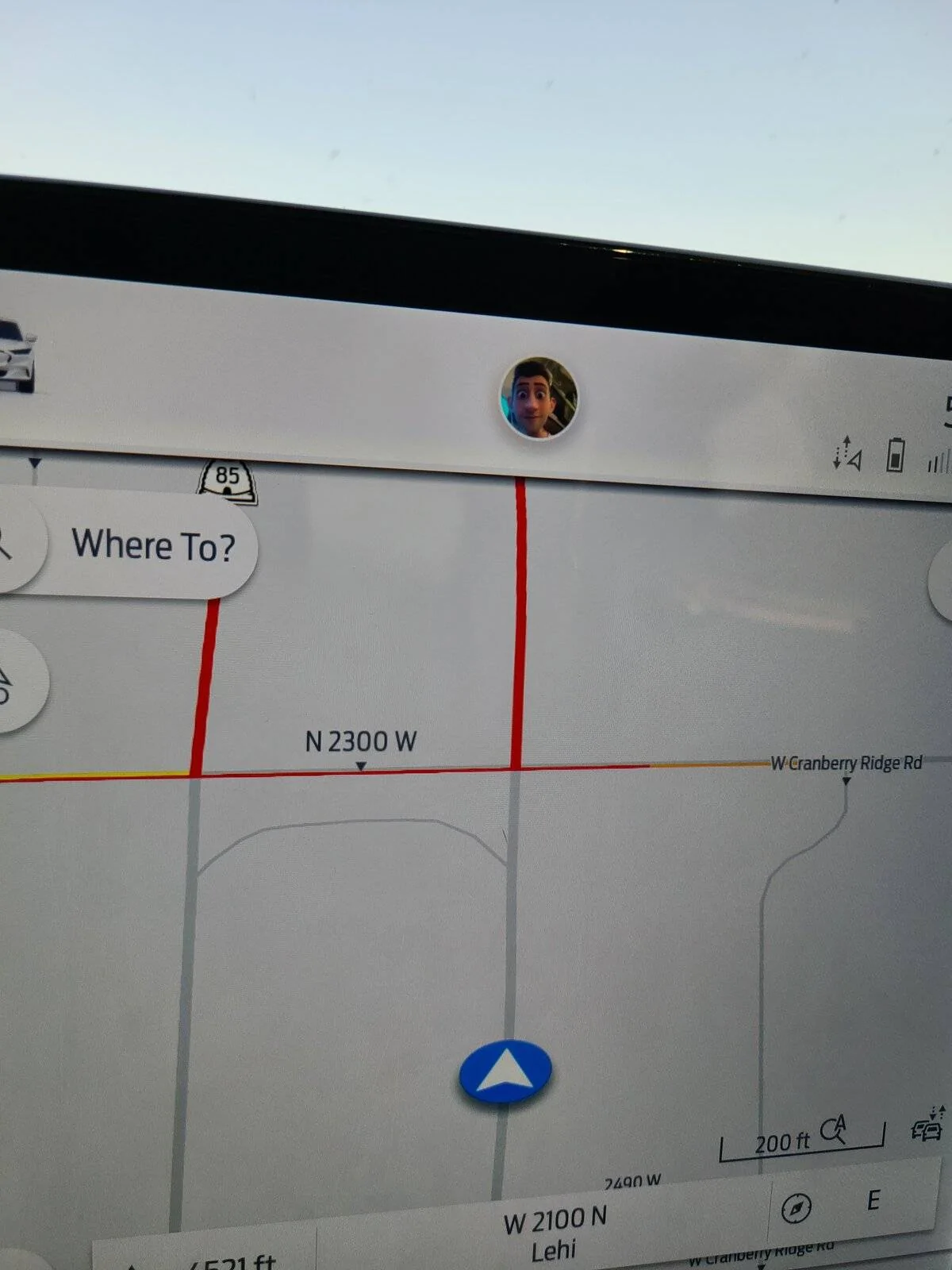
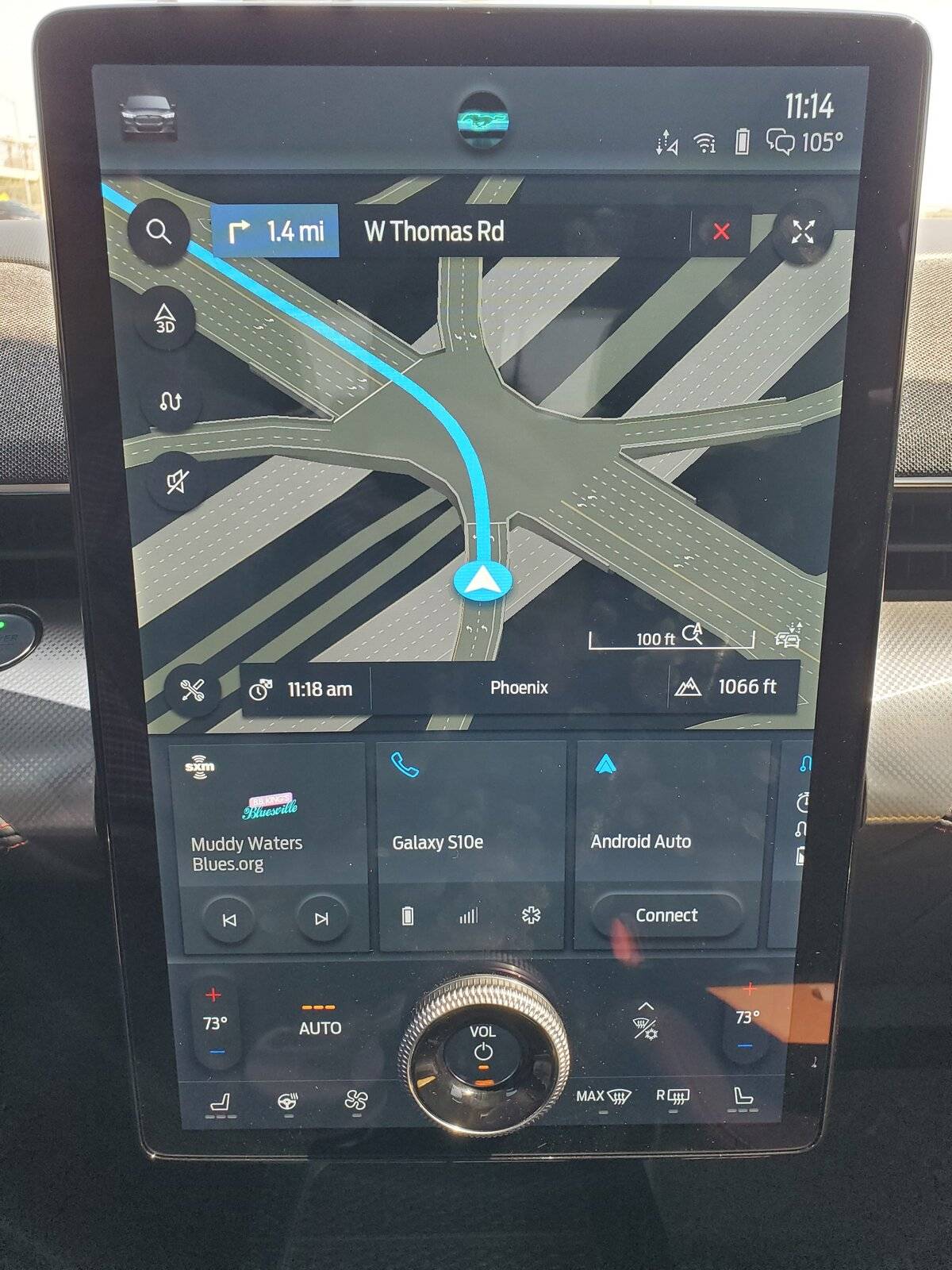
The native nav works very well for me. Going from memory....I think red is traffic jamb, yellow is heavy traffic, I think purple is construction or maybe an accident? Blue is the route if you have a destination programmed and white is a turn I think.....? There might be more colors that I can't remember....

Seems pretty nice to me. I suppose Green would be okay too. It might make it more clear when you see yellow on the opposite highway direction while your route is clear.....like the last photo attached. ?
Ford Mustang Mach-E Does Navigation Map show traffic conditions? 20210913_111429


Ford Mustang Mach-E Does Navigation Map show traffic conditions? 20210907_115723


Ford Mustang Mach-E Does Navigation Map show traffic conditions? 20210907_085147
 

TRP

Well-Known Member
First Name
Tim
Joined
Jun 23, 2021
Threads
77
Messages
1,264
Reaction score
1,456
Location
37841
Vehicles
Mach E P4x, Ford F150
Country flag
Purple is closed road.

I find it accurate. It has routed me around a couple of long delays quickly and smoothly
 

timbop

Well-Known Member
First Name
Tim
Joined
Jan 3, 2020
Threads
65
Messages
6,832
Reaction score
14,036
Location
New Jersey
Vehicles
Solar powered 2021 MME ER RWD (CA RT1)
Occupation
Software Engineer
Country flag
The native nav works very well for me. Going from memory....I think red is traffic jamb, yellow is heavy traffic, I think purple is construction or maybe an accident? Blue is the route if you have a destination programmed and white is a turn I think.....? There might be more colors that I can't remember....
It's a good thing that the guy who chose the color palette for the NAV isn't the same dope that picks the car colors. Otherwise white would be your route, offwhite a traffic jam, light gray construction, medium light gray for a closed road, and medium gray for a river.
 

Jimrpa

Well-Known Member
First Name
Jim
Joined
Sep 10, 2020
Threads
297
Messages
9,517
Reaction score
12,854
Location
Wayne, PA
Vehicles
2021 Infinite Blue Premium Mustang Mach E ER AWD
Occupation
Retied (formerly tried to herd highly technical, independent cats)
Country flag
The answer is that the built-in navigation does NOT show traffic conditions in green, orange, and red... because it doesn't show GREEN.

If there's no slowdowns, the map will have essentially the same display seen with traffic conditions toggled off. Which I actually don't like, so my preference is to use Google Maps in Android Auto (What you described with the various colors is what you'd see using Google Maps)
There is no need to show “green”. Why would you want to say “move along, nothing to see here?”

I’m of the school of UI design that says “illuminate it only if it needs the operators attention, otherwise, leave it dark (except for controls that require illumination for the operator to locate them, or for continuous status displays)”.
Sponsored


Top