Does the Mach E support portable music players?

zvez

Banned
Banned
First Name
chris
Joined
Dec 31, 2020
Threads
13
Messages
2,441
Reaction score
2,344
Location
ga
Vehicles
2023 GT PE Carbonized Grey with Nite Pony package
Occupation
retired
Country flag
I tried my IPod Touch, it worked fine.
I tried my Sandisk sport Clip plus, it worked fine.
I tried my Zune 30 GB it……..to be continued tomorrow when the battery recharges. It’s been two years.
I'm curious about this, I tried today to use an ipod nano plugged into the USB port in front under the sync 4 screen. It said device not supported. Is it something I'm doing wrong?
Sponsored


stephywephy88

Well-Known Member
First Name
Stephywephy
Joined
May 14, 2021
Threads
1
Messages
60
Reaction score
69
Location
New Jersey, USA
Vehicles
2021 Mach-e, Infinite Blue
Country flag
I'm curious about this, I tried today to use an ipod nano plugged into the USB port in front under the sync 4 screen. It said device not supported. Is it something I'm doing wrong?
I gave up and transferred my iPod music to a USB stick. It works just as well, but the added advantage of looking clean. I can still search through albums, artists, and songs.
 

zvez

Banned
Banned
First Name
chris
Joined
Dec 31, 2020
Threads
13
Messages
2,441
Reaction score
2,344
Location
ga
Vehicles
2023 GT PE Carbonized Grey with Nite Pony package
Occupation
retired
Country flag
I gave up and transferred my iPod music to a USB stick. It works just as well, but the added advantage of looking clean. I can still search through albums, artists, and songs.
did you have to convert the files or just a straight export from ipod? Seems strange that it wouldn't support it. Our 16 fiat did.
 

stephywephy88

Well-Known Member
First Name
Stephywephy
Joined
May 14, 2021
Threads
1
Messages
60
Reaction score
69
Location
New Jersey, USA
Vehicles
2021 Mach-e, Infinite Blue
Country flag
did you have to convert the files or just a straight export from ipod? Seems strange that it wouldn't support it. Our 16 fiat did.
I couldn’t find my original mp3s, so I found the hidden folder where they’re stored on the ipod and dragged and dropped to USB. The files had unrecognizable names (to me) so I felt sure it wouldn’t work, but the MME read the titles, artists, and album without issue.


zvez

Banned
Banned
First Name
chris
Joined
Dec 31, 2020
Threads
13
Messages
2,441
Reaction score
2,344
Location
ga
Vehicles
2023 GT PE Carbonized Grey with Nite Pony package
Occupation
retired
Country flag
I couldn’t find my original mp3s, so I found the hidden folder where they’re stored on the ipod and dragged and dropped to USB. The files had unrecognizable names (to me) so I felt sure it wouldn’t work, but the MME read the titles, artists, and album without issue.
I did exactly as you said and worked perfectly
 

SnatrapS99

Well-Known Member
First Name
Ryan
Joined
Aug 9, 2021
Threads
16
Messages
89
Reaction score
47
Location
Redondo Beach, CA
Vehicles
CA Rt1 RWD DMG named "Tango"
Occupation
I work for SpongeBob.
Country flag
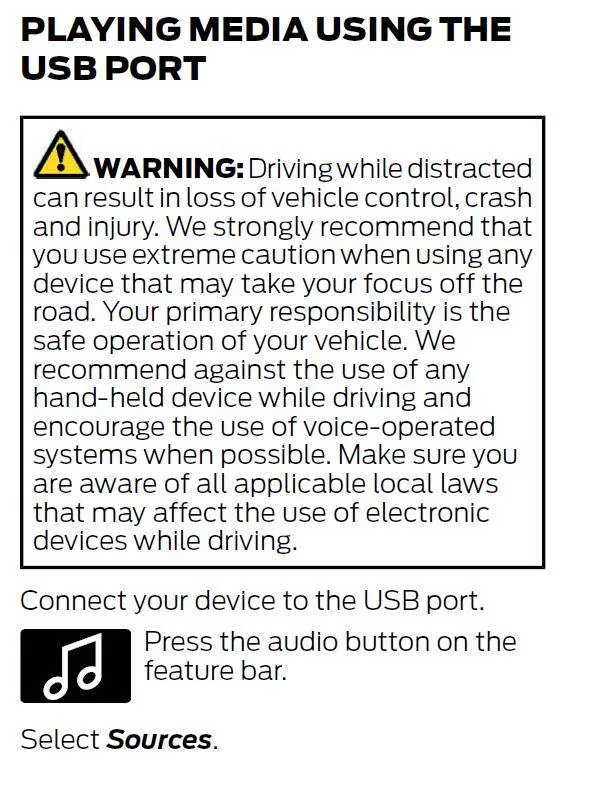
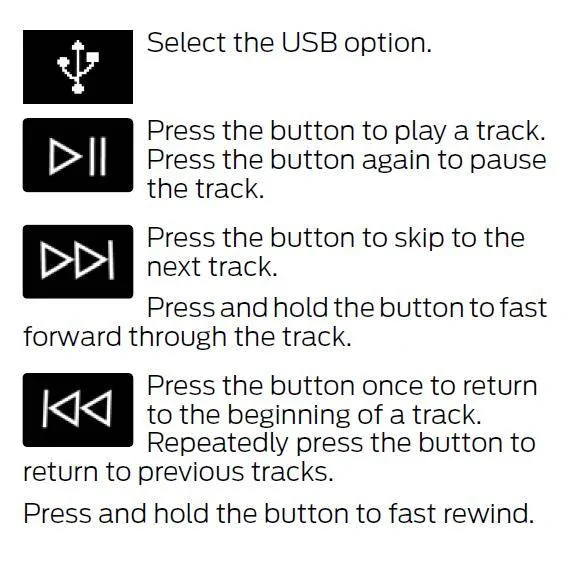
CLEAR! *BANG* Trying to revive this old thread. I have an iPod and I plug it into the USB port (front and rear) and nothing happens. I get no error message nor do I see a place to select the USB drive/iPod. I see in the User Manual it says to "Press the audio button on the feature bar." I don't know what the hell the "feature bar" is! I see under Settings there is an "Audio" button but it is either greyed out, or if I am listening to the radio it says "Radio" or if I am listening to SiriusXM it says "SiriusXM". Am I the only one with this issue? If it matters, I have a CA Route 1 (2022). I had the same issue when I test drove the premium back in 2021.
 
Last edited:

Lyn

New Member
Joined
Dec 8, 2022
Threads
0
Messages
1
Reaction score
0
Location
New Jersey
Vehicles
Mustang Mach E
Occupation
Retired
Country flag
Check out page 141 of the owners manual:

1625774897316.png


1625774935275.png
The only thing I see when I plug in my USB cord is am fm and Sirus. The audio button is grayed out. How do I get to see the USB port?
 

HuntingPudel

Well-Known Member
First Name
Steve
Joined
Mar 23, 2021
Threads
88
Messages
12,927
Reaction score
17,366
Location
Bay Area, CA
Vehicles
2024 MME GT with Performance Upgrade, 1979 Fire-Am, 1972 K/5 Blazer
Occupation
Engineering
Country flag
CLEAR! *BANG* Trying to revive this old thread. I have an iPod and I plug it into the USB port (front and rear) and nothing happens. I get no error message nor do I see a place to select the USB drive/iPod. I see in the User Manual it says to "Press the audio button on the feature bar." I don't know what the hell the "feature bar" is! I see under Settings there is an "Audio" button but it is either greyed out, or if I am listening to the radio it says "Radio" or if I am listening to SiriusXM it says "SiriusXM". Am I the only one with this issue? If it matters, I have a CA Route 1 (2022). I had the same issue when I test drove the premium back in 2021.
Most iPods (maybe all, but I am hedging here since I don’t have the specs for all of them in my head) do not have USB file system pass through so the contents are not visible to the Sync system. They also do not support CarPlay, so the contents of an iPod cannot be played through Sync 4A. It is not an issue with your car (unless you count not supporting an old, discontinued device that is no longer supported by its manufacturer). ??
Sponsored


Top