How can I know my HVB is pre-conditioning?

Mach-Lee

Well-Known Member
First Name
Lee
Joined
Jul 16, 2021
Threads
262
Messages
11,345
Reaction score
24,967
Location
Wisconsin
Vehicles
2022 Mach-E Premium AWD
Occupation
Sci/Eng
Country flag
It’s been a year since @Ford Motor Company was added to the Tesla Supercharger network. It’s baffling to me that Ford has not yet added Superchargers to the native nav system. What could possibly be the holdup?
It seems they are waiting to release a SYNC update that adds a toggle switch to show or hide NACS Supercharger locations.
Sponsored


gutowscr

Well-Known Member
Joined
Feb 1, 2025
Threads
7
Messages
81
Reaction score
44
Location
Charlotte, NC
Vehicles
2024 Mach-E AWD ER Premium
Yes, can use built in nav or Google maps through Android auto. Android auto is the only way to get preconditioning to work to a NACS Supercharger since they aren't in the Nav database yet.


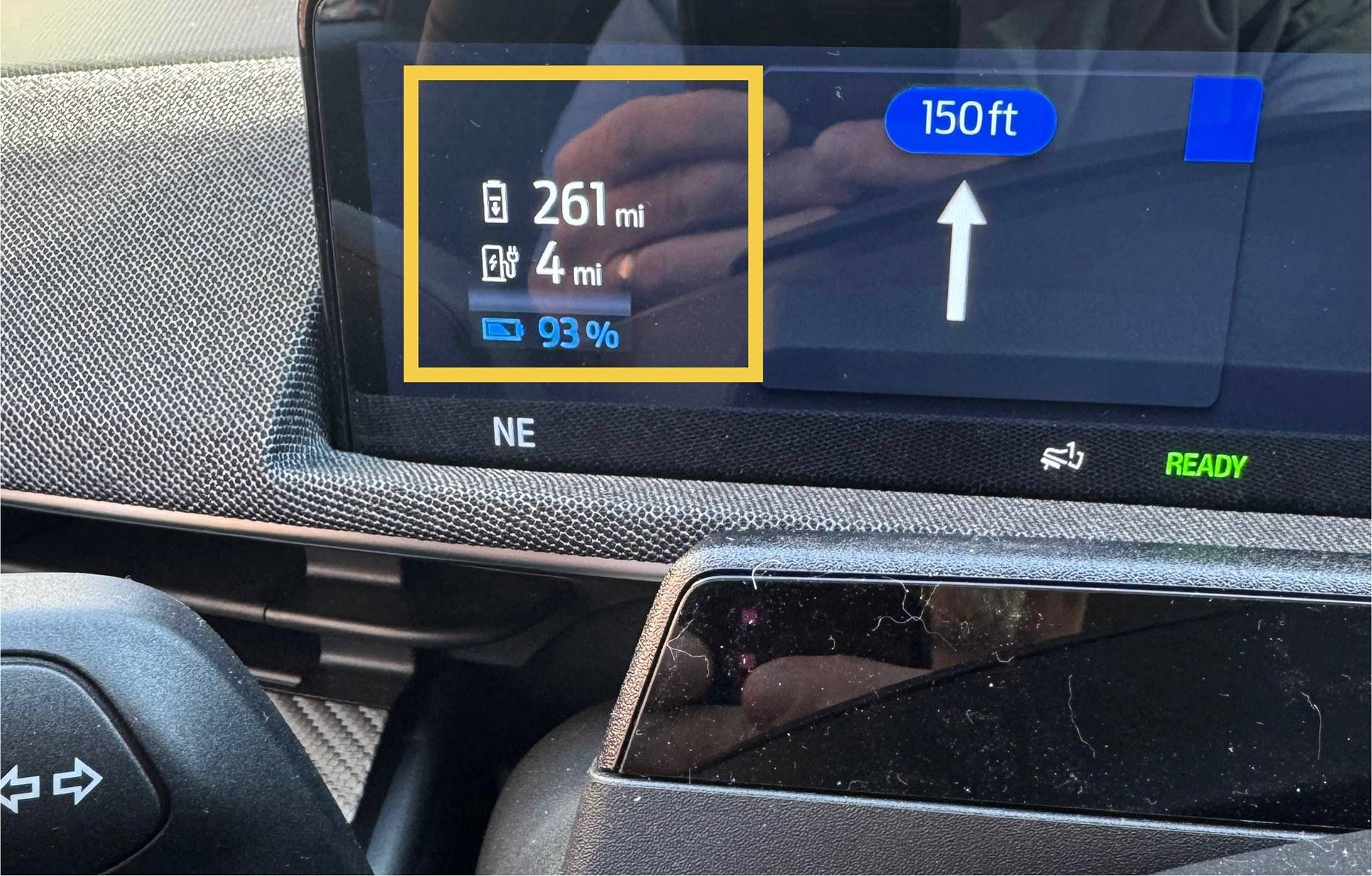
Preconditioning is active while less than 18.6 miles from the charger (not the other way around).
@Mach-Lee preconditioning only works on android auto, not Google Maps on latest iOS?
 

ChasingCoral

Well-Known Member
First Name
Mark
Joined
Feb 3, 2020
Threads
502
Messages
14,306
Reaction score
28,655
Location
Maryland
Vehicles
2021 GB E4X FE, 2022 F-150 Lightning Lariat ER
Occupation
Retired oceanographer
Country flag
And Public Charging doesn’t start preconditioning when it sends the charger destination to Connected Navigstion?
No
 

ChasingCoral

Well-Known Member
First Name
Mark
Joined
Feb 3, 2020
Threads
502
Messages
14,306
Reaction score
28,655
Location
Maryland
Vehicles
2021 GB E4X FE, 2022 F-150 Lightning Lariat ER
Occupation
Retired oceanographer
Country flag
It seems they are waiting to release a SYNC update that adds a toggle switch to show or hide NACS Supercharger locations.
I’d be much happier if they gave us access sooner and later gave us the ability to hide them.


Ravensfan1996

Well-Known Member
First Name
Rick
Joined
Nov 16, 2020
Threads
10
Messages
622
Reaction score
456
Location
Maryland/Pennsylvania New Freedom, Pa
Vehicles
2021 Mustang Mach E
Country flag
Isn't it within 18 miles?

As in if you're over 18 miles away it won't start conditioning until you're within 18 miles. So if you start less than 18 miles away it should start conditioning right away, just might not reach optimal since you gave it less time. Is all that right?

I was thinking it’s better to be that far away to give it time to warm up. If you are 2 miles away and sent the destination it wouldn’t have time to warm up.
 

Jimrpa

Well-Known Member
First Name
Jim
Joined
Sep 10, 2020
Threads
297
Messages
9,521
Reaction score
12,855
Location
Wayne, PA
Vehicles
2021 Infinite Blue Premium Mustang Mach E ER AWD
Occupation
Retied (formerly tried to herd highly technical, independent cats)
Country flag
@Mach-Lee can you put in a Tesla supercharger as a destination, then select a non-Tesla supercharger that would be en route from the list as a waypoint? Would the car pre-condition on the way to the waypoint charger?
 

Mach-Lee

Well-Known Member
First Name
Lee
Joined
Jul 16, 2021
Threads
262
Messages
11,345
Reaction score
24,967
Location
Wisconsin
Vehicles
2022 Mach-E Premium AWD
Occupation
Sci/Eng
Country flag

gutowscr

Well-Known Member
Joined
Feb 1, 2025
Threads
7
Messages
81
Reaction score
44
Location
Charlotte, NC
Vehicles
2024 Mach-E AWD ER Premium
I just tried every combination on iOS and none put the charger icon on the SOC display to designate preconditioning, only destination flag.

On iOS tried Waze, google maps, Apple Maps. I don’t have androind phone to try.

Separately, public charging app doesn’t either. Only searching for chargers in the ford navigation app will start preconditioning, again from what I understand about the charger icon.

Location has to be a charger the ford navigation app knows. Tired putting in Tesla supercharger and it only set as destination, not charger.
 

Jimrpa

Well-Known Member
First Name
Jim
Joined
Sep 10, 2020
Threads
297
Messages
9,521
Reaction score
12,855
Location
Wayne, PA
Vehicles
2021 Infinite Blue Premium Mustang Mach E ER AWD
Occupation
Retied (formerly tried to herd highly technical, independent cats)
Country flag
I still can’t put in a supercharger so I have to use a non-tesla one nearby. See strategy L - Leapfrog here: https://www.macheforum.com/site/threads/mach-lees-cold-weather-charging-strategies.24548/
you can’t select a Tesla supercharger from Public Charging?

Ok, I just tried what I’m asking about and it appears to work:
1. Open Public Charging
2. Select the Tesla Charger you want as the destination
3. In Connected Navigation, select a listed charger that is on the route to your Tesla charger and add it as a waypoint

The only thing I can’t confirm is whether pre-conditioning will start when you head to the waypoint (the charger you selected in connected navigation). It should though. See the picture below:
Ford Mustang Mach-E How can I know my HVB is pre-conditioning? IMG_2467
 

ChasingCoral

Well-Known Member
First Name
Mark
Joined
Feb 3, 2020
Threads
502
Messages
14,306
Reaction score
28,655
Location
Maryland
Vehicles
2021 GB E4X FE, 2022 F-150 Lightning Lariat ER
Occupation
Retired oceanographer
Country flag
you can’t select a Tesla supercharger from Public Charging?

Ok, I just tried what I’m asking about and it appears to work:
1. Open Public Charging
2. Select the Tesla Charger you want as the destination
3. In Connected Navigation, select a listed charger that is on the route to your Tesla charger and add it as a waypoint

The only thing I can’t confirm is whether pre-conditioning will start when you head to the waypoint (the charger you selected in connected navigation). It should though. See the picture below:
IMG_2467.jpeg
Nope. It won’t precondition.
 

Mach-Lee

Well-Known Member
First Name
Lee
Joined
Jul 16, 2021
Threads
262
Messages
11,345
Reaction score
24,967
Location
Wisconsin
Vehicles
2022 Mach-E Premium AWD
Occupation
Sci/Eng
Country flag
you can’t select a Tesla supercharger from Public Charging?

Ok, I just tried what I’m asking about and it appears to work:
1. Open Public Charging
2. Select the Tesla Charger you want as the destination
3. In Connected Navigation, select a listed charger that is on the route to your Tesla charger and add it as a waypoint

The only thing I can’t confirm is whether pre-conditioning will start when you head to the waypoint (the charger you selected in connected navigation). It should though. See the picture below:
IMG_2467.webp
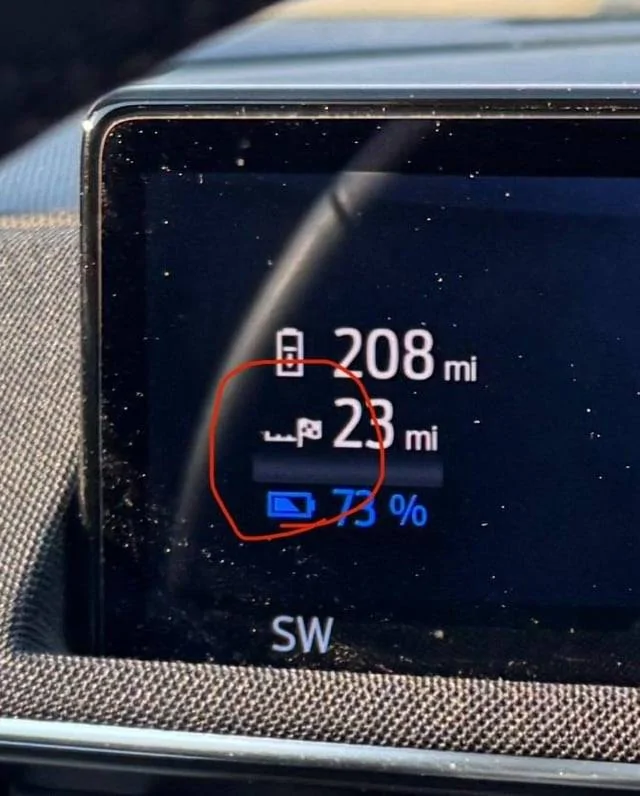
Nope, if you use the public charging app it won't precondition. The icon in the cluster for distance has to be a charger or preconditioning won't work. If it's a flag, then it won't do anything. The only way to navigate to a NACS supercharger and get preconditioning is through Android Auto/Google Maps. Nothing else works right now. This is why we've been begging for them to add the NACS Superchargers to the NAV for the past year so we can use preconditioning.
 

Jimrpa

Well-Known Member
First Name
Jim
Joined
Sep 10, 2020
Threads
297
Messages
9,521
Reaction score
12,855
Location
Wayne, PA
Vehicles
2021 Infinite Blue Premium Mustang Mach E ER AWD
Occupation
Retied (formerly tried to herd highly technical, independent cats)
Country flag
Nope, if you use the public charging app it won't precondition. The icon in the cluster for distance has to be a charger or preconditioning won't work. If it's a flag, then it won't do anything. The only way to navigate to a NACS supercharger and get preconditioning is through Android Auto/Google Maps. Nothing else works right now. This is why we've been begging for them to add the NACS Superchargers to the NAV for the past year so we can use preconditioning.
So, even though I selected a non-Tesla charger in connected navigation, it won’t start preconditioning? I do appreciate your patience with my questions. And thanks for explaining about the icon in the instrument panel. Sometime, I’ll try my experiment fully to see if the icon appears (it’s rare that I go on long trips, and I usually charge my car daily), but from what you say, I can be confident that it won’t, unless I use Android auto and Google maps (I have an iPhone, so that wouldn’t work for me anyway ?)
 

Jimrpa

Well-Known Member
First Name
Jim
Joined
Sep 10, 2020
Threads
297
Messages
9,521
Reaction score
12,855
Location
Wayne, PA
Vehicles
2021 Infinite Blue Premium Mustang Mach E ER AWD
Occupation
Retied (formerly tried to herd highly technical, independent cats)
Country flag
First, I want to thank @Mach-Lee again for sharing all of this information, and for putting up with my many repetitive (and likely stupid) questions!

I absolutely understand that there is NO way, using only software native to Sync 4 (Connected Navigation and Public Charging) to select a Tesla SuperCharger as a destination AND have the car pre-condition en-route to it.

However, I wanted to try to see if there might be some kind of workaround that would provide SOME level of pre-conditioning before arriving at a Tesla SuperCharger.

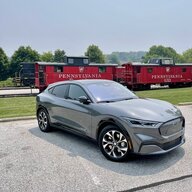
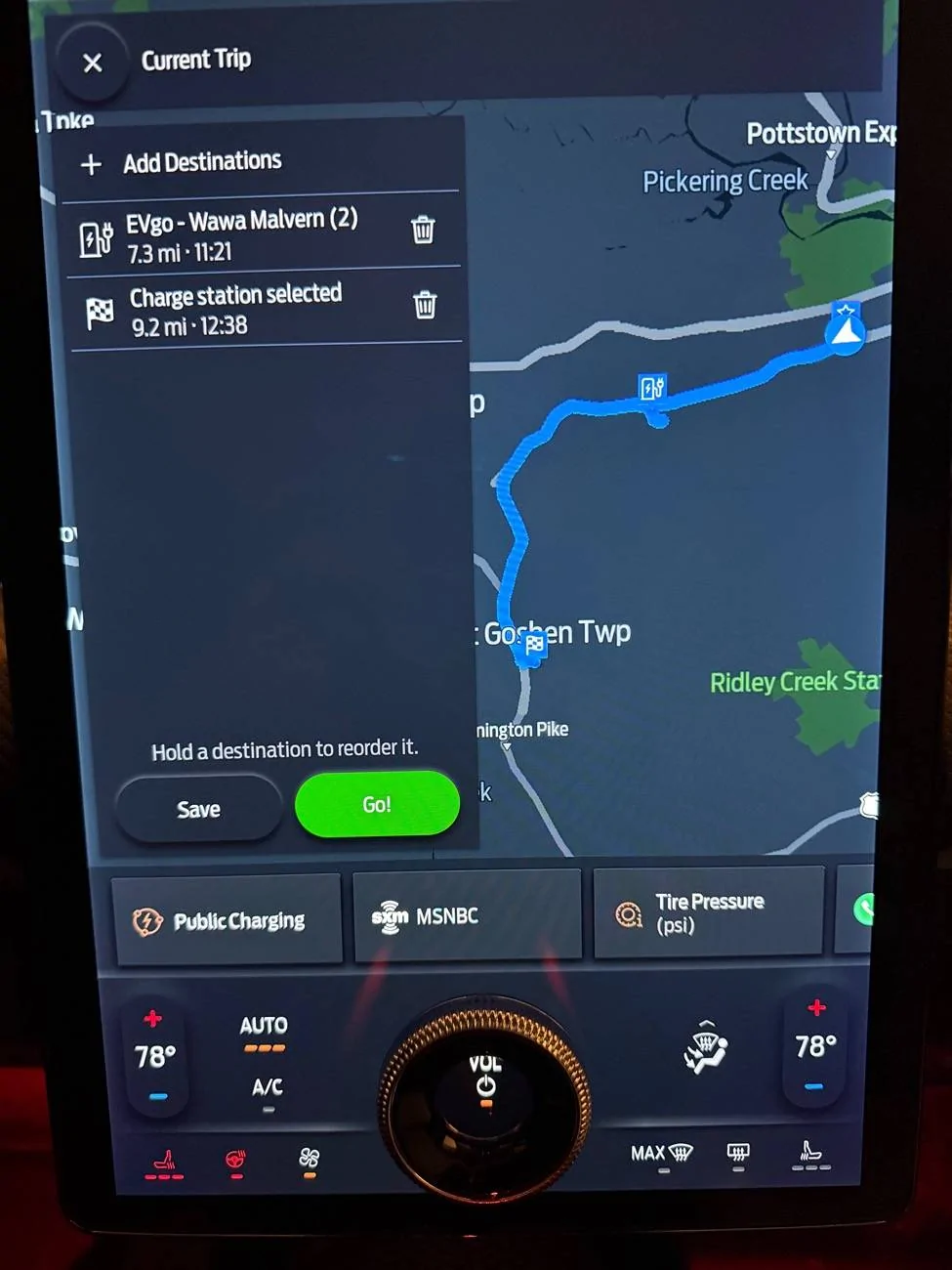
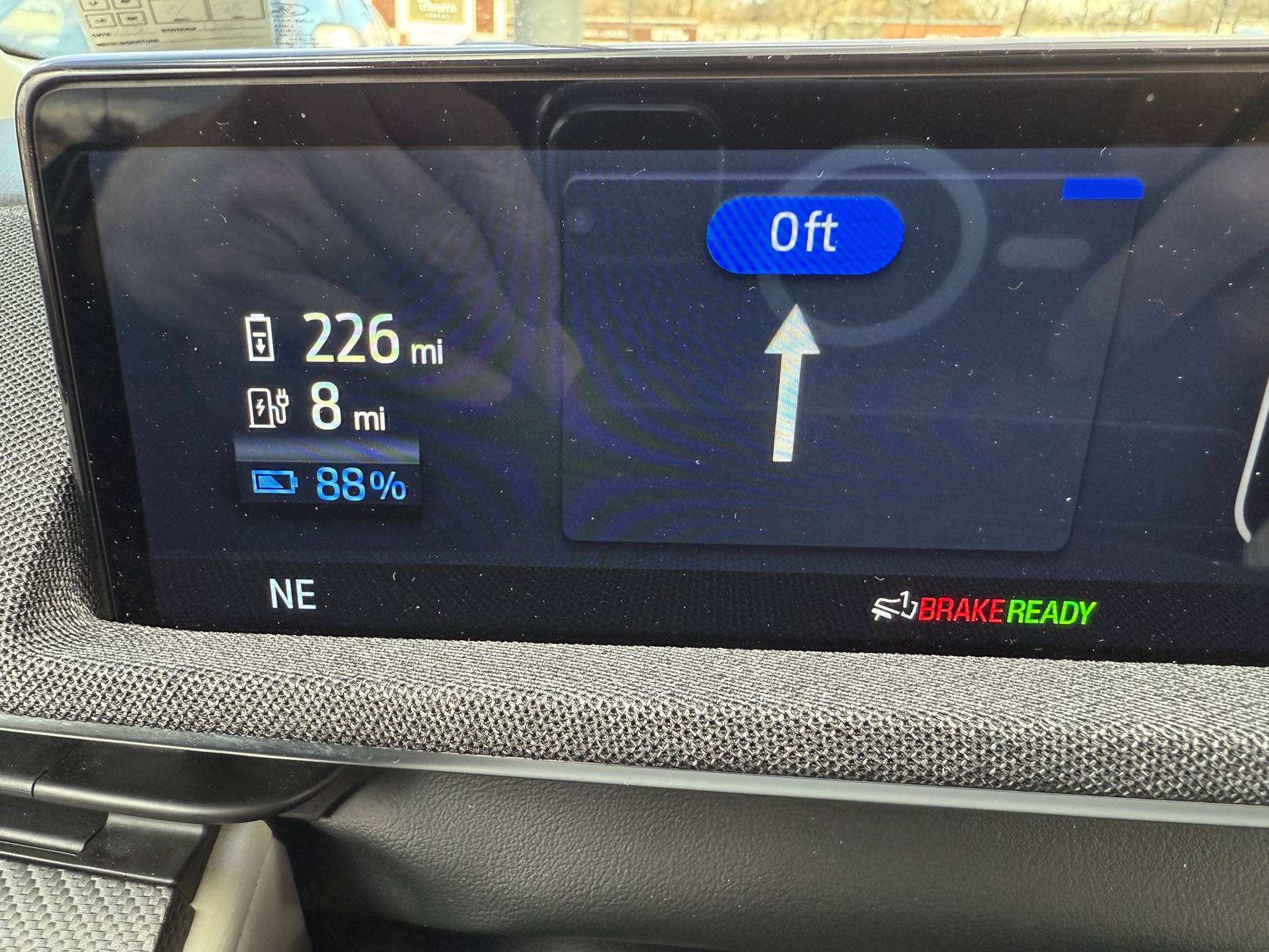
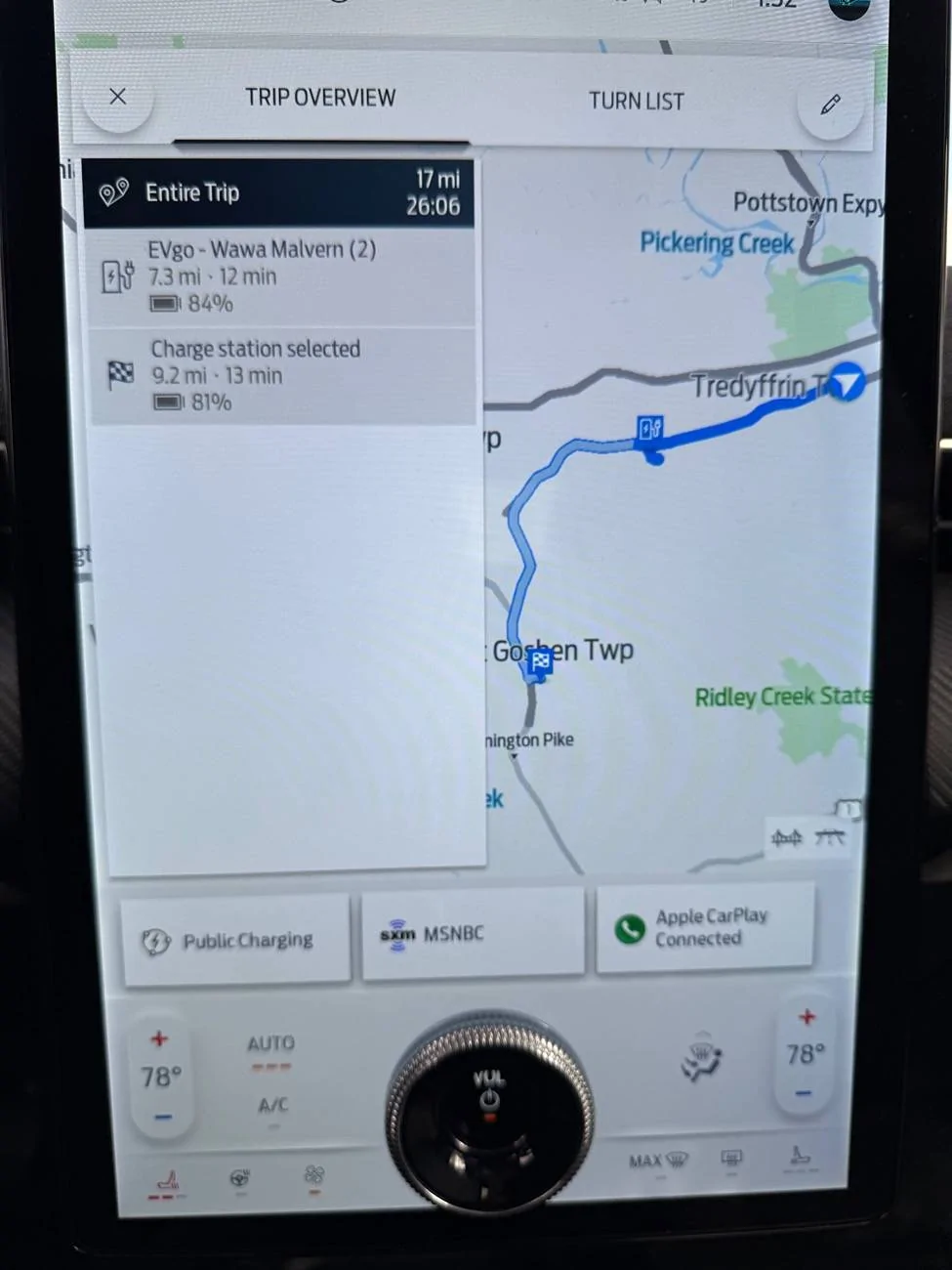
The first case, is also the most trivial. About 5 miles from my house, in Malvern, PA, there is a Wawa (a convenience store) that has BOTH EVgo and Tesla SuperChargers. If you want to pre-condition before getting there, you can select the EVgo charger as a destination in Connected Navigation, then use one of the Tesla SuperChargers when you arrive. But, there likely aren't TOO many co-located Level 3 CCS and Tesla SuperChargers.

Two non-trivial cases:
Case 1 - Level 3 CCS Charger en-route to a Tesla SuperCharger:
  • Assume a route where there is a Level 3 CCS charger on your way to the Tesla SuperCharger you want to use (it may not be directly on the route, but somewhat en-route).
  • Use Connected Navigation to select that Level 3 CCS charger as a destination.
  • Go into Public Charging, select the Tesla SuperCharger you really want to go to, and then, in Connected Navigation, add that as a waypoint.

As you can see from the pictures below, I get the pre-conditioning icon on the instrument panel, with the distance to the Level 3 CCS Charger. Obviously, once I'm past that CCS charger, my car will no longer be pre-conditioning, and any pre-conditioning that was done will slowly degrade. I understand that.

Ford Mustang Mach-E How can I know my HVB is pre-conditioning? IMG_2476

Ford Mustang Mach-E How can I know my HVB is pre-conditioning? IMG_2477


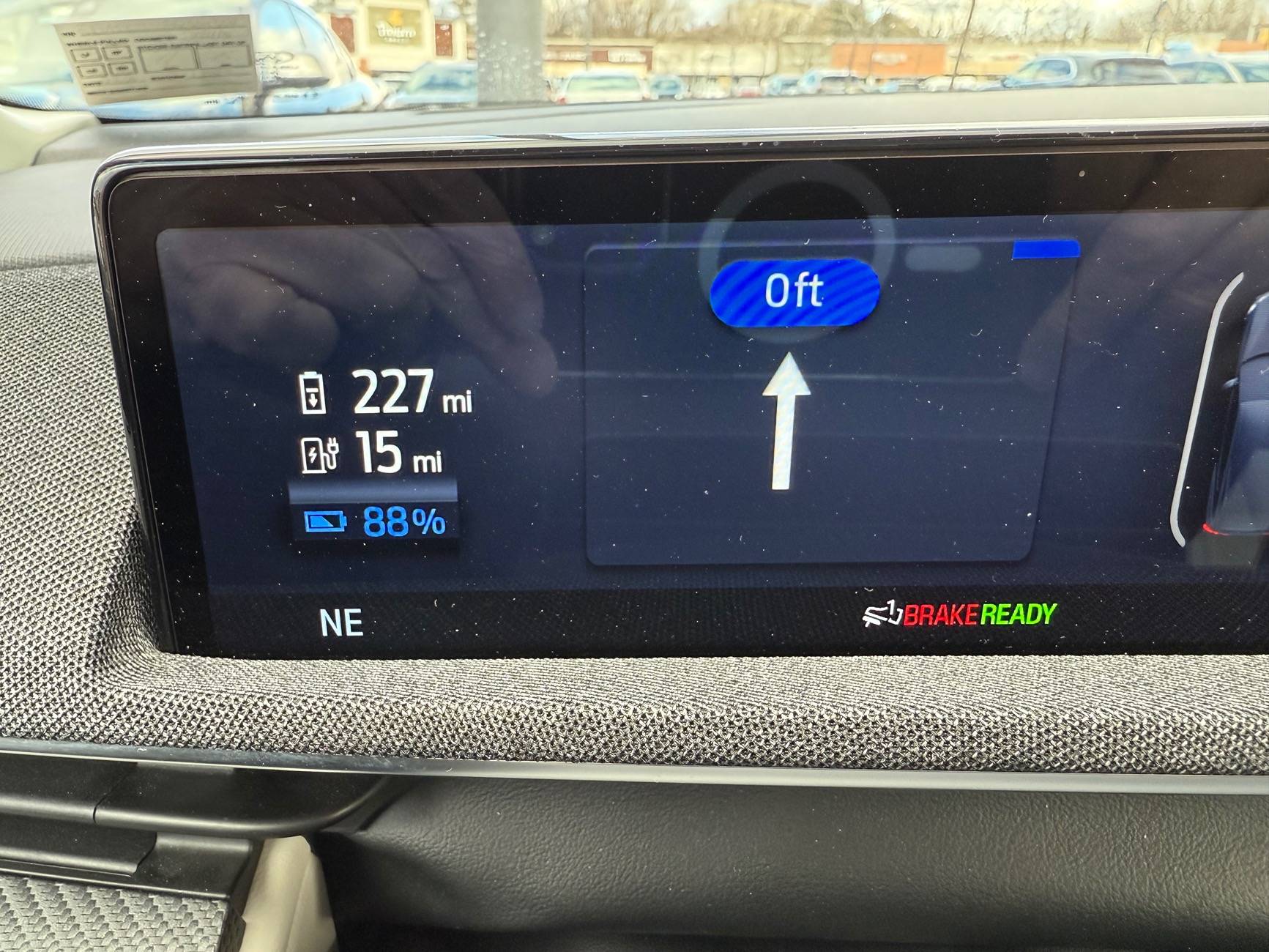
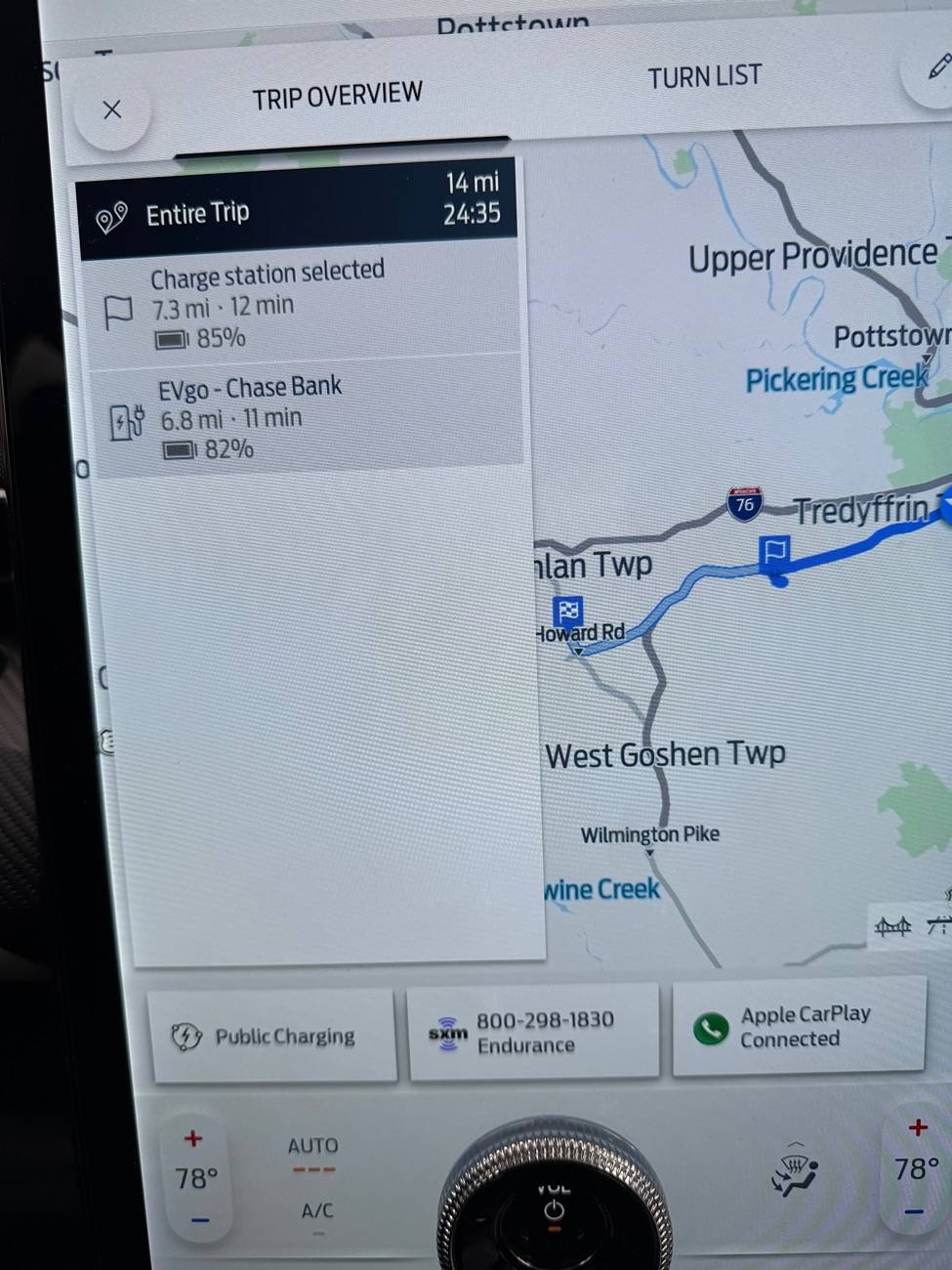
Case 2 - Level 3 CCS Charger beyond a Tesla SuperCharger:
  • Assume a route where there is a Level 3 CCS charger after Tesla SuperCharger you want to use (it may not be directly on the route, but somewhat en-route).
  • Use Connected Navigation to select that Level 3 CCS charger as a destination.
  • Go into Public Charging, select the Tesla SuperCharger you really want to go to, and then, in Connected Navigation, add that as a waypoint.

Again, as you can see from the pictures below, I get the pre-conditioning icon on the instrument panel, with the distance to the Level 3 CCS Charger. Now, it's possible/likely that the pre-conditioning won't be complete before I arrive at the Tesla SuperCharger, but at least some degree of pre-conditioning should be done.

Ford Mustang Mach-E How can I know my HVB is pre-conditioning? IMG_2474
Ford Mustang Mach-E How can I know my HVB is pre-conditioning? IMG_2475


Conclusion:
Obviously, the "correct" answer is for Ford to add Tesla SuperChargers to Connected Navigation. Problem solved and no Android Auto/Google Maps necessary.
The closer the Level 3 CCS charger used as a "pre-conditioning dummy" and the Tesla SuperCharger are to each other, the more effective this solution will be.

It does appear to offer a workaround for now. I'd be interested in hearing about any flaws in my methodology that would make this solution unviable.
Sponsored


Top