OP
OP

Jiji
Well-Known Member
- First Name
- Rick
- Joined
- Jul 26, 2021
- Threads
- 24
- Messages
- 516
- Reaction score
- 670
- Location
- Finger Lakes
- Vehicles
- 2022 Mustang Mach-E GT 2024 F-150 Lightning

- Thread starter
- #16
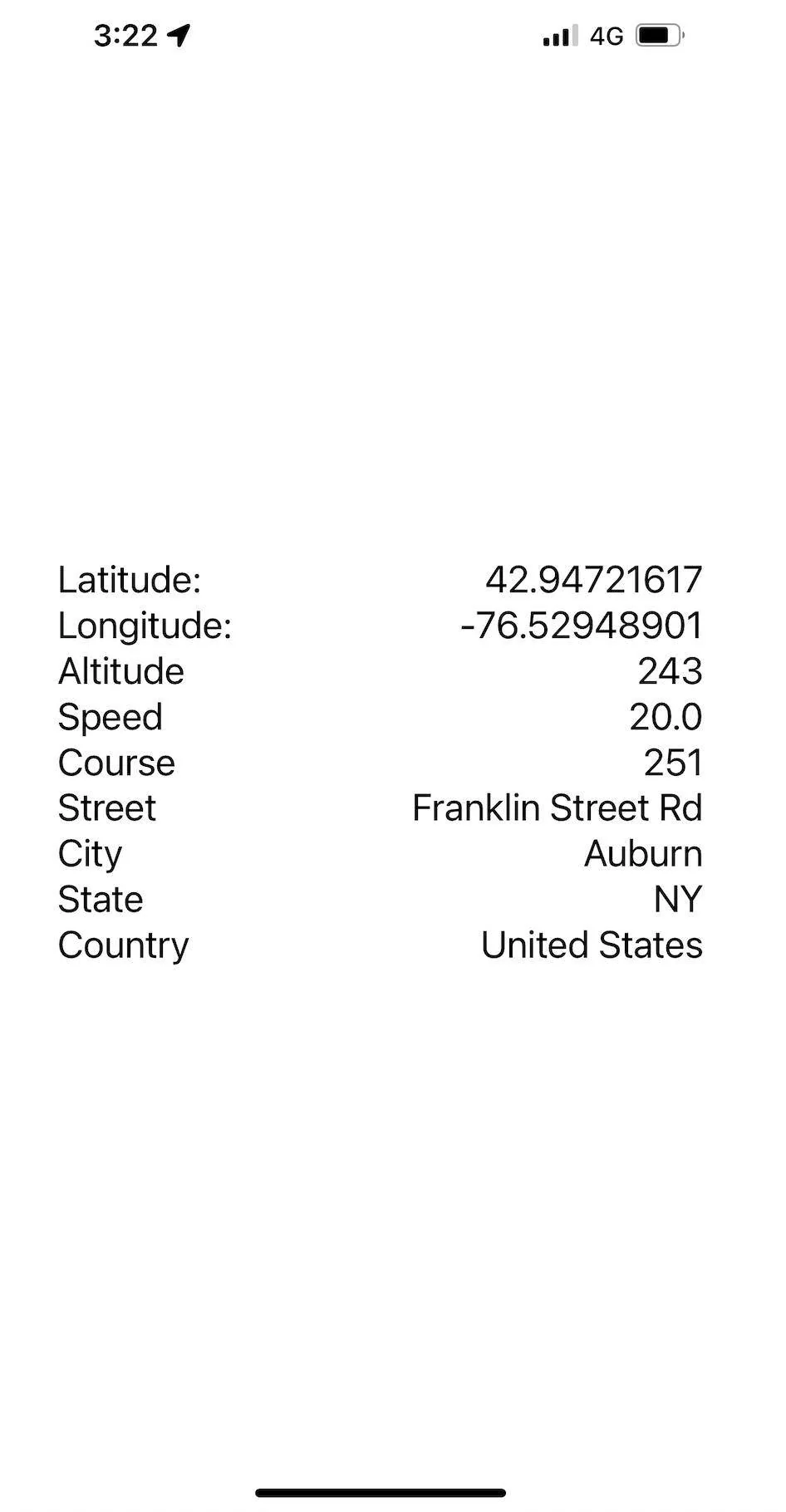
Work on the trip feature has been held up since there is one major obstacle in the Ford OBDII data stream - the lack of accurate GPS information. I was wary that this was something I could do with my limited skill set but decided to tackle it now before I was too invested and without a solution. And I can now announce I have a solution - my very own iOS app with a full featured HTTP server that serves up the latest iPhone GPS information over a secure network:

I know it doesn't look like much but it gives me access to navigation-quality GPS data that I can log with the vehicle dynamics to present a detailed and complete look at a trip. Let's dig in to see how it works.
When I first started I required an internet connection to relay the data to a Raspberry Pi server in my basement. Because of random cellular signal dropouts I could see this wasn't going to work so I upgraded the software to use a local data store whenever the database connection dropped. The Record software will continue to keep trying the connection on subsequent writes and will write the backing datastore when the connection is restored. The design is nice since it can be used without any internet, I can just upload the backing datastore when I return home and the MME Raspberry Pi connects to the home WiFi.
In order to find my GPS web server I need a static IP address, something else your phone will not have and for this I turned to Tailscale, which in their own words is:
Writing an iOS app means I needed to learn the programming language Swift, so I searched for open source software projects that had a compatible HTTP server implementation, which is called HummingbirdCore. Turned out to be pretty simple given I had never used Swift and last used Xcode/Objective-C in 2014 when I wanted to learn iOS programming. Two days later it is done, contains just 300 lines of Swift code and I'm back to working on the Raspberry Pi Python code to incorporate with the other MME data.
By tying the phone GPS data into the HTTP server response, I can retrieve the current GPS coordinates simply by visiting the URL.
% curl -X GET http://100.93.138.71:8080
{"speed":20.0,"latitude":42.94721617,"longitude":-76.52948901,"course":251,"altitude":243.2}
The Python code to request and extract the GPS data is simple as well:
>>> import requests
>>> r = requests.get('http://100.93.138.71:8080')
>>> print(r.json())
{'speed': 20.0, 'latitude': 42.94721617, 'longitude': -76.52948901, 'course': 251, 'altitude': 243.2}
A few days of organizing the trip data collection and I should be back at the visualization software seeing if I can make nice trip reports like I did with the charging session data.
I know it doesn't look like much but it gives me access to navigation-quality GPS data that I can log with the vehicle dynamics to present a detailed and complete look at a trip. Let's dig in to see how it works.
When I first started I required an internet connection to relay the data to a Raspberry Pi server in my basement. Because of random cellular signal dropouts I could see this wasn't going to work so I upgraded the software to use a local data store whenever the database connection dropped. The Record software will continue to keep trying the connection on subsequent writes and will write the backing datastore when the connection is restored. The design is nice since it can be used without any internet, I can just upload the backing datastore when I return home and the MME Raspberry Pi connects to the home WiFi.
In order to find my GPS web server I need a static IP address, something else your phone will not have and for this I turned to Tailscale, which in their own words is:
Perfect and free, just what I need to find my MME anywhere it has a cellular connection and be secure to keep anyone from snooping in on my location and traffic.Tailscale is a VPN service that makes the devices and applications you own accessible anywhere in the world, securely and effortlessly. It enables encrypted point-to-point connections using the open source WireGuard protocol, which means only devices on your private network can communicate with each other.
Writing an iOS app means I needed to learn the programming language Swift, so I searched for open source software projects that had a compatible HTTP server implementation, which is called HummingbirdCore. Turned out to be pretty simple given I had never used Swift and last used Xcode/Objective-C in 2014 when I wanted to learn iOS programming. Two days later it is done, contains just 300 lines of Swift code and I'm back to working on the Raspberry Pi Python code to incorporate with the other MME data.
By tying the phone GPS data into the HTTP server response, I can retrieve the current GPS coordinates simply by visiting the URL.
% curl -X GET http://100.93.138.71:8080
{"speed":20.0,"latitude":42.94721617,"longitude":-76.52948901,"course":251,"altitude":243.2}
The Python code to request and extract the GPS data is simple as well:
>>> import requests
>>> r = requests.get('http://100.93.138.71:8080')
>>> print(r.json())
{'speed': 20.0, 'latitude': 42.94721617, 'longitude': -76.52948901, 'course': 251, 'altitude': 243.2}
A few days of organizing the trip data collection and I should be back at the visualization software seeing if I can make nice trip reports like I did with the charging session data.
Sponsored