My winter Mustang Mach-E project

OP
OP
Jiji

Jiji

Well-Known Member
First Name
Rick
Joined
Jul 26, 2021
Threads
24
Messages
493
Reaction score
641
Location
Finger Lakes
Vehicles
2022 Mustang Mach-E GT 2024 F-150 Lightning
Country flag
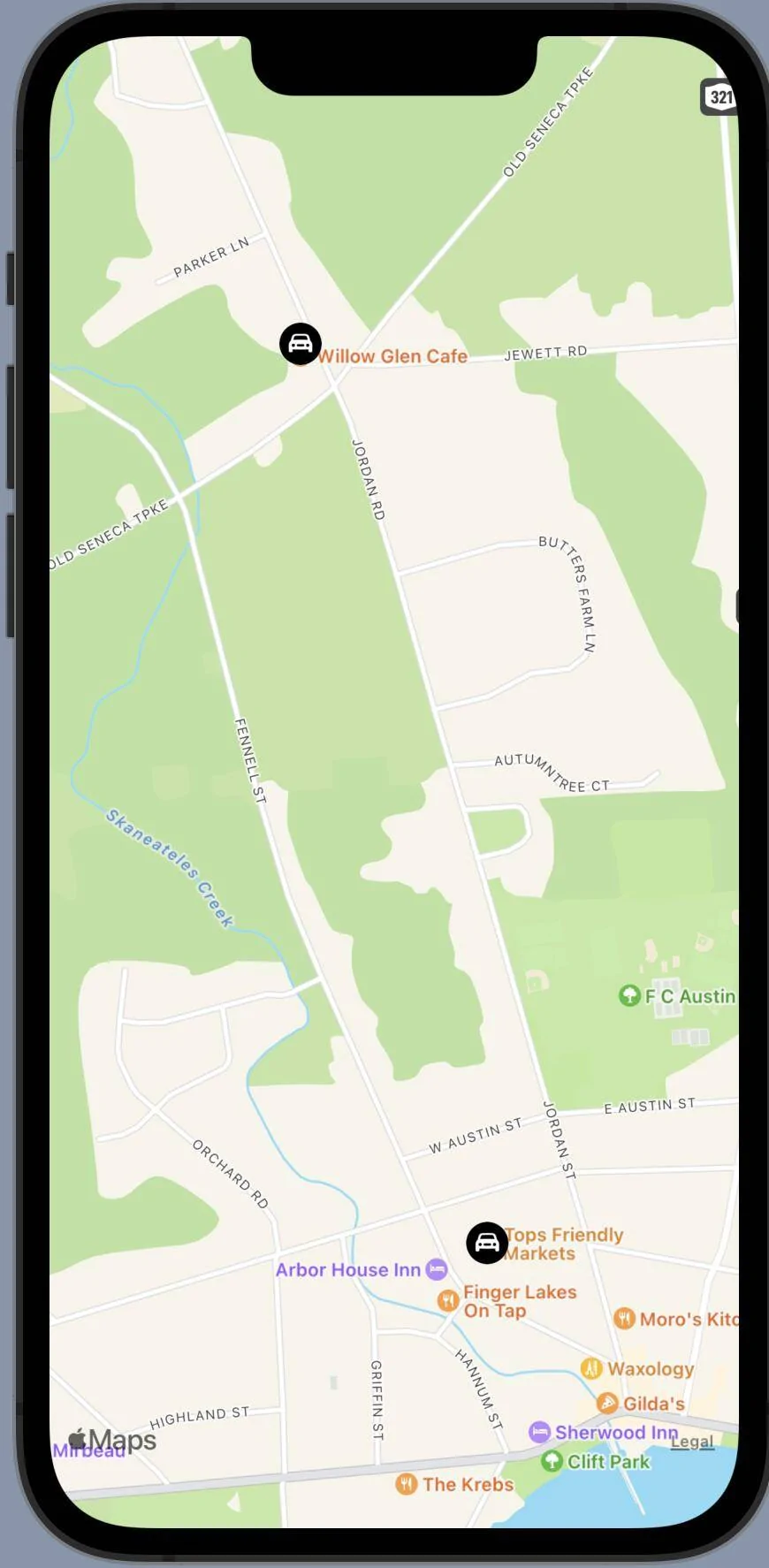
So how nice would it be to have this for displaying a trip route?

Ford Mustang Mach-E My winter Mustang Mach-E project 1645291543756


I knew I needed to step up my game to have any sort of nice displays so I spent an hour with some iOS SwiftUI MapKit examples and you can see the result. Not much code at all, most of the time was spent searching the web for ideas.

So what you see there is a simulated trip from the Willow Glen Cafe to Tops Friendly Market. To draw this view I just needed to define the start and end points:

Ford Mustang Mach-E My winter Mustang Mach-E project 1645291840518


Next is to find the center of the map, just the average of the latitudes and longitudes:

Ford Mustang Mach-E My winter Mustang Mach-E project 1645291947023


Next we need to define the region of the map that will be displayed, don't want it to be too big or small, we just want it to comfortably contain the start and end points of the trip:

Ford Mustang Mach-E My winter Mustang Mach-E project 1645292059819


A scale factor of 1.0 will place the start and end points at the margin, the value of 1.5 seems nice to show some of the surrounding region without losing the trip route detail.

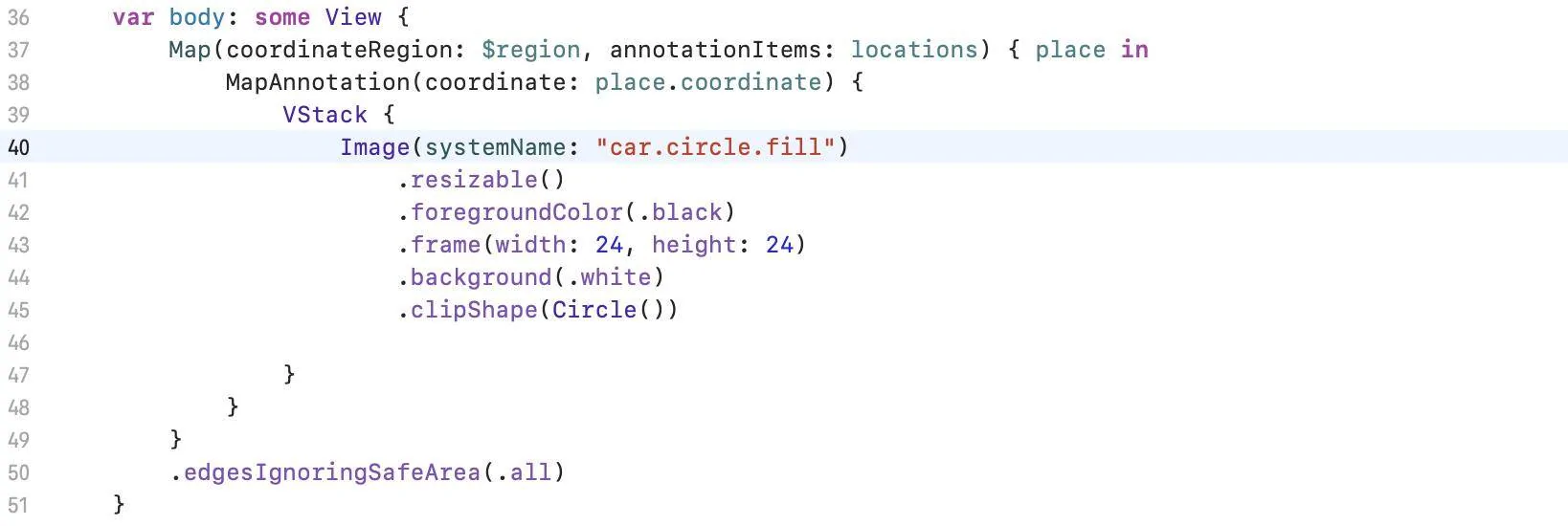
Finally the code that draws everything, including some custom car buttons to mark the start and end points:

Ford Mustang Mach-E My winter Mustang Mach-E project 1645292401838


And that is it, maybe 30 lines of code to create a map that contains a realistic view of a trip.

Seems too easy and so far it has been. But if I can pull the trip coordinates from my database using a query I can replace the simulated start/end points with those from an actual trip. InfluxDB has a Swift client and I have done queries in the past using the Python client so that part looks promising. The pulling the GPS track and overlaying it on the map completes the view, except it doesn't. Having other data like the SoC that pops up when a track point is selected would be just too much fun.
Sponsored

 
OP
OP
Jiji

Jiji

Well-Known Member
First Name
Rick
Joined
Jul 26, 2021
Threads
24
Messages
493
Reaction score
641
Location
Finger Lakes
Vehicles
2022 Mustang Mach-E GT 2024 F-150 Lightning
Country flag
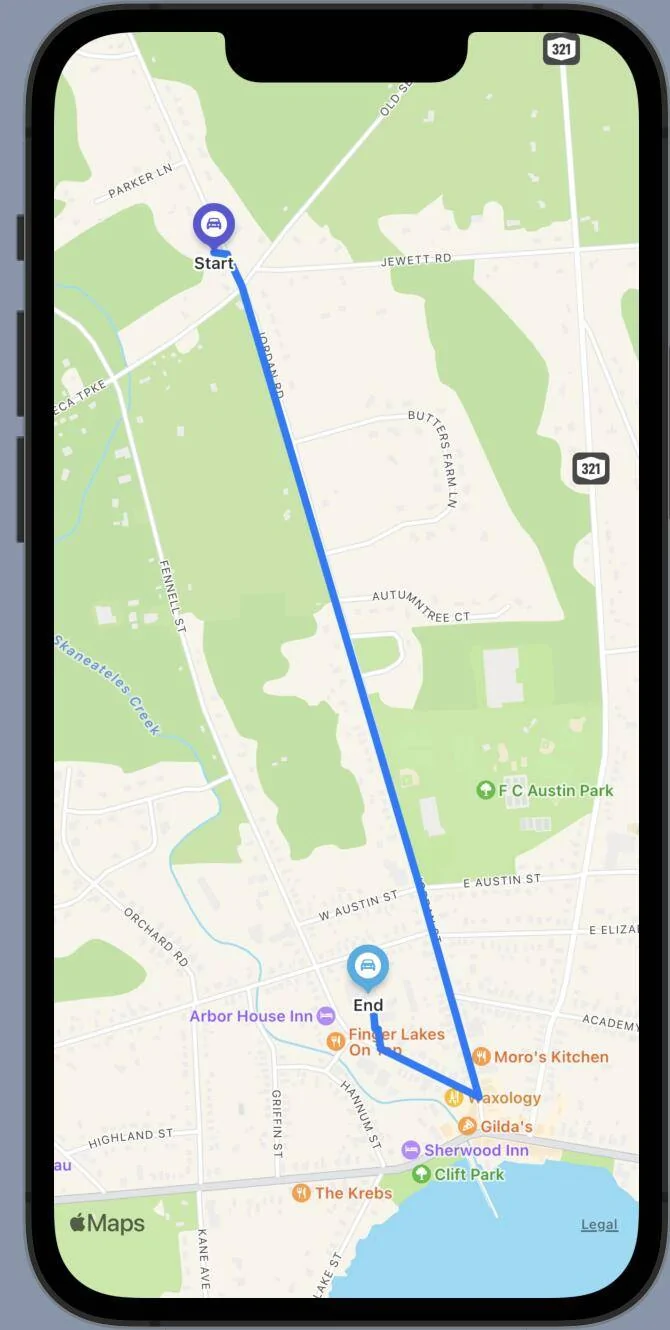
Last time I wanted to be able to draw a GPS path on the map so we can see where the trip started and ended. Well easy wasn't meant to be as the SwiftUI interface I used doesn't support map overlays. :mad:

But all was not lost as it turns out you need to do some extra coding to get overlays to work in a mixed SwiftUI/UIKit application. But thanks to Ale Patrón and her helpful guide on Medium (SwiftUI Tutorial — Finding a Route and Directions) I was able to get it done.

Ford Mustang Mach-E My winter Mustang Mach-E project 1645383717085


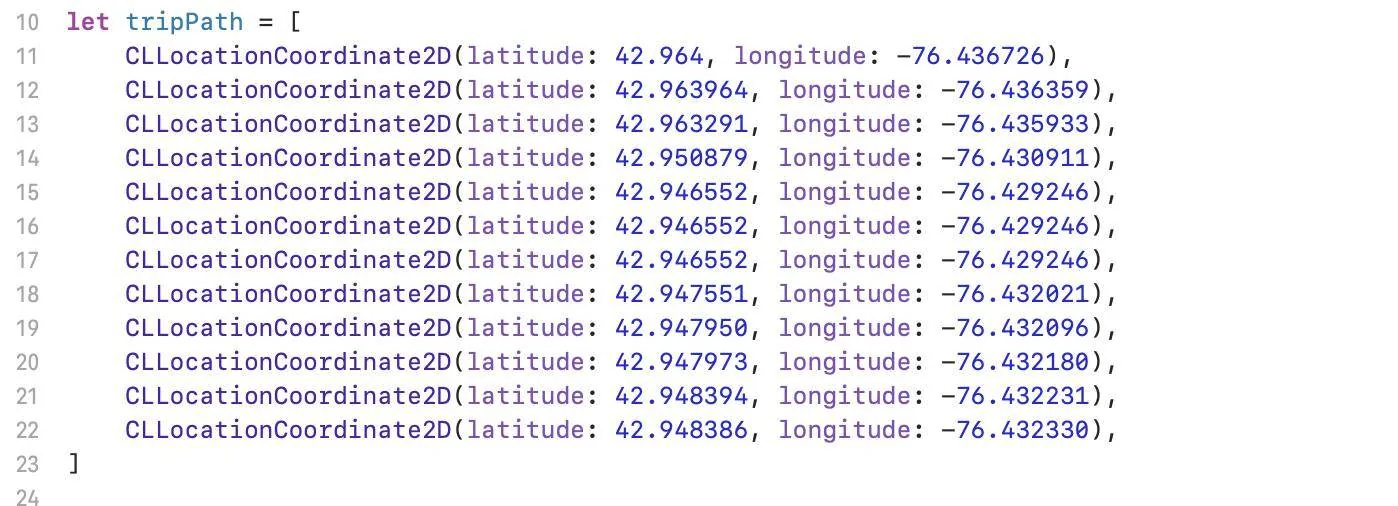
So what we have is a simulated trip with the GPS path overlaid on the map using this GPS path data (collected from the Apple Maps application):

Ford Mustang Mach-E My winter Mustang Mach-E project 1645382774754


Of course the above view would be created by selecting a trip from a list or calendar so this is just one or many views that will be needed. Each iteration gets me deeper into iOS application programming and the Swift programming language, both of which I'll need to learn in more detail. As this project is a series of small steps, time to prove I can query the database so I can show an arbitrary trip before getting too involved with the writing of an iPhone application.
 
OP
OP
Jiji

Jiji

Well-Known Member
First Name
Rick
Joined
Jul 26, 2021
Threads
24
Messages
493
Reaction score
641
Location
Finger Lakes
Vehicles
2022 Mustang Mach-E GT 2024 F-150 Lightning
Country flag
Getting close to showing a GPS path over a trip map. Today I worked on modifying the sample code that InfluxData includes with their iOS Swift client software and pulling everything I need from the database. I decided I need three queries written in the Flux query language to get all the data needed:

1. Find the most recent trip
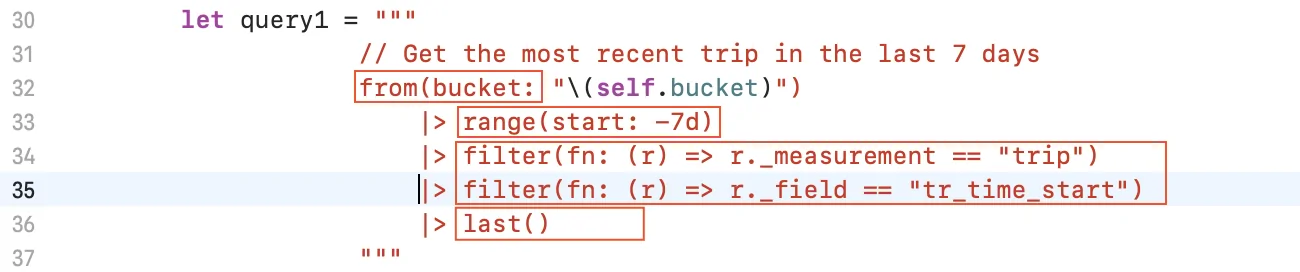
I decided to display the last trip, there could be hundreds of trips but this is perhaps the easiest to find. This query pulls data from a bucket - this is the name of the database holding all the data collected (there being multiple buckets on a server). The range is '-7d' so we are requesting to consider only trips recorded within the last seven days.

Ford Mustang Mach-E My winter Mustang Mach-E project 1645480304016


There are lots of data in the database so we need to filter for 'trip' measurements and the trip start time. This may result in multiple trips so we request the return the last row of the results table. And looking at the debug output we can see the query result, a single trip that started at 2022/02/21 16:19:57:

Ford Mustang Mach-E My winter Mustang Mach-E project 1645481335486


This trip start time now becomes the input to our next query.

2. Find the last trip data
This query is simple, we request all the trip data with the timestamp we got from the first query.

Ford Mustang Mach-E My winter Mustang Mach-E project 1645481053296


And the result is all the details of the trip:

Ford Mustang Mach-E My winter Mustang Mach-E project 1645481732534


This is useful data, tap on the starting point and we can popup a view of the starting time, temperature, SoC, and more. Do the same on the destination point and see the MME state at the end of the trip. But also included is the last bit of data needed to complete our trip view with the overlaid GPS path and that is the trip end time.

3. Retrieve the GPS path data
Besides recording trip and charge events there are all sorts of vehicle sensors that we have access to, and to create the GPS path we need the data named 'gps_latitude'and 'gps_longitude'. So our final query will request all the latitude/longitude data that falls within the trip start and end times:

Ford Mustang Mach-E My winter Mustang Mach-E project 1645482294965


This time we need to pivot the table, turning rows of unusable latitude and longitude data into columns of data with the same time, here is an example of what the tables look like before the pivot:

Ford Mustang Mach-E My winter Mustang Mach-E project 1645482528369


and after the pivot:

Ford Mustang Mach-E My winter Mustang Mach-E project 1645482562013


And the final result is an array of GPS locations ready to used in a map overlay:

Ford Mustang Mach-E My winter Mustang Mach-E project 1645482714970


This concludes the review of the database queries needed to pull the trip and GPS data, time to switch hats and start incorporating these results into an iPhone app.
 

MachTri

Well-Known Member
First Name
Geoff
Joined
Nov 1, 2021
Threads
9
Messages
99
Reaction score
89
Location
Maryland
Vehicles
Ford Mustang mach-e AWD
Country flag
Pretty cool. Are you planning to make the trip a heatmap showing energy use?
 
OP
OP
Jiji

Jiji

Well-Known Member
First Name
Rick
Joined
Jul 26, 2021
Threads
24
Messages
493
Reaction score
641
Location
Finger Lakes
Vehicles
2022 Mustang Mach-E GT 2024 F-150 Lightning
Country flag
Pretty cool. Are you planning to make the trip a heatmap showing energy use?
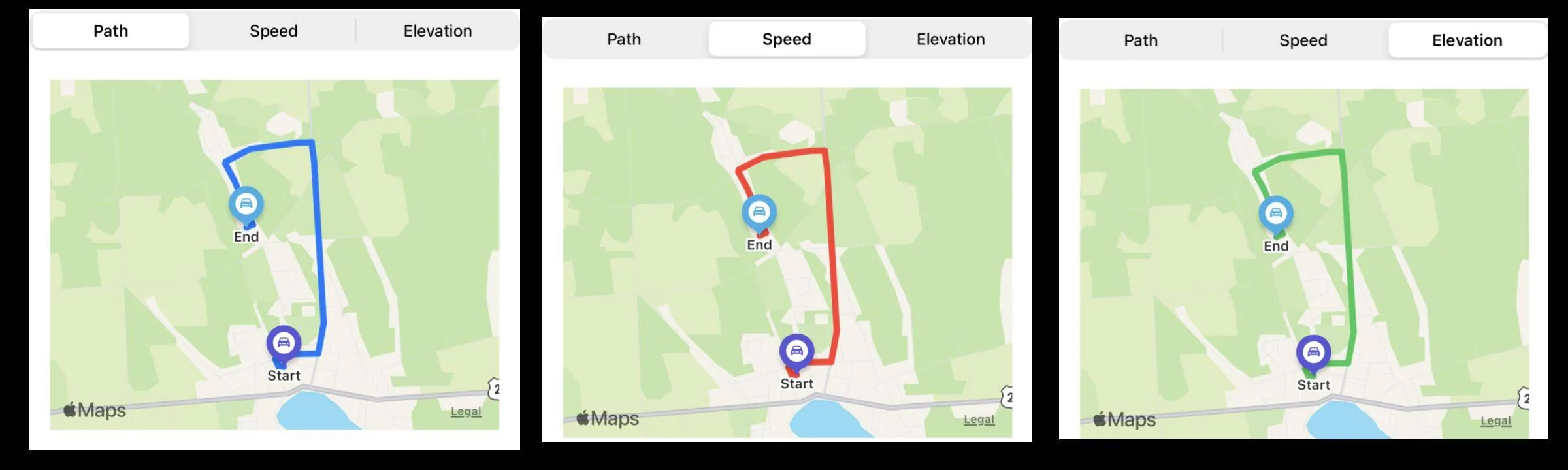
Sky's the limit. I started looking at using a color gradient for the path in place of the simple blue line, what it encodes could be anything. My initial thought was to try it out with speed (it comes with the GPS coordinates) but power or energy are also interesting options.

But I don't really have any plans for anything since it is all a big learning curve. A week ago I had no plans for an iPhone app but the lure of the Apple MapKit capabilities was too strong for what is a navigation application. Once I complete the database integration I suppose I will have to flesh out an usable UI for showing the charging and trip data and then follow up with whatever is interesting.


OP
OP
Jiji

Jiji

Well-Known Member
First Name
Rick
Joined
Jul 26, 2021
Threads
24
Messages
493
Reaction score
641
Location
Finger Lakes
Vehicles
2022 Mustang Mach-E GT 2024 F-150 Lightning
Country flag
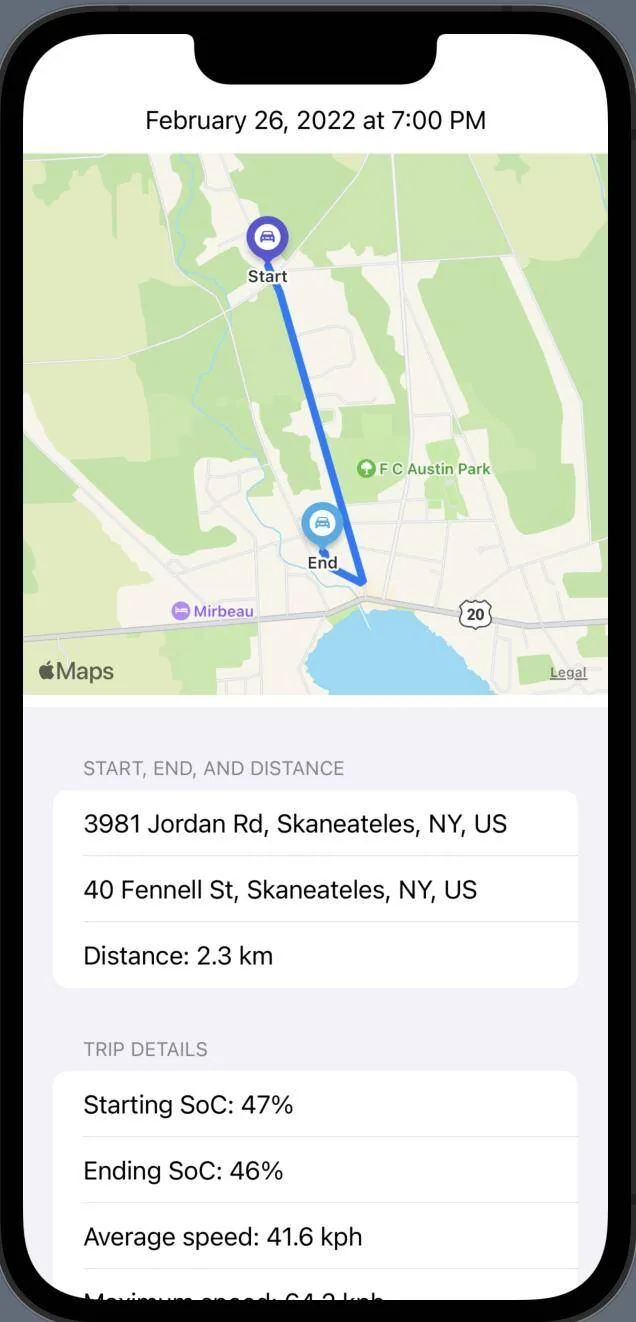
Finally made some progress and have integrated the database with my iPhone app. In anticipation of future upgrades it requests the past 7 days of trips but currently displays the most recent one. No time at all was spent designing the UI, it is as basic and boring as could be. The goal is just to get the trip data displayed - a well designed UI and intuitive UX can wait.

Ford Mustang Mach-E My winter Mustang Mach-E project 1645920937419


At the very top is the date and time of the trip, below it is GPS track which you can fiddle with should you want to zoom in or out. It is followed by the key trip details, using reverse geocoding to get the addresses of the trip start and end points and the display of the total distance.

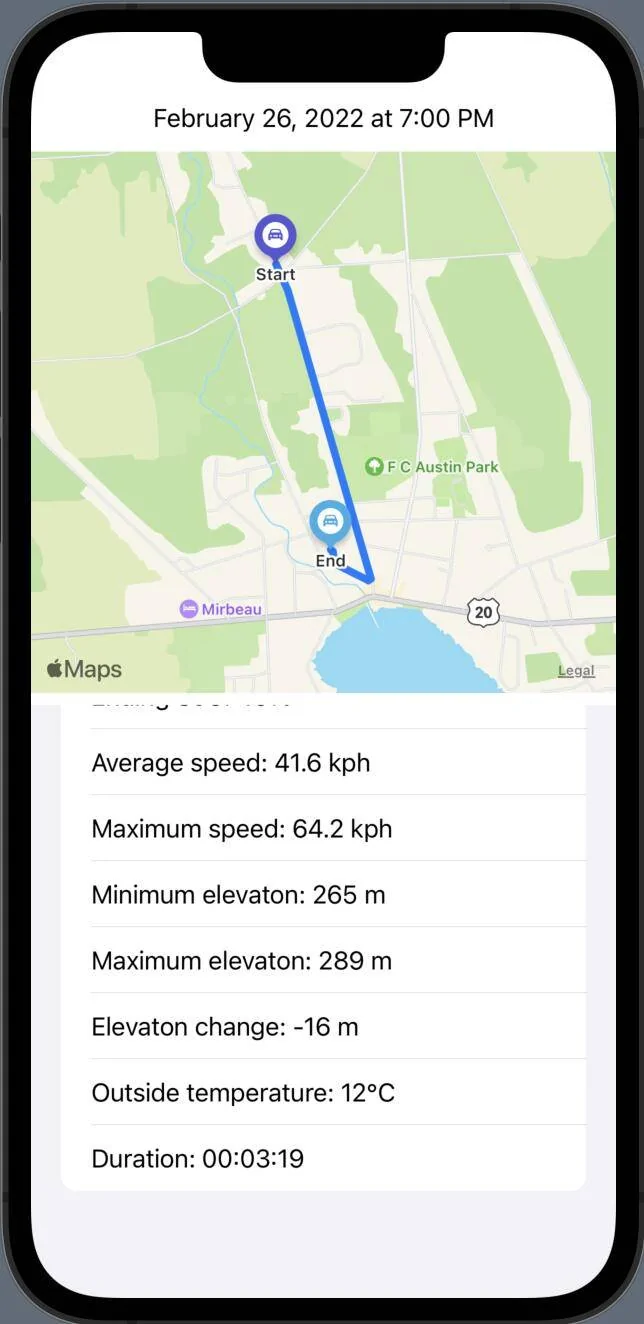
The bottom half is a scrolling form that contains the rest of the trip details:

Ford Mustang Mach-E My winter Mustang Mach-E project 1645921476438


There is actually more trip data that could be included but I decided this was enough for the time being.

I guess the next step is to start out with the list of trips, select one and you end up at this view but with a back button to return to the list. You can tell I have no idea what I am doing, I had just gotten comfortable with Python and now all this new Swift and SwiftUI stuff is just taking over.
 
OP
OP
Jiji

Jiji

Well-Known Member
First Name
Rick
Joined
Jul 26, 2021
Threads
24
Messages
493
Reaction score
641
Location
Finger Lakes
Vehicles
2022 Mustang Mach-E GT 2024 F-150 Lightning
Country flag
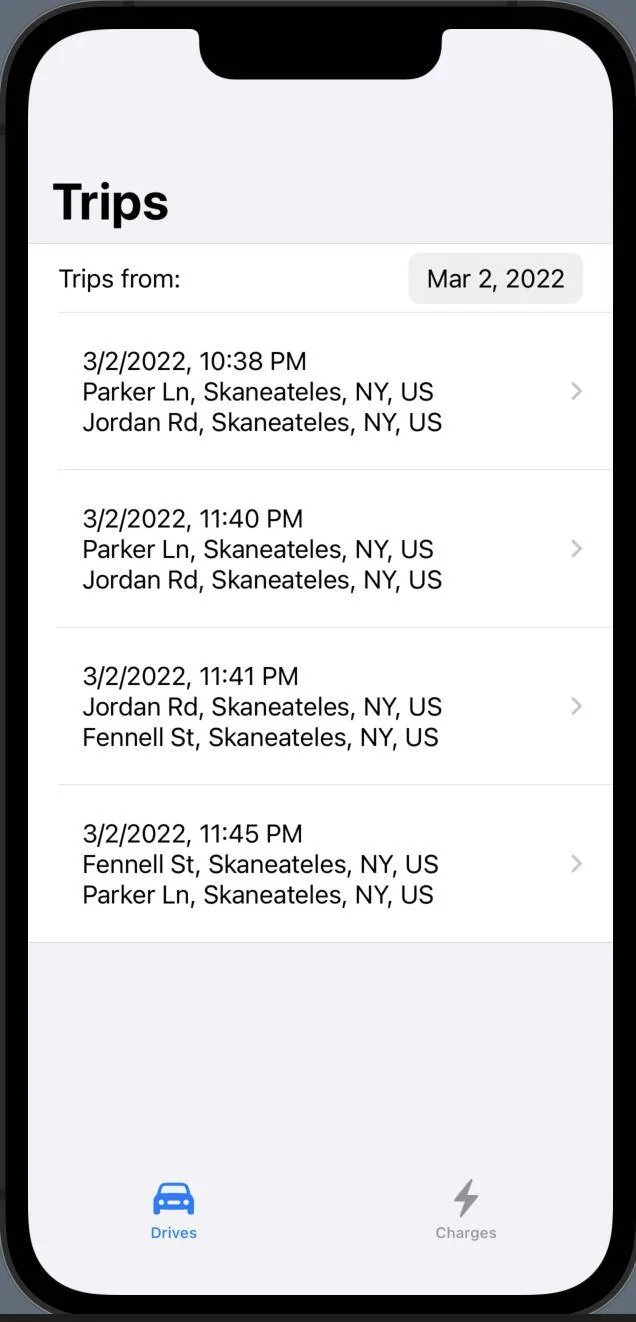
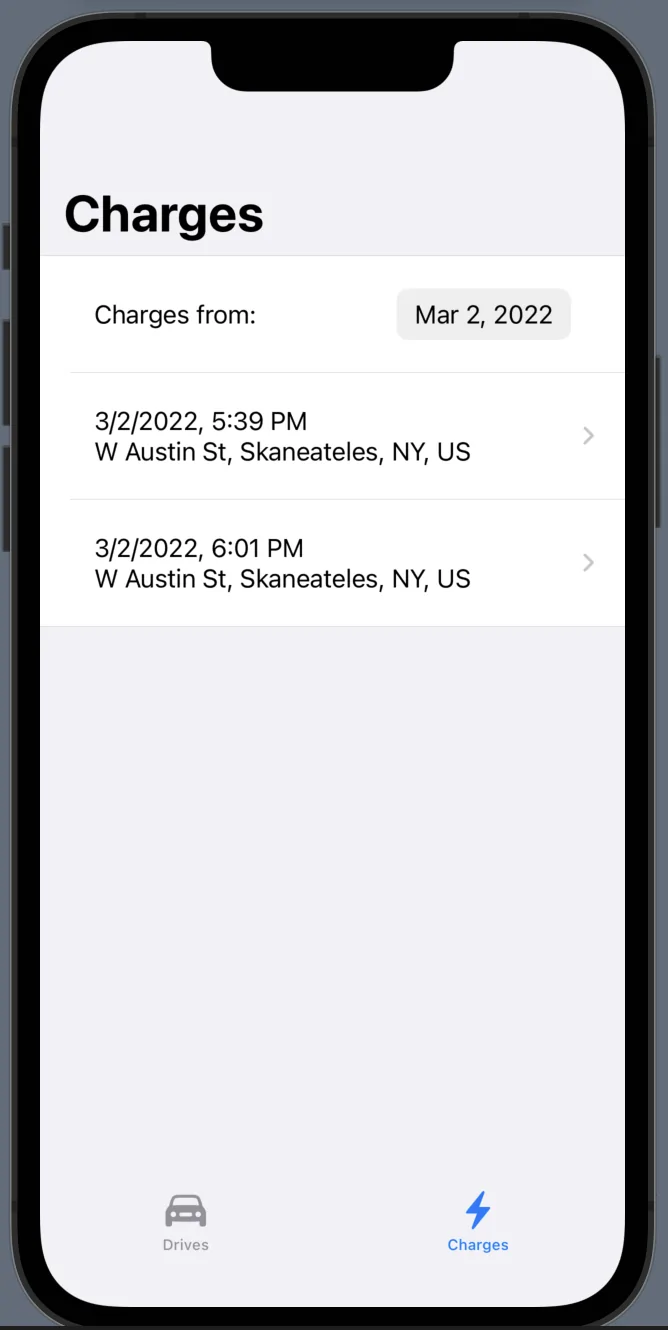
Short update on the iPhone app, it now is looking more like a real phone app, two tabs control the Trips or Charges views and there is a calendar to select the trips/charges you wish to view.

First up is the Trips view:

Ford Mustang Mach-E My winter Mustang Mach-E project 1646284302725


And the Charges view:
Ford Mustang Mach-E My winter Mustang Mach-E project 1646284343298


The trips view is similar to the last post, the Charges view is new and has the following charging session data:

Ford Mustang Mach-E My winter Mustang Mach-E project 1646284465815


Scrolling down you can see the rest the Charging data:

Ford Mustang Mach-E My winter Mustang Mach-E project 1646284551965


Yes the trips and charging data looks funny, it is because I have recorded trips/charges that I can playback without needing access to the MME, making it easy to write and test code.

Still need to port over the map displays from the previous post, but then who knows where I can go with it.
 
OP
OP
Jiji

Jiji

Well-Known Member
First Name
Rick
Joined
Jul 26, 2021
Threads
24
Messages
493
Reaction score
641
Location
Finger Lakes
Vehicles
2022 Mustang Mach-E GT 2024 F-150 Lightning
Country flag
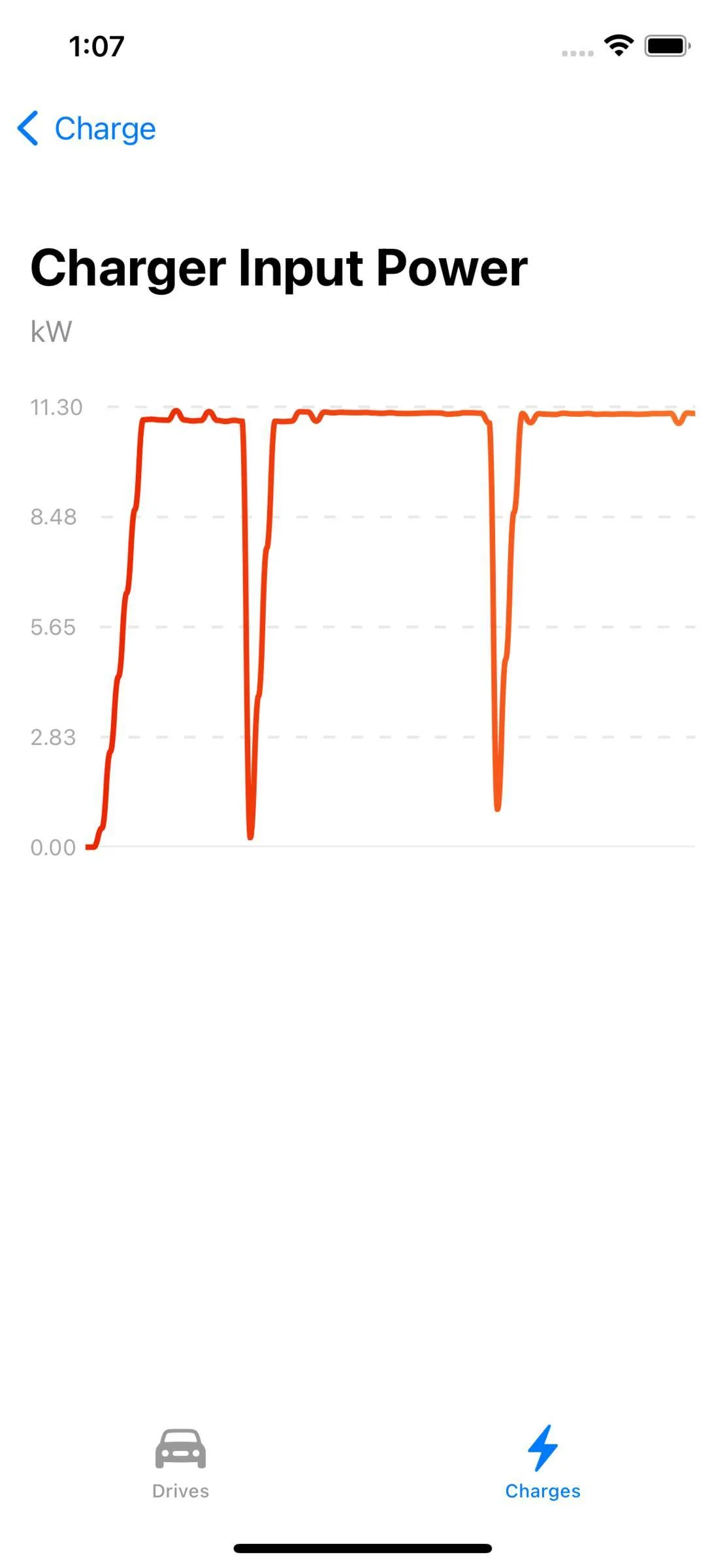
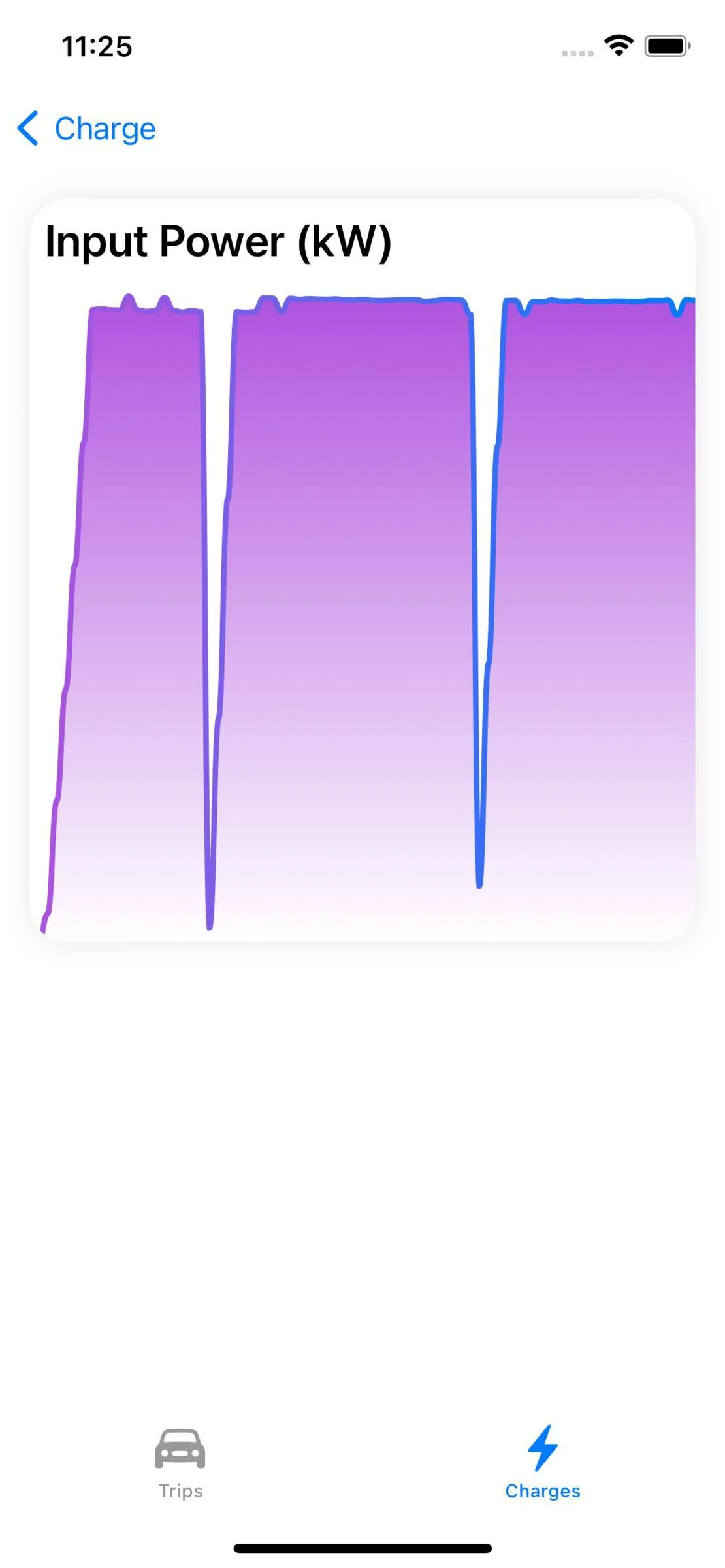
Just a teaser until I can get some decent screen shots but I now have some basic graphing.

This is from a charging session showing the input power measured at the plug:

Ford Mustang Mach-E My winter Mustang Mach-E project 1646633292538


And work-in-progress having the map path show more than the simple path:

Ford Mustang Mach-E My winter Mustang Mach-E project 1646633364554
 
OP
OP
Jiji

Jiji

Well-Known Member
First Name
Rick
Joined
Jul 26, 2021
Threads
24
Messages
493
Reaction score
641
Location
Finger Lakes
Vehicles
2022 Mustang Mach-E GT 2024 F-150 Lightning
Country flag
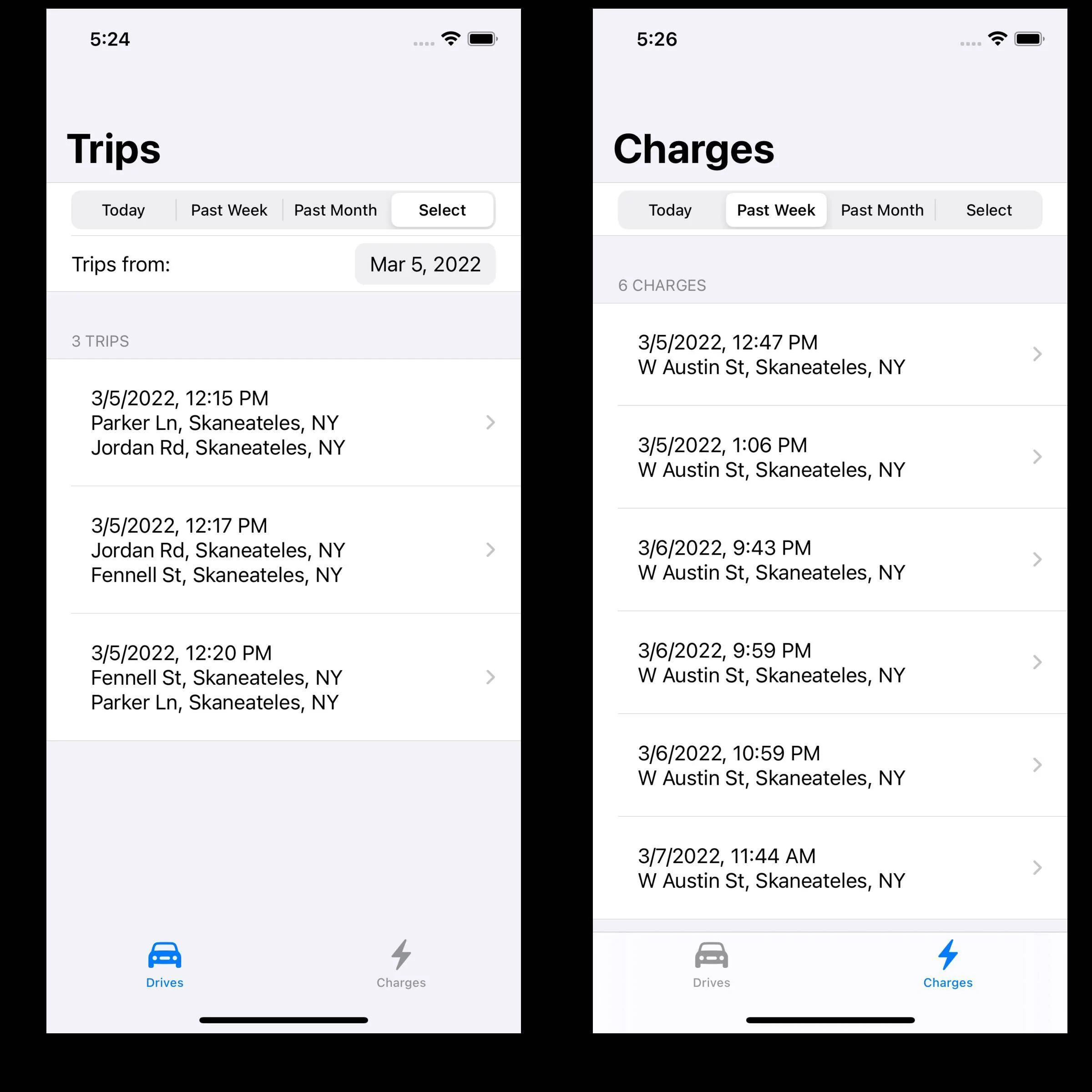
Both the Trips and Charge views have been enhanced, you can select a fixed period (today, last week, or last month), or select a day from a calendar, and as you change sections the lists are updated. That little Raspberry Pi 4 server does OK responding to the database queries.

Ford Mustang Mach-E My winter Mustang Mach-E project 1646692112078

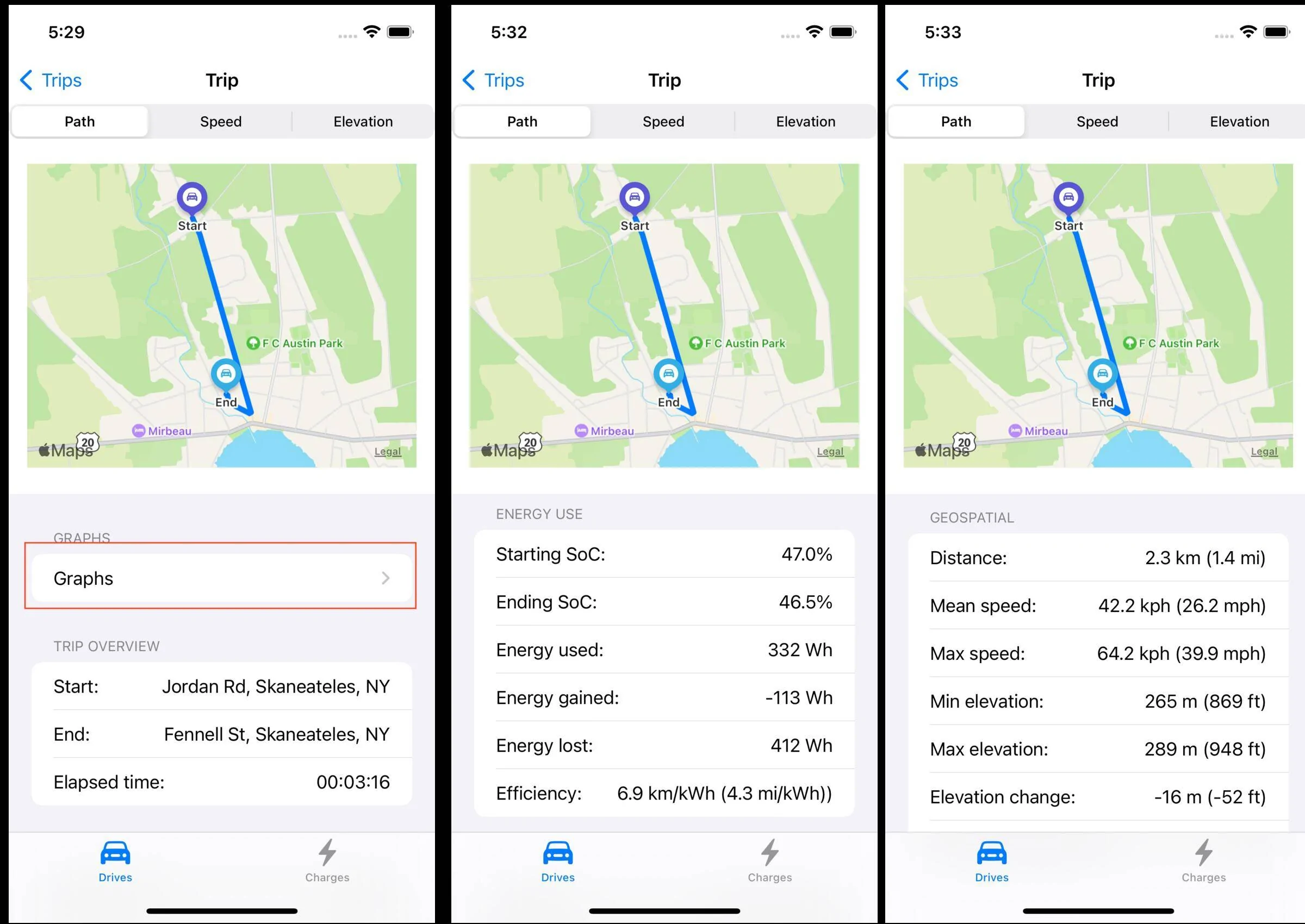
Selecting a trip from the list you can see the trip details:

Ford Mustang Mach-E My winter Mustang Mach-E project 1646692571024


The map is fixed in size but you can zoom in and out, took three screenshots and got everything except the average temperature data point which is below the elevation change.

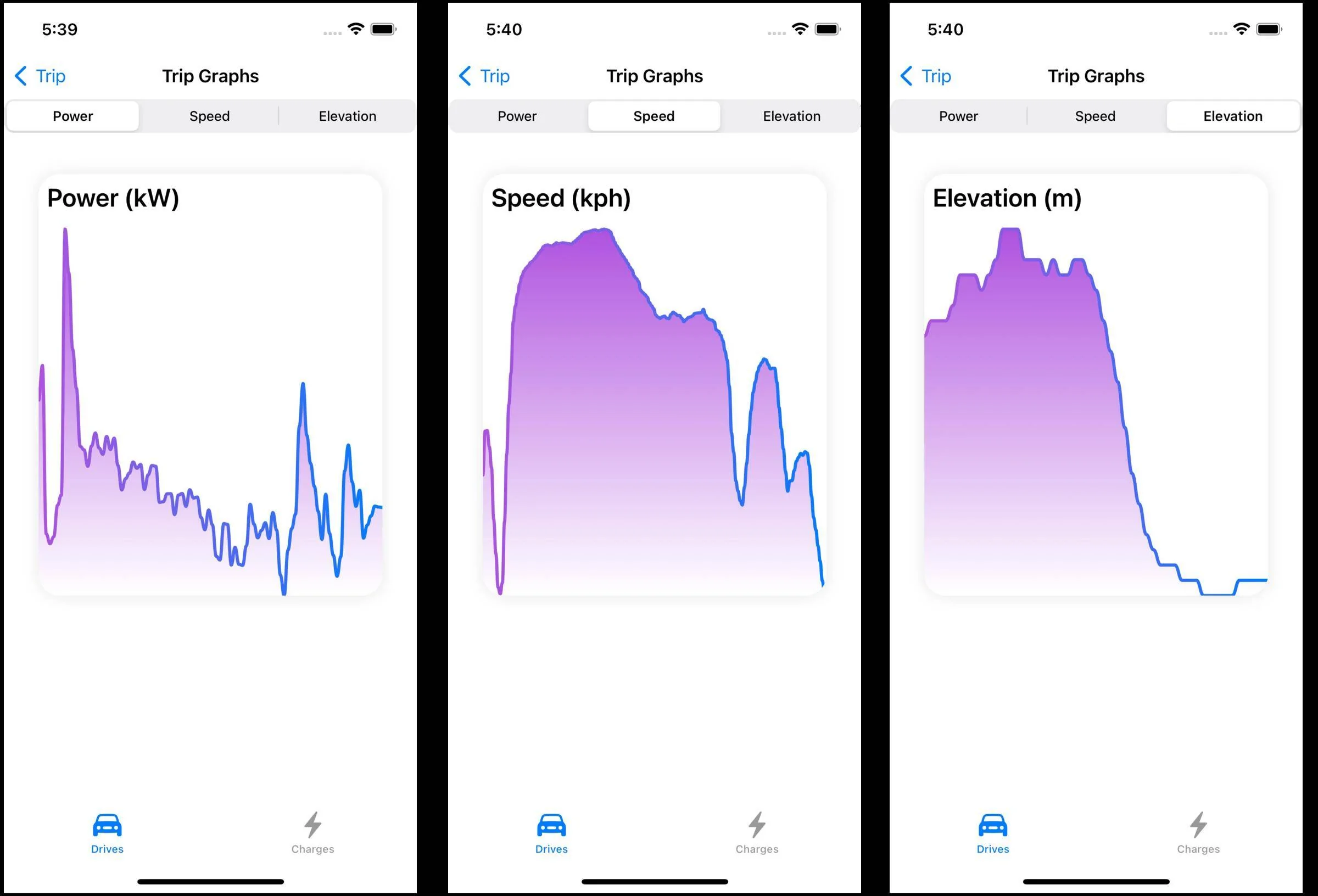
And we have rudimentary graphs, clinking the Graphs link displays a graph view with a picker that allows you to view different data. The graphs have many shortcomings so I consider these a placeholder until I can use a better graphing package.

Ford Mustang Mach-E My winter Mustang Mach-E project 1646692893189


This concludes our walk through of the Trips tab. I just noticed I used 'Drives' for the tab view label, so off to fix that since my app is all about 'Trips' and I'll be back later with a detailed walk through of the Charges tab details.
 
OP
OP
Jiji

Jiji

Well-Known Member
First Name
Rick
Joined
Jul 26, 2021
Threads
24
Messages
493
Reaction score
641
Location
Finger Lakes
Vehicles
2022 Mustang Mach-E GT 2024 F-150 Lightning
Country flag
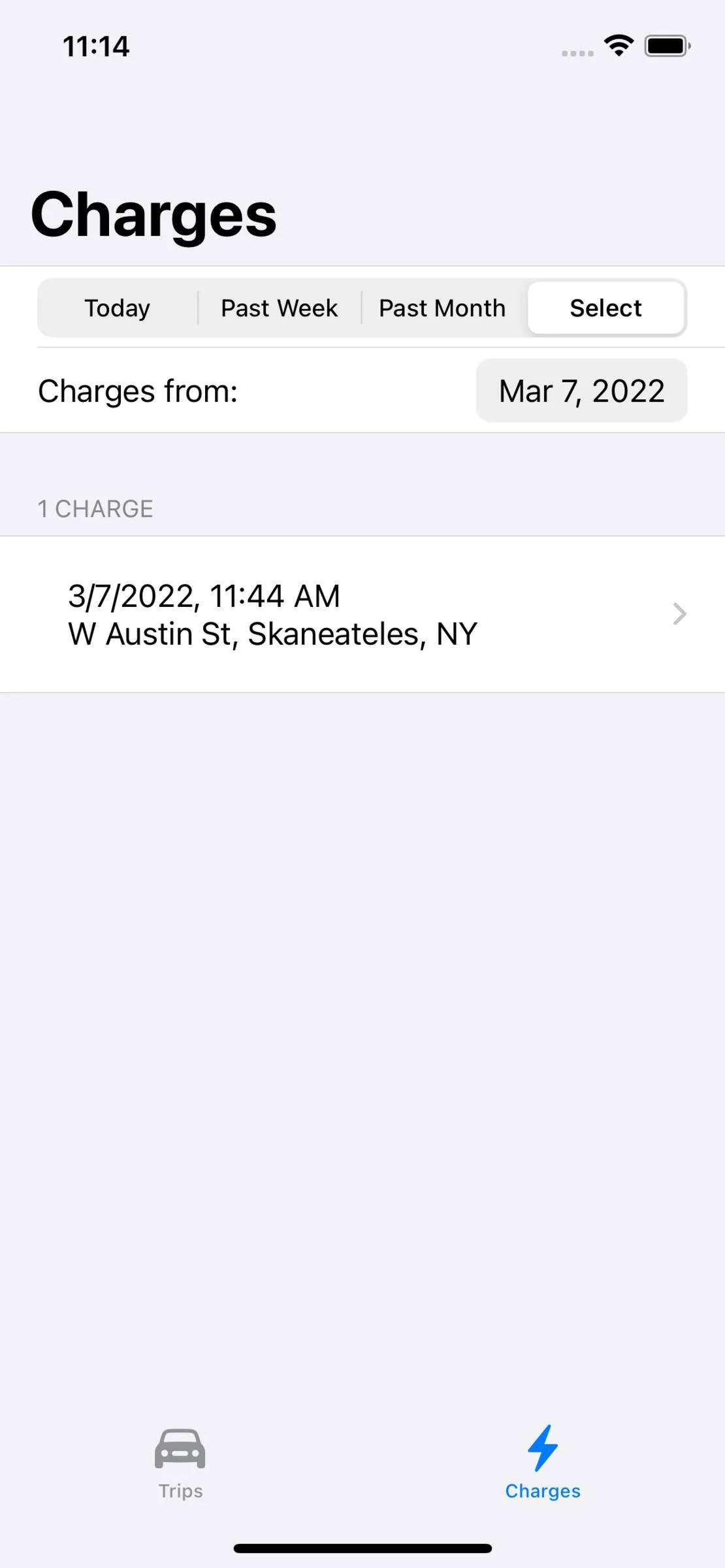
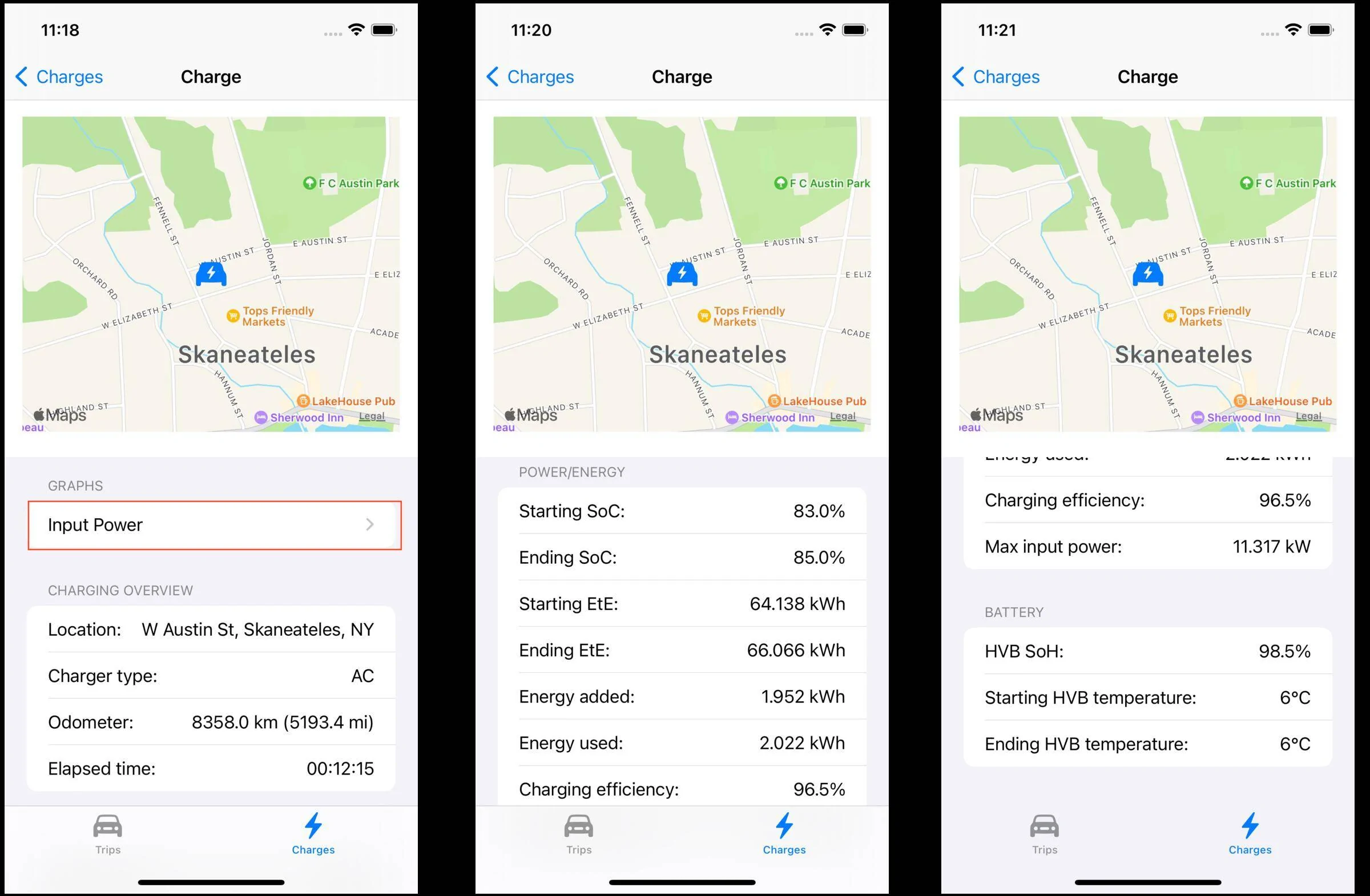
My last post did a deep dive into the Trips tab, here is the same for the Charges tab which displays the recorded charging sessions selected by the period controls.:

Ford Mustang Mach-E My winter Mustang Mach-E project 1646713019350


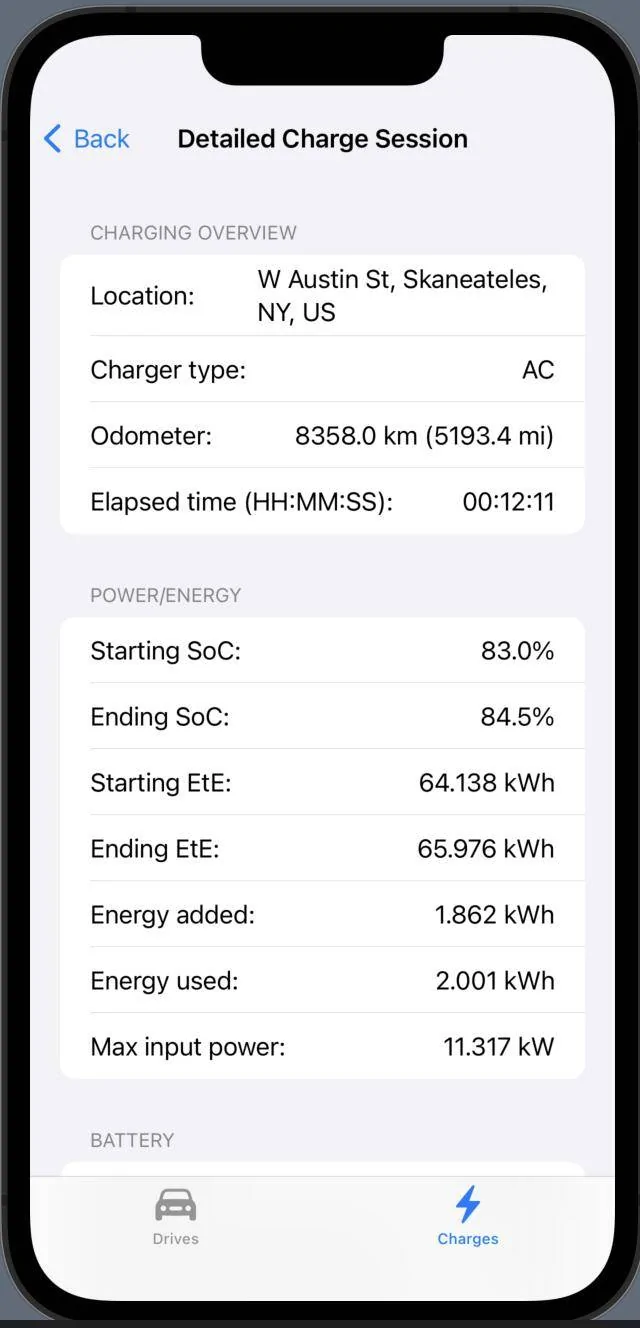
Selecting a charging session from the list bring up a detailed description of the session:

Ford Mustang Mach-E My winter Mustang Mach-E project 1646713393597


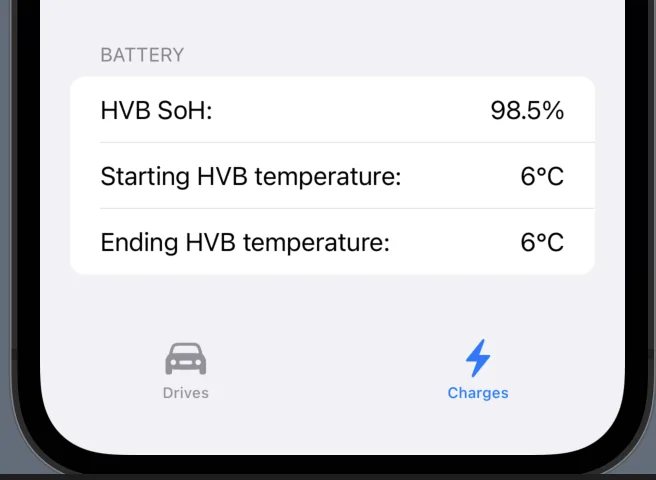
Lots of useful data to explore broken into overview, power/energy, and battery sections. And like the trip detailed view, we have available a graph of the input power measured at the charge plug, nominally 240 VAC and upwards of 48A:

Ford Mustang Mach-E My winter Mustang Mach-E project 1646713569451


This was a short session recorded for testing purposes and the interesting data point is the charging efficiency as you have to purchase more electricity than you put into the battery due to losses. This value is exceptionally high, normally it is closer to 90%, but this only charged for a few minutes, going from 83% to 85% SoC.

You also get to see the battery State of Health, mine was once 100% and it has dropped 1.5% so now I can keep an eye on it and see if continue to drop or the cold winter temperatures depress it temporarily. I suppose if this reaches 70% within 8 years you ask Ford for a new battery.

So you have seen everything, I'll be back when I have new features to show off, like my planned splash screen

⚠
Safety check
Are you driving?​
 

mkhuffman

Well-Known Member
First Name
Mike
Joined
Nov 19, 2020
Threads
29
Messages
6,875
Reaction score
9,507
Location
Virginia
Vehicles
2025 Rivian R1T Tri-Max, Jeep GC-L, VW Jetta
Country flag
Are you planning to sell the finished product?
 

Lord Polymath

Well-Known Member
Joined
Sep 13, 2021
Threads
12
Messages
734
Reaction score
729
Location
Arkansas
Vehicles
2021 Sienna, '22 Mach-E Premium ER AWD (PWRPONY)
Occupation
Computer nerd
Country flag
This is very impressive! Can we get a TLDR synopsis of what this software does and how/where to run it?
 
OP
OP
Jiji

Jiji

Well-Known Member
First Name
Rick
Joined
Jul 26, 2021
Threads
24
Messages
493
Reaction score
641
Location
Finger Lakes
Vehicles
2022 Mustang Mach-E GT 2024 F-150 Lightning
Country flag
Are you planning to sell the finished product?
No, just playing around. I would recommend ABRP or some other vendor like TRONITY.

Working thru the ODBII port is too limiting and I was spoiled by the data available on my Tesla Model 3 without any hardware. I just don’t see Ford opening this up but I would love to be proved wrong.
 
OP
OP
Jiji

Jiji

Well-Known Member
First Name
Rick
Joined
Jul 26, 2021
Threads
24
Messages
493
Reaction score
641
Location
Finger Lakes
Vehicles
2022 Mustang Mach-E GT 2024 F-150 Lightning
Country flag
This is very impressive! Can we get a TLDR synopsis of what this software does and how/where to run it?
TL;DR
Vehicle data collection
Raspberry Pi with CAN bus hat on OBDII port with Python Record software
iPhone app to supply accurate GPS data
Raspberry Pi Ubuntu server with InfluxDB database

Visualization
iPhone app

Software is available on GitHub
 

JimmyMachE

Well-Known Member
Joined
Jul 21, 2021
Threads
1
Messages
218
Reaction score
124
Location
Montana
Vehicles
Mach E
CarScanner Elm Obd2 app has very similar GPS visualisation: "trip data over GPS map" (in Data Recording menu), but I like your summary of Charging sessions.
Sponsored


Top