PaaK Question/Annoyance

Jimrpa

Well-Known Member
First Name
Jim
Joined
Sep 10, 2020
Threads
297
Messages
9,547
Reaction score
12,874
Location
Wayne, PA
Vehicles
2021 Infinite Blue Premium Mustang Mach E ER AWD
Occupation
Retied (formerly tried to herd highly technical, independent cats)
Country flag
I have a PaaK question and something about PaaK that annoys me (surprise!)
I have an iPhone 13 Pro Max and my phone is designated at the preferred phone in Sync.

A friend is staying at my house for a while so I’m letting him borrow my car. I had him create a ford.com account, enter my car’s VIN, then go through the PaaK creation process using the Fob. Now, I see his PaaK in FordPass, but it’s greyed out and I can’t delete it. I don’t like that. I want to be able to delete keys I give friends. How do I create a key and give it to a friend, yet retain the ability to delete the key from my FordPass account?

Second, somewhat related question. Every time, after he’s driven the car, when I go to use it with my phone, it loads his profile, even if he’s nowhere to be found. This is incredibly annoying as his settings are not ones I like. I have to manually select my profile.

It gets worse. If I drove the car last, then the next time, both he and I are going out in the car, even though I enter through the driver’s door with my phone and start the car, it loads HIS profile - ARGH! I’m very close to saying “we’re deleting you’re profile and you’re going back to the fob!”

Any thoughts on either of these?
Sponsored

 

Ford Motor Company

Well-Known Member
Official Ford Account
First Name
Brian
Joined
May 10, 2021
Threads
68
Messages
3,462
Reaction score
6,546
Location
Michigan
Vehicles
Mustang Mach-E
Occupation
Real Human & Community Manager
Country flag
Hey there! Ford's Phone As A Key™ (PAAK) is an intuitive technology that allows you to access and drive your vehicle without the need for a physical key. We want you to take advantage of this feature, so if you are needing additional support with PAAK take a look at these links below for some helpful tips and troubleshooting steps:

General Troubleshooting: https://www.ford.com/support/how-to...roubleshooting-tips-for-using-phone-as-a-key/

If you cannot unlock … https://www.ford.com/support/how-to...cannot-unlock-my-vehicle-with-phone-as-a-key/

How to start without PAAK or FOB https://www.ford.com/support/how-to...-use-my-phone-as-a-key-backup-start-passcode/

One stop shop: https://www.ford.com/support/how-to...-do-i-do-if-my-phone-as-a-key-is-not-working/
 

scoopman

Well-Known Member
Joined
Jan 30, 2021
Threads
60
Messages
2,771
Reaction score
5,816
Location
Bay Area
Vehicles
2023 KIA EV6 GT, 20214 Hyundai Ioniq 5 Ltd AWD
Occupation
former electric pony jockey, flatbed towing expert
Country flag
Gosh that is really unhelpful @Ford Motor Company ....

@PaaK_Android and @dsuyang this is an interesting use case.

However it also right now seems like it's just a household sharing a car and profiles and paak not playing well. Are situations like this part of your test cases?
 

PaaK_Android

Well-Known Member
First Name
Gage
Joined
Nov 29, 2021
Threads
0
Messages
50
Reaction score
102
Location
North America
Vehicles
Mach-e, Lincoln Aviator
Occupation
Lead PaaK Android Developer
Country flag
@scoopman @Jimrpa Profiles are not PaaK related. As far as deleting his key from your phone: I'm sure everyone can see why it could potentially be an issue to allow for someone to delete someone else's key across accounts. Currently our servers do not support the concept of the owner key/owner account and granting this ability to anyone except the owner would be irresponsible at best.

That being said, if he were to remove his key, login under your account, and setup a new key under your account on his phone. Then you would be able to remove that key from his phone remotely, of course he could in turn remove your key.

Another option provided is the ability to reset all keys from within the vehicle using the PaaK reset option under settings. Of course the downside is that you would have to setup your key again.


scoopman

Well-Known Member
Joined
Jan 30, 2021
Threads
60
Messages
2,771
Reaction score
5,816
Location
Bay Area
Vehicles
2023 KIA EV6 GT, 20214 Hyundai Ioniq 5 Ltd AWD
Occupation
former electric pony jockey, flatbed towing expert
Country flag
@scoopman @Jimrpa Profiles are not PaaK related. As far as deleting his key from your phone: I'm sure everyone can see why it could potentially be an issue to allow for someone to delete someone else's key across accounts. Currently our servers do not support the concept of the owner key/owner account and granting this ability to anyone except the owner would be irresponsible at best.

That being said, if he were to remove his key, login under your account, and setup a new key under your account on his phone. Then you would be able to remove that key from his phone remotely, of course he could in turn remove your key.

Another option provided is the ability to reset all keys from within the vehicle using the PaaK reset option under settings. Of course the downside is that you would have to setup your key again.
Got it, so to summarize:

Profiles aren't associated at all with a paak. This differs in functionality from FOB, which can be associated with a profile on the car. This is kinda a bummer, and obviously OP assumed intuitively if you said this was the same as a key it would be able to be operated as a key.

(I'm sure Brand T has this feature where their cards and PAAK have the same functionality for profiles, I wonder if someone has benchmarked it? This is a pretty silly miss, as for most of the year only one FOB can't with the car, why even have the ability to associate the profile to a FOB if there was only one key with the vehicle that could switch a profile?)

Second there's no master admin "owner";paak that can manage other paaks. Sounds like the best option here is for OP to have his buddy keep paak, but use his fob for himself during the visit so that his profile switches when he unlocks with his fob. When his friend leaves he needs to add to his checklist on leaving day to have the friend delete his paak
 

PaaK_Android

Well-Known Member
First Name
Gage
Joined
Nov 29, 2021
Threads
0
Messages
50
Reaction score
102
Location
North America
Vehicles
Mach-e, Lincoln Aviator
Occupation
Lead PaaK Android Developer
Country flag
Got it, so to summarize:

Profiles aren't associated at all with a paak. This differs in functionality from FOB, which can be associated with a profile on the car. This is kinda a bummer, and obviously OP assumed intuitively if you said this was the same as a key it would be able to be operated as a key.

(I'm sure Brand T has this feature where their cards and PAAK have the same functionality for profiles, I wonder if someone has benchmarked it? This is a pretty silly miss, as for most of the year only one FOB can't with the car, why even have the ability to associate the profile to a FOB if there was only one key with the vehicle that could switch a profile?)

Second there's no master admin "owner";paak that can manage other paaks. Sounds like the best option here is for OP to have his buddy keep paak, but use his fob for himself during the visit so that his profile switches when he unlocks with his fob. When his friend leaves he needs to add to his checklist on leaving day to have the friend delete his paak
I'm not certain why PaaK wasn't paired with vehicle profiles. I agree it seems like that functionality should have been provided.
 

macchiaz-o

Well-Known Member
First Name
Jonathan
Joined
Nov 25, 2019
Threads
171
Messages
8,580
Reaction score
15,988
Location
}not/A/gr8'Place.2.store-mEyePassword{
Vehicles
MY21 J1 Premium RWD SR
Country flag
I'm not certain why PaaK wasn't paired with vehicle profiles. I agree it seems like that functionality should have been provided.
It is. The vehicle lets me associate my PaaK with my driver's profile. Under the profile settings, one can see an icon of a phone along with the icons for key fob and door code...

In the manual, it's apparently referred to as "memory function" and only mentioned in one place, along with an unhelpful video.

https://www.fordservicecontent.com/...&userMarket=usa&div=f&vFilteringEnabled=False
 

PaaK_Android

Well-Known Member
First Name
Gage
Joined
Nov 29, 2021
Threads
0
Messages
50
Reaction score
102
Location
North America
Vehicles
Mach-e, Lincoln Aviator
Occupation
Lead PaaK Android Developer
Country flag
It is. The vehicle lets me associate my PaaK with my driver's profile. Under the profile settings, one can see an icon of a phone along with the icons for key fob and door code...

In the manual, it's apparently referred to as "memory function" and only mentioned in one place, along with an unhelpful video.

https://www.fordservicecontent.com/...&userMarket=usa&div=f&vFilteringEnabled=False
Interesting, then what I can say is it appears to be an issue with the vehicle software. If PaaK is connecting and letting you drive the rest is up to the vehicle.
 

flamant15

Member
First Name
Philippe
Joined
Feb 8, 2021
Threads
2
Messages
15
Reaction score
22
Location
Raleigh, NC
Vehicles
Mustang Mach E
Country flag
I really wish @Ford Motor Company would allow me to associate my Paak with my profile.

My FOB is connected to my wife's profile, and I use Paak. Many times even when I am the only one using the car an go on an errand. I will come back to my car (again just me on a trip and no FOB) and the car selects my wife's profile even though I just did the drip using Paak and changed to my profile.
 

scoopman

Well-Known Member
Joined
Jan 30, 2021
Threads
60
Messages
2,771
Reaction score
5,816
Location
Bay Area
Vehicles
2023 KIA EV6 GT, 20214 Hyundai Ioniq 5 Ltd AWD
Occupation
former electric pony jockey, flatbed towing expert
Country flag
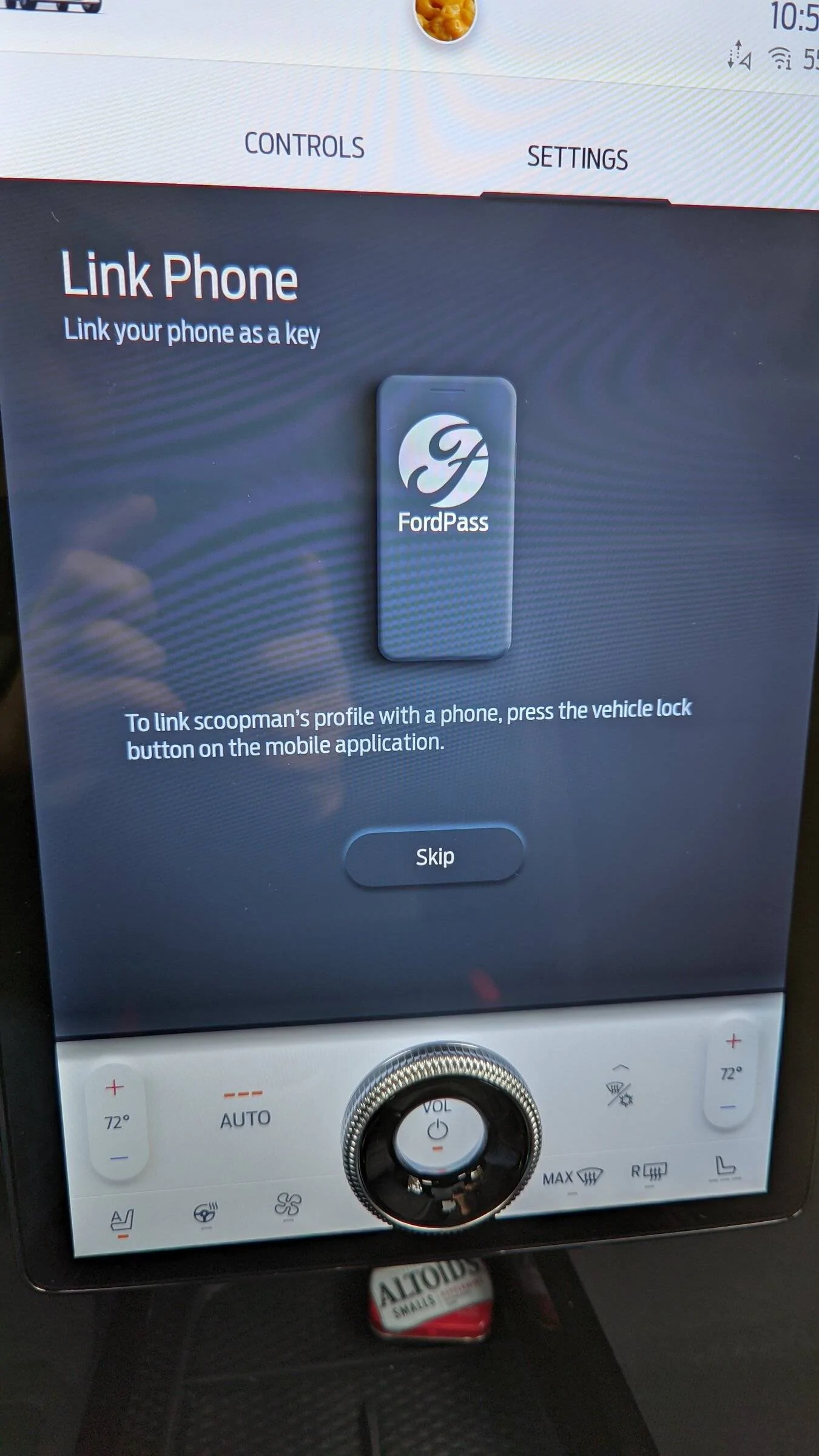
You totally can do this. Just worked for me.

Go Settings / Personal Profiles then select a profile and you'll see "Add phone". Tap that then you get the screen attached to authenticate the phone by pressing lock on the FP app. Once you do that you'll see that the phone is indeed associated with that profile.

Would be nice if the wording wasn't just "phone" but Phone As A Key so users could understand this option. Should also be included as a step when you set up PAAK....

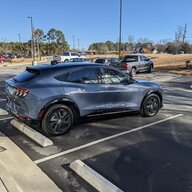
Ford Mustang Mach-E PaaK Question/Annoyance PXL_20211203_105853279


Ford Mustang Mach-E PaaK Question/Annoyance PXL_20211203_105947529
 
OP
OP
Jimrpa

Jimrpa

Well-Known Member
First Name
Jim
Joined
Sep 10, 2020
Threads
297
Messages
9,547
Reaction score
12,874
Location
Wayne, PA
Vehicles
2021 Infinite Blue Premium Mustang Mach E ER AWD
Occupation
Retied (formerly tried to herd highly technical, independent cats)
Country flag
@scoopman @Jimrpa Profiles are not PaaK related. As far as deleting his key from your phone: I'm sure everyone can see why it could potentially be an issue to allow for someone to delete someone else's key across accounts. Currently our servers do not support the concept of the owner key/owner account and granting this ability to anyone except the owner would be irresponsible at best.

That being said, if he were to remove his key, login under your account, and setup a new key under your account on his phone. Then you would be able to remove that key from his phone remotely, of course he could in turn remove your key.

Another option provided is the ability to reset all keys from within the vehicle using the PaaK reset option under settings. Of course the downside is that you would have to setup your key again.
Thanks!

Im not sure I understand why the concept of I, as the vehicle owner, being able to give another person a (time-limited) guest key to my vehicle would be considered irresponsible?

Here’s a real-world example: a very good friend is visiting and staying at my home for a few weeks. I’ve established “guest codes” on the electronic locks at my home for him to use. Ideally, I’d like the option to go into ford pass or my ford account, and generate a key to my Mustang Mach E that I can send him which he can use, until I revoke the key. FordPass doesn’t have that functionality. Instead, he had to create an account on ford.com, enter my vehicle VIN and set up a key with the fob in the vehicle just as I do as the vehicle owner. Now, I have no control over the key he created and, from ford’s perspective, he is a vehicle owner, just like me. This is actually less secure.
 
OP
OP
Jimrpa

Jimrpa

Well-Known Member
First Name
Jim
Joined
Sep 10, 2020
Threads
297
Messages
9,547
Reaction score
12,874
Location
Wayne, PA
Vehicles
2021 Infinite Blue Premium Mustang Mach E ER AWD
Occupation
Retied (formerly tried to herd highly technical, independent cats)
Country flag
I really wish @Ford Motor Company would allow me to associate my Paak with my profile.

My FOB is connected to my wife's profile, and I use Paak. Many times even when I am the only one using the car an go on an errand. I will come back to my car (again just me on a trip and no FOB) and the car selects my wife's profile even though I just did the drip using Paak and changed to my profile.
That’s essentially what happens to me, except with multiple PAAKs!
 
OP
OP
Jimrpa

Jimrpa

Well-Known Member
First Name
Jim
Joined
Sep 10, 2020
Threads
297
Messages
9,547
Reaction score
12,874
Location
Wayne, PA
Vehicles
2021 Infinite Blue Premium Mustang Mach E ER AWD
Occupation
Retied (formerly tried to herd highly technical, independent cats)
Country flag
You totally can do this. Just worked for me.

Go Settings / Personal Profiles then select a profile and you'll see "Add phone". Tap that then you get the screen attached to authenticate the phone by pressing lock on the FP app. Once you do that you'll see that the phone is indeed associated with that profile.

Would be nice if the wording wasn't just "phone" but Phone As A Key so users could understand this option. Should also be included as a step when you set up PAAK....

PXL_20211203_105853279.jpg


PXL_20211203_105947529.jpg
This is actually the way you are supposed to set it up!


Top